
ssm整合总结(一)--第一步之使用maven搭建一个web项目
本文内容来自:山硅谷,本文内容整合了任务2,任务3,任务4内容。http://www.gulixueyuan.com/my/course/50
1说明
1.1该项目使用的知识点有
1.1.1校验方式是 前段校验使用的是jQuery,后端校验使用的是JSR303。
1.1.2使用rest风格URL:使用HTTP协议请求方式的动词,来表示对资源的操作(GET(查询),POST(新增),PUT(修改),DELETE(删除))。
1.1.2前段框架使用的是bootstrap。
2新建maven项目
2.1
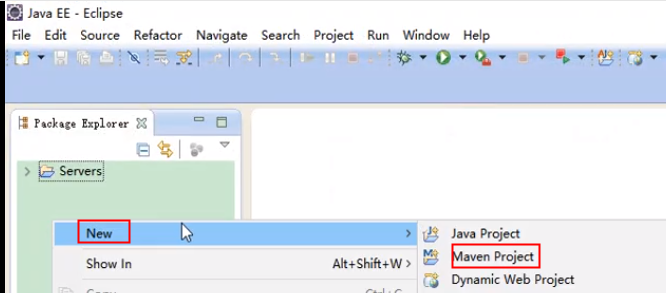
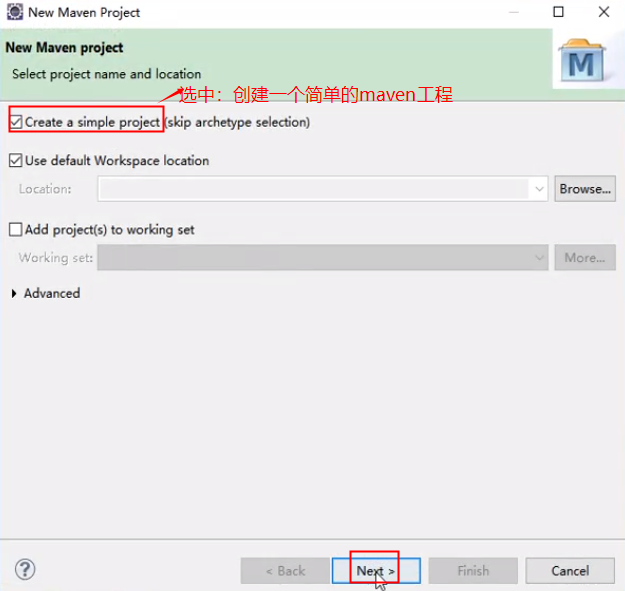
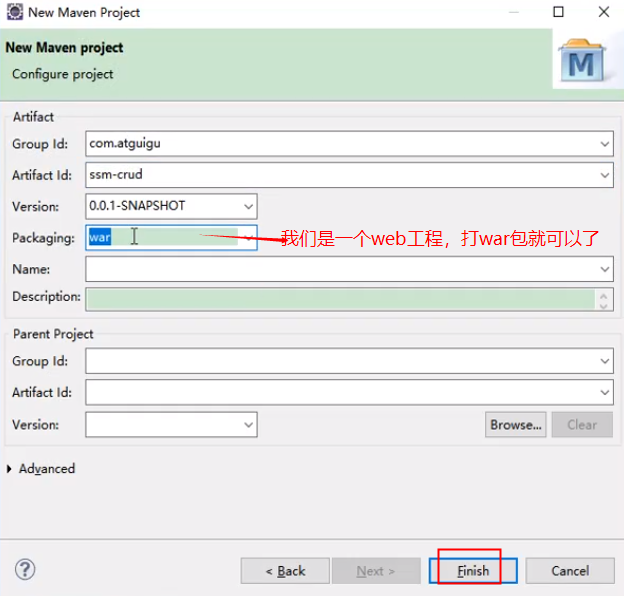
生成的一个maven项目的目录
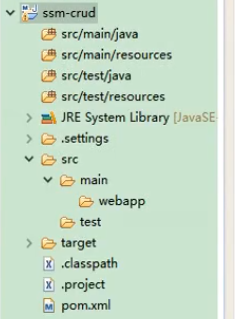
2.2创建web.xml文件
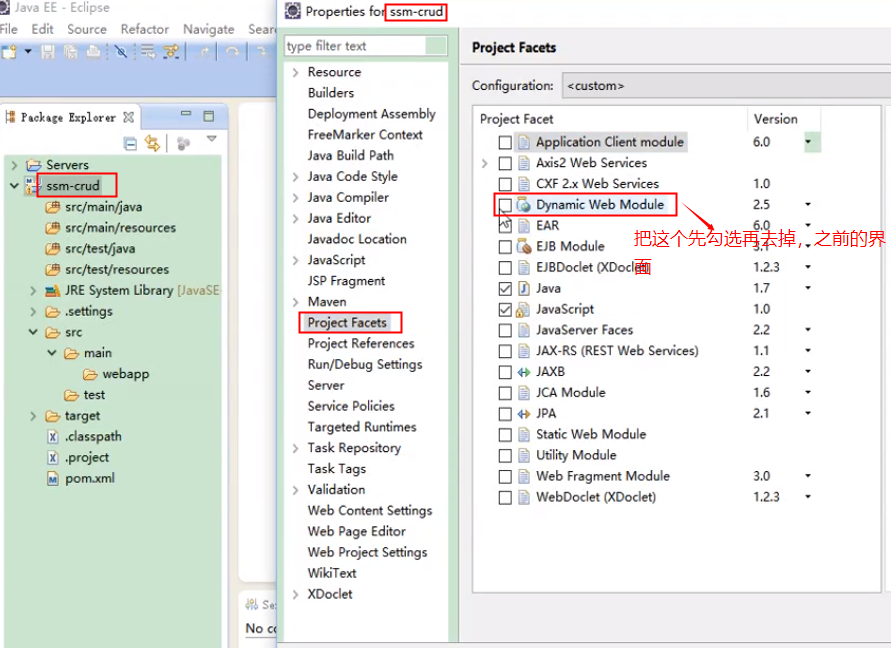
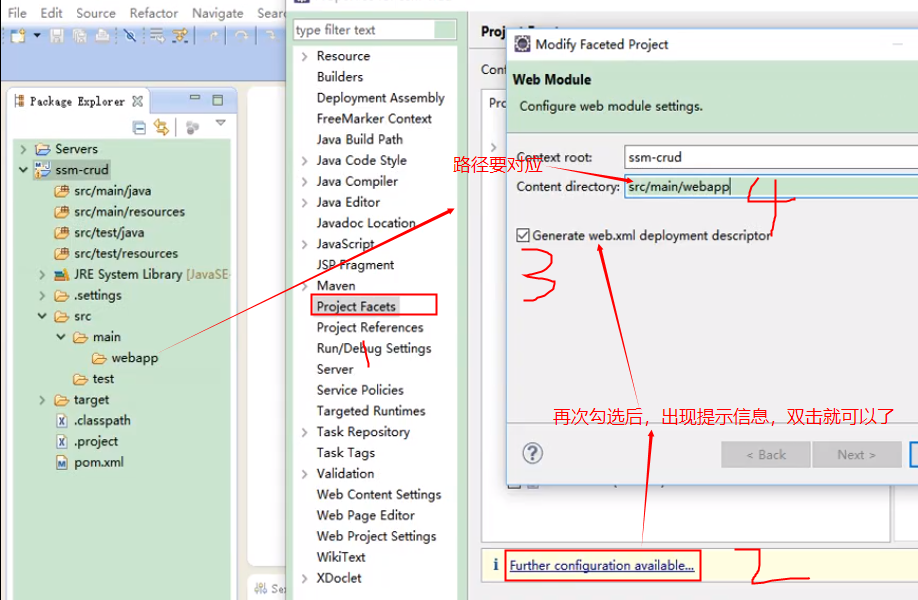
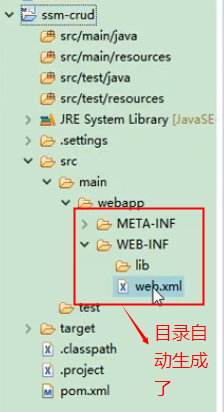
其实这里的maven项目已经构成了
3下面引入jar包
3.1进入到maven的中央仓库,搜索springmvn模块
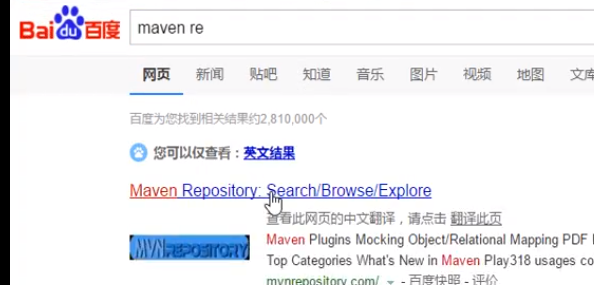
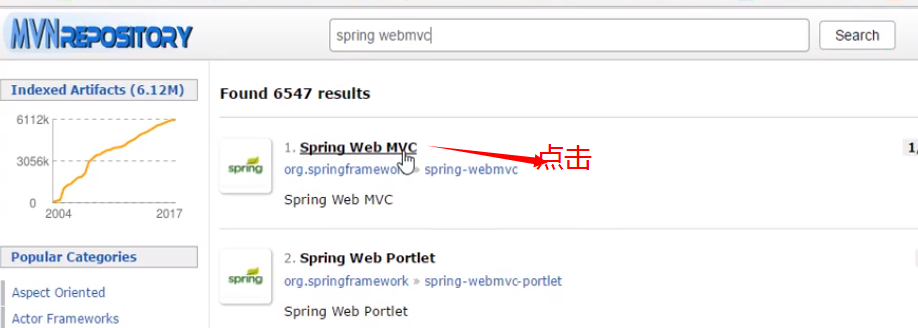

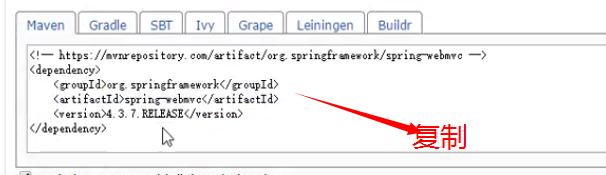
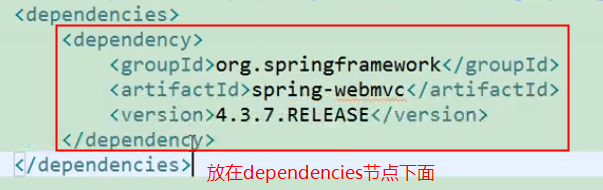
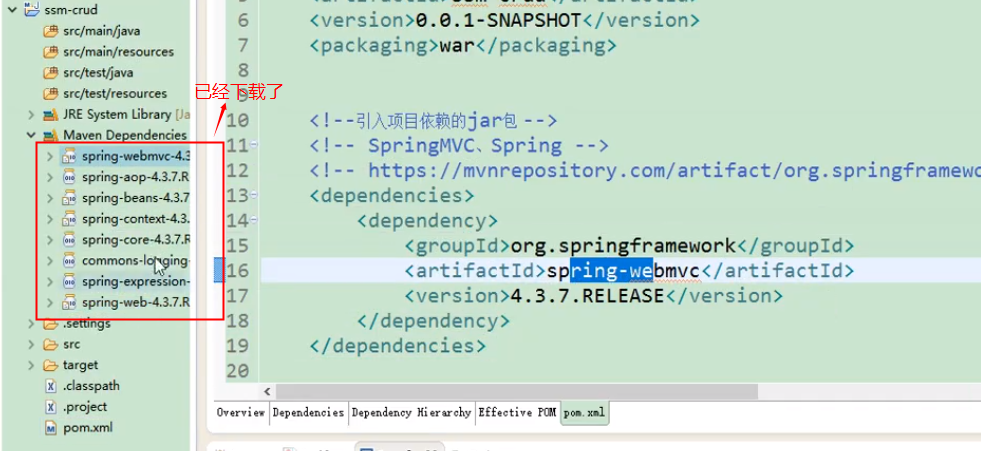
一次类推将其其他的包也加入进来,将复制的dependency粘贴到项目的pom.XML中保持时,可以自动现在依赖的jar包。如下图所示
如下是一个配置完成的pom.XML文件
<project xmlns="http://maven.apache.org/POM/4.0.0" xmlns:xsi="http://www.w3.org/2001/XMLSchema-instance"

	xsi:schemaLocation="http://maven.apache.org/POM/4.0.0 http://maven.apache.org/xsd/maven-4.0.0.xsd">

	<modelVersion>4.0.0</modelVersion>

	<groupId>com.atguigu</groupId>

	<artifactId>ssm-crud</artifactId>

	<version>0.0.1-SNAPSHOT</version>

	<packaging>war</packaging>

	<!--引入项目依赖的jar包 -->

	<!-- SpringMVC、Spring -->

	<!-- https://mvnrepository.com/artifact/org.springframework/spring-webmvc -->

	<dependencies>

		<!--引入pageHelper分页插件 -->

		<dependency>

			<groupId>com.github.pagehelper</groupId>

			<artifactId>pagehelper</artifactId>

			<version>5.0.0</version>

		</dependency>

		<!-- MBG -->

		<!-- https://mvnrepository.com/artifact/org.mybatis.generator/mybatis-generator-core -->

		<dependency>

			<groupId>org.mybatis.generator</groupId>

			<artifactId>mybatis-generator-core</artifactId>

			<version>1.3.5</version>

		</dependency>

		<dependency>

			<groupId>org.springframework</groupId>

			<artifactId>spring-webmvc</artifactId>

			<version>4.3.7.RELEASE</version>

		</dependency>

		<!-- 返回json字符串的支持 -->

		<!-- https://mvnrepository.com/artifact/com.fasterxml.jackson.core/jackson-databind -->

		<dependency>

			<groupId>com.fasterxml.jackson.core</groupId>

			<artifactId>jackson-databind</artifactId>

			<version>2.8.8</version>

		</dependency>

		<!--JSR303数据校验支持;tomcat7及以上的服务器,

		tomcat7以下的服务器:el表达式。额外给服务器的lib包中替换新的标准的el

		-->

		<!-- https://mvnrepository.com/artifact/org.hibernate/hibernate-validator -->

		<dependency>

			<groupId>org.hibernate</groupId>

			<artifactId>hibernate-validator</artifactId>

			<version>5.4.1.Final</version>

		</dependency>

		<!-- Spring-Jdbc -->

		<!-- https://mvnrepository.com/artifact/org.springframework/spring-jdbc -->

		<dependency>

			<groupId>org.springframework</groupId>

			<artifactId>spring-jdbc</artifactId>

			<version>4.3.7.RELEASE</version>

		</dependency>

		<!--Spring-test -->

		<!-- https://mvnrepository.com/artifact/org.springframework/spring-test -->

		<dependency>

			<groupId>org.springframework</groupId>

			<artifactId>spring-test</artifactId>

			<version>4.3.7.RELEASE</version>

		</dependency>

		<!-- Spring面向切面编程 -->

		<!-- https://mvnrepository.com/artifact/org.springframework/spring-aspects -->

		<dependency>

			<groupId>org.springframework</groupId>

			<artifactId>spring-aspects</artifactId>

			<version>4.3.7.RELEASE</version>

		</dependency>

		<!--MyBatis -->

		<!-- https://mvnrepository.com/artifact/org.mybatis/mybatis -->

		<dependency>

			<groupId>org.mybatis</groupId>

			<artifactId>mybatis</artifactId>

			<version>3.4.2</version>

		</dependency>

		<!-- MyBatis整合Spring的适配包 -->

		<!-- https://mvnrepository.com/artifact/org.mybatis/mybatis-spring -->

		<dependency>

			<groupId>org.mybatis</groupId>

			<artifactId>mybatis-spring</artifactId>

			<version>1.3.1</version>

		</dependency>

		<!-- 数据库连接池、驱动 -->

		<!-- https://mvnrepository.com/artifact/c3p0/c3p0 -->

		<dependency>

			<groupId>c3p0</groupId>

			<artifactId>c3p0</artifactId>

			<version>0.9.1</version>

		</dependency>

		<!-- https://mvnrepository.com/artifact/mysql/mysql-connector-java -->

		<dependency>

			<groupId>mysql</groupId>

			<artifactId>mysql-connector-java</artifactId>

			<version>5.1.41</version>

		</dependency>

		<!-- (jstl,servlet-api,junit) -->

		<!-- https://mvnrepository.com/artifact/jstl/jstl -->

		<dependency>

			<groupId>jstl</groupId>

			<artifactId>jstl</artifactId>

			<version>1.2</version>

		</dependency>

		<!-- https://mvnrepository.com/artifact/javax.servlet/javax.servlet-api -->

		<dependency>

			<groupId>javax.servlet</groupId>

			<artifactId>javax.servlet-api</artifactId>

			<version>3.0.1</version>

			<scope>provided</scope>

		</dependency>

		<!-- junit -->

		<!-- https://mvnrepository.com/artifact/junit/junit -->

		<dependency>

			<groupId>junit</groupId>

			<artifactId>junit</artifactId>

			<version>4.12</version>

		</dependency>

	</dependencies>

</project>
说明下该xml
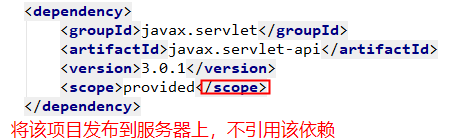
这有可能是因为本地开发时没有该依赖的包,而服务器上面有所以才需要这样做。
到处maven项目已经完成。下面开始进行其他操作
ssm整合总结(一)--第一步之使用maven搭建一个web项目的更多相关文章
- 使用Maven+ssm框架搭建一个web项目
1,前期准备:Eclipse(Mars.2 Release (4.5.2)).jdk1.7.tomcat7.maven3.2.1 2.使用eclipse中的maven新建一个web项目 点击next: ...
- vue.js 踩坑第一步 利用vue-cli vue-router搭建一个带有底部导航栏移动前端项目
vue.js学习 踩坑第一步 1.首先安装vue-cli脚手架 不多赘述,主要参考WiseWrong 的 Vue 爬坑之路(一)-- 使用 vue-cli 搭建项目 2.项目呈现效果 项目呈现网址:w ...
- MyBatis整合Spring+SpringMVC搭建一个web项目(SSM框架)
本文讲解如何搭建一个SSM架构的web站点 [工具] IDEA.SqlYog.Maven [简述] 该项目由3个模块组成:dao(数据访问层).service(业务处理层).web(表现层) dao层 ...
- PyCharm入门第一步-——创建并运行第一个Python项目
创建项目 点击Create New Project 创建项目 输入自己的项目名,点击Create创建 创建文件 右键项目名创建python文件 创建一个HelloPython文件 输入print(&q ...
- 如何搭建一个WEB服务器项目(一)—— 开篇 ,搭建SSH整合框架
使用Intellij IDEA2019创建SSH(Spring+SpringMVC+Hibernate+Maven整合)项目 观前提示:本系列文章有关服务器以及后端程序这些概念,我写的全是自己的理解, ...
- SSM整合+WebUpload使用(spring+springmvc+mybatis+maven)
SSM框架整合以及webupload的集成与使用 在项目中最近用到了webupload.js,也方方面面遇到了不少问题,比如上传文件前对表单参数校验,当校验失败不予提交,及在文件上传成功后,选择同 ...
- Java一步一步构建web系统 在IDEA下用Maven搭建多模块项目
1.需求 做一个项目会有很多模块,主要是方便复用,通过各个模块之间聚合.模块也可以独立出来,如公用类库,也可以在做其它项目中使用.该文的实例会有两个模块:分别为dallin-web模块,dallin- ...
- [maven学习笔记]第一节,认识maven,搭建maven开发环境,写第一个HelloWorld
本文地址:http://blog.csdn.net/sushengmiyan/article/details/40142771 maven官网:http://maven.apache.org/ 学习视 ...
- [shiro学习笔记]第一节 使用eclipse/myeclipse搭建一个shiro程序
本文地址:http://blog.csdn.net/sushengmiyan/article/details/39519509 shiro官网:http://shiro.apache.org/ shi ...
随机推荐
- react 修改state某一属性值
1.state // 筛选框相关数据 searchSelect: { term: { value: '学期', key: '', options: [] }, type_of_personnel: { ...
- 【Linux学习】python脚本直接运行与nohup运行结果不同
之前遇到问题,在云主机上运行python脚本直接运行与nohup运行结果不同,甚至nohup根本运行不出来. 后来参考下别人的博客,终于知道问题了. nohup 使用的python版本问题. 而且no ...
- LCD驱动分析【转】
转自:http://blog.csdn.net/hanmengaidudu/article/details/21559153 1.S3C2440上LCD驱动 (FrameBuffer)实例开发讲解 其 ...
- 宋牧春: Linux设备树文件结构与解析深度分析(2) 【转】
转自:https://mp.weixin.qq.com/s/WPZSElF3OQPMGqdoldm07A 作者简介 宋牧春,linux内核爱好者,喜欢阅读各种开源代码(uboot.linux.ucos ...
- 使用navicat for sqlserver 把excel中的数据导入到sqlserver数据库
以前记得使用excel向mysql中导入过数据,今天使用excel向sqlserver2005导入了数据,在此把做法记录一下 第一步:准备excel数据,在这个excel中有3个sheet,每个she ...
- Shp上传至Oracle Spatial
1.下载shp2sdo,将shp文件拷贝至shp2sdo相同路径下,打开windows命令窗口,执行: shp2sdo shp文件名 表名 -i id -s 4326 -d 例如:shp2sdo ci ...
- python开发web服务器——搭建简易网站
参看:https://blog.csdn.net/baidu_35085676/article/details/69807145
- Java中Enum的使用
http://www.cnblogs.com/happyPawpaw/archive/2013/04/09/3009553.html Enum有一个好处,可以使用EnumMap和EnumSet,而En ...
- promise应用于ajax
promise应用于ajax,可以在本页打开控制台,复制代码试验 var url = 'https://www.cnblogs.com/mvc/blog/news.aspx?blogApp=dkplu ...
- fatal error LNK1104: 无法打开文件“libc.lib”的问题
如果将用低版本的VC开发的项目,拿到高版本的VC开发环境上去编译,链接时也许会触发LNK1104错误.解决方案是链接时忽略此库,在此提供三种解决方案: 1.解决如下:项目->属性中->配置 ...