
ssm整合总结(一)--第一步之使用maven搭建一个web项目
本文内容来自:山硅谷,本文内容整合了任务2,任务3,任务4内容。http://www.gulixueyuan.com/my/course/50
1说明
1.1该项目使用的知识点有
1.1.1校验方式是 前段校验使用的是jQuery,后端校验使用的是JSR303。
1.1.2使用rest风格URL:使用HTTP协议请求方式的动词,来表示对资源的操作(GET(查询),POST(新增),PUT(修改),DELETE(删除))。
1.1.2前段框架使用的是bootstrap。
2新建maven项目
2.1
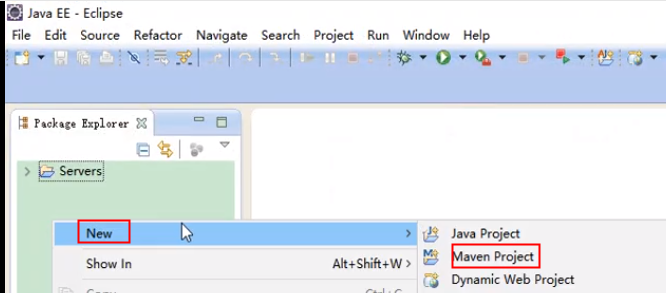
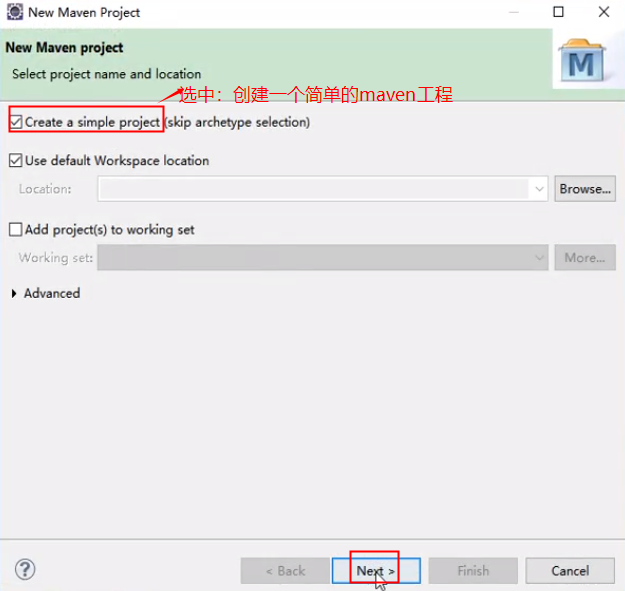
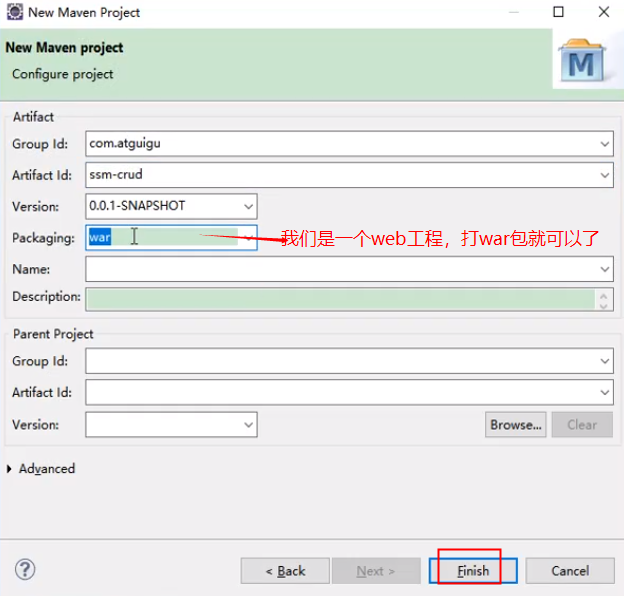
生成的一个maven项目的目录
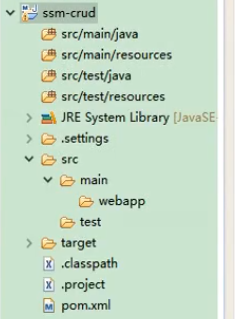
2.2创建web.xml文件
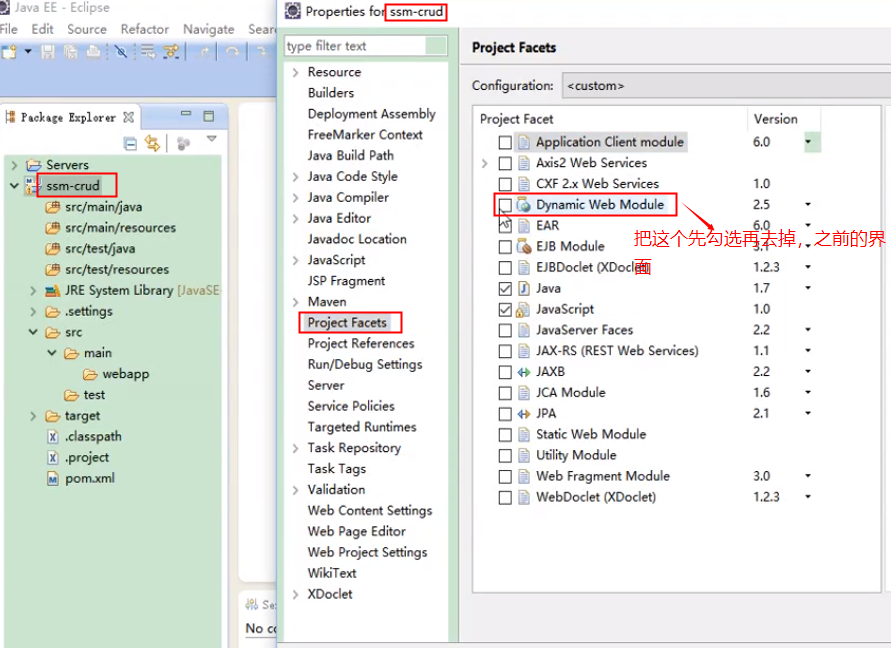
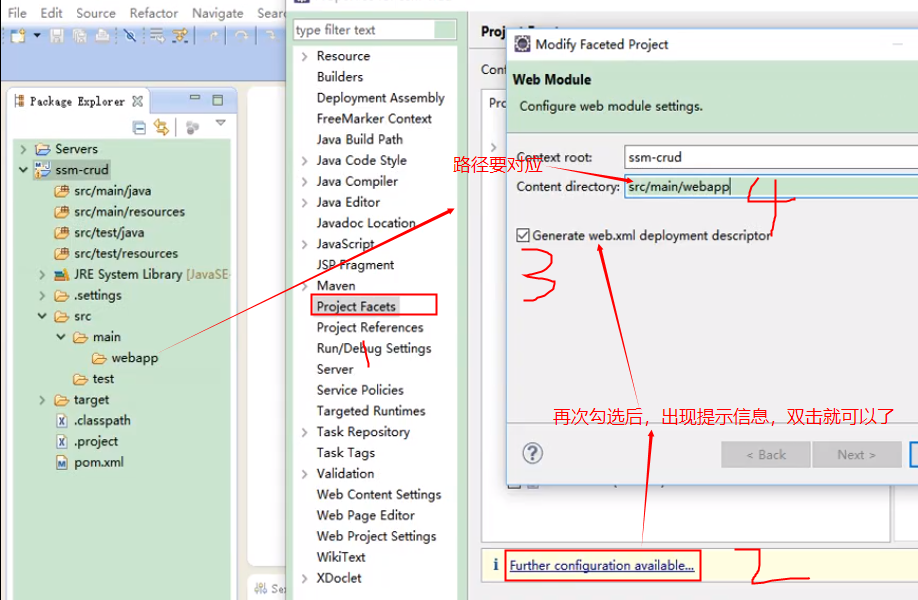
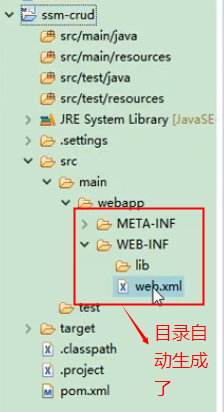
其实这里的maven项目已经构成了
3下面引入jar包
3.1进入到maven的中央仓库,搜索springmvn模块
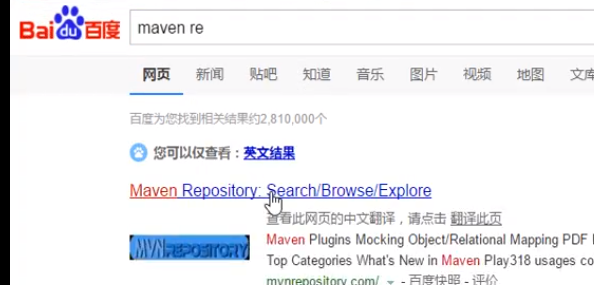
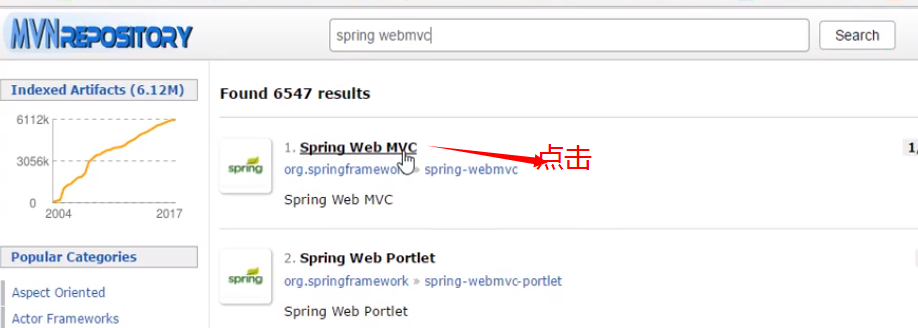

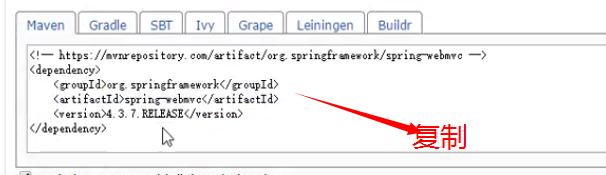
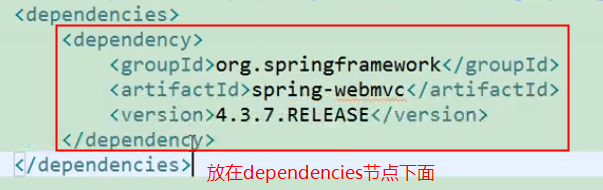
一次类推将其其他的包也加入进来,将复制的dependency粘贴到项目的pom.XML中保持时,可以自动现在依赖的jar包。如下图所示
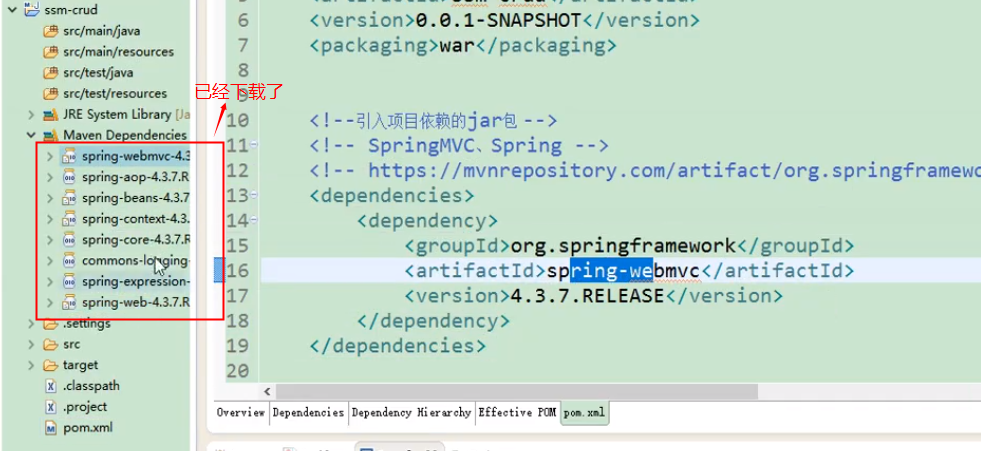
如下是一个配置完成的pom.XML文件
<project xmlns="http://maven.apache.org/POM/4.0.0" xmlns:xsi="http://www.w3.org/2001/XMLSchema-instance"

	xsi:schemaLocation="http://maven.apache.org/POM/4.0.0 http://maven.apache.org/xsd/maven-4.0.0.xsd">

	<modelVersion>4.0.0</modelVersion>

	<groupId>com.atguigu</groupId>

	<artifactId>ssm-crud</artifactId>

	<version>0.0.1-SNAPSHOT</version>

	<packaging>war</packaging>

	<!--引入项目依赖的jar包 -->

	<!-- SpringMVC、Spring -->

	<!-- https://mvnrepository.com/artifact/org.springframework/spring-webmvc -->

	<dependencies>

		<!--引入pageHelper分页插件 -->

		<dependency>

			<groupId>com.github.pagehelper</groupId>

			<artifactId>pagehelper</artifactId>

			<version>5.0.0</version>

		</dependency>

		<!-- MBG -->

		<!-- https://mvnrepository.com/artifact/org.mybatis.generator/mybatis-generator-core -->

		<dependency>

			<groupId>org.mybatis.generator</groupId>

			<artifactId>mybatis-generator-core</artifactId>

			<version>1.3.5</version>

		</dependency>

		<dependency>

			<groupId>org.springframework</groupId>

			<artifactId>spring-webmvc</artifactId>

			<version>4.3.7.RELEASE</version>

		</dependency>

		<!-- 返回json字符串的支持 -->

		<!-- https://mvnrepository.com/artifact/com.fasterxml.jackson.core/jackson-databind -->

		<dependency>

			<groupId>com.fasterxml.jackson.core</groupId>

			<artifactId>jackson-databind</artifactId>

			<version>2.8.8</version>

		</dependency>

		<!--JSR303数据校验支持;tomcat7及以上的服务器,

		tomcat7以下的服务器:el表达式。额外给服务器的lib包中替换新的标准的el

		-->

		<!-- https://mvnrepository.com/artifact/org.hibernate/hibernate-validator -->

		<dependency>

			<groupId>org.hibernate</groupId>

			<artifactId>hibernate-validator</artifactId>

			<version>5.4.1.Final</version>

		</dependency>

		<!-- Spring-Jdbc -->

		<!-- https://mvnrepository.com/artifact/org.springframework/spring-jdbc -->

		<dependency>

			<groupId>org.springframework</groupId>

			<artifactId>spring-jdbc</artifactId>

			<version>4.3.7.RELEASE</version>

		</dependency>

		<!--Spring-test -->

		<!-- https://mvnrepository.com/artifact/org.springframework/spring-test -->

		<dependency>

			<groupId>org.springframework</groupId>

			<artifactId>spring-test</artifactId>

			<version>4.3.7.RELEASE</version>

		</dependency>

		<!-- Spring面向切面编程 -->

		<!-- https://mvnrepository.com/artifact/org.springframework/spring-aspects -->

		<dependency>

			<groupId>org.springframework</groupId>

			<artifactId>spring-aspects</artifactId>

			<version>4.3.7.RELEASE</version>

		</dependency>

		<!--MyBatis -->

		<!-- https://mvnrepository.com/artifact/org.mybatis/mybatis -->

		<dependency>

			<groupId>org.mybatis</groupId>

			<artifactId>mybatis</artifactId>

			<version>3.4.2</version>

		</dependency>

		<!-- MyBatis整合Spring的适配包 -->

		<!-- https://mvnrepository.com/artifact/org.mybatis/mybatis-spring -->

		<dependency>

			<groupId>org.mybatis</groupId>

			<artifactId>mybatis-spring</artifactId>

			<version>1.3.1</version>

		</dependency>

		<!-- 数据库连接池、驱动 -->

		<!-- https://mvnrepository.com/artifact/c3p0/c3p0 -->

		<dependency>

			<groupId>c3p0</groupId>

			<artifactId>c3p0</artifactId>

			<version>0.9.1</version>

		</dependency>

		<!-- https://mvnrepository.com/artifact/mysql/mysql-connector-java -->

		<dependency>

			<groupId>mysql</groupId>

			<artifactId>mysql-connector-java</artifactId>

			<version>5.1.41</version>

		</dependency>

		<!-- (jstl,servlet-api,junit) -->

		<!-- https://mvnrepository.com/artifact/jstl/jstl -->

		<dependency>

			<groupId>jstl</groupId>

			<artifactId>jstl</artifactId>

			<version>1.2</version>

		</dependency>

		<!-- https://mvnrepository.com/artifact/javax.servlet/javax.servlet-api -->

		<dependency>

			<groupId>javax.servlet</groupId>

			<artifactId>javax.servlet-api</artifactId>

			<version>3.0.1</version>

			<scope>provided</scope>

		</dependency>

		<!-- junit -->

		<!-- https://mvnrepository.com/artifact/junit/junit -->

		<dependency>

			<groupId>junit</groupId>

			<artifactId>junit</artifactId>

			<version>4.12</version>

		</dependency>

	</dependencies>

</project>
说明下该xml
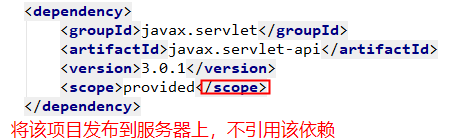
这有可能是因为本地开发时没有该依赖的包,而服务器上面有所以才需要这样做。
到处maven项目已经完成。下面开始进行其他操作
ssm整合总结(一)--第一步之使用maven搭建一个web项目的更多相关文章
- 使用Maven+ssm框架搭建一个web项目
1,前期准备:Eclipse(Mars.2 Release (4.5.2)).jdk1.7.tomcat7.maven3.2.1 2.使用eclipse中的maven新建一个web项目 点击next: ...
- vue.js 踩坑第一步 利用vue-cli vue-router搭建一个带有底部导航栏移动前端项目
vue.js学习 踩坑第一步 1.首先安装vue-cli脚手架 不多赘述,主要参考WiseWrong 的 Vue 爬坑之路(一)-- 使用 vue-cli 搭建项目 2.项目呈现效果 项目呈现网址:w ...
- MyBatis整合Spring+SpringMVC搭建一个web项目(SSM框架)
本文讲解如何搭建一个SSM架构的web站点 [工具] IDEA.SqlYog.Maven [简述] 该项目由3个模块组成:dao(数据访问层).service(业务处理层).web(表现层) dao层 ...
- PyCharm入门第一步-——创建并运行第一个Python项目
创建项目 点击Create New Project 创建项目 输入自己的项目名,点击Create创建 创建文件 右键项目名创建python文件 创建一个HelloPython文件 输入print(&q ...
- 如何搭建一个WEB服务器项目(一)—— 开篇 ,搭建SSH整合框架
使用Intellij IDEA2019创建SSH(Spring+SpringMVC+Hibernate+Maven整合)项目 观前提示:本系列文章有关服务器以及后端程序这些概念,我写的全是自己的理解, ...
- SSM整合+WebUpload使用(spring+springmvc+mybatis+maven)
SSM框架整合以及webupload的集成与使用 在项目中最近用到了webupload.js,也方方面面遇到了不少问题,比如上传文件前对表单参数校验,当校验失败不予提交,及在文件上传成功后,选择同 ...
- Java一步一步构建web系统 在IDEA下用Maven搭建多模块项目
1.需求 做一个项目会有很多模块,主要是方便复用,通过各个模块之间聚合.模块也可以独立出来,如公用类库,也可以在做其它项目中使用.该文的实例会有两个模块:分别为dallin-web模块,dallin- ...
- [maven学习笔记]第一节,认识maven,搭建maven开发环境,写第一个HelloWorld
本文地址:http://blog.csdn.net/sushengmiyan/article/details/40142771 maven官网:http://maven.apache.org/ 学习视 ...
- [shiro学习笔记]第一节 使用eclipse/myeclipse搭建一个shiro程序
本文地址:http://blog.csdn.net/sushengmiyan/article/details/39519509 shiro官网:http://shiro.apache.org/ shi ...
随机推荐
- typeof运算符
javascript中typeof用来判断一个变量或表达式的数据类型. typeof 返回值有六种可能: "number," "string," "b ...
- 2-Python基础语法-内存管理-运算符-程序控制
目录 1 Python 基础语法 1.1 注释 1.2 缩进 1.3 续行 1.4 标识符 1.5 转义序列 1.6 数字 1.7 字符串 1.8 其他 2 Python 运算符 2.1 赋值运算符 ...
- 安装sudo apt-get install ros-kinetic-desktop-full,报错mv: 无法获取'/var/lib/ni/licenses.xml.dpkg-old' 的文件状态(stat): 没有。。。。
安装sudo apt-get install ros-kinetic-desktop-full,报了一堆错误 mv: 无法获取'/var/lib/ni/licenses.xml.dpkg-old' 的 ...
- POJ 3186Treats for the Cows(区间DP)
题目链接:http://poj.org/problem?id=3186 题目大意:给出的一系列的数字,可以看成一个双向队列,每次只能从队首或者队尾出队,第n个出队就拿这个数乘以n,最后将和加起来,求最 ...
- IEEEXtreme 9.0 - Digit Fun!
博客中的文章均为 meelo 原创,请务必以链接形式注明 本文地址 Xtreme 9.0 - Digit Fun! 题目来源:第9届IEEE极限编程大赛第1题 Recurrence relations ...
- 使用递归计算n的阶乘n!
计算n! 观察公式2可以直接使用递归求解 C++代码如下: #include <iostream> using namespace std; unsigned func(unsigned ...
- JavaScript与C#互通的DES加解密算法
原文地址:传送门 本文提供了一个能使JavaScript与C#互通的DES加解密算法的实现,在前台页面中用JavaScript版本的DES算法将数据加密之后,传到服务器端,在服务器端可用C#版本的DE ...
- 原生js将数组分割成固定个数一组的小数组
reSetData(dataList,num) { let arr = []; let len = dataList.length; for (let i = 0; i < len; i += ...
- 【LOJ】 #2130. 「NOI2015」软件包管理器
题解 连树剖我都写跪一次,我现在怎么那么老年啊= = 简直滚粗预定了啊.. 我们线段树维护树剖只需要资瓷区间覆盖和区间求和就好了 安装的时候看看自己到根有多少包装了,dep减去这个数量就好 卸载的时候 ...
- spring boot 笔记
1.不能访问非启动类中的@RequestMapping 路径: 启动类注解 1.@Controller @EnableAutoConfiguration @ComponentScan 或 2.@Spr ...