
ElasticSearch(六) Elasticsearch在Thinkphp5.0中的使用
首先下载需要引入的类库
链接:https://pan.baidu.com/s/1XEXviLoWM-ypwJ_B0jXqlg 密码:u54t //Elasticsearch.zip类库压缩包地址
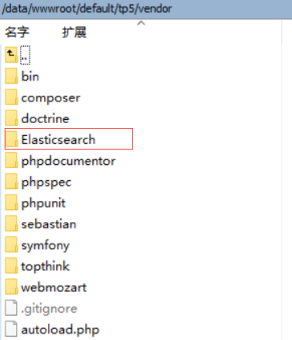
然后将压缩包解压到vendor目录下
<?php

namespace app\index\controller;

use think\Controller;

class Ec extends Controller

{

    public function _initialize()

    {

        Vendor('Elasticsearch.autoload');

        $params['hosts'] = array(

            '192.168.9.155:9200'

        );

        $this->client = new \Elasticsearch\Client($params);

    }

    public function index(){

        $this->search();

    }

    //创建索引

    //现在我们开始添加一个新的索引和一些自定义设置:

    public function create_index()

    {

        $indexParams['index'] = 'myindex';                         //索引名称

        $indexParams['type'] = 'mytype';                          //类型名称

        $indexParams['body']['settings']['number_of_shards'] = ;   //当前只有一台ES,1就可以了

        $indexParams['body']['settings']['number_of_replicas'] = ; //副本0,因为只有一台ES

        $this->client->create($indexParams);

    }

    //插入索引数据

    public function add_document()

    {

        $params = array();

        $params['body'] = array(

            'product_name' => '要插入的商品名称',

            'prodcut_id' =>

        );

        $params['index'] = 'myindex';  //索引名称

        $params['type'] = 'mytype';   //类型名称

        $params['id'] = '';     //不指定id,系统会自动生成唯一id

        $ret = $this->client->index($params);

    }

    //删除索引

    //由于 elasticsearch 的动态性质,我们添加第一个文档的时候自动创建了索引和一些默认设置。让我们删除这个索引,因为我们以后想要指定自己的设置:

    public function delete_index()

    {

        $deleteParams['index'] = 'myindex';

        $this->client->indices()->delete($deleteParams);

    }

    //删除文档

    public function delete_document()

    {

        $deleteParams = array();

        $deleteParams['index'] = 'myindex';

        $deleteParams['type'] = 'mytype';

        $deleteParams['id'] = '';

        $retDelete = $this->client->delete($deleteParams);

    }

    //更改文档

    public function update_document()

    {

        $updateParams = array();

        $updateParams['index'] = 'myindex';

        $updateParams['type'] = 'mytype';

        $updateParams['id'] = 'my_id';

        $updateParams['body']['doc']['product_name']  = '新商品名';

       $response = $this->client->update($updateParams);

    }

    //查询

    public function search()

    {

        $searchParams['index'] = 'myindex';

        $searchParams['type'] = 'mytype';

        $searchParams['from'] = ;

        $searchParams['size'] = ;

        $searchParams['sort'] = array(

            '_score' => array(

                'order' => 'id'

            )

        );

        //相当于sql语句:  select * from hp_product where prodcut_name like '茶'  limit 0,100 order by id desc;

        $searchParams['body']['query']['match']['product_name'] = '茶';

        $retDoc = $this->client->search($searchParams);

        echo '<pre>';

        print_r($retDoc);

        //相当于sql语句: select * from hp_product where product_name like '茶'  and product_id = 20 limit 200,10;

        // $searchParams['body']['query']['bool']['must'] = array(

        //     array('match' => array('product_name' => '茶')),

        //     array('match' => array('product_id' => 20))

        //    );

        // $searchParams['size'] = 10;

        // $searchParams['from'] = 200;

        //

        //

        // 当于sql语句:select * from hp_product where product_name like '茶' or product_id = 20 limit 200,10;

        // $searchParams['body']['query']['bool']['should'] = array(

        //        array('match' => array('product_name' => '茶')),

        //        array('match' => array('product_id' => 20))

        //      );

        //$searchParams['size'] = 10;

        //$searchParams['from'] = 200;

        //

        //

        // 当于sql语句: select * from hp_product where product_name like '茶' and product_id != 20 limit 200,10;

        // $searchParams['body']['query']['bool']['must_not'] = array(

        //        array('match' => array('product_name' => '茶')),

        //        array('match' => array('product_id' => 20))

        //      );

        //$searchParams['size'] = 10;

        //$searchParams['from'] = 200;

        //

        //

        //当于sql语句:select * from hp_product where id>=20 and id<30  limit 200,10;

        // $searchParams['body']['query']['range'] = array(

        //        'id' => array('gte' => 20,'lt' => 30);

        //      );

        //$searchParams['size'] = 10;

        //$searchParams['from'] = 200;

    }

    //获取文档

    public function get_document()

    {

        $getParams = array();

        $getParams['index'] = 'myindex';

        $getParams['type'] = 'mytype';

        $getParams['id'] = '';

        $retDoc = $this->client->get($getParams);

        print_r($retDoc);

    }

}

?>
关于更多详细的说明就自己百度一下官方文档和百度其他帖子吧~
ElasticSearch(六) Elasticsearch在Thinkphp5.0中的使用的更多相关文章
- 在thinkphp5.0中调用ajax时, 返回的JSON 格式数据在html前台不能用时
在thinkphp5.0中调用ajax时,如果控制器返回的数据为json格式,视图层接收到返回值即为json格式的数据,此时应该把 JSON 文本转换为 JavaScript 对象,方便调用.具体代码 ...
- ThinkPHP5.0中Redis的使用和封装(原创)
Redis是一种常用的非关系型数据库,主要用作数据缓存,数据保存形式为key-value,键值相互映射.它的数据存储跟MySQL不同,它数据存储在内存之中,所以数据读取相对而言很快,用来做高并发非常不 ...
- thinkPHP5.0中使用header跳转没作用
我在controller中的方法中这样写: header("Location:".$url); 但是一直没动静,不会跳转,最后还是官方文档解决了 https://www.kancl ...
- thinkphp5.0 中使用第三方无命名空间的类库
ThinkPHP5建议所有的扩展类库都使用命名空间定义,如果你的类库没有使用命名空间,则不支持自动加载,必须使用Loader::import方法先导入文件后才能使用. 首先要在文件头部使用loader ...
- ThinkPHP5.0中Request请求对象的使用和常用的操作
request的使用 第一种方法 在控制器头部添加request引用 然后在方法里调用 ‘instance’类 然后在调用方法: public function index($name='name') ...
- ThinkPHP5.0中Request请求对象的常用操作
获取当前系统参数 // 获取当前域名 echo '获取当前域名:'.$request->domain() . '<br/>'; // 获取当前入口文件 echo '获取当前入口文件: ...
- ThinkPHP5.0中的build.php自动生成所需的目录结构的详细方法
一.来到根目录下,找到bulid.php文件进行改写. 改写方法:保留常用的目录结构,其余按照需求改吧! 二.复制一份build.php文件到application目录下 此时根目录下的bulid.p ...
- thinkphp5.0 中简单处理微信支付异步通知
public function wx_notify(){ $postStr = $GLOBALS["HTTP_RAW_POST_DATA"]; libxml_disable_ent ...
- PHP(ThinkPHP5.0) + PHPMailer 进行邮箱发送验证码
GitHub下载最新版第三方类库PHPMailer: 第一步: 打开网址https://github.com/PHPMailer/PHPMailer/ 下载PHPMailer,PHPMailer 需要 ...
随机推荐
- 折腾deeplin系统
1.双系统失败记录 多系统启动问题 先安装完deepin,发现再安装windows怎么都起不起来,哪怕他们已经安装在不同的盘 (体现再Windows7通过ghost位于另外一个盘,但就是没有启动项) ...
- Git详解之二 Git细节拾遗
git知识点详解 文件状态 现在我们手上已经有了一个真实项目的 Git 仓库,并从这个仓库中取出了所有文件的工作拷贝.接下来,对这些文件作些修改,在完成了一个阶段的目标之后,提交本次更新到仓库. 请记 ...
- 666:放苹果(划分dp)
666:放苹果 查看 提交 统计 提问 总时间限制: 1000ms 内存限制: 65536kB 描述 把M个同样的苹果放在N个同样的盘子里,允许有的盘子空着不放,问共有多少种不同的分法?(用K表示 ...
- LAMP集群项目
vi /etc/sysconfig/network 一.安装硬件环境(安装虚拟机) 1.安装VMware步骤 1.修改网卡配置 vi /etc/sysconfig/network-scripts/if ...
- sersync+rsync原理及部署
标签:sersync+rsync部署文档 原创作品,允许转载,转载时请务必以超链接形式标明文章 原始出处 .作者信息和本声明.否则将追究法律责任.http://liubao0312.blog.51ct ...
- OKEx量化分析报告[2017-12-19]
[分析时间]2017-12-19 09:05 [分析对象]OKEx [有效期限]2017-12-19 09:00:00 — 2017-12-19 09:59:59 [报告内容]DASH_USDT ...
- TypeError: cannot use a string pattern on a bytes-like object的解决办法
#!/usr/python3 import re import urllib.request def gethtml(url): page=urllib.request.urlopen(url) ht ...
- 【react读取文件】react发送GET请求读取静态文件
react中,使用发送请求的方式把static文件夹中的前端可访问的静态文件读取成字符串: 1.new request,需要用到getRequestHeaders组件 2.fetch获取respons ...
- Navicat工具、pymysql模块、数据备份
IDE工具介绍(Navicat) 生产环境还是推荐使用mysql命令行,但为了方便我们测试,可以使用IDE工具,我们使用Navicat工具,这个工具本质上就是一个socket客户端,可视化的连接mys ...
- 谷歌浏览器Chrome错误提示Flash过期怎么办(转)
在使用谷歌浏览器Chrome时,会碰到谷歌浏览器Chrome的错误提示:“Adobe Flash Player因过期而遭到阻止”,点击“更新插件”是不行的,国内的网络根本就打不开,点击“运行一次”是可 ...