
google支付回调验证
原文链接: https://my.oschina.net/lemonzone2010/blog/398736
Google支付问题
20150218,挂机的日本服务器出现google支付被刷单现象,虽然目前进行的修补,但是这个问题并没有完全从根源上解决。并且公司以前的GooglePlay支付也有不完善的地方,在SDK端给支付回调发送支付信息后,支付回调程序没有调用Google API进行订单验证。因此Google支付流程需要进行完善。
Google支付解决方案
上面的支付问题,Google有自己的解决方案,就是根据订单号去向Google API发送验证申请,Google API会返回订单相关信息。可以根据这个信息和SDK返回的信息进行对比验证。
对于申请Google账号之类的流程,相信运营已经很清楚了,但是使用Google API还需要使用Google Developer Console创建Web Application账户,而后获取到client_id、client_secret、refresh_token。具体流程见下面:
1. 登陆 Google Developer Console ,地址:https://code.google.com/apis/console/
2. 在APIs & auth 项中找到 Credentials ,点击创建一个auth2.0 的web 应用
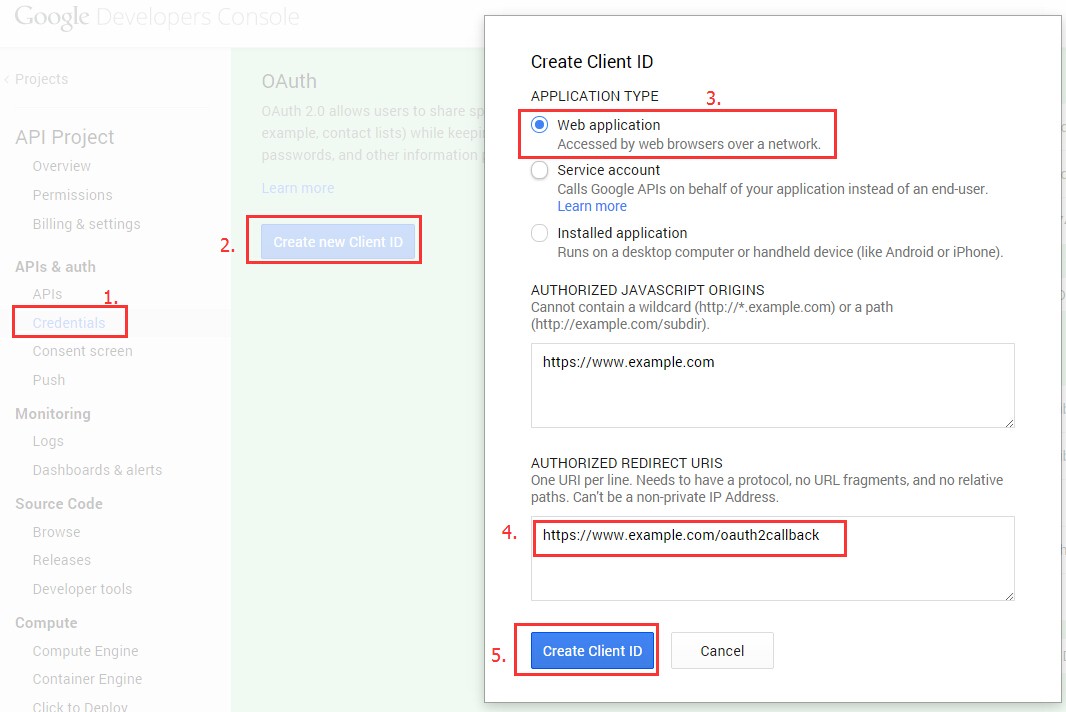
其中4的地址一定是 可用域名 + /oauth2callback
创建完后,可以获得,client_id, client_secret, redirect_url
3. 获取Authorization code
google中心在登陆状态,打开新页面输入如下地址:
https://accounts.google.com/o/oauth2/auth?scope=https://www.googleapis.com/auth/androidpublisher&response_type=code&access_type=offline&redirect_uri={REDIRECT_URIS}&client_id={CLIENT_ID}
将蓝色部分根据相应的值进行替换;
这时会提示你是否要授权,点击授权,url地址栏会自动跳转,之后会获得code例如:https://www.example.com/oauth2callback?code=4/CpVOd8CljO_gxTRE1M5jtwEFwf8gRD44vrmKNDi4GSS.kr-GHuseD-oZEnp6UADFXm0E0MD3FlAI
4. 利用code获取refresh_token, 这里需要post请求
请求地址:https://accounts.google.com/o/oauth2/token
请求参数:code, client_id, client_secret, redirect_uri, grant_type
其中 grant_type 值为 authorization_code
第一次发起请求得到的JSON字符串如下所示,以后再请求将不再出现refresh_token(长令牌,一般不会失效),需要保存好refresh_token,可以存放到配置文件(或者写到数据库),以备后用。
expires_in是指access_token的时效,为3600秒
{
"access_token": "ya29.3gC2jw5vm77YPkylq0H5sPJeJJDHX93Kq8qZHRJaMlknwJ85595eMogL300XKDOEI7zIsdeFEPY6zg",
"token_type": "Bearer",
"expires_in": 3600,
"refresh_token": "1/FbQD448CdDPfDEDpCy4gj_m3WDr_M0U5WupquXL_o"
}
在获取到client_id、client_secret、refresh_token后,我们的支付回调程序就可以使用订单号去请求Google Api进行验证。
Google支付回调验证流程
通过上一步获取到client_id、client_secret、refresh_token之后,支付回调程序就可以调用google api进行支付验证。具体流程如下:
1. 获取access_token。
请求地址:https://accounts.google.com/o/oauth2/token请求方式:post请求参数:client_id, client_secret, refresh_toke, grant_typegrant_type 值固定为 refresh_token返回:jsonUsing the refresh token
Each access token is only valid for a short time. Once the current access token expires, the server will need to use the refresh token to get a new one. To do this, send a POST request to https://accounts.google.com/o/oauth2/tokenwith the following fields set:
grant_type=refresh_token

client_id=<the client ID token created in the APIs Console>

client_secret=<the client secret corresponding to the client ID>

refresh_token=<the refresh token from the previous step>
A successful response will contain another access token:
{

  "access_token" : "ya29.AHES3ZQ_MbZCwac9TBWIbjW5ilJkXvLTeSl530Na2",

  "token_type" : "Bearer",

  "expires_in" : 3600,

}
The refresh token thus allows a web server continual access to the API without requiring an active login to a Google account.
2. 通过获得access_token 就可以请求谷歌的 API 接口,获得订单状态
在这里我所需要获取的是我在应用内给GooglePlay支付的购买信息,此类信息包含以下几个属性:(可参考Google Play Developer API下的Purchases.products)
A ProductPurchase resource indicates the status of a user's inapp product purchase.
请求接口:https://www.googleapis.com/androidpublisher/v2/applications/packageName/purchases/products/productId/tokens/purchaseToken?access_token=access_token
| packageName | The package name of the application the inapp product was sold in (for example, 'com.some.thing'). | |
| productId |
The inapp product SKU (for example, 'com.some.thing.inapp1'). |
|
| purchaseToken | The token provided to the user's device when the inapp product was purchased. 就是订单中purchaseToken |
返回数据
{

  "kind": "androidpublisher#productPurchase",

  "purchaseTimeMillis": long,

  "purchaseState": integer,

  "consumptionState": integer,

  "developerPayload": string

}| consumptionState | integer | The consumption state of the inapp product. Possible values are:
|
|
| developerPayload | string | A developer-specified string that contains supplemental information about an order. | |
| kind | string | This kind represents an inappPurchase object in the androidpublisher service. | |
| purchaseState | integer | The purchase state of the order. Possible values are:
|
|
| purchaseTimeMillis | long | The time the product was purchased, in milliseconds since the epoch (Jan 1, 1970). |
到此支付验证完成!
参考文档:
http://blog.csdn.net/hjun01/article/details/42032841
调用接口遇到的几个问题:
1. Access Not Configured.
{
"error": {
"errors": [
{
"domain": "usageLimits",
"reason": "accessNotConfigured",
"message": "Access Not Configured. The API(Google Play Android Developer API)is not enabled for you project.Please use Google Developers Console to update your configuration."
}
],
"code": 403,
"message": "Access Not Configured. The API(Google Play Android Developer API)is not enabled for you project.Please use Google Developers Console to update your configuration."
}
}
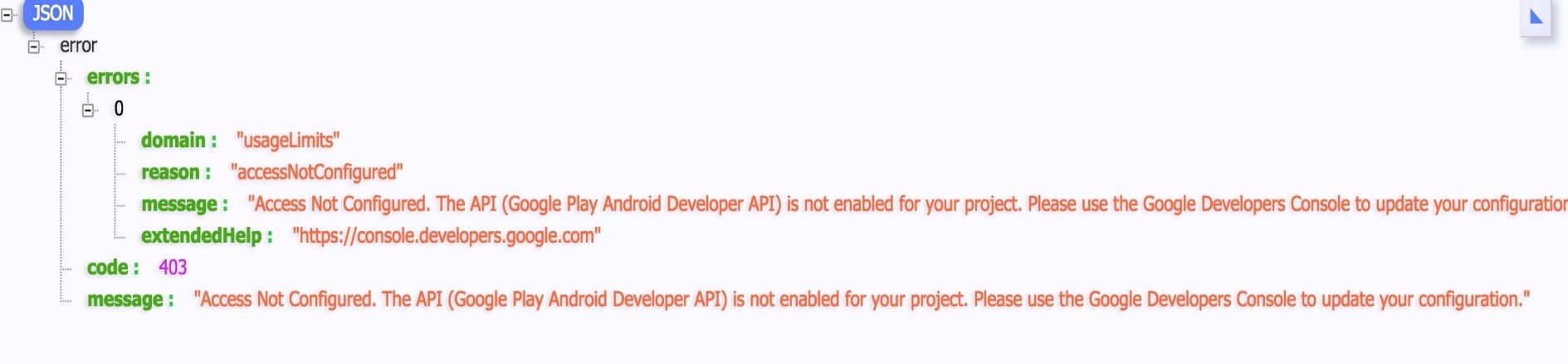
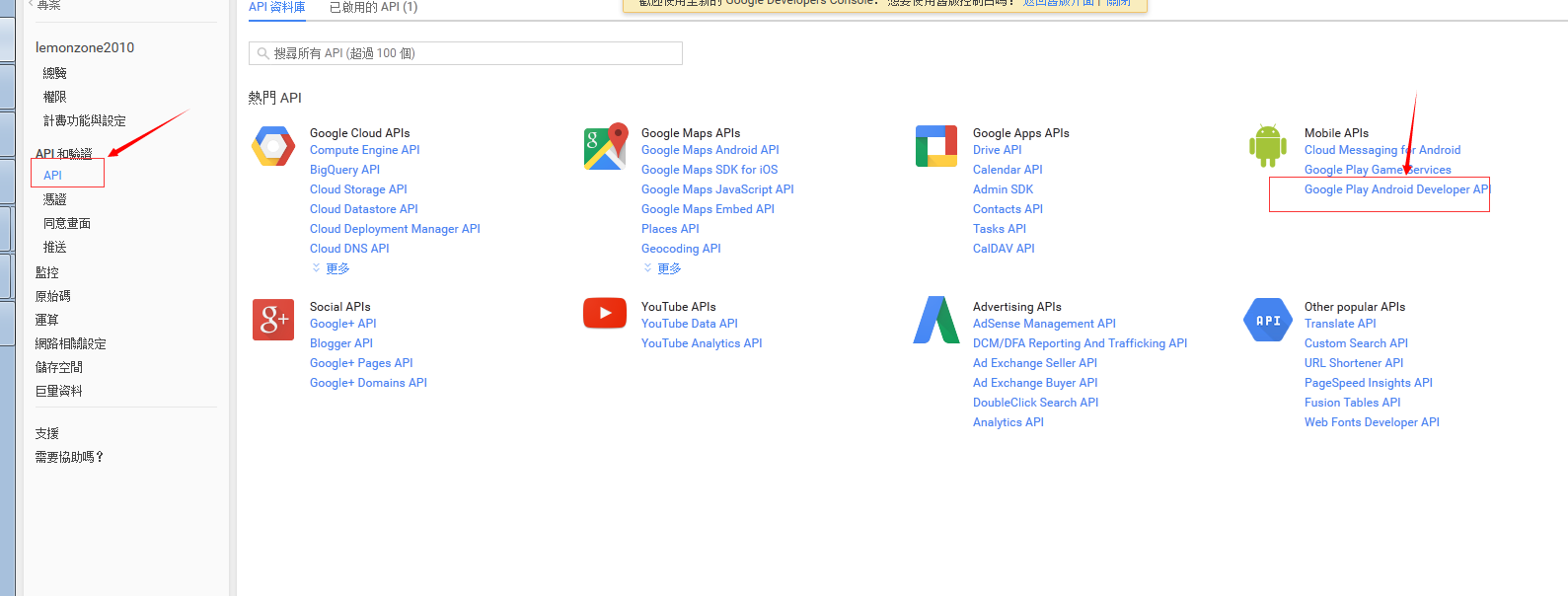
在这个页面: https://console.developers.google.com
Google Developer Console
1. "Google Developer Console" > "APIs & Auth" subcategory "APIs" > (api list) "Google Play Android Developer API". Set "STATUS" to "ON".
2. "APIs & auth" subcategory "Credentials" > "Create new Client ID". Choose "Service account" and create the id.
3. You should get a P12 key from the browser.
问题2: projectNotLinked
{
"error": {
"errors": [
{
"domain": "androidpublisher",
"reason": "projectNotLinked",
"message": "The project id used to call the Google Play Developer API has not been linked in the Google Play Developer Console."
}
],
"code": 403,
"message": "The project id used to call the Google Play Developer API has not been linked in the Google Play Developer Console."
}
}
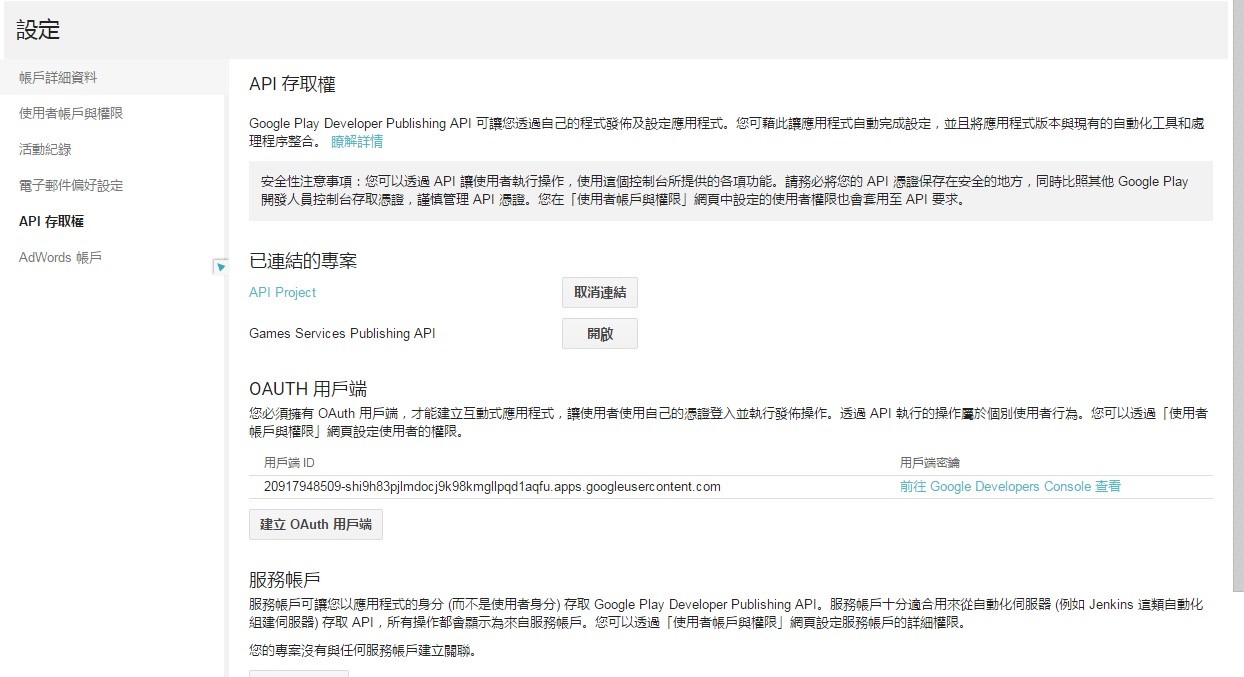
在这个页设置关联:https://play.google.com/apps/publish/
Google Play Developer Console
1. "Google Play Developer Console" > "Settings" > subcategory "API access".
2. Make a link to your "Linked Project".
3. "Service Account" place maybe already showing ur "Service account" CLIENT ID which made "google developer console".
google支付回调验证的更多相关文章
- php微信支付回调验证
//字典排序拼接字符串 function getWxPaySignature($arr){ ksort($arr); $str = ''; foreach ($arr as $k=>$a){ $ ...
- 微信JSAPI支付回调
在微信支付中,当用户支付成功后,微信会把相关支付结果和用户信息发送给商户,商户需要接收处理,并返回应答. 在经历了千幸万苦之,填完了所有的JSAPI支付的坑后(微信JSAPI支付 跟 所遇到的那些坑) ...
- PHP7 微信支付回调失败 解决
升级完PHP7 发现微信支付回调失败.原来是 $GLOBALS['HTTP_RAW_POST_DATA'];没有定义的问题.php7 移除了这个全局变量. 问题代码如下: 微信API :WxPay.A ...
- 微信支付重复回调,java微信支付回调问题
这几天一直在研究微信支付回调这个问题,发现之前微信支付回调都是正常的也没怎么在意,今天在自己项目上测试的时候发现相同的代码在我这个项目上微信支付回调老是重复执行导致支付成功之后的回调逻辑一直在执行,很 ...
- php对微信支付回调处理的方法(合集)
支付完成后,微信会把相关支付结果和用户信息发送给商户,商户需要接收处理,并返回应答. 对后台通知交互时,如果微信收到商户的应答不是成功或超时,微信认为通知失败,微信会通过一定的策略定期重新发起通知,尽 ...
- 微信扫码支付Native方式二以及支付回调
官方API文档https://pay.weixin.qq.com/wiki/doc/api/native.php?chapter=6_5 1.使用jar包 1 <!--微信支付 --> 2 ...
- 到处都是坑的微信支付V3之 微信支付回调页面
据上次 到处都是坑的微信支付V3 后很多园友在被虐了千百遍后终于跳转到了亲切的微信支付界面,但输入密码支付后却不知道怎么处理了,接下来补上支付后的处理流程. 1. html中根据前台支付后反馈信息成功 ...
- 教你快速高效接入SDK——服务器端支付回调的处理方式
转载自:http://blog.csdn.net/chenjie19891104/article/details/48321427今天着重把之前渠道服务器端SDK的时候,遇到的一个蛋疼的问题给解决了. ...
- Python Django对接企业微信第三方服务回调验证的一些坑
今天公司老总,叫我把公司的企业微信,服务商管理后台中的本地应用进行回调验证. 听起来一脸懵逼,没搞过企业微信对接情况.一头雾水,不知道如何下手. 先讲解一下,企业微信情况. 登录到企业微信后,右上角服 ...
随机推荐
- hdu 4678
HDU 4768: Flyer 题意: 有N个社团,每个社团三个属性A,B,C,表示会向编号A+k*C的同学发传单(k=0,1,2... && A+k*C <= B).题目保证 ...
- python【项目】:基于socket的FTP服务器
功能要求 1. 用户加密认证 2. 服务端采用 SocketServer实现,支持多客户端连接 3. 每个用户有自己的家目录且只能访问自己的家目录 4. 对用户进行磁盘配额.不同用户配额可不同 5. ...
- 20165301陈潭飞2017-2018-2 20165301 实验三《Java面向对象程序设计》实验报告
2017-2018-2 20165301 实验三<Java面向对象程序设计>实验报告 一.敏捷开发与XP实践-1 实验要求: 在IDEA中使用工具(Code->Reformate C ...
- css实现一行居中显示,两行靠左显示
<!DOCTYPE html> <html lang="en"> <head> <meta charset="UTF-8&quo ...
- MVC基础知识 – 2.新语法
1.自动属性 Auto-Implemented Properties 2.隐式类型 var 3.参数默认值 和 命名参数 4.对象初始化器 与 集合初始化器 { } 5.匿名类 & 匿名方法 ...
- thinkphp5.1使用phpstudy隐藏index.php
apache的重写规则如下: <IfModule mod_rewrite.c> Options +FollowSymlinks -Multiviews RewriteEngine on R ...
- 前端JS框架系列之requireJS基础学习
1 背景 伴随着项目功能的不断扩充,客户体验的不断完善,实现交互逻辑的JS代码变得越来越多.起初,为了管理JS代码,我们把JS从页面中解放出来独立成文件,接着又把相似的交互代码提取到公共的JS页面中. ...
- Loadrunner脚本开发规范
Loadrunner脚本开发规范 目录 1.一般约定... 3 2.代码注释约定... 4 3.格式化代码... 5 1.一般约定 1.1具体脚本规则,必须在具体代码中加注释,以便脚本开发人员阅读和理 ...
- oracle去掉字段值中的某些字符串
我想去掉字段值中的“_” select replace(fdisplayname,'_','') from SHENZHENJM1222.B replace 第一个参数:字段/值,第二个参数时替换字符 ...
- Java实现web在线预览office文档与pdf文档实例
https://yq.aliyun.com/ziliao/1768?spm=5176.8246799.blogcont.24.1PxYoX 摘要: 本文讲的是Java实现web在线预览office文档 ...