
使用VisualStudio读写NI FPGA板卡实例(基于FPGA Interface C API Generator)
实验平台说明:安装了NI LabVIEW 2015 32bit版本,安装了NI FPGA Interface C API Generator,安装了硬件PCIe-7842R;安装了Visual Studio 2015(下载的C API Generator说明是针对VS2013,不过实验测试发现vs2015可以使用);按照官网给的例子进行实验http://www.ni.com/tutorial/8638/en/,只测试了FPGA板卡模拟输入功能,没有写模拟输出功能。官网例子是采用NI公司的LabWindows/CVI上位机软件。
实验步骤:
- 在LabVIEW中新建FPGA工程,命名为FPGA.vi
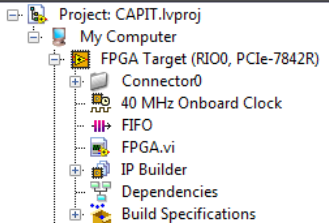
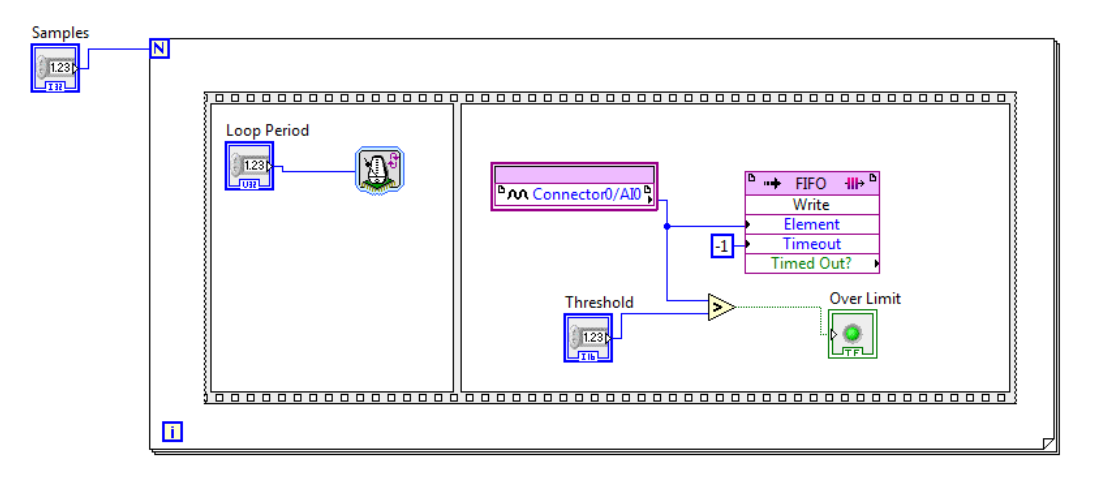
此工程中,FPGA和上位机有四个接口:3个参数输入接口(Samples等等),1个数据读取接口(FIFO),接口通信通过PCIe进行。编译该工程,得到bitfile文件
2.打开FPGA Interface C API Generator,导入之前用LabVIEW编译生成的FPGA bitfile,点击generate,生成了几个个文件:1.FPGA bitfile; 2.NiFpga.c;3.NiFpga.h;4.NiFpga_FPGA.h;
其中NiFpga_FPGA.h包含了应用程序中函数调用需要的常量,和上述读写结构的地址信息
NiFpga.c和NiFpga.h对所有工程都是一样的,包含了调用NI FPGA的各种系统函数。
3.新建visual studio控制台应用程序,添加上述几个文件
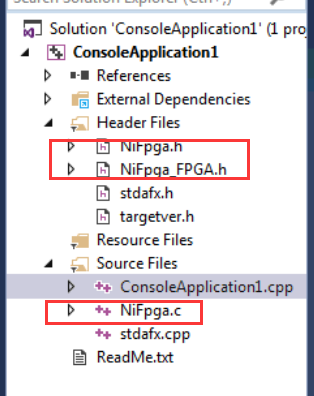
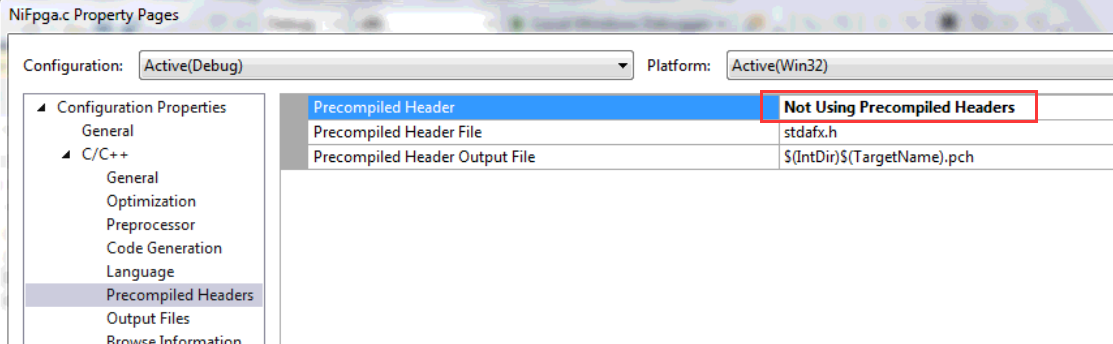
4.NiFpga.c设置编译属性,选择No Precompile,如下。(如果不这样设置,编译的时候会因C/C++编译问题而报错)
5.编译上位机程序,主要是打开FPGA(完成下载bitfile到FPGA的任务),按照地址读写FPGA中的接口,关闭FPGA等操作。测试程序如下:
 // ConsoleApplication1.cpp : Defines the entry point for the console application.

 //

 // NIFPGATest.cpp : Defines the entry point for the console application.

 //

 #include "stdafx.h"

 #include "NiFpga_FPGA.h"

 #include <malloc.h>

 int main()

 {

     /* must be called before any other calls */

     printf("Initializing...\n");

     NiFpga_Status status = NiFpga_Initialize();

     if (NiFpga_IsNotError(status))

     {

         NiFpga_Session session;

         /* opens a session, downloads the bitstream, and runs the FPGA */

         printf("Opening a session...\n");

         /* opens a session, downloads the bitstream, but does not run the FPGA */

         NiFpga_MergeStatus(&status, NiFpga_Open(NiFpga_FPGA_Bitfile, NiFpga_FPGA_Signature,

             "RIO0", NiFpga_OpenAttribute_NoRun, &session));

         if (NiFpga_IsNotError(status))

         {

             /* declare variables for output and input */

             double numSamples, aorate, airate;

             uint16_t threshold = ;

             uint32_t r, timeout = /* 10 seconds */;

             NiFpga_Bool overLimit;

             int16_t *data = NULL;

             numSamples = ;

             airate = ;

             /* allocate size for the samples to read */

             data = (int16_t*)malloc(sizeof(int16_t) * numSamples);

             /* write the number of samples and loop rate to the FPGA VI */

             NiFpga_MergeStatus(&status, NiFpga_WriteI32(session, NiFpga_FPGA_ControlI32_Samples, numSamples));

             NiFpga_MergeStatus(&status, NiFpga_WriteU32(session, NiFpga_FPGA_ControlU32_LoopPeriod, airate));

             NiFpga_MergeStatus(&status, NiFpga_WriteI16(session, NiFpga_FPGA_ControlI16_Threshold, threshold));

             /* run the FPGA application */

             printf("Running the FPGA...\n");

             NiFpga_MergeStatus(&status, NiFpga_Run(session, ));

             /* read the DMA FIFO */

             NiFpga_MergeStatus(&status, NiFpga_ReadFifoI16(session, NiFpga_FPGA_TargetToHostFifoI16_FIFO,

                 data, numSamples, timeout, &r));

             /* read the Over Limit? boolean */

             NiFpga_MergeStatus(&status, NiFpga_ReadBool(session, NiFpga_FPGA_IndicatorBool_OverLimit,

                 &overLimit));

             /* close the session now that we're done */

             printf("Closing the session...\n");

             NiFpga_MergeStatus(&status, NiFpga_Close(session, ));

         }

         /* must be called after all other calls */

         printf("Finalizing...\n");

         NiFpga_MergeStatus(&status, NiFpga_Finalize());

     }

     /* check if anything went wrong */

     if (NiFpga_IsError(status))

     {

         printf("Error %d!\n", status);

         printf("Press <Enter> to quit...\n");

         getchar();

     }

     return status;

 }
参考文献:
- 官网给出的R系列FPGA的C API用法说明http://www.ni.com/tutorial/8638/en/
- 电脑上给出的FPGA Interface C API Generator的example

使用VisualStudio读写NI FPGA板卡实例(基于FPGA Interface C API Generator)的更多相关文章
- 基于FPGA的数字识别的实现
欢迎大家关注我的微信公众号:FPGA开源工作室 基于FPGA的数字识别的实现二 作者:lee神 1 背景知识 1.1基于FPGA的数字识别的方法 通常,针对印刷体数字识别使用的算法有:基于模版 ...
- NI FPGA板卡程序设计概述
NI公司提到了三种不同应用开发环境ADE:http://www.ni.com/white-paper/5956/zhs/ LabVIEW是NI公司主推的ADE,采用G语言(图像化语言),支持力度最大 ...
- 基于FPGA的DDR3多端口读写存储管理系统设计
基于FPGA的DDR3多端口读写存储管理系统设计 文章出处:电子技术设计 发布时间: 2015/03/12 | 1747 次阅读 每天新产品 时刻新体验专业薄膜开关打样工厂,12小时加急出货 机载 ...
- 012 基于FPGA的网口通信实例设计【转载】
一.网口通信设计分类 通过上面其他章节的介绍,网口千兆通信,可以使用TCP或者UDP协议,可以外挂PHY片或者不挂PHY片,总结下来就有下面几种方式完成通信: 图8‑17基于FPGA的网口通信实例设计 ...
- 基于FPGA的XPT2046触摸控制器设计
基于FPGA的XPT2046触摸控制器设计 小梅哥编写,未经许可,文章内容和所涉及代码不得用于其他商业销售的板卡 本实例所涉及代码均可通过向 xiaomeige_fpga@foxmail.com 发 ...
- 基于FPGA的PCIe接口实现(具体讲解了数据流向)
时间:2014-12-09 来源:西安电子科技大学电子工程学院 作者:姜 宁,陈建春,王 沛,石 婷 摘要 PCI Express是一种高性能互连协议,被广泛应用于网络适配.图形加速器.网络存储.大数 ...
- 基于FPGA的图像开发平台 其他摄像头附件说明(OV5642 OV9655)
基于FPGA的图像开发平台 其他摄像头附件说明 FPGA_VIP_V101 编者 奇迹再现 个人博客 http://www.cnblogs.com/ccjt/ 联系邮箱 Shenyae86@163.c ...
- 基于FPGA的图像去噪
目录 结构图 其中FPGA 控制模块为核心,通过它实现视频图像数据的获取.缓存.处理和控制各模块间通讯[1].由CCD 相机对目标成像,高速图像数据由camera link 实时传输[2],经信号转换 ...
- 基于FPGA的红外遥控解码与PC串口通信
基于FPGA的红外遥控解码与PC串口通信 zouxy09@qq.com http://blog.csdn.net/zouxy09 这是我的<电子设计EDA>的课程设计作业(呵呵,这个月都拿 ...
随机推荐
- 详解Java中的clone方法 -- 原型模式
转自: http://blog.csdn.net/zhangjg_blog/article/details/18369201 Java中对象的创建 clone顾名思义就是复制, 在Java语言中, ...
- 20145310 《Java程序设计》第2周学习总结
20145310 <Java程序设计>第2周学习总结 教材学习内容总结 第三章主要学习了java的基础语法. java中的基本类型主要可区分为,整数.字节.浮点数.字符与布尔.整数shor ...
- 20145322 《Java程序设计》第7周学习总结
20145322何志威 <Java程序设计>第7周学习总结 教材学习内容总结 第十二章 如果使用JDK8的话,可以使用Lambda特性去除重复的信息. 在只有Lambda表达式的情况下,参 ...
- 20145324 《Java程序设计》第10周学习总结
20145324 <Java程序设计>第10周学习总结 教材学习内容总结 1.网络编程的实质就是两个(或多个)设备(例如计算机)之间的数据传输 2.在实际传输数据以前需要将域名转换为IP地 ...
- 20145331《Java程序设计》第5周学习总结
20145331<Java程序设计>第5周学习总结 教材学习内容总结 第八章 概述 Java异常机制主要依赖于try.catch.finally.throw.throws五个关键字. 语法 ...
- 20145333 《Java程序设计》第5周学习总结
20145333 <Java程序设计>第5周学习总结 教材学习内容总结 语法与继承架构 使用try.catch Java中所有错误都会被包装成对象,可以尝试(try)执行程序并捕捉(cat ...
- logstash在Windows2008简单配置实例
Windows2008 安装java1.8,配置系统环境变量: 官方下载并安装略...然后配置 logstash的配置文件 注意PATH路径名称不支持中文 input { file { type =& ...
- jni使用问题总结
参考: https://blog.csdn.net/fred_lzy/article/details/53159138 https://blog.csdn.net/avi3/article/detai ...
- Android通过soap2访问webservice遇到HTTP request failed, HTTP status: 302的问题
笔者用C#在服务器端写了一个Webservice,然后再Android客户端通过soap2调用webservice的函数,遇到了HTTP request failed, HTTP status: 30 ...
- Mybatis-Generator插件的使用与Spring集成Mybatis的配置
参考:http://blog.51cto.com/zero01/2103687 Mybatis-Generator是一个用于自动生成dao层接口.pojo以及mapper xml的一个Mybatis插 ...