
使用VisualStudio读写NI FPGA板卡实例(基于FPGA Interface C API Generator)
实验平台说明:安装了NI LabVIEW 2015 32bit版本,安装了NI FPGA Interface C API Generator,安装了硬件PCIe-7842R;安装了Visual Studio 2015(下载的C API Generator说明是针对VS2013,不过实验测试发现vs2015可以使用);按照官网给的例子进行实验http://www.ni.com/tutorial/8638/en/,只测试了FPGA板卡模拟输入功能,没有写模拟输出功能。官网例子是采用NI公司的LabWindows/CVI上位机软件。
实验步骤:
- 在LabVIEW中新建FPGA工程,命名为FPGA.vi
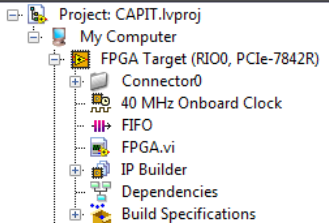
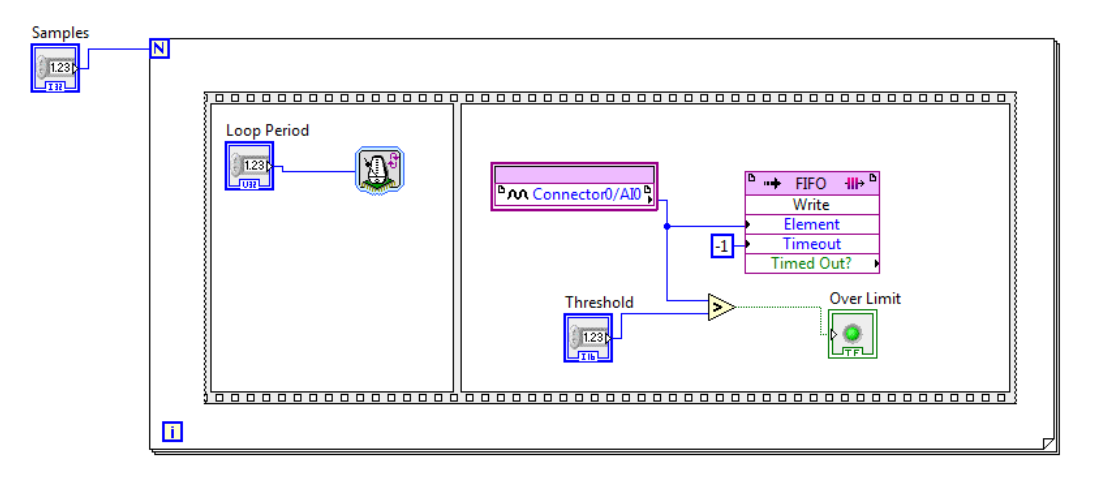
此工程中,FPGA和上位机有四个接口:3个参数输入接口(Samples等等),1个数据读取接口(FIFO),接口通信通过PCIe进行。编译该工程,得到bitfile文件
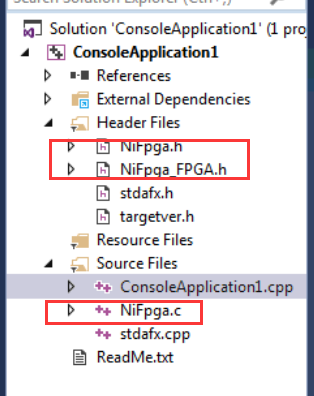
2.打开FPGA Interface C API Generator,导入之前用LabVIEW编译生成的FPGA bitfile,点击generate,生成了几个个文件:1.FPGA bitfile; 2.NiFpga.c;3.NiFpga.h;4.NiFpga_FPGA.h;
其中NiFpga_FPGA.h包含了应用程序中函数调用需要的常量,和上述读写结构的地址信息
NiFpga.c和NiFpga.h对所有工程都是一样的,包含了调用NI FPGA的各种系统函数。
3.新建visual studio控制台应用程序,添加上述几个文件
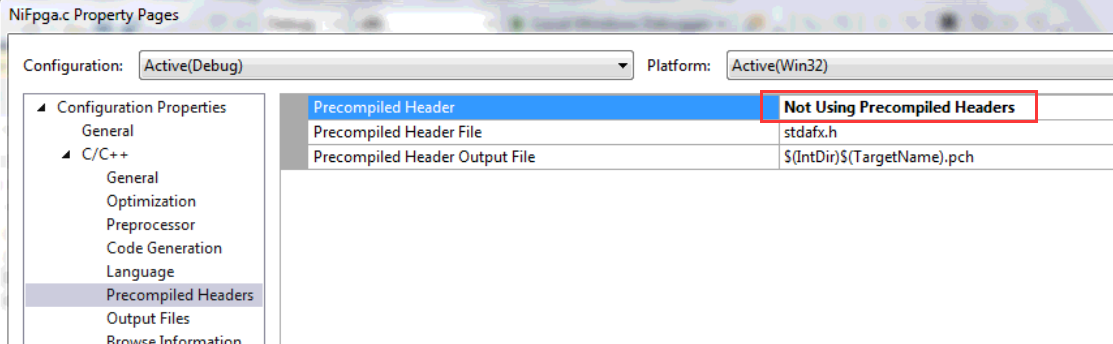
4.NiFpga.c设置编译属性,选择No Precompile,如下。(如果不这样设置,编译的时候会因C/C++编译问题而报错)
5.编译上位机程序,主要是打开FPGA(完成下载bitfile到FPGA的任务),按照地址读写FPGA中的接口,关闭FPGA等操作。测试程序如下:
 // ConsoleApplication1.cpp : Defines the entry point for the console application.

 //

 // NIFPGATest.cpp : Defines the entry point for the console application.

 //

 #include "stdafx.h"

 #include "NiFpga_FPGA.h"

 #include <malloc.h>

 int main()

 {

     /* must be called before any other calls */

     printf("Initializing...\n");

     NiFpga_Status status = NiFpga_Initialize();

     if (NiFpga_IsNotError(status))

     {

         NiFpga_Session session;

         /* opens a session, downloads the bitstream, and runs the FPGA */

         printf("Opening a session...\n");

         /* opens a session, downloads the bitstream, but does not run the FPGA */

         NiFpga_MergeStatus(&status, NiFpga_Open(NiFpga_FPGA_Bitfile, NiFpga_FPGA_Signature,

             "RIO0", NiFpga_OpenAttribute_NoRun, &session));

         if (NiFpga_IsNotError(status))

         {

             /* declare variables for output and input */

             double numSamples, aorate, airate;

             uint16_t threshold = ;

             uint32_t r, timeout = /* 10 seconds */;

             NiFpga_Bool overLimit;

             int16_t *data = NULL;

             numSamples = ;

             airate = ;

             /* allocate size for the samples to read */

             data = (int16_t*)malloc(sizeof(int16_t) * numSamples);

             /* write the number of samples and loop rate to the FPGA VI */

             NiFpga_MergeStatus(&status, NiFpga_WriteI32(session, NiFpga_FPGA_ControlI32_Samples, numSamples));

             NiFpga_MergeStatus(&status, NiFpga_WriteU32(session, NiFpga_FPGA_ControlU32_LoopPeriod, airate));

             NiFpga_MergeStatus(&status, NiFpga_WriteI16(session, NiFpga_FPGA_ControlI16_Threshold, threshold));

             /* run the FPGA application */

             printf("Running the FPGA...\n");

             NiFpga_MergeStatus(&status, NiFpga_Run(session, ));

             /* read the DMA FIFO */

             NiFpga_MergeStatus(&status, NiFpga_ReadFifoI16(session, NiFpga_FPGA_TargetToHostFifoI16_FIFO,

                 data, numSamples, timeout, &r));

             /* read the Over Limit? boolean */

             NiFpga_MergeStatus(&status, NiFpga_ReadBool(session, NiFpga_FPGA_IndicatorBool_OverLimit,

                 &overLimit));

             /* close the session now that we're done */

             printf("Closing the session...\n");

             NiFpga_MergeStatus(&status, NiFpga_Close(session, ));

         }

         /* must be called after all other calls */

         printf("Finalizing...\n");

         NiFpga_MergeStatus(&status, NiFpga_Finalize());

     }

     /* check if anything went wrong */

     if (NiFpga_IsError(status))

     {

         printf("Error %d!\n", status);

         printf("Press <Enter> to quit...\n");

         getchar();

     }

     return status;

 }
参考文献:
- 官网给出的R系列FPGA的C API用法说明http://www.ni.com/tutorial/8638/en/
- 电脑上给出的FPGA Interface C API Generator的example

使用VisualStudio读写NI FPGA板卡实例(基于FPGA Interface C API Generator)的更多相关文章
- 基于FPGA的数字识别的实现
欢迎大家关注我的微信公众号:FPGA开源工作室 基于FPGA的数字识别的实现二 作者:lee神 1 背景知识 1.1基于FPGA的数字识别的方法 通常,针对印刷体数字识别使用的算法有:基于模版 ...
- NI FPGA板卡程序设计概述
NI公司提到了三种不同应用开发环境ADE:http://www.ni.com/white-paper/5956/zhs/ LabVIEW是NI公司主推的ADE,采用G语言(图像化语言),支持力度最大 ...
- 基于FPGA的DDR3多端口读写存储管理系统设计
基于FPGA的DDR3多端口读写存储管理系统设计 文章出处:电子技术设计 发布时间: 2015/03/12 | 1747 次阅读 每天新产品 时刻新体验专业薄膜开关打样工厂,12小时加急出货 机载 ...
- 012 基于FPGA的网口通信实例设计【转载】
一.网口通信设计分类 通过上面其他章节的介绍,网口千兆通信,可以使用TCP或者UDP协议,可以外挂PHY片或者不挂PHY片,总结下来就有下面几种方式完成通信: 图8‑17基于FPGA的网口通信实例设计 ...
- 基于FPGA的XPT2046触摸控制器设计
基于FPGA的XPT2046触摸控制器设计 小梅哥编写,未经许可,文章内容和所涉及代码不得用于其他商业销售的板卡 本实例所涉及代码均可通过向 xiaomeige_fpga@foxmail.com 发 ...
- 基于FPGA的PCIe接口实现(具体讲解了数据流向)
时间:2014-12-09 来源:西安电子科技大学电子工程学院 作者:姜 宁,陈建春,王 沛,石 婷 摘要 PCI Express是一种高性能互连协议,被广泛应用于网络适配.图形加速器.网络存储.大数 ...
- 基于FPGA的图像开发平台 其他摄像头附件说明(OV5642 OV9655)
基于FPGA的图像开发平台 其他摄像头附件说明 FPGA_VIP_V101 编者 奇迹再现 个人博客 http://www.cnblogs.com/ccjt/ 联系邮箱 Shenyae86@163.c ...
- 基于FPGA的图像去噪
目录 结构图 其中FPGA 控制模块为核心,通过它实现视频图像数据的获取.缓存.处理和控制各模块间通讯[1].由CCD 相机对目标成像,高速图像数据由camera link 实时传输[2],经信号转换 ...
- 基于FPGA的红外遥控解码与PC串口通信
基于FPGA的红外遥控解码与PC串口通信 zouxy09@qq.com http://blog.csdn.net/zouxy09 这是我的<电子设计EDA>的课程设计作业(呵呵,这个月都拿 ...
随机推荐
- Method Swizzling 剖析
一.背景介绍 关于Method Swizzling的文章一大堆,讲的非常好的也数不胜数.不过,很多人只是会用,知道一些注意点.深入一点问的话,估计就答得不好.归其原因就是对Method Swizzli ...
- redis 简单命令操作
一.概述: 在该系列的前几篇博客中,主要讲述的是与Redis数据类型相关的命令,如String.List.Set.Hashes和Sorted-Set.这些命令都具有一个共同点,即所有的操作都是针对与K ...
- Python3.x:BeautifulSoup()解决中文乱码问题
Python3.x:BeautifulSoup()解决中文乱码问题 问题: BeautifulSoup获取网页内容,中文显示乱码: 解决方案: 遇到情况也是比较奇葩,利用chardet获取网页编码,然 ...
- DNS ARP地址解析原理
ARP是地址解析协议 主机A与主机B之间如果要进行数据间的传输,需要获取对方的IP与物理地址(MAC),在只清楚ip的情况下,主机A向主机B请求链接,会先查找ARP高速缓存表,是否存在对应的主机B的i ...
- PyTorch源码解读之torchvision.transforms(转)
原文地址:https://blog.csdn.net/u014380165/article/details/79167753 版权声明:本文为博主原创文章,未经博主允许不得转载. https://bl ...
- ACM输入函数测试 - scanf cin 优化的输入
2017-08-27 10:26:19 writer:pprp 进行测试如下四种输入方式: 1.scanf 2.cin 3.用了ios::sync_with_stdio(false);的cin 4.自 ...
- UVa 11324 最大团(强连通分量缩点)
https://vjudge.net/problem/UVA-11324 题意:给一张有向图G,求一个结点数最大的结点集,使得该结点集中任意两个结点u和v满足,要么u可以到达v,要么v可以达到u. 思 ...
- vc libcurl 模拟上传文件
http://www.cnblogs.com/killbit/p/5393301.html 附上这篇文章,因为当时就已经想到了模拟上传,但是因为时间关系,所以就直接用PHP写了.现在改进一下,用VC+ ...
- nignx的master进程和worker进程的作用
ngnix进程启动启动后会有一个master进程和多个worker进程. master进程的主要作用: 1.读取并验证配置信息: 2.创建,绑定及关闭套接字: 3.启动,终止worker进程以及维护w ...
- ColKang v1.0
/* *2015.3.31 14:00更新 *上午刚写完这篇博客,下午就读到迭代器了.C++ primer中讲迭代器那节说道了->符号的意思,即(*ptr). 及将指针解引用之后再调用成员函数 ...