
rsync之脑袋疼
rsync图片参考
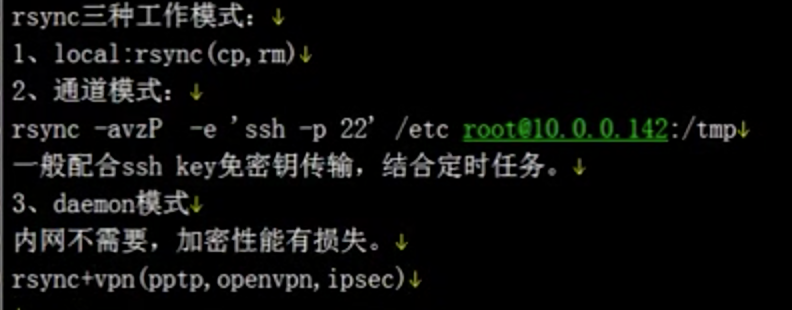
d本地模式,cp的感觉
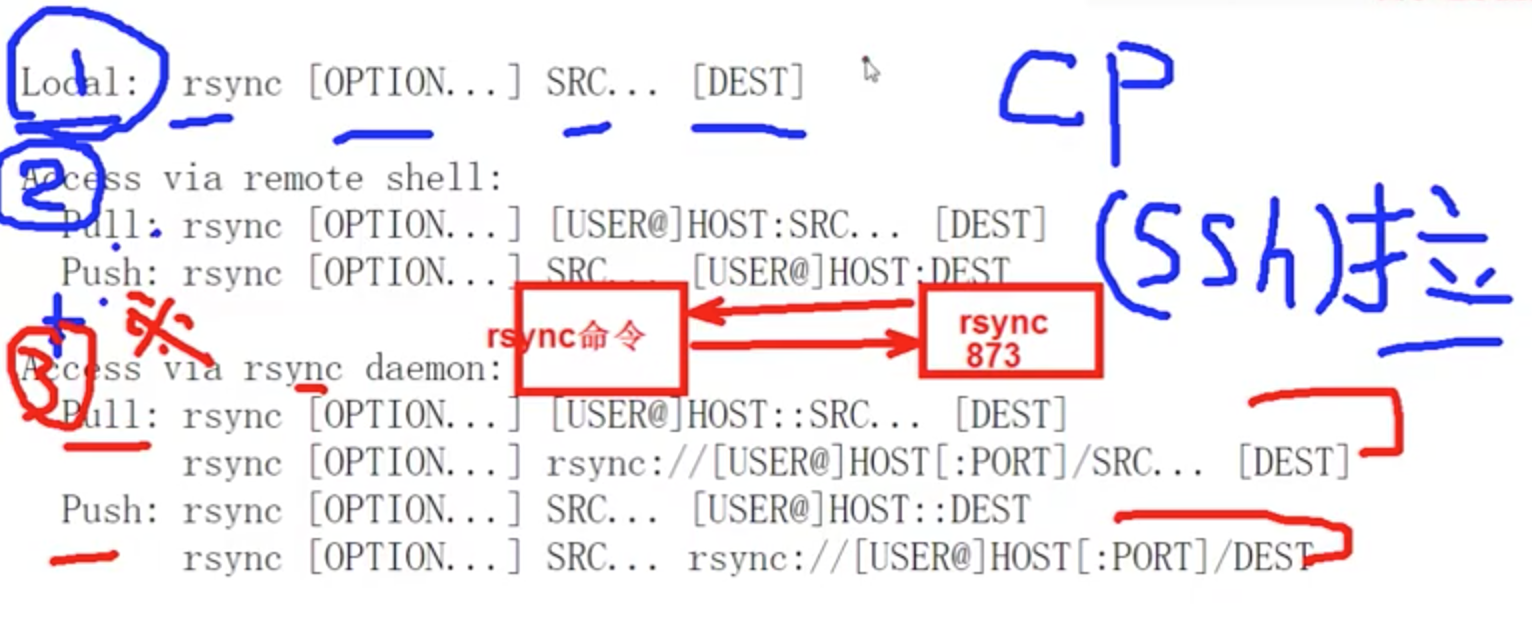
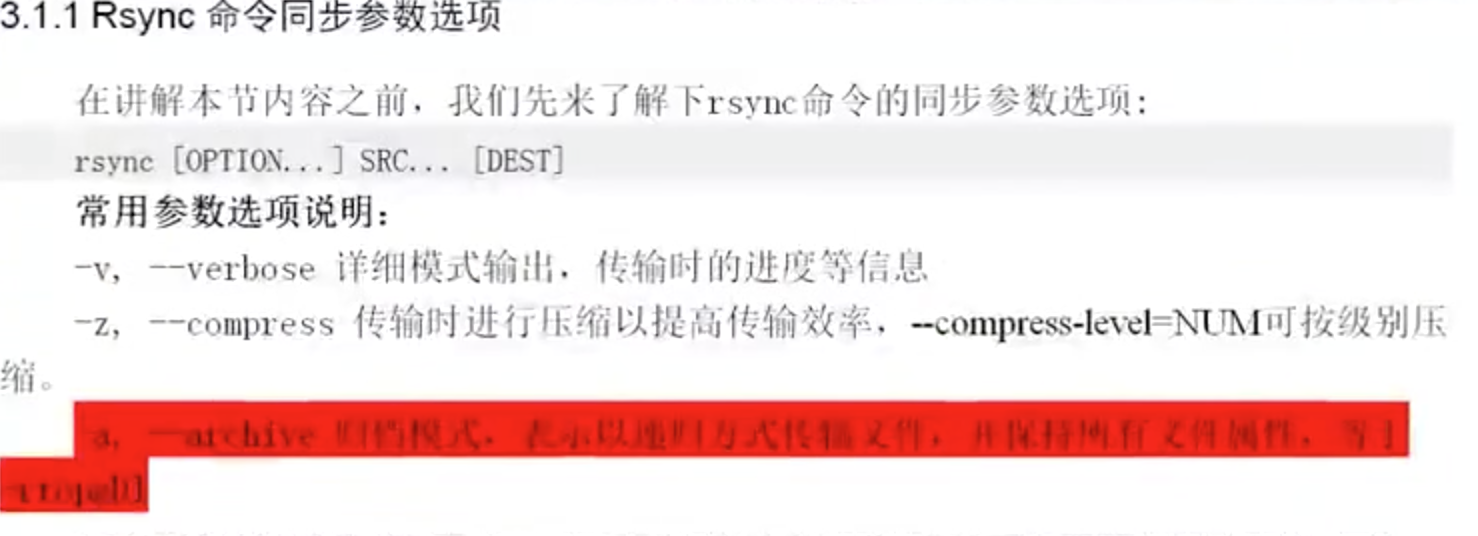
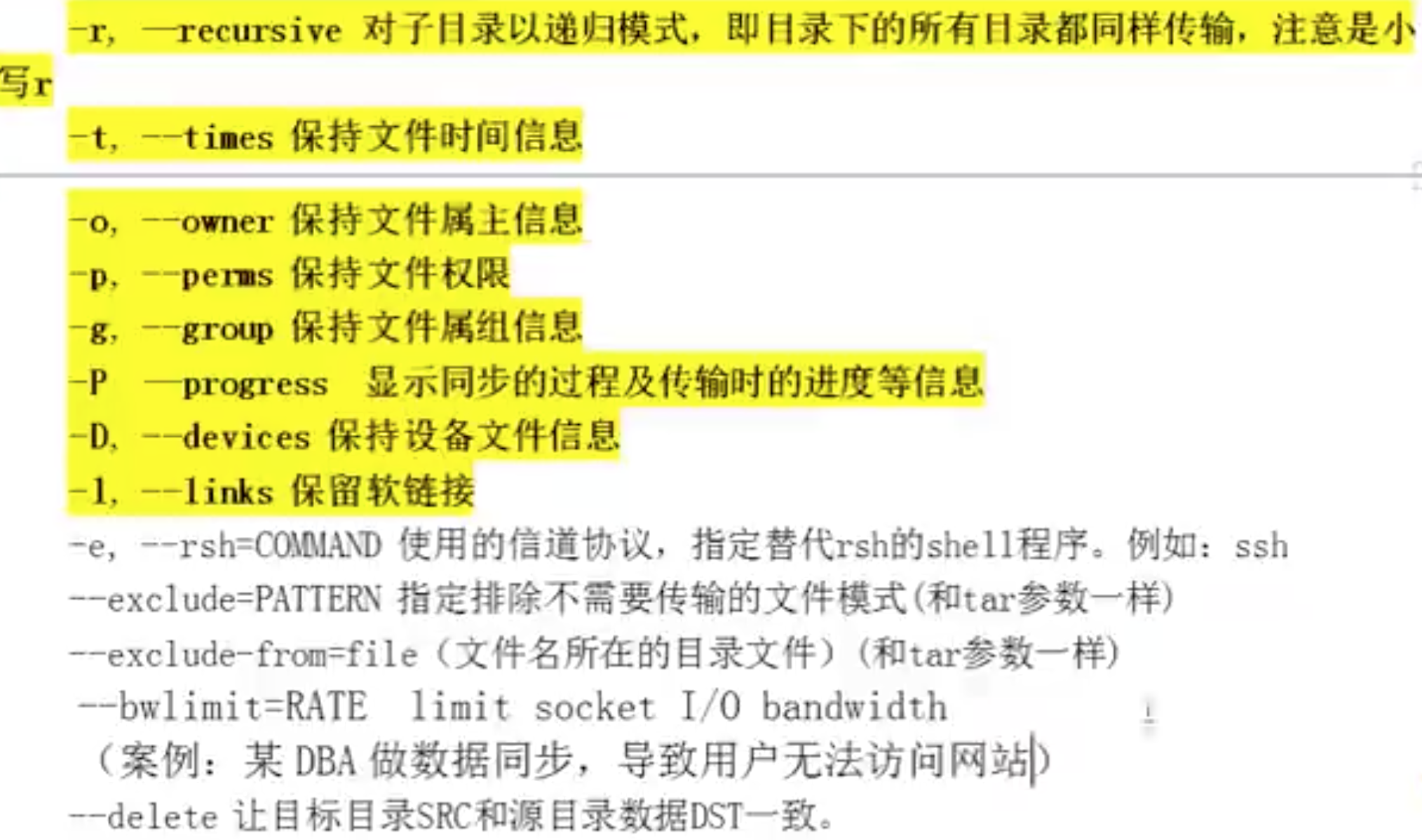

vzrtopg = a - d -l
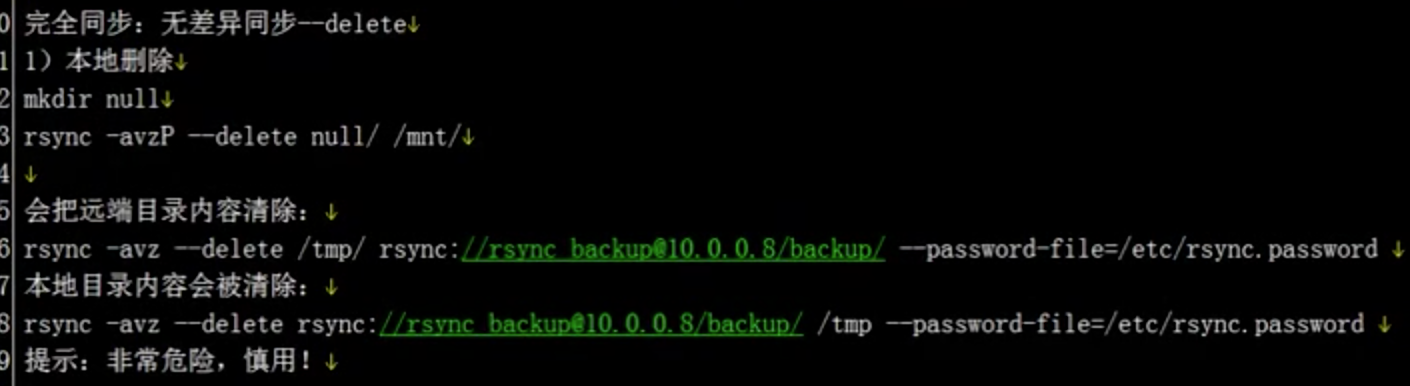
--delete适用于2个目录完全一样的情况
默认avz就可以了
2,远端的shell


解决ssh链接慢的问题


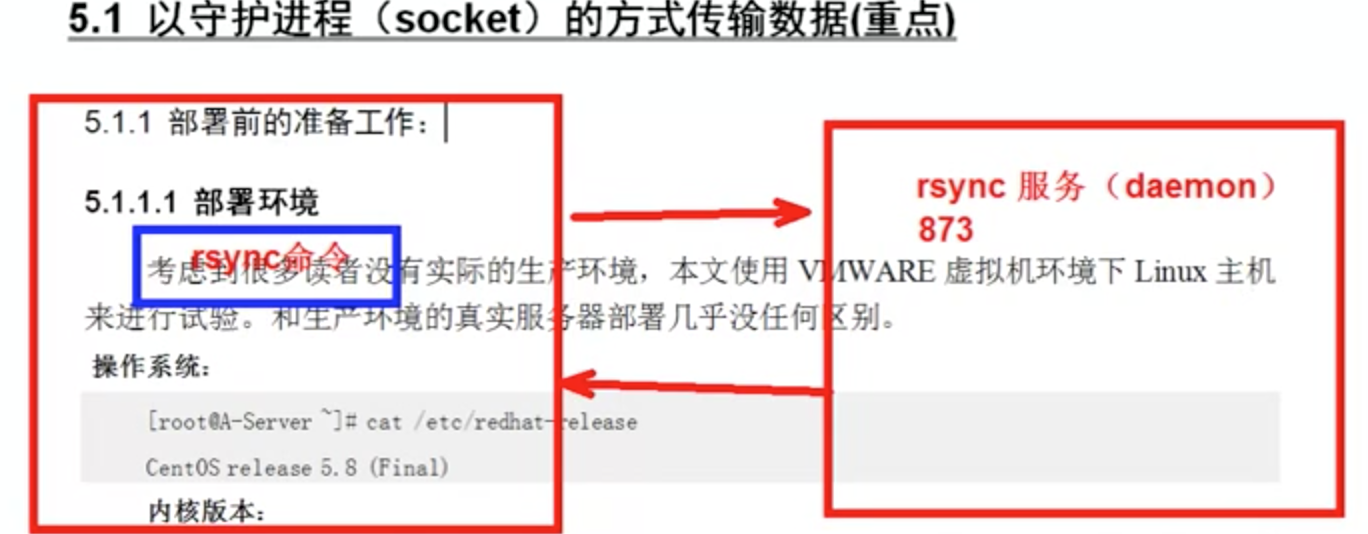
3.daemon方式
yum install rsync
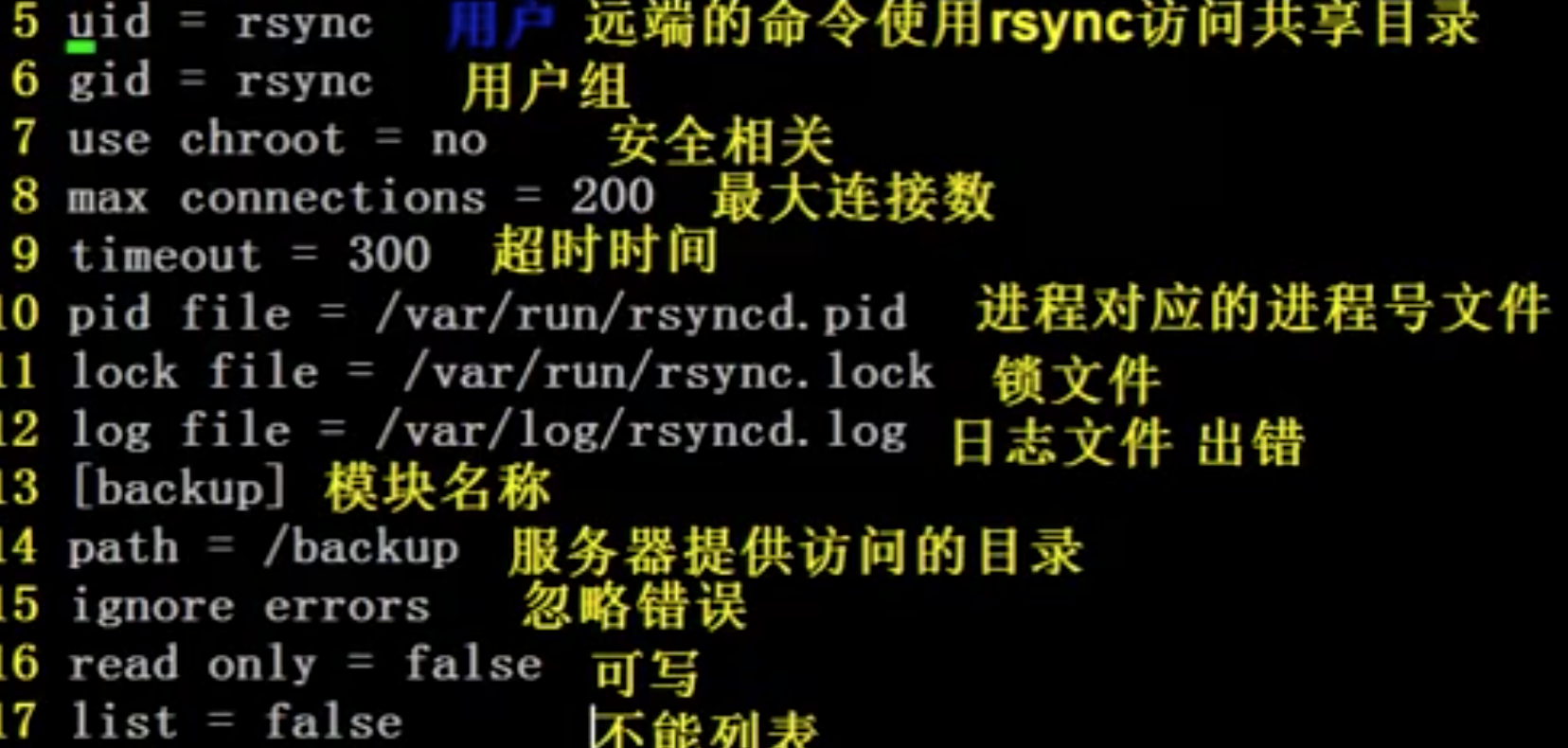
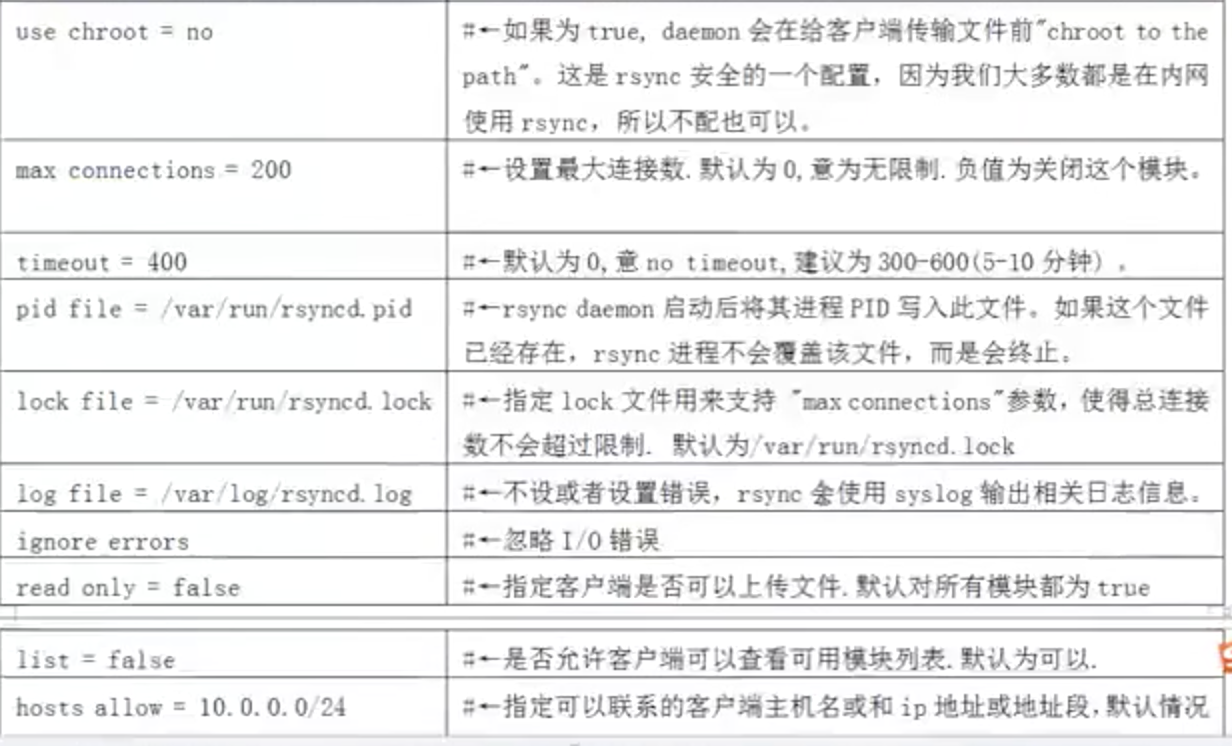
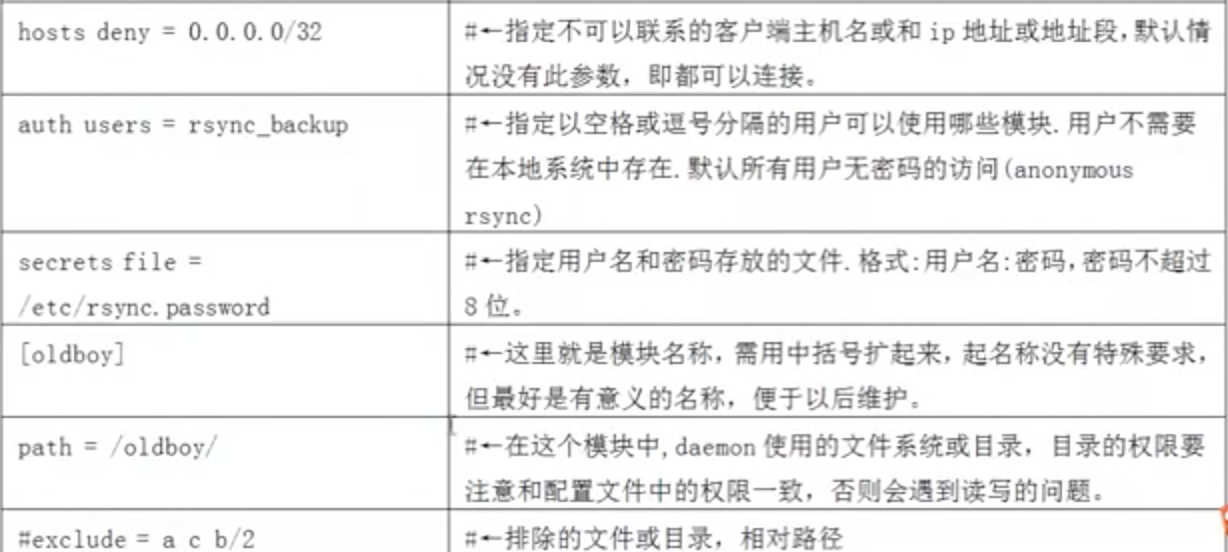
/etc/rsyncd.conf



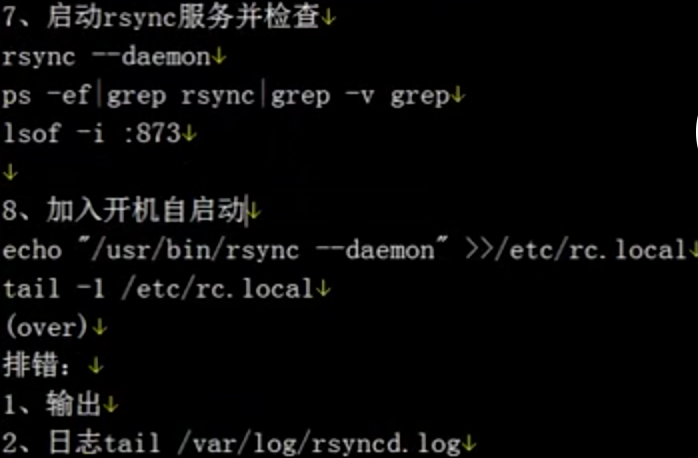 2
2
客户端



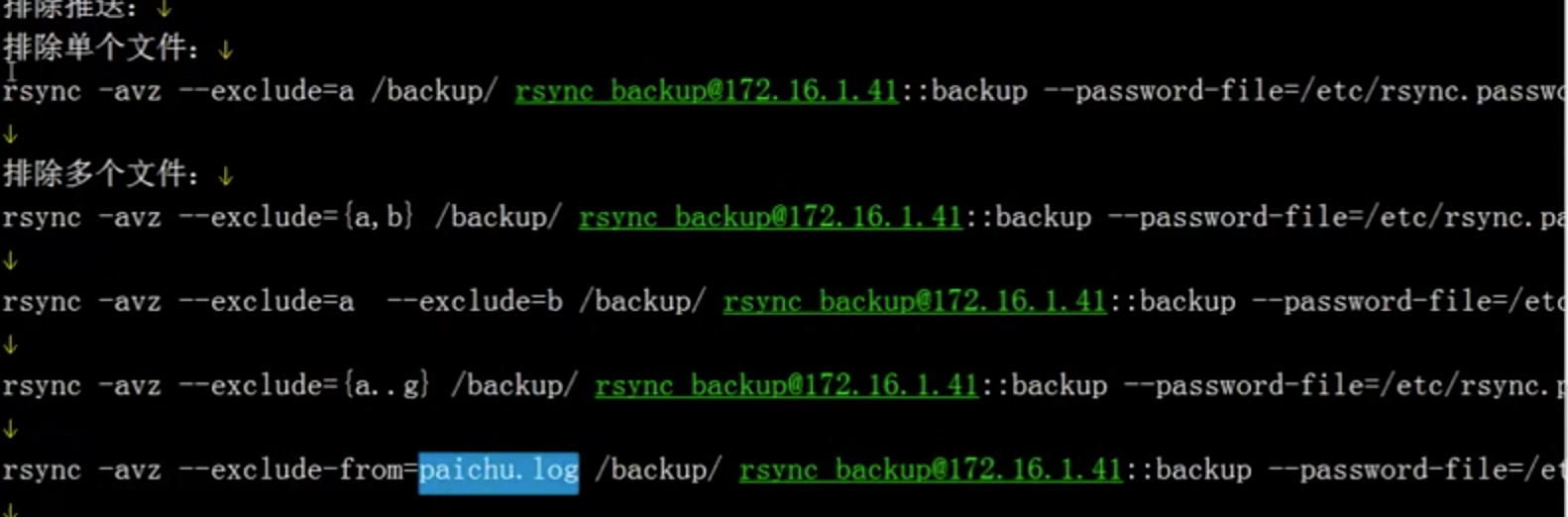
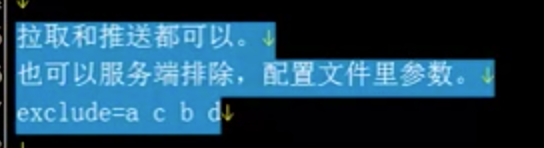
推子目录

rsync 文字参考
本地模式

1,yum install rsync

rsync -avzP /mnt/ /data/ 类似cp

ssh信道模式

1,客户端,服务端 yum install rsync

rsync -avzP -e "ssh -p 22" root@ip:/mnt/ /data/ 类似scp

deamon守护进程模式

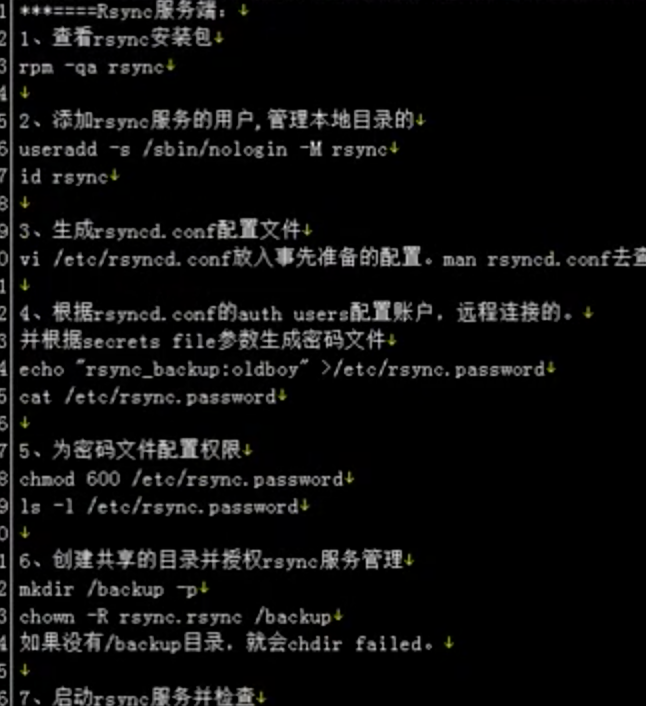
1,服务端 yum install rsync

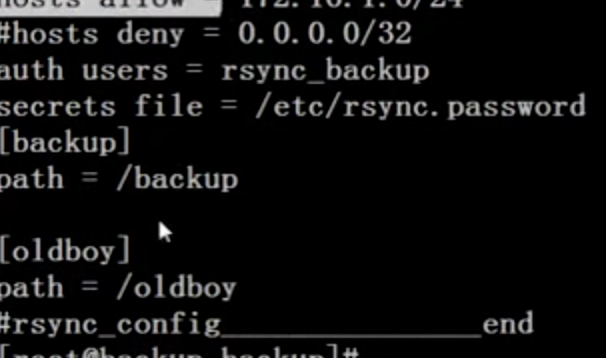
2,cat /etc/rsyncd.conf

uid = rsync

gid = rsync

use chroot = no

max connections = 2000

pid file = /var/run/rsyncd.pid

lock file = /var/run/rsyncd.lock

log file = /var/log/rsyncd.log

timeout = 900

# ignore errors

read only = false

# list = false # 是否允许客户端查看模块列表(不常用)

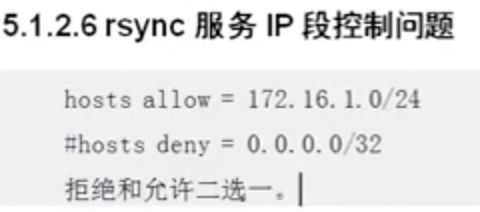
# hosts allow = ip 允许访问的地址,默认没有此参数,都可以链接

# hosts deny = 0.0.0.0/32 拒绝的网段,默认情况没有此参数,都可以链接,与上面二选一

auth users = rsync_backup

secrets file = /etc/rsyncd.password

exclude = *.txt 1111 # 过滤到.txt文件

[backup1]

path = /backup1

[backup2]

path = /backup2

3,cat  /etc/rsyncd.password     600权限

rsync_backup:woshimima

4,创建目录,注意是rsync的属主和属组,记得创建rsync账号

useradd rsync -s /sbin/nologin -M

chown -R rsync.rsync /backup

5,rsync --daemon --config=/etc/rsyncd.conf
   systemctl stop/start/status/enable/disable rsyncd.service

1,客户端 yum install rsync

2,推送的目录属主属组也要是rsync,并且要有rsync的账号

3,cat  /etc/rsyncd.password     600权限

woshimima

4,rsync -avzP /data/ rsync_backup(auth_users)@ip::backup(模块)/ --password-file=/etc/rsyncd.password
5,如果是/data/就是把/data/目录下的所有文件同步,如果是/data就会把/data目录传送过去
附赠配置文件说明
######### 全局配置参数 ##########

port=888    # 指定rsync端口。默认873

uid = rsync # rsync服务的运行用户,默认是nobody,文件传输成功后属主将是这个uid

gid = rsync # rsync服务的运行组,默认是nobody,文件传输成功后属组将是这个gid

use chroot = no # rsync daemon在传输前是否切换到指定的path目录下,并将其监禁在内

max connections = 200 # 指定最大连接数量,0表示没有限制

timeout = 300         # 确保rsync服务器不会永远等待一个崩溃的客户端,0表示永远等待

motd file = /var/rsyncd/rsync.motd   # 客户端连接过来显示的消息

pid file = /var/run/rsyncd.pid       # 指定rsync daemon的pid文件

lock file = /var/run/rsync.lock      # 指定锁文件

log file = /var/log/rsyncd.log       # 指定rsync的日志文件,而不把日志发送给syslog

dont compress = *.gz *.tgz *.zip *.z *.Z *.rpm *.deb *.bz2  # 指定哪些文件不用进行压缩传输

###########下面指定模块,并设定模块配置参数,可以创建多个模块###########

[longshuai]        # 模块ID

path = /longshuai/ # 指定该模块的路径,该参数必须指定。启动rsync服务前该目录必须存在。rsync请求访问模块本质就是访问该路径。

ignore errors      # 忽略某些IO错误信息

read only = false  # 指定该模块是否可读写,即能否上传文件,false表示可读写,true表示可读不可写。所有模块默认不可上传

write only = false # 指定该模式是否支持下载,设置为true表示客户端不能下载。所有模块默认可下载

list = false       # 客户端请求显示模块列表时,该模块是否显示出来,设置为false则该模块为隐藏模块。默认true

hosts allow = 10.0.0.0/24 # 指定允许连接到该模块的机器,多个ip用空格隔开或者设置区间

hosts deny = 0.0.0.0/32   # 指定不允许连接到该模块的机器

auth users = rsync_backup # 指定连接到该模块的用户列表,只有列表里的用户才能连接到模块,用户名和对应密码保存在secrts file中,

                          # 这里使用的不是系统用户,而是虚拟用户。不设置时,默认所有用户都能连接,但使用的是匿名连接

secrets file = /etc/rsyncd.passwd # 保存auth users用户列表的用户名和密码,每行包含一个username:passwd。由于"strict modes"

                                  # 默认为true,所以此文件要求非rsync daemon用户不可读写。只有启用了auth users该选项才有效。

[xiaofang]    # 以下定义的是第二个模块

path=/xiaofang/

read only = false

ignore errors

comment = anyone can access
附赠rsync脚本,执行于备份服务器,daemon模式
#!/bin/bash

# The author is joker, applied to file synchronization.

# deamon守护进程模式

# 模块,备份目录,如果是多目录,或者单目录,请修改,在下面代码中有创建该目录过程,也请修改,注意上层目录joker的修改

module1=gameserver1

path1=/joker/$module1

module2=gameserver2

path2=/joker/$module2

# 认证用户密码

author=rsync_backup

password=woshimima

# 进程检索

rsync_process=`ps -ef|grep rsync|grep -v grep|wc -l`

# 软件安装检索

rsync_order=`which rsync 1>/dev/null 2>&1`

if [ $? -eq 1 ];then

    # 1,安装rsync——deamon守护进程模式

    echo -e "\033[31m 红色字,正在安装rsync \033[0m"

    yum install rsync -y

    sleep 1

    sh $0

else

    # 2,创建配置文件

cat >/etc/rsyncd.conf<<EOF

# The author is joker, which is the configuration file for rsync.

uid = rsync

gid = rsync

use chroot = no

max connections = 2000

pid file = /var/run/rsyncd.pid

lock file = /var/run/rsyncd.lock

log file = /var/log/rsyncd.log

# motd file = /var/rsyncd/rsync.motd 端口链接过来信息

timeout = 100

ignore errors

read only = false

# list = false # 是否允许客户端查看模块列表(不常用)

# hosts allow = ip 允许访问的地址,默认没有此参数,都可以链接

# hosts deny = 0.0.0.0/32 拒绝的网段,默认情况没有此参数,都可以链接,与上面二选一

auth users = $author

secrets file = /etc/rsync.passwd

# exclude = *.txt 1111 # 过滤到.txt文件

[$module1]

path = $path1

[$module2]

path = $path2

EOF

    # 3,密码文件

cat >/etc/rsync.passwd<<EOF

$author:$password

EOF

    chmod 600 /etc/rsync.passwd

    # 4,创建目录,注意是rsync的属主和属组,记得创建rsync账号

    useradd rsync -s /sbin/nologin -M

    mkdir $path1 $path2 -p

    chown -R rsync.rsync $path1

    chown -R rsync.rsync $path2

    # 5,用配置文件启动进程

    # $rsync_order --daemon --config=/etc/rsyncd.conf

    # 6, 系统启动

    systemctl start rsyncd.service

    sleep 1

    if [ $rsync_process -ge 1 ];then

        echo -e "\033[32m rsync deamon 启动成功 \033[0m"

    else

        echo -e "\033[31m rsync deamon 启动失败 ,请检查原因\033[0m"

    #systemctl stop/start/status/enable/disable rsyncd.service

    fi

fi
rsync之脑袋疼的更多相关文章
- LeetCode() Merge Intervals 还是有问题,留待,脑袋疼。
感觉有一点进步了,但是思路还是不够犀利. /** * Definition for an interval. * struct Interval { * int start; * int end; * ...
- Android杂记:genymotion与eclipse报错问题
用eclipse启动genymotion时有时候会报 The connection to adb is down, and a severe error has occured. You must r ...
- Python中文乱码
1,注意:请使用智慧型浏览器 "CHROME" 配合理解和运作本文中提到的程序. 2,提示:谷歌的CHROME浏览器是迄今为止最智慧的浏览器,没有之一,只有第一. 3,谷歌的CHR ...
- Microsoft Word 段前距设置和页眉设置
在毕设论文整理中,段前距的设置和页眉的设置不起作用,这着实让我脑袋疼.网上搜索了几种方式,搭配一下还是起了作用. 一. 段前距设置 1. 各级标题在首页,段前距设置不起作用. 选择要段前分页的段落,右 ...
- 【原创】Kakfa utils源代码分析(三)
Kafka utils包最后一篇~~~ 十五.ShutdownableThread.scala 可关闭的线程抽象类! 继承自Thread同时还接收一个boolean变量isInterruptible表 ...
- python chinese code
http://blog.csdn.net/inte_sleeper/article/details/6676351 编码的历史 1. ASCII ASCII(American Standard ...
- python的编码问题
本文简单介绍了各种常用的字符编码的特点,并介绍了在python2.x中如何与编码问题作战 :) 请注意本文关于Python的内容仅适用于2.x,3.x中str和unicode有翻天覆地的变化,请查阅其 ...
- Python:字符编码详解
相关文章 Python中文编码问题:为何在控制台下输出中文会乱码及其原理 1. 字符编码简介 1.1. ASCII ASCII(American Standard Code for Informati ...
- 【Origin】答友朋关切书
发烧感冒脑袋疼, 剃了短毛不威风: 莫再问我有何事, 躺下一觉到天明. --作于二零一五年七月二十七日
随机推荐
- 解决错误:This bundle is invalid - The file extension must be .zip
近期在 iOS 开发中遇到了一个很蛋疼的问题,Xcode 工程中接入了iMessage 壁纸的功能后,每次上传 ipa 包都会显示此包无效,并报上述的错误描述:This bundle is inval ...
- 【Java实战】DecimalFormat对数值格式化的舍入问题——RoundingMode
转自http://blog.csdn.net/alanzyy/article/details/8465098 背景: 在对数值做一些计算的时候,往往我们需要控制计算结果的精度,所以会使用到Dec ...
- iOS数组的去重,判空,删除元素,删除重复元素 model排序 等
一: 去重 有时需要将NSArray中去除重复的元素,而存在NSArray中的元素不一定都是NSString类型.今天想了想,加上朋友的帮助,想到两种解决办法,先分述如下. 1.利用NSDiction ...
- 安装Oracle 11G Enterprise Manager工具
1.登录ORACLE数据库 sqlplus / as sysdba; 2.查询实例名 SQL> select instance_name from v$instance; INSTANCE_NA ...
- postfix邮件服务器搭建02-安装篇
本文接着上文的环境,进行postfix邮件发信端和dovecot邮件收信端的部署,之后部署基于浏览器的extmail图形管理端,使管理员可以通过网页对邮件虚拟用户进行管理,对邮件服务器进行管控 1.p ...
- js之购物车案例
这里主要提供思路: 一共两个页面通过原生来实现,我们需要对cookie进行封装. 在商品列表页,我们将点击添加的商品放入一个对象中,而后将该对象放入数组中,一个对象可以说就是一个商品.在购物车页面 ...
- SLIP 协议
SLIP 协议 SLIP 英文原义:Serial Line Internet Protocol 中文释义:串行线路网际协议 注解:该协议是Windows远程访问的一种旧工业标准,主要在Unix远程访问 ...
- Ubuntu中apt-get安装或更新软件错误的解决办法
$su #apt-get clean #cd /var/lib/apt #mv lists lists.back #mkdir -p lists/partial #apt-get clean #apt ...
- python 除法
- C++中的友元函数的总结
1.友元函数的简单介绍 1.1为什么要使用友元函数 在实现类之间数据共享时,减少系统开销,提高效率.如果类A中的函数要访问类B中的成员(例如:智能指针类的实现),那么类A中该函数要是类B的友元函数.具 ...