
rocketmq刷盘过程
public enum FlushDiskType {

    // 同步刷盘

    SYNC_FLUSH,

    // 异步刷盘

    ASYNC_FLUSH

}
| 线程服务 | 场景 | 写消息性能 |
| CommitRealTimeService | 异步刷盘 && 开启内存字节缓冲区 | 第一 |
| FlushRealTimeService | 异步刷盘 | 第二 |
| GroupCommitService | 同步刷盘 | 第三 |
其中CommitRealTimeService是老一些版本中没有的,它为开启内存字节缓存的刷盘服务。
介绍各个线程工作之前,先需要重点了解一下waitForRunning方法,因为在三个刷盘服务线程中都频繁使用该方法:
protected void waitForRunning(long interval) {

        if (hasNotified.compareAndSet(true, false)) {

            this.onWaitEnd();

            return;

        }

        //entry to wait

        waitPoint.reset();

        try {

            waitPoint.await(interval, TimeUnit.MILLISECONDS);

        } catch (InterruptedException e) {

            log.error("Interrupted", e);

        } finally {

            hasNotified.set(false);

            this.onWaitEnd();

        }

    }
shutdown()

stop()

wakeup()
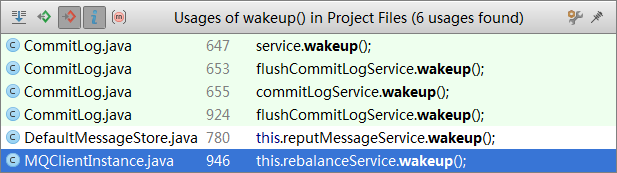
这里我们关心的是wakeup()方法,调用wakeup方法的几处如下
public void run() {

            CommitLog.log.info(this.getServiceName() + " service started");

            while (!this.isStopped()) {

                try {

                    this.waitForRunning(10);

                    this.doCommit();

                } catch (Exception e) {

                    CommitLog.log.warn(this.getServiceName() + " service has exception. ", e);

                }

            }

            // Under normal circumstances shutdown, wait for the arrival of the

            // request, and then flush

            try {

                Thread.sleep(10);

            } catch (InterruptedException e) {

                CommitLog.log.warn("GroupCommitService Exception, ", e);

            }

            synchronized (this) {

                this.swapRequests();

            }

            this.doCommit();

            CommitLog.log.info(this.getServiceName() + " service end");

        }
if (FlushDiskType.SYNC_FLUSH == this.defaultMessageStore.getMessageStoreConfig().getFlushDiskType()) {

            final GroupCommitService service = (GroupCommitService) this.flushCommitLogService;

            if (messageExt.isWaitStoreMsgOK()) {

                GroupCommitRequest request = new GroupCommitRequest(result.getWroteOffset() + result.getWroteBytes());

                service.putRequest(request);

                boolean flushOK = request.waitForFlush(this.defaultMessageStore.getMessageStoreConfig().getSyncFlushTimeout());

                if (!flushOK) {

                    log.error("do groupcommit, wait for flush failed, topic: " + messageExt.getTopic() + " tags: " + messageExt.getTags()

                        + " client address: " + messageExt.getBornHostString());

                    putMessageResult.setPutMessageStatus(PutMessageStatus.FLUSH_DISK_TIMEOUT);

                }

            } else {

                service.wakeup();

            }

}
这条消息是否已经刷盘成功进行汇报的逻辑 -- waitForFlush方法:
public static class GroupCommitRequest {

        private final long nextOffset;

        private final CountDownLatch countDownLatch = new CountDownLatch(1);

        private volatile boolean flushOK = false;

        public GroupCommitRequest(long nextOffset) {

            this.nextOffset = nextOffset;

        }

        public long getNextOffset() {

            return nextOffset;

        }

        public void wakeupCustomer(final boolean flushOK) {

            this.flushOK = flushOK;

            this.countDownLatch.countDown();

        }

        public boolean waitForFlush(long timeout) {

            try {

 // 阻塞当前工作线程,等待时间5s后或者countDownLatch记数为0时,停止阻塞,执行下一条语句

                this.countDownLatch.await(timeout, TimeUnit.MILLISECONDS);

                return this.flushOK;

            } catch (InterruptedException e) {

                log.error("Interrupted", e);

                return false;

            }

        }

}
 private void swapRequests() {

        List<GroupCommitRequest> tmp = this.requestsWrite;

        this.requestsWrite = this.requestsRead;

        this.requestsRead = tmp;

}
private void doCommit() {

    //

            synchronized (this.requestsRead) {

                if (!this.requestsRead.isEmpty()) {

                    for (GroupCommitRequest req : this.requestsRead) {

                        // There may be a message in the next file, so a maximum of

                        // two times the flush

                        boolean flushOK = false;

                        for (int i = 0; i < 2 && !flushOK; i++) {

                            flushOK = CommitLog.this.mappedFileQueue.getFlushedWhere() >= req.getNextOffset();

                            if (!flushOK) {

                                CommitLog.this.mappedFileQueue.flush(0);

                            }

                        }

                        req.wakeupCustomer(flushOK);

                    }

                    long storeTimestamp = CommitLog.this.mappedFileQueue.getStoreTimestamp();

                    if (storeTimestamp > 0) {

                        CommitLog.this.defaultMessageStore.getStoreCheckpoint().setPhysicMsgTimestamp(storeTimestamp);

                    }

                    this.requestsRead.clear();

                } else {

                    // Because of individual messages is set to not sync flush, it

                    // will come to this process

                    CommitLog.this.mappedFileQueue.flush(0);

                }

            }

}
 public boolean flush(final int flushLeastPages) {

        boolean result = true;

        MappedFile mappedFile = this.findMappedFileByOffset(this.flushedWhere, false);

        if (mappedFile != null) {

            long tmpTimeStamp = mappedFile.getStoreTimestamp();

            int offset = mappedFile.flush(flushLeastPages);

            long where = mappedFile.getFileFromOffset() + offset;

            result = where == this.flushedWhere;

            this.flushedWhere = where;

            if (0 == flushLeastPages) {

                this.storeTimestamp = tmpTimeStamp;

            }

        }

        return result;

    }
commit
public boolean commit(final int commitLeastPages) {

        boolean result = true;

        MappedFile mappedFile = this.findMappedFileByOffset(this.committedWhere, false);

        if (mappedFile != null) {

            int offset = mappedFile.commit(commitLeastPages);

            long where = mappedFile.getFileFromOffset() + offset;

            result = where == this.committedWhere;

            this.committedWhere = where;

        }

        return result;

    }
rocketmq刷盘过程的更多相关文章
- RocketMQ消息丢失解决方案:同步刷盘+手动提交
前言 之前我们一起了解了使用RocketMQ事务消息解决生产者发送消息时消息丢失的问题,但使用了事务消息后消息就一定不会丢失了吗,肯定是不能保证的. 因为虽然我们解决了生产者发送消息时候的消息丢失问题 ...
- RocketMQ中Broker的刷盘源码分析
上一篇博客的最后简单提了下CommitLog的刷盘 [RocketMQ中Broker的消息存储源码分析] (这篇博客和上一篇有很大的联系) Broker的CommitLog刷盘会启动一个线程,不停地 ...
- 【RocketMQ】消息的刷盘机制
刷盘策略 CommitLog的asyncPutMessage方法中可以看到在写入消息之后,调用了submitFlushRequest方法执行刷盘策略: public class CommitLog { ...
- HTC A510C电信手机刷机过程
HTC A510C电信手机刷机过程记录 Writed by Peter Hu(2014.6.7) ON WIN7_64 刷机需要的步骤: 1) 将S-ON加密保护式去掉,改成S-OFF模式,这样才能 ...
- mq刷盘方式
Broker 在收到Producer发送过来的消息后,会存入CommitLog对应的内存映射区中,见CommitLog类的putMessage方法.该方法执行OK后,会判断存储配置中刷盘模式:同步or ...
- Rocket重试机制,消息模式,刷盘方式
一.Consumer 批量消费(推模式) 可以通过 consumer.setConsumeMessageBatchMaxSize(10);//每次拉取10条 这里需要分为2种情况 Consumer端先 ...
- MySQL InnoDB 日志管理机制中的MTR和日志刷盘
1.MTR(mini-transaction) 在MySQL的 InnoDB日志管理机制中,有一个很重要的概念就是MTR.MTR是InnoDB存储擎中一个很重要的用来保证物理写的完整性和持久性的机制. ...
- 【软件安装与环境配置】TX2刷机过程
前言 使用TX2板子之前需要进行刷机,一般都是按照官网教程的步骤刷机,无奈买不起的宝宝只有TX2核心板,其他外设自己搭建,所以只能重新制作镜像,使用该镜像进行刷机. 系统需求 1.Host Platf ...
- 从CM刷机过程和原理分析Android系统结构
前面101篇文章都是分析Android系统源代码,似乎不够接地气. 假设能让Android系统源代码在真实设备上跑跑看效果,那该多好.这不就是传说中的刷ROM吗?刷ROM这个话题是老罗曾经一直避免谈的 ...
随机推荐
- asp搭建网站
测试环境:Windows 2003 下载asp源码导入 C:\Inetpub\wwwroot ###一.通过ip访问 最后浏览 浏览器输入ip或者 http://127.0.0.1 二.通过域名访问 ...
- Javascript实现简单的选项卡
版权声明:本文为博主原创文章,未经博主同意不得转载. https://blog.csdn.net/u011043843/article/details/30723933 在线演示:http://jsf ...
- shell监控网卡状态,故障时自动重启网卡
今天朋友找我写个监控网卡状态的脚本,要求在系统网卡挂了可以自己启动起来,这个要求是不是很bt,我考虑了半天,简单的写了个shell脚本来监控,实现原理是使用ping来测试网络连通性,如果不通就重启 ...
- Linux环境下安装Nexus
JDK的安装本文不在说了. 直接进入正题. 1. wget http://www.sonatype.org/downloads/nexus-2.13.0-01-bundle.tar.gz 获取nexu ...
- Docker容器编排器概览
就像Apple推出iPhone让智能手机变成主流,Docker让容器变成了主流.自从项目发布以来,Docker着重于提升开发者的体验.基本理念是可以在整个行业中,在一个标准的框架上,构建.交付并且运行 ...
- QT creator 调试问题
问题:debug出现“ptrace:不允许的操作.” 解决办法: # may not be appropriate for developers or servers with only admin ...
- 什么是spark(六)Spark中的对象
Spark中的对象 Spark的Conf,极简化的场景,可以设置一个空conf给sparkContext,在执行spark-submit的时候,系统会默认给sparkContext赋一个SparkCo ...
- webservice-之使用axis+spring开发
一.环境配置 :在 eclipse 中配置引入相应的 spring框架( core/Remoting/Web ). axis 包. 二.代码开发 1. 在 MyEclipse 中建立一个新的 J ...
- angular先加载页面再执行事件,使用echarts渲染页面
剧情重现: 在一个页面中有多个小模块,这几个模块是可以拖动调顺序的,并且其中有两个模块使用了echarts渲染, 调整顺序angular插件有成熟的解决方案angular-sortable,https ...
- 无法解析的外部符号 _WinMain@16
无法解析的外部符号 _WinMain@16 Ctrl+F7 编译的时候没有错误,而F6生成解决方案的时候出现如下两个错误: 1:error LNK2019: 无法解析的外部符号 _WinMain@16 ...