
Android——布局(线性布局linearLayout,表格布局TableLayout,帧布局FrameLayout)
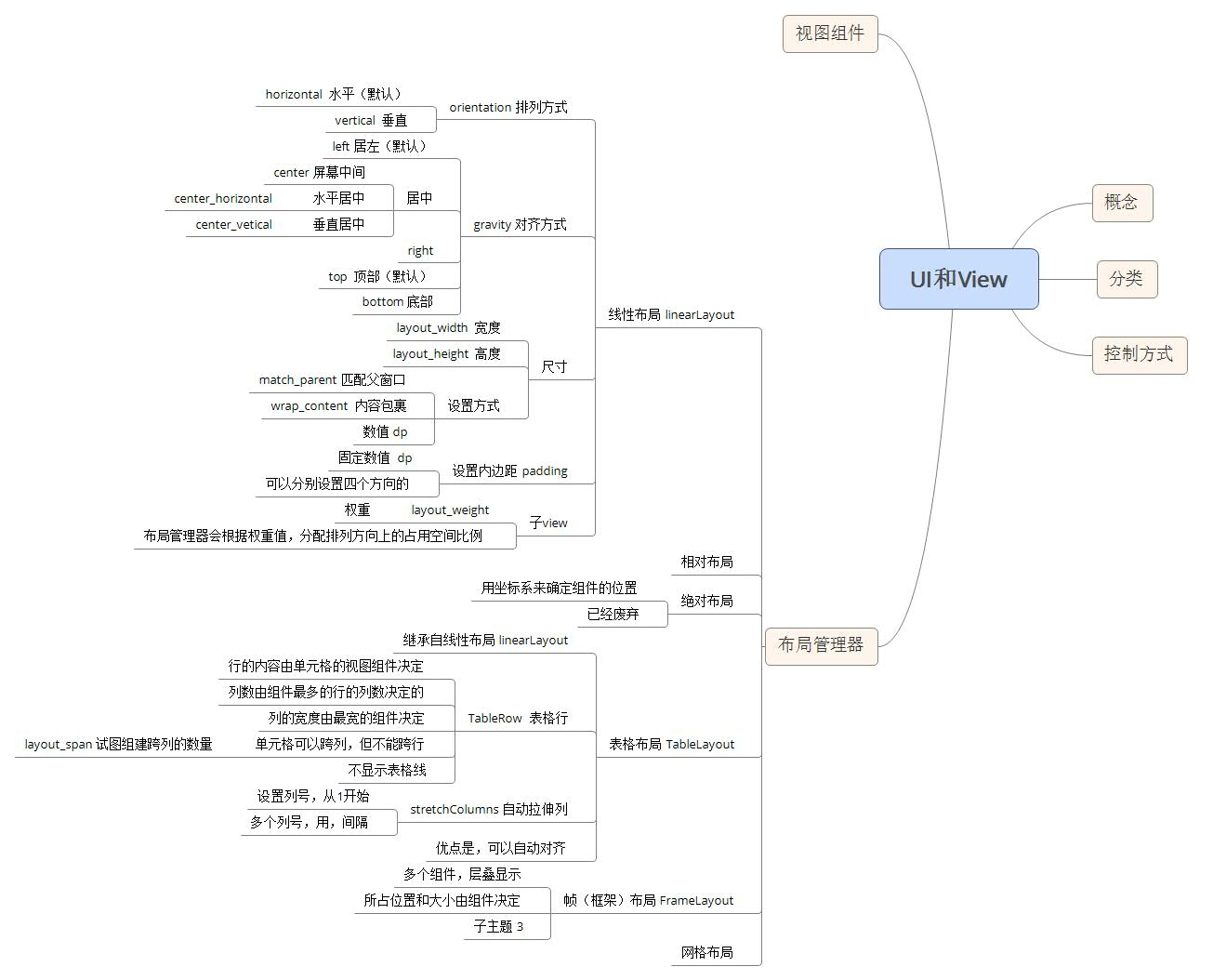
线性布局:
<?xml version="1.0" encoding="utf-8"?>

<LinearLayout xmlns:android="http://schemas.android.com/apk/res/android"

    xmlns:tools="http://schemas.android.com/tools"

    android:layout_width="match_parent"

    android:layout_height="match_parent"

    tools:context="com.example.chenshuai.test322.MainActivity"

    android:orientation="vertical"

   android:gravity="center_horizontal"

    >

    <LinearLayout

        android:layout_width="match_parent"

        android:layout_height="wrap_content"

        android:padding="16dp">

        <TextView

            android:layout_width="wrap_content"

            android:layout_height="wrap_content"

            android:text="用户名:"

            />

        <EditText

            android:layout_width="match_parent"

            android:layout_height="wrap_content"

            android:hint="请输入用户名"/><!--默认值-->

    </LinearLayout>

    <LinearLayout

        android:layout_width="match_parent"

        android:layout_height="wrap_content"

        android:padding="16dp">

        <TextView

            android:layout_width="wrap_content"

            android:layout_height="wrap_content"

            android:text="密     码:"

            />

        <EditText

            android:layout_width="match_parent"

            android:layout_height="wrap_content"

            android:hint="请输入密码"

            android:password="true"/><!--密码输入框-->

    </LinearLayout>

    <LinearLayout

        android:layout_width="match_parent"

        android:layout_height="wrap_content"

        android:gravity="center_horizontal">

        <Button

            android:layout_width="0dp"

            android:layout_height="wrap_content"

            android:text="登陆"

            android:layout_weight="1"/><!--权重-->

        <Button

            android:layout_width="0dp"

            android:layout_height="wrap_content"

            android:text="注册"

            android:id="@+id/button2"

            android:layout_weight="1"/>

        <Button

            android:layout_width="0dp"

            android:layout_height="wrap_content"

            android:text="取消"

            android:layout_weight="1"/>

    </LinearLayout>

</LinearLayout>
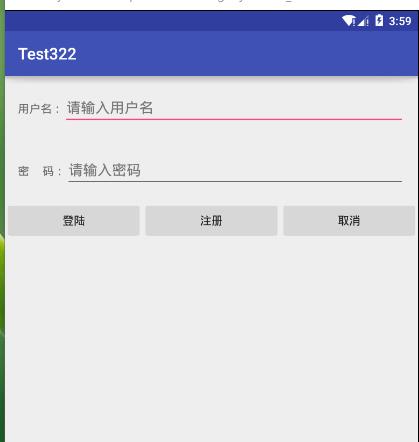
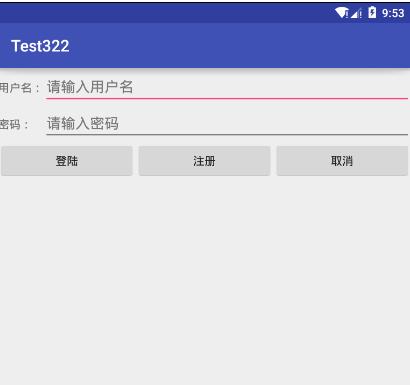
表格布局
<?xml version="1.0" encoding="utf-8"?>

<TableLayout xmlns:android="http://schemas.android.com/apk/res/android"

    android:layout_width="match_parent"

    android:layout_height="match_parent"

    android:stretchColumns="1,2">

    <TableRow>

        <TextView

            android:layout_width="wrap_content"

            android:layout_height="wrap_content"

            android:text="用户名:"

            />

        <EditText

            android:layout_width="match_parent"

            android:layout_height="wrap_content"

            android:layout_span="2"

            android:hint="请输入用户名"/>

    </TableRow>

    <TableRow>

        <TextView

            android:layout_width="wrap_content"

            android:layout_height="wrap_content"

            android:text="密码:"

            />

        <EditText

            android:layout_width="match_parent"

            android:layout_height="wrap_content"

            android:password="true"

            android:layout_span="2"

            android:hint="请输入密码"/>

    </TableRow>

    <TableRow>

        <Button

            android:layout_width="0dp"

            android:layout_height="wrap_content"

            android:text="登陆"

            android:layout_weight="1"/><!--用权重对应的数值设为0dp-->

        <Button

            android:layout_width="0dp"

            android:layout_height="wrap_content"

            android:text="注册"

            android:id="@+id/button2"

            android:layout_weight="1"/>

        <Button

            android:layout_width="0dp"

            android:layout_height="wrap_content"

            android:text="取消"

            android:layout_weight="1"/>

    </TableRow>

</TableLayout>
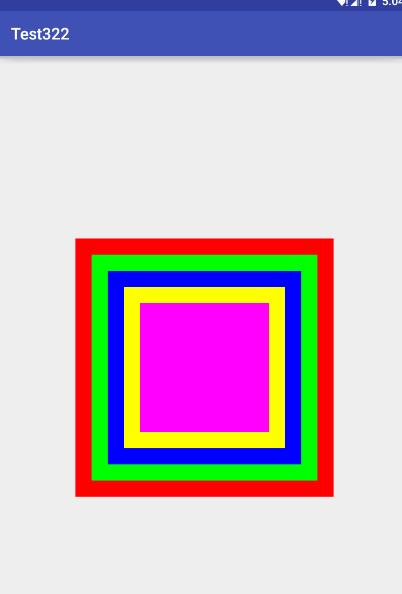
帧布局
<?xml version="1.0" encoding="utf-8"?>

<FrameLayout xmlns:android="http://schemas.android.com/apk/res/android"

    android:layout_width="match_parent"

    android:layout_height="match_parent">

    <TextView

        android:layout_width="wrap_content"

        android:layout_height="wrap_content"

        android:width="320dp"

        android:height="320dp"

        android:layout_gravity="center"

        android:background="#f00"/><!--红色-->

    <TextView

        android:layout_width="wrap_content"

        android:layout_height="wrap_content"

        android:width="280dp"

        android:height="280dp"

        android:layout_gravity="center"

        android:background="#0f0"/><!--绿色-->

    <TextView

        android:layout_width="wrap_content"

        android:layout_height="wrap_content"

        android:width="240dp"

        android:height="240dp"

        android:layout_gravity="center"

        android:background="#00f"/><!--蓝色-->

    <TextView

        android:layout_width="wrap_content"

        android:layout_height="wrap_content"

        android:width="200dp"

        android:height="200dp"

        android:layout_gravity="center"

        android:background="#ff0"/><!--黄色-->

    <TextView

        android:layout_width="wrap_content"

        android:layout_height="wrap_content"

        android:width="160dp"

        android:height="160dp"

        android:layout_gravity="center"

        android:background="#f0f"/><!--紫色-->

</FrameLayout>
Android——布局(线性布局linearLayout,表格布局TableLayout,帧布局FrameLayout)的更多相关文章
- Android 自学之帧布局 FrameLayout
帧布局(FrameLayout)直接继承了ViewGroup组件: 帧布局容器为每一个加入其中的组件都创建了一个空白的区域,这个区域我们称之为一帧,所有每个组件都占据一帧,这些都会根据gravity属 ...
- Android开发5:布局管理器2(表格布局TableLayout)
版本:Android4.3 API18 学习整理:liuxinming 概念 TableLayout继承了LinearLayout,因此它的本质依然是线性布局管理器. 表格布局采 ...
- Android -- UI布局管理,相对布局,线性布局,表格布局,绝对布局,帧布局
1. 相对布局 <RelativeLayout xmlns:android="http://schemas.android.com/apk/res/android" xmln ...
- Android五大布局详解——LinearLayout(线性布局)
Android五大布局 本篇开始介绍Android的五大布局的知识,一个丰富的界面显示总是要有众多的控件来组成的,那么怎样才能让这些控件能够按你的想法进行摆放,从而自定义你所想要的用户界面呢?这就牵涉 ...
- Android精通:TableLayout布局,GridLayout网格布局,FrameLayout帧布局,AbsoluteLayout绝对布局,RelativeLayout相对布局
在Android中提供了几个常用布局: LinearLayout线性布局 RelativeLayout相对布局 FrameLayout帧布局 AbsoluteLayout绝对布局 TableLayou ...
- [转]浅谈Android五大布局(二)——RelativeLayout和TableLayout
在浅谈Android五大布局(一)中已经描述了LinearLayout(线性布局).FrameLayout(单帧布局)和AbsoulteLayout(绝对布局)三种布局结构,剩下的两种布局Relati ...
- Android布局管理器(表格布局)
表格布局有TableLayout所代表,TableLayout继承了LinearLayout,因此他的本质依然是LinearLayout. 表格布局采用行.列的形式来进行管理,在使用的时候不需要声明多 ...
- Android笔记(七) Android中的布局——线性布局
我们的软件是由好多个界面组成的,而每个界面又由N多个控件组成,Android中借助布局来让各个空间有条不紊的摆放在界面上. 可以把布局看作是一个可以放置很多控件的容器,它可以按照一定的规律调整控件的位 ...
- 一步一步学android之布局管理器——LinearLayout
线性布局是最基本的一种布局,在基本控件篇幅中用到的都是LinearLayout,线性布局有两种方式,前面也有用到,一种是垂直的(vertical),一种是水平的(horizontal).我们同样来看下 ...
随机推荐
- MongoDB 数据迁移 备份 导入(自用)
MongoDB bin文件夹下 备份:mongodump -h IP:PORT -d 库名 -c 集合名 -o 存储路径 恢复:mongorestore -h IP:PORT -d 库名 -c 集合名 ...
- Cognos备份与恢复方案
场景:早上来上班,突然发现COGNOS服务器挂掉了,比如硬盘彻底坏掉了,不能恢复了,那该怎么办?前提是肯定要有备份啊. 备份内容: A:FM模型备份OKB:Cognos内容库备份OK 恢复过程: 1: ...
- ant design pro (十六)advanced 权限管理
一.概述 原文地址:https://pro.ant.design/docs/authority-management-cn 权限控制是中后台系统中常见的需求之一,你可以利用我们提供的权限控制组件,实现 ...
- 页面刷新 vuex 数据重新被初始化
1.原因 vuex里用来存储的也只是一个全局变量,当页面刷新,该全局变量自然不存在了. 2.解决 使用localStorage存储一份 (1)storage.js /** * vuex localSt ...
- html单行注释符号
html单行注释符号 2014-10-02 15:33 来源: IT技术学习网原创 阅读: 589 说到html的单行注释,比较特别,html中确确实实没有专门的单行注释符号.不管是//还是#,在 ...
- Solr4.6删除数据的办法
Solr4.6的管理界面上,假设不配置数据导入的功能,将看不到清除数据的button.我表示非常遗憾,正好我们线上没有配置数据导入的功能. 网上搜到的各种清理solr数据的HTTP请求,拿到我的sol ...
- Linux命令-压缩解压命令:gzip、gunzip
gzip [选项] 源文件名(压缩前) gunzip [选项] 源文件名(压缩后) cd /tmp 切换tmp目录 rm -rf * 强制删除tmp目录下面所有的文件和目录 touch beijing ...
- mysql分区 详解
第18章:分区 目录 18.1. MySQL中的分区概述 18.2. 分区类型 18.2.1. RANGE分区 18.2.2. LIST分区 18.2.3. HASH分区 18.2.4. KEY分区 ...
- laravel的cookie操作
前提你的整个http流程一定要走完,页就是必须走到view()或Response,你写到中间中断调试,cookie是设置不上去的......(坑~~) 读取: $value = Cookie::get ...
- C union共用体
共用体是一种特殊的数据类型,允许您在相同的内存位置存储不同的数据类型.您可以定义一个带有多成员的共用体,但是任何时候只能有一个成员带有值.共用体提供了一种使用相同的内存位置的有效方式. 共用体定义: ...