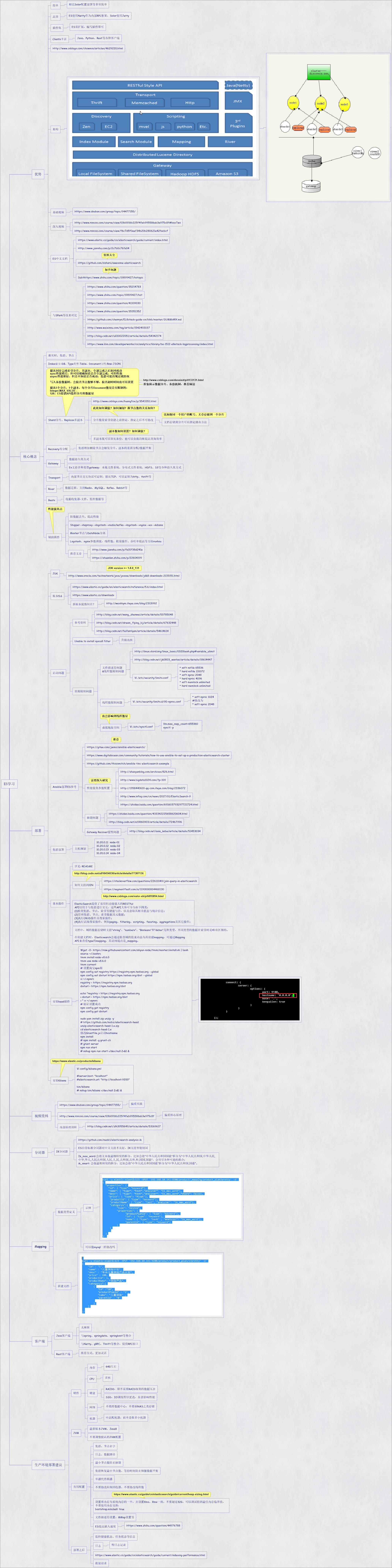
1.2.1 ES使用Netty作为内部RPC框架,Solor使用Jetty
1.4.1 Java、Python、Rest等各种客户端
1.5 http://www.cnblogs.com/chowmin/articles/4629220.html
1.7.1 https://www.douban.com/group/topic/94477155/
1.8.1 http://www.roncoo.com/course/view/03b0916b225f4feb995586ab3e975c8f#boxTwo
1.8.2 http://www.roncoo.com/course/view/f6c7d5f0eef34b20b280621e42facbcf
1.9.1 https://www.elastic.co/guide/cn/elasticsearch/guide/current/index.html
1.9.2 http://www.jianshu.com/p/2c7b0c76fa04
1.9.3 https://github.com/dzharii/awesome-elasticsearch
1.9.4 Subthttps://www.zhihu.com/topic/19899427/hotopic
1.10.1 https://www.zhihu.com/question/35214783
1.10.2 https://www.zhihu.com/topic/19899427/hot
1.10.3 https://www.zhihu.com/question/41109030
1.10.4 https://www.zhihu.com/question/35351352
1.10.5 https://github.com/chenryn/ELKstack-guide-cn/blob/master/SUMMARY.md
1.10.6 http://www.weixinnu.com/tag/article/1542492037
1.10.7 http://blog.csdn.net/u010022051/article/details/54342174
1.10.8 https://www.ibm.com/developerworks/cn/analytics/library/ba-1512-elkstack-logprocessing/index.html
2.2 Index索引-DB、Type类型-Table、Document文档-Row-JSON
2.3.1 http://www.cnblogs.com/huangfox/p/3543351.html
2.3.2 分片数量索引创建之前指定,指定之后不可修改
2.3.3 多副本既可以容灾备份,也可以负载均衡提高查询效率
2.4.1 集群增加删除节点会触发分片、副本的重新分配/数据平衡
2.5.2 es支持多种类型gateway,本地文件系统、分布式文件系统、HDFS、S3等各种持久化方式
2.6.1 内部节点交互协议可定制,默认TCP,可以定制为http、thrift等
2.7.1 数据迁移,支持Redis、MySQL、Kafka、Rabbit等
2.9.2 shipper-->haproxy-->logstash-->redis/kafka-->logstash-->nginx-->es-->kibana
2.9.3 Master节点与DataNode分离
2.9.4 logstash、nginx参数调优,线程数、批量操作、吞吐率提高等方面rushou
2.9.5.1 http://www.jianshu.com/p/fa31f38d241e
2.9.5.2 https://zhuanlan.zhihu.com/p/22604199
3.1.1 http://www.oracle.com/technetwork/java/javase/downloads/jdk8-downloads-2133151.html
3.2.1 https://www.elastic.co/guide/en/elasticsearch/reference/5.6/index.html
3.2.2 https://www.elastic.co/downloads
3.2.3.1 http://weishiym.iteye.com/blog/2313992
3.3.1.1 http://blog.csdn.net/wang_zhenwei/article/details/53785048
3.3.1.2 http://blog.csdn.net/dream_flying_bj/article/details/67632448
3.3.1.3 http://blog.csdn.net/feifantiyan/article/details/54614614
3.3.2 unable to install syscall filter
3.3.3.1.1 http://linux.vbird.org/linux_basic/0320bash.php#variable_ulimit
3.3.3.1.2 http://blog.csdn.net/jk0803_wantao/article/details/18614447
3.3.3.1.3 vi /etc/security/limits.conf
3.3.3.1.3.1 * soft nofile 65536 * hard nofile 131072 * soft nproc 2048 * hard nproc 4096 * soft memlock unlimited * hard memlock unlimited
3.3.3.2.1 vi /etc/security/limits.d/90-nproc.conf
3.3.3.2.1.1 * soft nproc 1024 #修改为 * soft nproc 2048
3.3.3.3.1 vi /etc/sysctl.conf
3.3.3.3.1.1 vm.max_map_count=655360 sysctl -p
3.4.1 https://gitee.com/jiemo/ansible-elasticsearch/
3.4.2 https://www.digitalocean.com/community/tutorials/how-to-use-ansible-to-set-up-a-production-elasticsearch-cluster
3.4.3 https://github.com/thisismitch/ansible-tinc-elasticsearch-example
3.4.4.1 http://zhaoyanblog.com/archives/826.html
3.4.4.2 http://www.bigdata1024.com/?p=109
3.4.4.3 http://1358440610-qq-com.iteye.com/blog/2336072
3.4.4.4 http://www.infoq.com/cn/news/2017/01/ElasticSearch-9
3.4.4.5 https://zhidao.baidu.com/question/691603793297721724.html
3.4.5.1 https://zhidao.baidu.com/question/433342225658620604.html
3.4.5.2 http://blog.csdn.net/a19860903/article/details/72467996
3.4.6 Gateway Recover缓慢问题
3.4.6.1 http://blog.csdn.net/asia_kobe/article/details/51453034
3.5.1.1 10.20.0.11 node-01 10.20.0.12 node-02 10.20.0.13 node-03 10.20.0.14 node-04
3.6.2.1 https://stackoverflow.com/questions/22611049/join-query-in-elasticsearch
3.6.2.2 https://segmentfault.com/a/1190000004468130
3.6.3 ElasticSearch提供了易用但功能强大的RESTful API以用于与集群进行交互,这些API大体可分为如下四类: (1)检查集群、节点、索引等健康与否,以及获取其相关状态与统计信息; (2)管理集群、节点、索引数据及元数据; (3)执行CRUD操作及搜索操作; (4)执行高级搜索操作,例如paging、filtering、scripting、faceting、aggregations及其它操作;
3.6.4 文档中,域的数据存储时支持“string”、“numbers”、“Booleans”和“dates”几种类型,不同类型的数据在索引时是略有区别的。 在创建文档时,Elasticsearch会通过检查域的值来动态为其创建mapping,可通过Mapping API来查看type的mapping,其访问端点是_mapping。
3.7.1 wget -O- https://raw.githubusercontent.com/aliyun-node/tnvm/master/install.sh | bash source ~/.bashrc tnvm install node-v8.6.0 tnvm use node-v8.6.0 tnvm current # 设置淘宝npm源 npm config set registry https://registry.npm.taobao.org --global npm config set disturl https://npm.taobao.org/dist --global vi ~/.npmrc registry = https://registry.npm.taobao.org disturl = https://npm.taobao.org/dist echo "registry = https://registry.npm.taobao.org > disturl = https://npm.taobao.org/dist > " >> ~/.npmrc # 验证设置成功 npm config get registry npm config get disturl sudo yum install zip unzip -y # https://github.com/mobz/elasticsearch-head unzip elasticsearch-head-1.x.zip cd elasticsearch-head-1.x 修改Gruntfile.js启动hostname npm install # npm install -g grunt-cli # grunt server npm run start # nohup npm run start >/dev/null 2>&1 &
3.8.1 vi config/kibana.yml #server.host: "localhost" #elasticsearch.url: "http://localhost:9200" bin/kibana # nohup bin/kibana >/dev/null 2>&1 &
4.1 https://www.douban.com/group/topic/94477155/
4.2 http://www.roncoo.com/course/view/03b0916b225f4feb995586ab3e975c8f
4.3.1 http://blog.csdn.net/zlh3955649/article/details/53169617
5.1.1 https://github.com/medcl/elasticsearch-analysis-ik
5.1.2 ES自带标准分词器对中文支持不友好,IK支持智能切词
5.1.3 ik_max_word:会将文本做最细粒度的拆分,比如会将“中华人民共和国国歌”拆分为“中华人民共和国,中华人民, 中华,华人,人民共和国,人民,人,民,共和国,共和,和,国国,国歌”,会穷尽各种可能的组合; ik_smart: 会做最粗粒度的拆分,比如会将“中华人民共和国国歌”拆分为“中华人民共和国,国歌”。
7.1.2 与spring、springdata、springboot等整合
7.1.3 与Netty、gRPC、Thrift等整合,提供RPC接口
8.1.3.1 RAID0,即不需要RAID级别的数据冗余
8.1.3.2 SSD,IO调度程序更改,显著影响性能
8.1.4.1 不要跨数据中心,不要搞NAS之类存储
8.3.4 集群恢复最小节点数、等待时间防止频繁数据平衡
8.3.7 设置堆内存为系统内存的一半,并设置Xms、Xmx一致,不要超过32G,可以调试得到最佳内存临界值, 不要使用内存交换: bootstrap.mlockall: true
8.3.9.1 https://www.zhihu.com/question/44976788
8.4.3 https://www.elastic.co/guide/cn/elasticsearch/guide/current/indexing-performance.html
- Elasticsearch学习笔记一
Elasticsearch Elasticsearch(以下简称ES)是一款Java语言开发的基于Lucene的高效全文搜索引擎.它提供了一个分布式多用户能力的基于RESTful web接口的全文搜索 ...
- elasticsearch学习笔记——相关插件和使用场景
logstash-input-jdbc学习 ES(elasticsearch缩写)的一大优点就是开源,插件众多.所以扩展起来非常的方便,这也造成了它的生态系统越来越强大.这种开源分享的思想真是与天朝格 ...
- ElasticSearch学习笔记(超详细)
文章目录 初识ElasticSearch 什么是ElasticSearch ElasticSearch特点 ElasticSearch用途 ElasticSearch底层实现 ElasticSearc ...
- ElasticSearch学习笔记--2、ES相关配置
1.配置文件 ES的配置文件位置:config/elasticsearch.yml可以直接搜索elasticsearch.yml 2.配置远程api访问 network.host: 192.168.1 ...
- 【原】无脑操作:ElasticSearch学习笔记(01)
开篇来自于经典的“保安的哲学三问”(你是谁,在哪儿,要干嘛) 问题一.ElasticSearch是什么?有什么用处? 答:截至2018年12月28日,从ElasticSearch官网(https:// ...
- ElasticSearch学习笔记-01 简介、安装、配置与核心概念
一.简介 ElasticSearch是一个基于Lucene构建的开源,分布式,RESTful搜索引擎.设计用于云计算中,能够达到实时搜索,稳定,可靠,快速,安装使用方便.支持通过HTTP使用JSON进 ...
- Elasticsearch学习笔记 一
本文版权归博客园和作者吴双本人共同所有 转载和爬虫请注明原文地址 www.cnblogs.com/tdws. 本文参考和学习资料 <ES权威指南> 一.基本概念 存储数据到ES中的行为叫做 ...
- 2018/2/13 ElasticSearch学习笔记三 自动映射以及创建自动映射模版,ElasticSearch聚合查询
终于把这些命令全敲了一遍,话说ELK技术栈L和K我今天花了一下午全部搞定,学完后还都是花式玩那种...E却学了四天(当然主要是因为之前上班一直没时间学,还有安装服务时出现的各种error真是让我扎心了 ...
- 2018/2/11 ELK技术栈之ElasticSearch学习笔记二
终于有时间记录一下最近学习的知识了,其实除了写下的这些还有很多很多,但懒得一一写下了: ElasticSearch添加修改删除原理:ElasticSearch的倒排索引和文档一旦生成就不允许修改(其实 ...
随机推荐
- python抓包模块
pcapy模块 安装 yum install -y epel-release yum install -y pip gcc gcc-c++ libpcap-devel python-deve ...
- thinkphp5使用redis
1.设置应用配置文件config.php type可以是很多分类File.Redis等等 2.thinkphp5使用redis新建application/index/controller/index. ...
- Django ORM训练专题
图书信息系统 表结构设计 # 书 class Book(models.Model): title = models.CharField(max_length=32) publish_date = mo ...
- 【BZOJ 4558】 4558: [JLoi2016]方 (计数、容斥原理)
未经博主同意不能转载 4558: [JLoi2016]方 Time Limit: 20 Sec Memory Limit: 256 MBSubmit: 362 Solved: 162 Descri ...
- 维护直线的线段树:Bzoj1568,Bzoj3938(Uoj88)
有这样一类线段树,可以维护一些直线方程并对每个点求出最大值. 首先先看BZOJ1568,输入给你条直线的方程,你需要对于指定的位置求出最大的函数值. 看到数据范围nlog^2n可做,考虑用线段树去维护 ...
- 【转载】利用一个堆溢出漏洞实现 VMware 虚拟机逃逸
1. 介绍 2017年3月,长亭安全研究实验室(Chaitin Security Research Lab)参加了 Pwn2Own 黑客大赛,我作为团队的一员,一直专注于 VMware Worksta ...
- C# 中判断字符串是否包含另一段字符串,请使用 Contains
使用:Contains 比 IndexOf 的性能提高很多. 因为 Contains 是判断某个字符串是否在另外一个字符串中,而IndexOf需要返回下标值.
- 【转载】实现UTF8与GB2312编码格式相互转换(VC)已经验证!
UTF-8编码:[1,1,1,0,A5,A6,A7,A8],[1,0,B3,B4,B5,B6,B7,B8],[1,0,C3,C4,C5,C6,C7,C8];对应的UNICODE编码:[A5,A6,A7 ...
- Codeforces Round #350 (Div. 2) A. Holidays 水题
A. Holidays 题目连接: http://www.codeforces.com/contest/670/problem/A Description On the planet Mars a y ...
- 【NOIP2014】联合权值 树上dp
题目描述 Description 无向连通图G 有n 个点,n - 1 条边.点从1 到n 依次编号,编号为 i 的点的权值为W i ,每条边的长度均为1 .图上两点( u , v ) 的距离定 ...
