
UILabel混合显示动画效果
UILabel混合显示动画效果
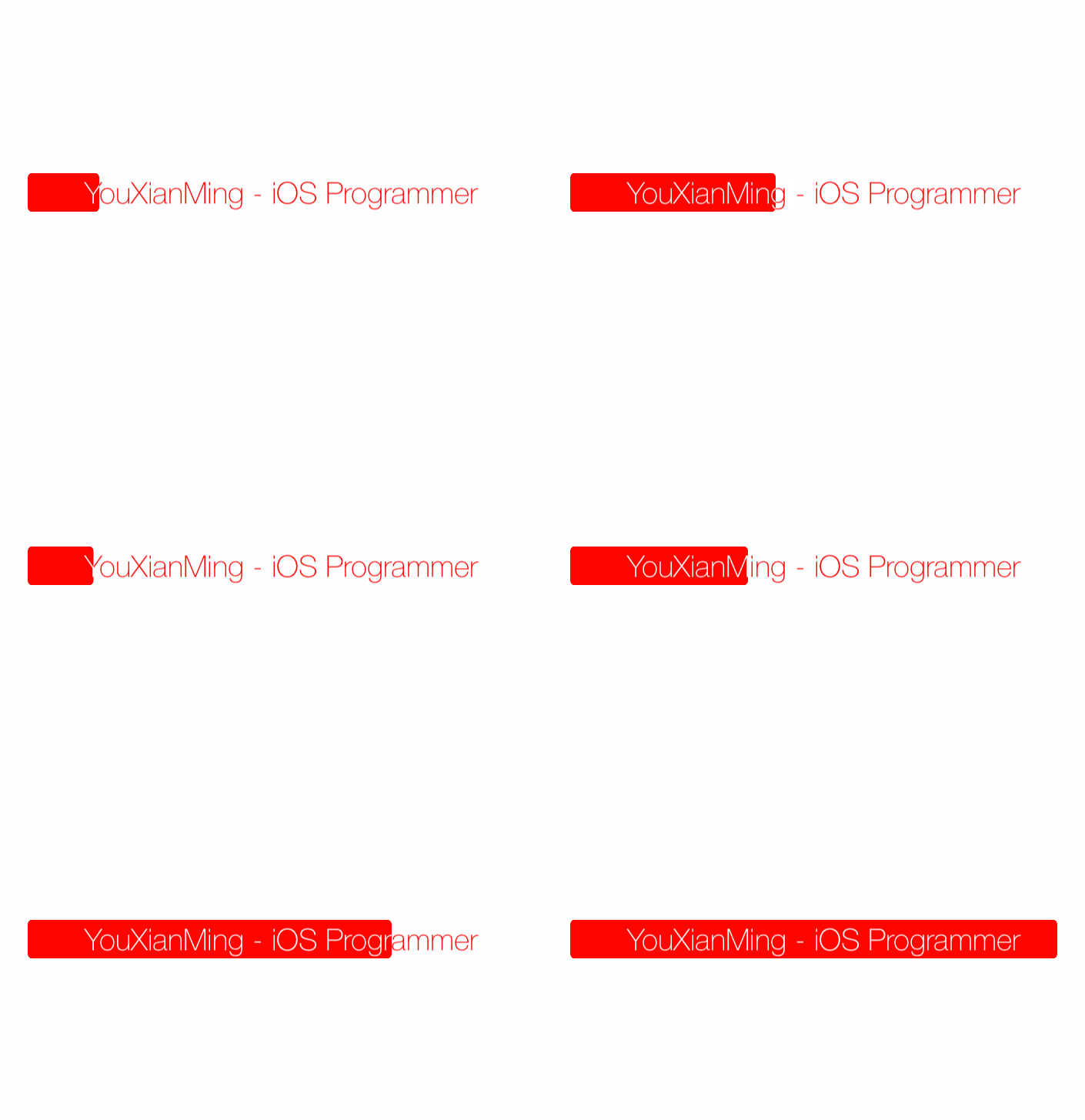
效果
源码
https://github.com/YouXianMing/Animations
//

//  MixedColorProgressViewController.m

//  Animations

//

//  Created by YouXianMing on 16/1/5.

//  Copyright © 2016年 YouXianMing. All rights reserved.

//

#import "MixedColorProgressViewController.h"

#import "UIView+SetRect.h"

#import "GCD.h"

@interface MixedColorProgressViewController ()

@property (nonatomic, strong)  UIView   *upView;

@property (nonatomic, strong)  UILabel  *upLabel;

@property (nonatomic, strong)  UIView   *downView;

@property (nonatomic, strong)  UILabel  *downLabel;

@property (nonatomic, strong)  GCDTimer *timer;

@end

@implementation MixedColorProgressViewController

- (void)setup {

    [super setup];

    /*

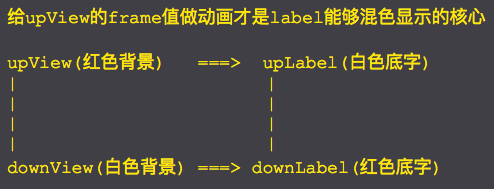
     给upView的frame值做动画才是label能够混色显示的核心

     upView(红色背景)   ===>  upLabel(白色底字)

     |                       |

     |                       |

     |                       |

     |                       |

     downView(白色背景) ===> downLabel(红色底字)

     */

    // 上面一层

    {

        // 红色背景

        _upView                     = [[UIView alloc] initWithFrame:CGRectMake(, , , )];

        _upView.center              = self.view.center;

        _upView.layer.cornerRadius  = .f;

        _upView.backgroundColor     = [UIColor redColor];

        _upView.layer.masksToBounds = YES; // 核心(不让subview显示超出范围)

        [self.view addSubview:_upView];

        // 白色底字

        _upLabel                    = [[UILabel alloc] initWithFrame:_upView.bounds];

        _upLabel.font               = [UIFont fontWithName:@"HelveticaNeue-Thin" size:];

        _upLabel.text               = @"YouXianMing - iOS Programmer";

        _upLabel.textColor          = [UIColor whiteColor];

        _upLabel.textAlignment      = NSTextAlignmentCenter;

        [_upView addSubview:_upLabel];

    }

    // 下面一层

    {

        // 白色背景

        _downView                     = [[UIView alloc] initWithFrame:CGRectMake(, , , )];

        _downView.center              = self.view.center;

        _downView.layer.cornerRadius  = .f;

        _downView.backgroundColor     = [UIColor whiteColor];

        [self.view addSubview:_downView];

        // 红色底字

        _downLabel                    = [[UILabel alloc] initWithFrame:_downView.bounds];

        _downLabel.textColor          = [UIColor redColor];

        _downLabel.font               = [UIFont fontWithName:@"HelveticaNeue-Thin" size:];

        _downLabel.text               = @"YouXianMing - iOS Programmer";

        _downLabel.textAlignment = NSTextAlignmentCenter;

        [_downView addSubview:_downLabel];

    }

    // 显示上面一层

    [self.view bringSubviewToFront:_upView];

    // 给上面一层的frame值做动画

    _timer = [[GCDTimer alloc] initInQueue:[GCDQueue mainQueue]];

    [_timer event:^{

        [UIView animateWithDuration:0.5f delay:.f usingSpringWithDamping:.f initialSpringVelocity: options: animations:^{

            _upView.width = arc4random() % ;

        } completion:nil];

    } timeInterval:NSEC_PER_SEC];

    [_timer start];

}

@end
细节
UILabel混合显示动画效果的更多相关文章
- UILabel的缩放动画效果
UILabel的缩放动画效果 效果图 源码 https://github.com/YouXianMing/Animations // // ScaleLabel.h // Animations // ...
- 高逼格UILabel的闪烁动画效果
高逼格UILabel的闪烁动画效果 最终效果图如下: 源码: YXLabel.h 与 YXLabel.m // // YXLabel.h // // Created by YouXianMing o ...
- anacoda的spyder在调用matplotlib的时候无法显示动画效果【学习笔记】
ipython console的默认设置将图像结果显示在终端,但是这样显示存在的问题是无法显示动画效果,因此需要将动画效果显示到单独的窗口,按照下面的截图即可显示. 方法一.按照如下截图显示设置,重启 ...
- jquery 隐藏 显示 动画效果
<!DOCTYPE html> <html> <head> <script src="/jquery/jquery-1.11.1.min.js&qu ...
- cad.net 图元延迟显示,动画效果,编辑器延迟发送提示.
public class Command_test { [CommandMethod("tt", CommandFlags.Modal | CommandFlags.UsePick ...
- iframe载入页面过程显示动画效果
http://www.xfeixiang.com/Bug/Detail/A2FD7EFFA8CA72F1
- 设置Activity显示和关闭时的动画效果
设置Activity显示和关闭时的动画效果 通过overridePendingTransition方法可以设置Activity显示和关闭的动画效果.首先需要在res/anim目录中建立相应的动画资源文 ...
- UI设计篇·入门篇·简单动画的实现,透明动画/旋转动画/移动动画/缩放动画,混合动画效果的实现,为动画设置监听事件,自定义动画的方法
基本的动画构成共有四种:透明动画/旋转动画/移动动画/缩放动画. 配置动画的方式有两种,一种是直接使用代码来配置动画效果,另一种是使用xml文档配置动画效果 相比而言,用xml文档写出来的动画效果,写 ...
- Android ListView item项 显示动画
(1)使用LayoutAnimation 所谓的布局动画,其实就是为ViewGroup添加显示动画效果,主要用过LayoutAnimationController来控制实现.LayoutAnimati ...
随机推荐
- JOIN从句
MySQL基础表和数据 -- 5条数据 select * from test_a; -- 8条数据 select * from test_b; 内连接 -- 内连接,join,为inner join的 ...
- 设置 cookie过期时间
cookie.setMaxAge(0);//不记录cookie cookie.setMaxAge(-1);//会话级cookie,关闭浏览器失效 cookie.setMaxAge(60*60);//过 ...
- jupyter notebook 小技巧
Converting notebooks to other formats¶ !pip install https://github.com/ipython-contrib/jupyter_contr ...
- MXNet——symbol
参考资料:有基础(Pytorch/TensorFlow基础)mxnet+gluon快速入门 symbol symbol 是一个重要的概念,可以理解为符号,就像我们平时使用的代数符号 x,y,z 一样. ...
- CSUOJ 1982 小M的移动硬盘
Description 最近小M买了一个移动硬盘来储存自己电脑里不常用的文件.但是他把这些文件一股脑丢进移动硬盘后,觉得这些文件似乎没有被很好地归类,这样以后找起来岂不是会非常麻烦?小M最终决定要把这 ...
- Java 集合之 Collection
集合就是一组数的集合,就像是一个容器,但是我们应该清楚的是集合中存放的都是对象的引用,而不是真正的实体.而我们常说的集合中的对象其实指的就是对象的引用. 我们可以把集合理解为一个小型数据库,用于存放数 ...
- mysql 错误解决:Plugin 'FEDERATED' is disabled. /usr/sbin/mysqld: Table 'mysql.plugin' doesn't exist
今天安装完Mysql后,开启发生了错误: 1.打开相应文件夹,查看错误信息: 2.打开错误信息文件,查看错误原因是:Plugin 'FEDERATED' is disabled. /usr/sbin/ ...
- C# 非模式窗体show()和模式窗体showdialog()的区别
对话框不是模式就是无模式的.模式对话框,在可以继续操作应用程序的其他部分之前,必须被关闭(隐藏或卸载).例如,如果一个对话框,在可以切换到其它窗 体或对话框之前要求先单击"确定"或 ...
- [ 原创 ] Java基础3--Java中的接口
一.使用接口(interface)的目的 Java只支持单继承,即一个类最多只能继承一个直接父类,接口的主要功能就是可以实现类似于类的多重继承的功能. 二.接口的性质 1.接口具有继承性,即子接口可继 ...
- pycharm 激活相关
https://blog.csdn.net/u014044812/article/details/78727496dfasdfasdfdfaasdkjfhaskljdfhkajsdhfljahsdfk ...