
Cmake编写JNI
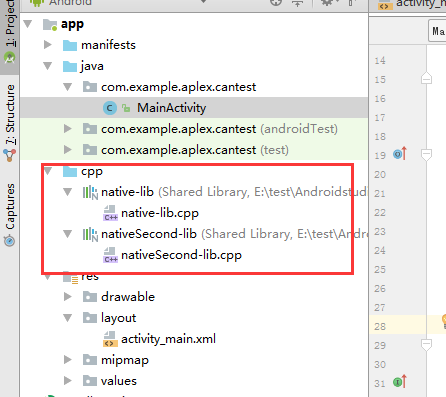
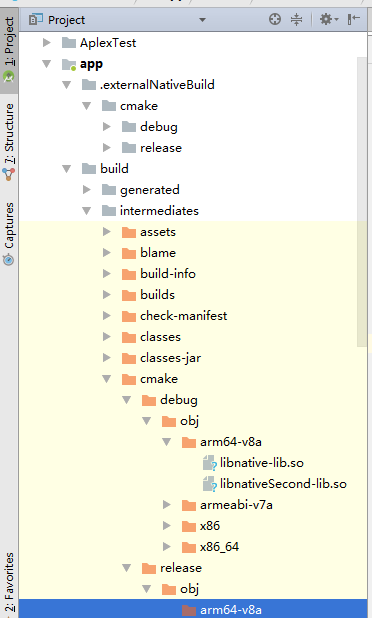
调用两个库
CMakeLists.txt
//把那种大段的注释去掉了

cmake_minimum_required(VERSION 3.4.)


add_library( # Sets the name of the library.

             native-lib

             # Sets the library as a shared library.

             SHARED

             # Provides a relative path to your source file(s).

             src/main/cpp/native-lib.cpp )

add_library( # Sets the name of the library.

             nativeSecond-lib

             # Sets the library as a shared library.

             SHARED

             # Provides a relative path to your source file(s).

             src/main/cpp/nativeSecond-lib.cpp )


find_library( # Sets the name of the path variable.

              log-lib

              # Specifies the name of the NDK library that

              # you want CMake to locate.

              log )


target_link_libraries( # Specifies the target library.

                       native-lib

                       # Links the target library to the log library

                       # included in the NDK.

                       ${log-lib} )

target_link_libraries( # Specifies the target library.

                     nativeSecond-lib

                     # Links the target library to the log library

                     # included in the NDK.

                     ${log-lib} )
native-lib.cpp
#include <jni.h>

#include <string>

extern "C"

JNIEXPORT jstring

JNICALL

Java_com_example_aplex_cantest_MainActivity_stringFromJNI(

        JNIEnv *env,

        jobject /* this */) {

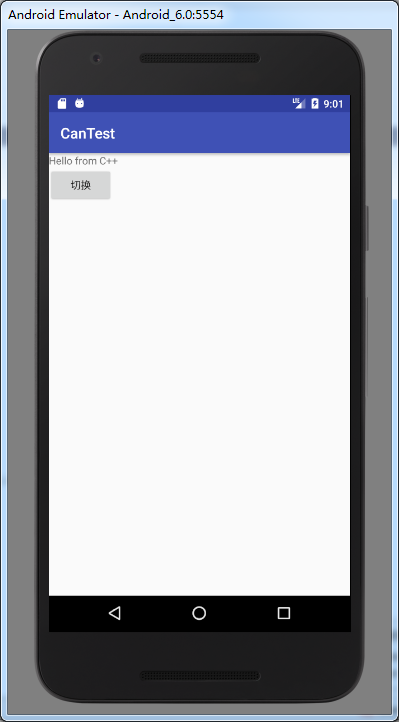
    std::string hello = "Hello from C++";

    return env->NewStringUTF(hello.c_str());

}
nativeSecond-lib.cpp
#include <jni.h>

#include <string>

extern "C"

JNIEXPORT jstring

JNICALL

Java_com_example_aplex_cantest_MainActivity_stringFromJNI22(

        JNIEnv *env,

        jobject /* this */) {

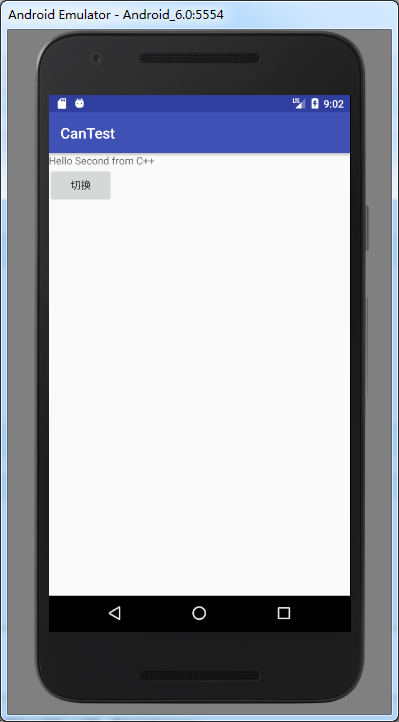
    std::string hello = "Hello Second from C++";

    return env->NewStringUTF(hello.c_str());

}
MainActivity.java
package com.example.aplex.cantest;

import android.support.v7.app.AppCompatActivity;

import android.os.Bundle;

import android.view.View;

import android.widget.Button;

import android.widget.TextView;

public class MainActivity extends AppCompatActivity {

    // Used to load the 'native-lib' library on application startup.

    static {

        System.loadLibrary("native-lib");

        System.loadLibrary("nativeSecond-lib");

    }

    Button bt;

    TextView tv;

    @Override

    protected void onCreate(Bundle savedInstanceState) {

        super.onCreate(savedInstanceState);

        setContentView(R.layout.activity_main);

        // Example of a call to a native method

        tv = (TextView) findViewById(R.id.sample_text);

        tv.setText(stringFromJNI());

        bt = (Button)findViewById(R.id.bt);

        bt.setOnClickListener(new View.OnClickListener() {

            @Override

            public void onClick(View view) {

                tv.setText(stringFromJNI22());

            }

        });

    }

    /**

     * A native method that is implemented by the 'native-lib' native library,

     * which is packaged with this application.

     */

    public native String stringFromJNI();

    public native String stringFromJNI22();

}
Cmake编写JNI的更多相关文章
- Android JNI编程(八)——体验AS2.2.2编写Jni程序、Java调C、C调Java函数、将C代码中的Log打印至Logcat
版权声明:本文出自阿钟的博客,转载请注明出处:http://blog.csdn.net/a_zhon/. 目录(?)[+] 不得不说在AS2.2以上的版本进行开发就一个字——爽,在2.0上使用jni出 ...
- JNI技术基础(2)——从零开始编写JNI代码
书接上文: <JNI技术基础(1)——从零开始编写JNI代码> 2.编译源程序HelloWorld.java并生成HelloWorld.class 3.生成头文件HelloWorld.h ...
- 技术转载:Jni学习四:如何编写jni方法
转载:http://blog.chinaunix.net/u1/38994/showart_1099528.html 一.概述: 在这篇文章中将会简单介绍如何编制一些简单的JNI 方法.我们都知道JN ...
- 在Ubuntu为Android硬件抽象层(HAL)模块编写JNI方法提供Java访问硬件服务接口(老罗学习笔记4)
在上两篇文章中,我们介绍了如何为Android系统的硬件编写驱动程序,包括如何在Linux内核空间实现内核驱动程序和在用户空间实现硬件抽象层接口.实现这两者的目的是为了向更上一层提供硬件访问接口,即为 ...
- 为Android硬件抽象层(HAL)模块编写JNI方法提供Java访问硬件服务接口
在上两篇文章中,我们介绍了如何为Android系统的硬件编写驱动程序,包括如何在Linux内核空间实现内核驱动程序和在用户空间实现硬件抽象层接 口.实现这两者的目的是为了向更上一层提供硬件访问接口,即 ...
- Android Studio 编写 JNI
之前一直都不知怎么编写JNI,今天刚好学习一下,感谢梦真的指教,以及提供的文档. 参考链接 http://blog.csdn.net/u011168565/article/details/518781 ...
- JNI技术基础(1)——从零开始编写JNI代码
众所周知,Java程序的最大特点就是其跨平台的特性,编写的上层应用程序可以不加任何修改甚至不用重新编译而运行于不同的平台上,然而,Java本身也存着这一个弊端,那就是性能上相对要差一些,在对性能要求比 ...
- 【转载】cmake编写
Cmake的输入是在源码目录下的CMakeLists.txt文件.这个文件可以用include或者 add_subdirectory 命令增加入其它的输入文件. 语法 CMakeList.txt文件是 ...
- Android(java)学习笔记261:JNI之编写jni程序适配所有处理器型号
1. 还是以"02_两个数相加"为例,你会发现这个jni程序只能在ARM处理器下运行,如下: 如果我们让上面的程序运行在x86模拟器上,处理平台不对应,报如下错误: 03-29 ...
随机推荐
- SED 学习笔记
1. Sed简介 sed是一种在线编辑器,它一次处理一行内容.处理时,把当前处理的行存储在临时缓冲区中,称为“模式空间”(pattern space),接着用sed命令处理缓冲区中的内容,处理完成 ...
- Android蓝牙联机Demo解析
写在前面: 手游的双人对战实现方式有很多,比如: 联网对战(需要一个服务器负责转发客户端请求,各种大型手游的做法) 分屏对战(手机上下分屏,典型的例子就是切水果的双人对战) 蓝牙联机对战(通过蓝牙联机 ...
- .Net Core在Middleware中解析RouteData
在ASP.Net Core中,如果直接在Middleware中获取RouteData返回的是空值,这是因为RouterMiddleware还没执行.但有些情况下需要获取RouteData,这要怎么做呢 ...
- C# 生产成条形码3种方法
首先效果: 1:首先下载BarcodeLib.dll 下载地址 http://pan.baidu.com/share/link?shareid=2590968386&uk=2148890391 ...
- AGC032D Rotation Sort
题目传送门 Description 给定\(N\)的排列(\(N\leq5000\)),将任一区间最左侧的数插到该区间最右边的代价为\(A\),将任一区间最右侧的数插到该区间最左边的代价为\(B\), ...
- 698. Partition to K Equal Sum Subsets
Given an array of integers nums and a positive integer k, find whether it's possible to divide this ...
- 600. Non-negative Integers without Consecutive Ones
Given a positive integer n, find the number of non-negative integers less than or equal to n, whose ...
- django 视图中执行原生的 sql 查询语句
可以使用objects的raw()方法执行原生的sql语句,进行对数据库的查询操作,raw()方法只能执行查询语句 query_set = your_model.objects.raw("s ...
- python打造渗透工具集
python是门简单易学的语言,强大的第三方库让我们在编程中事半功倍,今天我们就来谈谈python在渗透测试中的应用,让我们自己动手打造自己的渗透工具集. 难易程度:★★★阅读点:python;web ...
- nginx代理websocket协议
以下是代码段.location /wsapp/ { proxy_pass http://wsbackend; proxy_http_version 1.1; proxy_set ...