
vue2.0 tab切换几种方式
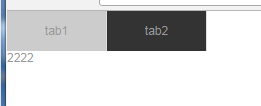
第一种 比较灵活简单的方式(切换改变部分的内容在组件中比较方便操作)
<template>

  <div id="app">

    <ul>

      <li v-for="(tab,index) in tabs" @click="toggle(index,tab.view)" :class="{active:active==index}">

        {{tab.type}}

      </li>

    </ul>

    <!--:is实现多个组件实现同一个挂载点-->

    <component :is="currentView"></component>

  </div>

</template>

<script>

import tab1 from './components/tabs/tab1.vue'

import tab2 from './components/tabs/tab2.vue'

export default {

  name: 'app',

  data(){

    return {

      active:,

      currentView:'tab1',

      tabs:[

        {

          type:'tab1',

          view:'tab1'

        },

        {

          type:'tab2',

          view:'tab2'

        }

      ]

    }

  },

  methods:{

    toggle(i,v){

      this.active=i;

      this.currentView=v;

    }

  },

  components:{

    tab1,

    tab2

  }

}

</script>

<style>

#app {

  font-family: 'Avenir', Helvetica, Arial, sans-serif;

  -webkit-font-smoothing: antialiased;

  -moz-osx-font-smoothing: grayscale;

  /* text-align: center;

  color: #2c3e50;

  margin-top: 60px; */

}

ul{

  width:200px;

  display:flex;

}

ul li{

  width:100px;

  height:40px;

  background: #ccc;

  display: inline-flex;

  border-right:1px solid #ddd;

  justify-content: center;

  align-items: center;
  cursor:pointer

}

ul li.active{

 background:#;

}

</style>
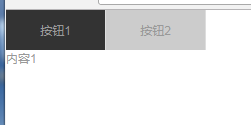
第二种(比较死板,内容被固定住了)
<template>

  <div id="app">

    <ul >

         <li v-for="(tab,index) in tabs"  :class="{active:num==index}" @click="table(index)">{{tab}}</li>

   </ul>

   <div class="tabContent">

       <div v-for="(tabCon,index) in tabsCon" v-show="index==num">{{tabCon}}</div>

    </div>

  </div>

</template>

<script>

/*import tab1 from './components/tabs/tab1.vue'

import tab2 from './components/tabs/tab2.vue'*/

export default {

  name: 'app',

  data(){

    return {

      tabs:['按钮1','按钮2'],

      tabsCon:['内容1','内容2'],

      num:0

    }

  },

  methods:{

    table(index) {

        this.num = index;

    }

  }

 /* components:{

    tab1,

    tab2

  }*/

}

</script>

<style>

#app {

  font-family: 'Avenir', Helvetica, Arial, sans-serif;

  -webkit-font-smoothing: antialiased;

  -moz-osx-font-smoothing: grayscale;

  /* text-align: center;

  color: #2c3e50;

  margin-top: 60px; */

}

ul{

  width:200px;

  display:flex;

}

ul li{

  width:100px;

  height:40px;

  background: #ccc;

  display: inline-flex;

  border-right:1px solid #ddd;

  justify-content: center;

  align-items: center;

  cursor:pointer;

}

ul li.active{

 background:#333;

}

</style>
第三种(比较死板,内容被固定住了,使用过jquery的人习惯用的方式)
<template>

<div id="app">

  <div class="nav-tab">

    <a v-for="(value,index) in tab" :class="{active:value.isactive}" @click="change(index)">

      {{value.title}}

    </a>

  </div>

  <div class="tabs">

    <div v-for="(value,index) in tab" class="tab" :class="{active:value.isactive}">{{value.content}}</div>

  </div>

</div>

</template>

<script>

/*import tab1 from './components/tabs/tab1.vue'

import tab2 from './components/tabs/tab2.vue'*/

export default {

  name: 'app',

  data(){

    return {

      tab: [{

        title: 'tab1',

        content: 'this is tab1',

        isactive: true

      }, {

        title: 'tab2',

        content: 'this is tab2',

        isactive: false

      }]

    }

  },

  methods: {

    change(index){

      this.tab.forEach(function(v){

        v.isactive=false

      })

      this.tab[index].isactive=true

    }

  }

}

</script>

<style>

*{

  padding:0;

  margin:0;

  box-sizing:border-box;

}

#app {

  font-family: 'Avenir', Helvetica, Arial, sans-serif;

  -webkit-font-smoothing: antialiased;

  -moz-osx-font-smoothing: grayscale;

  /* text-align: center;

  color: #2c3e50;

  margin-top: 60px; */

  width:100%;

}

.nav-tab{

  width:100%;

  height: 30px;

  line-height:30px;

  display:flex;

  justify-content: space-around;

}

.nav-tab a{

  flex:1;

  text-align: center;

  background:#ccc;

  border-right:1px solid #ddd;

  cursor:pointer;

}

.nav-tab a.active{

  border-bottom:1px solid red;

}

.tabs .tab{

  display: none;

}

.tabs .tab.active{

  display:block;

}

</style>
vue2.0 tab切换几种方式的更多相关文章
- CobalStrike 4.0 生成后门几种方式 及 主机上线后基础操作
出品|MS08067实验室(www.ms08067.com) 本文作者:BlackCat(Ms08067内网安全小组成员) CobalStrike 4.0 生成后门几种方式 步骤:Attacks-〉P ...
- MAC下安装多版本JDK和切换几种方式
环境: MAC AIR,OS X 10.10,64位 历史: 过去 Mac 上的 Java 都是由 Apple 自己提供,只支持到 Java 6,并且OS X 10.7 开始系统并不自带(而是可选 ...
- vue2.0路由切换后页面滚动位置不变BUG
最近项目中遇到这样一个问题,vue切换路由,页面到顶端的滚动距离仍会保持不变. 方法一: 监听路由 // app.vue export default { watch:{ '$route':func ...
- eclipse中英文切换--四种方式
若转载,请注明出处 http://www.cnblogs.com/last_hunter/p/5627009.html 谢谢! ------------------------------------ ...
- Win8 安装.Net Framework3.5(2.0,3.0)组件二种方式
第一种: 通过命令+win8映像文件 找到系统盘cmd文件:C:\WINDOWS\system32\Cmd.exe 右键“以管理员身份运行”,然后弹出一个黑框框. 黑框框里面输入一下命令: dism. ...
- vue2.0 动态切换组件
组件标签是Vue框架自定义的标签,它的用途就是可以动态绑定我们的组件,根据数据的不同更换不同的组件. <!DOCTYPE html> <html lang="en" ...
- Vue2.0的三种常用传值方式、父传子、子传父、非父子组件传值
参考链接:https://blog.csdn.net/lander_xiong/article/details/79018737
- Vue2.0 $set()的正确使用方式
https://blog.csdn.net/panyang01/article/details/76665448
- drupal7 覆写node-type.tpl.php获取字段值的两种方式
字段的机读名称为:field_publication_date <!-- 下面两种方式都可以获取node字段的值--> 出版时间: <?php print date('Y-m-d', ...
随机推荐
- php for 循环使用实例介绍
for 循环用于您预先知道脚本需要运行的次数的情况. 语法 for (初始值; 条件; 增量) { 要执行的代码; } 参数: 初始值:主要是初始化一个变量值,用于设置一个计数器(但可以是任何在循环的 ...
- CSS 背景background实例
css背景background用于设置html标签元素的背景颜色.背景图片已经其他背景属性.本文章向码农介绍CSS 背景background使用方法和基本的使用实例.需要的码农可以参考一下. 一.Cs ...
- Linux下Nagios的安装与配置 及遇到的坑
原文http://www.jianshu.com/p/7bc822fa8278 不愿意看前5.6c部分可以直接跳到最后看命令. 一.Nagios简介 Nagios是一款开源的电脑系统和网络监视工具,能 ...
- Python 之 cas-clinet
因为要搞一个用户登录安全的验证,要用到cas服务,所以在网上搜了很多关于cas信息才搞成功. 我写的属于客户端的cas就是从CAS服务,获取返回的ticket验证通过,用户登录成功. 使用的是web. ...
- QT按键(Qbutton)改变颜色
第一种是按键上面的字颜色的改变: ui->motor1->setStyleSheet("color: red"); 效果: 第二种是背景改变: ui->mot ...
- ASP.net显示当前系统在线人数
void Application_Start(object sender, EventArgs e) { // 在应用程序启动时运行的代码 Application.Lock(); if (Applic ...
- leetcode150
public class Solution { public int EvalRPN(string[] tokens) { Stack<int> ST_NUM = new Stack< ...
- iframe中子页面父页面里函数互调
在iframe中很多要用的子页面父页面函数互调的情况,下面看一下各自用法,本人写个人网站的时候用过其他场景尚未试过 子页面调父页面 function fu(){ alert('父'); } funct ...
- jquery 隐藏 显示 动画效果
<!DOCTYPE html> <html> <head> <script src="/jquery/jquery-1.11.1.min.js&qu ...
- Annoying “Remote System Explorer Operation” causing freeze for couple of seconds
Eclipse -> Preferences -> General -> Startup and Shutdown. -Uncheck RSE UI. Eclipse -> P ...