
python开发_configparser_解析.ini配置文件工具_完整版_博主推荐
#

#   最近出了一趟差,是从20号去的,今天回来...

#   就把最近学习的python内容给大家分享一下...

#

'''

   在python中,configparser模块提供了操作*.ini配置文件的一些操作方法

   就如python的API中所描述的一样:

       This module provides the ConfigParser class which implements

    a basic configuration language which provides a structure similar

    to what’s found in Microsoft Windows INI files. You can use this

    to write Python programs which can be customized by end users easily.

    以下实现的功能是:

    将一些配置信息写入到指定文件中,并且提供方法获取配置文件中的信息

'''
下面是我做的demo,
运行效果:
Python 3.3.2 (v3.3.2:d047928ae3f6, May 16 2013, 00:03:43) [MSC v.1600 32 bit (Intel)] on win32

Type "copyright", "credits" or "license()" for more information.

>>> ================================ RESTART ================================

>>>

SHOW_LOG : True

The path [C:\test] dosen't exist!

Created the path [C:\test]

打开文件:[C:\test\hongten.ini]

开始写入数据:[{'url': 'jdbc:oracle:thin:@', 'ip': '172.0.0.1', 'isJndiDs': 'false', 'user': 'root', 'port': '', 'driverClassName': 'oracle.jdbc.OracleDriver', 'password': '*******', 'name': 'hongten_datasource', 'dbName': 'db_hongten'}]

打开文件:[C:\test\hongten.ini]

开始读取数据:[url] = [jdbc:oracle:thin:@]

开始读取数据:[ip] = [172.0.0.1]

开始读取数据:[isjndids] = [false]

开始读取数据:[user] = [root]

开始读取数据:[port] = [1521]

开始读取数据:[driverclassname] = [oracle.jdbc.OracleDriver]

开始读取数据:[password] = [*******]

开始读取数据:[name] = [hongten_datasource]

开始读取数据:[dbname] = [db_hongten]

url : jdbc:oracle:thin:@,ip : 172.0.0.1,isjndids : false,user : root,port : 1521,driverclassname : oracle.jdbc.OracleDriver,password : *******,name : hongten_datasource,dbname : db_hongten

##################################################

打开文件:[C:\test\hongten.ini]

写入数据:[DATA_SOURCE_INFO]

[url : jdbc:oracle:thin:@,ip : 172.0.0.1,isjndids : false,user : root,port : 1521,driverclassname : oracle.jdbc.OracleDriver,password : *******,name : hongten_datasource,dbname : db_hongten]

写入数据:[PROVINCES]

[zj : Zhejiang,bj : Beijing,gd : Guangdong,sh : Shanghai]

写入数据:[AUTHOR_INFO]

[create : 2013-08-22,blog : http://www.cnblogs.com/hongten,author : hongten,mailto : hongtenzone@foxmail.com,qq : 648719819,version : 1.0]

打开文件:[C:\test\hongten.ini]

获取模块名称:[DATA_SOURCE_INFO]

开始读取数据:[url] = [jdbc:oracle:thin:@]

开始读取数据:[ip] = [172.0.0.1]

开始读取数据:[isjndids] = [false]

开始读取数据:[user] = [root]

开始读取数据:[port] = [1521]

开始读取数据:[driverclassname] = [oracle.jdbc.OracleDriver]

开始读取数据:[password] = [*******]

开始读取数据:[name] = [hongten_datasource]

开始读取数据:[dbname] = [db_hongten]

获取模块名称:[PROVINCES]

开始读取数据:[zj] = [Zhejiang]

开始读取数据:[bj] = [Beijing]

开始读取数据:[gd] = [Guangdong]

开始读取数据:[sh] = [Shanghai]

获取模块名称:[AUTHOR_INFO]

开始读取数据:[create] = [2013-08-22]

开始读取数据:[blog] = [http://www.cnblogs.com/hongten]

开始读取数据:[author] = [hongten]

开始读取数据:[mailto] = [hongtenzone@foxmail.com]

开始读取数据:[qq] = [648719819]

开始读取数据:[version] = [1.0]

{'DATA_SOURCE_INFO': {'driverclassname': 'oracle.jdbc.OracleDriver', 'user': 'root', 'isjndids': 'false', 'name': 'hongten_datasource', 'port': '', 'url': 'jdbc:oracle:thin:@', 'password': '*******', 'ip': '172.0.0.1', 'dbname': 'db_hongten'}, 'PROVINCES': {'bj': 'Beijing', 'zj': 'Zhejiang', 'gd': 'Guangdong', 'sh': 'Shanghai'}, 'AUTHOR_INFO': {'create': '2013-08-22', 'blog': 'http://www.cnblogs.com/hongten', 'author': 'hongten', 'mailto': 'hongtenzone@foxmail.com', 'qq': '', 'version': '1.0'}}

##################################################

打开文件:[C:\test\hongten.ini]

获取到[C:\test\hongten.ini]文件,模块:[DATA_SOURCE_INFO],键:[name],值:[hongten_datasource]

hongten_datasource

>>>
在c:\\test目录下面的情况:
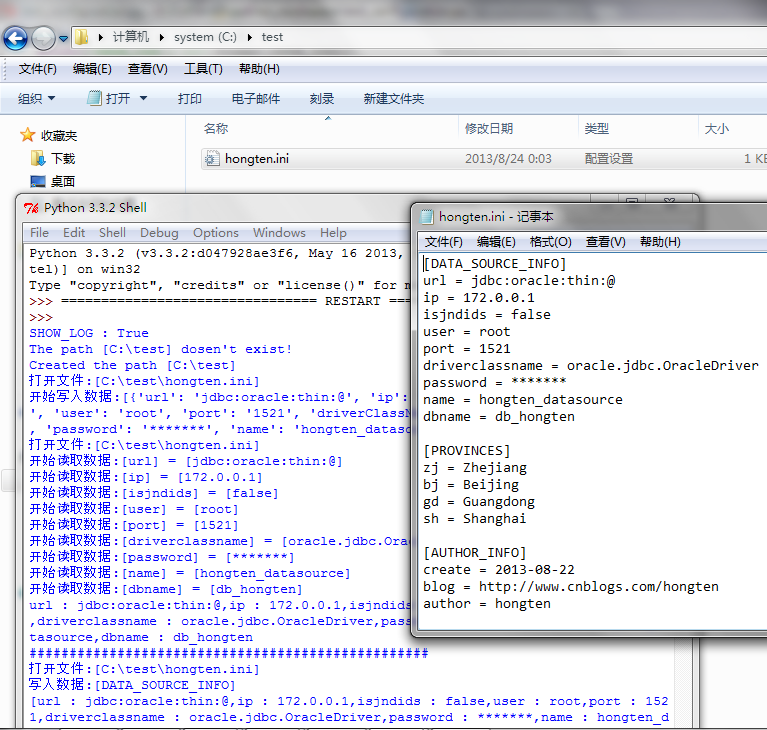
====================================================
代码部分:
====================================================
 #python configparser

 #Author  : Hongten

 #Mailto  : hongtenzone@foxmail.com

 #Blog    : http://www.cnblogs.com/hongten

 #QQ      : 648719819

 #Create  : 2013-08-22

 #Version : 1.0

 import os

 import configparser

 '''

    在python中,configparser模块提供了操作*.ini配置文件的一些操作方法

    就如python的API中所描述的一样:

        This module provides the ConfigParser class which implements

     a basic configuration language which provides a structure similar

     to what’s found in Microsoft Windows INI files. You can use this

     to write Python programs which can be customized by end users easily.

     以下实现的功能是:

     将一些配置信息写入到指定文件中,并且提供方法获取配置文件中的信息

 '''

 #global var

 SHOW_LOG = True

 #Microsoft Windows INI files path

 HONGTEN_INT_PATH = ''

 def mkdirs(path):

     '''创建多级目录'''

     if os.path.exists(path):

         if SHOW_LOG:

             print('The path [{}] existing!'.format(path))

     else:

         if SHOW_LOG:

             print('The path [{}] dosen\'t exist!'.format(path))

         os.makedirs(path)

         if SHOW_LOG:

             print('Created the path [{}]'.format(path))

 def get_path(absPath):

     '''获取到一个绝对路径的目录,

     如绝对路径:'C:\\test\\hongten.ini'

     则返回的是'C:\\test'

     '''

     if os.path.exists(absPath):

         if SHOW_LOG:

             print('the path [{}] existing!'.format(absPath))

         return os.path.split(absPath)[0]

     else:

         return os.path.split(absPath)[0]

 def get_config():

     '''return a configparser object'''

     return configparser.ConfigParser()

 def write_datas_2_config(path, config, datas):

     '''向指定的ini配置文件中写入数据

     参数:

         path       -- 指定的ini配置文件路径

         config     -- configparaser的一个对象

         datas      -- 配置文件的数据,类型为字典类型

                       在datas数据中有key,value,对于

                       每一个value来说都是字典类型,如:

                       datas = {'a' : {'1', '2'}

                       'b' : {'c', 'd', 'e'}}

         '''

     for k, v in datas.items():

         config[k] = v

     if SHOW_LOG:

         print('打开文件:[{}]'.format(path))

     with open(path, 'w') as cf:

         if SHOW_LOG:

             for name in config.sections():

                 c = ''

                 for key in config[name]:

                     c += key + ' : ' + config[name][key] + ','

                 print('写入数据:[{}]\n[{}]'.format(name, c[0:-1]))

         config.write(cf)

 def write_config(path, config, name, data):

     '''向指定的ini配置文件中写入数据

     参数:

         path       -- 指定的ini配置文件路径

         config     -- configparaser的一个对象

         name       -- 配置项的root名称

         data       -- 配置文件的数据,类型为字典类型

                       如:

                       data = {'a', 'b', 'c'}

     '''

     config[name] = data

     if SHOW_LOG:

         print('打开文件:[{}]'.format(path))

     with open(path, 'w') as cf:

         if SHOW_LOG:

             print('开始写入数据:[{}]'.format(data))

         config.write(cf)

 def read_config(path, config, name):

     '''读取配置文件信息'''

     if SHOW_LOG:

         print('打开文件:[{}]'.format(path))

     config.read(path)

     sections = config.sections()

     if name is not None and name != '' and name in sections:

         content = ''

         for key in config[name]:

             if SHOW_LOG:

                 print('开始读取数据:[{}] = [{}]'.format(key, config[name][key]))

             content += key + ' : ' + config[name][key] +','

         return content[0:-1]

     else:

         print('name is Empty or equals None or not int sections!')

 def read_form_config(path, config):

     '''读取配置文件信息,以字典的形式返回'''

     if SHOW_LOG:

         print('打开文件:[{}]'.format(path))

     config.read(path)

     sections = config.sections()

     #返回的字典对象

     result_dict = {}

     for name in sections:

         #字典中每一个value都是一个字典对象

         temp_dict = {}

         if SHOW_LOG:

             print('获取模块名称:[{}]'.format(name))

         for key in config[name]:

             if SHOW_LOG:

                 print('开始读取数据:[{}] = [{}]'.format(key, config[name][key]))

             temp_dict[key] = config[name][key]

         result_dict[name] = temp_dict

     return result_dict

 def get_value_from_config(path, config, name, key):

     '''

     从ini文件中获取某个key所对应的value值

     参数:

         path       -- ini文件路径

         config     -- configparser对象

         name       -- ini文件中的模块名称

         key        -- 对应模块中的key值

     '''

     if SHOW_LOG:

         print('打开文件:[{}]'.format(path))

     config.read(path)

     sections =  config.sections()

     if name is not None and name != '' and name in sections:

         keys = []

         for k in config[name]:

             keys.append(k)

         if key in keys:

             if SHOW_LOG:

                 print('获取到[{}]文件,模块:[{}],键:[{}],值:[{}]'.format(path, name, key, config[name][key]))

             return config[name][key]

         else:

             print('不存在对应的key...')

     else:

         print('name is Empty or equals None or not int sections!')

 def init():

     global SHOW_LOG

     SHOW_LOG = True

     print('SHOW_LOG : {}'.format(SHOW_LOG))

     #Microsoft Windows INI files path

     global HONGTEN_INT_PATH

     HONGTEN_INT_PATH = 'C:\\test\\hongten.ini'

     abspath = get_path(HONGTEN_INT_PATH)

     mkdirs(abspath)

 def main():

     init()

     data = {'name' : 'hongten_datasource',

             'driverClassName' : 'oracle.jdbc.OracleDriver',

             'isJndiDs' : 'false',

             'ip' : '172.0.0.1',

             'port' : '',

             'dbName' : 'db_hongten',

             'user' : 'root',

             'password' : '*******',

             'url' : 'jdbc:oracle:thin:@'}

     prov_data = {'GD' : 'Guangdong',

                  'SH' : 'Shanghai',

                  'BJ' : 'Beijing',

                  'ZJ' : 'Zhejiang'}

     author_data = {'author' : 'hongten',

                    'mailto' : 'hongtenzone@foxmail.com',

                    'blog' : 'http://www.cnblogs.com/hongten',

                    'qq' : '',

                    'create' : '2013-08-22',

                    'version' : '1.0'}

     datas = {'DATA_SOURCE_INFO' : data,

              'PROVINCES' : prov_data,

              'AUTHOR_INFO' : author_data}

     name = 'DATA_SOURCE_INFO'

     key = 'name'

     config = get_config()

     write_config(HONGTEN_INT_PATH, config, name, data)

     content = read_config(HONGTEN_INT_PATH, config, name)

     print(content)

     print('#' * 50)

     write_datas_2_config(HONGTEN_INT_PATH, config, datas)

     content = read_form_config(HONGTEN_INT_PATH, config)

     print(content)

     print('#' * 50)

     value = get_value_from_config(HONGTEN_INT_PATH, config, name, key)

     print(value)

 if __name__ == '__main__':

     main()
python开发_configparser_解析.ini配置文件工具_完整版_博主推荐的更多相关文章
- python开发_xml.dom_解析XML文档_完整版_博主推荐
在阅读之前,你需要了解一些xml.dom的一些理论知识,在这里你可以对xml.dom有一定的了解,如果你阅读完之后. 下面是我做的demo 运行效果: 解析的XML文件位置:c:\\test\\hon ...
- python开发_csv(Comma Separated Values)_逗号分隔值_常用导入导出格式_完整版_博主推荐
## 最近出了一趟差,是从20号去的,今天回来...# 就把最近学习的python内容给大家分享一下...#''' 在python中,CSV(Comma Separated Values),从字面上面 ...
- python开发_gzip_压缩|解压缩gz文件_完整版_博主推荐
''' gzip -- 支持gzip文件 源文件:Lib/gzip.py 这个模块提供了一些简单的接口来对文件进行压缩和解压缩,类似于GNU项目的gzip和gunzip. 数据的压缩源于zlib模块的 ...
- python开发_tkinter_菜单选项中英文切换_菜单选项不可用操作_博主推荐
我使用的python版本为:3.3.2 如果你对python中tkinter模块的菜单操作不是很了解,你可以看看: python开发_tkinter_窗口控件_自己制作的Python IDEL_博主推 ...
- python开发_tkinter_窗口控件_自己制作的Python IDEL_博主推荐(二)
在上一篇blog:python开发_tkinter_窗口控件_自己制作的Python IDEL_博主推荐 中介绍了python中的tkinter的一些东西,你可能对tkinter有一定的了解了.这篇b ...
- 大数据搭建各个子项目时配置文件技巧(适合CentOS和Ubuntu系统)(博主推荐)
不多说,直接上干货! 很多同行,也许都知道,对于我们大数据搭建而言,目前主流,分为Apache 和 Cloudera 和 Ambari. 后两者我不多说,是公司必备和大多数高校科研环境所必须的! 分别 ...
- Ubuntu14.04下Mongodb数据库可视化工具安装部署步骤(图文详解)(博主推荐)
不多说,直接上干货! 前期博客 Ubuntu14.04下Mongodb(离线安装方式|非apt-get)安装部署步骤(图文详解)(博主推荐) Ubuntu14.04下Mongodb官网安装部署步骤(图 ...
- 精通Android4.0开发视频【张泽华】-完整版下载
观看须知: 本视频教程为黑马程序员 张泽华老师历经2年时间整理 适合有JavaWeb基础同学学习,教程采用的AVI方式发布,所以看起来很流畅. 视频概括: 1. 本套视频不同于市面上任何一套andro ...
- python读取uti-8格式ini配置文件出现UnicodeDecodeError: 'gbk' codec can't decode byte 0xba in position 367: illegal multibyte sequence错误解决方法
出现这种错误只需要在read下添加encoding='utf-8' 如: from configparser import ConfigParser cf = ConfigParser() cf.re ...
随机推荐
- 【内核】几个重要的linux内核文件【转】
转自:http://www.cnblogs.com/lcw/p/3159394.html Preface 当用户编译一个linux内核代码后,会产生几个文件:vmlinz.initrd.img, 以及 ...
- 你的组织使用了 windows defender 应用程序控制来阻止此应用
=============================================== 2018/2/8_第1次修改 ccb_warlock === ...
- idea中JDK失效
[问题] 在没有改变任何东西的情况下,突然间IDEA里面所有的代码都标红,无法找到JDK [解决方法] [File]->[Invalidate Caches],然后就好了
- 30 C? Go? Cgo!
C? Go? Cgo! 17 March 2011 Introduction Cgo lets Go packages call C code. Given a Go source file writ ...
- Extjs6设置Store、Ajax、form的请求方式(GET、POST)
Extjs6 设置Store.Ajax.form的请求方式(GET.POST) Ajax请求和Form的submit方法设置请求方式和原来一样,使用method : 'POST'设置 // 表单提交 ...
- C++类指针类型的成员变量的浅复制与深复制
本篇文章旨在阐述C++类的构造,拷贝构造,析构机制,以及指针成员变量指针悬空问题的解决.需要读者有较好的C++基础,熟悉引用,const的相关知识. 引言: 类作为C++语言的一种数据类型,是对C语言 ...
- github后端开发面试题大集合(一)
作者:小海胆链接:https://www.nowcoder.com/discuss/3614?type=0&order=0&pos=5&page=0?from=wb来源:牛客网 ...
- JS调用百度地图API标记地点
<!DOCTYPE html> <html> <head> <meta http-equiv="Content-Type" content ...
- Codeforces 264B Good Sequences(DP+素数筛)
题目链接:http://codeforces.com/problemset/problem/264/B 题目大意:给出n个单调递增的数,让你找出最长的好序列,好序列是一种单调递增的并且相邻元素的最大公 ...
- NFS服务简介
NFS服务简介 NFS是Network File System的缩写,即网络文件系统.NFS是由Sun开发并发展起来的一项用于在不同机器,不同操作系统之间通过网络互相分享各自的文件.NFS serve ...