
创建自己的Code Snippet(代码模板)
一、名词解释
Code Snippet,代码模板,是一种快速生成代码的快捷方式,使用它可以有效地提高编程效率。
编程中可以使用Visual Studio提供的预先设置好的Code Snippet,也可以根据需要创建自己的Code Snippet。
二、使用方法演示
使用code snippet创建属性:
1. 输入prop,出现下图所示的提示:
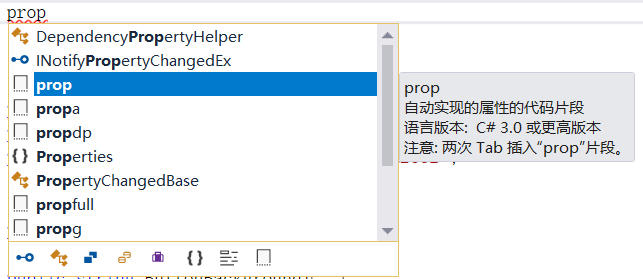
2. 连按两下Tab键,得到如下代码:

3. 按一下Tab键,可以在橙色背景色的可更改字段之间来回跳转,编辑后得到自定义的属性:
public string FirstName { get; set; }
三、创建自己的Code Snippet
以创建具有通知功能的属性为例,该种属性是基于Caliburn.Micro框架的,写在ViewModel中,可与View界面上的控件进行绑定。
在Visual Studio的Tools菜单里,找到Code Snippets Manager,
在Language下拉框中选择Visual C#,
在Location下面的很多文件夹中,找到Visual C#文件夹,可以看到很多code snippet文件,根据路径打开该文件夹,
将propfull.snippet文件复制出来,我们将基于它修改得到自己的code snippet,重命名为propcn.snippet,cn是Caliburn.Micro和Notification的缩写,
打开propcn.snippet,开始修改,
修改<Header>中的代码为:
<Title>propcn</Title>

<Shortcut>propcn</Shortcut>

<Description>Code snippet for Notification property in Caliburn.Micro</Description>
修改<Code>中的代码为:
<Code Language="csharp">

     <![CDATA[private $type$ $field$;

     public $type$ $property$

     {

        get { return $field$;}

        set

      {

         $field$ = value;

         NotifyOfPropertyChange(() => $property$);

       }

    }

    $end$]]>

</Code>
7. 保存propcn.snippet,并将该新的code snippet文件剪切到Visual C#文件夹下,至此就创建好了自己的code snippet,试试打开Visual Studio使用它:
输入propcn,连按两下Tab键,得到如下代码片段,修改为自己需要的属性即可啦。
private string _firstName;

public string FirstName

{

      get { return _firstName; }

      set

      {

            _firstName = value;

            NotifyOfPropertyChange(() => FirstName);

       }

}
四、常用的Code Snippet
ctor → 构造函数
for → for循环
prop → 简化类型的属性
propfull → 完整属性
propdp → 依赖属性
五、添加XAML code snippet
主要步骤同上,找到XAML code snippet的文件夹,将新建的代码模板文件放入,在XAML中编程时输入缩写再敲击两下Tab键。
例如,2行2列的Grid模板:
<?xml version="1.0" encoding="utf-8"?>

<CodeSnippet Format="1.0.0" xmlns="http://schemas.microsoft.com/VisualStudio/2005/CodeSnippet">

  <Header>

    <SnippetTypes>

      <SnippetType>Expansion</SnippetType>

    </SnippetTypes>

    <Title>2X2 Grid</Title>

    <Author>Microsoft Corporation</Author>

    <Description>XAML snippet for a 2X2 Grid</Description>

    <HelpUrl></HelpUrl>

    <Shortcut>2by2Grid</Shortcut>

  </Header>

  <Snippet>

    <Declarations>

      <Literal Editable="true">

        <ID>Height1</ID>

        <ToolTip>Height of row 0</ToolTip>

        <Default>*</Default>

        <Function>

        </Function>

      </Literal>

      <Literal Editable="true">

        <ID>Height2</ID>

        <ToolTip>Height of row 1</ToolTip>

        <Default>*</Default>

        <Function>

        </Function>

      </Literal>

      <Literal Editable="true">

        <ID>Width1</ID>

        <ToolTip>Width of column 0</ToolTip>

        <Default>*</Default>

        <Function>

        </Function>

      </Literal>

      <Literal Editable="true">

        <ID>Width2</ID>

        <ToolTip>Width of column 1</ToolTip>

        <Default>*</Default>

        <Function>

        </Function>

      </Literal>

    </Declarations>

    <Code Language="XAML">

      <![CDATA[

          <Grid>

              <Grid.ColumnDefinitions>

                  <ColumnDefinition Width="$Width1$"/>

                  <ColumnDefinition Width="$Width2$"/>

              </Grid.ColumnDefinitions>

              <Grid.RowDefinitions>

                  <RowDefinition Height="$Height1$"/>

                  <RowDefinition Height="$Height2$"/>

              </Grid.RowDefinitions>

          </Grid>

              ]]>

    </Code>

  </Snippet>

</CodeSnippet>
也可以下载一些现成的模板文件,例如CodePlex Archive 的XAML snippets:https://archive.codeplex.com/?p=xamlsnippets
创建自己的Code Snippet(代码模板)的更多相关文章
- 如何创建 Code Snippet
比如有一行自定义代码段: @property (nonatomic,copy) NSString *<#string#>; 需要添加到 Code Snippet 上,以帮助开发人员开发更便 ...
- 善用VS中的Code Snippet来提高开发效率
http://www.cnblogs.com/anderslly/archive/2009/02/16/vs2008-code-snippets.html http://www.cnblogs.com ...
- 善用VS中的Code Snippet来提高开发效率 分类: C# 2015-01-22 11:06 69人阅读 评论(0) 收藏
前言 在谈谈VS中的模板中,我介绍了如何创建项目/项模板,这种方式可以在创建项目时省却不少重复性的工作,从而提高开发效率.在创建好了项目和文件后,就得开始具体的编码了,这时又有了新的重复性工作,就是 ...
- wpf Route Event Code Snippet
将下面内容保存为snippet后缀文件,通过vs的代码片段管理工具导入即可,快捷键请按需修改: <?xml version="1.0" encoding="utf- ...
- iOS programming Code Snippet Library
iOS programming Code Snippet Library The freebie code comes from the code snippet library. 代码来自cod ...
- 关于VS2015中的code snippet无法使用的问题
什么是code snippet? Code snippets are small blocks of reusable code that can be inserted in a code file ...
- VS自定义代码块Code Snippet
一 .简述 我们在开发当中,避免不了一些重复的开发工作,在你漫长的开发以及学习当中,你会发现有这么一部分代码是你时常会使用到的.我想这个工具也是针对这个原因出来的吧,它就是预先把你需要的这部分代码的 ...
- VS里的 代码片段(Code snippet)很有用,制作也很简单
工欲善其事必先利其器,而 Visual Studio 就是我们的开发利器. 上一篇文章,介绍了一个很棒的快捷键,如果你还没用过这个快捷键,看完之后应该会豁然开朗.如果你已经熟练的应用它,也会温故而知新 ...
- 使用 Code Snippet 简化 Coding
在开发的项目的时候,你是否经常遇到需要重复编写一些类似的代码,比如是否经常会使用 for.foreach ? 在编写这两个循环语句的时候,你是一个字符一个字符敲还是使用 Visual Studio 提 ...
随机推荐
- 【校招面试 之 C/C++】第18题 C++ 中的隐式转换以及explicit关键字
1.什么是隐式转换: 众所周知,C++的基本类型中并非完全的对立,部分数据类型之间是可以进行隐式转换的. 所谓隐式转换,是指不需要用户干预,编译器私下进行的类型转换行为.很多时候用户可能都不知道进行了 ...
- 【校招面试 之 C/C++】第17题 C 中的malloc相关
1.malloc (1)原型:extern void *malloc(unsigned int num_bytes); 头文件:#include <malloc.h> 或 #include ...
- struts框架问题五之向值栈中保存数据
5. 问题五: 向值栈保存数据 (主要针对root栈) > valueStack.push(Object obj); * push方法的底层调用root对象的push方法(把元素添加到0位置) ...
- ajax.beginform控制器中实体为null的问题
控制器: 函数声明:public JsonResult ApplyFun(Test test) 原因:在视图中有一个表单的name属性为test,因为冲突所导致.
- Mybatis之拦截器原理(jdk动态代理优化版本)
在介绍Mybatis拦截器代码之前,我们先研究下jdk自带的动态代理及优化 其实动态代理也是一种设计模式...优于静态代理,同时动态代理我知道的有两种,一种是面向接口的jdk的代理,第二种是基于第三方 ...
- 2018.10.23 vijo1243生产产品(单调队列优化dp)
传送门 这道单调队列真的有点难写啊. 方程感觉挺简单的. f[i][j]f[i][j]f[i][j]表示在第iii个车间结束前jjj次步骤的最小代价. 然后用单调队列毒瘤优化一下就行了. 代码: #i ...
- 着重基础之—Spring Boot 编写自己的过滤器
Spring Boot 编写自己的"过滤器" 又好久没有写博客进行总结了,说实话,就是 "懒",懒得总结,懒得动.之所以写这篇博客,是因为最近对接公司SSO服务的时候,需要自定义拦 ...
- Django入门指南-第8章:第一个测试用例(完结)
python manage.py test python manage.py test --verbosity=2 # boards/tests.py from django.core.urlreso ...
- 基础的linux学习
学习了这几个命令分享一下: 文本文件内搜索数据 grep -n -e pattern1 -e pattern2 file1 -n 搜索到的数据显示行号展示 -e pattern1 多个匹配模式下可以通 ...
- CentOS7中实用的命令总结
一:软件安装配置方面 这里总结一下对个人很实用的功能 1.查询rpm包的依赖哪些文件:rpm -qpR xx.rpm,然后rpm会分析此包的文件依赖性 2.查询系统中安装了哪些rpm包:rpm -qa ...