
Day10 API
String类
String是不可变类:值一旦确定了,就不会更改。
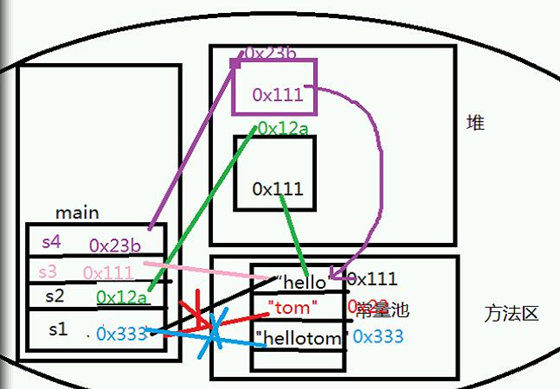
public static void main(String[] args) {

        String s1 = "hello";//到常量池里找对象

        String s2 = new String("hello");

        s1 = "Tom";

        s1 = "hello"+"Tom";

        String s3 = "hello";

        String s4 = new String("hello");

        // ==判断是否为同一对象,判断内存地址

        System.out.println(s1==s2);//false

        System.out.println(s2==s4);//false

        System.out.println(s1==s3);//false

        s1 = "hello";

        System.out.println(s1==s3);//true

    }
String常用的方法
concat
字符串连接,返回连接后的串
 String s1 = "hello";

 //concat 字符串连接,返回连接后的串

 s1 = s1.concat("tom");

 System.out.println(s1);//hellotom
length
字符串长度
System.out.println(s1.length());
equals
比较字符序列是否相同,区分大小写
String s2 = "hellotom";

System.out.println(s1.equals(s2));
equalsIgnoreCase
比较字符序列是否相同,不区分大小写
String s3 = "HEllotom";

System.out.println(s1.equalsIgnoreCase(s3));
toUpperCase
大写兼容,全部转为大写
System.out.println(s1.toUpperCase());
toLowerCase
小写兼容,全部转为小写
System.out.println(s1.toLowerCase());
indexOf
首次出现的位置索引,没有返回-1
s1 = "hellohellotom";

System.out.println(s1.indexOf("hello"));

System.out.println(s1.indexOf("abc"));
lastIndexOf
最后一次出现的位置索引
System.out.println(s1.lastIndexOf("hello"));
charAt
取出某一个位置的字符
System.out.println(s1.charAt());//h
substring
取字符串
//取子串(起始位置)取到最后

System.out.println(s1.substring());//tom

//[起始位置,终止位置)    不包括终止位置

System.out.println(s1.substring(, ));//tom
trim
去除字符串的首尾空格
s1 = "   h  e  l  l  o  t  o  m   ";

System.out.println(s1);//   h  e  l  l  o  t  o  m

System.out.println(s1.trim());//h  e  l  l  o  t  o  m
replace
字符串替换(旧串,新串)用新串替换旧串
s1 = "hellotom";

System.out.println(s1.replace(s1, "你好"));//你好

//去掉是s1串中的所有空格

s1 = "  h e     l l    o t  om    ";

System.out.println(s1.replace(" ", ""));//hellotom
endsWith
判断是否以某个字符串结尾,是true,否false
s1 = "hello.java";

System.out.println(s1.endsWith("java"));//true
startsWith
判断是否以某个字符串开头,是true,否false
System.out.println(s1.startsWith("he"));//true
compareTo
字符串比较大小
s1 = "abc";

//unicode s1在参数之前,返回负数,s1在参数之后,返回正数,相对返回0

System.out.println(s1.compareTo("cc"));//-2

System.out.println(s1.compareTo("aa"));//

System.out.println(s1.compareTo("abc"));//
contains
是否包含指定参数的字符串,包含true,不包含false
System.out.println(s1.contains("bc"));//true
toCharArray()
把字符串转换成字符数组
char[] c = s1.toCharArray();//'a','b','c'

for(char cc:c) {

    System.out.print("字符:"+cc);//字符:a字符:b字符:c

}
split
用某个字符串把原始字符串分割为一个字符串数组
s1 = "aa bb cc dd ee";

String[] strs = s1.split(" ");//"aa","bb","cc","dd","ee"

for(String ss : strs) {

    System.out.print("元素:"+ss);//元素:aa元素:bb元素:cc元素:dd元素:ee

}
 public static void main(String[] args) {

         // String  常用的方法

         String s1 = "hello";

 /*        System.out.println(s1);//hello

         s1 = s1 + "tom";// "hellotom"

 */

         //连接字符串,返回连接后的串

         s1 = s1.concat("tom");//"hellotom"

         System.out.println(s1);//"hellotom"

         //字符串长(字符序列的个数)

         System.out.println(s1.length());//8

         //equals比较字符序列是否相同 相同 true 区分大小写

         String s2 = "hellotoM";

         System.out.println(s1.equals(s2));//fasle

         //忽略大小写

         System.out.println(s1.equalsIgnoreCase(s2));

         //大小写兼容

         //大写

         System.out.println(s1.toUpperCase());

         //小写

         System.out.println(s1.toLowerCase());

         // zhangsan@163.com

         //    0123------------------------------------

         s1 = "hellohellotom";

         //位置索引

         //首次出现的位置索引  ,没有返回 -1

         System.out.println(s1.indexOf("hello"));//

         System.out.println(s1.indexOf("@"));//-1

         //最后一次出现的位置索引

         System.out.println(s1.lastIndexOf("hello"));//5

         //取出  某一个 位置 的字符

         System.out.println(s1.charAt());//'h'

         //取 子串  (起始位置)  取到最后

         System.out.println(s1.substring());//"tom"

         //[起始位置,终止位置)  不包括终止位置

         System.out.println(s1.substring(, ));

         //----------------------------------------

         s1 = "   h e l l o tom   ";

         //去除字符串 的 首尾 空格

         System.out.println(s1.trim());

         //

         s1 = "hellotom";

         //字符串 替换  (旧串,新串)  用新串 替换 旧串

         System.out.println(s1.replace("hello","你好"));//"hello"->“你好”

         s1 = "   h e     l l    o t  om   ";

         //问题:去掉  s1串 中的 所有空格

         System.out.println(s1.replace(" ", ""));

         //

         s1 = "hello.java";

         //判断 是否 以 某个 字符串 结尾  是  true

         System.out.println(s1.endsWith("java"));//true

         //判断 是否 以 某个 字符串 开头  是  true

         System.out.println(s1.startsWith("he"));//true

         //字符串 比较大小

         s1 = "abc";

         //unicode  s1  在 参数之前 ,返回 负数 ,s1 在参数后 ,返回正数,相等 返回0

         System.out.println(s1.compareTo("cc"));//-2

         System.out.println(s1.compareTo("aa"));//

         System.out.println(s1.compareTo("abc"));//0

         //-----------------------------------------

         //是否 包含 指定参数 的字符串 ,包含 true

         System.out.println(s1.contains("ab"));

         //把 字符串 转换成字符数组

         char [] c = s1.toCharArray();// 'a','b','c'

         for(char cc :c) {

             System.out.println("字符:"+cc);

         }

         //

         s1 = "aa bb cc dd ee";

         //用某个 字符串  把原始字符串 分割为  一个 字符串数组

         String [] strs = s1.split(" ");//"aa","bb","cc","dd","ee"

         for(String ss:strs) {

             System.out.println("元素:"+ss);

         }

     }
StringBuffer类
如果频繁更改字符串的值,不要用String类,效率低,用变长字符串类StringBuffer和StringBuilder类
StringBuffer类常用方法
capacity
返回容量
StringBuffer sf1 = new StringBuffer();

//具备16个字符的缓冲区

System.out.println(sf1.capacity());//

StringBuffer sf2 = new StringBuffer("hello");

System.out.println(sf2.capacity());//21=16+5

//直接规定缓冲区大小

StringBuffer sf3 = new StringBuffer();

System.out.println(sf3.capacity());//
apend
追加字符串
StringBuffer sf = new StringBuffer();

sf.append("hello");

System.out.println(sf);//hello

char[] c = {'a','b','c'};

sf.append(c,,);//bc

System.out.println(sf);//hellobc
trimToSize
缩小容量为我存储的字符的个数大小
System.out.println(sf.capacity());//

sf.trimToSize();

System.out.println(sf.capacity());//
insert
向索引位置插入一个字符串
System.out.println(sf);//hellobc

sf.insert(, "你好");

System.out.println(sf);//hello你好bc
setCharAt
修改指定位置的一个字符
sf.setCharAt(, '您');

System.out.println(sf);//hello您好bc
deleteCharAt
删除指定位置索引的一个字符
sf.deleteCharAt();

System.out.println(sf);//hello好bc
delete
删除指定范围的字符串[起始位置,终止位置),不包括终止位置
sf.delete(, );

System.out.println(sf);//hello
chatAt
获取指定索引处的字符
System.out.println(sf.charAt());//e
indexOf
首次出现的位置索引,没有返回-1
System.out.println(sf.indexOf("l"));//
lastIndexOf
最后一次出现的位置索引
System.out.println(sf.lastIndexOf("l"));//
reverse
反转
System.out.println(sf);//hello

sf.reverse();

System.out.println(sf);//olleh
String类与StringBuffer类之间的转换
String str = sf.toString();

StringBuffer sfr = new StringBuffer(str);
 public static void main(String[] args) {

         // StringBuffer  StringBuilder

         //String 不可变类

         //如果频繁 更改字符串的值,不要用String效率低,用 变 长字符串类 StringBuffer  StringBuilder

         //StringBuffer

         StringBuffer sf1 = new StringBuffer();

         //具备 16个字符的缓冲区

         System.out.println(sf1.capacity());//

         StringBuffer sf2 = new StringBuffer("hello");

         //容量

         System.out.println(sf2.capacity());//

         sf2.append("aaaaaaaaaaaaaaaaaaaaaaaaaaaaaaa");

         System.out.println(sf2.capacity());//

         StringBuffer sf3 = new StringBuffer();

         System.out.println(sf3.capacity());

         //----------------StringBuffer--------------------------------

         StringBuffer sf = new StringBuffer();

         //容量

         System.out.println(sf.capacity());

         //追加字符串的

         sf.append("hello");

         char[] c = {'a','b','c'};

         sf.append(c, , );//bc

         System.out.println(sf);//"hellobc"

         System.out.println(sf.capacity());

         //缩小容量为 我 存储的字符的个数大小

         sf.trimToSize();

         System.out.println(sf.capacity());

         System.out.println(sf);//"hellobc"//

         //向 索引 位置 插入一个字符串

         sf.insert(, "你好");//"hello你好bc"

         System.out.println(sf);

         //修改 指定位置的一个 字符

         sf.setCharAt(, '您');//"hello您好bc"

         System.out.println(sf);

         //删除 指定 位置索引的  一个 字符

         sf.deleteCharAt();//"hello好bc"

         System.out.println(sf);

         //删除 指定 范围 的字符串  【起始位置,终止位置)不包括 终止位置

         sf.delete(, );

         System.out.println(sf);//"hello"

         System.out.println(sf.charAt());//e

         System.out.println(sf.indexOf("l"));//

         System.out.println(sf.lastIndexOf("l"));//3

         //------------其它----------------------

         sf.reverse();

         System.out.println(sf);

         String str = sf.toString();//StringBuffer -> String

         //String - > StingBuffer

         StringBuffer sfr = new StringBuffer(str);

         //-----------------------------------------------------

         /*

          * String:定长字符串类,不可变类,表示一个简单的字符串 用 String

          * 但是,如果  字符串的值大量更改频繁更改 ,选择StringBuffer,StringBuilder

          * StringBuffer :线程安全的,数据准确,但速度慢

          * StringBuilder:线程非安全的,多线程环境下数据不准确,但是速度快。

          */

         //--------------------------------------------------

     }
String、StringBuffer和StringBuilder之间的区别
String:定长字符串类,不可变类,表示一个简单的字符串用String,但是,如果字符串的值大量更改频繁,选择StringBuffer或StringBuilder
StringBuffer:线程安全的,数据准确,但速度慢
StringBuilder:线程非安全的,多线程环境下数据不准确,但是速度快
正则表达式
用某种模式去匹配指定字符串的一种表达方式。
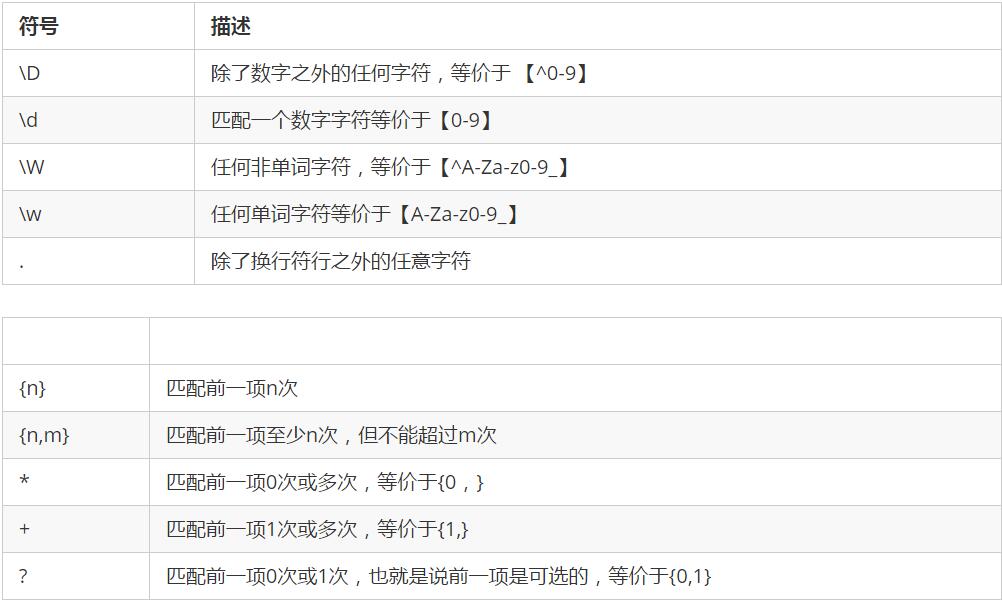
语法
定义正则表达式:Pattern.compile(regString,)
表达式的模式:Matcher matcher = p.matcher();
验证:matcher.matches()
public static void main(String[] args) {

        //正则验证:邮政编码必须6位

        //1.指定正则表达式[0-9]{6}或\\d{6}

        Pattern p =Pattern.compile("[0-9]{6}");

        //2.指定要验证的数据

        Matcher m = p.matcher("");

        //3.验证

        System.out.println(m.matches());//格式验证true

    }
拆箱、装箱
JDK提供了对所有的基本数据类型的包装类
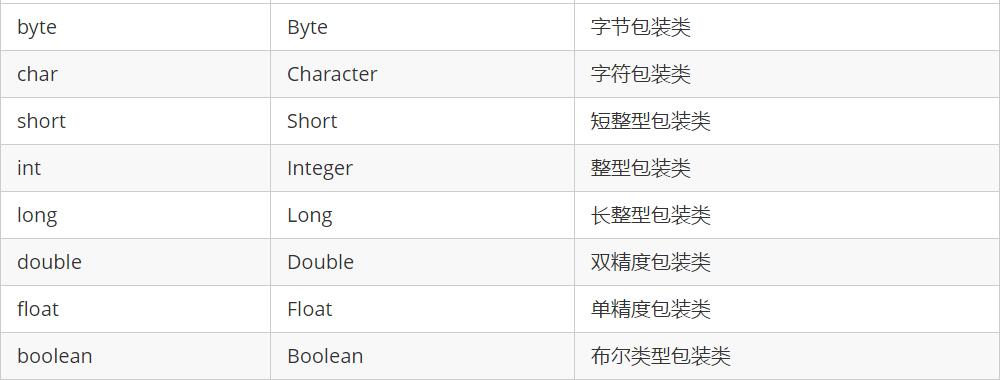
作用
1.把基本类型当做对象使用
2.提供了更加丰富的功能。
Day10 API的更多相关文章
- ##DAY10 UITableView基础
##DAY10 UITableView基础 UITableView继承于UIScrollView,可以滚动. UITableView的每⼀条数据对应的单元格叫做Cell,是UITableViewCel ...
- day10(java web之request&respone&访问路径&编码问题)
day10 请求响应流程图 response response概述 response是Servlet.service方法的一个参数,类型为javax.servlet.http.HttpServletR ...
- Elasticsearch--集群管理_别名&插件&更新API
目录 使用索引别名 别名 创建别名 修改别名 合并命令 获取所有别名 移除别名 别名中过滤 别名和路由 Elasticsearch插件 基础知识 安装插件 移除插件 更新设置API 使用索引别名 通过 ...
- 学习日常笔记<day10>servlet编程
1 如何开发一个Servlet 1.1 步骤: 1)编写java类,继承HttpServlet类 2)重新doGet和doPost方法 3)Servlet程序交给tomcat服务器运行!! 3.1 s ...
- 383 day10缓冲流、转换流、序列化流
day10[缓冲流.转换流.序列化流] 主要内容 缓冲流 转换流 序列化流 打印流 教学目标 [ ] 能够使用字节缓冲流读取数据到程序 [ ] 能够使用字节缓冲流写出数据到文件 [ ] 能够明确字符缓 ...
- 干货来袭-整套完整安全的API接口解决方案
在各种手机APP泛滥的现在,背后都有同样泛滥的API接口在支撑,其中鱼龙混杂,直接裸奔的WEB API大量存在,安全性令人堪优 在以前WEB API概念没有很普及的时候,都采用自已定义的接口和结构,对 ...
- 12306官方火车票Api接口
2017,现在已进入春运期间,真的是一票难求,深有体会.各种购票抢票软件应运而生,也有购买加速包提高抢票几率,可以理解为变相的黄牛.对于技术人员,虽然写一个抢票软件还是比较难的,但是还是简单看看123 ...
- 几个有趣的WEB设备API(二)
浏览器和设备之间还有很多有趣的接口, 1.屏幕朝向接口 浏览器有两种方法来监听屏幕朝向,看是横屏还是竖屏. (1)使用css媒体查询的方法 /* 竖屏 */ @media screen and (or ...
- html5 canvas常用api总结(三)--图像变换API
canvas的图像变换api,可以帮助我们更加方便的绘画出一些酷炫的效果,也可以用来制作动画.接下来将总结一下canvas的变换方法,文末有一个例子来更加深刻的了解和利用这几个api. 1.画布旋转a ...
随机推荐
- IDEA 构建为了打 jar 包的工程,包含 maven 打 jar 包的过程
前言:最近自己写了一个单表查询的组件,包含前端.后台,所以需要向阿里的 druid 一样将所有文件打到一个 jar 包里,这里首先记录如何打 jar 包. 附:自己的一个 jar 包源码 https: ...
- java 正则表达式(内附例子)
前言:最近工作中遇到了大量用正则表达式的情况,需要用一定的规则匹配字符串,然后提取里面的数据,格式化后转成自己想要的格式.所以作为一个菜鸟是时候再来巩固一下正则表达式了.转载请注明出处:https:/ ...
- 穿过代理获取真正的IP
/// <summary> /// 获取真ip /// </summary> /// <returns></returns> public string ...
- 浅谈白鹭Egret
浅谈白鹭Egret 最近在做一个移动项目,技术选型的时候接触到了白鹭,简单了解了之后觉得挺合适的,最终就选择了这个引擎. 为什么会选择白鹭引擎呢? 我看上他主要有一下几点: 1 ...
- 当碰到需要调试打包后的js
在react中经常开发碰到不能热更中进行调试的,如IE之类的 这个时候我们就需要打包才能运行看到效果, 但是往往每次打包都需要很长的时间: 这个时候我们就可以直接找到打包后的文件,直接在改文件中修改: ...
- EventBus 3.0源码解析
现在网上讲解EventBus的文章大多数都是针对2.x版本的,比较老旧,本篇文章希望可以给大家在新版本上面带来帮助. EventBus 是专门为Android设计的用于订阅,发布总线的库,用到这个库的 ...
- 单机安装hive和presto
问题: 公司最近在搞presto,主要是分析一下presto和hive的查询大数据量的性能对比: 我先把我的对比图拿出来(50条数据左右)针对同一条sql(select * from employee ...
- linux 局域网探测工具nmap
NMap,也就是Network Mapper,是Linux下的网络扫描和嗅探工 具包,其基本功能有三个, 一是探测一组主机是否在线: 其次是扫描主机端口,嗅探所提供的网络服务: 还可以推断主机所用的操 ...
- UpdateServer事务实现机制
UpdateServer(UPS) 是OceanBase的写入单点,一个集群中只有一台UPS服务器,所有的写都写入到这台机器.OceanBase采用基于静动态数据分离的机制,静态数据存储在静态数据服务 ...
- java笔记--线程的插队行为
对线程的插队行为的理解 在编写多线程时,会遇到让一个线程优先于其他线程运行的情况, 此时除了可以设置其优先级高于其他线程外,更直接的方式是使用Thread类的join()方法 --如果朋友您想转载本文 ...