
[翻译] ZLHistogramAudioPlot
ZLHistogramAudioPlot
A hardware-accelerated audio visualization view using EZAudio, inspired by AudioCopy. ZLHistogramAudioPlot was originally developed for Murmur.
这是使用了EZAudio,一个硬件加速的audio可视化view,灵感来自于AudioCopy.ZLHistogramAudioPlot这个最开始是为了Murmur而开发的.
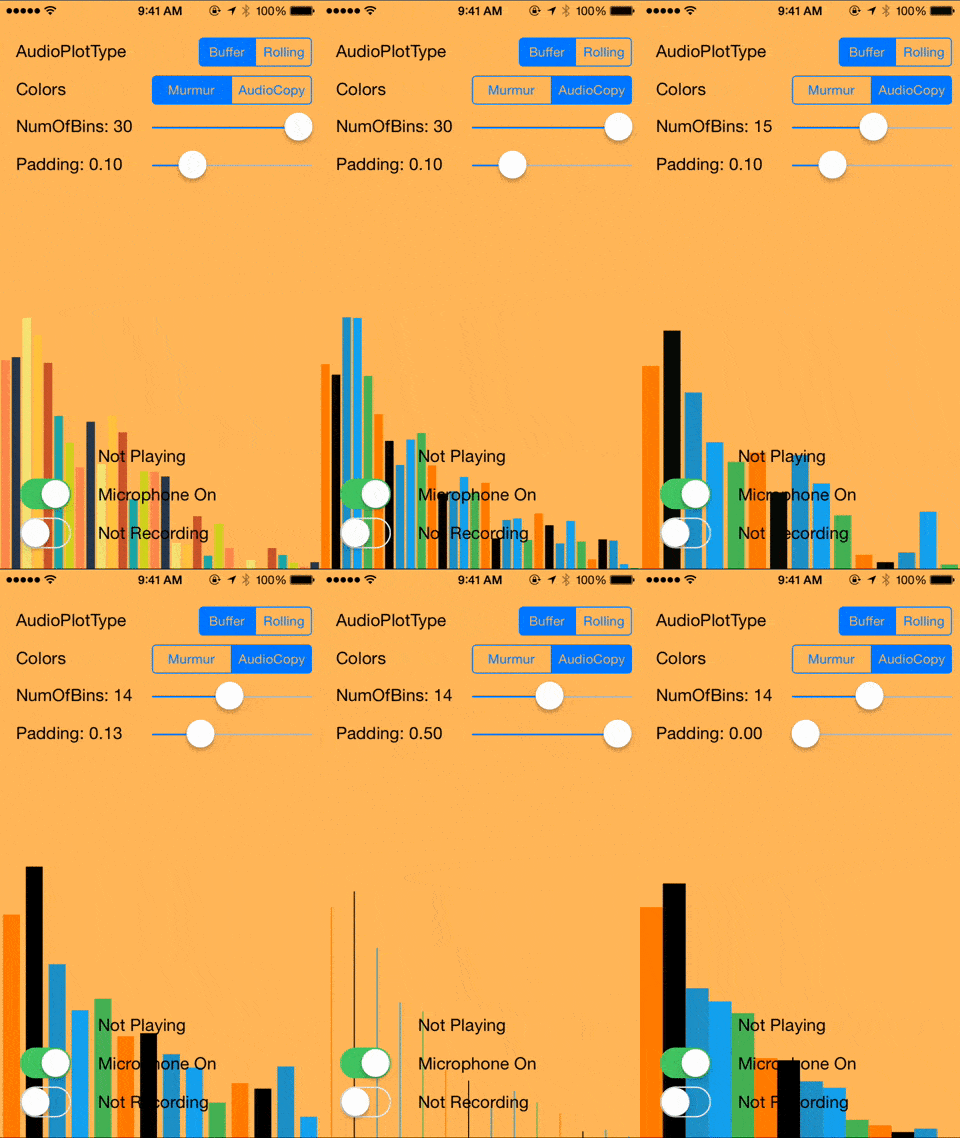
Preview - 预览
Buffer
CocoaPods
You can install ZLHistogramAudioPlot through CocoaPods adding the following to your Podfile:
你可以用CocoaPods来安装ZLHistogramAudioPlot
pod 'ZLHistogramAudioPlot'
Usage - 使用
Checkout the demo app for an example.
下载demo app来看源码吧:
Customizable attributes:
可以定制的属性:
/// The upper bound of the frequency range the audio plot will display. Default:

/// 10000Hz

@property (nonatomic) float maxFrequency;

/// The lower bound of the frequency range the audio plot will display. Default:

/// 1200Hz

@property (nonatomic) float minFrequency;

/// The number of bins in the audio plot. Default: 30

@property (nonatomic) NSUInteger numOfBins;

/// The padding of each bin in percent width. Default: 0.1

@property (nonatomic) CGFloat padding;

/// The gain applied to the height of each bin. Default: 10

@property (nonatomic) CGFloat gain;

/// A float that specifies the vertical gravitational acceleration applied to

/// each bin. Default: 10 pixel/sec^2

@property (nonatomic) float gravity;

/// The color of all bins in the audio plot.

@property (strong, nonatomic) UIColor *color;

/// An array of color objects defining the color of each bin in the audio plot.

/// If not set, the color attribute will be used instead. Currently only

/// supported by plot type EZPlotTypeBuffer.

@property (strong, nonatomic) NSArray *colors;
Dependencies - 依赖关系
ZLHistogramAudioPlotis a subclass ofEZAudioPlot. It requires EZAudio. ZLHistogramAudioPlot继承自EZAudioPlot,它需要EZAudio框架支持- It also requires Accelerate framework for hardware acceleration. 他也需要Accelerate来支持硬件加速
Compatibilty - 兼容性
ZLHistogramAudioPlot uses the following interface provided by EZAudio to get audio data:
ZLHistogramAudioPlot是使用以下的接口来获取到EZAudio的audio数据的:
- (void)updateBuffer:(float *)buffer withBufferSize:(UInt32)bufferSize;
It can be easily modified to work with Audio Unit and Core Audio.
你也可以简单的修改到支持 Audio Unit 与 Core Audio
Requirements - 需要的环境
- iOS 6 or higher. iOS 6 +
- Automatic Reference Counting (ARC). ARC
License
ZLHistogramAudioPlot is available under the MIT license. See the LICENSE file for more info.
[翻译] ZLHistogramAudioPlot的更多相关文章
- 《Django By Example》第五章 中文 翻译 (个人学习,渣翻)
书籍出处:https://www.packtpub.com/web-development/django-example 原作者:Antonio Melé (译者@ucag注:大家好,我是新来的翻译, ...
- 《Django By Example》第四章 中文 翻译 (个人学习,渣翻)
书籍出处:https://www.packtpub.com/web-development/django-example 原作者:Antonio Melé (译者注:祝大家新年快乐,这次带来<D ...
- [翻译]开发文档:android Bitmap的高效使用
内容概述 本文内容来自开发文档"Traning > Displaying Bitmaps Efficiently",包括大尺寸Bitmap的高效加载,图片的异步加载和数据缓存 ...
- 【探索】机器指令翻译成 JavaScript
前言 前些时候研究脚本混淆时,打算先学一些「程序流程」相关的概念.为了不因太枯燥而放弃,决定想一个有趣的案例,可以边探索边学. 于是想了一个话题:尝试将机器指令 1:1 翻译 成 JavaScript ...
- 《Django By Example》第三章 中文 翻译 (个人学习,渣翻)
书籍出处:https://www.packtpub.com/web-development/django-example 原作者:Antonio Melé (译者注:第三章滚烫出炉,大家请不要吐槽文中 ...
- 《Django By Example》第二章 中文 翻译 (个人学习,渣翻)
书籍出处:https://www.packtpub.com/web-development/django-example 原作者:Antonio Melé (译者注:翻译完第一章后,发现翻译第二章的速 ...
- 《Django By Example》第一章 中文 翻译 (个人学习,渣翻)
书籍出处:https://www.packtpub.com/web-development/django-example 原作者:Antonio Melé (译者注:本人目前在杭州某家互联网公司工作, ...
- 【翻译】Awesome R资源大全中文版来了,全球最火的R工具包一网打尽,超过300+工具,还在等什么?
0.前言 虽然很早就知道R被微软收购,也很早知道R在统计分析处理方面很强大,开始一直没有行动过...直到 直到12月初在微软技术大会,看到我软的工程师演示R的使用,我就震惊了,然后最近在网上到处了解和 ...
- ASP.NET MVC with Entity Framework and CSS一书翻译系列文章之第一章:创建基本的MVC Web站点
在这一章中,我们将学习如何使用基架快速搭建和运行一个简单的Microsoft ASP.NET MVC Web站点.在我们马上投入学习和编码之前,我们首先了解一些有关ASP.NET MVC和Entity ...
随机推荐
- MVC中使用Castle.Windsor
我在MVC中使用Castle.Windsor是这样用的. 首先在UI层安装Install Castle.Windsor 在App_Start中增加一个类WindsorActivator,用于注册和销毁 ...
- Java线程池,你了解多少?
一.前言 随着业务的发展,单线程已经远远不能满足,随即就有多线程的出现.多线程虽然能解决单线程解决不了的事情,但是它也会给你带来额外的问题.比如成千上万甚至上百万的线程时候,你系统就会出现响应延迟.卡 ...
- UIKit 框架之UITextView
// // ViewController.m // UItextView // // Created by City--Online on 15/5/22. // Copyright (c) 2015 ...
- Extjs报错处理
错误信息: IE:SCRIPT1009: 缺少 '}' FF: SyntaxError: identifier starts immediately after numeric literal ... ...
- vue-cli的工程如何正确使用Google Analytics?
前言 最方便的方法,莫过于使用vue-analytics:https://github.com/MatteoGabriele/vue-analytics. 包是有了,可是真正使用起来会发现Google ...
- pictureBox控件获得图片路径的三种方法及自适应大小属性
1.绝对路径: this.pictureBox2.Image=Image.FromFile("D:\\001.jpg"); 2.相对路径: Application.StartupP ...
- winform 导出datagridview 到excel
数据不多可以用下面的方式方法,如果数据较大,不建议这样使用,可能会比较卡如果电脑上没有Microsoft.Office.Interop.Excel.dll去找DLL下载站下载即可 需要先导入这个dll ...
- 啰里吧嗦式讲解java静态代理动态代理模式
一.为啥写这个 文章写的比较啰嗦,有些东西可以不看,因为想看懂框架, 想了解SSH或者SSM框架的设计原理和设计思路, 又去重新看了一遍反射和注解, 然后看别人的博客说想要看懂框架得先看懂设计模式,于 ...
- JAVA实现加入收藏和设为首页---网摘
JS:加入收藏夹<script language="javascript">function bookmark(){window.external.AddFavorit ...
- 撰写html标签的快捷方式1
一: <ul> <li><a href=""></a></li></ul> 如果要写上面的标签,直接写 ul ...