
Spring Boot之HelloWorld
视频网址:http://www.iqiyi.com/w_19ruksbpf1.html
<project xmlns="http://maven.apache.org/POM/4.0.0" xmlns:xsi="http://www.w3.org/2001/XMLSchema-instance"

    xsi:schemaLocation="http://maven.apache.org/POM/4.0.0 http://maven.apache.org/xsd/maven-4.0.0.xsd">

    <modelVersion>4.0.</modelVersion>

    <groupId>edu.shy.javaee</groupId>

    <artifactId>sprint-boot-hello</artifactId>

    <version>0.0.-SNAPSHOT</version>

    <packaging>jar</packaging>

    <name>sprint-boot-hello</name>

    <url>http://maven.apache.org</url>

    <!--sprint boot 父节点依赖,引入这个之后相关的引入就不需要加version配置,sprint boot 会自动选择最合适的版本进行添加 -->

    <parent>

        <groupId>org.springframework.boot</groupId>

        <artifactId>spring-boot-starter-parent</artifactId>

        <version>1.4..BUILD-SNAPSHOT</version>

    </parent>

    <properties>

        <project.build.sourceEncoding>UTF-</project.build.sourceEncoding>

        <!-- 指定一下jdk的版本,这里我们 使用jdk1.,默认1. -->

        <java.version>1.8</java.version>

    </properties>

    <dependencies>

        <!-- spring-boot-starter-web:MVC,AOP的依赖包 -->

        <dependency>

            <groupId>org.springframework.boot</groupId>

            <artifactId>spring-boot-starter-web</artifactId>

        </dependency>

        <dependency>

            <groupId>org.slf4j</groupId>

            <artifactId>slf4j-nop</artifactId>

            <version>1.7.</version>

        </dependency>

    </dependencies>

    <!-- Package as an executable jar -->

    <build>

        <plugins>

            <plugin>

                <groupId>org.springframework.boot</groupId>

                <artifactId>spring-boot-maven-plugin</artifactId>

            </plugin>

        </plugins>

    </build>

    <!-- Add Spring repositories -->

    <!-- (you don't need this if you are using a .RELEASE version) -->

    <repositories>

        <repository>

            <id>spring-snapshots</id>

            <url>http://repo.spring.io/snapshot</url>

            <snapshots>

                <enabled>true</enabled>

            </snapshots>

        </repository>

        <repository>

            <id>spring-milestones</id>

            <url>http://repo.spring.io/milestone</url>

        </repository>

    </repositories>

    <pluginRepositories>

        <pluginRepository>

            <id>spring-snapshots</id>

            <url>http://repo.spring.io/snapshot</url>

        </pluginRepository>

        <pluginRepository>

            <id>spring-milestones</id>

            <url>http://repo.spring.io/milestone</url>

        </pluginRepository>

    </pluginRepositories>

</project>
参考:https://blog.csdn.net/lxhjh/article/details/51711148
问题:Failed to load class "org.slf4j.impl.StaticLoggerBinder"
添加配置:
        <dependency>

            <groupId>org.slf4j</groupId>

            <artifactId>slf4j-nop</artifactId>

            <version>1.7.</version>

        </dependency>
参考:https://blog.csdn.net/qq_35923749/article/details/76735191
问题:Failed to start end point associated with ProtocalHandler [http-nio-8080] java.net.BindException:Address already in use :bind
SPRING-BOOT中TOMCAT端口修改
https://stackoverflow.com/questions/21083170/spring-boot-how-to-configure-port
https://www.cnblogs.com/h-ys/p/5470047.html

或
干掉进程中Java(TM) Platform SE binary
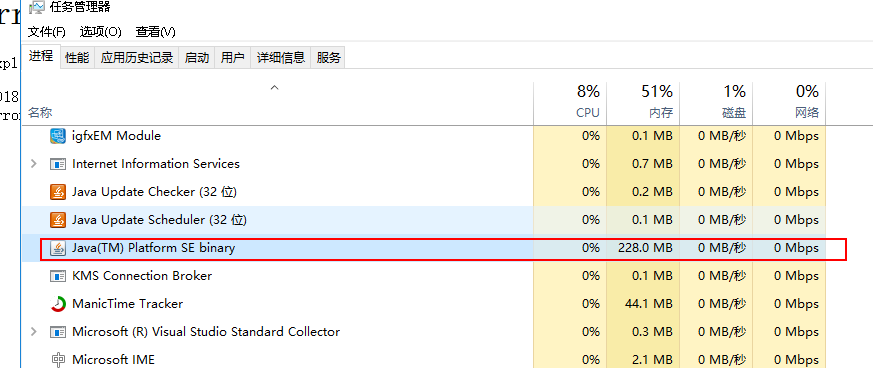
参考:https://www.cnblogs.com/onlycxue/p/3573154.html
或:
@Bean

public EmbeddedServletContainerFactory servletContainer(){

TomcatEmbeddedServletContainerFactory factory=new TomcatEmbeddedServletContainerFactory();

factory.setPort();

factory.setSessionTimeout(,TimeUnit.MINUTES);

//factory.addErrorPages(new ErrorPage(HttpStatus.Not_FOUND,"/notfund.html"));

return factory;

}
参考:
https://www.cnblogs.com/zhao1949/p/6206417.html
spring boot
spring cloud
https://www.zhihu.com/question/39483566
Spring Boot之HelloWorld的更多相关文章
- Spring Boot 之 HelloWorld详解
摘要: 原创出处:www.bysocket.com 泥瓦匠BYSocket 希望转载,保留摘要,谢谢! “以前是人放狗看家,现在是狗牵着人散步” — 随笔 一.Spring Boot 自述 世界上最好 ...
- Springboot(二):Spring Boot 之 HelloWorld
关于项目的创建不再解释,需要了解的请参考: Springboot(一):使用Intellij中的Spring Initializr来快速构建Spring Boot工程 目录结构: 首先我们在上一项目的 ...
- 借助Maven入手Spring Boot第一个程序
目前网上有不少Spring Boot的入门文章,都很有帮助,本人最近在深入学习Spring Cloud,在搭建第一个Hello World程序时,感觉对于新手而言,介绍文章怎么详细都不为过,因为其中坑 ...
- Spring Boot 集成 FreeMarker 详解案例(十五)
一.Springboot 那些事 SpringBoot 很方便的集成 FreeMarker ,DAO 数据库操作层依旧用的是 Mybatis,本文将会一步一步到来如何集成 FreeMarker 以及配 ...
- Spring Boot应用启动的三种方式
Spring Boot应用HelloWorld的三种启动方式: 项目的创建可以在http://start.spring.io/网站中进行项目的创建. 首先项目结构: 1. 通过main方法的形式启动 ...
- spring boot 初试,springboot入门,springboot helloworld例子
因为项目中使用了spring boot ,之前没接触过,所以写个helloworld玩玩看,当做springboot的一个入门例子.搜索 spring boot.得到官方地址:http://proje ...
- Spring Boot——2分钟构建spring web mvc REST风格HelloWorld
之前有一篇<5分钟构建spring web mvc REST风格HelloWorld>介绍了普通方式开发spring web mvc web service.接下来看看使用spring b ...
- [转]Spring Boot——2分钟构建spring web mvc REST风格HelloWorld
Spring Boot——2分钟构建spring web mvc REST风格HelloWorld http://projects.spring.io/spring-boot/ http://spri ...
- Spring Boot实战之逐行释义HelloWorld
一.前言 研究Spring boot也有一小段时间了,最近会将研究东西整理一下给大家分享,大概会有10~20篇左右的博客,整个系列会以一个简单的博客系统作为基础,因为光讲理论很多东西不是特别容易理解 ...
随机推荐
- select2插件替换掉数据列表为空时候的No results found的提示
$(".select2").select2({ language: { noResults: function (params) { return "暂无数据" ...
- [Backbone]7. Collection Views, Custom Events
It's finally time to start building out our Appointment app. We're going to be using a collection an ...
- IN 查询时出现ORA-01795:列表中的最大表达式数为1000解决方法
问题描写叙述: SQL进行IN查询时出现:java.sql.SQLException: ORA-01795: 列表中的最大表达式数为 1000 解决的方法: 问题原因是:SQL进行IN查询时.IN中的 ...
- 编程算法 - 二叉搜索树 与 双向链表 代码(C++)
二叉搜索树 与 双向链表 代码(C++) 本文地址: http://blog.csdn.net/caroline_wendy 题目:输入一颗二叉搜索树, 将该二叉搜索树转换成一个排序的双向链表. 要求 ...
- Linux内核二层数据包接收流程
本文主要讲解了Linux内核二层数据包接收流程,使用的内核的版本是2.6.32.27 为了方便理解,本文采用整体流程图加伪代码的方式从内核高层面上梳理了二层数据包接收的流程,希望可以对大家有所帮助.阅 ...
- SQL入门教程
SQL SELECT DISTINCT 语句 在表中,可能会包含重复值.这并不成问题,不过,有时您也许希望仅仅列出不同(distinct)的值. 关键词 DISTINCT 用于返回唯一不同的值. 语法 ...
- WebStorm配置
一.主题配色 主题设置方法:File -> Settings -> Appearance & Behavior -> Appearance ->Theme. webst ...
- 建maven私服nexus
1.下载nexus 2.配置java环境 3.安装 C:\Program Files\nexus\nexus-2.11.4-01\bin\jsw\windows-x86-64 4.配置 http:// ...
- openerp7.0接收邮件时别名区分大小写问题,以及处理非别名域邮件问题解决方法
修改代码addons\mail\mail_thread.py #550 line #local_parts = [e.split('@')[0] for e in tools.email_split( ...
- CF MVC3此操作要求连接到 'master' 数据库。无法创建与 'master' 数据库之间的连接,这是因为已打开原始数据库连接,并且已从连接字符串中删除凭据。请提供未打开的连接 解决方法
<add name="ProwebEntities" connectionString ="Data Source=.;Integrated Security=tr ...