
VRRP+tunnel+IP SLA+Track实现冗余切换
IP SLA(Internet Protocol Service-Level Agreement)互联网服务等级协议,本实验里通过发送测试报文,测试下一跳是否可达,结合Track实现冗余静态路由的切换。
实验环境:
模拟器:GNS3-1.5.2
路由器IOS 版本:C2691-ADVENTERPRISEK9-M)
交换机IOS版本:(C3640-IK9S-M), Version 12.4(10)
终端:VPCS

------------------------------网络接口配置---------------------------------------------
R1:
R1#sho ip interface brief
Interface IP-Address OK? Method Status Protocol
FastEthernet0/1 172.16.20.1 YES NVRAM up up
FastEthernet1/0 192.168.1.2 YES NVRAM up up
Tunnel0 172.18.1.2 YES NVRAM up up
R1(config)#interface Tunnel0
ip address 172.18.1.2 255.255.255.0
keepalive 10 3
tunnel source FastEthernet0/1
tunnel destination 10.1.1.4
R2:
R2#sho ip inter bri
Interface IP-Address OK? Method Status Protocol
FastEthernet0/1 192.168.1.3 YES NVRAM up up
FastEthernet1/0 172.16.50.1 YES NVRAM up up
Tunnel0 172.18.2.2 YES NVRAM up up
R2(config)#interface Tunnel0
ip address 172.18.2.2 255.255.255.0
tunnel source FastEthernet1/0
tunnel destination 10.1.1.4
R3:
R3#sh ip int bri
Interface IP-Address OK? Method Status Protocol
FastEthernet0/1 172.16.20.2 YES NVRAM up up
FastEthernet1/0 10.1.1.2 YES NVRAM up up
R4:
R4#show ip int br
Interface IP-Address OK? Method Status Protocol
FastEthernet1/0 172.16.50.2 YES NVRAM up up
FastEthernet1/1 10.1.1.3 YES NVRAM up up
R5:
R5#sh ip int br
Interface IP-Address OK? Method Status Protocol
FastEthernet0/0 unassigned YES unset up up
FastEthernet0/1 unassigned YES unset up up
FastEthernet0/10 10.248.0.1 YES NVRAM up up
Vlan10 10.1.1.4 YES NVRAM up up
Tunnel0 172.18.1.1 YES NVRAM up up
Tunnel1 172.18.2.1 YES NVRAM up up
R5(config)#interface Tunnel0
ip address 172.18.1.1 255.255.255.0
tunnel source Vlan10
tunnel destination 172.16.20.1
exit
interface Tunnel1
ip address 172.18.2.1 255.255.255.0
tunnel source Vlan10
tunnel destination 172.16.50.1
Sw1:
sw1#sh ip int br
Interface IP-Address OK? Method Status Protocol
FastEthernet0/0 unassigned YES unset up up
FastEthernet0/1 unassigned YES unset up up
FastEthernet0/10 20.1.1.1 YES NVRAM up up
Vlan10 192.168.1.4 YES NVRAM up up
VPCS:
PC1> ip 20.1.1.2/24 20.1.1.1
PC2> ip 10.248.0.2/24 10.248.0.1
--------------------------------------------------IP SLA与静态路由配置命令---------------------------------------------------------------
R1:
R1(config-sla-monitor)#type echo protocol ipIcmpEcho 10.1.1.4
life forever start-time now
R1(config)#track 10
rtr 10
reachability
R1(config-track)#exit
R1(config)#ip route 10.1.1.0 255.255.255.0 172.16.20.2
R1(config)#ip route 10.248.0.0 255.255.255.0 Tunnel0
R1(config)#ip route 20.1.1.0 255.255.255.0 192.168.1.4
R2:
R2(config-sla-monitor)#type echo protocol ipIcmpEcho 10.1.1.4
life forever start-time now
R2(config)#track 10
reachability
R2(config-track)#exit
R2(config)#ip route 10.1.1.0 255.255.255.0 172.16.50.2
R2(config)#ip route 10.248.0.0 255.255.255.0 Tunnel0
R2(config)#ip route 20.1.1.0 255.255.255.0 192.168.1.4
R3:
R3(config)#ip route 10.248.0.0 255.255.255.0 10.1.1.4
R3(config)#ip route 20.1.1.0 255.255.255.0 172.16.20.1
R3(config)#ip route 172.17.1.0 255.255.255.0 172.16.20.1
R3(config)#ip route 192.168.1.0 255.255.255.0 172.16.20.1
R4:
R4(config)#ip route 10.248.0.0 255.255.255.0 10.1.1.4
R4(config)#ip route 20.1.1.0 255.255.255.0 172.16.50.1
R4(config)#ip route 172.17.2.0 255.255.255.0 172.16.50.1
R4(config)#ip route 192.168.1.0 255.255.255.0 172.16.50.1
R5:
R5(config(config-sla-monitor)#type echo protocol ipIcmpEcho 172.16.20.1 source-interface Vlan10 //从vlan10 去ping 172.16.20.1
R5
(config-sla-monitor-echo)#timeout 5000 //5秒没有响应,认为掉线
R5
(config-sla-monitor-echo)#frequency 3 //每3秒PING 一次
life forever start-time now
reachability
R5(config-track)#exit
R5(config)#ip route 20.1.1.0 255.255.255.0 Tunnel1 10
R5(config)#ip route 172.16.20.0 255.255.255.0 Vlan10
R5(config)#ip route 172.16.50.0 255.255.255.0 Vlan10
-----------------------------------------------------VRRP配置---------------------------------------------------------------------
R1:
R1(config)#interface FastEthernet1/0
ip address 192.168.1.2 255.255.255.0
vrrp 10 ip 192.168.1.1
vrrp 10 priority 250
standby 1 preempt
vrrp 10 track 10 decrement 100 //当出现SLA出现中断时,把自己的优先级降低100.
R1:
R2(config)#interface FastEthernet0/1
ip address 192.168.1.3 255.255.255.0
vrrp 10 ip 192.168.1.1
vrrp 10 priority 200
-----------------------------------------------------测试---------------------------------------------------------------------
中断master任意节点,切线路自动切换.

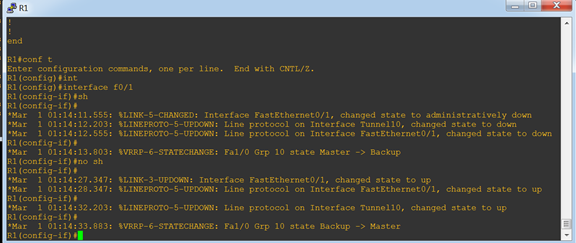
在双方设备条件允许情况下,可以使用 BFD检测机制,提供毫秒级检测。大多数情况下,由于网络设备厂商不同、设备新旧程度不同,可能不支持BFD协议,所以IP SLA作为备选方案提供秒级的检测。华为的NQA技术和cisco IP SLA类似。
VRRP+tunnel+IP SLA+Track实现冗余切换的更多相关文章
- Cisco IOS IP Service Level Agreementv (IP SLA)
Responder and Control Protocol 1.Responder内嵌在思科目标路由器中的一个组件,用来对IP SLA请求包做应答,通过对应达包添加时间戳属性,以提高测量计算的准确性 ...
- VRRP虚IP漂移
简介 VRRP 是 Virtual Router Redundancy Protocol 的简称,即 虚拟路由冗余协议 . 原文地址:https://linux-network-programming ...
- openstack私有云布署实践【3 keepalive配置(VRRP虚IP)】
这里只用到keepalived 或者pacemaker两种方法,可二选一来配置,官方提供的是pacemaker,但我们实际测试环境和生产环境上使的是keepalive 首先在4台control ...
- [转]openstack-kilo--issue(十四)Tunnel IP %(ip)s in use with host %(host)s'
bug: http://lists.openstack.org/pipermail/openstack-operators/2015-August/007924.html https://bugs.l ...
- 理解 OpenStack 高可用(HA)(2):Neutron L3 Agent HA 之 虚拟路由冗余协议(VRRP)
本系列会分析OpenStack 的高可用性(HA)概念和解决方案: (1)OpenStack 高可用方案概述 (2)Neutron L3 Agent HA - VRRP (虚拟路由冗余协议) (3)N ...
- 架构-虚拟路由器冗余协议【原理篇】VRRP详解
转自:http://zhaoyuqiang.blog.51cto.com/6328846/1166840/ 为什么要使用VRRP技术 我们知道,为了实现不同子网之间的设备通信,需要配置路由.目前常用的 ...
- (转)虚拟路由器冗余协议【原理篇】VRRP详解
原文:http://blog.51cto.com/zhaoyuqiang/1166840 为什么要使用VRRP技术 我们知道,为了实现不同子网之间的设备通信,需要配置路由.目前常用的指定路由方法有两种 ...
- VRRP(Virtual Router Redundancy Protocol) 虚拟路由器冗余协议简介
因工作中使用Keepalived配置Nginx代理和MySQL代理的高可用,而Keepalived是VRRP协议在linux上的软件实现.因此了解了下VRRP的基础. 1. VRRP技术的引入 随着I ...
- 冗余网络构建方案对比:VRRP协议、多网卡绑定及WN202冗余链路网卡
在组建网络时为网络设计冗余方案已经成为提高网络可用性必不可少的一环,伴随着网络技术的发展实现网络冗余的技术方案也是层出不穷,例如应用于服务器端的HA.LB,应用于存储的SAN.DAS.NAS等.本文重 ...
随机推荐
- 使用concurrent.futures模块并发,实现进程池、线程池
Python标准库为我们提供了threading和multiprocessing模块编写相应的异步多线程/多进程代码 从Python3.2开始,标准库为我们提供了concurrent.futures模 ...
- input file实现多选,限制文件上传类型,图片上传前预览功能
限制上传类型 & 多选:① accept 属性只能与 <input type="file" /> 配合使用.它规定能够通过文件上传进行提交的文件类型. ② mu ...
- 标绘ol3版开源啦
地址:git.oschina.net/ilocation/plot By 平凡的世界 plot4ol3 说明 基于OpenLayers3实现动态标绘API. 在线体验 :7xr2vb.com1.z0. ...
- 2018 ACM-ICPC 中国大学生程序设计竞赛线上赛 F题 Clever King(最小割)
2018 ACM-ICPC 中国大学生程序设计竞赛线上赛:https://www.jisuanke.com/contest/1227 题目链接:https://nanti.jisuanke.com/t ...
- ASP.NET web api 跨域请求
1.学习文章:AJAX 跨域请求 - JSONP获取JSON数据 1.asp.net代码 参考文章:http://www.sxt.cn/info-2790-u-756.html (1).增加CorsH ...
- 【转】python中的对象拷贝
转自:https://www.cnblogs.com/bhlsheji/p/5352330.html python中.进行函数參数传递或者返回值时,假设是一般的变量,会拷贝传递.假设是列表或字典则是引 ...
- PAT乙级1006
1006 换个格式输出整数 (15 分) 让我们用字母 B 来表示“百”.字母 S 表示“十”,用 12...n 来表示不为零的个位数字 n(<10),换个格式来输出任一个不超过 3 位的正 ...
- bat取时间间隔
@echo off echo 现在时间是%time:~,%点%time:~,%分%time:~,%秒 ,%%time:~,%%time:~,% pause echo 现在时间是%time:~,%点%t ...
- iOS 折线图、柱状图的简单实现
首先我得感谢某位博主,非常抱歉,因为之前直接下载博主提供这篇文章的demo,然后去研究了,没记住博主的名字.再次非常感谢. 而这个dome我又修改了一些,完善了一些不美观的bug,当然还有,后面会陆续 ...
- 0CO_PC_01 成本对象控制: 计划/实际数据
用户提出要取生产订单的成本分析明细,分析目标和实际的差异. 查了一下,可以使用 BW标准数据源:0CO_PC_01 其中,值类型:10(实际).20(计划).30(目标) 货币类型:20(成本控制范围 ...