
holder.js如何使用
holder.js的使用
一、总结
一句话总结:使用:holder.js后面接图片宽高
<img src="holder.js/300x200" />
1、holder.js的使用注意事项是什么?
使用:<img src="holder.js/300x200" />注意事项:300x200里面的符号是x,不是乘法号
2、holder.js后如何接类似主题这样的参数?
和url接参数的方式一致,?问号加参数(使用的时候失败了)
theme: The theme to use for the placeholder. Example:holder.js/300x200?theme=skyrandom: Use random theme. Example:holder.js/300x200?random=yes
二、holder.js的使用
使用:<img src="holder.js/300x200" />注意事项:300x200里面的符号是x,不是乘法号
为了避免控制台404错误,您可以使用data-src代替src。<img data-src="holder.js/300x200" />
Placeholder options are set through URL properties, e.g. holder.js/300x200?x=y&a=b. Multiple options are separated by the & character.
theme: The theme to use for the placeholder. Example:holder.js/300x200?theme=skyrandom: Use random theme. Example:holder.js/300x200?random=yesbg: Background color. Example:holder.js/300x200?bg=2a2025fg: Foreground (text) color. Example:holder.js/300x200?fg=fffffftext: Custom text. Example:holder.js/300x200?text=Hellosize: Custom text size. Defaults toptunits. Example:holder.js/300x200?size=50font: Custom text font. Example:holder.js/300x200?font=Helveticaalign: Custom text alignment (left, right). Example:holder.js/300x200?align=leftoutline: Draw outline and diagonals for placeholder. Example:holder.js/300x200?outline=yeslineWrap: Maximum line length to image width ratio. Example:holder.js/300x200?lineWrap=0.5
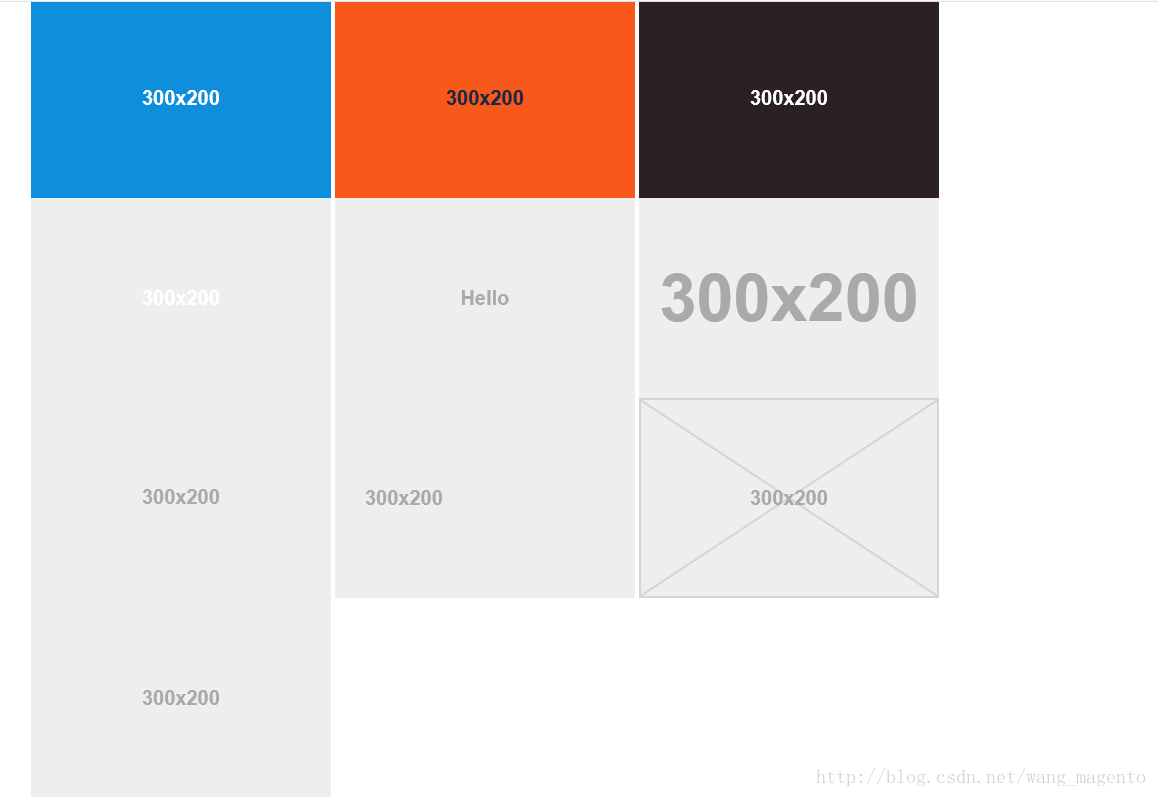
sky, vine, lava, gray, industrial, and social. Example: holder.js/300x200?theme=social Themes
have 5 properties: fg, bg, size, font and fontweight.
The size property specifies the
minimum font
size for the theme. The fontweight default
value is bold. You
can create a sample theme like this:
Holder.addTheme("red", {
bg: "#F00",
fg: "#aaa",
size: 11,
font: "Monaco",
fontweight: "normal"
});
</script>
If you have a group of placeholders where you'd like to use particular text, you can do so by adding a text property
to the theme:
Holder.addTheme("thumbnail", { bg: "#fff", text: "Thumbnail" });
参考:holder.js的使用 - CSDN博客
https://blog.csdn.net/wang_magento/article/details/78799032
holder.js如何使用的更多相关文章
- html图片占位符插件holder.js
1.下载源码 下载链接:http://www.bootcdn.cn/holder/ 2.在HTML中引入holde.js <script src="holder-js-2.9.4\ho ...
- 你需要了解的JS框架
excanvas.js/Chart.js/cubism.js/d3.js/dc.js/dx.chartjs.js/echarts.js/flot.js 用途:构建数据统计图表,兼容多浏览器 ...
- 前端开发需要了解的JS插件
excanvas.js/Chart.js/cubism.js/d3.js/dc.js/dx.chartjs.js/echarts.js/flot.js 用途:构建数据统计图表,兼容多浏览器 jquer ...
- bootstrap1
让bootstarp3 支持ie的兼容模式: 支持浏览器的响应式布局: 是指网页既可以用在pc上,也可以用在手机上, 而且不需要修改源文件. bootstrap包括: css文件, 只需要加载: cs ...
- bootstrap--小李子demo
最近忙啊...看到各位冬鞋都在认真写博客,认真敲代码,认真工作,总觉得自己时间太少,总觉得时间不够,老了...... 进正题: 上次不知从哪里(忘了)下载了bootstrap的一些使用小demo,以后 ...
- editplus中使用emmet?
要用emmet生成html类型, 格式是: html:???, 意思是 都是html大类型, 小类型用冒号. 如:html:5, 或者全部都是! 则生成html5的类型文档. emmet是zen co ...
- bootstrap-carousel
功能:轮播插件carousel, 主要用于首页大图片的显示与左右按钮的点击滑动图片 插件:carouse.js 要点:class="carousel slide"里的data-sl ...
- 15款增强web体验的Javascript库
1. Pikaday: Standalone JavaScript Datepicker 这是一个令人耳目一新的JavaScript日期选择器 轻量轻(压缩和gzip后小于5KB) 没有依赖其它JS框 ...
- React+BootStrap+ASP.NET MVC实现自适应和组件的复用
系统展示如下 1.前端采用bootstrap3进行架构 2.后端采用asp.net mvc进行开发 开发工具vs2010 mvc4需要安装sp1的补丁. 3.js组件的封装采用react 1.新建mv ...
随机推荐
- CRC校验的C语言实现
文章转自 循环冗余校验(CRC)算法入门引导 - Ivan 的专栏 - 博客频道 - CSDN.NET http://blog.csdn.net/liyuanbhu/article/details/7 ...
- Spring MVC学习------------WebApplicationContext
父子上下文(WebApplicationContext) 假设你使用了listener监听器来载入配置.一般在Struts+Spring+Hibernate的项目中都是使用listener监听器的. ...
- 怎样使用纯CSS3创建一个简单的五角星图形
我们能够使用SVG.Canvas.CSS3或者背景图片来实现五角星图案及其悬停效果. CSS3引入的伪元素和变换特性使得实现五角星图形很easy,而且能够结合渐变实现更为美丽的效果.因此使用图片实现五 ...
- SQL函数-str()
1 str()函数用于将数值类型数据转换未字符类型. 2 str()函数语法 select str(数字类型的表达式[,表达式总长度][,小数点后面的位数]) 表达式总长度和小数点后面的位数为可选择参 ...
- 如何把本地的项目推送到github上面去
前题:本地已经建好了项目,但电脑上没有安装git (windows 系统) 1.首页从网上下载git 并安装. 2.进入项目所在的文件夹,右键鼠标 3.新建.gitignore文件 touch .g ...
- Linux桌面词典 GoldenDict词典
GoldenDict 是一款不错的.与StarDict(星际译王)类似的词典软件.它使用 WebKit作为渲染核心,格式化.颜色.图像.链接等支持一应俱全:支持多种词典文件格式,包括Babylon的 ...
- vue抽取公共方法———方法一
方法一:Vue插件 1.概述 作用:满足vue之外的需求,特定场景的需求 比如说,让你在每个单页面组件里,都可以调用某个方法(公共方法),或者共享某个变量等 2.使用方法 [声明插件]- [写插件]- ...
- 洛谷——P1518 两只塔姆沃斯牛 The Tamworth Two
https://www.luogu.org/problem/show?pid=1518 题目背景 题目描述 两只牛逃跑到了森林里.农夫John开始用他的专家技术追捕这两头牛.你的任务是模拟他们的行为( ...
- C# Arcgis Engine 捕捉功能实现
namespace 捕捉 { public partial class Form1 : Form { private bool bCreateElement=true; ; ; private IEl ...
- iOS定制改动navigation的backbutton
iOS开发中.navigation的返回button是英文"back".想改动成中文"返回"或者自己定义的文字.这么简单的事情却折腾了小半个小时.原来是被lef ...