
holder.js如何使用
holder.js的使用
一、总结
一句话总结:使用:holder.js后面接图片宽高
<img src="holder.js/300x200" />
1、holder.js的使用注意事项是什么?
使用:<img src="holder.js/300x200" />注意事项:300x200里面的符号是x,不是乘法号
2、holder.js后如何接类似主题这样的参数?
和url接参数的方式一致,?问号加参数(使用的时候失败了)
theme: The theme to use for the placeholder. Example:holder.js/300x200?theme=skyrandom: Use random theme. Example:holder.js/300x200?random=yes
二、holder.js的使用
使用:<img src="holder.js/300x200" />注意事项:300x200里面的符号是x,不是乘法号
为了避免控制台404错误,您可以使用data-src代替src。<img data-src="holder.js/300x200" />
Placeholder options are set through URL properties, e.g. holder.js/300x200?x=y&a=b. Multiple options are separated by the & character.
theme: The theme to use for the placeholder. Example:holder.js/300x200?theme=skyrandom: Use random theme. Example:holder.js/300x200?random=yesbg: Background color. Example:holder.js/300x200?bg=2a2025fg: Foreground (text) color. Example:holder.js/300x200?fg=fffffftext: Custom text. Example:holder.js/300x200?text=Hellosize: Custom text size. Defaults toptunits. Example:holder.js/300x200?size=50font: Custom text font. Example:holder.js/300x200?font=Helveticaalign: Custom text alignment (left, right). Example:holder.js/300x200?align=leftoutline: Draw outline and diagonals for placeholder. Example:holder.js/300x200?outline=yeslineWrap: Maximum line length to image width ratio. Example:holder.js/300x200?lineWrap=0.5
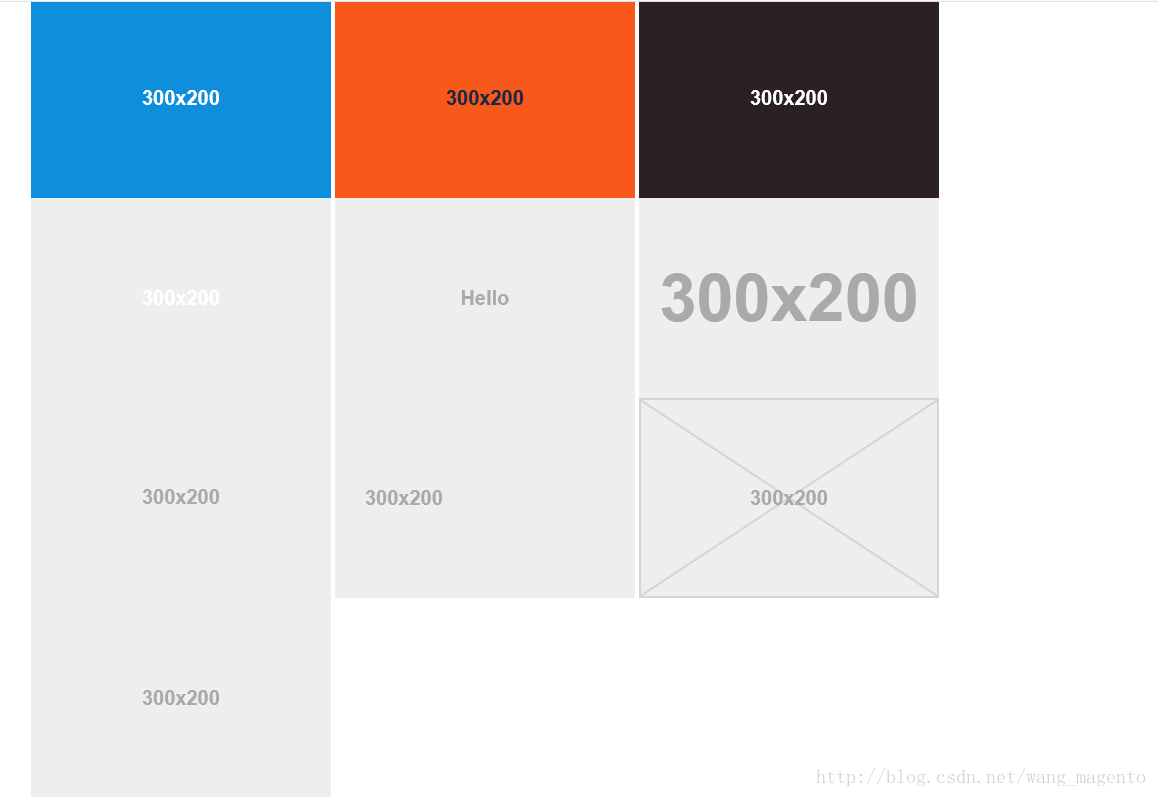
sky, vine, lava, gray, industrial, and social. Example: holder.js/300x200?theme=social Themes
have 5 properties: fg, bg, size, font and fontweight.
The size property specifies the
minimum font
size for the theme. The fontweight default
value is bold. You
can create a sample theme like this:
Holder.addTheme("red", {
bg: "#F00",
fg: "#aaa",
size: 11,
font: "Monaco",
fontweight: "normal"
});
</script>
If you have a group of placeholders where you'd like to use particular text, you can do so by adding a text property
to the theme:
Holder.addTheme("thumbnail", { bg: "#fff", text: "Thumbnail" });
参考:holder.js的使用 - CSDN博客
https://blog.csdn.net/wang_magento/article/details/78799032
holder.js如何使用的更多相关文章
- html图片占位符插件holder.js
1.下载源码 下载链接:http://www.bootcdn.cn/holder/ 2.在HTML中引入holde.js <script src="holder-js-2.9.4\ho ...
- 你需要了解的JS框架
excanvas.js/Chart.js/cubism.js/d3.js/dc.js/dx.chartjs.js/echarts.js/flot.js 用途:构建数据统计图表,兼容多浏览器 ...
- 前端开发需要了解的JS插件
excanvas.js/Chart.js/cubism.js/d3.js/dc.js/dx.chartjs.js/echarts.js/flot.js 用途:构建数据统计图表,兼容多浏览器 jquer ...
- bootstrap1
让bootstarp3 支持ie的兼容模式: 支持浏览器的响应式布局: 是指网页既可以用在pc上,也可以用在手机上, 而且不需要修改源文件. bootstrap包括: css文件, 只需要加载: cs ...
- bootstrap--小李子demo
最近忙啊...看到各位冬鞋都在认真写博客,认真敲代码,认真工作,总觉得自己时间太少,总觉得时间不够,老了...... 进正题: 上次不知从哪里(忘了)下载了bootstrap的一些使用小demo,以后 ...
- editplus中使用emmet?
要用emmet生成html类型, 格式是: html:???, 意思是 都是html大类型, 小类型用冒号. 如:html:5, 或者全部都是! 则生成html5的类型文档. emmet是zen co ...
- bootstrap-carousel
功能:轮播插件carousel, 主要用于首页大图片的显示与左右按钮的点击滑动图片 插件:carouse.js 要点:class="carousel slide"里的data-sl ...
- 15款增强web体验的Javascript库
1. Pikaday: Standalone JavaScript Datepicker 这是一个令人耳目一新的JavaScript日期选择器 轻量轻(压缩和gzip后小于5KB) 没有依赖其它JS框 ...
- React+BootStrap+ASP.NET MVC实现自适应和组件的复用
系统展示如下 1.前端采用bootstrap3进行架构 2.后端采用asp.net mvc进行开发 开发工具vs2010 mvc4需要安装sp1的补丁. 3.js组件的封装采用react 1.新建mv ...
随机推荐
- 【Facebook的UI开发框架React入门之九】button简单介绍(iOS平台)-goodmao
--------------------------------------------------------------------------------------------------- ...
- Equals和==比較
总结一下: 对于字符串来说.两个比較的都是对象的值,而且是等效的,这是由于MS重写了==运算符和Equals方法所致 对于非字符串的其它引用类型(非匿名类型)两个比較的都是对象 ...
- 五大最受欢迎的BUG管理系统
Google在中国大陆遭遇变故做出临时性的退出大陆市场,也使非常多忠实的用户受到小小的挫折,以本公司为例.原本的BUG都是记录在google的 EXCEL在线文档中,由于常常性的打不开.測试和开发组在 ...
- SQL Source Control
https://documentation.red-gate.com/display/SOC5/SQL+Source+Control+5+documentation Working with migr ...
- Intellij Idea创建的第一个JavaWeb程序
第一个JavaWeb程序 1. 创建 2. 目录结构 src目录用于放java源文件,web目录用于放web资源,WEB-INF是Java web应用固定的存放配置及类库的目录,index.jsp是我 ...
- Cisco交换机解决网络蠕虫病毒入侵问题
Cisco交换机解决网络蠕虫病毒入侵问题 今年来网络蠕虫泛滥给ISP和企业都造成了巨大损失,截至目前已发现近百万种病毒及木马.受感染的网络基础设施遭到破坏,以Sql Slammer为 ...
- Tomcat部署项目修改浏览器上猫咪头像
一.发现问题用tomcat部署项目,在浏览器标签也上发现了tomcat猫咪图.要把这个图修改掉. 二.解决问题apache-tomcat-5.5.28\webapps\ROOT下的ico文件,将需要替 ...
- LINUX上使用GDB单步调试Chromium Android C++代码。
###动机###在LINUX使用GDB单步调试Chromium Android C++代码. [1]编译android平台Chromium, 修改GN文件中编译选项:-g -O0 使得编译优化更少,便 ...
- Linux下yum安装ffmpeg和使用
本文属于转载文章:转载地址是http://www.cnblogs.com/dennisit/archive/2012/12/27/2835089.html 使用Yum安装ffmpeg 打开 vi /e ...
- leetcode笔记:Sort Colors
一. 题目描写叙述 Given an array with n objects colored red, white or blue, sort them so that objects of the ...