
[Angular2 Router] Auxiliary Routes bit by bit
Auxiliary Routes is is little bit hard to understand.
Here is demo, link
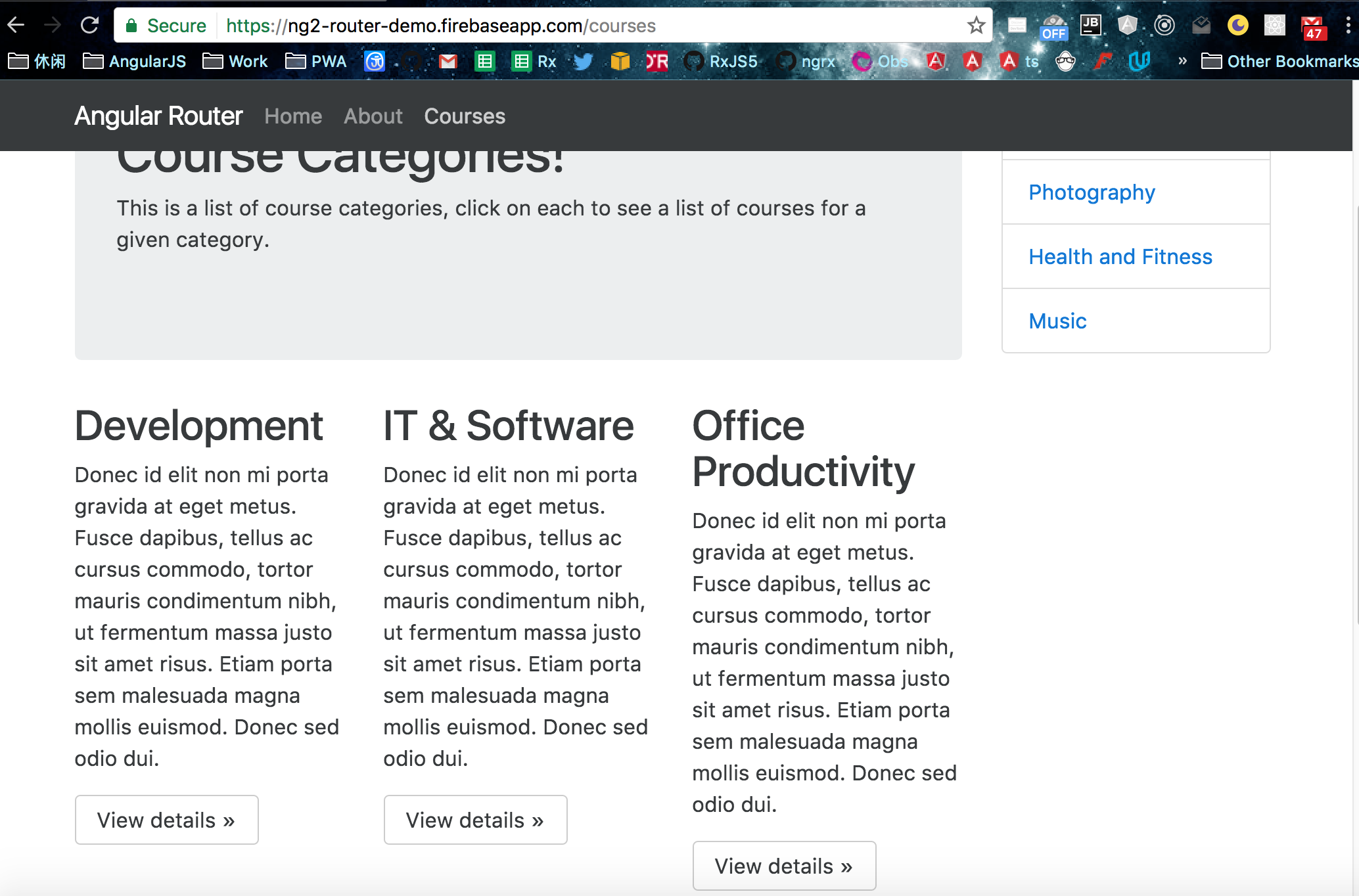
You can see each category has an own 'View detials' button, and there is a side menu on the right side.
What we want is when we click the "View details" button, it will nav to category detail component along with the id (in this case is the title ex: 'development').
Also we want the side menu also get the information what button have been clicked.
Vice Versa....

Once we got those id, then we can do the rest application logic, which won't be included here... but the importantce is to get the id for both category detail component and sidemenu component.
The router config:
export const routerConfig: Routes = [

    {

        path: 'home',

        component: HomeComponent

    },

    {

        path: 'courses',

        component: CoursesComponent,

        children: [

            {

                path: '',

                component: CourseCardsComponent

            },

            {

              path: ':id',

              component: CoursesCategoryComponent

            },

            {

                path: '',

                outlet: 'sidemenu',

                component: SideMenuComponent

            },

            {

                path: ':id',

                outlet: 'sidemenu',

                component: SideMenuComponent

            }

        ]

    },

    {

        path: '',

        redirectTo: '/home',

        pathMatch: 'full'

    },

    {

        path: '**',

        redirectTo: '/home',

        pathMatch: 'full'

    }

];
Look at 'courses' router, we have two empty paths, it means for the empty path, we have tow componet to display, one is 'CourseCardsComponent' and 'SidemenuComponent'. 'CourseCardsComponent' will be displayed in primay outlet, and 'SidemenuComponent' will be display in auxiliary router outlet.
<main>

    <div class="container">

        <div class="row row-offcanvas row-offcanvas-right">

            <div class="col-xs-12 col-sm-9">

                <ol class="breadcrumb">

                    <li class="breadcrumb-item"><a routerLink="/home">Home</a></li>

                    <li class="breadcrumb-item active">Courses</li>

                </ol>

                <div class="jumbotron">

                    <h1>Course Categories!</h1>

                    <p>This is a list of course categories, click on each to see a list of courses for a given

                        category.</p>

                </div>

                <router-outlet></router-outlet>

            </div>

            <router-outlet name="sidemenu"></router-outlet>

        </div>

    </div>

</main>
So now when we click the button, how to make url like this:
/courses/(development//sidemenu:development)
and what does it means?
This url means:
the courses url segment is active
inside it the primary route is set to
/courses/developmentthe auxiliary child route 'development' is active for the outlet
sidemenu
So there are two thing going on, for the primay outlet, we are in /courses/development state, and for sidemenu, we are also in /development state.
import { Component, OnInit } from '@angular/core';

import {Router, ActivatedRoute} from "@angular/router";

@Component({

  selector: 'app-course-cards',

  templateUrl: './course-cards.component.html',

  styleUrls: ['./course-cards.component.css']

})

export class CourseCardsComponent {

  constructor(private router: Router, private route: ActivatedRoute) {

  }

    navigate(path) {

        this.router.navigate([{outlets: {primary: path, sidemenu:path}}], {relativeTo: this.route});

    }

}
    <div class="col-xs-6 col-lg-4">

        <h2>Development</h2>

        <p>Donec id elit non mi porta gravida at eget metus. Fusce dapibus, tellus ac cursus commodo, tortor mauris condimentum nibh, ut fermentum massa justo sit amet risus. Etiam porta sem malesuada magna mollis euismod. Donec sed odio dui. </p>

        <p><a class="btn btn-secondary" (click)="navigate('development')"  role="button">View details »</a></p>

    </div>
So we are using 'navigate' method or Router, set primary and auxiliary router's path to 'development'.
How to get the path information in sidemenu and category detail?
  id: string;

  constructor(route: ActivatedRoute, private router: Router) {

    route.params.subscribe(

        (params) => this.id = params['id']

    )

  }
Until now, when we click the "View details" button, we can finish the logic, then let's see how it is done from sidemenu.
<div class="col-xs-6 col-sm-3 sidebar-offcanvas" id="sidebar">

    <h2>{{id}}</h2>

    <div class="list-group">

        <a (click)="nav($event, 'development')" class="list-group-item">Development</a>

        <a href="#" (click)="nav($event, 'it-software')" class="list-group-item">IT &

            Software</a>

        <a href="#" (click)="nav($event, 'office')" class="list-group-item">Office

            Productivity</a>

        <a href="#" (click)="nav($event, 'photo')" class="list-group-item">Photography</a>

        <a href="#" (click)="nav($event, 'health')" class="list-group-item">Health and

            Fitness</a>

        <a href="#" (click)="nav($event, 'music')" class="list-group-item">Music</a>

    </div>

</div>
  nav(e, path){

    e.preventDefault();

    this.router.navigateByUrl(`/courses/(${path}//sidemenu:${path})`);

  }
Pretty simple and similar, just using navigateByUrl method, cause here we want to use absoulte router.
[Angular2 Router] Auxiliary Routes bit by bit的更多相关文章
- [Angular2 Router] Resolving route data in Angular 2
From Article: RESOLVING ROUTE DATA IN ANGULAR 2 Github If you know Anuglar UI router, you must know ...
- [Angular2 Router] Lazy Load Angular 2 Modules with the Router
Angular 2 lazy loading is a core feature of Angular 2. Lazy loading allows your application to start ...
- 在addroutes后,$router.options.routes没有更新的问题(手摸手,带你用vue撸后台 读后感)
参照<着手摸手,带你用vue撸后台>一文,本人做了前端的权限判断 https://segmentfault.com/a/1190000009275424 首先就是在addroutes后,$ ...
- [Angular2 Router] Configure Auxiliary Routes in the Angular 2 Router - What is the Difference Towards a Primary Route?
In this tutorial we are going to learn how we can can configure redirects in the angular 2 router co ...
- [Angular2 Router] Use Params from Angular 2 Routes Inside of Components
Angular 2’s ActivatedRoute allows you to get the details of the current route into your components. ...
- Angular2 Router路由相关
路由设置 Angular中路由的配置应该按照先具体路由到通用路由的设置,因为Angular使用先匹配者优先的原则. 示例: 路由设置如下: export const reportRoute: Rout ...
- [Angular2 Router] CanActivate Route Guard - An Example of An Asynchronous Route Guard
In this tutorial we are going to learn how we can to configure an can activate route guard in the An ...
- [Angular2 Router] CanDeactivate Route Guard - How To Confirm If The User Wants To Exit A Route
In this tutorial we are going to learn how we can to configure an exit guard in the Angular 2 Router ...
- [Angular2 Router] Optional Route Query Parameters - The queryParams Directive and the Query Parameters Observable
In this tutorial we are going to learn how to use the Angular 2 router to pass optional query parame ...
随机推荐
- 使程序在Linux下后台运行 (关掉终端继续让程序运行的方法)
你是否遇到过这样的情况:从终端软件登录远程的Linux主机,将一堆很大的文件压缩为一个.tar.gz文件,连续压缩了半个小时还没有完成,这时,突然你断网了,你登录不上远程Linux主机了,那么前面的半 ...
- 【Hello 2018 A】 Modular Exponentiation
[链接] 我是链接,点我呀:) [题意] 在这里输入题意 [题解] 当a<b的时候 a%b==a 显然2^n增长很快的. 当2^n>=1e8的时候,直接输出m就可以了 [代码] #incl ...
- Jenkins学习总结(3)——Jenkins+Maven+Git搭建持续集成和自动化部署的
前言 持续集成这个概念已经成为软件开发的主流,可以更频繁的进行测试,尽早发现问题并提示.自动化部署就更不用说了,可以加快部署速度,并可以有效减少人为操作的失误.之前一直没有把这个做起来,最近的新项目正 ...
- Nio学习3——基础模型:多路复用模型
Reactor模式和NIO 本文可看成是对Doug Lea Scalable IO in Java一文的翻译. 当前分布式计算 Web Services盛行天下,这些网络服务的底层都离不开对socke ...
- vmware-虚拟机播放器的下载、安装
如果是在window下安装的话: 1.下载vmware: 到官网下载免费个人版本 https://my.vmware.com/cn/web/vmware/free#desktop_end_user_c ...
- Fedora 13 Alpha测试手记横空出世
本文转载在:http://www.linux521.com/2009/system/201004/10719.html 本文是继<Fedora 11-Alpha试用手记>文章(http ...
- iOS Threading编程指南 官方文档翻译第一篇(序言)
序言 Thread是能够使多个code paths 在同一个APP内并发运行的几种技术之一.虽然新的技术为并发运行提供了先进.高效的工具(例如operation 对象和GCD),但是OS X和iO ...
- socket UDP简单通讯
// // SocketUDPServerClient.m // socket_server_client // // Created by lujunjie on 2016/11/26. // Co ...
- OpenCV人脸检測(完整源代码+思路)
本博文IDE为vs2013 OpenCV2.49 话不多说,先看视频演示(20S演示): 例如以下: https://v.youku.com/v_show/id_XMjYzMzkxMTYyMA==.h ...
- amazeui页面分析之登录页面
amazeui页面分析之登录页面 一.总结 1.tpl命名空间:tpl命名空间的样式都是从app.css里面来的,app.css用用来移动网站开发的样式 2.表单样式:am-form到am-form- ...