
[Python] Statistical analysis of time series
Global Statistics:
Common seen methods as such
1. Mean
2. Median
3. Standard deviation: the larger the number means it various a lot.
4. Sum.
Rolling Statistics:
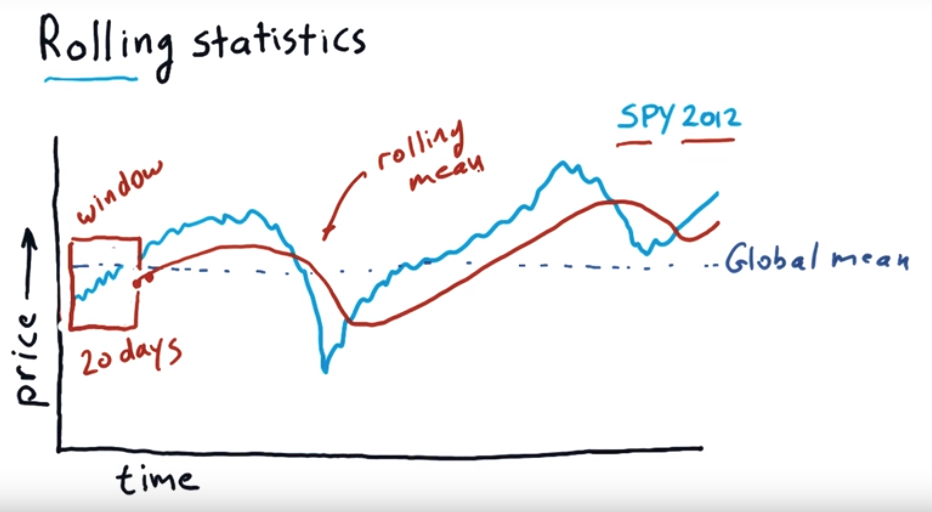
It use a time window, moving forward each day to calculate the mean value of those window periods.
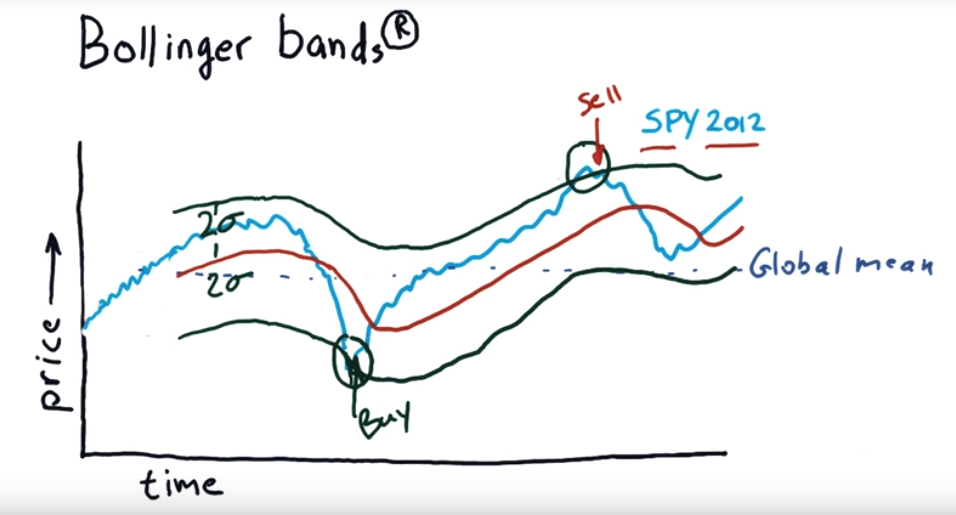
To find which day is good to buy which day is good for sell, we can use Bollinger bands.
Bollinger bands:
import os

import pandas as pd

import matplotlib.pyplot as plt

def test_run():

    start_date='2017-01-01'

    end_data='2017-12-15'

    dates=pd.date_range(start_date, end_data)

    # Create an empty data frame

    df=pd.DataFrame(index=dates)

    symbols=['SPY', 'AAPL', 'IBM', 'GOOG', 'GLD']

    for symbol in symbols:

        temp=getAdjCloseForSymbol(symbol)

        df=df.join(temp, how='inner')

    return df

if __name__ == '__main__':

    df=test_run()

    # data=data.ix['2017-12-01':'2017-12-15', ['IBM', 'GOOG']]

    # df=normalize_data(df)

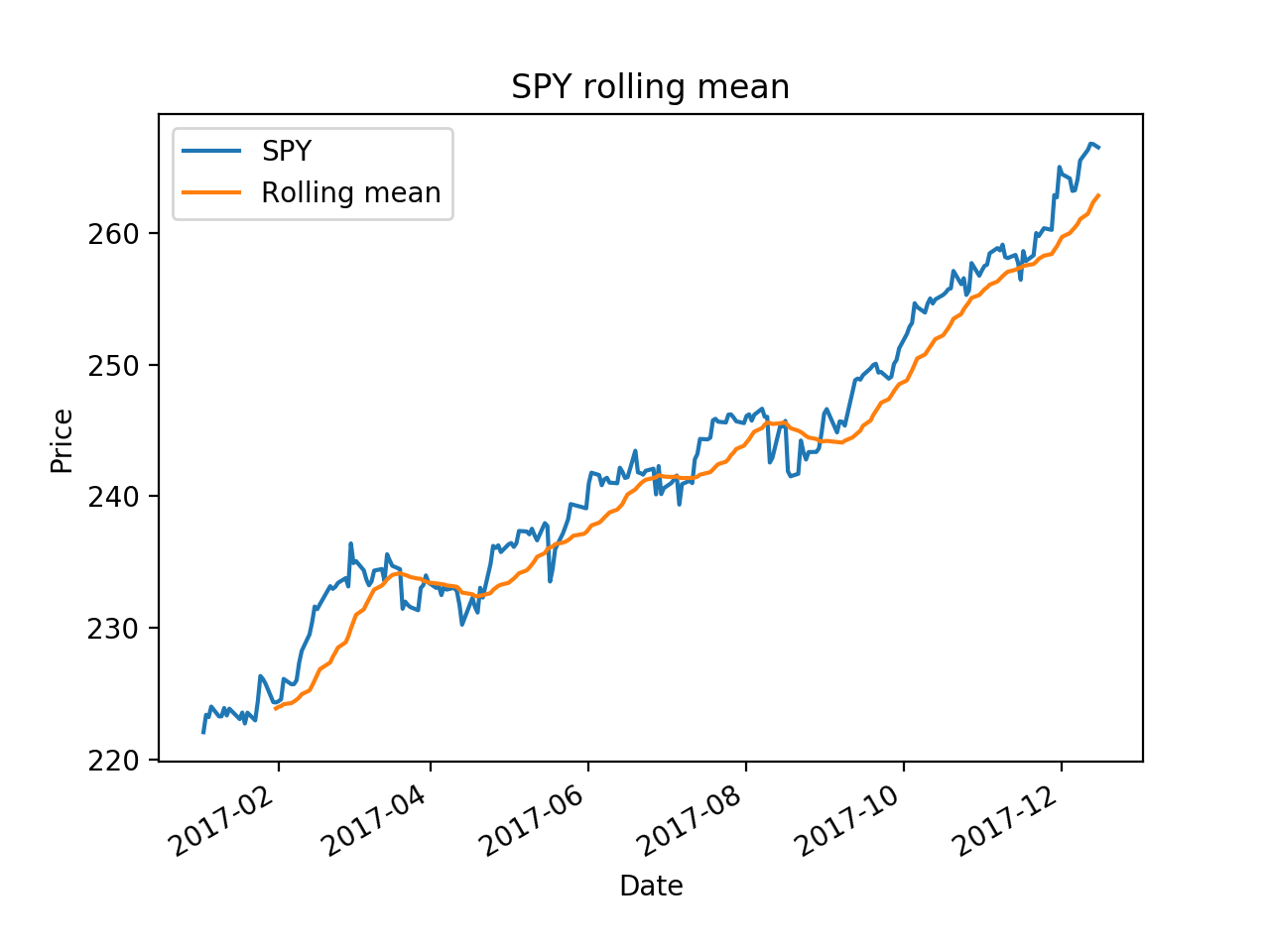
    ax = df['SPY'].plot(title="SPY rolling mean", label='SPY')

    rm = df['SPY'].rolling(20).mean()

    rm.plot(label='Rolling mean', ax=ax)

    ax.set_xlabel('Date')

    ax.set_ylabel('Price')

    ax.legend(loc="upper left")

    plt.show()
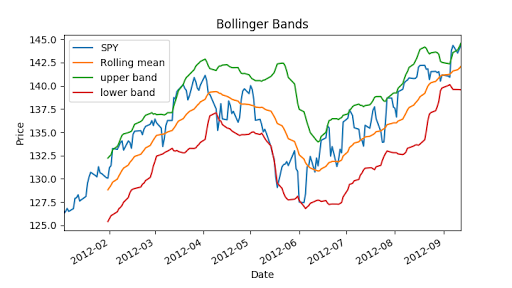
Now we can calculate Bollinger bands, it is 2 times std value.
"""Bollinger Bands."""

import os

import pandas as pd

import matplotlib.pyplot as plt

def symbol_to_path(symbol, base_dir="data"):

    """Return CSV file path given ticker symbol."""

    return os.path.join(base_dir, "{}.csv".format(str(symbol)))

def get_data(symbols, dates):

    """Read stock data (adjusted close) for given symbols from CSV files."""

    df = pd.DataFrame(index=dates)

    if 'SPY' not in symbols:  # add SPY for reference, if absent

        symbols.insert(0, 'SPY')

    for symbol in symbols:

        df_temp = pd.read_csv(symbol_to_path(symbol), index_col='Date',

                parse_dates=True, usecols=['Date', 'Adj Close'], na_values=['nan'])

        df_temp = df_temp.rename(columns={'Adj Close': symbol})

        df = df.join(df_temp)

        if symbol == 'SPY':  # drop dates SPY did not trade

            df = df.dropna(subset=["SPY"])

    return df

def plot_data(df, title="Stock prices"):

    """Plot stock prices with a custom title and meaningful axis labels."""

    ax = df.plot(title=title, fontsize=12)

    ax.set_xlabel("Date")

    ax.set_ylabel("Price")

    plt.show()

def get_rolling_mean(values, window):

    """Return rolling mean of given values, using specified window size."""

    return values.rolling(window=window).mean()

def get_rolling_std(values, window):

    """Return rolling standard deviation of given values, using specified window size."""

    # TODO: Compute and return rolling standard deviation

    return values.rolling(window=window).std()

def get_bollinger_bands(rm, rstd):

    """Return upper and lower Bollinger Bands."""

    # TODO: Compute upper_band and lower_band

    upper_band = rstd * 2 + rm

    lower_band =  rm - rstd * 2

    return upper_band, lower_band

def test_run():

    # Read data

    dates = pd.date_range('2012-01-01', '2012-12-31')

    symbols = ['SPY']

    df = get_data(symbols, dates)

    # Compute Bollinger Bands

    # 1. Compute rolling mean

    rm_SPY = get_rolling_mean(df['SPY'], window=20)

    # 2. Compute rolling standard deviation

    rstd_SPY = get_rolling_std(df['SPY'], window=20)

    # 3. Compute upper and lower bands

    upper_band, lower_band = get_bollinger_bands(rm_SPY, rstd_SPY)

    # Plot raw SPY values, rolling mean and Bollinger Bands

    ax = df['SPY'].plot(title="Bollinger Bands", label='SPY')

    rm_SPY.plot(label='Rolling mean', ax=ax)

    upper_band.plot(label='upper band', ax=ax)

    lower_band.plot(label='lower band', ax=ax)

    # Add axis labels and legend

    ax.set_xlabel("Date")

    ax.set_ylabel("Price")

    ax.legend(loc='upper left')

    plt.show()

if __name__ == "__main__":

    test_run()
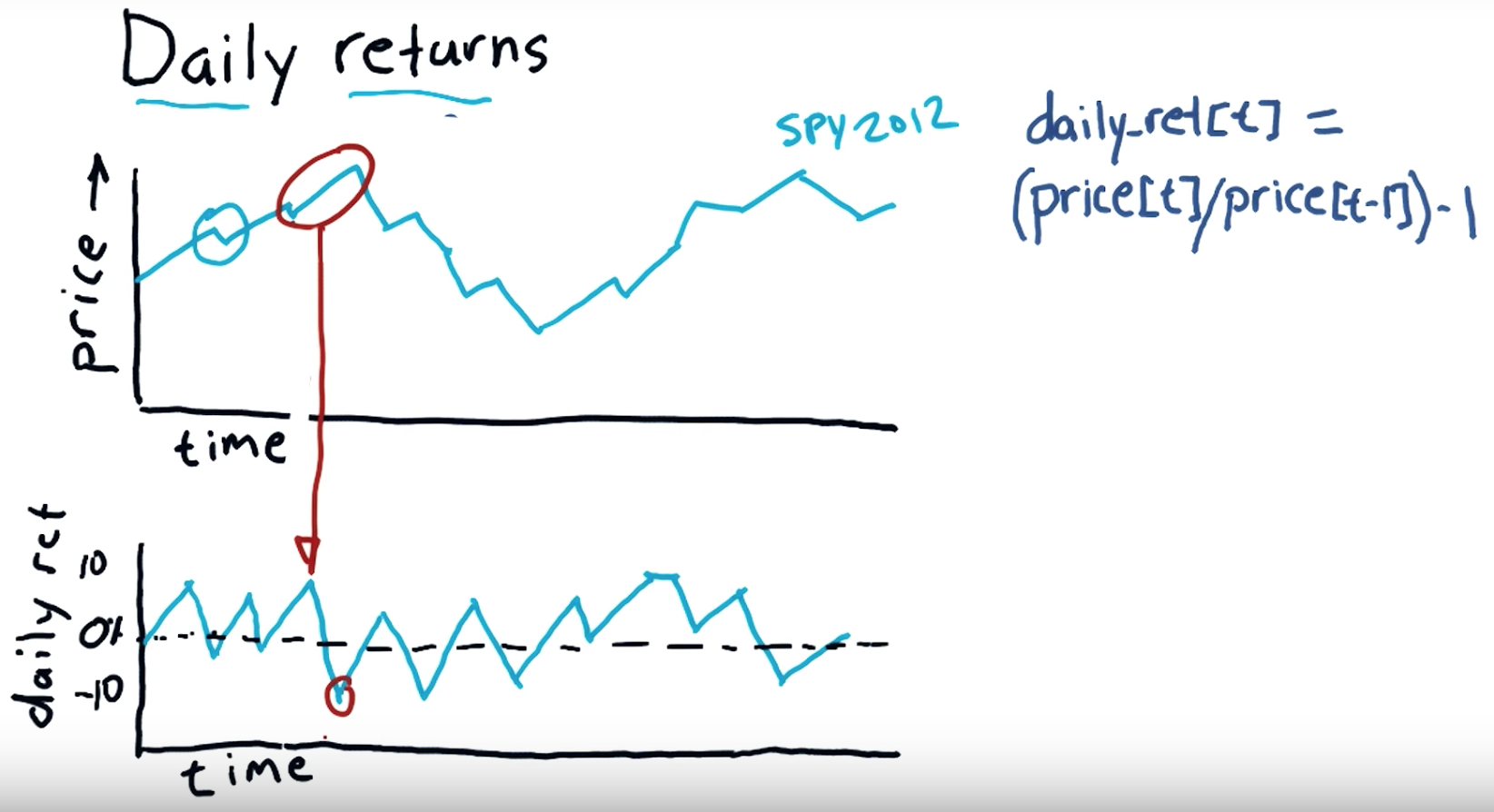
Daily return:
Subtract the previous day's closing price from the most recent day's closing price. In this example, subtract $35.50 from $36.75 to get $1.25. Divide your Step 4 result by the previous day's closing price to calculate the daily return. Multiply this result by 100 to convert it to a percentage.
"""Compute daily returns."""

import os

import pandas as pd

import matplotlib.pyplot as plt

def symbol_to_path(symbol, base_dir="data"):

    """Return CSV file path given ticker symbol."""

    return os.path.join(base_dir, "{}.csv".format(str(symbol)))

def get_data(symbols, dates):

    """Read stock data (adjusted close) for given symbols from CSV files."""

    df = pd.DataFrame(index=dates)

    if 'SPY' not in symbols:  # add SPY for reference, if absent

        symbols.insert(0, 'SPY')

    for symbol in symbols:

        df_temp = pd.read_csv(symbol_to_path(symbol), index_col='Date',

                parse_dates=True, usecols=['Date', 'Adj Close'], na_values=['nan'])

        df_temp = df_temp.rename(columns={'Adj Close': symbol})

        df = df.join(df_temp)

        if symbol == 'SPY':  # drop dates SPY did not trade

            df = df.dropna(subset=["SPY"])

    return df

def plot_data(df, title="Stock prices", xlabel="Date", ylabel="Price"):

    """Plot stock prices with a custom title and meaningful axis labels."""

    ax = df.plot(title=title, fontsize=12)

    ax.set_xlabel(xlabel)

    ax.set_ylabel(ylabel)

    plt.show()

def compute_daily_returns(df):

    """Compute and return the daily return values."""

    # TODO: Your code here

    # Note: Returned DataFrame must have the same number of rows

    return df / df.shift(-1) -1

def test_run():

    # Read data

    dates = pd.date_range('2012-07-01', '2012-07-31')  # one month only

    symbols = ['SPY','XOM']

    df = get_data(symbols, dates)

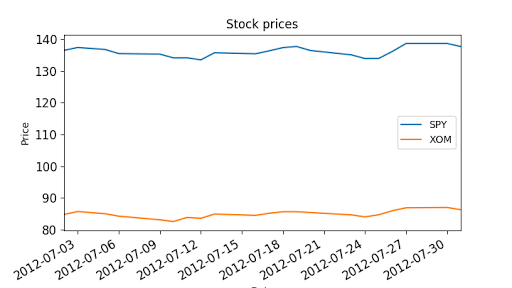
    plot_data(df)

    # Compute daily returns

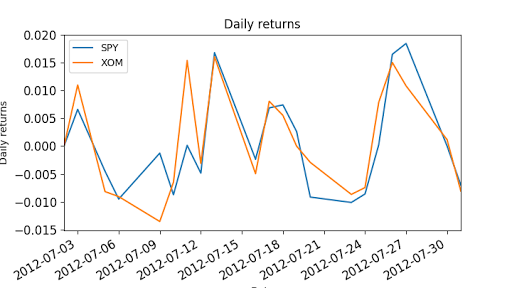
    daily_returns = compute_daily_returns(df)

    plot_data(daily_returns, title="Daily returns", ylabel="Daily returns")

if __name__ == "__main__":

    test_run()
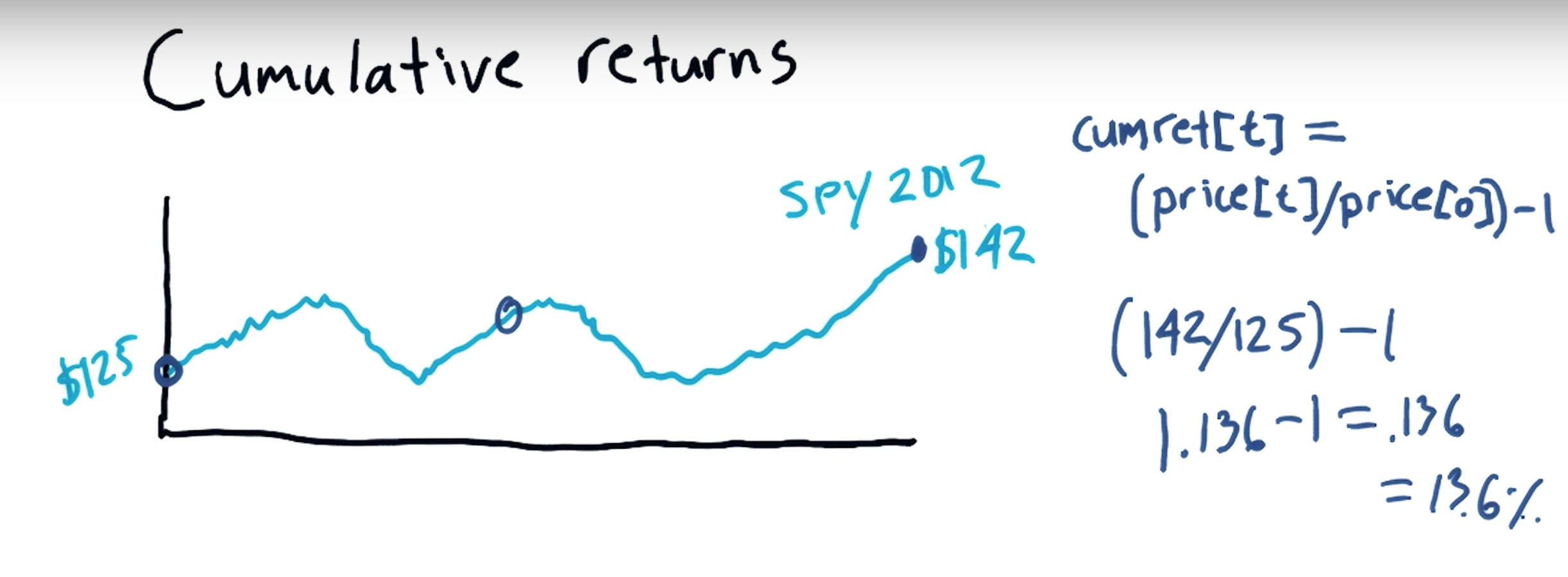
Cumulative return:
an investment relative to the principal amount invested over a specified amount of time. ... To calculate cumulative return, subtract the original price of the investment from the current price and divide that difference by the original price.
[Python] Statistical analysis of time series的更多相关文章
- How-to: Do Statistical Analysis with Impala and R
sklearn实战-乳腺癌细胞数据挖掘(博客主亲自录制视频教程) https://study.163.com/course/introduction.htm?courseId=1005269003&a ...
- python data analysis | python数据预处理(基于scikit-learn模块)
原文:http://www.jianshu.com/p/94516a58314d Dataset transformations| 数据转换 Combining estimators|组合学习器 Fe ...
- python学习笔记—DataFrame和Series的排序
更多大数据分析.建模等内容请关注公众号<bigdatamodeling> ################################### 排序 ################## ...
- Should You Build Your Own Backtester?
By Michael Halls-Moore on August 2nd, 2016 This post relates to a talk I gave in April at QuantCon 2 ...
- Python数据分析工具:Pandas之Series
Python数据分析工具:Pandas之Series Pandas概述Pandas是Python的一个数据分析包,该工具为解决数据分析任务而创建.Pandas纳入大量库和标准数据模型,提供高效的操作数 ...
- 用 Python 通过马尔可夫随机场(MRF)与 Ising Model 进行二值图降噪
前言 这个降噪的模型来自 Christopher M. Bishop 的 Pattern Recognition And Machine Learning (就是神书 PRML……),问题是如何对一个 ...
- 大数据分析与机器学习领域Python兵器谱
http://www.thebigdata.cn/JieJueFangAn/13317.html 曾经因为NLTK的缘故开始学习Python,之后渐渐成为我工作中的第一辅助脚本语言,虽然开发语言是C/ ...
- Machine and Deep Learning with Python
Machine and Deep Learning with Python Education Tutorials and courses Supervised learning superstiti ...
- Python 网页爬虫 & 文本处理 & 科学计算 & 机器学习 & 数据挖掘兵器谱(转)
原文:http://www.52nlp.cn/python-网页爬虫-文本处理-科学计算-机器学习-数据挖掘 曾经因为NLTK的缘故开始学习Python,之后渐渐成为我工作中的第一辅助脚本语言,虽然开 ...
随机推荐
- 接口测试工具篇--jmeter
jmeter的安装及使用在这里不进行讲解了,网上有很多资料 下面开始讲解如何使用jmeter做http接口测试 在jmeter中添加一个http请求,添加方式:测试计划上邮件添加线程组,线程组上邮件选 ...
- shell编程, 100文钱买100只鸡, 简单实现
今天碰到一个有趣的问题: 群友用shell写的一个: #!/bin/bash # 百元买百鸡,每种鸡至少买一只 all= # 公鸡每只多少元 read -p '公鸡多少文一只: ' gongji # ...
- [LOJ2422]【NOIP2015】斗地主
大名鼎鼎的NOIP2015D1T3 题意: 由于一些众所周知的原因,没有完整题面…… 给你一副斗地主的手牌(牌数<=23),问最少要几次能出完: 包含双王,没有癞子,连对要三连对以上,可以直接出 ...
- redhat下搭建jdk+tomcat环境
由于redhat自带安装了jdk,我们需要现将其进行卸载 卸载系统自带的jdk版本: 查看自带的jdk: 输入命令:rpm -qa|grep gcj 可能看到如下类似的信息: libgcj-4.1.2 ...
- 【codeforces 466D】Increase Sequence
[题目链接]:http://codeforces.com/problemset/problem/466/D [题意] 给你n个数字; 让你选择若干个区间; 且这些区间[li,ri]; 左端点不能一样; ...
- javascript位操作符右移>>>的妙用
var len=arr.length>>>0; 在arr.length为null或undefined的时间,强制转换为0;
- 通过HttpURLConnection 上传和下载文件(二)
HttpURLConnection文件上传 HttpURLConnection采用模拟浏览器上传的数据格式,上传给服务器 上传代码如下: package com.util; import java.i ...
- GNU-libiconv编码转换库的使用举例
继GDAL库.PROJ库.HDF5库.TINYXML库之后,手上进行的项目又让我碰到了ICONV库.之前花了2天时间没有搞定,在甲方一直催促下,今天又捡起来搞搞,搞了一天最终搞定了.相关心得记录例如以 ...
- mysql-增删改数据
一.增加操作 INSERT用来插入或添加行到数据库表的.插入用以下几种方式: 1.插入完整的行 insert into customers values(null,'Pep E,LaPew','100 ...
- GridView中使用CheckBox
asp.net中checkbox是向server提交时才干触发事件 把该控件的autopostback设置为true.才干响应事件 protected void Checkbox_CheckedCh ...