
Nginx 代理以及HTTPS (二)
一、HTTPS解析
https 加密
私钥
公钥
http 的握手 是确认网络是连通的。
https 的握手 是一个加密的过程 加密图
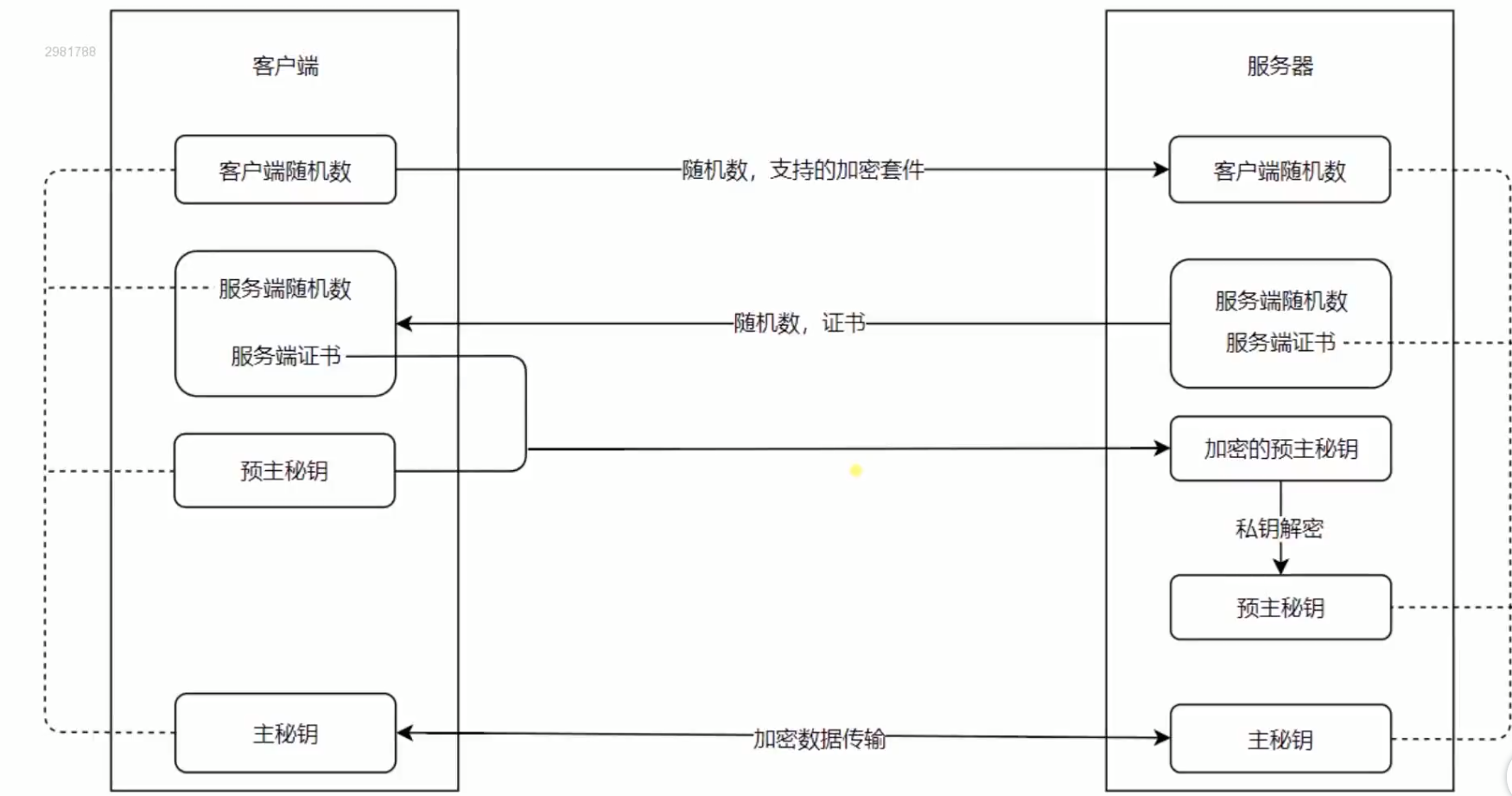
二、 使用Nginx 部署HTTPS 服务
1.证书生成命令(https://gist.github.com/Jokcy/5e73fd6b2a9b21c142ba2b1995150808) copy 里面的命令 在 Git上面运行
2.访问网站获得的命令
openssl req -x509 -newkey rsa: -nodes -sha256 -keyout localhost-privkey.pem -out localhost-cert.pem
3.在 git 上运行此命令

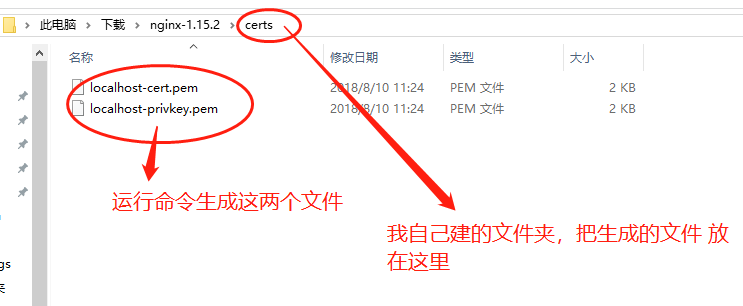
就会生成如下两个文件:
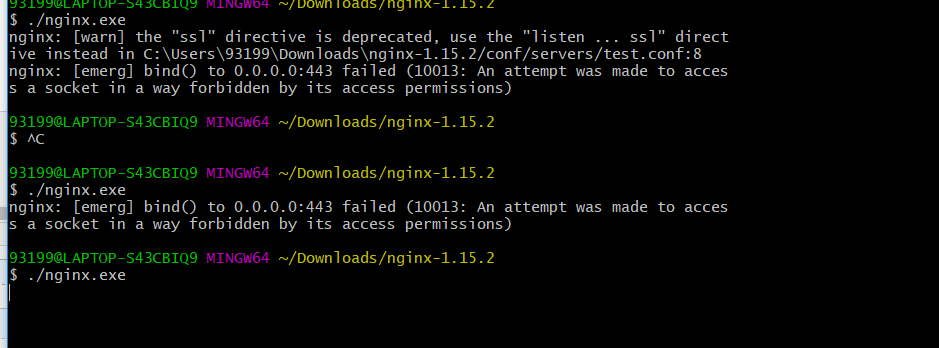
4. 启动 nginx 报错:bind() to 0.0.0.0:443 failed (10013: An attempt was made to access a socket in a way forbidden by its access permissions
这是由于其他进程占用了nginx 的端口。
解决办法:
运行 cmd, 输入netstat -aon|findstr "443"
找到 0.0.0.0:443,找到 PID,在任务管理器结束进程。 vmware-hostd.exe
5.成功启动Nginx
5.启动一个 nodejs 的服务:
然后再浏览器输入test,默认跳转https 服务。

2.配置 Nginx 代码
proxy_cache_path cache levels=: keys_zone=my_cache:10m;

# 把http变为 https

server {

  listen        default_server;

  listen       [::]: default_server;

  server_name  test.com;

  return  https://$server_name$request_uri;

}

server {

  listen       ;

  server_name  test.com;

#开启https验证

  ssl on; #Nginx 1.5 以后 不需要 ssl on  直接删除这行代码即可(但是删除以后就不会出现https 服务了,所以还是不要删除)

  ssl_certificate_key  ../certs/localhost-privkey.pem;

  ssl_certificate      ../certs/localhost-cert.pem;

  location / {

    proxy_cache my_cache;

    proxy_pass http://127.0.0.1:8888;

    proxy_set_header Host $host;

  }

}
三、HTTP2的优势和Nginx配置HTTP2的简单实用
1.优势:
信道复用
分帧传输
Server Push
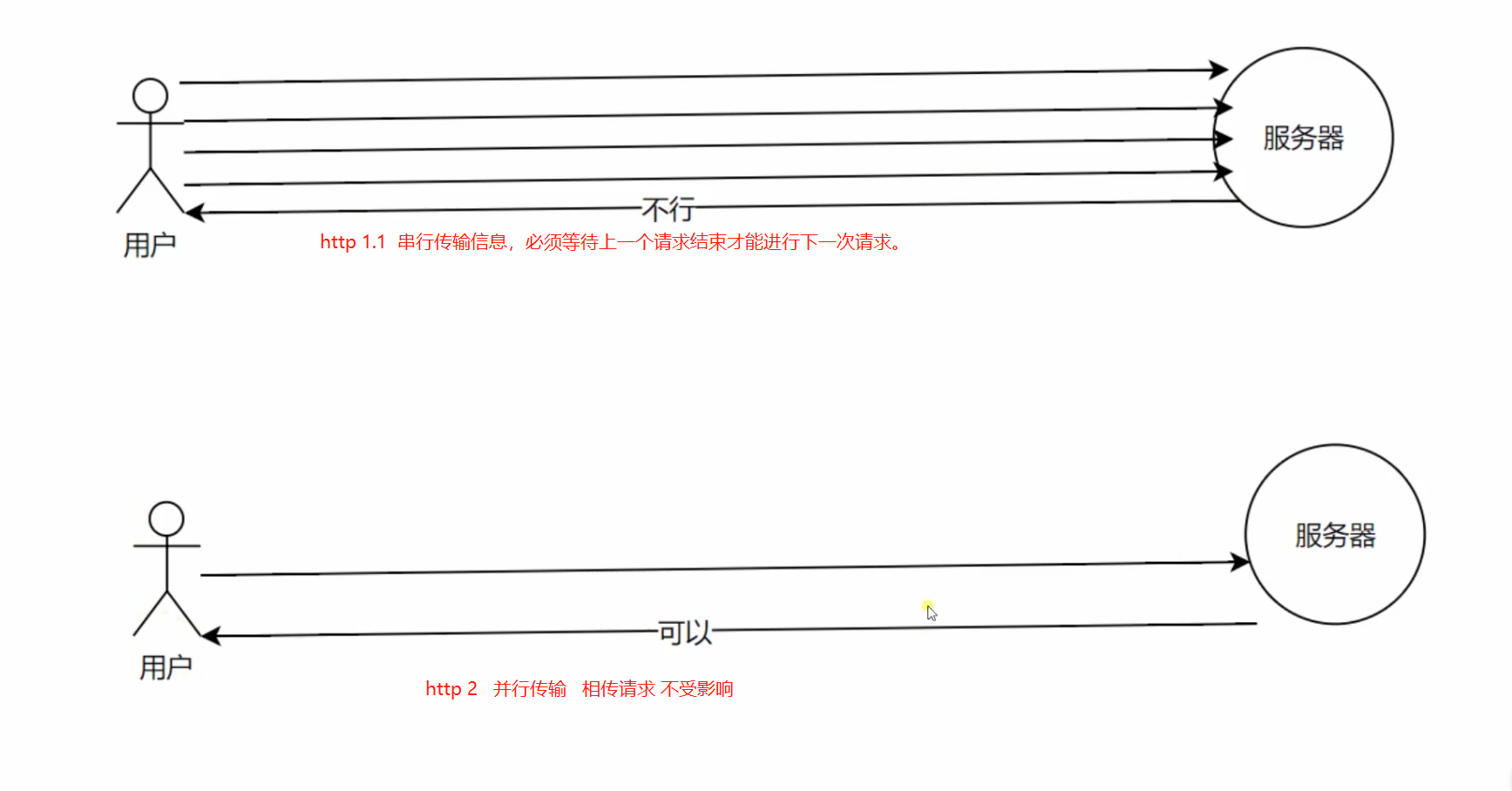
2.开启 http2 协议 仅仅支持在https协议。
效果图:

查看http 2 的push 服务端推送特性 chrome://net-internals/#events
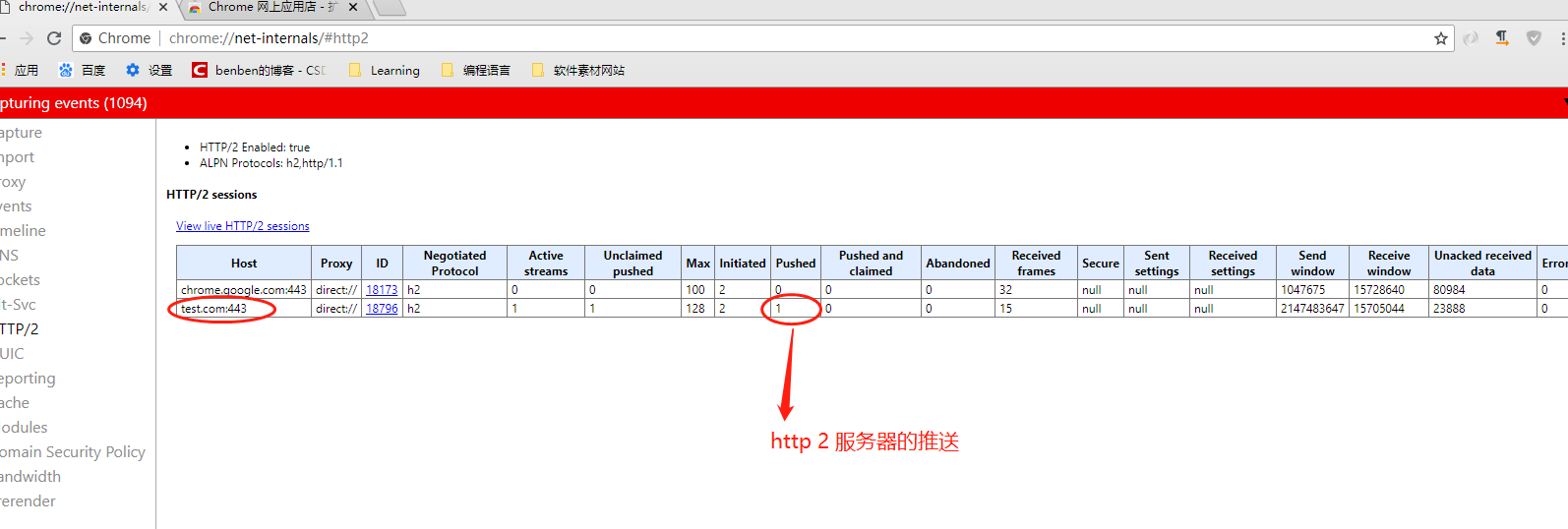
server.js 代码:
const http = require('http')

const fs = require('fs')

http.createServer(function (request, response) {

  console.log('request come', request.url)

  const html = fs.readFileSync('test.html', 'utf8')

  const img = fs.readFileSync('test.jpg')

  if (request.url === '/') {

    response.writeHead(, {

      'Content-Type': 'text/html',

      'Connection': 'keep-alive',

      'Link': '</test.jpg>; as=image; rel=preload' //路径 格式 服务器加载方式

    })

    response.end(html)

  } else {

    response.writeHead(, {

      'Content-Type': 'image/jpg',

      'Connection': 'keep-alive' // or close

    })

    response.end(img)

  }

}).listen()

console.log('server listening on 8888')
test.html 代码:
<!DOCTYPE html>

<html lang="en">

<head>

  <meta charset="UTF-8">

  <meta name="viewport" content="width=device-width, initial-scale=1.0">

  <meta http-equiv="X-UA-Compatible" content="ie=edge">

  <title>Document</title>

</head>

<body>

  <img src="/test.jpg" alt="">

</body>

</html>
test.jpg

.conf
proxy_cache_path cache levels=: keys_zone=my_cache:10m;

server {

  listen        default_server;

  listen       [::]: default_server;

  server_name  test.com;

   return  https://$server_name$request_uri;

}

server {

  listen        http2;

  server_name  test.com;

  http2_push_preload on;

  ssl on;

  ssl_certificate_key  ../certs/localhost-privkey.pem;

  ssl_certificate      ../certs/localhost-cert.pem;

  location / {

    proxy_cache my_cache;

    proxy_pass http://127.0.0.1:8888;

    proxy_set_header Host $host;

  }

}
Nginx 代理以及HTTPS (二)的更多相关文章
- NGINX 代理以及 HTTPS (一)
一. Nginx 安装 和基础代理配置 假如 启动nginx 出现这个错误,可能是 iis服务被打开了,80端口被占用了. 需要如下操作: 用Nginx 配置一个test.com 的代理名称.配置ho ...
- nginx代理https站点(亲测)
nginx代理https站点(亲测) 首先,我相信大家已经搞定了nginx正常代理http站点的方法,下面重点介绍代理https站点的配置方法,以及注意事项,因为目前大部分站点有转换https的需要所 ...
- nginx 代理 https 后,应用变成 http
需求:nginx 代理 https,后面的 tomcat 处理 http 请求,sso 的客户端,重定向时需要带上 target,而这个 target 默认是 tomcat 的 http,现在需要把这 ...
- 使用nginx代理后以及配置https后,如何获取真实的ip地址
使用nginx代理后以及配置https后,如何获取真实的ip地址 Date:2018-8-27 14:15:51 使用nginx, apache等反向代理后,如果想获取请求的真实ip,要在nginx中 ...
- Nginx代理MysqlCluster集群(二)
Nginx代理MySql集群本次实验采用nginx 版本1.12以上 集合了tcp代理功能只需在编译时明文开启指定的功能 --with-stream--prefix=/usr/local/ngin - ...
- CentOS 7.X下 -- 配置nginx正向代理支持https
环境说明: 本次测试使用的操作系统为:CentOS 7.2 x86 64位 最小化安装的操作系统,系统基础优化请参考:https://www.cnblogs.com/hei-ma/p/9506623. ...
- NGINX之——配置HTTPS加密反向代理訪问–自签CA
转载请注明出处:http://blog.csdn.net/l1028386804/article/details/46695495 出于公司内部訪问考虑,採用的CA是本机Openssl自签名生成的,因 ...
- nginx 代理https后,应用redirect https变成http --转
原文地址:http://blog.sina.com.cn/s/blog_56d8ea900101hlhv.html 情况说明nginx配置https,tomcat正常http接受nginx转发.ngi ...
- nginx 反向代理及 https 证书配置
nginx 反向代理及 https 证书配置 author: yunqimg(ccxtcxx0) 1. 编译安装nginx 从官网下载 nginx源码, 并编译安装. ./configure --pr ...
随机推荐
- 紫书 习题8-18 UVa 11536 (扫描法)
这道题貌似可以用滑动窗口或者单调栈做, 但是我都没有用到. 这道题要求连续子序列中和乘上最小值最大, 那么我们就可以求出每一个元素, 以它为最小值的的最大区间的值, 然后取max就ok了.那么怎么求呢 ...
- poj2280--Amphiphilic Carbon Molecules(扫描线+极角排序+转换坐标)
题目链接:id=2280">点击打开链接 题目大意:给出n个点的坐标.每一个点有一个值0或者1,如今有一个隔板(无限长)去分开着n个点,一側统计0的个数,一側统计1的个数,假设点在板上 ...
- 二维码框架ZBarSDK的使用和自己定义二维码扫描界面方法
假设你不知道ZBarSDK怎么用,请下载demo http://download.csdn.net/detail/u013686641/7858917 假设你已经配置好ZBarSDK .那么以下这个类 ...
- jsp布局中关于<iframe>标签的使用
iframe 元素会创建包括另外一个文档的内联框架(即行内框架). 注意:在 HTML 4.1 Strict DTD 和 XHTML 1.0 Strict DTD 中,不支持 iframe 元素. & ...
- [Swift] 随机数 | Random numbers
★★★★★★★★★★★★★★★★★★★★★★★★★★★★★★★★★★★★★★★★➤微信公众号:山青咏芝(shanqingyongzhi)➤博客园地址:山青咏芝(https://www.cnblogs. ...
- java9新特性-22-总结
1.在java 9 中看不到什么? 1.1 一个标准化和轻量级的JSON API 一个标准化和轻量级的JSON API被许多java开发人员所青睐.但是由于资金问题无法在Java 9中见到,但并不会削 ...
- CUDA笔记(11)
CUDA提供了一种cudaEvent_t的类型,这种类型Event可以统计GPU上面某一个任务或者代码段的精确运行时间 使用常量内存的光线跟踪器的性能比使用全局内存的性能提升了50% __consta ...
- .net 操作INI文件
using System.Runtime.InteropServices; using System.Text; namespace FaureciaManager { public class Fi ...
- git提交的规范
- 去除input的前后的空格
这里用的是jquery的方法