
4、python基本知识点及字符串常用方法
查看变量内存地址 id(变量名)
ni = 123
n2 = 123
ni和n2肯定是用的两份内存,但是python对于数字在-5~257之间的数字共用一份地址,范围可以修改
name = ‘李璐’
for i in name:
print(i) //将会打印出李璐
print(bytes(i,encoding='utf-8')) //把utf-8编码的字符转换成字节流
--恢复内容开始---
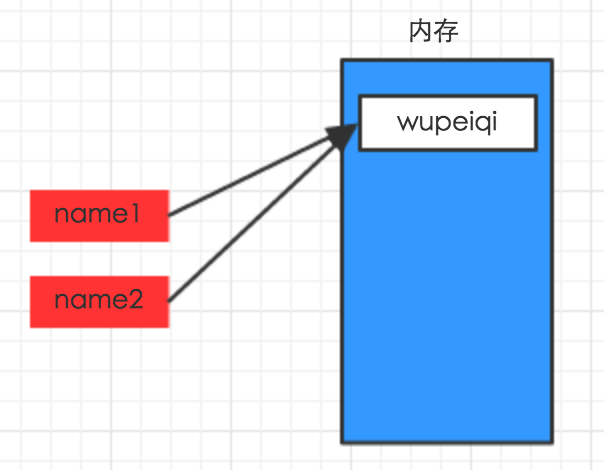
name1 = "wupeiqi"

name2 = name1
---恢复内容结束---
pycharm工具使用ctrl + / 可以批量注释
1、查看对象的类,或对象所具备的功能
temp = ‘ssss’
dir(temp) 可以字符串类所有该功能
help(temp) 或者help(type(temp))可以详细接受每种功能
class str(basestring):
"""
str(object='') -> string
Return a nice string representation of the object.
If the argument is a string, the return value is the same object.
"""
def capitalize(self):
""" 首字母变大写 """
def center(self, width, fillchar=None):
""" 内容居中,width:总长度;fillchar:空白处填充内容,默认无 """
def count(self, sub, start=None, end=None):
""" 子序列个数 """
def decode(self, encoding=None, errors=None):
""" 解码 """
def encode(self, encoding=None, errors=None):
""" 编码,针对unicode """
def endswith(self, suffix, start=None, end=None):
""" 是否以 xxx 结束 """
def expandtabs(self, tabsize=None):
""" 将tab转换成空格,默认一个tab转换成8个空格 """
‘hello\t999’ -> ‘hello 999’
def find(self, sub, start=None, end=None):
""" 寻找子序列位置,如果没找到,返回 -1 """
def format(*args, **kwargs): # known special case of str.format
""" 字符串格式化,动态参数,将函数式编程时细说 """
'hello {0},age {1}'.format('alex',19) -> hello alex,age 19
def index(self, sub, start=None, end=None):
""" 子序列位置,如果没找到,报错 """
def isalnum(self):
""" 是否是字母和数字 """
def isalpha(self):
""" 是否是字母 """
def isdigit(self):
""" 是否是数字 """
def islower(self):
""" 是否小写 """
def isspace(self):
是否是空格
def istitle(self):
是否是标题(单词首字母是不是都大写)
def isupper(self):
是否大写
def join(self, iterable):
""" 连接 """
b是列表或者元组 a.join(b) -> 把列表 b中每个元素用a连接起来
def ljust(self, width, fillchar=None):
""" 内容左对齐,右侧填充 """
def lower(self):
""" 变小写 """
def lstrip(self, chars=None):
""" 移除左侧空白 """
def partition(self, sep):
""" 分割,前,中,后三部分 """
"""
S.partition(sep) -> (head, sep, tail)(元组)
def replace(self, old, new, count=None):
""" 替换 """
"""count表示从左往右替换多少个
S.replace(old, new[, count]) -> string
def rfind(self, sub, start=None, end=None):
"""从右往左找
S.rfind(sub [,start [,end]]) -> int
def rindex(self, sub, start=None, end=None):
"""
def rjust(self, width, fillchar=None):
"""
S.rjust(width[, fillchar]) -> string
Return S right-justified in a string of length width. Padding is
done using the specified fill character (default is a space)
"""
return ""
def rpartition(self, sep):
"""
S.rpartition(sep) -> (head, sep, tail)
def rsplit(self, sep=None, maxsplit=None):
"""
S.rsplit([sep [,maxsplit]]) -> list of strings
从左边开始分割
def rstrip(self, chars=None):
"""把右边空白移除
S.rstrip([chars]) -> string or unicode
def split(self, sep=None, maxsplit=None):
""" 分割, maxsplit最多分割几次 """
"""
S.split([sep [,maxsplit]]) -> list of strings
def splitlines(self, keepends=False):
""" 根据换行分割 """
"""
S.splitlines(keepends=False) -> list of strings
def startswith(self, prefix, start=None, end=None):
""" 是否已摸个字符或者字符串起始 """
"""
S.startswith(prefix[, start[, end]]) -> bool
def strip(self, chars=None):
""" 移除两段空白 """
"""
S.strip([chars]) -> string or unicode
def swapcase(self):
""" 大写变小写,小写变大写 """
def title(self):
"""
字符串”变成标题
“the sheool” -> 'The School'
def translate(self, table, deletechars=None):
"""
转换,需要先做一个对应表,最后一个表示删除字符集合
intab = "aeiou"
outtab = "12345"
trantab = maketrans(intab, outtab)
str = "this is string example....wow!!!"
print str.translate(trantab, 'xm')
"""
def upper(self):
"""
S.upper() -> string
Return a copy of the string S converted to uppercase.
"""
return ""
def zfill(self, width):
"""方法返回指定长度的字符串,原字符串右对齐,前面填充0。"""
"""
S.zfill(width) -> string
Pad a numeric string S with zeros on the left, to fill a field
of the specified width. The string S is never truncated.
"""
return ""
def _formatter_field_name_split(self, *args, **kwargs): # real signature unknown
pass
def _formatter_parser(self, *args, **kwargs): # real signature unknown
pass
def __add__(self, y):
""" x.__add__(y) <==> x+y """
pass
def __contains__(self, y):
""" x.__contains__(y) <==> y in x """
pass
def __eq__(self, y):
""" x.__eq__(y) <==> x==y """
pass
def __format__(self, format_spec):
"""
S.__format__(format_spec) -> string
Return a formatted version of S as described by format_spec.
"""
return ""
def __getattribute__(self, name):
""" x.__getattribute__('name') <==> x.name """
pass
def __getitem__(self, y):
""" x.__getitem__(y) <==> x[y] """
pass
def __getnewargs__(self, *args, **kwargs): # real signature unknown
pass
def __getslice__(self, i, j):
"""
x.__getslice__(i, j) <==> x[i:j]
Use of negative indices is not supported.
"""
pass
def __ge__(self, y):
""" x.__ge__(y) <==> x>=y """
pass
def __gt__(self, y):
""" x.__gt__(y) <==> x>y """
pass
def __hash__(self):
""" x.__hash__() <==> hash(x) """
pass
def __init__(self, string=''): # known special case of str.__init__
"""
str(object='') -> string
Return a nice string representation of the object.
If the argument is a string, the return value is the same object.
# (copied from class doc)
"""
pass
def __len__(self):
""" x.__len__() <==> len(x) """
pass
def __le__(self, y):
""" x.__le__(y) <==> x<=y """
pass
def __lt__(self, y):
""" x.__lt__(y) <==> x<y """
pass
def __mod__(self, y):
""" x.__mod__(y) <==> x%y """
pass
def __mul__(self, n):
""" x.__mul__(n) <==> x*n """
pass
@staticmethod # known case of __new__
def __new__(S, *more):
""" T.__new__(S, ...) -> a new object with type S, a subtype of T """
pass
def __ne__(self, y):
""" x.__ne__(y) <==> x!=y """
pass
def __repr__(self):
""" x.__repr__() <==> repr(x) """
pass
def __rmod__(self, y):
""" x.__rmod__(y) <==> y%x """
pass
def __rmul__(self, n):
""" x.__rmul__(n) <==> n*x """
pass
def __sizeof__(self):
""" S.__sizeof__() -> size of S in memory, in bytes """
pass
def __str__(self):
""" x.__str__() <==> str(x) """
pass
4、python基本知识点及字符串常用方法的更多相关文章
- 【python基础语法】字符串常用方法 、列表(第3天课堂笔记)
""" 字符串的方法 join 字符串拼接,将列表转换为字符串 find 查找元素位置 count 查找元素个数 replace 替换字符 split 字符串分割,将字符 ...
- python 整型、字符串常用方法、for循环
整型--int 定义:用于比较和计算 python2和python3: python2:python2中油int(整型)和long(长整型):1231312L+ 进制转换: 十进制转二进制:正除2,获 ...
- python学习之字符串常用方法和格式化字符串
Python中的字符串同样适用标准的序列操作(索引,分片,乘法,成员判断,求长度,取最小值和最大值),但因为字符串是不可变的,因此字符串不支持分片赋值. s='http://www.baidu.com ...
- python基础(2)字符串常用方法
python字符串常用方法 find(sub[, start[, end]]) 在索引start和end之间查找字符串sub 找到,则返回最左端的索引值,未找到,则返回-1 start和end都可 ...
- python 字符串常用方法
字符串常用方法 capitalize() String.capitalize() 将字符串首字母变为大写 name = 'xiaoming' new_name = name.capitalize() ...
- python基础3 字符串常用方法
一. 基础数据类型 总览 int:用于计算,计数,运算等. 1,2,3,100...... str:'这些内容[]' 用户少量数据的存储,便于操作. bool: True, False,两种状态 ...
- Python基础二_操作字符串常用方法、字典、文件读取
一.字符串常用方法: name.captitalize() #字符串首字母大写 name.center(50,'*') ...
- python浅谈正则的常用方法
python浅谈正则的常用方法覆盖范围70%以上 上一次很多朋友写文字屏蔽说到要用正则表达,其实不是我不想用(我正则用得不是很多,看过我之前爬虫的都知道,我直接用BeautifulSoup的网页标签去 ...
- .Net程序员之Python基础教程学习----字符串的使用 [Second Day]
在The FirstDay 里面学习了列表的元组的使用,今天开始学习字符串的使用.字符串的使用主要要掌握,字符串的格式化(C语言中我们应该都知道,Python和C语言差别不大),字符串的基本 ...
随机推荐
- 【Henu ACM Round#16 B】 Bear and Colors
[链接] 我是链接,点我呀:) [题意] 在这里输入题意 [题解] O(n^2)枚举每一个区间. 然后维护这个区间里面的"统治数字"是什么. 对于每个区间cnt[统治数字]++; ...
- Linux经常使用命令(十六) - whereis
whereis命令仅仅能用于程序名的搜索(程序安装在哪?).并且仅仅搜索二进制文件(參数-b).man说明文件(參数-m)和源码文件(參数-s). 假设省略參数,则返回全部信息. 和find相比.wh ...
- C++对象模型——Inline Functions(第四章)
4.5 Inline Functions 以下是Point class 的一个加法运算符的可能实现内容: class Point { friend Point operator+(const Poin ...
- 项目: python爬虫 福利 煎蛋网妹子图
嘿嘿嘿! 嘿嘿嘿! 福利一波, 之前看小甲鱼的python教学视频的时候, 看到上面教的爬虫, 爬美女图片的, 心很痒痒, 但是不知道为啥, 按照视频一个字一个字敲的代码,总是报错, 有一天花了 一下 ...
- Android RecyclerView滑动监听,判断是否滑动到了最后一个item
项目中的需求,RecyclerView横向滑动列表,要有加载更多的功能,给RecyclerView设置一个滑动监听,在onScrolled方法中判断一下滑动方向,然后在onScrollStateCha ...
- 设置https验证方式
if (url.StartsWith("https", StringComparison.OrdinalIgnoreCase))
- 分享一个jquery实现的双向选择组件
<html><head> <meta charset="utf-8"> <title>数据删选组件</title> &l ...
- BZOJ 高精度开根 JAVA代码
晓华所在的工作组正在编写一套高精度科学计算的软件,一些简单的部分如高精度加减法.乘除法早已写完了,现在就剩下晓华所负责的部分:实数的高精度开m次根.因为一个有理数开根之后可能得到一个无理数,所以这项工 ...
- Git学习总结(2)——初识 GitHub
1. 写在前面 我一直认为 GitHub 是程序员必备技能,程序员应该没有不知道 GitHub 的才对,没想到这两天留言里给我留言最多的就是想让我写关于 GitHub 的教程,说看了不少资料还是一头雾 ...
- web显示winform,web打开winform,IE打开winform
前言:为什么要用ie打开winform 个人觉得,winform部署client太麻烦如金蝶··用友,winfrom打补丁太麻烦,加入新功能再部署很费时间:于是就想为什么不能用IE打开呢?这样就不须要 ...