
Pytorch实战(3)----分类
一、分类任务:
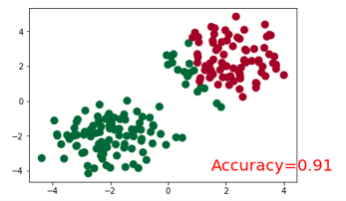
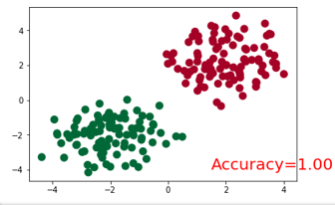
将以下两类分开。

创建数据代码:
# make fake data

n_data = torch.ones(100, 2)

x0 = torch.normal(2*n_data, 1)      # class0 x data (tensor), shape=(100, 2)

y0 = torch.zeros(100)               # class0 y data (tensor), shape=(100, 1)

x1 = torch.normal(-2*n_data, 1)     # class1 x data (tensor), shape=(100, 2)

y1 = torch.ones(100)                # class1 y data (tensor), shape=(100, 1)

x = torch.cat((x0, x1), 0).type(torch.FloatTensor)  # shape (200, 2) FloatTensor = 32-bit floating

y = torch.cat((y0, y1), ).type(torch.LongTensor)    # shape (200,) LongTensor = 64-bit integer

# torch can only train on Variable, so convert them to Variable

x, y = Variable(x), Variable(y)

plt.scatter(x.data.numpy()[:, 0], x.data.numpy()[:, 1], c=y.data.numpy(), s=100, lw=0, cmap='RdYlGn')

plt.show()
二、步骤
导入包
创建模型
设置优化器和损失函数
训练模型
三、代码:
导入包:
import torch

from torch.autograd import Variable

import torch.nn.functional as F

import matplotlib.pyplot as plt

%matplotlib inline

torch.manual_seed(1)    # reproducible
创建模型:
class Net(torch.nn.Module):

    def __init__(self, n_feature, n_hidden, n_output):

        super(Net, self).__init__()

        self.hidden = torch.nn.Linear(n_feature, n_hidden)   # hidden layer

        self.out = torch.nn.Linear(n_hidden, n_output)   # output layer

    def forward(self, x):

        x = F.relu(self.hidden(x))      # activation function for hidden layer

        x = self.out(x)

        return x
设置优化器和损失函数
#输入的x为2维张量,输出有两类

net = Net(n_feature=2, n_hidden=10, n_output=2)     # define the network

print(net)  # net architecture

# Loss and Optimizer

# Softmax is internally computed.

# Set parameters to be updated.

optimizer = torch.optim.SGD(net.parameters(), lr=0.02)

loss_func = torch.nn.CrossEntropyLoss()  # the target label is NOT an one-hotted
训练模型并画图展示
plt.ion()   # something about plotting

plt.show()

for t in range(100):

    out = net(x)                 # input x and predict based on x

    loss = loss_func(out, y)     # must be (1. nn output, 2. target), the target label is NOT one-hotted

    optimizer.zero_grad()   # clear gradients for next train

    loss.backward()         # backpropagation, compute gradients

    optimizer.step()        # apply gradients

    if t % 10 == 0 or t in [3, 6]:

        # plot and show learning process

        plt.cla()

        _, prediction = torch.max(F.softmax(out), 1)  #这里是得到softmax之后最大概率的y预测值。

        pred_y = prediction.data.numpy().squeeze()

        print(pred_y)

        target_y = y.data.numpy()

        plt.scatter(x.data.numpy()[:, 0], x.data.numpy()[:, 1], c=pred_y, s=100, lw=0, cmap='RdYlGn')

        accuracy = sum(pred_y == target_y)/200.

        plt.text(1.5, -4, 'Accuracy=%.2f' % accuracy, fontdict={'size': 20, 'color':  'red'})

        plt.show()

#         plt.pause(0.1)

plt.ioff()
结果展示:
Pytorch实战(3)----分类的更多相关文章
- 深度学习之PyTorch实战(1)——基础学习及搭建环境
最近在学习PyTorch框架,买了一本<深度学习之PyTorch实战计算机视觉>,从学习开始,小编会整理学习笔记,并博客记录,希望自己好好学完这本书,最后能熟练应用此框架. PyTorch ...
- 参考《深度学习之PyTorch实战计算机视觉》PDF
计算机视觉.自然语言处理和语音识别是目前深度学习领域很热门的三大应用方向. 计算机视觉学习,推荐阅读<深度学习之PyTorch实战计算机视觉>.学到人工智能的基础概念及Python 编程技 ...
- PyTorch 实战:计算 Wasserstein 距离
PyTorch 实战:计算 Wasserstein 距离 2019-09-23 18:42:56 This blog is copied from: https://mp.weixin.qq.com/ ...
- pytorch实战(二)hw2——预测收入是否高于50000,分类问题
代码和ppt: https://github.com/Iallen520/lhy_DL_Hw 遇到的一些细节问题: 1. X_train文件不带后缀名csv,所以不是规范的csv文件,不能直接用pd. ...
- 深度学习之PyTorch实战(3)——实战手写数字识别
上一节,我们已经学会了基于PyTorch深度学习框架高效,快捷的搭建一个神经网络,并对模型进行训练和对参数进行优化的方法,接下来让我们牛刀小试,基于PyTorch框架使用神经网络来解决一个关于手写数字 ...
- Bert实战---情感分类
1.情感分析语料预处理 使用酒店评论语料,正面评论和负面评论各5000条,用BERT参数这么大的模型, 训练会产生严重过拟合,,泛化能力差的情况, 这也是我们下面需要解决的问题; 2.sigmoid二 ...
- pytorch解决鸢尾花分类
半年前用numpy写了个鸢尾花分类200行..每一步计算都是手写的 python构建bp神经网络_鸢尾花分类 现在用pytorch简单写一遍,pytorch语法解释请看上一篇pytorch搭建简单网 ...
- 深度学习之PyTorch实战(2)——神经网络模型搭建和参数优化
上一篇博客先搭建了基础环境,并熟悉了基础知识,本节基于此,再进行深一步的学习. 接下来看看如何基于PyTorch深度学习框架用简单快捷的方式搭建出复杂的神经网络模型,同时让模型参数的优化方法趋于高效. ...
- Scrapy实战-新浪网分类资讯爬虫
项目要求: 爬取新浪网导航页所有下所有大类.小类.小类里的子链接,以及子链接页面的新闻内容. 什么是Scrapy框架: Scrapy是用纯Python实现一个为了爬取网站数据.提取结构性数据而编写的应 ...
随机推荐
- MVC.Net:通过Global.asax捕捉错误
在MVC.Net中,如果我们想做一个统一的错误处理的模块,有几个选择,一种是通过一个Base Controller来实现,另外一种就是在Global.asax中实现.这里介绍后一种方法. 首先打开Gl ...
- jq 抽奖
<!DOCTYPE HTML> <html> <head> <meta http-equiv="Content-Type" content ...
- Codeforces Round #303 (Div. 2) E
五道水题,但要手快才好...我手慢了,E题目都没看完TAT.... 想了一发,很水,就是一遍Dijk即可,使用优先队列,同时记录由哪条边转移而来 #include <iostream> # ...
- [RxJS] AsyncSubject and ReplaySubject - Learn the Differences
We can use Subject as Observable and Observer: // Subject should be only used to emit value for priv ...
- MSP430WARE++的使用2:RSP1 driver的调用方法
MSP430WARE是一套基于C++语言的开源的MSP430层次化软件架构,支持多种外设.本文将介绍雷达測速芯片RSP1驱动程序的调用方法. 1.硬件原理图 採用下图所看到的 ...
- BEGINNING SHAREPOINT® 2013 DEVELOPMENT 第9章节--client对象模型和REST APIs概览 介绍SP2013中远程APIs
BEGINNING SHAREPOINT® 2013 DEVELOPMENT 第9章节--client对象模型和REST APIs概览 介绍SP2013中远程APIs 当SP首次開始 ...
- Sublime text 神器小记
曾经一直使用的都是Editplus,一直感觉都是非常不错的. 可是近期接触到sublime text,我就fall in love with it. Sublime 的意思是"顶峰,高尚,非 ...
- C++著名程序库的比较
转载出处:http://www.acejoy.com/ace/thread-3777-1-1.html 1.C++各大有名库的介绍——C++标准库 2.C++各大有名库的介绍——准标准库Boost3. ...
- oc28--Property增强
// // Person.h #import <Foundation/Foundation.h> @interface Person : NSObject /* { @public int ...
- Firefox浏览器中,input输入框输入的内容在刷新网页后为何还在?
转自:http://www.webym.net/jiaocheng/473.html 这个问题比较容易解决,如果不希望浏览器保留以前输入的内容,只要给对应的 input 输入框加上以下参数: auto ...