
Linux-编译安装http-实验
准备工作
1、关闭防火墙和SELinux
2、基础安装的系统,安装以下命令
yum install gcc make autoconf gcc-c++ glibc glibc-devel pcre pcre-devel openssl openssl-devel systemd-devel zlib-devel vim lrzsz tree tmux lsof tcpdump wget net-tools iotop bc bzip2 zip unzip nfs-utils man-pages
3、下载httpd2.4,虚拟机下载可能会很慢,本机下载好上传的虚拟机中
[root@centos8/data]$wget https://dlcdn.apache.org/httpd/httpd-2.4.53.tar.bz2
4、查看下载或上传好的安装包,解压
[root@centos8/data]$ls

httpd-2.4.53.tar.bz2

[root@centos8/data]$tar xf httpd-2.4.53.tar.bz2

[root@centos8/data]$ls

httpd-2.4.53  httpd-2.4.53.tar.bz2
5、进入httpd-2.4.53目录查看
[root@centos8/data]$cd httpd-2.4.53/

[root@centos8/data/httpd-2.4.53]$ls

ABOUT_APACHE     BuildBin.dsp     docs         InstallBin.dsp  modules           ROADMAP

acinclude.m4     buildconf        emacs-style  LAYOUT          NOTICE            server

Apache-apr2.dsw  CHANGES          httpd.dep    libhttpd.dep    NWGNUmakefile     srclib

Apache.dsw       changes-entries  httpd.dsp    libhttpd.dsp    os                support

apache_probes.d  CMakeLists.txt   httpd.mak    libhttpd.mak    README            test

ap.d             config.layout    httpd.spec   LICENSE         README.CHANGES    VERSIONING

build            configure        include      Makefile.in     README.cmake

BuildAll.dsp     configure.in     INSTALL      Makefile.win    README.platforms
6、编译安装
1)建立安装目录
[root@centos8~]$midir /usr/local/apache2
2)安装
[root@centos8/data/httpd-2.4.53]$./configure --prefix=/usr/local/apache2/ --sysconfdir=/etc/httpd --enable-ssl    #指定安装路径,配置文件路径

[root@centos8/data/httpd-2.4.53]$echo $?                                             #检测生成编译文件是否成功

0

[root@centos8/data/httpd-2.4.53]$make

[root@centos8/data/httpd-2.4.53]$echo $?

0

[root@centos8/data/httpd-2.4.53]$make install

[root@centos8/data/httpd-2.4.53]$echo $?

0
7、配置环境
[root@centos8/data/httpd-2.4.53]$echo 'PATH=/usr/local/apache2/bin:$PATH' > /etc/profile.d/httpd.sh

[root@centos8/data/httpd-2.4.53]$. /etc/profile.d/httpd.sh

[root@centos8/data/httpd-2.4.53]$apachectl start

AH00558: httpd: Could not reliably determine the server's fully qualified domain name, using fe80::250:56ff:fe33:298d. Set the 'ServerName' directive globally to suppress this message

[root@centos8/data/httpd-2.4.53]$
8、指定用apache用户运行
[root@centos8~]$clear

[root@centos8~]$useradd -r -s /sbin/nologin -d /var/www -c Apache -u 48 apache

[root@centos8~]$vim /etc/httpd/httpd.conf
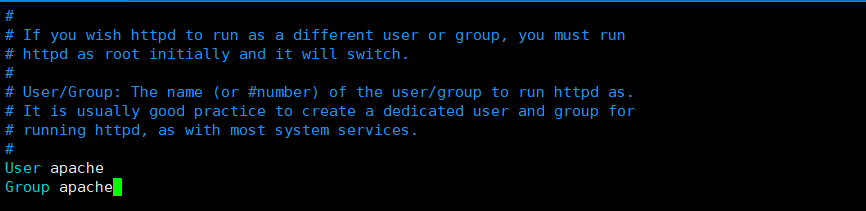
[root@centos8~]$apachectl restart           #配置生效和验证

AH00558: httpd: Could not reliably determine the server's fully qualified domain name, using fe80::250:56ff:fe33:298d. Set the 'ServerName' directive globally to suppress this message

[root@centos8~]$ps aux | tail -6

root       26483  0.0  0.0      0     0 ?        I    14:02   0:00 [kworker/1:0-ata_sff]

apache     26487  0.0  0.3 1321352 7728 ?        Sl   14:02   0:00 /usr/local/apache2//bin/httpd -k start

apache     26488  0.0  0.3 1321352 7728 ?        Sl   14:02   0:00 /usr/local/apache2//bin/httpd -k start

apache     26489  0.0  0.5 1321352 11808 ?       Sl   14:02   0:00 /usr/local/apache2//bin/httpd -k start

root       26575  0.0  0.1  58740  3828 pts/0    R+   14:03   0:00 ps aux

root       26576  0.0  0.0   7348   888 pts/0    S+   14:03   0:00 tail -6
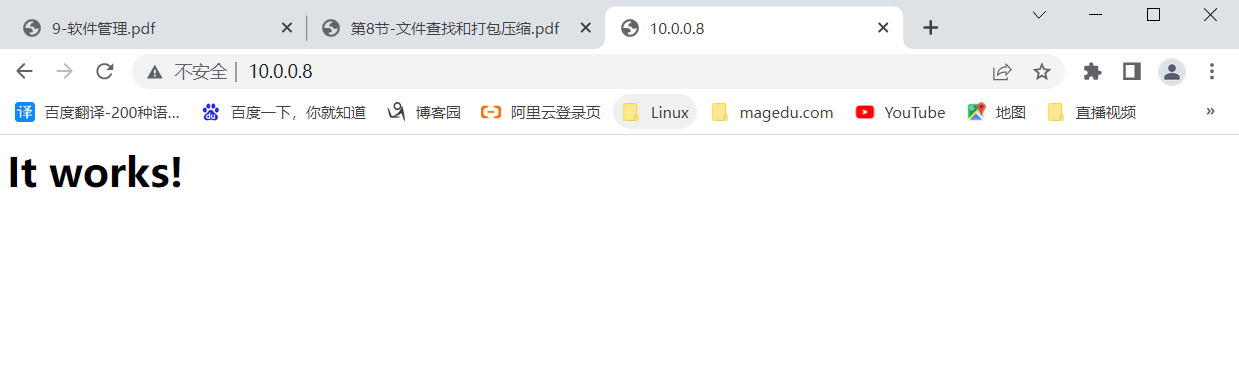
9浏览器访问
Linux-编译安装http-实验的更多相关文章
- 【转】linux 编译安装nginx,配置自启动脚本
linux 编译安装nginx,配置自启动脚本 本文章来给各位同学介绍一篇关于linux 编译安装nginx,配置自启动脚本教程,希望有需要了解的朋友可一起来学习学习哦. 在公司的suse服务器装ng ...
- linux 编译安装nginx,配置自启动脚本
本文章来给各位同学介绍一篇关于linux 编译安装nginx,配置自启动脚本教程,希望有需要了解的朋友可一起来学习学习哦. 在公司的suse服务器装nginx,记录下安装过程: 参照这篇文章:Linu ...
- linux 编译安装PHP模块
本文移到:http://www.phpgay.com/Article/detail/classid/6/id/54.html linux 编译安装PHP模块 1.首先你要有你服务器上安装的PHP的版 ...
- [CentOS_7.4]Linux编译安装ffmpeg
[CentOS_7.4]Linux编译安装ffmpeg 安装过程: 下载安装源,配置,编译,安装,设置环境变量. # wget http://www.ffmpeg.org/releases/ffm ...
- 转:Linux 编译安装 Mysql5.7
http://broqiang.com/2017/04/18/Mysql-Install-5.7.18-Linux-Compile/ 原文 Linux 编译安装 Mysql5.7 Ubuntu 下快速 ...
- Linux编译安装Apache+PHP
Linux编译安装Apache+PHP 来自:自学it网,http://www.zixue.it/. 1]编译安装Apache+PHP 1.安装程序依赖库和开发环境 为了省事把所需要的库文件全都安 ...
- Linux编译安装Qt 5.4.1(-qt-xcb是必须要指定的,卸载自带的gcc等)
转载请注明文章:Linux编译安装Qt 5.4.1 出处:多客博图 很久不写文章了,过程很简单,但是操作很多,简单说吧. 前言: 操作系统CentOS 6.6,64位的. 1.安装gcc 4.8.4, ...
- Linux 编译安装、压缩打包、定时任务
目录 Linux 编译安装 知识储备: wget命令 编译安装 Linux 压缩打包 gzip压缩 bzip2压缩 tar打包 Linux 定时任务 相关文件及操作 Linux 编译安装 编译安装就是 ...
- Linux 编译安装内核
一.简介 内核,是一个操作系统的核心.它负责管理系统的进程.内存.设备驱动程序.文件和网络系统,决定着系统的性能和稳定性.Linux作为一个自由软件,在广大爱好者的支持下,内核版本不断更新.新的内核修 ...
- LINUX 编译安装 PHP 环境
今天终于有时间 总结一下 linux 的编译安装 php 环境同学给我发了他写的文档 ,基本就可以实现编译安装了我同学文章地址: http://penghui.link/articles/2016/0 ...
随机推荐
- 什么是 Idempotence 以及它在哪里使用?
幂等性是能够以这样的方式做两次事情的特性,即最终结果将保持不变,即好像 它只做了一次. 用法:在远程服务或数据源中使用 Idempotence,这样当它多次接收指令时,它 只处理指令一次.
- MySQL_fetch_array 和 MySQL_fetch_object 的区别是什么?
以下是 MySQL_fetch_array 和 MySQL_fetch_object 的区别: MySQL_fetch_array() – 将结果行作为关联数组或来自数据库的常规数组返回. MySQL ...
- spring-boot-关于配置文件
------------恢复内容开始------------ spring-boot 的配置文件有四个地方: 项目更目录下的config目you录下(自己建) 项目根目录下 resource 目录下的 ...
- 是否可以继承 String 类?
String 类是 final 类,不可以被继承. 补充:继承 String 本身就是一个错误的行为,对 String 类型最好的重用方式是关 联关系(Has-A)和依赖关系(Use-A)而不是继承关 ...
- 学习ELK日志平台(一)
一.需求及基础: 场景: 1.开发人员不能登录线上服务器查看详细日志 2.各个系统都有日志,日志数据分散难以查找 3.日志数据量大,查询速度慢,或者数据不够实时 4.一个调用会涉及到多个系统,难以在这 ...
- SQL之总结(三)
1.怎么在where指定多个值得问题? select * from tb_article where article_id in(10008,10009) 结果如下: 如果是字符串的话: select ...
- 利用angular4和nodejs-express构建一个简单的网站(七)—用户注册之ReactiveForm
这一节对用户注册组件进行分析.用户注册组件主要涉及angular4表单的操作.Angular提供了两种构建表单的技术:响应式表单和模板驱动表单. 这两项技术都属于@angular/forms库,并且共 ...
- 为Anaconda python3安装gi模块
项目开发中需要使用到gi模块,Ubuntu自带的Python3.5可以正常使用gi.项目解释环境是Anaconda python3.5,提示ImportError: No module named ' ...
- Elasticsearch8.1-ElasticsearchClient-Java客户端简单增删查改-随笔
环境准备 Springboot 基本环境 自行前往https://start.spring.io/ 构建一个即可 Elasticsearch服务端 简单说下windows版本的安装 https:// ...
- ICMP TYPE CODE 对应表
下载ping程序源代码等信息,可以在这里下载 [root@ht8 network-scripts]# ping -V ping utility, iputils-s20160308 //ping实用程 ...