
6.监控elasticsearch集群---放弃采用(获取不到数据),建议看另一篇文章:监控elasticsearch
prometheus监控es,同样采用exporter的方案。
- 项目地址:
- elasticsearch_exporter:https://github.com/justwatchcom/elasticsearch_exporter
1、安装部署
现有es三节点的集群,环境大概如下:
| 主机 | 组件 |
|---|---|
| 192.168.75.11 | prometheus |
| 192.168.75.21 | es,kibana,nginx |
接着分别在如上三台主机上进行如下配置:
wget https://github.com/justwatchcom/elasticsearch_exporter/releases/download/v1.1.0/elasticsearch_exporter-1.1.0.linux-amd64.tar.gz

tar -zxv -f elasticsearch_exporter-1.1.0.linux-amd64.tar.gz

mv elasticsearch_exporter-1.1.0.linux-amd64 /usr/local/elasticsearch_exporter
创建用户等
groupadd prometheus

useradd -g prometheus -m -d /var/lib/prometheus -s /sbin/nologin prometheus

chown -R prometheus.prometheus /usr/local/elasticsearch_exporter
启动监控客户端:
nohup ./elasticsearch_exporter --web.listen-address ":9308" --es.uri http://192.168.75.21:9200 &
使用systemd管理:
cat /lib/systemd/system/es_exporter.service

[Unit]

Description=The es_exporter

After=network.target

[Service]

Type=simple

User=prometheus

ExecStart=/usr/local/elasticsearch_exporter/elasticsearch_exporter --web.listen-address ":9308" --es.uri http://192.168.75.21:9200

Restart=on-failure

[Install]

WantedBy=multi-user.target
启动:
systemctl daemon-reload

systemctl start es_exporter

systemctl enable es_exporter
查看metrics:
curl 127.0.0.1:9308/metrics
2,配置 prometheus.yml 添加监控目标
vim /usr/local/prometheus/prometheus.yml

  - job_name: 'elasticsearch'

    scrape_interval: 60s

    scrape_timeout:  30s

    metrics_path: "/metrics"

    static_configs:

    - targets: ['192.168.75.21:9308']

      labels:

       service: elasticsearch
重启服务。
systemctl restart prometheus
或者通过命令热加载:
curl -XPOST localhost:9090/-/reload
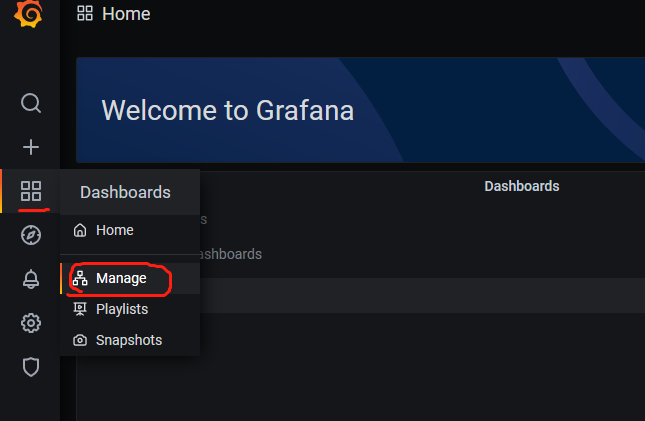
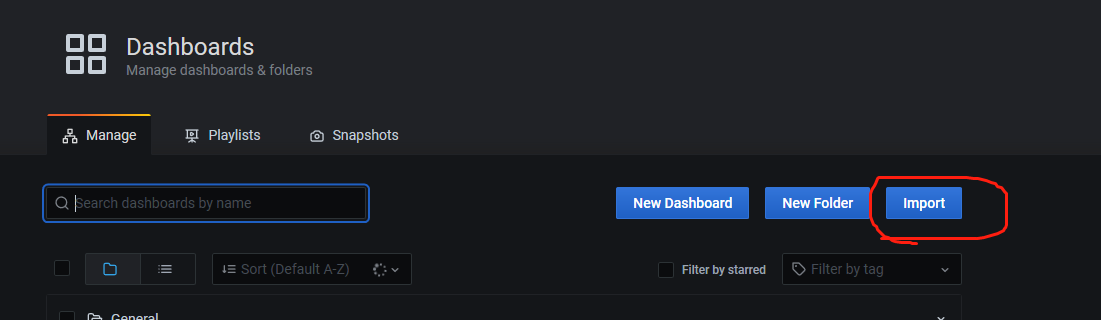
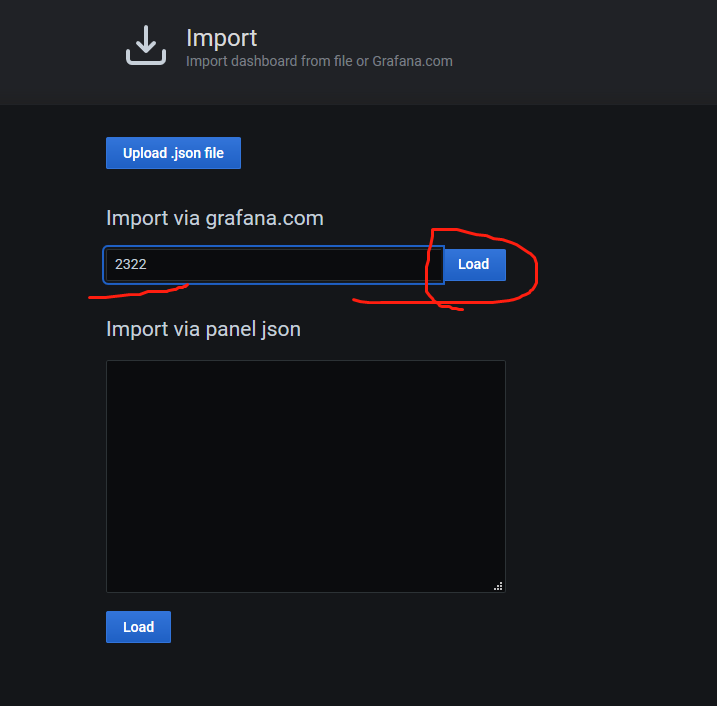
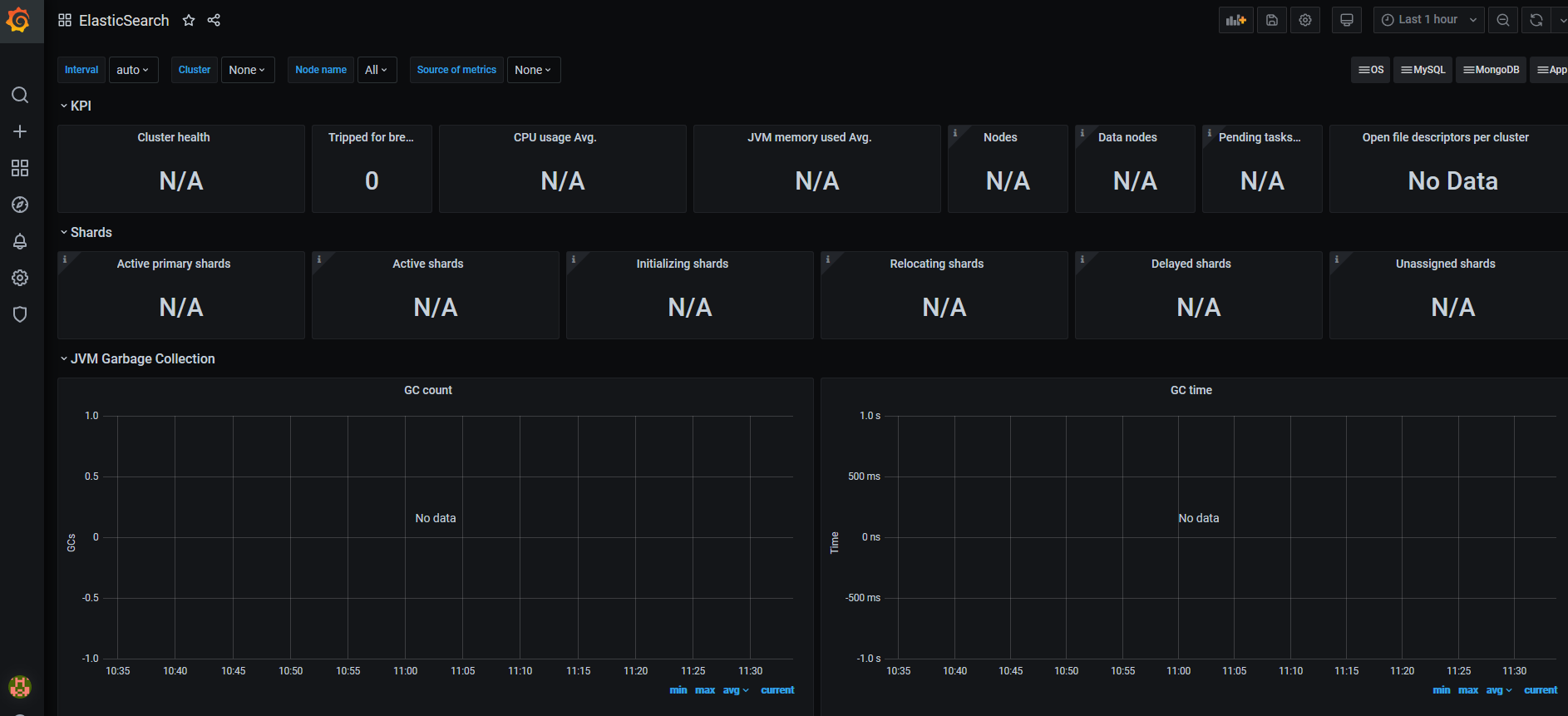
5,配置 Grafana 的模板
模板通过json文件进行导入,文件就在解压的包内。
参考地址:https://shenshengkun.github.io/posts/550bdf86.html
或者通过如下ID进行导入:2322以及其他。
6,开启认证的启动方式
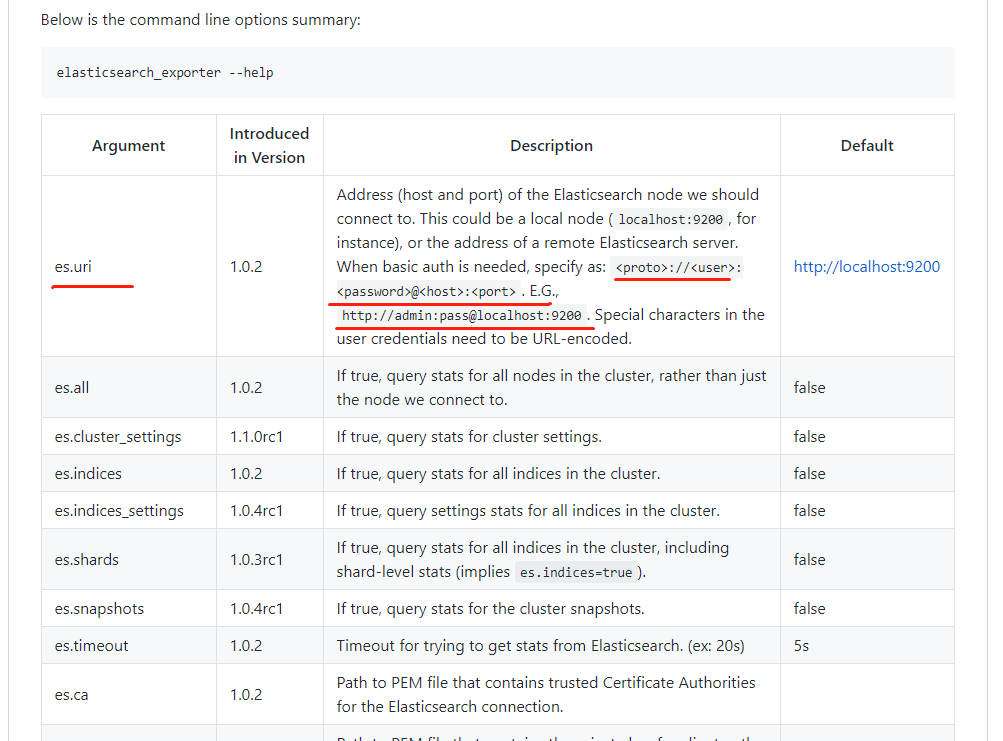
如果es开启了认证,那么启动的时候需要将用户名密码加载进去:
elasticsearch_exporter --web.listen-address ":9308" --es.uri http://username:password@192.168.75.21:9200 &
其中使用的是monitoring的用户密码。
当然,除去这种命令行的启动方式之外,还可以像上边一样,基于systemd进行管理,只需将认证的参数信息写入到如下内容当中:
参考网址:https://github.com/justwatchcom/elasticsearch_exporter
cat /etc/default/elasticsearch_exporter

[Unit]

Description=The es_exporter

After=network.target

[Service]

Type=simple

User=prometheus

ExecStart=/usr/local/elasticsearch_exporter/elasticsearch_exporter --web.listen-address ":9308" --es.uri=http://username:password@192.168.75.21:9200

Restart=on-failure

[Install]

WantedBy=multi-user.target
6.监控elasticsearch集群---放弃采用(获取不到数据),建议看另一篇文章:监控elasticsearch的更多相关文章
- shell脚本监控k8s集群job状态,若出现error通过触发阿里云的进程监控报警
#!/bin/bash while [ 1 ] do job_error_no=`kubectl get pod -n weifeng |grep -i "job"|grep -c ...
- Elasticsearch集群 管理
第7章 深入Elasticsearch集群 启动一个Elasticsearch节点时,该节点会开始寻找具有相同集群名字并且可见的主节点.如 果找到主节点,该节点加入一个已经组成了的集群:如果没有找到, ...
- 手把手教你搭建一个 Elasticsearch 集群
为何要搭建 Elasticsearch 集群 凡事都要讲究个为什么.在搭建集群之前,我们首先先问一句,为什么我们需要搭建集群?它有什么优势呢? 高可用性 Elasticsearch 作为一个搜索引擎, ...
- ElasticSearch 集群监控
要监控哪些 ElasticSearch metrics? Elasticsearch 提供了大量的 Metric,可以帮助您检测到问题的迹象,在遇到节点不可用.out-of-memory.long g ...
- zabbix监控Elasticsearch集群
本节以 zabbix 为例,介绍如何使用监控系统完成 Elasticsearch 的监控报警. github 上有好几个版本的 ESZabbix 仓库,都源自 Elastic 公司员工 unterge ...
- Prometheus监控elasticsearch集群(以elasticsearch-6.4.2版本为例)
部署elasticsearch集群,配置文件可"浓缩"为以下: cluster.name: es_cluster node.name: node1 path.data: /app/ ...
- Elasticsearch 集群优化-尽可能全面详细
Elasticsearch 集群优化-转载参考1 基本配置 基本配置,5台配置为 24C 125G 17T 的主机,每台主机上搭建了一个elasticsearch节点. 采用的elasticsearc ...
- Docker部署Elasticsearch集群
http://blog.sina.com.cn/s/blog_8ea8e9d50102wwik.html Docker部署Elasticsearch集群 参考文档: https://hub.docke ...
- Elasticsearch 集群 单服务器 超级详细教程
前言 之前了解了Elasticsearch的基本概念.将spring boot + ElasticSearch + head插件 搞通之后.紧接着对es进行下一步的探索:集群.查阅资料的过程中,找到了 ...
随机推荐
- .net webapi 实现 接口版本控制并打通swagger支持
我们在开发 webapi 项目时如果遇到 api 接口需要同时支持多个版本的时候,比如接口修改了入参之后但是又希望支持老版本的前端(这里的前端可能是网页,可能是app,小程序 等等)进行调用,这种情况 ...
- Idea 的Test测试报错:java.lang.IllegalStateException: Failed to load ApplicationContext
因为在Test里面使用了注解@Autowired 引入来至bean.xml文件的内容 ,而在Test没有没有办法自动引入,需要在Test类上加上注解 @ContextConfiguration(loc ...
- Solution -「CF1373G」Pawns
小清新线段树题(( 每个位置的边只能向靠右的三个方向走,最后要走到一条基准线上.即对于一个点 \((x, y)\),它最后应该落在 \((k, y + |k - x|)\). 士兵可以一个一个进行移动 ...
- CF665B Shopping
CF665B Shopping 题目描述 Ayush is a cashier at the shopping center. Recently his department has started ...
- 第十三天python3 生成器yield
生成器generator 生成器指的是生成器对象,可由生成器表达式得到,也可以使用yield关键字得到一个生成器函数,调用这个函数得到一个生成器对象: 生成器函数 函数体中包含yield语句的函数,返 ...
- Linux系列之比较命令
前言 Linux中有两个比较命令,它们分别是comm和diff,在比较文本文件的版本时通常很有用.本文介绍它们的区别和简单用法. comm命令 该命令对两个文本文件进行比较,并显示每个文件独有的行和它 ...
- SpringBoot定时任务 - 经典定时任务设计:时间轮(Timing Wheel)案例和原理
Timer和ScheduledExecutorService是JDK内置的定时任务方案,而业内还有一个经典的定时任务的设计叫时间轮(Timing Wheel), Netty内部基于时间轮实现了一个Ha ...
- 基础3:js实现继承的多种方式
js实现继承的多种方式 1. 原型链继承 function Parent() { this.name = 'xwk' } Parent.prototype.getName = function() { ...
- Java jdk常用工具集合
jdk 常用工具包目录: windows: 默认安装目录:C:\Program Files\Java\jdk1.8.0_152\bin> 1.查看Java进程 jps -l 查看当前机器的Jav ...
- for循环与range的使用
for循环与range的使用 for循环 for循环的本质 for循环和while循环功能基本一致,while循环可以做到的事情for循环也都可以做到,但是for循环可以给他增加一个定义循环次数和范围 ...