
Springboot实现文件上传下载功能
一、文件上传
1. controller层
@RestController

@RequestMapping(value = "/excel")

public class UploadController {

    @Autowired

    private UploadExcelPoiService uploadExcelPoiService;

    /**

     * 导入excel文件

     *

     * @param file param

     * @return rep

     * @throws ApplicationException ex

     */

    @PostMapping("/temporaryIncentive/import")

    @ResponseBody

    ResponseVO<List<List<MonthValueVO>>> importIncentive(@RequestParam("file") MultipartFile file)

        throws ApplicationException {

        return uploadExcelPoiService.importTemporaryIncentive(file);

    }

}
2. service层
@Service

public class UploadExcelPoiService implements IUploadExcelPoiService {

    private static final Logger LOGGER = LoggerFactory.getLogger(ExcelTaskService.class);

    /**

     * import TemporaryIncentive

     *

     * @param file param

     * @return ResponseVO

     * @throws ApplicationException ex

     */

    @Override

    public ResponseVO<List<List<MonthValueVO>>> importTemporaryIncentive(MultipartFile file)

        throws ApplicationException {

        if (file == null) {

            return ResponseUtil.resultError("com.xxx.it.iprice.00010104", new ArrayList<>());

        }

        String fileName = file.getOriginalFilename();

        if (fileName == null) {

            return ResponseUtil.resultError("com.xxx.it.iprice.00010105", new ArrayList<>());

        }

        if (!fileName.matches("^.+\\.(?i)(xls)$") && !fileName.matches("^.+\\.(?i)(xlsx)$")) {

            return ResponseUtil.resultError("com.xxx.it.iprice.00010105", new ArrayList<>());

        }

        boolean isExcel2003 = !fileName.matches("^.+\\.(?i)(xlsx)$");

        List<List<MonthValueVO>> monthList = new LinkedList<>();

        File outputFile = null;

        try {

            String outputFilePath = System.getProperty("java.io.tmpdir") + fileName;

            outputFile = new File(outputFilePath);

            file.transferTo(outputFile);

            LOGGER.info("上传文件名{}, 路径{}", fileName, outputFile.getAbsolutePath());

            InputStream is = new FileInputStream(outputFile);

            Workbook wb;

            if (isExcel2003) {

                wb = new HSSFWorkbook(is);

            } else {

                wb = new XSSFWorkbook(is);

            }

            Sheet sheet = wb.getSheetAt(0);

            if (sheet == null) {

                return ResponseUtil.resultError("com.xxx.it.iprice.00010106", new ArrayList<>());

            }

            int lastRowNum = sheet.getLastRowNum();

            if (lastRowNum <= 0) {

                return ResponseUtil.resultError("com.xxx.it.iprice.00010107", new ArrayList<>());

            }

            // 读取首行

            Row row0 = sheet.getRow(0);

            if (row0 == null) {

                return ResponseUtil.resultError("com.xxx.it.iprice.00010107", new ArrayList<>());

            }

            int lastCloNum = row0.getPhysicalNumberOfCells();

            List<MonthValueVO> singleList = new LinkedList<>();

            int rateIndex = 3;

            // 共lastCloNum-rateIndex+1个月

            for (int c = rateIndex; c <= lastCloNum; c++) {

                String month = row0.getCell(c).getStringCellValue();

                MonthValueVO tmp = new MonthValueVO();

                tmp.setMonth(month);

                singleList.add(tmp);

            }

            for (int r = 1; r <= lastRowNum; r++) {

                Row row = sheet.getRow(r);

                if (row == null) {

                    continue;

                }

                List<MonthValueVO> monthValueVoList = new LinkedList<>();

                for (int colIdx = rateIndex; colIdx <= lastCloNum; colIdx++) {

                    String monthRate = row.getCell(colIdx).getStringCellValue();

                    if (!BasicUtil.isValid(monthRate)) {

                        throw new ExcelImportException("com.xxx.it.iprice.00010108", r + 1, colIdx + 1);

                    }

                    MonthValueVO monthValueVo = new MonthValueVO();

                    monthValueVo.setMonth(singleList.get(colIdx - rateIndex).getMonth());

                    monthValueVo.setValue(monthRate.substring(0, monthRate.length() - 1));

                    monthValueVoList.add(monthValueVo);

                }

                monthList.add(monthValueVoList);

            }

        } catch (IOException e) {

            LOGGER.error(e.getMessage(), e);

        } finally {

            if (outputFile != null) {

                outputFile.delete();

            }

        }

        return ResponseUtil.resultSuccess(monthList);

    }

}
3. postman调试
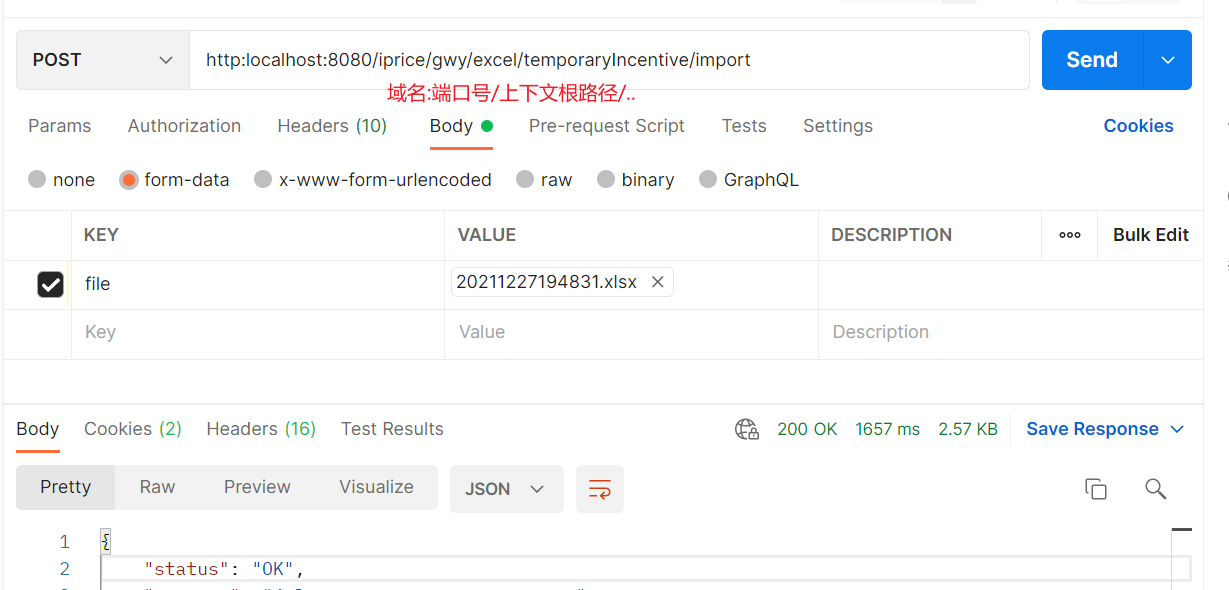
二、文件下载
1. 服务接口
    @GET

    @Path("/temporaryIncentive/export")

    @Consumes(MediaTypes.JSON_UTF8)

    void exportTemporaryIncentive(@QueryParam("sortType") String sortType, @QueryParam("versionId") String versionId,

        @Context HttpServletRequest req, @Context HttpServletResponse resp) throws ApplicationException;
2. 服务实现
private void exportIncentiveToExcel(List<VerticalPriceVO> verticalPriceList, HttpServletRequest req,

        HttpServletResponse resp) {

        if (verticalPriceList == null || verticalPriceList.size() <= 0) {

            return;

        }

        XSSFWorkbook inWb = new XSSFWorkbook();

        final XSSFSheet inSheet = inWb.createSheet("Temporary Incentive");

        int rowIdx = 0;

        int colIdx = 0;

        XSSFRow row1 = inSheet.createRow(rowIdx);

        final CellStyle dataLStyle = setDataCellStyle(inWb, 8, HorizontalAlignment.LEFT, true);

        final CellStyle dataRStyle = setDataCellStyle(inWb, 8, HorizontalAlignment.RIGHT, true);

        createCell("临时激励", dataLStyle, colIdx, row1);

        colIdx += 3;

        VerticalPriceVO single = verticalPriceList.get(0);

        List<MonthValueVO> monthValueVoList = single.getTempIncentiveRate();

        for (MonthValueVO monthValueVo : monthValueVoList) {

            createCell(monthValueVo.getMonth(), dataRStyle, colIdx, row1);

            colIdx++;

        }

        rowIdx++;

        // 先将所有渠道类型国际化信息查到本地,减少服务调用

        Map<String, String> categoryMap = new HashMap<>();

        try {

            List<LookupItemVO> channelCategoryList =

                lookupItemQueryService.findItemListByClassify(LookupConstants.CHANNEL_CATEGORY);

            categoryMap = channelCategoryList.stream()

                .collect(Collectors.toMap(item -> item.getItemCode() + item.getLanguage(), LookupItemVO::getItemName));

        } catch (ApplicationException e) {

            LOGGER.error("getCountryRegionPricingList error --- ", e);

        }

        if (categoryMap.size() <= 0) {

            LOGGER.error("------------ categoryMap.size()<=0 ----------------");

            return;

        }

        for (VerticalPriceVO ele : verticalPriceList) {

            XSSFRow inRow = inSheet.createRow(rowIdx);

            List<MonthValueVO> tempIncentiveRateList = ele.getTempIncentiveRate();

            String lang = CommonUtils.getLanguage();

            String channelTypeName = categoryMap.get(ele.getChannelType() + lang);

            String[] productArr = new String[] {ele.getOfferingName(), channelTypeName, ele.getDirectAccountName()};

            int colIndex = 0;

            for (; colIndex < productArr.length; colIndex++) {

                createCell(productArr[colIndex], dataLStyle, colIndex, inRow);

            }

            for (MonthValueVO monthValueVo : tempIncentiveRateList) {

                String tempIncentiveRate = monthValueVo.getValue();

                String percent = BasicUtil.isBigDecimal(tempIncentiveRate);

                createCell(percent, dataRStyle, colIndex, inRow);

                colIndex++;

            }

            rowIdx++;

        }

        String fileName = "临时激励";

        if (Constants.LANGUAGE_EN_US.equalsIgnoreCase(CommonUtils.getLanguage())) {

            fileName = "temporaryIncentive";

        }

        writeToExcel(inWb, req, resp, fileName);

    }
/**

     * 写入excel

     *

     * @param workBook param

     * @param req param

     * @param resp param

     * @param name param

     */

    public void writeToExcel(XSSFWorkbook workBook, HttpServletRequest req, HttpServletResponse resp, String name) {

        DateFormat dfNow = new SimpleDateFormat("yyyyMMddHHmmss");

        String fileName = name + BasicUtil.UNDERLINE + dfNow.format(new Date()) + ".xlsx";

        String checkPath = StringVerifyUtil.dealSpecialChar(fileName);

        File outputFile = new File(checkPath);

        FileOutputStream out = null;

        try {

            out = new FileOutputStream(outputFile);

            workBook.write(out); // 保存Excel文件

        } catch (IOException e) {

            LOGGER.error(e.getMessage(), e);

        } finally {

            if (out != null) {

                try {

                    // 关闭文件流

                    out.close();

                } catch (IOException ex) {

                    LOGGER.error(ex.getMessage(), ex);

                }

            }

        }

        downloadExcel(req, resp, outputFile);

    }

    private void downloadExcel(HttpServletRequest req, HttpServletResponse resp, File file) {

        InputStream in = null;

        DownloadOutput download = new DownloadOutput();

        try {

            // 尝试下载文件

            // 根据浏览器判断下载文件名转义

            String agent = req.getHeader("User-Agent").toLowerCase();

            File checkFile = StringVerifyUtil.getValidDirectoryPath(file);

            in = new FileInputStream(checkFile);

            if (agent.contains("msie") || agent.contains("trident")) {

                download.outputFromStream(req, resp, in, file.getName(), true, 0L);

            } else {

                download.outputFromStream(req, resp, in,

                    new String(file.getName().getBytes(StandardCharsets.UTF_8), StandardCharsets.ISO_8859_1), false,

                    0L);

            }

        } catch (FileNotFoundException e) {

            LOGGER.error("file: {} not found -- ", file.getPath(), e);

        } catch (Exception e) {

            LOGGER.error("{} download error -- ", file.getPath(), e);

        } finally {

            StreamUtil.closeStreams(in);

            if (in != null) {

                try {

                    in.close();

                } catch (IOException e) {

                    LOGGER.error(e.getMessage(), e);

                }

            }

        }

        if (file.delete()) {

            LOGGER.info("{} delete success -- ", file.getPath());

        }

    }
3. postman测试
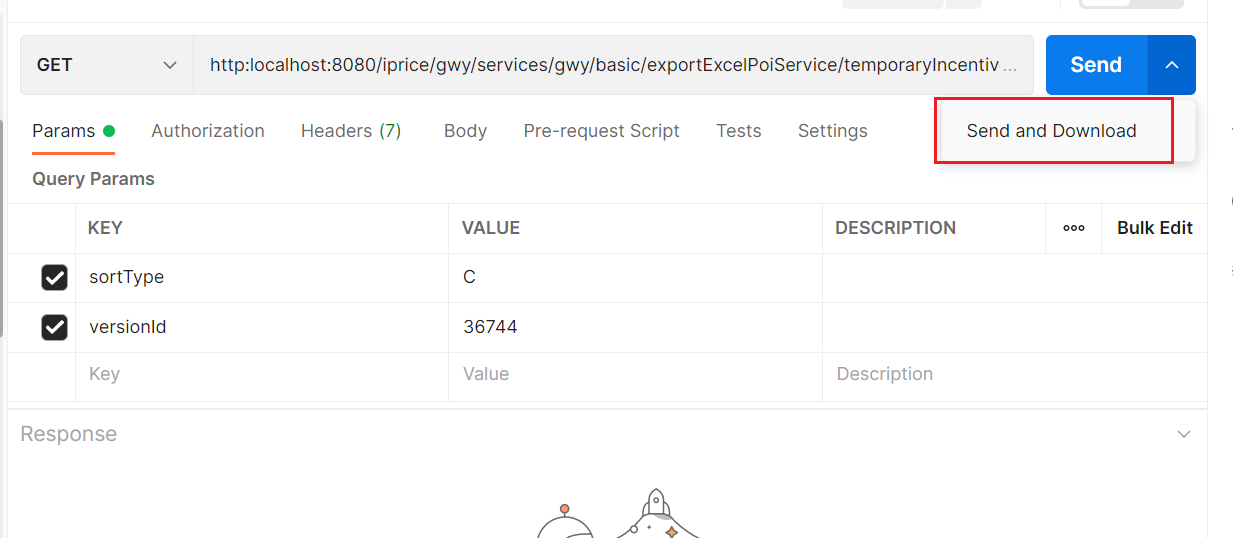
Springboot实现文件上传下载功能的更多相关文章
- JavaWeb实现文件上传下载功能实例解析
转:http://www.cnblogs.com/xdp-gacl/p/4200090.html JavaWeb实现文件上传下载功能实例解析 在Web应用系统开发中,文件上传和下载功能是非常常用的功能 ...
- JavaWeb实现文件上传下载功能实例解析 (好用)
转: JavaWeb实现文件上传下载功能实例解析 转:http://www.cnblogs.com/xdp-gacl/p/4200090.html JavaWeb实现文件上传下载功能实例解析 在Web ...
- SpringBoot图文教程4—SpringBoot 实现文件上传下载
有天上飞的概念,就要有落地的实现 概念+代码实现是本文的特点,教程将涵盖完整的图文教程,代码案例 文章结尾配套自测面试题,学完技术自我测试更扎实 概念十遍不如代码一遍,朋友,希望你把文中所有的代码案例 ...
- WEB文件上传下载功能
WEB文件上传下载在日常工作中经常用到的功能 这里用到JS库 http://files.cnblogs.com/meilibao/ajaxupload.3.5.js 上传代码段(HTML) <% ...
- Struts2实现文件上传下载功能(批量上传)
今天来发布一个使用Struts2上传下载的项目, struts2为文件上传下载提供了好的实现机制, 首先,可以先看一下我的项目截图 关于需要使用的jar包,需要用到commons-fileupload ...
- php实现文件上传下载功能小结
文件的上传与下载是项目中必不可少的模块,也是php最基础的模块之一,大多数php框架中都封装了关于上传和下载的功能,不过对于原生的上传下载还是需要了解一下的.基本思路是通过form表单post方式实现 ...
- 文件一键上传、汉字转拼音、excel文件上传下载功能模块的实现
----------------------------------------------------------------------------------------------[版权申明: ...
- C# 文件上传下载功能实现 文件管理引擎开发
Prepare 本文将使用一个NuGet公开的组件技术来实现一个服务器端的文件管理引擎,提供了一些简单的API,来方便的实现文件引擎来对您自己的软件系统的文件进行管理. 在Visual Studio ...
- javaweb项目中的文件上传下载功能的实现
框架是基于spring+myBatis的. 前台页面的部分代码: <form action="${ctx}/file/upLoadFile.do"method="p ...
- FasfDFS整合Java实现文件上传下载功能实例详解
https://www.jb51.net/article/120675.htm 在上篇文章给大家介绍了FastDFS安装和配置整合Nginx-1.13.3的方法,大家可以点击查看下. 今天使用Java ...
随机推荐
- 不需要鼠标交互的UI去掉RaycastTarget
UI事件会在EventSystem在Update的Process触发.UGUI会遍历屏幕中所有RaycastTarget是true的UI,接着就会发射线,并且排序找到玩家最先触发的那个UI,在抛出事件 ...
- 使用JIMO ActionOne HongHu 及其他MR VR眼镜,将真实场景和游戏内场景混合渲染
1. 在VR相机Head内创建一个 Camera 和两个RawImage(Camera 的参数和VRCamera的参数一致, 两个RawImage尺寸一致, 要把VRCamera的相机遮挡住 ) 2. ...
- 苹果App 上架 app store 提示 “一张或多张屏幕快照的尺寸存在错误“
获取预览图的方式有两种:第一种是用真机运行然后截图获取:另一种是用模拟器运行然后截图获取. 先说说第一种获取方式:app运行在5.5英寸(6+)的手机上,截取屏幕快照.在上传时会报错:"一张 ...
- 图片上传 加水印 以及GDI基本画图
上传图片并给所上传的图片添加水印 1 HttpPostedFile file = Context.Request.Files[0]; //有这个0说明一次只能上传一张 2 if (file.Con ...
- 加密算法和hash
随着安全问题越来越被重视,公司也全面替换了HTTP为HTTPS.2015年iOS9的ATS到今年苹果更是放出话来,2017年全面支持HTTPS,不支持的App,在审核的时候可能会遇到麻烦.鉴于此,我有 ...
- pycharm—python__________windows下安装
参考地址:https://www.runoob.com/w3cnote/pycharm-windows-install.html 一.安装python 1.pip 和 setuptools ...
- 复杂SQL语句及其优化
一,复杂SQL语句类型 1 ,笛卡尔连接 题目1:找出工资超过各自经理的员工姓名 表:employee(id , name , depid , salary, manager_id ) SELECT ...
- ubuntu下ntp时间同步
1. 首先安装ntp服务(ubuntu 16.02)在linux的root用户下执行以下命 sudo apt-get install ntp (如果不是ubuntu系统则执行 yum insta ...
- EhLib 9安装
EhLib 9安装 安装EhLib: 在Installer文件夹里找到EhLibInstaller.exe,右键以管理员权限运行EhLibInstaller.exe. 按照提示一路安装下来,顺利完成. ...
- MCU构成及其运行原理
MCU构成及其运行原理 1. MCU概念 MCU,微控制单元(Microcontroller Unit) ,又称单片微型计算机(Single Chip Microcomputer )或者单片机,是把中 ...