
Springboot实现文件上传下载功能
一、文件上传
1. controller层
@RestController

@RequestMapping(value = "/excel")

public class UploadController {

    @Autowired

    private UploadExcelPoiService uploadExcelPoiService;

    /**

     * 导入excel文件

     *

     * @param file param

     * @return rep

     * @throws ApplicationException ex

     */

    @PostMapping("/temporaryIncentive/import")

    @ResponseBody

    ResponseVO<List<List<MonthValueVO>>> importIncentive(@RequestParam("file") MultipartFile file)

        throws ApplicationException {

        return uploadExcelPoiService.importTemporaryIncentive(file);

    }

}
2. service层
@Service

public class UploadExcelPoiService implements IUploadExcelPoiService {

    private static final Logger LOGGER = LoggerFactory.getLogger(ExcelTaskService.class);

    /**

     * import TemporaryIncentive

     *

     * @param file param

     * @return ResponseVO

     * @throws ApplicationException ex

     */

    @Override

    public ResponseVO<List<List<MonthValueVO>>> importTemporaryIncentive(MultipartFile file)

        throws ApplicationException {

        if (file == null) {

            return ResponseUtil.resultError("com.xxx.it.iprice.00010104", new ArrayList<>());

        }

        String fileName = file.getOriginalFilename();

        if (fileName == null) {

            return ResponseUtil.resultError("com.xxx.it.iprice.00010105", new ArrayList<>());

        }

        if (!fileName.matches("^.+\\.(?i)(xls)$") && !fileName.matches("^.+\\.(?i)(xlsx)$")) {

            return ResponseUtil.resultError("com.xxx.it.iprice.00010105", new ArrayList<>());

        }

        boolean isExcel2003 = !fileName.matches("^.+\\.(?i)(xlsx)$");

        List<List<MonthValueVO>> monthList = new LinkedList<>();

        File outputFile = null;

        try {

            String outputFilePath = System.getProperty("java.io.tmpdir") + fileName;

            outputFile = new File(outputFilePath);

            file.transferTo(outputFile);

            LOGGER.info("上传文件名{}, 路径{}", fileName, outputFile.getAbsolutePath());

            InputStream is = new FileInputStream(outputFile);

            Workbook wb;

            if (isExcel2003) {

                wb = new HSSFWorkbook(is);

            } else {

                wb = new XSSFWorkbook(is);

            }

            Sheet sheet = wb.getSheetAt(0);

            if (sheet == null) {

                return ResponseUtil.resultError("com.xxx.it.iprice.00010106", new ArrayList<>());

            }

            int lastRowNum = sheet.getLastRowNum();

            if (lastRowNum <= 0) {

                return ResponseUtil.resultError("com.xxx.it.iprice.00010107", new ArrayList<>());

            }

            // 读取首行

            Row row0 = sheet.getRow(0);

            if (row0 == null) {

                return ResponseUtil.resultError("com.xxx.it.iprice.00010107", new ArrayList<>());

            }

            int lastCloNum = row0.getPhysicalNumberOfCells();

            List<MonthValueVO> singleList = new LinkedList<>();

            int rateIndex = 3;

            // 共lastCloNum-rateIndex+1个月

            for (int c = rateIndex; c <= lastCloNum; c++) {

                String month = row0.getCell(c).getStringCellValue();

                MonthValueVO tmp = new MonthValueVO();

                tmp.setMonth(month);

                singleList.add(tmp);

            }

            for (int r = 1; r <= lastRowNum; r++) {

                Row row = sheet.getRow(r);

                if (row == null) {

                    continue;

                }

                List<MonthValueVO> monthValueVoList = new LinkedList<>();

                for (int colIdx = rateIndex; colIdx <= lastCloNum; colIdx++) {

                    String monthRate = row.getCell(colIdx).getStringCellValue();

                    if (!BasicUtil.isValid(monthRate)) {

                        throw new ExcelImportException("com.xxx.it.iprice.00010108", r + 1, colIdx + 1);

                    }

                    MonthValueVO monthValueVo = new MonthValueVO();

                    monthValueVo.setMonth(singleList.get(colIdx - rateIndex).getMonth());

                    monthValueVo.setValue(monthRate.substring(0, monthRate.length() - 1));

                    monthValueVoList.add(monthValueVo);

                }

                monthList.add(monthValueVoList);

            }

        } catch (IOException e) {

            LOGGER.error(e.getMessage(), e);

        } finally {

            if (outputFile != null) {

                outputFile.delete();

            }

        }

        return ResponseUtil.resultSuccess(monthList);

    }

}
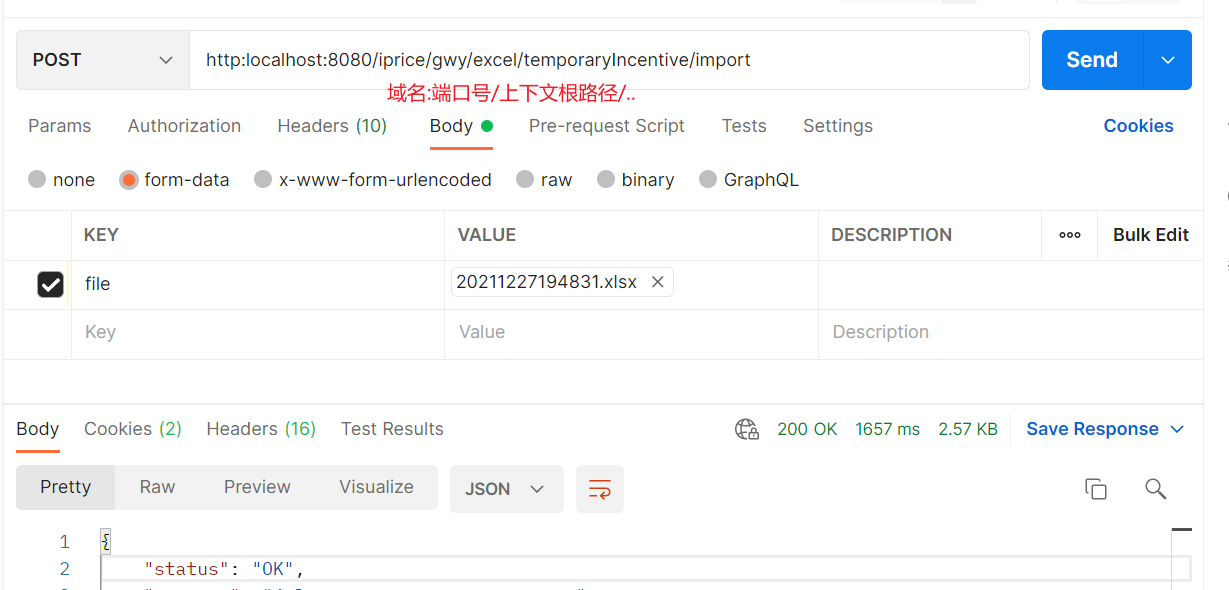
3. postman调试
二、文件下载
1. 服务接口
    @GET

    @Path("/temporaryIncentive/export")

    @Consumes(MediaTypes.JSON_UTF8)

    void exportTemporaryIncentive(@QueryParam("sortType") String sortType, @QueryParam("versionId") String versionId,

        @Context HttpServletRequest req, @Context HttpServletResponse resp) throws ApplicationException;
2. 服务实现
private void exportIncentiveToExcel(List<VerticalPriceVO> verticalPriceList, HttpServletRequest req,

        HttpServletResponse resp) {

        if (verticalPriceList == null || verticalPriceList.size() <= 0) {

            return;

        }

        XSSFWorkbook inWb = new XSSFWorkbook();

        final XSSFSheet inSheet = inWb.createSheet("Temporary Incentive");

        int rowIdx = 0;

        int colIdx = 0;

        XSSFRow row1 = inSheet.createRow(rowIdx);

        final CellStyle dataLStyle = setDataCellStyle(inWb, 8, HorizontalAlignment.LEFT, true);

        final CellStyle dataRStyle = setDataCellStyle(inWb, 8, HorizontalAlignment.RIGHT, true);

        createCell("临时激励", dataLStyle, colIdx, row1);

        colIdx += 3;

        VerticalPriceVO single = verticalPriceList.get(0);

        List<MonthValueVO> monthValueVoList = single.getTempIncentiveRate();

        for (MonthValueVO monthValueVo : monthValueVoList) {

            createCell(monthValueVo.getMonth(), dataRStyle, colIdx, row1);

            colIdx++;

        }

        rowIdx++;

        // 先将所有渠道类型国际化信息查到本地,减少服务调用

        Map<String, String> categoryMap = new HashMap<>();

        try {

            List<LookupItemVO> channelCategoryList =

                lookupItemQueryService.findItemListByClassify(LookupConstants.CHANNEL_CATEGORY);

            categoryMap = channelCategoryList.stream()

                .collect(Collectors.toMap(item -> item.getItemCode() + item.getLanguage(), LookupItemVO::getItemName));

        } catch (ApplicationException e) {

            LOGGER.error("getCountryRegionPricingList error --- ", e);

        }

        if (categoryMap.size() <= 0) {

            LOGGER.error("------------ categoryMap.size()<=0 ----------------");

            return;

        }

        for (VerticalPriceVO ele : verticalPriceList) {

            XSSFRow inRow = inSheet.createRow(rowIdx);

            List<MonthValueVO> tempIncentiveRateList = ele.getTempIncentiveRate();

            String lang = CommonUtils.getLanguage();

            String channelTypeName = categoryMap.get(ele.getChannelType() + lang);

            String[] productArr = new String[] {ele.getOfferingName(), channelTypeName, ele.getDirectAccountName()};

            int colIndex = 0;

            for (; colIndex < productArr.length; colIndex++) {

                createCell(productArr[colIndex], dataLStyle, colIndex, inRow);

            }

            for (MonthValueVO monthValueVo : tempIncentiveRateList) {

                String tempIncentiveRate = monthValueVo.getValue();

                String percent = BasicUtil.isBigDecimal(tempIncentiveRate);

                createCell(percent, dataRStyle, colIndex, inRow);

                colIndex++;

            }

            rowIdx++;

        }

        String fileName = "临时激励";

        if (Constants.LANGUAGE_EN_US.equalsIgnoreCase(CommonUtils.getLanguage())) {

            fileName = "temporaryIncentive";

        }

        writeToExcel(inWb, req, resp, fileName);

    }
/**

     * 写入excel

     *

     * @param workBook param

     * @param req param

     * @param resp param

     * @param name param

     */

    public void writeToExcel(XSSFWorkbook workBook, HttpServletRequest req, HttpServletResponse resp, String name) {

        DateFormat dfNow = new SimpleDateFormat("yyyyMMddHHmmss");

        String fileName = name + BasicUtil.UNDERLINE + dfNow.format(new Date()) + ".xlsx";

        String checkPath = StringVerifyUtil.dealSpecialChar(fileName);

        File outputFile = new File(checkPath);

        FileOutputStream out = null;

        try {

            out = new FileOutputStream(outputFile);

            workBook.write(out); // 保存Excel文件

        } catch (IOException e) {

            LOGGER.error(e.getMessage(), e);

        } finally {

            if (out != null) {

                try {

                    // 关闭文件流

                    out.close();

                } catch (IOException ex) {

                    LOGGER.error(ex.getMessage(), ex);

                }

            }

        }

        downloadExcel(req, resp, outputFile);

    }

    private void downloadExcel(HttpServletRequest req, HttpServletResponse resp, File file) {

        InputStream in = null;

        DownloadOutput download = new DownloadOutput();

        try {

            // 尝试下载文件

            // 根据浏览器判断下载文件名转义

            String agent = req.getHeader("User-Agent").toLowerCase();

            File checkFile = StringVerifyUtil.getValidDirectoryPath(file);

            in = new FileInputStream(checkFile);

            if (agent.contains("msie") || agent.contains("trident")) {

                download.outputFromStream(req, resp, in, file.getName(), true, 0L);

            } else {

                download.outputFromStream(req, resp, in,

                    new String(file.getName().getBytes(StandardCharsets.UTF_8), StandardCharsets.ISO_8859_1), false,

                    0L);

            }

        } catch (FileNotFoundException e) {

            LOGGER.error("file: {} not found -- ", file.getPath(), e);

        } catch (Exception e) {

            LOGGER.error("{} download error -- ", file.getPath(), e);

        } finally {

            StreamUtil.closeStreams(in);

            if (in != null) {

                try {

                    in.close();

                } catch (IOException e) {

                    LOGGER.error(e.getMessage(), e);

                }

            }

        }

        if (file.delete()) {

            LOGGER.info("{} delete success -- ", file.getPath());

        }

    }
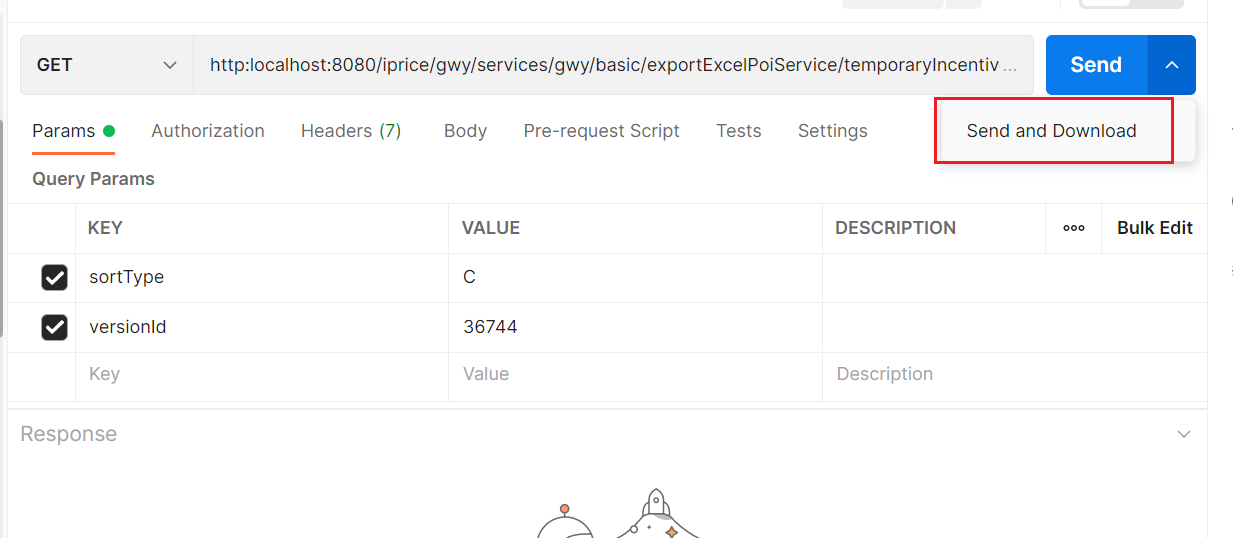
3. postman测试
Springboot实现文件上传下载功能的更多相关文章
- JavaWeb实现文件上传下载功能实例解析
转:http://www.cnblogs.com/xdp-gacl/p/4200090.html JavaWeb实现文件上传下载功能实例解析 在Web应用系统开发中,文件上传和下载功能是非常常用的功能 ...
- JavaWeb实现文件上传下载功能实例解析 (好用)
转: JavaWeb实现文件上传下载功能实例解析 转:http://www.cnblogs.com/xdp-gacl/p/4200090.html JavaWeb实现文件上传下载功能实例解析 在Web ...
- SpringBoot图文教程4—SpringBoot 实现文件上传下载
有天上飞的概念,就要有落地的实现 概念+代码实现是本文的特点,教程将涵盖完整的图文教程,代码案例 文章结尾配套自测面试题,学完技术自我测试更扎实 概念十遍不如代码一遍,朋友,希望你把文中所有的代码案例 ...
- WEB文件上传下载功能
WEB文件上传下载在日常工作中经常用到的功能 这里用到JS库 http://files.cnblogs.com/meilibao/ajaxupload.3.5.js 上传代码段(HTML) <% ...
- Struts2实现文件上传下载功能(批量上传)
今天来发布一个使用Struts2上传下载的项目, struts2为文件上传下载提供了好的实现机制, 首先,可以先看一下我的项目截图 关于需要使用的jar包,需要用到commons-fileupload ...
- php实现文件上传下载功能小结
文件的上传与下载是项目中必不可少的模块,也是php最基础的模块之一,大多数php框架中都封装了关于上传和下载的功能,不过对于原生的上传下载还是需要了解一下的.基本思路是通过form表单post方式实现 ...
- 文件一键上传、汉字转拼音、excel文件上传下载功能模块的实现
----------------------------------------------------------------------------------------------[版权申明: ...
- C# 文件上传下载功能实现 文件管理引擎开发
Prepare 本文将使用一个NuGet公开的组件技术来实现一个服务器端的文件管理引擎,提供了一些简单的API,来方便的实现文件引擎来对您自己的软件系统的文件进行管理. 在Visual Studio ...
- javaweb项目中的文件上传下载功能的实现
框架是基于spring+myBatis的. 前台页面的部分代码: <form action="${ctx}/file/upLoadFile.do"method="p ...
- FasfDFS整合Java实现文件上传下载功能实例详解
https://www.jb51.net/article/120675.htm 在上篇文章给大家介绍了FastDFS安装和配置整合Nginx-1.13.3的方法,大家可以点击查看下. 今天使用Java ...
随机推荐
- 记一次修改vg name 引发的血案
项目服务器安装完操作系统后,由于vg name 与转维标准不一致,故修改了vg name,那么案件由此发生 1.安装完系统后 /etc/fstab 默认为 2.修改vg name 和 lv name ...
- 生成数据库文档 —— Spring Boot + Screw
1.创建一个SpringBoot项目(本人使用的是IntelliJ IDEA 2020.1 x64) 最佳简单的项目配置如下: 2.添加相关依赖 <!--screw依赖--> <de ...
- vux方法
vuex 的备注 // vuex的公用数据放置处 state: { count: 0, }, // (方法) 在里面可以去修改state里面的数据(在这里面不能写异步操作) mutations: { ...
- JustAuth-第三方登录组件
1.新增依赖 <dependency> <groupId>me.zhyd.oauth</groupId> <artifactId>JustAuth< ...
- Spring 常见注解及其作用
1.@ConfigurationProperties 可以非常方便的把资源文件中的内容绑定到对象上 绑定单一属性值,绑定整个对象属性 2.@Value("${app.n ...
- JavaScript基础知识整理(引用类型-Function)
Function Function类型实际上是对象,每个函数都是Function类型的实例,自然也就具有属性和方法. 定义函数通常有三种方式 使用函数声明 function sum(num1,num2 ...
- 14.java 中缀表达式转后缀表达式
思路如下: 1.初始化两个栈,运算符栈和中间结果栈 2.从左至右扫描 3.遇到数时直接压入s2 4.遇到运算符时,比较其与s1栈顶的优先级,有如下几种情况: 1)s1为空或栈顶为"(&quo ...
- python+接口参数化(ddt和pytest.mark.parametrize())使用
一.ddt(基于unittest) 实例:字典解包[{},{}] test_data=t.read_excel(mode,case_list)@ddt class Interface(unittest ...
- (一)用go实现单链表
本篇,我们用go简单的实现单链表这种数据结构. 1.节点定义 type Node struct{ data int next *Node } 2.节点的添加 // 尾插法插入节点 func (p *N ...
- Go--解析yaml文件
yaml 文件是目前最常用的配置文件,使用go语言编写代码和工具时,也会用到yaml文件,将服务配置及中间件等信息定义到yaml文件中,后续可根据实际场景来选用. //先下载外部包 go get -u ...