
vue3+ts+vant制作音乐播放器(进度条拖拽、倍速切换、上一曲、下一曲)完整版
1、进度条的用的是vant的Progress组件,比手写进度条方便很多,有自带的事件
2、H5页面兼容pc
效果展示
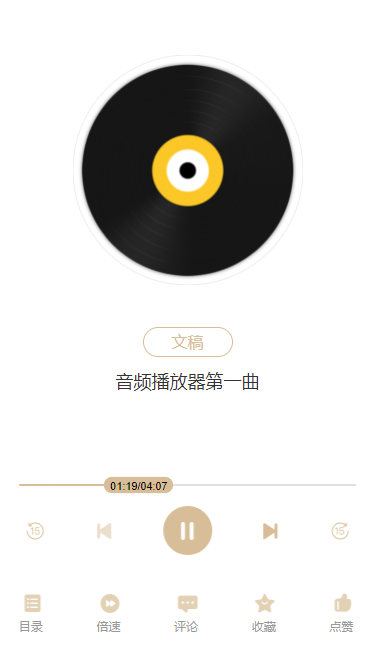
上代码
一、template模块
<template lang="pug">

.audioPlay

  main

    .audioBox

      .imgBox

        van-image.songImg(

          width="4.6rem",

          height="4.6rem",

          fit="cover",

          style="border-radius: 5px; overflow: hidden",

          :src="require('@/assets/images/media/song.png')"

        )

      .titBox 文稿

      .titText {{ title }}

      .audioControl

        audio(

          :src="audioSrc",

          @canplay="getDuration",

          @timeupdate="updateTime",

          v-show="false",

          controls,

          ref="audio"

        )

        van-slider.audioSlider(

          v-model="sliderValue",

          @update:model-value="sliderOnChange",

          active-color="#D8BE98",

          inactive-color="#E0E0E0",

          :disabled="isSlide > 0 ? false : true"

        )

          template(#button)

            .custom-button {{ currentDuration }}/{{ duration }}

        ul.handleUl

          li.handleLi(@click="handleBack")

            van-image.handleImg(

              width="0.44rem",

              height="0.44rem",

              fit="cover",

              :src="require('@/assets/images/media/houtui.png')"

            )

          li.handleLi(@click="prevPlay(isPlayNum)")

            van-image.handleImg(

              width="0.44rem",

              height="0.44rem",

              fit="cover",

              :src="isPlayNum > 1 ? require('@/assets/images/media/prevL.png') : require('@/assets/images/media/prev.png')"

            )

          li.handleLi(@click="handlePauseOrPlay")

            van-image.handleImg(

              width="0.98rem",

              height="0.98rem",

              fit="cover",

              :src="paused ? require('@/assets/images/media/play.png') : require('@/assets/images/media/stop.png')"

            )

          li.handleLi(@click="nextPlay(isPlayNum)")

            van-image.handleImg(

              width="0.44rem",

              height="0.44rem",

              fit="cover",

              :src="isPlayNum < catalogArray.length ? require('@/assets/images/media/nextL.png') : require('@/assets/images/media/next.png')"

            )

          li.handleLi(@click="handleForward")

            van-image.handleImg(

              width="0.44rem",

              height="0.44rem",

              fit="cover",

              :src="require('@/assets/images/media/qianjin.png')"

            )

        ul.funUl

          li.funLi(@click="sheetShowCli('mulu', '选集')")

            van-image.funImg(

              width="0.54rem",

              height="0.54rem",

              fit="cover",

              :src="require('@/assets/images/media/mulu.png')"

            )

            p.funtext 目录

          li.funLi(@click="sheetShowCli('beisu', '倍速')")

            van-image.funImg(

              width="0.54rem",

              height="0.54rem",

              fit="cover",

              :src="require('@/assets/images/media/beisu.png')"

            )

            p.funtext 倍速

          li.funLi(

            @click="sheetShowCli('pinglun', '评论')"

          )

            van-image.funImg(

              width="0.54rem",

              height="0.54rem",

              fit="cover",

              :src="require('@/assets/images/media/pinglun.png')"

            )

            p.funtext 评论

          li.funLi

            van-image.funImg(

              width="0.54rem",

              height="0.54rem",

              fit="cover",

              :src="require('@/assets/images/media/shoucang.png')"

            )

            p.funtext 收藏

          li.funLi

            van-image.funImg(

              width="0.54rem",

              height="0.54rem",

              fit="cover",

              :src="require('@/assets/images/media/dianzan.png')"

            )

            p.funtext 点赞

    van-action-sheet.audioSheet(v-model:show="sheetShow", :title="sheetTit")

      .sheetCon

        .multipW(v-if="sheetConActive == 'beisu'")

          .multipInfo(

            v-for="(item, index) in multipleArray",

            :key="index",

            @click="multipSelect(item.num, index)"

          )

            .multipText(:class="item.isSelected ? 'isSelect' : ''") {{ item.text }}

            van-icon.multipIcon(

              :name="require('@/assets/images/media/isSelected.png')",

              size="0.7rem",

              v-if="item.isSelected"

            )

        .catalogW(v-if="sheetConActive == 'mulu'")

          .catalogInfo(

            v-for="(item, index) in catalogArray",

            :key="index",

            @click="catalogSelect(index)"

          )

            .catalogCon(:class="item.isPlay ? 'isPlay' : ''")

              .con_box

                .con_boxTit {{ index + 1 }}.{{ item.title }}

                .con_boxDesc {{ item.desc }}

                .con_boxIcon

                  van-icon.timeIcon(name="clock-o", size="0.2rem")

                  span.timeSpan {{ item.audioDurat }}

              van-image.con_Img(

                width="0.6rem",

                height="0.6rem",

                fit="cover",

                :src="item.isPlay ? require('@/assets/images/media/playing.gif') : require('@/assets/images/media/playMl.png')"

              )

        .reviewW(v-if="sheetConActive == 'pinglun'")

          .reviewInfo 评论内容

</template>
二、ts部分
<script lang="ts">

import {

  defineComponent,

  onBeforeMount,

  reactive,

  ref,

  toRefs,

} from "vue";

interface control {

  audioUrl: string;

  play: boolean;

}

export default defineComponent({

  name: "audioPlay",

  setup() {

    const audioControl: control = reactive({ audioUrl: "", play: false });

    onBeforeMount(() => {

      audioInfo.audioSrc = (catalogArray as any).value[0].audioSrc;

      audioInfo.title = (catalogArray as any).value[0].title;

      audioInfo.duration = (catalogArray as any).value[0].audioDurat;

      setTimeout(() => {

        audioInfo.isSlide = audio.value.duration;

        console.log("audio.value.duration22", typeof audio.value.duration);

        // alert(audio.value.duration);

      }, 100);

    });

    //暂停播放

    const handlePlayer = (): void => {

      audioControl.play = !audioControl.play;

      audioControl.play

        ? (audio.value as any).play()

        : (audio.value as any).pause();

    };

    const audioInfo = reactive({

      audioSrc: "",

      backSecond: 15, //后退秒数

      forwardSecond: 15, //前进秒数

      duration: "00:00", //音频总时长

      currentDuration: "00:00", //音频当前播放时长

      title: "",

      paused: true,

      isPlayNum: 1, //上下集用到-正在播放的第几集

      isSlide: 0, //判断滑块是否可以滑动

    });

    const audio = ref();

    const sliderValue = ref();

    //后退

    const handleBack = (): void => {

      if (audio.value.currentTime > audioInfo.backSecond) {

        audio.value.currentTime =

          audio.value.currentTime - audioInfo.backSecond;

      }

    };

    //前进

    const handleForward = (): void => {

      if (

        audio.value.duration - audio.value.currentTime >

        audioInfo.forwardSecond

      ) {

        audio.value.currentTime =

          audio.value.currentTime + audioInfo.forwardSecond;

      }

    };

    //暂停或播放

    const handlePauseOrPlay = (): void => {

      console.log("audio.value.duration22", typeof audio.value.duration);

      setTimeout(() => {

        audio.value.paused ? audio.value.play() : audio.value.pause();

        audioInfo.paused = !audioInfo.paused;

      }, 200);

    };

    //视频在可以播放时触发

    const getDuration = (): void => {

      setTimeout(() => {

        (audioInfo.duration as any) = timeFormat(audio.value.duration);

      }, 200);

    };

    //将单位为秒的的时间转换成mm:ss的形式

    const timeFormat = (number: Number) => {

      let minute = parseInt((<number>number / 60) as any);

      let second = parseInt((<number>number % 60) as any);

      (minute as any) = minute >= 10 ? minute : "0" + minute;

      (second as any) = second >= 10 ? second : "0" + second;

      return minute + ":" + second;

    };

    //进度条发生变化时触发

    const updateTime = (): void => {

      audioInfo.currentDuration = timeFormat(audio.value.currentTime);

      sliderValue.value = (

        (audio.value.currentTime * 100) /

        audio.value.duration

      ).toFixed(3);

      audioInfo.isSlide = audio.value.duration;

      // 播放完毕按钮变回

      if (audioInfo.currentDuration == audioInfo.duration) {

        audioInfo.paused = true;

      }

    };

    //滑动进度条

    const sliderOnChange = (value: any): void => {

      console.log("value", timeFormat((audio.value.duration * value) / 100));

      //   设置播放时间

      audioInfo.currentDuration = timeFormat(

        (audio.value.duration * value) / 100

      );

      audio.value.currentTime = parseInt(

        ((audio.value.duration * value) / 100) as any

      );

    };

    // 点击右侧功能

    const sheetShow = ref(false);

    const sheetTit = ref("");

    const sheetConActive = ref("");

    const multipleArray = ref([

      { num: 0.75, text: "0.75X", isSelected: false },

      { num: 1, text: "1.0X(正常倍速)", isSelected: true },

      { num: 1.25, text: "1.25X", isSelected: false },

      { num: 1.5, text: "1.5X", isSelected: false },

      { num: 2, text: "2X", isSelected: false },

    ]);

    const catalogArray = ref([

      {

        title: "音频播放器第一曲",

        desc: "第一站《大宪章》纪念碑1/4",

        audioSrc: require("@/assets/images/media/audio/music1.mp3"),

        audioDurat: "04:07",

        isPlay: true,

      },

      {

        title: "测试二未过时的未过时仍未未过时的未过时过时的未过时的未过",

        desc: "第一站测试二未过时的未过时仍未未过时的未过时过时的未过时的",

        audioSrc: require("@/assets/images/media/audio/music2.mp3"),

        audioDurat: "02:06",

        isPlay: false,

      },

      {

        title: "测试三过时未过时的未过时",

        desc: "第一站测试三未过时的未过时仍未未过时的未过时过时的未过时的/4",

        audioSrc: require("@/assets/images/media/audio/music3.mp3"),

        audioDurat: "04:56",

        isPlay: false,

      },

    ]);

    // 下方功能唤起面板

    const sheetShowCli = (val: any, tit: any): void => {

      sheetConActive.value = val;

      sheetTit.value = tit;

      sheetShow.value = true;

    };

    // 倍速选择

    const multipSelect = (num: Number, index: number): void => {

      audio.value.playbackRate = num;

      multipleArray.value.forEach((item: any) => {

        item.isSelected = false;

      });

      multipleArray.value[index].isSelected = true;

      sheetShow.value = false;

    };

    // 选集功能

    const catalogSelect = (index: number): void => {

      catalogArray.value.forEach((item: any) => {

        item.isPlay = false;

      });

      sliderValue.value = 0;

      audio.value.currentTime = 0;

      audioInfo.paused = true;

      audioInfo.audioSrc = (catalogArray as any).value[index].audioSrc;

      audioInfo.title = (catalogArray as any).value[index].title;

      audioInfo.currentDuration = "00:00";

      audioInfo.duration = (catalogArray as any).value[index].audioDurat;

      catalogArray.value[index].isPlay = true;

      sheetShow.value = false;

      audioInfo.isPlayNum = index + 1;

      handlePauseOrPlay();

    };

    // 上一集

    const prevPlay = (num: any): void => {

      if (num > 1) {

        catalogArray.value.forEach((item: any) => {

          item.isPlay = false;

        });

        sliderValue.value = 0;

        audio.value.currentTime = 0;

        audioInfo.paused = true;

        audioInfo.audioSrc = (catalogArray as any).value[num - 2].audioSrc;

        audioInfo.title = (catalogArray as any).value[num - 2].title;

        audioInfo.currentDuration = "00:00";

        audioInfo.duration = (catalogArray as any).value[num - 2].audioDurat;

        catalogArray.value[num - 2].isPlay = true;

        audioInfo.isPlayNum = num - 1;

        sheetShow.value = false;

        handlePauseOrPlay();

      }

    };

    // 下一集

    const nextPlay = (num: any): void => {

      if (num < catalogArray.value.length) {

        catalogArray.value.forEach((item: any) => {

          item.isPlay = false;

        });

        sliderValue.value = 0;

        audio.value.currentTime = 0;

        audioInfo.paused = true;

        audioInfo.audioSrc = (catalogArray as any).value[num].audioSrc;

        audioInfo.title = (catalogArray as any).value[num].title;

        audioInfo.currentDuration = "00:00";

        audioInfo.duration = (catalogArray as any).value[num].audioDurat;

        catalogArray.value[num].isPlay = true;

        audioInfo.isPlayNum = num + 1;

        sheetShow.value = false;

        handlePauseOrPlay();

      }

    };

    return {

      ...toRefs(audioControl),

      handlePlayer,

      ...toRefs(audioInfo),

      handleBack,

      handleForward,

      handlePauseOrPlay,

      getDuration,

      updateTime,

      audio,

      sliderValue,

      sliderOnChange,

      sheetShow,

      multipleArray,

      sheetShowCli,

      sheetTit,

      sheetConActive,

      multipSelect,

      catalogArray,

      catalogSelect,

      prevPlay,

      nextPlay,

    };

  },

});

</script>
三、样式部分
<style lang="scss">

.audioSlider {

  .van-slider__bar {

    z-index: 1111;

  }

  &.van-slider--disabled {

    opacity: 1;

  }

}

.isPlay {

  .con_Img {

    .van-image__img {

      width: 0.4rem;

      height: 0.4rem;

    }

  }

}

</style>

<style lang="scss" scoped>

.audioPlay {

  height: 100vh;

  display: flex;

  flex-direction: column;

  .content {

    @include Padding(0.2rem, 0px);

    @include Position(relative, 0, -0.9rem);

    width: 100%;

  }

  main {

    flex: 1;

    overflow: auto;

    .audioBox {

      .imgBox {

        width: 100%;

        text-align: center;

        margin-top: 1.1rem;

      }

    }

    .titBox {

      width: 1.8rem;

      height: 0.6rem;

      border-radius: 0.3rem;

      border: 1px solid #d8be98;

      text-align: center;

      margin: 0.6rem auto 0;

      font-size: 0.32rem;

      line-height: 0.6rem;

      color: #d8be98;

      box-sizing: border-box;

    }

    .titText {

      width: 80%;

      margin: 0.3rem auto 0;

      @include textEllipsis();

      font-size: 0.36rem;

      line-height: 0.4rem;

      color: #333;

      text-align: center;

    }

    .audioControl {

      position: relative;

      &::before {

        position: absolute;

        top: 0;

        left: 0;

        width: 50%;

        content: "";

        height: 2px;

        background: #d8be98;

      }

      &::after {

        position: absolute;

        top: 0;

        right: 0;

        width: 50%;

        content: "";

        height: 2px;

        background: #e0e0e0;

      }

      width: 90%;

      position: absolute;

      bottom: 0.6rem;

      left: 50%;

      transform: translateX(-50%);

      .audioSlider {

        width: 80%;

        margin: 0 auto;

        .custom-button {

          background: #d8be98;

          padding: 0 0.14rem;

          height: 0.36rem;

          line-height: 0.4rem;

          border-radius: 0.18rem;

          font-size: 0.24rem;

          color: #000;

          transform: scale(0.9);

        }

      }

      .handleUl {

        display: flex;

        justify-content: space-between;

        align-items: center;

        padding: 0 0.1rem;

        box-sizing: border-box;

        margin-top: 0.4rem;

        .handleLi {

          line-height: 0;

        }

      }

    }

    .funUl {

      display: flex;

      justify-content: space-between;

      align-items: center;

      margin-top: 0.7rem;

      .funLi {

        line-height: 0;

        .funtext {

          color: #999999;

          font-size: 0.24rem;

          line-height: 0.4rem;

        }

      }

    }

  }

  .audioSheet {

    .sheetCon {

      border-top: 1px solid #dfdfdf;

      .multipW {

        padding: 0 0.32rem 1rem;

        .multipInfo {

          border-bottom: 1px solid #dfdfdf;

          height: 0.86rem;

          display: flex;

          justify-content: space-between;

          align-items: center;

          .multipText {

            color: #666666;

            font-size: 0.32rem;

            &.isSelect {

              color: #caaa7c;

            }

            .multipIcon {

              color: #caaa7c;

            }

          }

        }

      }

      .catalogW {

        padding: 0 0.32rem 0.6rem;

        .catalogInfo {

          border-bottom: 1px solid #e6e6e6;

          .catalogCon {

            display: flex;

            justify-content: space-between;

            align-items: center;

            padding: 0.24rem 0.2rem 0.24rem 0;

            box-sizing: border-box;

            .con_box {

              width: 80%;

              .con_boxTit {

                width: 100%;

                @include textEllipsis();

                font-size: 0.32rem;

                color: #000000;

              }

              .con_boxDesc {

                font-size: 0.28rem;

                color: #999999;

                @include textEllipsis();

                margin-top: 0.1rem;

              }

              .con_boxIcon {

                color: #cccccc;

                font-size: 0.24rem;

                margin-top: 0.2rem;

                .timeIcon {

                  margin-right: 0.1rem;

                }

              }

            }

            &.isPlay {

              .con_box {

                .con_boxTit {

                  color: #caaa7c;

                }

                .con_boxDesc {

                  color: #e0ccb1;

                }

                .con_boxIcon {

                  color: #e0ccb1;

                }

              }

            }

            .con_Img {

              background: #f7f1e8;

              width: 0.6rem;

              height: 0.6rem;

              border-radius: 50%;

              display: flex;

              align-items: center;

              justify-content: center;

            }

          }

        }

      }

    }

    .reviewW {

      padding: 0 0.32rem 0.6rem;

      .reviewInfo {

        border-bottom: 1px solid #e6e6e6;

        padding: 0.4rem 0;

        .reviewCon {

          display: flex;

          justify-content: space-between;

          .con_box {

            width: calc(100% - 0.78rem);

            .con_boxTit {

              font-size: 0.28rem;

              color: #666666;

            }

            .con_boxTime {

              color: #b3b3b3;

              font-size: 0.24rem;

              line-height: 0.4rem;

            }

            .con_boxText {

              font-size: 0.32rem;

              color: #333333;

              line-height: 0.48rem;

            }

            .con_boxReply {

              background: #f8f8f8;

              width: 100%;

              padding: 0.1rem 0.2rem 0.2rem;

              box-sizing: border-box;

              margin-top: 0.2rem;

              .replyList {

                display: flex;

                font-size: 0.28rem;

                line-height: 0.36rem;

                margin-top: 0.1rem;

                .replyName {

                  color: #666;

                  white-space: nowrap;

                  margin-right: 0.1rem;

                }

                .replyText {

                  color: #333;

                }

              }

            }

          }

        }

      }

    }

  }

}

@media only screen and (min-width: 750px) {

  .audioPlay {

    @include boxSize(750px, 100vh);

    margin: 0 auto;

  }

}

</style>
做个笔记
vue3+ts+vant制作音乐播放器(进度条拖拽、倍速切换、上一曲、下一曲)完整版的更多相关文章
- HTML+纯JS制作音乐播放器
该篇文章会教你通过JavaScript制作一个简单的音乐播放器.包括播放.暂停.上一曲和下一曲. 阅读本文章你需要对HTML.CSS和Javascript有基本的了解. 话不多说,先上图. emmm. ...
- Android 音视频深入 十三 OpenSL ES 制作音乐播放器,能暂停和调整音量(附源码下载)
项目地址https://github.com/979451341/OpenSLAudio OpenSL ES 是基于NDK也就是c语言的底层开发音频的公开API,通过使用它能够做到标准化, 高性能,低 ...
- Qt+MPlayer音乐播放器开发笔记(一):ubuntu上编译MPlayer以及Demo演示
前言 在ubuntu上实现MPlayer播放器播放音乐. Demo Mplayer MPlayer是一款开源多媒体播放器,以GNU通用公共许可证发布.此款软件 ...
- html5+css3 制作音乐播放器
//css// body , html{ margin:0; padding:0; font:12px Arial, Helvetica, sans-serif; } .Mus ...
- 开源播放器 ijkplayer (二) :ijkplayer倍速变调问题解决方案
转载注明出处:http://www.cnblogs.com/renhui/p/6510872.html 之前使用IjkPlayer做播放器的使用的时候,在做倍速播放的时候,发现播放的声音音调明显变高了 ...
- JavaScript实现水平进度条拖拽效果
<html> <head> <meta charset="UTF-8"> <title>Document</title> ...
- 使用 原生js 制作插件 (javaScript音乐播放器)
1.引用页面 index.html <!DOCTYPE html> <html lang="en"> <head> <meta chars ...
- 【重点突破】——Canvas技术绘制音乐播放器界面
一.引言 在用Canvas练习制作了验证码之后,还有一个用Canvas技术很综合的练习——制作音乐播放器.在做这个练习的过程中,还有一个重要的观察点,那就是理解Canvas的一大问题. 二.要求 点 ...
- ios开发:一个音乐播放器的设计与实现
github地址:https://github.com/wzpziyi1/MusicPlauer 这个Demo,关于歌曲播放的主要功能都实现了的.下一曲.上一曲,暂停,根据歌曲的播放进度动态滚动歌词, ...
- vue实现音乐播放器实战笔记
原文链接:https://blog.csdn.net/Forever201295/article/details/80266600 一.项目说明该播放器的是基于学习vue的实战练习,不用于其他途径.应 ...
随机推荐
- 手写Web图片懒加载~
废话不多说,直接上代码: 1 <!DOCTYPE html> 2 <html> 3 <head> 4 <title>图片懒加载</title> ...
- [2002年NOIP普及组] 选数
已知 n 个整数 x1,x2,-,xn,以及一个整数 k(k<n).从 n 个整数中任选 k 个整数相加,可分别得到一系列的和.例如当 n=4,k=3,4 个整数分别为 3,7,12,19 时, ...
- Java基础_字符串比较
字符串之间的比较 compareTo "==" equals compareTo 示例: compareTo(string) compareToIgnoreCase(String) ...
- Rabbit MQ的几种模式
RabbitMQ是实现了高级消息队列协议(AMQP)的开源消息代理软件(亦称面向消息的中间件). 官网文档:https://www.rabbitmq.com/getstarted.html Rabbi ...
- 流程图draw.io自选中文字体
draw.io免费好用,完全可以取代Visio. 唯独缺省选择都是英文字体.但要选择中文字体也可以自行添加,步骤: 确保系统里已经安装了相应中文字体.ubuntu下Google思源字体在/usr/sh ...
- Windows10免安装版的Mysql
文章转载出处https://www.cnblogs.com/winton-nfs/p/11524007.html 免安装版的Mysql MySQL关是一种关系数据库管理系统,所使用的 SQL 语言是用 ...
- 9.java单链表初学代码复现及一些不值一提的小问题(2)
首先写完了update和delete函数,在之前的铺垫下.倒是不难,结构和之前的都相同,遍历找到节点后处理该节点.代码如下 public void update(teamNode node){ tea ...
- 抽取JDBC工具类:JDBCUtils
目的:简化书写 分析: 驱动注册,连接对象创建,其中包括输入驱动,数据库的地址,以及用户名和密码,每次编写代码都需要重复编写,如果每次使用的都是同一个账户的同一个数据库,代码的重复读很高,甚至 ...
- git submodule .gitmodules 子模块
初始化 git submodule init 添加子项目 git submodule add -b xxxx {path} -b 指定分支 path 可为空 (不知为何, 直接写在 .gitmodul ...
- Razor视图cshtml做到运行时编译【提高开发效率】
当你的.NET开发工具升级到.NET Core版本以上,就会发现有时候无法将视图界面做的修改可以直接保存后刷新输出,一般都需要重新热重载或重新编译,这样会导致开发效率过慢的行为,开发者无法直接直观地看 ...