
再见Docker!Containerd安装与使用
Containerd 的技术方向和目标
- 简洁的基于 gRPC 的 API 和 client library
- 完整的 OCI 支持(runtime 和 image spec)
- 同时具备稳定性和高性能的定义良好的容器核心功能
- 一个解耦的系统(让 image、filesystem、runtime 解耦合),实现插件式的扩展和重用
为什么需要独立的 containerd:
- 以往隶属于docker项目中,现如今从整体 docker 引擎中分离出的项目(开源项目的思路)
- 可以被 Kubernets CRI 等项目使用(通用化)
- 为广泛的行业合作打下基础(就像 runC 一样)
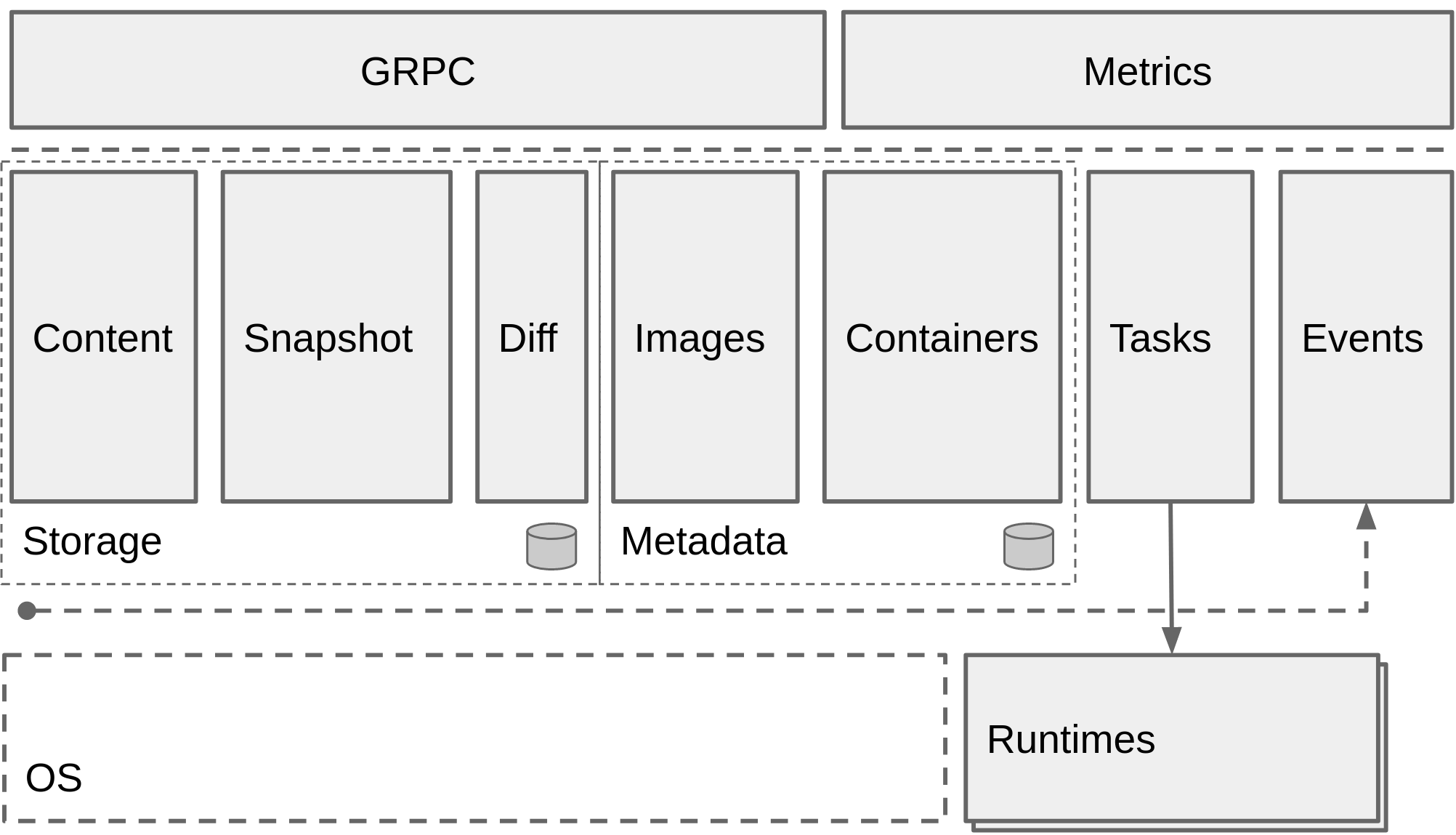
containerd的架构设计图:
安装containerd
验证仓库版本:
root@containerd:~# apt-cache madison containerd
ubuntu在线仓库版本不是最新,可以使用github仓库中的新版本,使用二进制方式部署
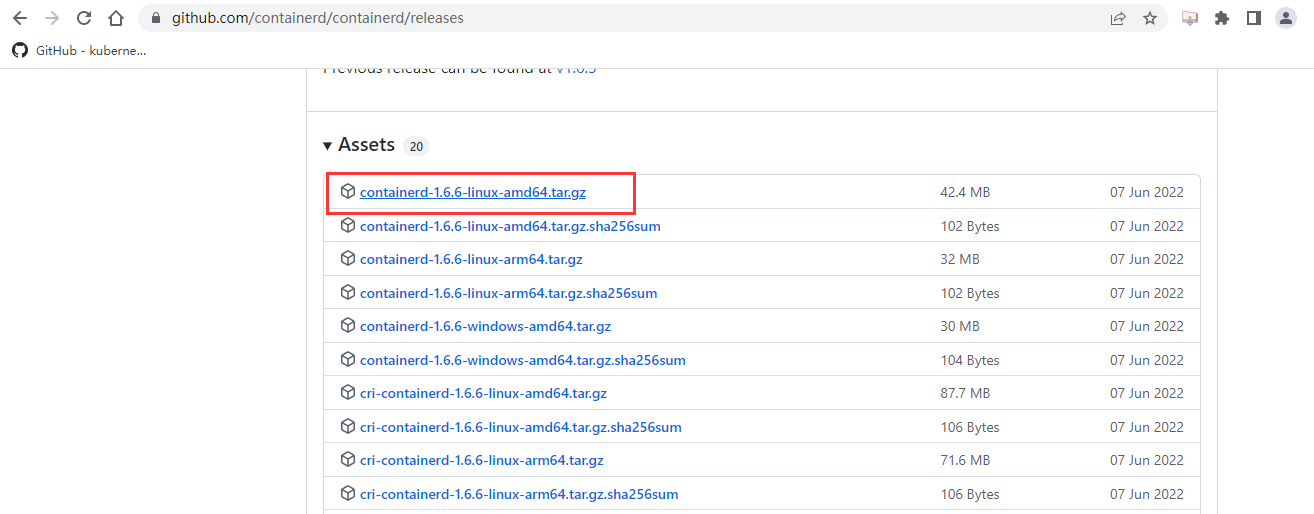
下载二进制安装包
github链接地址:https://github.com/containerd/containerd/releases
选择64位x86架构系统安装包
上传安装包到服务器并开始解压安装

解压缩并将containerd执行文件放入系统默认命令路径下
root@containerd:/tools# tar xf containerd-1.6.6-linux-amd64.tar.gz

root@containerd:/tools# cp -r bin/* /usr/local/bin/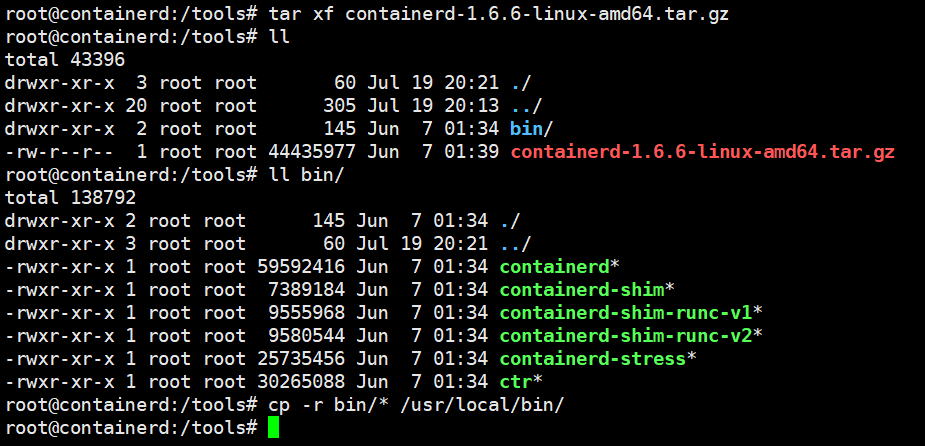
创建containerd systemd service启动管理文件:
修改ExecStart=/usr/local/bin/containerd为当前containerd文件路径
root@containerd:/tools# cd /etc/systemd/system/

root@containerd:/etc/systemd/system# cat containerd.service

# Copyright The containerd Authors.

#

# Licensed under the Apache License, Version 2.0 (the "License");

# you may not use this file except in compliance with the License.

# You may obtain a copy of the License at

#

#     http://www.apache.org/licenses/LICENSE-2.0

#

# Unless required by applicable law or agreed to in writing, software

# distributed under the License is distributed on an "AS IS" BASIS,

# WITHOUT WARRANTIES OR CONDITIONS OF ANY KIND, either express or implied.

# See the License for the specific language governing permissions and

# limitations under the License.

[Unit]

Description=containerd container runtime

Documentation=https://containerd.io

After=network.target local-fs.target

[Service]

ExecStartPre=-/sbin/modprobe overlay

ExecStart=/usr/local/bin/containerd

Type=notify

Delegate=yes

KillMode=process

Restart=always

RestartSec=5

# Having non-zero Limit*s causes performance problems due to accounting overhead

# in the kernel. We recommend using cgroups to do container-local accounting.

LimitNPROC=infinity

LimitCORE=infinity

LimitNOFILE=infinity

# Comment TasksMax if your systemd version does not supports it.

# Only systemd 226 and above support this version.

TasksMax=infinity

OOMScoreAdjust=-999

[Install]

WantedBy=multi-user.target
重新加载系统管理服务文件
root@containerd:/etc/systemd/system# systemctl daemon-reload创建配置文件
root@containerd:/etc/systemd/system# mkdir /etc/containerd
生成模板配置文件
root@containerd:/etc/systemd/system# containerd config default > /etc/containerd/config.toml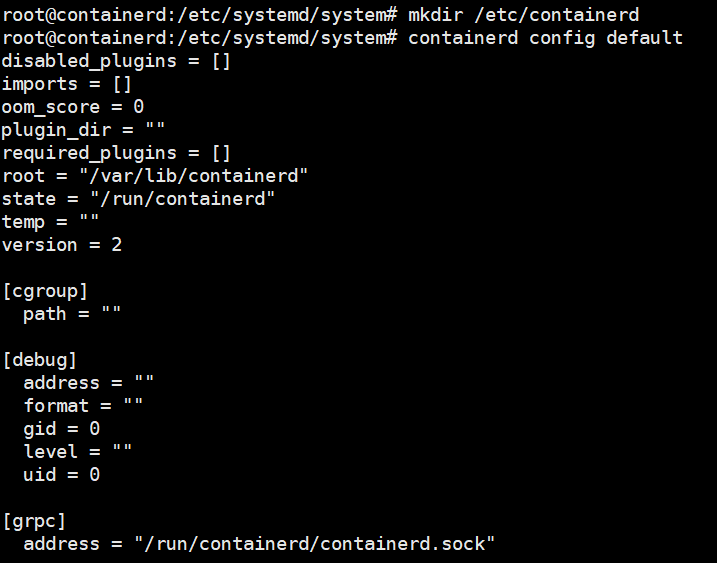
修改配置文件
root@containerd:/etc/systemd/system# cd /etc/containerd/

root@containerd:/etc/containerd# vim config.toml
vim下搜索/mirrors,添加镜像加速,使用docker镜像源即可,上下级配置,缩进两个空格。
   [plugins."io.containerd.grpc.v1.cri".registry.mirrors]

        [plugins."io.containerd.grpc.v1.cri".registry.mirrors."docker.io"]

          endpoint = ["https://dxc7f1d6.mirror.aliyuncs.com"]
如果是从docker.io下载进行,则使用endpoint配置的镜像站点加速下载

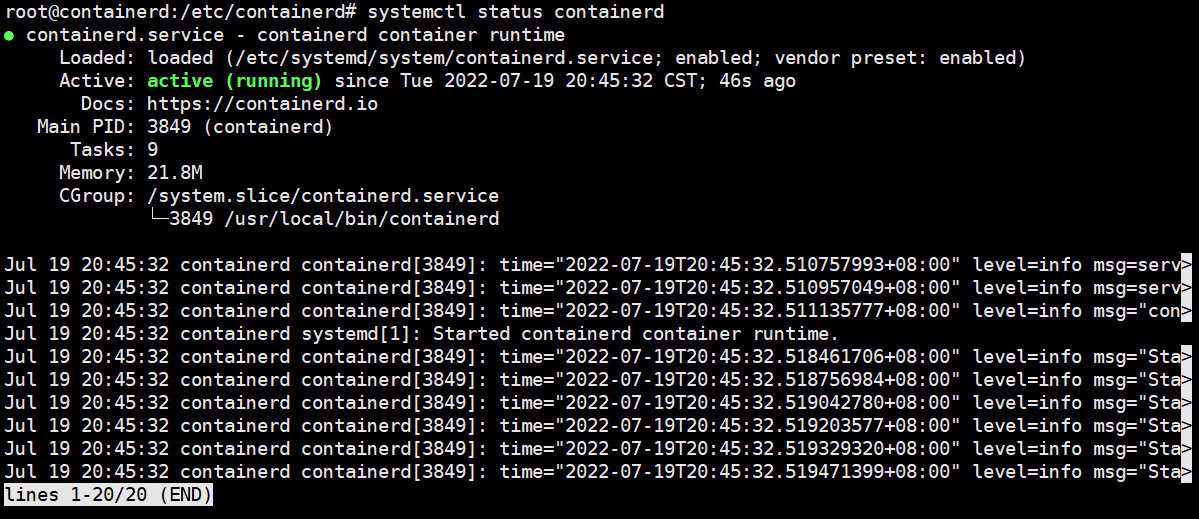
启动containerd并设置开机自启动
root@containerd:/etc/containerd# systemctl enable containerd --now
安装runc
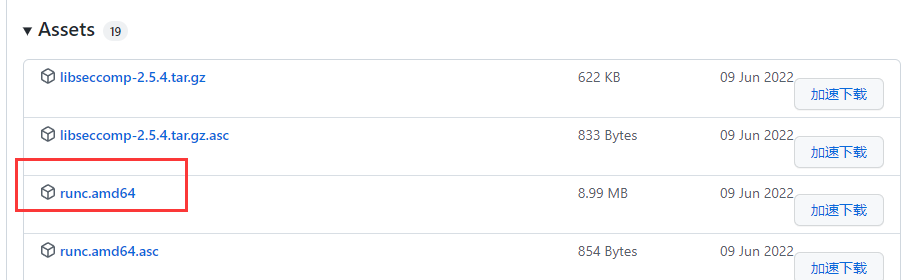
github下载链接:https://github.com/opencontainers/runc/releases
下载最新版本
上传到服务器
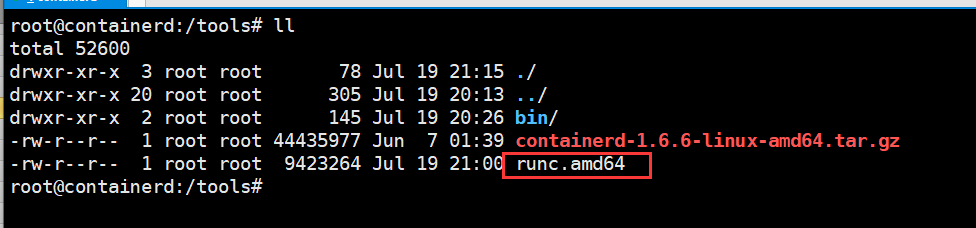
root@containerd:/tools# chmod +x runc.amd64

root@containerd:/tools# cp runc.amd64 /usr/local/bin/runc
验证使用containerd
containerd是ctrl工具在服务器上创建、管理和使用容器
root@containerd:~# ctr --help

NAME:

   ctr -

        __

  _____/ /______

 / ___/ __/ ___/

/ /__/ /_/ /

\___/\__/_/

containerd CLI

USAGE:

   ctr [global options] command [command options] [arguments...]

VERSION:

   v1.6.6

DESCRIPTION:

ctr is an unsupported debug and administrative client for interacting

with the containerd daemon. Because it is unsupported, the commands,

options, and operations are not guaranteed to be backward compatible or

stable from release to release of the containerd project.

COMMANDS:

   plugins, plugin            provides information about containerd plugins

   version                    print the client and server versions

   containers, c, container   manage containers

   content                    manage content

   events, event              display containerd events

   images, image, i           manage images

   leases                     manage leases

   namespaces, namespace, ns  manage namespaces

   pprof                      provide golang pprof outputs for containerd

   run                        run a container

   snapshots, snapshot        manage snapshots

   tasks, t, task             manage tasks

   install                    install a new package

   oci                        OCI tools

   shim                       interact with a shim directly

   help, h                    Shows a list of commands or help for one command

GLOBAL OPTIONS:

   --debug                      enable debug output in logs

   --address value, -a value    address for containerd's GRPC server (default: "/run/containerd/containerd.sock") [$CONTAINERD_ADDRESS]

   --timeout value              total timeout for ctr commands (default: 0s)

   --connect-timeout value      timeout for connecting to containerd (default: 0s)

   --namespace value, -n value  namespace to use with commands (default: "default") [$CONTAINERD_NAMESPACE]

   --help, -h                   show help

   --version, -v                print the version
拉取镜像
与docker区别在于拉取官方镜像必须指定镜像的完整名称包括镜像仓库地址
root@containerd:~# ctr images pull docker.io/library/nginx:latest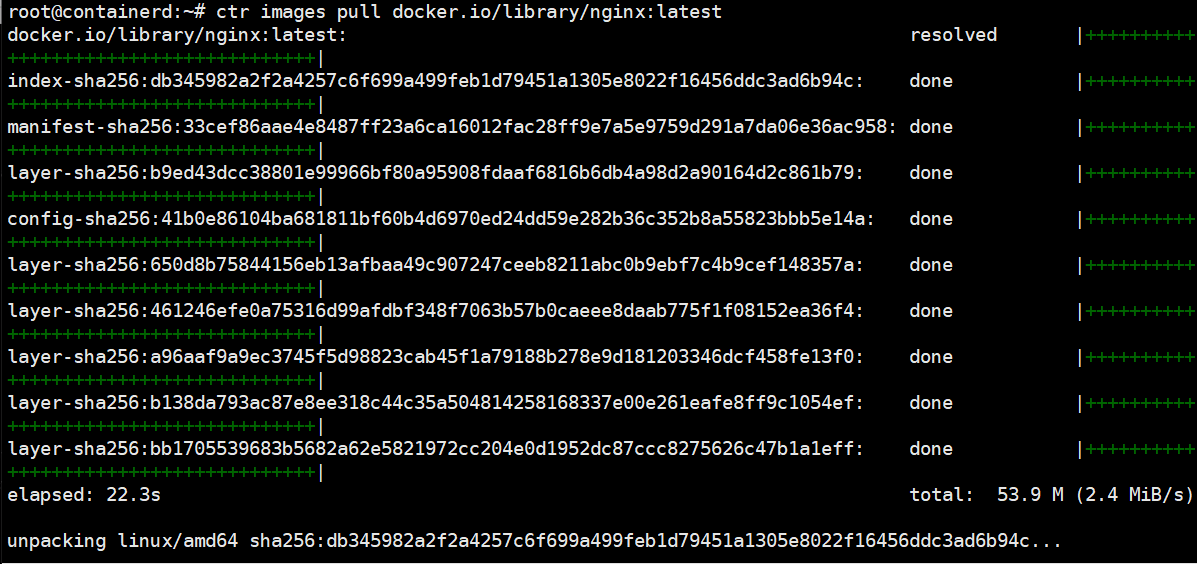
查看本地的镜像
root@containerd:~# ctr images ls
运行容器
root@containerd:~# ctr run -t docker.io/library/nginx:latest container1 bash
container客户端工具
客户端工具有两种,分别是crictl和nerdctl
推荐使用nerdctl,使用效果与docker命令的语法一致
github下载链接:https://github.com/containerd/nerdctl/releases
下载安装nerdctl
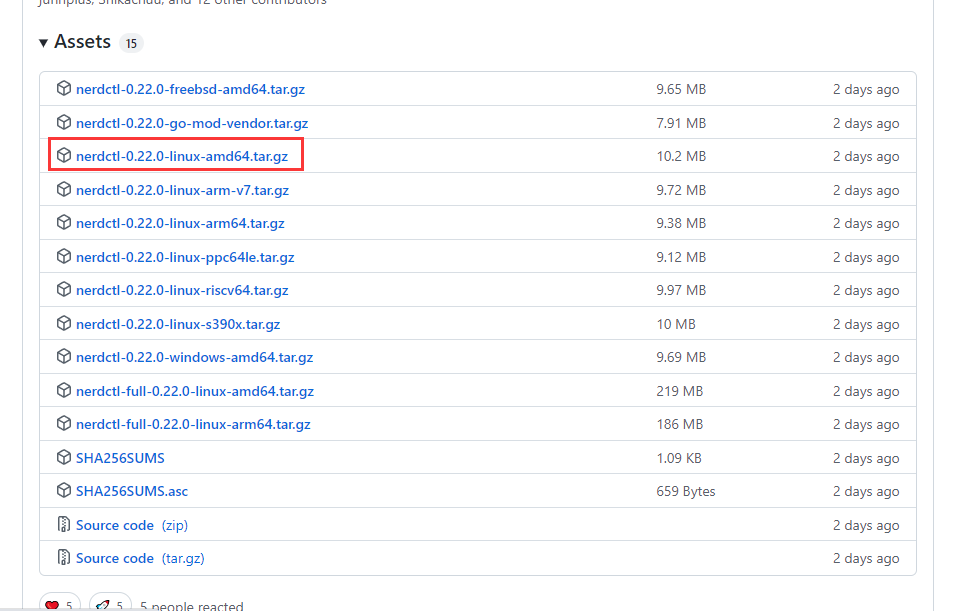
解压安装nerdctl

拷贝nerdctl到系统二进制命令路径下
root@containerd:/tools# cp nerdctl /usr/local/bin/
验证版本
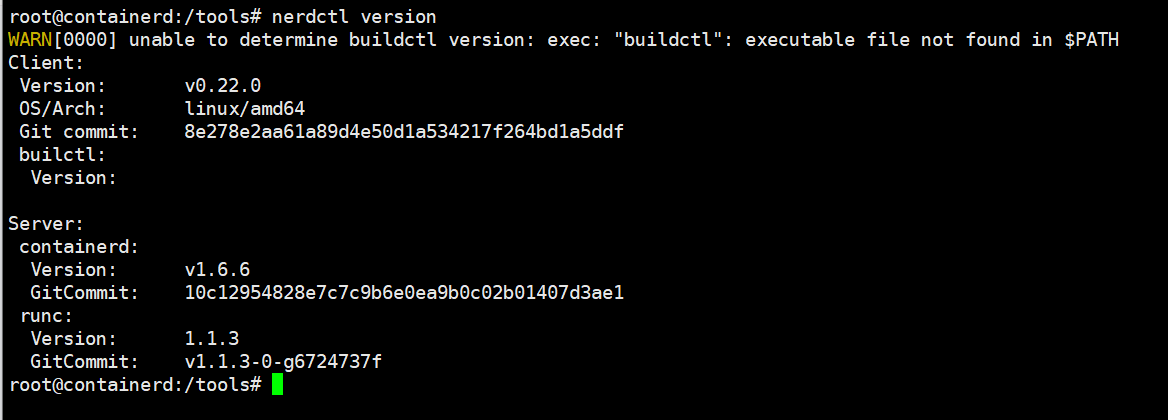
查看nerdctl使用帮助,与docker客户端工具使用方法基本一致
root@containerd:~# nerdctl --help

nerdctl is a command line interface for containerd

Config file ($NERDCTL_TOML): /etc/nerdctl/nerdctl.toml

Usage:

  nerdctl [flags]

  nerdctl [command]

Management commands:

  apparmor    Manage AppArmor profiles

  builder     Manage builds

  container   Manage containers

  image       Manage images

  ipfs        Distributing images on IPFS

  namespace   Manage containerd namespaces

  network     Manage networks

  system      Manage containerd

  volume      Manage volumes

Commands:

  build       Build an image from a Dockerfile. Needs buildkitd to be running.

  commit      Create a new image from a container's changes

  completion  Generate the autocompletion script for the specified shell

  compose     Compose

  cp          Copy files/folders between a running container and the local filesystem.

  create      Create a new container. Optionally specify "ipfs://" or "ipns://" scheme to pull image from IPFS.

  events      Get real time events from the server

  exec        Run a command in a running container

  help        Help about any command

  history     Show the history of an image

  images      List images

  info        Display system-wide information

  inspect     Return low-level information on objects.

  kill        Kill one or more running containers

  load        Load an image from a tar archive or STDIN

  login       Log in to a Docker registry

  logout      Log out from a Docker registry

  logs        Fetch the logs of a container. Currently, only containers created with `nerdctl run -d` are supported.

  pause       Pause all processes within one or more containers

  port        List port mappings or a specific mapping for the container

  ps          List containers

  pull        Pull an image from a registry. Optionally specify "ipfs://" or "ipns://" scheme to pull image from IPFS.

  push        Push an image or a repository to a registry. Optionally specify "ipfs://" or "ipns://" scheme to push image to IPFS.

  rename      rename a container

  restart     Restart one or more running containers

  rm          Remove one or more containers

  rmi         Remove one or more images

  run         Run a command in a new container. Optionally specify "ipfs://" or "ipns://" scheme to pull image from IPFS.

  save        Save one or more images to a tar archive (streamed to STDOUT by default)

  start       Start one or more running containers

  stats       Display a live stream of container(s) resource usage statistics.

  stop        Stop one or more running containers

  tag         Create a tag TARGET_IMAGE that refers to SOURCE_IMAGE

  top         Display the running processes of a container

  unpause     Unpause all processes within one or more containers

  update      Update one or more running containers

  version     Show the nerdctl version information

  wait        Block until one or more containers stop, then print their exit codes.

Flags:

  -H, --H string                 Alias of --address (default "/run/containerd/containerd.sock")

  -a, --a string                 Alias of --address (default "/run/containerd/containerd.sock")

      --address string           containerd address, optionally with "unix://" prefix [$CONTAINERD_ADDRESS] (default "/run/containerd/containerd.sock")

      --cgroup-manager string    Cgroup manager to use ("cgroupfs"|"systemd") (default "cgroupfs")

      --cni-netconfpath string   cni config directory [$NETCONFPATH] (default "/etc/cni/net.d")

      --cni-path string          cni plugins binary directory [$CNI_PATH] (default "/opt/cni/bin")

      --data-root string         Root directory of persistent nerdctl state (managed by nerdctl, not by containerd) (default "/var/lib/nerdctl")

      --debug                    debug mode

      --debug-full               debug mode (with full output)

  -h, --help                     help for nerdctl

      --host string              Alias of --address (default "/run/containerd/containerd.sock")

      --hosts-dir strings        A directory that contains <HOST:PORT>/hosts.toml (containerd style) or <HOST:PORT>/{ca.cert, cert.pem, key.pem} (docker style) (default [/etc/containerd/certs.d,/etc/docker/certs.d])

      --insecure-registry        skips verifying HTTPS certs, and allows falling back to plain HTTP

  -n, --n string                 Alias of --namespace (default "default")

      --namespace string         containerd namespace, such as "moby" for Docker, "k8s.io" for Kubernetes [$CONTAINERD_NAMESPACE] (default "default")

      --snapshotter string       containerd snapshotter [$CONTAINERD_SNAPSHOTTER] (default "overlayfs")

      --storage-driver string    Alias of --snapshotter (default "overlayfs")

  -v, --version                  version for nerdctl

Use "nerdctl [command] --help" for more information about a command.
查看镜像、容器:

拉取镜像:
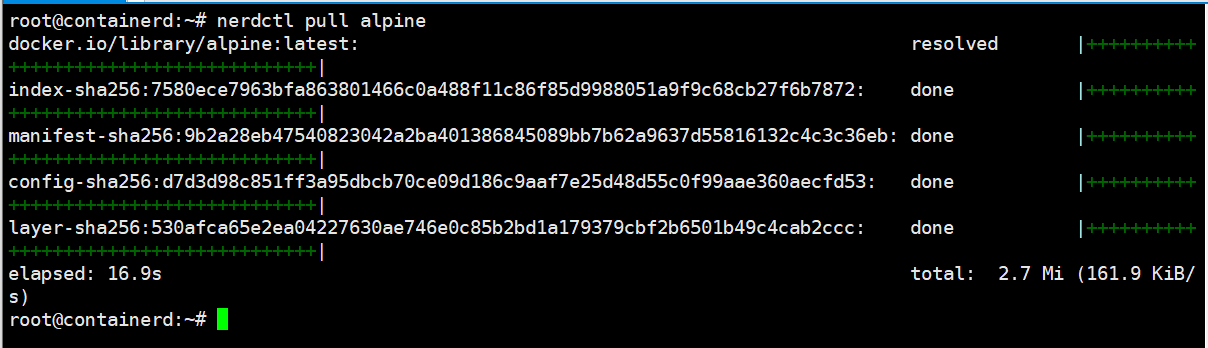
安装cni网络插件
CNI:Container network interface容器网络接口,为容器分配ip地址网卡等
github链接:
https://github.com/containernetworking/plugins/releases 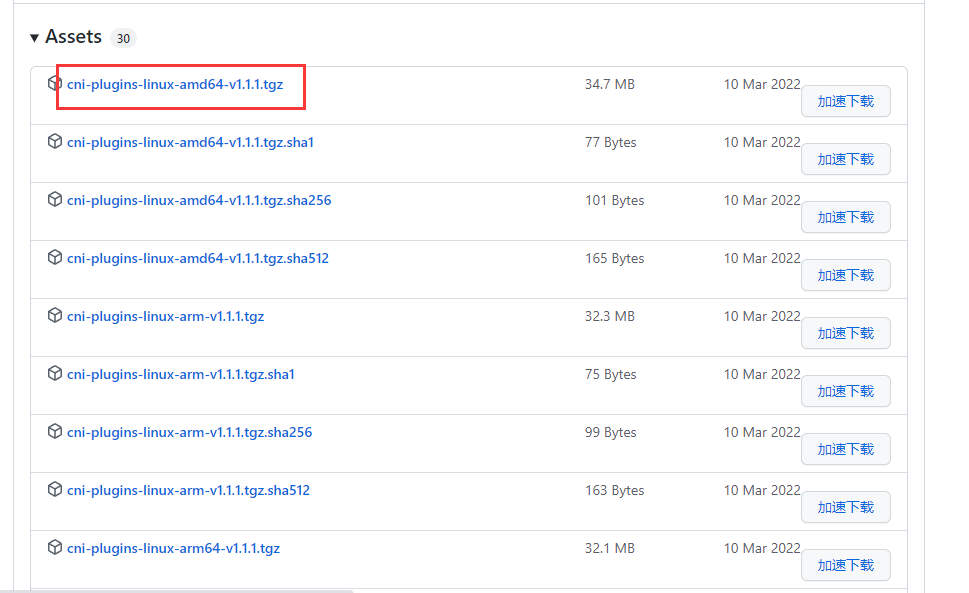
下载安装cni,并解压到/usr/local/cni/bin目录下
root@containerd:/tools# mkdir /opt/cni/bin -p

root@containerd:/tools# tar xf cni-plugins-linux-amd64-v1.1.1.tgz -C /opt/cni/bin/
查看解压后的cni插件文件:
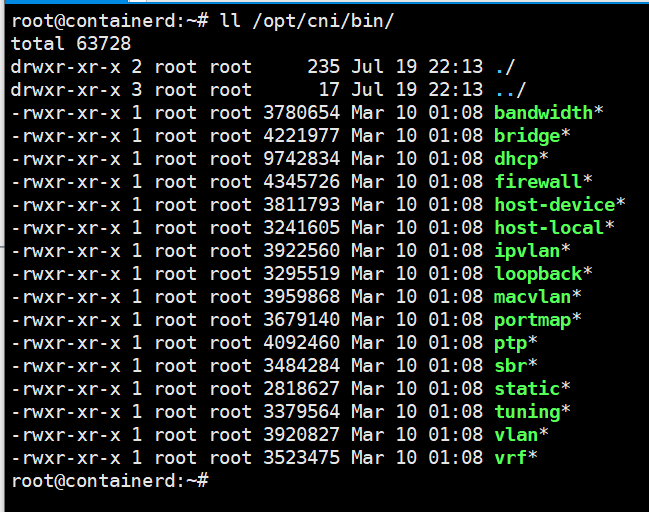
注意:必须将cni解压到/opt/cni/bin,否则nerdctl为容器映射端口时,会出现找不到cni插件的报错
root@containerd:~# nerdctl run -d -p 80:80 --name=web --restart=always nginx:latest

FATA[0000] needs CNI plugin "bridge" to be installed in CNI_PATH ("/opt/cni/bin"), see https://github.com/con stat /opt/cni/bin/bridge: no such file or directory
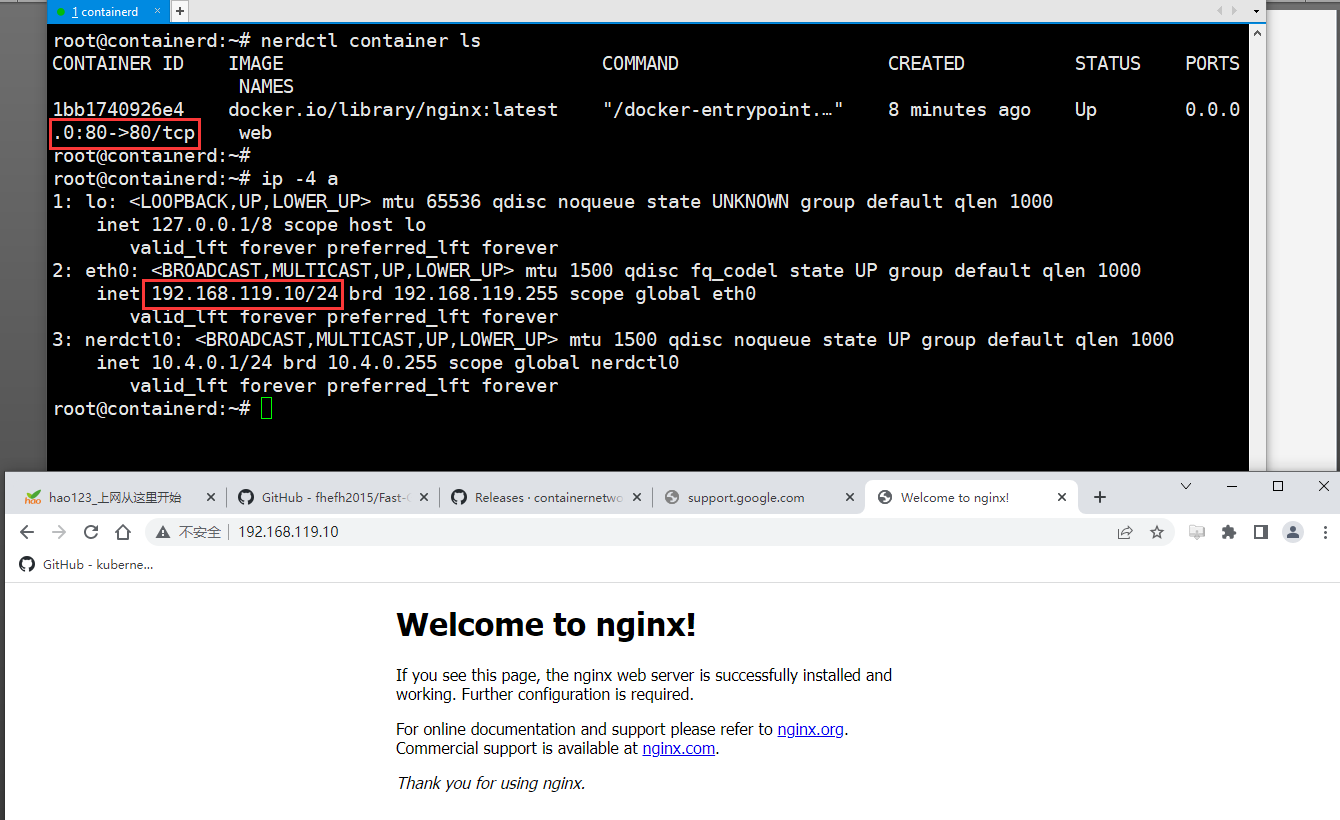
验证:使用nerdctl运行一个容器

宿主机访问容器映射到宿主机80端口
以上就是关于container的介绍与安装。如果对你有帮助或有建议疑问可以评论区留言!
再见Docker!Containerd安装与使用的更多相关文章
- docker的安装及使用
准备工具: 系统:ubuntu18.04 docker软件包:docker-compose.tar.gz,containerd.io_1.2.4-1_amd64.deb,docker-ce-cli_1 ...
- docker + ubuntun 安装show doc
基本安装步骤 Ubuntu Docker 安装 Docker 支持以下的 Ubuntu 版本: Ubuntu Precise 12.04 (LTS) Ubuntu Trusty 14.04 (LTS) ...
- [TimLinux] docker CentOS7安装docker-ce最新版
1. 环境 $ lsb_release -a # 需要安装 redhat-lsb-core 包 LSB Version: :core-4.1-amd64:core-4.1-noarch Distrib ...
- docker入门-安装篇
一.docker介绍 1:docker官网 www.docker.com 2:github https://github.com/docker/docker.github.io 3:开源的容器引擎, ...
- Docker的安装与使用
Docker的安装 (1)卸载老版本yum remove docker \ docker-client \ docker-clien ...
- linux下如何使用docker二进制文件安装_docker离线安装
1,下载二进制文件 https://download.docker.com/linux/static/stable/x86_64/docker-18.03.1-ce.tgz 2,解压二进制文件 tar ...
- (一) CentOS 7 进行 Docker CE 安装
参考并感谢 官方文档: https://docs.docker.com/install/linux/docker-ce/centos/ 卸载旧版本 # 停止所有正在运行的容器 docker stop ...
- docker系列三之docker的安装
docker的安装 读者只需按照以下的命令一步步执行即可实现安装,笔者也只是将官网的步骤复制出来(笔者的环境为Centos7),详细请参考:https://docs.docker.com/instal ...
- Linux下Docker的安装与使用
yum安装Docker最新版和docker-compose(超级简单的安装方法) Install Docker 首先安装依赖 yum install -y yum-utils device-mappe ...
- docker的安装使用
目录 Docker 入门到精通 CentOS安装Docker 设置管理Docker的仓库 安装Docker Engine-Community Docker基础命令 开启关闭 镜像操作 容器操作 Doc ...
随机推荐
- 按照 Promise/A+ 规范逐行注释并实现 Promise
0. 前言 面试官:「你写个 Promise 吧.」 我:「对不起,打扰了,再见!」 现在前端越来越卷,不会手写 Promise 都不好意思面试了(手动狗头.jpg).虽然没多少人会在业务中用自己实现 ...
- git提交代码到GitHub操作-简易版(后续完善)
一.git上传代码到GitHub 1.远程仓库GitHub创建好一个新仓库注意仓库名 2.本地建一个目录写代码,目录名与仓库命名一致 3.在目录下右键 git Bash here 打开git终端命令行 ...
- 【Electron】使用 build-tools 在 Windows 中编译 electron
[Electron]使用 build-tools 在 Windows 中编译 electron 提前准备 预留好磁盘空间 Git 缓存目录:%UserProfile%/.git_cache ,大概有 ...
- 为 map 中不存在的 key 提供缺省值
需求 需要往一个复杂的 map 中写入数据,或为 map 中不存在 key 提供 default value java standard library Map<K, List<V> ...
- ubuntu 20.04 source mirror(aliyun)
x64 deb http://mirrors.aliyun.com/ubuntu/ focal main restricted universe multiverse deb-src http://m ...
- Nginx报错收集
在安装完成ngixn之后,访问页面显示空白,报错信息里面有这一条报错信息: tailf /usr/local/nginx/logs/error.log 2018/10/26 10:58:00 [err ...
- C#语言中的类型转换方法(unfinished)
一.C#中的数据类型 1.数值类型 2.字符类型 3.字符串类型 4.布尔类型 5.枚举类型 6.Object类型 二.常见的类型转换 从转换方式的角度,类型转换分为隐式转换与显式转换两种. 其中,隐 ...
- 基于RabbltMQ延迟插件实现延迟队列代码示例
上一篇文章写了docker安装RabbitMQ及延迟插件的安装,这篇的话是基于RabbitMQ延迟插件实现延迟队列的示例 那么废话不多说 直接上代码!! 首先创建延迟队列配置类 DelayedQueu ...
- 如何在Vue项目中,通过点击DOM自动定位VScode中的代码行?
作者:vivo 互联网大前端团队- Youchen 一.背景 现在大型的 Vue项目基本上都是多人协作开发,并且随着版本的迭代,Vue 项目中的组件数也会越来越多,如果此时让你负责不熟悉的页面功能开发 ...
- ssh隧道连接的方式连接数据库
最好用xshell做隧道连接,其他工具没接触过过 1.先新建一个会话 2.点进刚刚建好的连接,右击属性 3.点进隧道,添加,输入映射到本地的配置 4.完成之后用数据库连接工具连接即可 参考连接: ht ...