
C#---串口调试助手
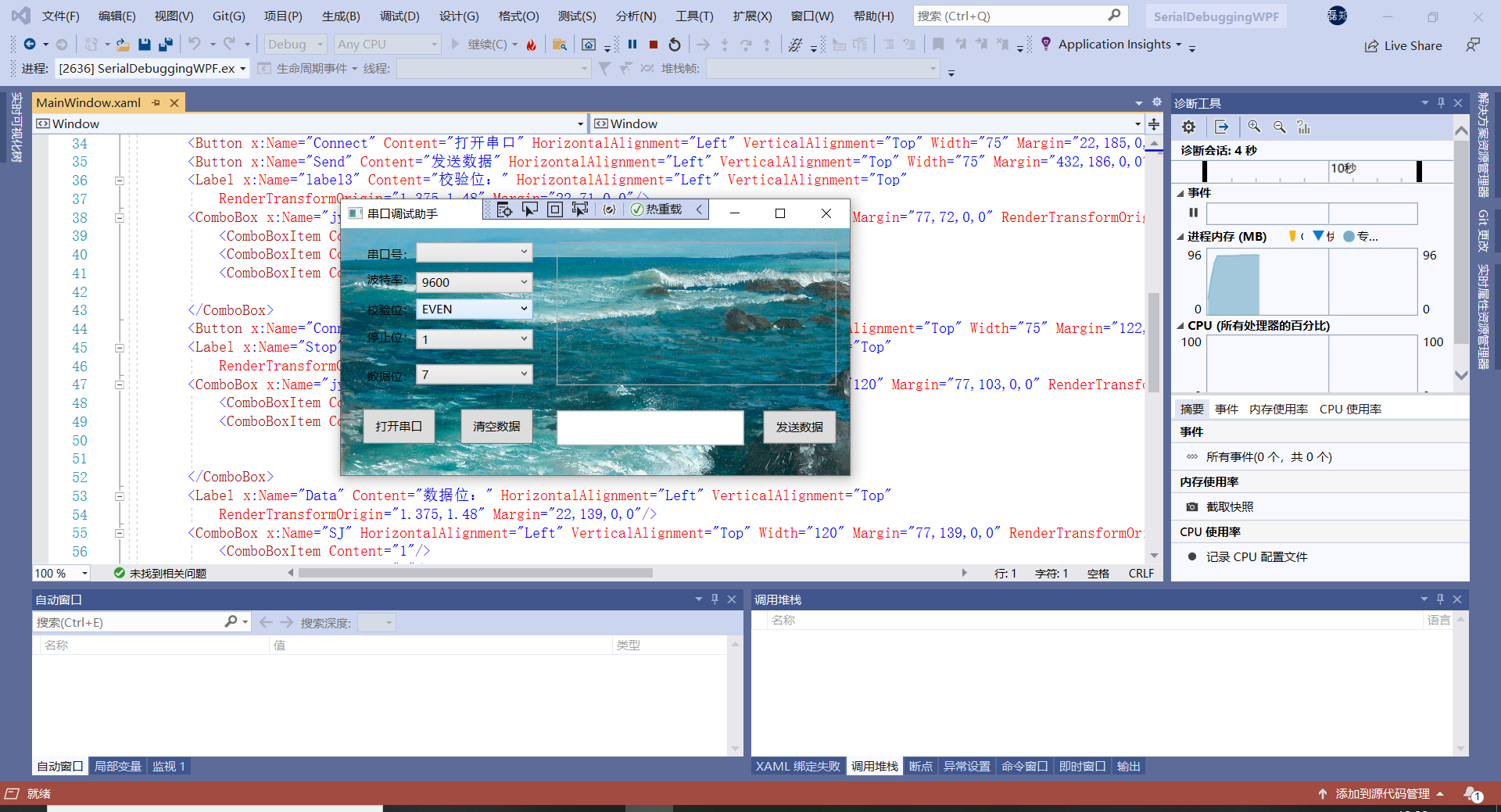
  1 using System;

  2 using System.Collections.Generic;

  3 using System.Linq;

  4 using System.Text;

  5 using System.Threading.Tasks;

  6 using System.Windows;

  7 using System.Windows.Controls;

  8 using System.Windows.Data;

  9 using System.Windows.Documents;

 10 using System.Windows.Input;

 11 using System.Windows.Media;

 12 using System.Windows.Media.Imaging;

 13 using System.Windows.Navigation;

 14 using System.Windows.Shapes;

 15 using System.IO.Ports;

 16 using System.Text;

 17

 18

 19 namespace SerialDebuggingWPF

 20 {

 21     /// <summary>

 22     /// MainWindow.xaml 的交互逻辑

 23     /// </summary>

 24     public partial class MainWindow : Window

 25     {

 26         private System.IO.Ports.SerialPort serialPort = new SerialPort();//串口对象

 27         private StringBuilder stringBuilder = new StringBuilder();//作为缓冲

 28         public MainWindow()

 29         {

 30             InitializeComponent();

 31         }

 32

 33         /// <summary>

 34         /// 加载窗口

 35         /// </summary>

 36         /// <param name="sender"></param>

 37         /// <param name="e"></param>

 38

 39         private void Window_Loaded(object sender, RoutedEventArgs e)

 40         {

 41             portname.ItemsSource = SerialPort.GetPortNames();

 42             if (portname.Items.Count > 0)

 43             {

 44                 this.portname.SelectedIndex = 0;

 45             }

 46             else

 47             {

 48                 MessageBox.Show("未找到有效串口!!", "提示");

 49             }

 50             //Console.WriteLine(this.baud.Items.IndexOf("9600")+"");

 51             this.baud.SelectedIndex = 1;

 52             this.jy.SelectedIndex = 0;

 53             this.jy_Copy.SelectedIndex = 0;

 54             this.SJ.SelectedIndex = 6;

 55

 56         }

 57         /// <summary>

 58         /// 串口数据通信

 59         /// </summary>

 60         /// <param name="sender"></param>

 61         /// <param name="e"></param>

 62         private void DataReceived(object sender, SerialDataReceivedEventArgs e)

 63         {

 64             Byte[] receivedData = new Byte[serialPort.BytesToRead];//获取读取字节个数

 65             try

 66             {

 67                 serialPort.Read(receivedData, 0, receivedData.Length);

 68                 String info = Encoding.GetEncoding("GB2312").GetString(receivedData);

 69                 updateReceiveText("接收数据: " + info);

 70             }

 71             catch

 72             {

 73                 MessageBox.Show("串口失效", "提示");

 74                 serialPort.Close();

 75                 if (Connect.Dispatcher.CheckAccess())

 76                 {

 77                     Connect.Content = "打开串口";

 78                 }

 79                 else

 80                 {

 81                     Action act = () => { Connect.Content = "打开串口"; };

 82                     Connect.Dispatcher.Invoke(act);

 83                 }

 84             }

 85         }

 86

 87

 88

 89

 90

 91

 92

 93         /// <summary>

 94         /// 串口连接按钮

 95         /// </summary>

 96         /// <param name="sender"></param>

 97         /// <param name="e"></param>

 98         private void Connect_Click(object sender, RoutedEventArgs e)

 99         {

100             if (serialPort.IsOpen)

101             {

102                 serialPort.Close();

103                 if (Connect.Dispatcher.CheckAccess())

104                 {

105                     Connect.Content = "打开串口";

106                 }

107                 else

108                 {

109                     Action act = () => { Connect.Content = "打开串口"; };

110                     Connect.Dispatcher.Invoke(act);

111                 }

112                 Console.WriteLine("正在关闭串口");

113             }

114             else

115             {

116                 if (portname.Text != null && !portname.Text.Equals(""))

117                 {

118                     serialPort.PortName = portname.SelectedItem.ToString();

119                     serialPort.BaudRate = Convert.ToInt32(baud.Text);

120                     try

121                     {

122                         serialPort.Open();//打开串口

123                         if (Connect.Dispatcher.CheckAccess())

124                         {

125                             Connect.Content = "关闭串口";

126                         }

127                         else

128                         {

129                             Action act = () => { Connect.Content = "关闭串口"; };

130                             Connect.Dispatcher.Invoke(act);

131                         }

132                         Console.WriteLine("正在打开串口");

133                         serialPort.DataReceived += new SerialDataReceivedEventHandler(DataReceived);//添加事件监听程序

134                     }

135                     catch

136                     {

137                         MessageBox.Show("该串口不存在或被占用,请确认", "提示");

138                     }

139                 }

140                 else

141                 {

142                     MessageBox.Show("请输入正确的串口号", "提示");

143                 }

144             }

145         }

146

147

148         /// <summary>

149         /// 数据发送按钮

150         /// </summary>

151         /// <param name="sender"></param>

152         /// <param name="e"></param>

153         private void Send_Click(object sender, RoutedEventArgs e)

154         {

155             String s = this.SendText.Text.Trim();

156             if (serialPort.IsOpen)

157             {

158                 if (s != null && !"".Equals(s))

159                 {

160                     try

161                     {

162                         byte[] Data = Encoding.UTF8.GetBytes(s);

163                         serialPort.Write(Data, 0, Data.Length);

164                         updateReceiveText("发送数据: " + s);

165                     }

166                     catch (Exception ex)

167                     {

168                         Console.WriteLine(ex.Message);

169                         MessageBox.Show("串口失效", "提示");

170                     }

171                 }

172                 else

173                 {

174                     Console.WriteLine("文本为空");

175                 }

176             }

177             else

178             {

179                 MessageBox.Show("请确认串口状态", "提示");

180             }

181         }

182

183         private void updateReceiveText(string str)

184         {

185             if (ReceiveText.Dispatcher.CheckAccess())

186             {

187                 ReceiveText.AppendText(str + "\r\n");

188             }

189             else

190             {

191                 Action act = () => { ReceiveText.AppendText(str + "\r\n"); };

192                 ReceiveText.Dispatcher.Invoke(act);

193             }

194         }

195

196         private void Connect_Copy_Click(object sender, RoutedEventArgs e)

197         {

198             this.ReceiveText.Clear();

199             this.SendText.Clear();

200         }

201

202

203     }

204     }

205

206

207
  1 using System;

  2 using System.Collections.Generic;

  3 using System.IO.Ports;

  4 using System.Linq;

  5 using System.Text;

  6 using System.Threading.Tasks;

  7

  8 namespace SerialDebuggingWPF

  9 {

 10     class MyConvert

 11     {

 12

 13

 14

 15         public static byte[] strToToHexByte(string hexString)//16进制字符转字节数组

 16         {

 17             hexString = hexString.Replace(" ", "");

 18             if ((hexString.Length % 2) != 0)

 19                 hexString += " ";

 20             byte[] returnBytes = new byte[hexString.Length / 2];

 21             for (int i = 0; i < returnBytes.Length; i++)

 22                 returnBytes[i] = Convert.ToByte(hexString.Substring(i * 2, 2), 16);

 23             return returnBytes;

 24         }

 25

 26         public static String Byteto16String(byte b)//字节转16进制字符

 27         {

 28             String str = Convert.ToString(b, 16);

 29             if (str.Length == 1)

 30             {

 31                 str = "0" + str;

 32             }

 33             return str;

 34         }

 35

 36         public static String Byteto16String(byte[] b)//字节数组转16进制字符

 37         {

 38             String s = "";

 39             foreach (byte date in b)

 40             {

 41                 String str = Convert.ToString(date, 16);

 42                 if (str.Length == 1)

 43                 {

 44                     str = "0" + str;

 45                 }

 46                 s = s + str;

 47             }

 48

 49             return s;

 50         }

 51

 52         public static String Byteto16String(byte[] b, int a)//具体长度字节数组转16进制字符

 53         {

 54             String s = "";

 55             for (int i = 0; i < a; i++)

 56             {

 57                 String str = Convert.ToString(b[i], 16);

 58                 if (str.Length == 1)

 59                 {

 60                     str = "0" + str;

 61                 }

 62                 s = s + str;

 63             }

 64

 65             return s;

 66         }

 67

 68         public static String Byteto16String(byte[] B, int a, int b)//指定长度字节数组转16进制字符

 69         {

 70             String s = "";

 71             for (int i = 0; i < b; i++, a++)

 72             {

 73                 String str = Convert.ToString(B[a], 16);

 74                 if (str.Length == 1)

 75                 {

 76                     str = "0" + str;

 77                 }

 78                 s = s + str;

 79             }

 80

 81             return s;

 82         }

 83

 84         //int i = Convert.ToInt32("10", 16);//将十六进制“10”转换为十进制i

 85

 86         //string s = string.Format("{0:X}", i);//将十进制i转换为十六进制s

 87

 88         public static String[] SubString(String Data)//切割字符串成字符数组

 89         {//14

 90             Data = Data.Replace(" ", "");

 91             String[] data = new String[Data.Length / 2];//7

 92             for (int x = 0, y = 0; x < data.Length; x++, y += 2)//0~6

 93             {

 94                 data[x] = Data.Substring(y, 2);

 95             }

 96             return data;

 97         }

 98

 99         public static String SubString2(String Data)//修改字符串成两个一组加空格

100         {

101             String[] data = SubString(Data);

102             String s = "";

103             for (int i = 0; i < data.Length; i++)

104             {

105                 if (i < data.Length - 1)

106                 {

107                     s = s + data[i] + " ";

108                 }

109                 else

110                 {

111                     s = s + data[i];

112                 }

113             }

114             return s.ToUpper();

115         }

116

117         public static String String_10toString_16(String s)//十进制字符转16进制字符

118         {

119             int a = Convert.ToInt32(s);

120             String ss = String.Format("{0:X}", a);

121             if (ss.Length == 1)

122             {

123                 ss = "0" + ss;

124             }

125             ss = ss.ToUpper();

126             return ss;

127         }

128

129     }

130 }
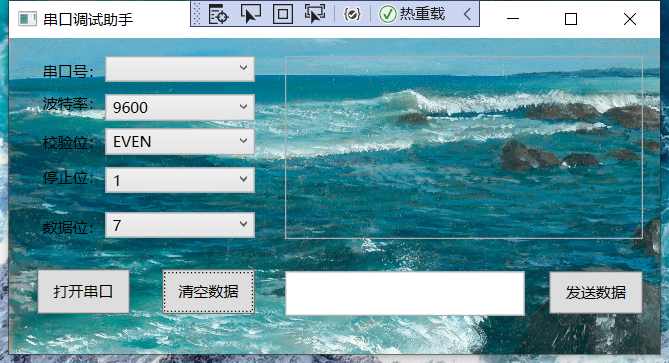
C#---串口调试助手的更多相关文章
- 串口调试助手vc源程序及其详细编写过程
串口调试助手vc源程序及其详细编写过程 目次: 1.建立项目 2.在项目中插入MSComm控件 3.利用ClassWizard定义CMSComm类控制变量 4.在对话框中添加控件 5.添加串口事件 ...
- 基于.Net C# 通信开发-串口调试助手
基于.Net C# 通信开发-串口调试助手 1.概述 串口调试助手,广泛应用于工控领域的数据监控.数据采集.数据分析等工作,可以帮助串口应用设计.开发.测试人员检查所开发的串口应用软硬件的数据收发状况 ...
- Qt 编写串口调试助手
一.成品图展示 成品图如下所示: 二.串口通讯步骤 1.在工程文件(.pro)中添加串口通信相关运行库:QT += serialport 2.在头文件中添加: #include <QSerial ...
- OSDA - 一个以MIT协议开源的串口调试助手
市场其实有很多开源的串行端口调试助手(Open Serial Port debug assistant),但其中很大一部分没有明确的开源协议,还有一部分只限个人使用,所以编写了一个并以MIT协议授权开 ...
- ubuntu安装ch34x驱动,并安装串口调试助手
1.查看系统自带的ch34x驱动 kangxubo@kangxubo-HKNS:/lib/modules/5.19.0-38-generic/kernel/drivers/usb/serial$ ls ...
- [转]web串口调试助手,浏览器控制串口设备
本文转自:https://blog.csdn.net/ldevs/article/details/39664697 打开串口时查找可用串口供选择 通过javascript调用activex控制串口收发 ...
- Delphi - 采用第三方控件TMS、SPComm开发串口调试助手
第三方控件TMS.SPComm的下载与安装 盒子上可搜索关键字进行下载,TMS是.dpk文件,SPComm.pas文件: 安装方法自行百度,不做赘述. 通过TMS控件进行界面布局 界面预览: Delp ...
- C#基于wpf编写的串口调试助手
支持数据保存,自定义协议解码等功能 链接:https://pan.baidu.com/s/1zvhcES4QIjpDDJGzth1qOA 提取码:lp2x
- 纪念下自学QT 第十天 终于写成了串口调试助手
- Modbus通讯协议学习 - 串口调试
概述 我们在做任何事情之前都需要获取很多 调试步骤: 1:485转换器连接硬件 2:485转换器上的USB接口连接电脑. 3:打开设备管理器 ->查看端口 4:打开串口调试工具,在串口配置的地方 ...
随机推荐
- vue基础系列文章12---创建脚手架
一.交互式命令行创建 1.运行 vue create myvue 选择默认创建模式,会在指定的文件夹下创建文件 2.进入到myvue文件夹,运行:npm run serve 3.访问本地的地址就可以 ...
- 搭建mongo的replica set
搭建mongo的replica set 前言 安装 构建副本集 加入认证 备份数据 备份数据到本地 数据恢复 搭建mongo的replica set 前言 准备三台机器,相互可以访问的.处理思路,先构 ...
- 【四】gym搭建自己的环境,全网最详细版本,3分钟你就学会了!
相关文章: [一]gym环境安装以及安装遇到的错误解决 [二]gym初次入门一学就会-简明教程 [三]gym简单画图 [四]gym搭建自己的环境,全网最详细版本,3分钟你就学会了! [五]gym搭建自 ...
- ROS节点通信(一)消息发布和订阅
目录 1.说明 2.创建工作空间 3.创建功能包 4.编写自定义传输类型文件 5.编写源代码 5.1.编写发布者代码 5.2.编写订阅者代码 6.编译 7.启动运行 8.查看ROS网络结构图 1.说明 ...
- Nginx的反向代理做负载均衡
对于一个大型网站,随着网站的访问量快速增长,单台服务器很难再支撑起需要,所以我们会购置多个服务器来满足业务量的需求,然后再利用Nginx提供的反向代理功能,来实现多台服务器间的协作功能,提高网站的处理 ...
- 在OpenGL中使用Dear ImGui
在众多GUI库中,Dear ImGui用起来最简单,它很容易集成到程序中,绘制的窗口看起来也还不错.可以用它画出非常炫酷的GUI界面: 而我则不同:无论使用哪个GUI库,画出来的窗口都惨不忍睹.下面简 ...
- 零基础入门学习Java课堂笔记 ——day05
面向对象(上) 面向过程:我打算列个计划表一步一步来 面向对象:我喜欢先分析分类,把复杂的问题简单化 1.什么是面向对象!!? 面向对象的本质就是:以类的方式组织代码,以对象的方式组织数据 封装 继承 ...
- C语言无锁高并发安全环形缓冲队列设计(一)
1.前言 队列,常用数据结构之一,特点是先进先出. 队列是一种特殊的线性表,特殊之处在于它只允许在表的前端(front)进行删除操作,而在表的后端(rear)进行插入操作,和栈一样,队列是一种操作受限 ...
- 视觉slam十四讲 ch3 三维刚体运动
视觉slam十四讲 ---CH3 三维刚体运动 三维刚体运动,即三维空间下的刚体的运动.刚体,是指在运动中和受力作用后,形状和大小不变,而且内部各点的相对位置不变的物体.在运动过程中,机器人或者飞机和 ...
- FreeSWITCH在session上执行定时挂机与取消
操作系统 :CentOS 7.6_x64 FreeSWITCH版本 :1.10.9 日常开发中,会遇到需要在已存在的session上执行定时挂机和取消挂机的情况,今天整理下这方面的内容,我将从 ...