
EMCC13.5+Oracle19.13+Redhat8 In Silent Mode
问题描述:使用静默的方式来安装emcc13.5+Oracle19.13,准备好19c的oracle环境,一开始用21c的库+emcc13.5的安装检查一直过不去,但是19c是没有问题的,具体问题会在下面文档中体现
一、下载软件
https://www.oracle.com/enterprise-manager/downloads/cloud-control-downloads.html
https://www.oracle.com/enterprise-manager/downloads/linux-x86-64-13c-rel5-downloads.html
文件列表如下:
19_11_0_0_0_Database_Template_for_EM13_5_0_0_0_Linux_x64.zip

em13500_linux64-4.zip

em13500_linux64-5.zip

em13500_linux64.bin

em13500_linux64-2.zip

em13500_linux64-3.zip
数据库版本
$sqlplus / as sysdba

SQL*Plus: Release 19.0.0.0.0 - Production on Fri Dec 1 14:31:52 2023

Version 19.13.0.0.0

Copyright (c) 1982, 2021, Oracle.  All rights reserved.

Connected to:

Oracle Database 19c Enterprise Edition Release 19.0.0.0.0 - Production

Version 19.13.0.0.0

SQL>
二、解压数据库模板,创建oem实例
使用模板不能从模板中创建容器数据库,下面可以自己去创建
$ unzip ~/software/19_11_0_0_0_Database_Template_for_EM13_5_0_0_0_Linux_x64.zip -d /u01/app/oracle/product/19.0.0.0/dbhome_1/assistants/dbca/templates/
$dbca -silent -createDatabase -templateName 19_11_0_0_0_Database_Template_for_EM13_5_0_0_0_Medium_deployment.dbc -gdbname emrep1 -sid emrep1 -responseFile NO_VALUE -characterSet AL32UTF8 -sysPassword Dba_Paword02 -systemPassword Dba_Paword02 -createAsContainerDatabase true -numberOfPDBs 1 -pdbName emreppdb -pdbAdminPassword Pdb_Password1 -databaseType MULTIPURPOSE -memoryMgmtType auto_sga -totalMemory 2000 -redoLogFileSize 500 -emConfiguration NONE -ignorePreReqs
[FATAL] [DBT-10313] A container database cannot be created from template 19_11_0_0_0_Database_Template_for_EM13_5_0_0_0_Medium_deployment.dbc.
CAUSE: A container database cannot be created from a database clone template that was created from a non-container database.
ACTION: Select a structural template, a Container database template or an Oracle shipped template.
使用dbca创建数据库
dbca -silent -createDatabase -templateName General_Purpose.dbc -gdbname emrep -sid emrep -responseFile NO_VALUE -characterSet AL32UTF8 -sysPassword Dba_Paword02 -systemPassword Dba_Paword02 -createAsContainerDatabase true -numberOfPDBs 1 -pdbName emreppdb -pdbAdminPassword Pdb_Password1 -databaseType MULTIPURPOSE -memoryMgmtType auto_sga -totalMemory 2000 -redoLogFileSize 500 -emConfiguration NONE -ignorePreReqs
lsnrctl
$lsnrctl status

LSNRCTL for Linux: Version 19.0.0.0.0 - Production on 01-DEC-2023 14:32:36

Copyright (c) 1991, 2021, Oracle.  All rights reserved.

Connecting to (ADDRESS=(PROTOCOL=tcp)(HOST=)(PORT=1521))

STATUS of the LISTENER

------------------------

Alias                     LISTENER

Version                   TNSLSNR for Linux: Version 19.0.0.0.0 - Production

Start Date                30-NOV-2023 17:29:16

Uptime                    0 days 21 hr. 3 min. 19 sec

Trace Level               off

Security                  ON: Local OS Authentication

SNMP                      OFF

Listener Log File         /u01/app/oracle/diag/tnslsnr/testoradb01/listener/alert/log.xml

Listening Endpoints Summary...

  (DESCRIPTION=(ADDRESS=(PROTOCOL=tcp)(HOST=testoradb01)(PORT=1521)))

Services Summary...

Service "0b5c3dc33cbf73eae063ce13530acb70" has 1 instance(s).

  Instance "emrep", status READY, has 1 handler(s) for this service...

Service "86b637b62fdf7a65e053f706e80a27ca" has 1 instance(s).

  Instance "emrep", status READY, has 1 handler(s) for this service...

Service "emrep" has 1 instance(s).

  Instance "emrep", status READY, has 1 handler(s) for this service...

Service "emrepXDB" has 1 instance(s).

  Instance "emrep", status READY, has 1 handler(s) for this service...

Service "emreppdb" has 1 instance(s).

  Instance "emrep", status READY, has 1 handler(s) for this service...

The command completed successfully
配置tnsnames.ora,配置cdb和pdb的tns,保证能够连接
$vim $ORACLE_HOME/network/admin/tnsnames.ora
emrep =

  (DESCRIPTION =

    (ADDRESS = (PROTOCOL = TCP)(HOST = 192.168.163.21)(PORT = 1521))

    (CONNECT_DATA =

      (SERVER = DEDICATED)

      (SERVICE_NAME = emrep)

    )

  )

emreppdb =

  (DESCRIPTION =

    (ADDRESS = (PROTOCOL = TCP)(HOST = 192.168.163.21)(PORT = 1521))

    (CONNECT_DATA =

      (SERVER = DEDICATED)

      (SERVICE_NAME = emreppdb)

    )

  )
调整参数,以下参数动态调整,不用重启数据库
alter system set "_optimizer_nlj_hj_adaptive_join"= FALSE scope=both ;

alter system set "_optimizer_strans_adaptive_pruning" = FALSE scope=both ;

alter system set "_px_adaptive_dist_method" = OFF scope=both ;

alter system set "_sql_plan_directive_mgmt_control" = 0 scope=both ;

alter system set "_optimizer_dsdir_usage_control" = 0 scope=both ;

alter system set "_optimizer_use_feedback" = FALSE scope=both ;

alter system set "_optimizer_gather_feedback" = FALSE scope=both ;

alter system set "_optimizer_performance_feedback" = OFF scope=both ;

alter system set "_allow_insert_with_update_check" = true;

alter system set parallel_min_servers=0;

alter system set parallel_max_servers=2;

exec DBMS_AUTO_TASK_ADMIN.DISABLE(client_name => 'auto optimizer stats collection',operation => NULL,window_name => NULL);

exec DBMS_AUTO_TASK_ADMIN.DISABLE(client_name => 'auto space advisor',operation => NULL,window_name => NULL);

exec DBMS_AUTO_TASK_ADMIN.DISABLE(client_name => 'sql tuning advisor',operation => NULL,window_name => NULL);
三、安装配置OEM
生成安装配置模板
/home/oracle/software/em13500_linux64.bin -getResponseFileTemplates -outputLoc /tmp
创建目录
mkdir -p /u01/app/oracle/middleware

mkdir -p /u01/app/oracle/gc_inst

mkdir -p /u01/app/oracle/agent
编辑oem软件配置文件
$vim /home/oracle/software_only.rsp

RESPONSEFILE_VERSION=2.2.1.0.0

UNIX_GROUP_NAME=oinstall

INVENTORY_LOCATION=/u01/app/oraInventory

SECURITY_UPDATES_VIA_MYORACLESUPPORT=false

DECLINE_SECURITY_UPDATES=false

MYORACLESUPPORT_USERNAME=abc@125.com

MYORACLESUPPORT_PASSWORD=

INSTALL_UPDATES_SELECTION=skip

STAGE_LOCATION=

MYORACLESUPPORT_USERNAME_FOR_SOFTWAREUPDATES=

MYORACLESUPPORT_PASSWORD_FOR_SOFTWAREUPDATES=

ORACLE_MIDDLEWARE_HOME_LOCATION=/u01/app/oracle/middleware

AGENT_BASE_DIR=/u01/app/oracle/agent

ORACLE_HOSTNAME=testoradb01

b_upgrade=false

EM_INSTALL_TYPE=NOSEED

CONFIGURATION_TYPE=LATER
安装oem13.5软件
$ /home/oracle/software/em13500_linux64.bin -silent -responseFile /home/oracle/software_only.rsp
..........(省略部分)
Saving inventory (Monday, November 27, 2023 6:05:15 PM HKT)

Saving inventory complete

End of install phases.(Monday, November 27, 2023 6:05:18 PM HKT)

.Prompt for the allroot.sh

Warning: You must run the following configuration scripts as the "root" user.

  /u01/app/oracle/middleware/allroot.sh

To execute the configuration scripts:

 1. Open a new  terminal window.

 2. Login in as "root".

 3. Run the scripts.

Successfully installed Enterprise Manager Cloud Control.

Logs successfully copied to /u01/app/oraInventory/logs.

[oracle@testoradb01 ~]$

[oracle@testoradb01 ~]$ exit

logout

[root@testoradb01 software]# /u01/app/oracle/middleware/allroot.sh

Starting to execute allroot.sh .........

Starting to execute /u01/app/oracle/middleware/root.sh ......

Check /u01/app/oracle/middleware/install/root_testoradb01_2023-11-27_18-09-09.log for the output of root script

Finished product-specific root actions.

/etc exist

/u01/app/oracle/agent/agent_13.5.0.0.0

Finished execution of  /u01/app/oracle/middleware/root.sh ......

Starting to execute /u01/app/oracle/agent/agent_13.5.0.0.0/root.sh ......

Finished product-specific root actions.

/etc exist

/u01/app/oracle/agent/agent_13.5.0.0.0

Finished execution of  /u01/app/oracle/agent/agent_13.5.0.0.0/root.sh ......
编辑oem配置文件
RESPONSEFILE_VERSION=2.2.1.0.0

UNIX_GROUP_NAME=oinstall

INVENTORY_LOCATION=/u01/app/oraInventory

SECURITY_UPDATES_VIA_MYORACLESUPPORT=false

DECLINE_SECURITY_UPDATES=false

MYORACLESUPPORT_USERNAME=abc@125.com

MYORACLESUPPORT_PASSWORD=

INSTALL_UPDATES_SELECTION=skip

STAGE_LOCATION=

MYORACLESUPPORT_USERNAME_FOR_SOFTWAREUPDATES=

MYORACLESUPPORT_PASSWORD_FOR_SOFTWAREUPDATES=

PROXY_USER=

PROXY_PWD=

PROXY_HOST=

PROXY_PORT=

ORACLE_MIDDLEWARE_HOME_LOCATION=/u01/app/oracle/middleware

ORACLE_HOSTNAME=testoradb01

AGENT_BASE_DIR=/u01/app/oracle/agent

WLS_ADMIN_SERVER_USERNAME=admin

WLS_ADMIN_SERVER_PASSWORD=abcABC12

WLS_ADMIN_SERVER_CONFIRM_PASSWORD=abcABC12

NODE_MANAGER_PASSWORD=abcABC12

NODE_MANAGER_CONFIRM_PASSWORD=abcABC12

#ORACLE_INSTANCE_HOME_LOCATION=/u01/app/oracle/gc_inst

CONFIGURE_ORACLE_SOFTWARE_LIBRARY=true

DATABASE_HOSTNAME=testoradb01

LISTENER_PORT=1521

SERVICENAME_OR_SID=oempdb1

SYS_PASSWORD=Dba_Paword02

SYSMAN_PASSWORD=Dba_Paword02

SYSMAN_CONFIRM_PASSWORD=Dba_Paword02

DEPLOYMENT_SIZE=MEDIUM

MANAGEMENT_TABLESPACE_LOCATION=/u01/app/oracle/oradata/OEMCDB1/oempdb1/mgmt.dbf

CONFIGURATION_DATA_TABLESPACE_LOCATION=/u01/app/oracle/oradata/OEMCDB1/oempdb1/mgmt_ecm_depot.dbf

JVM_DIAGNOSTICS_TABLESPACE_LOCATION=/u01/app/oracle/oradata/OEMCDB1/oempdb1/mgmt_ad4j.dbf

AGENT_REGISTRATION_PASSWORD=abcABC12

AGENT_REGISTRATION_CONFIRM_PASSWORD=abcABC12

STATIC_PORTS_FILE=

PLUGIN_SELECTION=

b_upgrade=false

EM_INSTALL_TYPE=NOSEED

CONFIGURATION_TYPE=ADVANCED

CONFIGURE_SHARED_LOCATION_BIP=false

CONFIG_LOCATION=

CLUSTER_LOCATION=
vim /tmp/new_install.rsp

####################################################################

##                                                                ##

## Copyright (c) 2015 Oracle. All rights reserved.                ##

##                                                                ##

## Specify values for the variables listed below to customize     ##

## your installation.                                             ##

##                                                                ##

## Each variable is associated with a comment. The comment        ##

## identifies the variable type.                                  ##

##                                                                ##

## Specify values in the following format:                        ##

##                                                                ##

##         Type         Example                                   ##

##         ----         -------                                   ##

##         string       Sample Value                              ##

##         boolean      TRUE or FALSE                             ##

##         number       1000                                      ##

##                                                                ##

####################################################################

####################################################################

#------------------------------------------------------------------#

# Name        : RESPONSEFILE_VERSION

# Type        : string

# Description : Response file version

#------------------------------------------------------------------#

RESPONSEFILE_VERSION=2.2.1.0.0

#------------------------------------------------------------------#

# Name        : UNIX_GROUP_NAME

# Type        : string

# Description : Specify UNIX GROUP NAME if there is no central inventory and inventory location is not passed using -invptrLoc.

# Example     : UNIX_GROUP_NAME=dba

#------------------------------------------------------------------#

UNIX_GROUP_NAME=oinstall

#------------------------------------------------------------------#

# Name        : INVENTORY_LOCATION

# Type        : string

# Description : Specify INENTORY LOCATION if there is no central inventory and inventory location is not passed using -invptrLoc.

# Example     : INVENTORY_LOCATION=/scratch/oracle/oraInventory

#------------------------------------------------------------------#

INVENTORY_LOCATION=/u01/app/oraInventory

#------------------------------------------------------------------#

# Name        : INSTALL_UPDATES_SELECTION

# Type        : string

# Description : Option 1. If you want to skip the software updates, provide

#               INSTALL_UPDATES_SELECTION="skip"

#               Option 2. If you have already downloaded the updates then provide

#               INSTALL_UPDATES_SELECTION="staged"

#               If you choose the Option 2 then make sure you also provide STAGE_LOCATION.

#------------------------------------------------------------------#

INSTALL_UPDATES_SELECTION=skip

#------------------------------------------------------------------#

# Name        : STAGE_LOCATION

# Type        : string

# Description : Its for software updates. It will be effected only when INSTALL_UPDATES_SELECTION is  set to "staged".

#------------------------------------------------------------------#

STAGE_LOCATION=<string>

#------------------------------------------------------------------#

# Name        : MYORACLESUPPORT_USERNAME_FOR_SOFTWAREUPDATES

# Type        : string

# Description : If you want to download the updates during the installation, make sure you provide

#               MYORACLESUPPORT_USERNAME_FOR_SOFTWAREUPDATES and MYORACLESUPPORT_PASSWORD_FOR_SOFTWAREUPDATES

#               and set INSTALL_UPDATES_SELECTION="download".

#------------------------------------------------------------------#

MYORACLESUPPORT_USERNAME_FOR_SOFTWAREUPDATES=<string>

#------------------------------------------------------------------#

# Name        : MYORACLESUPPORT_PASSWORD_FOR_SOFTWAREUPDATES

# Type        : string

# Description : If you want to download the updates during the installation, make sure you provide

#               MYORACLESUPPORT_PASSWORD_FOR_SOFTWAREUPDATES and MYORACLESUPPORT_PASSWORD_FOR_SOFTWAREUPDATES

#               and set INSTALL_UPDATES_SELECTION="download".

#------------------------------------------------------------------#

MYORACLESUPPORT_PASSWORD_FOR_SOFTWAREUPDATES=<string>

#------------------------------------------------------------------#

# Name        : PROXY_USER

# Type        : string

# Description : User name for proxy access.

#------------------------------------------------------------------#

PROXY_USER=

#------------------------------------------------------------------#

# Name        : PROXY_PWD

# Type        : string

# Description : Password for proxy access.

#------------------------------------------------------------------#

PROXY_PWD=

#------------------------------------------------------------------#

# Name        : PROXY_HOST

# Type        : string

# Description : Server providing proxy access.

#------------------------------------------------------------------#

PROXY_HOST=

#------------------------------------------------------------------#

# Name        : PROXY_PORT

# Type        : string

# Description : Port for proxy access.

#------------------------------------------------------------------#

PROXY_PORT=

#------------------------------------------------------------------#

# Name        : ORACLE_MIDDLEWARE_HOME_LOCATION

# Type        : string

# Description : Middleware home location.

#------------------------------------------------------------------#

ORACLE_MIDDLEWARE_HOME_LOCATION=/u01/app/oracle/middleware

#------------------------------------------------------------------#

# Name        : ORACLE_HOSTNAME

# Type        : string

# Description : Current Host name where the installer is invoked.By default the fully qualified hostname of the machine will

#               taken(without providing this value)Value for this ORACLE_HOSTNAME has to be provided only if you want to configure with different hostname.

#------------------------------------------------------------------#

ORACLE_HOSTNAME=testoradb01

#------------------------------------------------------------------#

# Name        : AGENT_BASE_DIR

# Type        : string

# Description : Agent home location.

#------------------------------------------------------------------#

AGENT_BASE_DIR=/u01/app/oracle/agent

#------------------------------------------------------------------#

# Name        : WLS_ADMIN_SERVER_USERNAME

# Type        : string

# Description : Weblogic server user name.

#------------------------------------------------------------------#

WLS_ADMIN_SERVER_USERNAME=admin

#------------------------------------------------------------------#

# Name        : WLS_ADMIN_SERVER_PASSWORD

# Type        : string

# Description : Weblogic admin server  confirm password.

#------------------------------------------------------------------#

WLS_ADMIN_SERVER_PASSWORD=abcABC12

#------------------------------------------------------------------#

# Name        : WLS_ADMIN_SERVER_CONFIRM_PASSWORD

# Type        : string

# Description : Weblogic admin server password.

#------------------------------------------------------------------#

WLS_ADMIN_SERVER_CONFIRM_PASSWORD=abcABC12

#------------------------------------------------------------------#

# Name        : NODE_MANAGER_PASSWORD

# Type        : string

# Description : Node Manager password.

#------------------------------------------------------------------#

NODE_MANAGER_PASSWORD=abcABC12

#------------------------------------------------------------------#

# Name        : NODE_MANAGER_CONFIRM_PASSWORD

# Type        : string

# Description : Node Manager confirm password.

#------------------------------------------------------------------#

NODE_MANAGER_CONFIRM_PASSWORD=abcABC12

#------------------------------------------------------------------#

# Name        : ORACLE_INSTANCE_HOME_LOCATION

# Type        : string

# Description : Oracle instance home location.

#------------------------------------------------------------------#

ORACLE_INSTANCE_HOME_LOCATION=/u01/app/oracle/gc_inst

#------------------------------------------------------------------#

# Name        : CONFIGURE_ORACLE_SOFTWARE_LIBRARY

# Type        : boolean

# Description : If you want to configure the Software Library at the time of installation, set this parameter to TRUE. Otherwise, set it to FALSE.

#               Even if you do not configure it at the time of installation, your installation will succeed, and you can always configure it later

#               from the Enterprise Manager Cloud Control Console. However, Oracle recommends that you configure it at the

#               time of installation so that it is automatically configured by the installer,thus saving your time and effort.

#------------------------------------------------------------------#

CONFIGURE_ORACLE_SOFTWARE_LIBRARY=true

#------------------------------------------------------------------#

# Name        : SOFTWARE_LIBRARY_LOCATION

# Type        : string

# Description : If you have set CONFIGURE_ORACLE_SOFTWARE_LIBRARY to TRUE, then enter the absolute path leading up to a unique directory name on the OMS host where the

#               Software Library can be configured. Ensure that the location you enter is a shared location on the OMS host. This helps when you install additional OMS

#               instances that can use the same shared Software Library location.

#------------------------------------------------------------------#

SOFTWARE_LIBRARY_LOCATION=

#------------------------------------------------------------------#

# Name        : DATABASE_HOSTNAME

# Type        : string

# Description : Hostname of the Repository database.

# Example     : DATABASE_HOSTNAME=hostname.domain.com

#------------------------------------------------------------------#

DATABASE_HOSTNAME=testoradb01

#------------------------------------------------------------------#

# Name        : LISTENER_PORT

# Type        : string

# Description : Port on which the Repository database is running.

# Example     : LISTENER_PORT=1521

#------------------------------------------------------------------#

LISTENER_PORT=1521

#------------------------------------------------------------------#

# Name        : SERVICENAME_OR_SID

# Type        : string

# Description : SID or Service name  of the Repository database.

# Example     : SERVICENAME_OR_SID=emrep

#------------------------------------------------------------------#

SERVICENAME_OR_SID=emreppdb

#------------------------------------------------------------------#

# Name        : SYS_PASSWORD

# Type        : string

# Description : Password of DBA user used to create repository schema.

# Example     : SYS_PASSWORD=password

#------------------------------------------------------------------#

SYS_PASSWORD=Dba_Paword02

#------------------------------------------------------------------#

# Name        : SYSMAN_PASSWORD

# Type        : string

# Description : Password of sysman user.

# Example     : SYSMAN_PASSWORD=password

#------------------------------------------------------------------#

SYSMAN_PASSWORD=Dba_Paword02

#------------------------------------------------------------------#

# Name        : SYSMAN_CONFIRM_PASSWORD

# Type        : string

# Description : Password of sysman user.

#------------------------------------------------------------------#

SYSMAN_CONFIRM_PASSWORD=Dba_Paword02

#------------------------------------------------------------------#

# Name        : DEPLOYMENT_SIZE

# Type        : string

# Description : If you are planning to do simple install then use it.

#------------------------------------------------------------------#

DEPLOYMENT_SIZE=MEDIUM

#------------------------------------------------------------------#

# Name        : MANAGEMENT_TABLESPACE_LOCATION

# Type        : string

# Description : Management table space location.

# Example     : MANAGEMENT_TABLESPACE_LOCATION=/scratch/OracleHomes/oradata/mgmt.dbf

#------------------------------------------------------------------#

MANAGEMENT_TABLESPACE_LOCATION=/u01/app/oracle/oradata/EMREP/emreppdb/mgmt.dbf

#------------------------------------------------------------------#

# Name        : CONFIGURATION_DATA_TABLESPACE_LOCATION

# Type        : string

# Description : Configuration table space location.

# Example     : CONFIGURATION_DATA_TABLESPACE_LOCATION=/scratch/OracleHomes/oradata/mgmt_ecm_depot1.dbf

#------------------------------------------------------------------#

CONFIGURATION_DATA_TABLESPACE_LOCATION=/u01/app/oracle/oradata/EMREP/emreppdb/mgmt_ecm_depot.dbf

#------------------------------------------------------------------#

# Name        : JVM_DIAGNOSTICS_TABLESPACE_LOCATION

# Type        : string

# Description : JVM table space location.

# Example     : JVM_DIAGNOSTICS_TABLESPACE_LOCATION=/scratch/OracleHomes/oradata/mgmt_deepdive.dbf

#------------------------------------------------------------------#

JVM_DIAGNOSTICS_TABLESPACE_LOCATION=/u01/app/oracle/oradata/EMREP/emreppdb/mgmt_ad4j.dbf

#------------------------------------------------------------------#

# Name        : EMPREREQ_AUTO_CORRECTION

# Type        : boolean

# Description : To Specify whether prereqs can be auto correct.

#------------------------------------------------------------------#

EMPREREQ_AUTO_CORRECTION=false

#------------------------------------------------------------------#

# Name        : Is_oneWaySSL

# Type        : string

# Description : Set true if Database is configured with One way SSL.

#------------------------------------------------------------------#

Is_oneWaySSL=<string>

#------------------------------------------------------------------#

# Name        : TRUSTSTORE_LOCATION

# Type        : string

# Description : Absolute location of TrustStore Wallet file.

#------------------------------------------------------------------#

TRUSTSTORE_LOCATION=<string>

#------------------------------------------------------------------#

# Name        : TRUSTSTORE_PASSWORD

# Type        : string

# Description : TrustStore Wallet Password.

#------------------------------------------------------------------#

TRUSTSTORE_PASSWORD=<string>

#------------------------------------------------------------------#

# Name        : Is_twoWaySSL

# Type        : string

# Description : Set true if Database is configured with Two way SSL.

#------------------------------------------------------------------#

Is_twoWaySSL=<string>

#------------------------------------------------------------------#

# Name        : KEYSTORE_LOCATION

# Type        : string

# Description : Absolute location of KeyStore Wallet file.

#------------------------------------------------------------------#

KEYSTORE_LOCATION=<string>

#------------------------------------------------------------------#

# Name        : KEYSTORE_PASSWORD

# Type        : string

# Description : KeyStore Wallet Password

#------------------------------------------------------------------#

KEYSTORE_PASSWORD=<string>

#------------------------------------------------------------------#

# Name        : AGENT_REGISTRATION_PASSWORD

# Type        : string

# Description : Registration Password.

#------------------------------------------------------------------#

AGENT_REGISTRATION_PASSWORD=abcABC12

#------------------------------------------------------------------#

# Name        : AGENT_REGISTRATION_CONFIRM_PASSWORD

# Type        : string

# Description : Registration Password.

#------------------------------------------------------------------#

AGENT_REGISTRATION_CONFIRM_PASSWORD=abcABC12

#------------------------------------------------------------------#

# Name        : STATIC_PORTS_FILE

# Type        : string

# Description : Location of the static_ports.ini file

#------------------------------------------------------------------#

STATIC_PORTS_FILE=

#------------------------------------------------------------------#

# Name        : PLUGIN_SELECTION

# Type        : string

# Description : list of extra plugins to deployed.

#               Default/Core plugins like oracle.sysman.db, oracle.sysman.emas, oracle.sysman.mos will be deployed by default.

#               StringList contains list of strings and each string is PLUGIN_ID of that plugin.

#               DVD/Disk1/plugins has list of plugins that are shipped as part of DVD.

#               If you want to install 12.1.0.2.0_oracle.sysman.empa_2000_0.opar and 12.1.0.2.0_oracle.sysman.vt_2000_0.opar then

#               pass PLUGIN_SELECTION={"oracle.sysman.empa","oracle.sysman.vt"}

# Example     : PLUGIN_SELECTION={"oracle.sysman.empa","oracle.sysman.vt"}

#------------------------------------------------------------------#

PLUGIN_SELECTION={}

#------------------------------------------------------------------#

# Name        : b_upgrade

# Type        : boolean

# Description : To Specify whether it is Normal Install .

#------------------------------------------------------------------#

b_upgrade=false

#------------------------------------------------------------------#

# Name        : EM_INSTALL_TYPE

# Type        : string

# Description : Type of Grid Control install being performed.

#------------------------------------------------------------------#

EM_INSTALL_TYPE=NOSEED

#------------------------------------------------------------------#

# Name        : CONFIGURATION_TYPE

# Type        : string

# Description : Value can be "ADVANCED" or "LATER".

#------------------------------------------------------------------#

CONFIGURATION_TYPE=ADVANCED
静默安装oem
/u01/app/oracle/middleware/sysman/install/ConfigureGC.sh -silent -responseFile /tmp/new_install.rsp
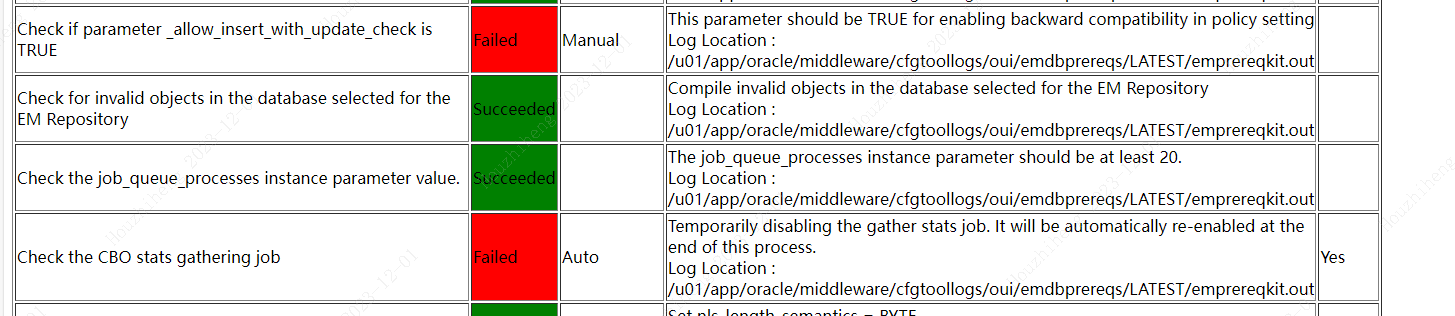
这里如果参数设置不好,安装过程有一个安装检查是通不过的
解决方案:
(Check if parameter _allow_insert_with_update_check is TRUE failed)
alter system set "_allow_insert_with_update_check" = true;


(Check the CBO stats gathering job failed)

exec DBMS_AUTO_TASK_ADMIN.DISABLE(client_name => 'auto optimizer stats collection',operation => NULL,window_name => NULL);

exec DBMS_AUTO_TASK_ADMIN.DISABLE(client_name => 'auto space advisor',operation => NULL,window_name => NULL);

exec DBMS_AUTO_TASK_ADMIN.DISABLE(client_name => 'sql tuning advisor',operation => NULL,window_name => NULL);

解决方案:这个mos上和日志上给的很清楚的给了解决方案,但是也需要区分版本,同样的解决方案在19c中就可以通过,但是放在21c不知道有没有其他的隐含参数来空值
alter system set "_optimizer_nlj_hj_adaptive_join"= FALSE scope=both ;

alter system set "_optimizer_strans_adaptive_pruning" = FALSE scope=both ;

alter system set "_px_adaptive_dist_method" = OFF scope=both ;

alter system set "_sql_plan_directive_mgmt_control" = 0 scope=both ;

alter system set "_optimizer_dsdir_usage_control" = 0 scope=both ;

alter system set "_optimizer_use_feedback" = FALSE scope=both ;

alter system set "_optimizer_gather_feedback" = FALSE scope=both ;

alter system set "_optimizer_performance_feedback" = OFF scope=both ;

解决方案:
alter system set parallel_min_servers=0;

alter system set parallel_max_servers=2;
重新进行安装,此过程较为缓慢,会在40-60分钟
[oracle@testoradb01:install]>$./ConfigureGC.sh -silent -responseFile /tmp/new_install.rsp

ScratchPathValue :/u01/app/oracle/middleware

*************************************

Error Messages:

----------------------------------------------------

* Invalid option(s): sourceLoc

List file is unreadable

List file is unreadable

List file is unreadable

List file is unreadable

List file is unreadable

List file is unreadable

List file is unreadable

List file is unreadable

List file is unreadable

List file is unreadable

List file is unreadable

List file is unreadable

List file is unreadable

List file is unreadable

List file is unreadable

List file is unreadable

List file is unreadable

List file is unreadable

List file is unreadable

List file is unreadable

List file is unreadable

List file is unreadable

List file is unreadable

List file is unreadable

List file is unreadable

List file is unreadable

13NGCHEKAGGREGATE  : oracle.sysman.top.agent

13NGCHEKAGGREGATE  : oracle.sysman.top.oms

13NGCHEKAGGREGATE  : OuiConfigVariables

13NGCHEKAGGREGATE  : encap_oms

13NGCHEKAGGREGATE  : OuiConfigVariables

2023-12-01_10-21-54AM: Configuration Assistant "Plugins Prerequisites Check" is in progress.

2023-12-01_10-21-59AM: Configuration Assistant "Plugins Prerequisites Check" has Succeeded.

2023-12-01_10-21-59AM: Configuration Assistant "Repository Configuration" is in progress.

Calling the EMSCHEMA MANAGER: CREATE

before starting RCU

Dec 01, 2023 10:21:59 AM org.apache.sshd.common.io.DefaultIoServiceFactoryFactory getIoServiceProvider

INFO: No detected/configured IoServiceFactoryFactory using Nio2ServiceFactoryFactory

Repository Creation Utility - Checking Prerequisites

Checking Global Prerequisites

Repository Creation Utility - Checking Prerequisites

Checking Component Prerequisites

Repository Creation Utility - Creating Tablespaces

Validating and Creating Tablespaces

Create tablespaces in the repository database

Repository Creation Utility - Create

Repository Create in progress.

Executing pre create operations

Creating EM Repository Common(EM_REPOS_COMMON)

Creating EM Repository Init Configuration(EM_REPOS_INIT)

 Check the Repository Configuration Assistant logs at: /u01/app/oracle/middleware//sysman/log/schemamanager

INVOKING with sslConfig

TNS Test Inserted Successfully

Successfully Added TNS Query Descriptors

  ********   ORACLE_HOME is /u01/app/oracle/middleware/

test properties path: /u01/app/oracle/middleware//sysman/admin/emdrep/prop/imap.properties

CreateTestType:createCompleteTest: BEGIN

CreateTestType:createTestMetadataObject: BEGIN

CreateTestType:createTestMetadataObject: END

CreateTestType:createPropertyGroups: BEGIN

CreateTestType:createPropertyGroups: END

CreateTestType:createStrayProperties: BEGIN

CreateTestType:createStrayProperties: END

CreateTestType:createDefaultPromotions: BEGIN

CreateTestType:createDefaultPromotions: END

CreateTestType:createDefaultThresholds: BEGIN

CreateTestType:createDefaultThresholds: END

CreateTestType:createMetrics4TestType: BEGIN

CreateTestType:createMetrics4TestType: END

PropertyName :imap_host

PropertyName :imap_port

PropertyName :imap_user_name

PropertyName :imap_password

PropertyName :numretries

PropertyName :retryinterval

CreateTestType:createQueryDescriptor: BEGIN

CreateTestType:createQueryDescriptor: END

Enabled test for: IMAP , generic_service , 1.0

Enabled test for: IMAP , aggregate_service , 1.0

CreateTestType:createCompleteTest: END

  ********   ORACLE_HOME is /u01/app/oracle/middleware/

INVOKING with sslConfig

log4j:WARN No appenders could be found for logger (oracle.sysman.swlib.component).

log4j:WARN Please initialize the log4j system properly.

log4j:WARN See http://logging.apache.org/log4j/1.2/faq.html#noconfig for more info.

INVOKING with sslConfig

Creating EM Repository Creation Configuration(EM_REPOS_CONFIG)

Executing post create operations

Repository Creation Utility: Create - Completion Summary

Database details:

-----------------------------

Connect Descriptor                           : (DESCRIPTION=(ADDRESS_LIST=(ADDRESS=(PROTOCOL=TCP)(HOST=testoradb01)(PORT=1521)))(CONNECT_DATA=(SERVICE_NAME=emreppdb)))

Connected As                                 : SYS

RCU Logfile                                  : No log file specified

Component schemas created:

-----------------------------

Component                                    Status         Logfile

EM Repository Creation Configuration         Success        /u01/app/oracle/middleware/sysman/log/schemamanager/m_120123_1021_AM/m_120123_1021_AM.CREATE/RCU2023-12-01_10-22_221975425/logs/em_repos_config.log

EM Repository Init Configuration             Success        /u01/app/oracle/middleware/sysman/log/schemamanager/m_120123_1021_AM/m_120123_1021_AM.CREATE/RCU2023-12-01_10-22_221975425/logs/em_repos_init.log

EM Repository Common                         Success        /u01/app/oracle/middleware/sysman/log/schemamanager/m_120123_1021_AM/m_120123_1021_AM.CREATE/RCU2023-12-01_10-22_221975425/logs/em_repos_common.log

Repository Creation Utility - Create : Operation Completed

after starting RCU

-------------------This action is not required ------------------

The correct order of execution is :

-showPrereqs , -runPrerequisites , -showCorrectiveActions , -runCorrectiveActions , -runPrerequisites(optional at this point), -showPostCorrectiveActions , -runPostCorrectiveActions

The creation of Repository is completed now running the MOS

2023-12-01_11-11-46AM: Configuration Assistant "Repository Configuration" has Succeeded.

2023-12-01_11-11-46AM: Configuration Assistant "MDS Schema Configuration" is in progress.

jdbcURL:[jdbc:oracle:thin:@(DESCRIPTION=(ADDRESS_LIST=(ADDRESS=(PROTOCOL=TCP)(HOST=testoradb01)(PORT=1521)))(CONNECT_DATA=(SERVICE_NAME=emreppdb)))]

ssl info is null

-silent -createRepository -compInfoXMLLocation /u01/app/oracle/middleware//sysman/emdrep/config/mds/ComponentInfo.xml -storageXMLLocation /u01/app/oracle/middleware//sysman/emdrep/config/mds/Storage.xml -connectString (DESCRIPTION=(ADDRESS_LIST=(ADDRESS=(PROTOCOL=TCP)(HOST=testoradb01)(PORT=1521)))(CONNECT_DATA=(SERVICE_NAME=emreppdb))) -dbUser SYS -dbRole sysdba -schemaPrefix SYSMAN -component MDS

Repository Creation Utility - Checking Prerequisites

Checking Global Prerequisites

Repository Creation Utility - Checking Prerequisites

Checking Component Prerequisites

Repository Creation Utility - Creating Tablespaces

Validating and Creating Tablespaces

Create tablespaces in the repository database

Repository Creation Utility - Create

Repository Create in progress.

        Percent Complete: 30

Executing pre create operations

        Percent Complete: 65

        Percent Complete: 65

        Percent Complete: 70

        Percent Complete: 70

        Percent Complete: 75

        Percent Complete: 75

Creating Metadata Services(MDS)

        Percent Complete: 95

Executing post create operations

        Percent Complete: 100

Repository Creation Utility: Create - Completion Summary

Database details:

-----------------------------

Connect Descriptor                           : (DESCRIPTION=(ADDRESS_LIST=(ADDRESS=(PROTOCOL=TCP)(HOST=testoradb01)(PORT=1521)))(CONNECT_DATA=(SERVICE_NAME=emreppdb)))

Connected As                                 : SYS

Prefix for (prefixable) Schema Owners        : SYSMAN

RCU Logfile                                  : No log file specified

Component schemas created:

-----------------------------

Component                                    Status         Logfile

Metadata Services                            Success        /u01/app/oracle/middleware/sysman/log/schemamanager/m_120123_1021_AM/m_120123_1021_AM.CREATE/RCU2023-12-01_11-11_72834283/logs/mds.log

Repository Creation Utility - Create : Operation Completed

jdbcURL:[jdbc:oracle:thin:@(DESCRIPTION=(ADDRESS_LIST=(ADDRESS=(PROTOCOL=TCP)(HOST=testoradb01)(PORT=1521)))(CONNECT_DATA=(SERVICE_NAME=emreppdb)))]

Repository Creation Utility - Checking Prerequisites

Checking Global Prerequisites

Repository Creation Utility - Checking Prerequisites

Checking Component Prerequisites

Repository Creation Utility - Creating Tablespaces

Validating and Creating Tablespaces

Create tablespaces in the repository database

Repository Creation Utility - Create

Repository Create in progress.

Executing pre create operations

        Percent Complete: 50

        Percent Complete: 55

        Percent Complete: 65

        Percent Complete: 65

        Percent Complete: 80

        Percent Complete: 90

        Percent Complete: 95

        Percent Complete: 95

Creating Oracle Platform Security Services(OPSS)

        Percent Complete: 97

Executing post create operations

        Percent Complete: 100

Repository Creation Utility: Create - Completion Summary

Database details:

-----------------------------

Connect Descriptor                           : (DESCRIPTION=(ADDRESS_LIST=(ADDRESS=(PROTOCOL=TCP)(HOST=testoradb01)(PORT=1521)))(CONNECT_DATA=(SERVICE_NAME=emreppdb)))

Connected As                                 : SYS

Prefix for (prefixable) Schema Owners        : SYSMAN122140

RCU Logfile                                  : No log file specified

Component schemas created:

-----------------------------

Component                                    Status         Logfile

Oracle Platform Security Services            Success        /u01/app/oracle/middleware/sysman/log/schemamanager/m_120123_1021_AM/m_120123_1021_AM.CREATE/RCU2023-12-01_11-11_72834283/logs/opss.log

Repository Creation Utility - Create : Operation Completed

Repository Creation Utility - Checking Prerequisites

Checking Global Prerequisites

Repository Creation Utility - Checking Prerequisites

Checking Component Prerequisites

Repository Creation Utility - Creating Tablespaces

Validating and Creating Tablespaces

Create tablespaces in the repository database

Repository Creation Utility - Create

Repository Create in progress.

Executing pre create operations

        Percent Complete: 50

        Percent Complete: 50

        Percent Complete: 55

        Percent Complete: 60

        Percent Complete: 65

        Percent Complete: 65

        Percent Complete: 70

        Percent Complete: 70

Creating Common Infrastructure Services(STB)

        Percent Complete: 85

Executing post create operations

        Percent Complete: 100

Repository Creation Utility: Create - Completion Summary

Database details:

-----------------------------

Connect Descriptor                           : (DESCRIPTION=(ADDRESS_LIST=(ADDRESS=(PROTOCOL=TCP)(HOST=testoradb01)(PORT=1521)))(CONNECT_DATA=(SERVICE_NAME=emreppdb)))

Connected As                                 : SYS

Prefix for (prefixable) Schema Owners        : SYSMAN

RCU Logfile                                  : No log file specified

Component schemas created:

-----------------------------

Component                                    Status         Logfile

Common Infrastructure Services               Success        /u01/app/oracle/middleware/sysman/log/schemamanager/m_120123_1021_AM/m_120123_1021_AM.CREATE/RCU2023-12-01_11-11_72834283/logs/stb.log

Repository Creation Utility - Create : Operation Completed

2023-12-01_11-11-54AM: Configuration Assistant "MDS Schema Configuration" has Succeeded.

2023-12-01_11-11-54AM: Configuration Assistant "OMS Configuration" is in progress.

 Executing the OMSCA command...

 Check the log files of the OMS Configuration Assistant at: /u01/app/oracle/middleware//cfgtoollogs/omsca

 OMS Configuration Assistant completed successfully.

2023-12-01_11-20-36AM: Configuration Assistant "OMS Configuration" has Succeeded.

2023-12-01_11-20-36AM: Configuration Assistant "Plugins Deployment and Configuration" is in progress.

2023-12-01_11-25-51AM: Configuration Assistant "Plugins Deployment and Configuration" has Succeeded.

2023-12-01_11-25-51AM: Configuration Assistant "Start Oracle Management Service" is in progress.

Starting OMS ...

Executing the command: /u01/app/oracle/middleware//bin/emctl start oms

Starting of OMS is successful.

Starting export oms config...

Executing command: /u01/app/oracle/middleware//bin/emctl exportconfig oms -dir  /u01/app/oracle/gc_inst/em/EMGC_OMS1/sysman/backup

Export config of OMS is successful.

2023-12-01_11-28-12AM: Configuration Assistant "Start Oracle Management Service" has Succeeded.

2023-12-01_11-28-12AM: Configuration Assistant "Agent Configuration Assistant" is in progress.

AgentConfiguration:agent configuration has been started

The AgentFreshInstaller is starting now

Oraclehome : ../u01/app/oracle/agent/agent_13.5.0.0.0

InstanceHome : /u01/app/oracle/agent/agent_inst

Agent Base Directory : /u01/app/oracle/agent

The oraclehome /u01/app/oracle/agent/agent_13.5.0.0.0

Dec 01, 2023 11:28:12 AM oracle.sysman.agent.installer.AgentInstaller parseResponseFile

INFO: /u01/app/oracle/agent/agent_13.5.0.0.0

Dec 01, 2023 11:28:12 AM oracle.sysman.agent.installer.AgentInstaller parseResponseFile

INFO: /u01/app/oracle/agent/agent_inst

Dec 01, 2023 11:28:12 AM oracle.sysman.agent.installer.AgentInstaller parseResponseFile

INFO: /u01/app/oracle/agent

Dec 01, 2023 11:28:12 AM oracle.sysman.agent.installer.AgentInstaller parseResponseFile

INFO: RESPONSE_FILE=/u01/app/oracle/agent/agentInstall.rsp

Dec 01, 2023 11:28:12 AM oracle.sysman.agent.installer.AgentInstaller parseResponseFile

INFO: ORACLE_HOME=/u01/app/oracle/agent/agent_13.5.0.0.0

Dec 01, 2023 11:28:12 AM oracle.sysman.agent.installer.AgentInstaller parseResponseFile

INFO: AGENT_PORT=

Dec 01, 2023 11:28:12 AM oracle.sysman.agent.installer.AgentInstaller parseResponseFile

INFO: ORACLE_HOSTNAME=testoradb01

Dec 01, 2023 11:28:12 AM oracle.sysman.agent.installer.AgentInstaller parseResponseFile

INFO: b_doDiscovery=true

Dec 01, 2023 11:28:12 AM oracle.sysman.agent.installer.AgentInstaller parseResponseFile

INFO: AGENT_BASE_DIR=/u01/app/oracle/agent

Dec 01, 2023 11:28:12 AM oracle.sysman.agent.installer.AgentInstaller parseResponseFile

INFO: AGENT_INSTANCE_HOME=/u01/app/oracle/agent/agent_inst

Dec 01, 2023 11:28:12 AM oracle.sysman.agent.installer.AgentInstaller parseResponseFile

INFO: s_hostname=testoradb01

Dec 01, 2023 11:28:12 AM oracle.sysman.agent.installer.AgentInstaller parseResponseFile

INFO: OMS_HOST=testoradb01

Dec 01, 2023 11:28:12 AM oracle.sysman.agent.installer.AgentInstaller parseResponseFile

INFO: START_AGENT=true

startAgent is:true

Dec 01, 2023 11:28:12 AM oracle.sysman.agent.installer.AgentInstaller parseResponseFile

INFO: b_secureAgent=true

seci is :true

Dec 01, 2023 11:28:12 AM oracle.sysman.agent.installer.AgentInstaller parseResponseFile

INFO: b_chainedInstall=true

Dec 01, 2023 11:28:12 AM oracle.sysman.agent.installer.AgentInstaller parseResponseFile

INFO: b_forceConfigure=false

Dec 01, 2023 11:28:12 AM oracle.sysman.agent.installer.AgentInstaller parseResponseFile

INFO: EM_UPLOAD_PORT=4903

Dec 01, 2023 11:28:12 AM oracle.sysman.agent.installer.AgentInstaller parseResponseFile

INFO: b_forceAgentDefaultPort=false

Dec 01, 2023 11:28:12 AM oracle.sysman.agent.installer.AgentInstaller parseResponseFile

INFO: s_staticPorts=

Dec 01, 2023 11:28:12 AM oracle.sysman.agent.installer.AgentInstaller parseResponseFile

INFO: PROPERTIES_FILE=

Dec 01, 2023 11:28:12 AM oracle.sysman.agent.installer.AgentInstaller parseResponseFile

INFO: b_skipValidation=false

Dec 01, 2023 11:28:12 AM oracle.sysman.agent.installer.AgentInstaller parseResponseFile

INFO: ORACLE_HOME=/u01/app/oracle/agent/agent_13.5.0.0.0

Dec 01, 2023 11:28:12 AM oracle.sysman.agent.installer.AgentInstaller parseResponseFile

INFO: AGENT_PORT=

Dec 01, 2023 11:28:12 AM oracle.sysman.agent.installer.AgentInstaller parseResponseFile

INFO: ORACLE_HOSTNAME=testoradb01

Dec 01, 2023 11:28:12 AM oracle.sysman.agent.installer.AgentInstaller parseResponseFile

INFO: b_doDiscovery=true

Dec 01, 2023 11:28:12 AM oracle.sysman.agent.installer.AgentInstaller parseResponseFile

INFO: AGENT_BASE_DIR=/u01/app/oracle/agent

Dec 01, 2023 11:28:12 AM oracle.sysman.agent.installer.AgentInstaller parseResponseFile

INFO: AGENT_INSTANCE_HOME=/u01/app/oracle/agent/agent_inst

Dec 01, 2023 11:28:12 AM oracle.sysman.agent.installer.AgentInstaller parseResponseFile

INFO: s_hostname=testoradb01

Dec 01, 2023 11:28:12 AM oracle.sysman.agent.installer.AgentInstaller parseResponseFile

INFO: OMS_HOST=testoradb01

Dec 01, 2023 11:28:12 AM oracle.sysman.agent.installer.AgentInstaller parseResponseFile

INFO: START_AGENT=true

startAgent is:true

Dec 01, 2023 11:28:12 AM oracle.sysman.agent.installer.AgentInstaller parseResponseFile

INFO: b_secureAgent=true

seci is :true

Dec 01, 2023 11:28:12 AM oracle.sysman.agent.installer.AgentInstaller parseResponseFile

INFO: b_chainedInstall=true

Dec 01, 2023 11:28:12 AM oracle.sysman.agent.installer.AgentInstaller parseResponseFile

INFO: b_forceConfigure=false

Dec 01, 2023 11:28:12 AM oracle.sysman.agent.installer.AgentInstaller parseResponseFile

INFO: EM_UPLOAD_PORT=4903

Dec 01, 2023 11:28:12 AM oracle.sysman.agent.installer.AgentInstaller parseResponseFile

INFO: b_forceAgentDefaultPort=false

Dec 01, 2023 11:28:12 AM oracle.sysman.agent.installer.AgentInstaller parseResponseFile

INFO: s_staticPorts=

Dec 01, 2023 11:28:12 AM oracle.sysman.agent.installer.AgentInstaller parseResponseFile

INFO: PROPERTIES_FILE=

Dec 01, 2023 11:28:12 AM oracle.sysman.agent.installer.AgentInstaller parseResponseFile

INFO: b_skipValidation=false

log loction is setlog

Creating log directoyr :/u01/app/oracle/agent/agent_13.5.0.0.0/cfgtoollogs/agentDeploy

Writing the following contents into /u01/app/oracle/agent/agent_13.5.0.0.0/install/oragchomelist

/u01/app/oracle/agent/agent_13.5.0.0.0:/u01/app/oracle/agent/agent_inst

Creating directory /u01/app/oracle/agent/agent_13.5.0.0.0/install/tmp completed successfully.

File /etc/oragchomelist exists.

File /etc/oragchomelist is writable.

Index :-1 for line : /u01/app/oracle/middleware

Index :0 for line : /u01/app/oracle/agent/agent_13.5.0.0.0

Overwriting the contents since oracle home:/u01/app/oracle/agent/agent_13.5.0.0.0 entry already exists.

Agent Home is : {0}

The value of chainInstall : true forceConfigure : false skipValidation : false

Validated the oms host and port :- testoradb01----4903

Logs Location is : {0}

Getting Inet Addresses for host testoradb01

** Agent Port Check completed successfully.**

Validated the agent port :- ----3872

Executing command: {0}

shared agent value is :false

Setting system property CUSTOM_INVENTORY to {0}

chain install is :true

Cloning of agent home completed successfully

Agent Configuration completed successfully

The following configuration scripts need to be executed as the "root" user. Root script to run : /u01/app/oracle/agent/agent_13.5.0.0.0/root.sh

AgentConfiguration:agent configuration finished with status = true

2023-12-01_11-29-02AM: Configuration Assistant "Agent Configuration Assistant" has Succeeded.

*** The Installation was Successful. ***

This information is also available at:

        /u01/app/oracle/middleware//install/setupinfo.txt

See the following for information pertaining to your Enterprise Manager installation:

Use the following URL to access:

        1. Enterprise Manager Cloud Control URL: https://testoradb01:7803/em

        2. Admin Server URL: https://testoradb01:7102/console

The following details need to be provided while installing an additional OMS:

        1. Admin Server Host Name: testoradb01

        2. Admin Server Port: 7102

You can find the details on ports used by this deployment at : /u01/app/oracle/middleware/install/portlist.ini

 NOTE:

 An encryption key has been generated to encrypt sensitive data in the Management Repository. If this key is lost, all encrypted data in the Repository becomes unusable.

 A backup of the OMS configuration is available in /u01/app/oracle/gc_inst/em/EMGC_OMS1/sysman/backup on host testoradb01. See Cloud Control Administrators Guide for details on how to back up and recover an OMS.

 NOTE: This backup is valid only for the initial OMS configuration. For example, it will not reflect plug-ins installed later, topology changes like the addition of a load balancer, or changes to other properties made using emctl or emcli. Backups should be created on a regular basis to ensure they capture the current OMS configuration. Use the following command to backup the OMS configuration:

/u01/app/oracle/middleware//bin/emctl exportconfig oms -dir <backup dir>
根据提示执行脚本
Root script to run : /u01/app/oracle/agent/agent_13.5.0.0.0/root.sh
四、前台页面
用户名:sysman
密码:Dba_Paword02


EMCC13.5+Oracle19.13+Redhat8 In Silent Mode的更多相关文章
- Oracle 19C的下载和安装部署(图形安装和静默安装)
Oracle 19C的下载和安装部署(图形安装和静默安装) https://docs.oracle.com/en/database/oracle/oracle-database/19/ladbi/ ...
- 【转】Install MATLAB 2013a on CentOS 6.4 x64 with mode silent
首先要下载安装光盘. Matlab801_MacUnix.iso [root@db-172-16-3-150 mnt]# md5sum /ssd1/Matlab801_MacUnix.iso 0d3 ...
- 13.1.17 CREATE TABLE Syntax
13.1.17 CREATE TABLE Syntax 13.1.17.1 CREATE TABLE ... LIKE Syntax 13.1.17.2 CREATE TABLE ... SELECT ...
- Oracle 12c(12.1.0.5) oem agent silent install(静默安装agent)
注释: 文章自oracle support 文档 ID 1360083.1,静默安装agent采用的是把OMS服务端(即oem server端)的agent用压缩包download,远程传到agent ...
- Archlinux配置~小米笔记本Air 13.3英寸版本
1 .zsh echo $ SHELL \\查看当前正在使用shell: pacman -S zsh zsh-syntax-highlighting git wget wget https://raw ...
- OEMCC 13.2 安装部署
需求:安装部署OEM 13.2 环境:两台主机,系统RHEL 6.5,分别部署OMS和OMR: OMS,也就是OEMCC的服务端 IP:192.168.1.88 内存:12G+ 硬盘:100G+ OM ...
- iOS7中的多任务 - Background Fetch,Silent Remote Notifications,Background Transfer Service
转自:http://onevcat.com/2013/08/ios7-background-multitask/ 在IOS 7 出来不就,公司内部也组织了一次关于IOS 7 特性的的分享,今天看见on ...
- Installing Oracle Database 12c Release 2(12.2) RAC on RHEL7.3 in Silent Mode
概要 在RHEL7静默方式安装oracle database 12.2 RAC. 一.环境配置 1. 配置hosts文件 cp /etc/hosts /etc/hosts_$(date +%Y%d%m ...
- 13 Ways Companies Do Whatsapp Marketing & Support (May 2019)
13 Ways Companies Do Whatsapp Marketing & Support (May 2019) By Iaroslav Kudritskiy We're livin ...
- oracle 19c dataguard silent install (oracle 19c dataguard 静默安装)
环境说明 1.关闭透明大页 RHEL 6: # cat /sys/kernel/mm/redhat_transparent_hugepage/enabled [oracle@rhel 6 ~]$ c ...
随机推荐
- 基于Supabase开发公众号接口
在<开源BaaS平台Supabase介绍>一文中我们对什么是BaaS以及一个优秀的BaaS平台--Supabase做了一些介绍.在这之后,出于探究的目的,我利用一些空闲时间基于Micros ...
- MySQL InnoDB 是怎么使用 B+ 树存数据的?
这里限定 MySQL InnoDB 存储引擎来进行阐述,避免不必要的阅读歧义. 首先通过一篇文章简要了解下 B 树的相关知识:你好,我是B树 . B+ 树是在 B 树基础上的变种,主要区别包括: 1. ...
- API接口技术的使用可以增加软件开发和运行的灵活性,降低软件运行和维护的成本
随着科技的发展和互联网的普及,越来越多的公司和企业把业务拓展到互联网上,这就需要用到API接口技术.API(Application Programming Interface,应用程序接口)是指不同软 ...
- Unity UGUI的Dropdown(下拉菜单)组件的介绍及使用
Unity UGUI的Dropdown(下拉菜单)组件的介绍及使用 1. 什么是Dropdown组件? Dropdown(下拉菜单)是Unity UGUI中的一个常用组件,用于在用户点击或选择时显示一 ...
- Electron创建项目并打包生成exe
安装nodejs 访问这个网站去下载 http://nodejs.cn/download/ 创建项目 创建项目 git clone https://github.com/electron/electr ...
- 搞懂fflush(stdout)
使用 printf 或 cout 打印内容时,输出永远不会直接写入"屏幕".而是,被发送到 stdout. (stdout 就像一个缓冲区) 默认情况下,发送到 stdout 的输 ...
- 前端三件套系例之BootStrap—— BootStrap组件、BootStrap插件
文章目录 1 BootStrap组件 1 Glyphicons 字体图标 2 下拉菜单 2.1 基本使用 2.2 对齐 2.3 标题 2.4 分割线 2.5 禁用的菜单项 3 按钮组 3.1 基本使用 ...
- visio 2010 kit tools
Getting Office License Configuration Information.---------------------------------------Backing Up L ...
- Python+Softmax+MNIST
# -*- coding: utf-8 -*- """ 用神经网络搭建的softmax线性分离器 Softmax是用于分类过程,用来实现多分类的,简单来说,它把一些输出的 ...
- 一些对dp突然的理解
突然想到了一些理解,感觉有些模糊,怕忘记,就赶紧记下来就是对于状态的设计 用01背包举例子吧,我们设计状态的时候一定是要保证所有可能在最后优秀的子状态在前面的时候是能够保留下来的也就是我们的状态设计要 ...