
SpringBoot配置启动页(首页)控制台打印项目访问入口url
一、SpringBootApplication
 1 package com.reliable.yang;

 2

 3 /**

 4  * @author Administrator

 5  * @date 2022-06-20 16:32

 6  */

 7 import lombok.extern.slf4j.Slf4j;

 8 import org.springframework.boot.SpringApplication;

 9 import org.springframework.boot.autoconfigure.SpringBootApplication;

10 import org.springframework.context.ConfigurableApplicationContext;

11 import org.springframework.core.env.Environment;

12 import org.springframework.util.StringUtils;

13

14 import java.net.InetAddress;

15 import java.net.UnknownHostException;

16 @Slf4j

17 @SpringBootApplication

18 public class BlogApp {

19     public static void main(String[] args) throws UnknownHostException, UnknownHostException {

20         ConfigurableApplicationContext application = SpringApplication.run(BlogApp.class, args);

21         log.info("..######..##.....##..######...######..########..######...######.\n" +

22                 ".##....##.##.....##.##....##.##....##.##.......##....##.##....##\n" +

23                 ".##.......##.....##.##.......##.......##.......##.......##......\n" +

24                 "..######..##.....##.##.......##.......######....######...######.\n" +

25                 ".......##.##.....##.##.......##.......##.............##.......##\n" +

26                 ".##....##.##.....##.##....##.##....##.##.......##....##.##....##\n" +

27                 "..######...#######...######...######..########..######...######.");

28         Environment env = application.getEnvironment();

29         String ip = InetAddress.getLocalHost().getHostAddress();

30         String port = env.getProperty("server.port");

31         String path = env.getProperty("server.servlet.context-path");

32         if (StringUtils.isEmpty(path)) {

33             path = "";

34         }

35         log.info("\n----------------------------------------------------------\n\t" +

36                 "Application  is running! Access URLs:\n\t" +

37                 "Local访问网址: \t\thttp://localhost:" + "8080" + path + "\n\t" +

38 //                "External访问网址: \thttp://" + ip + ":" + port + path + "\n\t" +

39                 "----------------------------------------------------------");

40     }

41 }
二、application.properties
1 server.port= 8888

2 server.servlet.context-path=/
三、controller
1 @Controller

2

3 public class IndexController {

4     @RequestMapping("/")

5     public String homePage() {

6         return "login.html"; // login.html 需要在static目录下

7     }

8 }
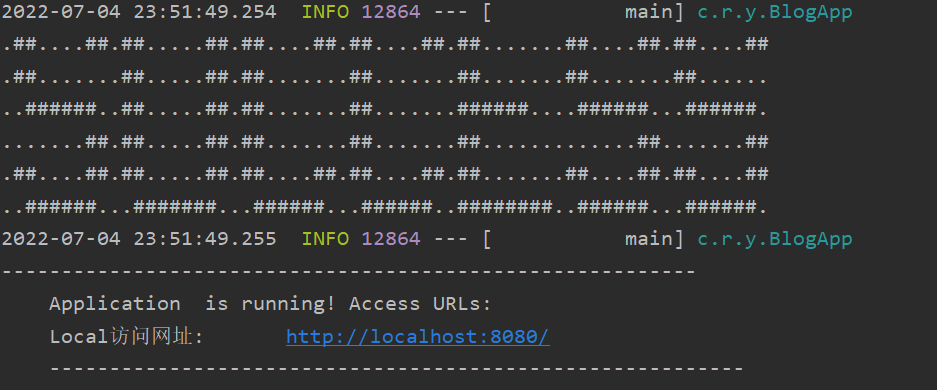
效果如图:
参考:https://www.hangge.com/blog/cache/detail_2528.html
SpringBoot配置启动页(首页)控制台打印项目访问入口url的更多相关文章
- 将Web项目访问的URL项目名设置为"/"
工具:Eclipse 步骤: 1.鼠标右键项目名--->properties--->Web Project Setting--->Context root. 将Context roo ...
- [Swift]LaunchScreen.storyboard设置启动页
设置[General]->[App Icons and Launch Images] 注意:当App不是用LaunchScreen.xib来配置启动页时,[LaunchScreen File]置 ...
- 关于iOS启动页launchImage无法显示解决办法
在没有美工的时候,往往项目开发到一半,才拿到icon和launchImage图片,这时在添加对应图片之后发现并没有正常显示,这就蛋疼了,以下列出几种解决方式. 关于设置launchImage: 工程配 ...
- iOS开发-APP图标、启动页、名字的设置
APP图标.启动页.名字的设置:(较全面,但是APP启动页讲述的有漏洞) 参考链接:https://www.jianshu.com/p/2c7e181276ff APP启动页:(弥补上一文的漏洞) 参 ...
- IDEA springboot配置
基于springboot2.1.7 springboot项目创建 springboot热部署 springboot配置swagger2 springboot配置mybatis springboot配置 ...
- springboot配置redis+jedis,支持基础redis,并实现jedis GEO地图功能
Springboot配置redis+jedis,已在项目中测试并成功运行,支持基础redis操作,并通过jedis做了redis GEO地图的java实现,GEO支持存储地理位置信息来实现诸如附近的人 ...
- 【IOS】模仿"抽屉新热榜"动态启动页YFSplashScreen
IOS最好要设置系统默认启动页面,不然进入应用就会突然闪现黑色画面 下图是我们要实现的效果: 总体思路:设置一个系统默认启动页面,在进入didFinishLaunchingWithOptions时, ...
- 微信小程序之启动页的重要性
启动页在APP中是个很常见的需求,为什么对于小程序来说也非常重要呢?首先我描述一下我在开发过程中遇到的一些问题以及解决的步骤,到最后为什么要加启动页,看完你就明白了. 小程序的首页需要展示用户关注的小 ...
- maven项目整合SSM配置log4j, 实现控制台打印SQL语句
在原有项目正常启动的情况下, 实现在控制台打印mapper包下SQL语句. 1.在pom.xml配置文件中添加两个依赖(缺一不可) <!--日志包--> <dependency> ...
- 用Flutter开发的跨平台项目,完美运行在Android和IOS上,Material简洁风格,包括启动页、引导页、注册、登录、首页、体系、公众号、导航、项目,还有漂亮的妹子图库,运行极度流畅,结构清晰,代码规范,值得拥有
Flutter学习资源汇总持续更新中...... Flutter官方网站 Flutter中文网 wendux的Flutter实战 Flutter官方exampleflutter_gallery 阿里巴 ...
随机推荐
- macOS使用CodeRunner快速配置fortran环境
个人网站:xzajyjs.cn 由于一些项目的缘故,需要有fortran的需求,但由于是M1 mac的缘故,不能像windows那样直接使用vs+ivf这种经典配置.搜了一下网上主流的跨平台方案,主要 ...
- 【Azure 存储服务】Azure Blob Storage SDK 升级失败,遇见 Unsatisfied Dependency Exception 和 Unexpected Length Exception
问题描述 在升级Java Azure Blob Storage SDK的过程中,先后遇见了 UnsatisfiedDependencyException 和 UnexpectedLengthExcep ...
- 【Azure Redis 缓存】VM 里的 Redis 能直接迁移到 Azure Cache for Redis ? 需要改动代码吗?
问题描述 原来部署在VM 里的 Redis 能直接迁移到 Azure Cache for Redis? 需要改动代码吗? 问题解答 以上问题需要从两个方面来解答. 第一:VM中Redis的数据转移到 ...
- debian手册摘要
apt-get source 包名 # 获取源码dpkg --info deb包名 # 查看包信息apt-cache show 包名 # 包信息(含有Depends.Suggests.Section. ...
- Advanced .Net Debugging 3:基本调试任务(上)
一.简介 这是我的<Advanced .Net Debugging>这个系列的第三篇文章.这个系列的每篇文章写的周期都要很长,因为每篇文章都是原书的一章内容(太长的就会分开写).再者说,原 ...
- 使用go语言开发自动化API测试工具
前言 上一篇文章说到我还开发了一个独立的自动测试工具,可以根据 OpenAPI 的文档来测试,并且在测试完成后输出测试报告,报告内容包括每个接口是否测试通过和响应时间等. 这个工具我使用了 go 语言 ...
- 手把手带你认识GaussDB轻量化运维管理工具
本文分享自华为云社区<GaussDB轻量化运维管理工具介绍>,作者: Gauss松鼠会小助手. 一.GaussDB 运维管理平台简介 开放生态层 友好Web界面,多云皮肤个性化定制 丰富的 ...
- Socket编程:htons()、htonl()、ntohs()、ntohl()
前言 在计算机网络学到Socket编程的时候,自己在Linux下用C语言试验了一番,发现了这四个古怪的函数:htons().htonl().ntohs().ntohl(). 查阅资料得知,这是涉及到网 ...
- MySQL之过滤条件
[一]筛选过滤条件 [1]查询语句 -- 查询当前表中的指定字段的数据 select id,name from emp where id > 3; [2]创建数据表 create databas ...
- Java面向对象(下)--static/final/代码块/抽象/接口/内部类
目录 1 关键字:static 2 理解main方法的语法 3 类的成员之四:代码块 4关键字:final 5 抽象类与抽象方法 6 接口(interface) 7 类的成员之五:内部类 static ...