
springboot启动流程 (1) 流程概览
本文将通过阅读源码方式分析SpringBoot应用的启动流程,不涉及Spring启动部分(有相应的文章介绍)。
本文不会对各个流程做展开分析,后续会有文章介绍详细流程。
SpringApplication类
应用启动入口
使用以下方式启动一个SpringBoot应用:
@SpringBootApplication

public class SpringBootDemoApplication {

  public static void main(String[] args) {

    SpringApplication.run(SpringBootDemoApplication.class, args);

  }

}
run方法
public static ConfigurableApplicationContext run(Class<?> primarySource, String... args) {

	return run(new Class<?>[] { primarySource }, args);

}

public static ConfigurableApplicationContext run(Class<?>[] primarySources, String[] args) {

	return new SpringApplication(primarySources).run(args);

}

public ConfigurableApplicationContext run(String... args) {

	StopWatch stopWatch = new StopWatch();

	stopWatch.start();

	ConfigurableApplicationContext context = null;

	Collection<SpringBootExceptionReporter> exceptionReporters = new ArrayList<>();

	configureHeadlessProperty();

	SpringApplicationRunListeners listeners = getRunListeners(args);

	listeners.starting();

	try {

		ApplicationArguments applicationArguments = new DefaultApplicationArguments(args);

		// 获取应用env

		ConfigurableEnvironment environment = prepareEnvironment(listeners, applicationArguments);

		configureIgnoreBeanInfo(environment);

		// 打印banner

		Banner printedBanner = printBanner(environment);

		// 创建ApplicationContext

		context = createApplicationContext();

		exceptionReporters = getSpringFactoriesInstances(SpringBootExceptionReporter.class,

				new Class[] { ConfigurableApplicationContext.class }, context);

		// 一些准备工作

		prepareContext(context, environment, listeners, applicationArguments, printedBanner);

		// refresh ApplicationContext

		refreshContext(context);

		afterRefresh(context, applicationArguments);

		stopWatch.stop();

		if (this.logStartupInfo) {

			new StartupInfoLogger(this.mainApplicationClass).logStarted(getApplicationLog(), stopWatch);

		}

		// 调用listener

		listeners.started(context);

		// 调用ApplicationRunner和CommandLineRunner

		callRunners(context, applicationArguments);

	} catch (Throwable ex) {

		handleRunFailure(context, ex, exceptionReporters, listeners);

		throw new IllegalStateException(ex);

	}

	try {

		listeners.running(context);

	} catch (Throwable ex) {

		handleRunFailure(context, ex, exceptionReporters, null);

		throw new IllegalStateException(ex);

	}

	return context;

}
获取应用env
private ConfigurableEnvironment prepareEnvironment(SpringApplicationRunListeners listeners,

		ApplicationArguments applicationArguments) {

	// 创建StandardServletEnvironment, 会初始化四个PropertySource:

	// servletConfigInitParams, servletContextInitParams, systemProperties, systemEnvironment

	// 比如-Dserver.port=8888会在systemProperties中

	ConfigurableEnvironment environment = getOrCreateEnvironment();

	// 添加defaultProperties和命令行配置参数即CommandLinePropertySource

	// 通常都没有这两个配置

	configureEnvironment(environment, applicationArguments.getSourceArgs());

	// 使用ConfigurationPropertySourcesPropertySource封装并暴露所有的PropertySource集

	ConfigurationPropertySources.attach(environment);

	// 添加ApplicationEnvironmentPreparedEvent事件并触发multicastEvent加载应用配置文件

	listeners.environmentPrepared(environment);

	// 将spring.main.xx配置加载到SpringApplication对象

	bindToSpringApplication(environment);

	if (!this.isCustomEnvironment) {

		environment = new EnvironmentConverter(getClassLoader()).convertEnvironmentIfNecessary(environment,

				deduceEnvironmentClass());

	}

	ConfigurationPropertySources.attach(environment);

	return environment;

}
加载配置文件的入口在ConfigFileApplicationListener类中:
public void postProcessEnvironment(ConfigurableEnvironment environment, SpringApplication application) {

	addPropertySources(environment, application.getResourceLoader());

}

protected void addPropertySources(ConfigurableEnvironment environment, ResourceLoader resourceLoader) {

	// 添加RandomValuePropertySource

	RandomValuePropertySource.addToEnvironment(environment);

	// 加载配置文件

	new Loader(environment, resourceLoader).load();

}
加载配置文件的源码较多,此处不做记录,简单梳理一下流程:
- 加载active profile配置文件
- 如果配置了spring.config.additional-location或spring.config.location参数,会使用它们作为配置文件。如果这两个参数值是目录,则会从这两个目录下查找配置文件
- 默认从classpath:/,classpath:/config/,file:./,file:./config/*/,file:./config/目录下查找application-xx.properties或application-xx.yml文件
- 使用PropertiesPropertySourceLoader和YamlPropertySourceLoader解析配置文件
- 会将配置参数封装成OriginTrackedMapPropertySource类型对象,使用applicationConfig: [classpath:/application-dev.yml]之类的字符串作为PropertySource的名称
- 加载默认的application.properties或application.yml文件
- 解析出来的所有PropertySource都会添加到environment的propertySources中,propertySources是一个MutablePropertySources对象,管理着所有的PropertySource集,在这个过程中,添加的先后顺序决定了配置的优先级
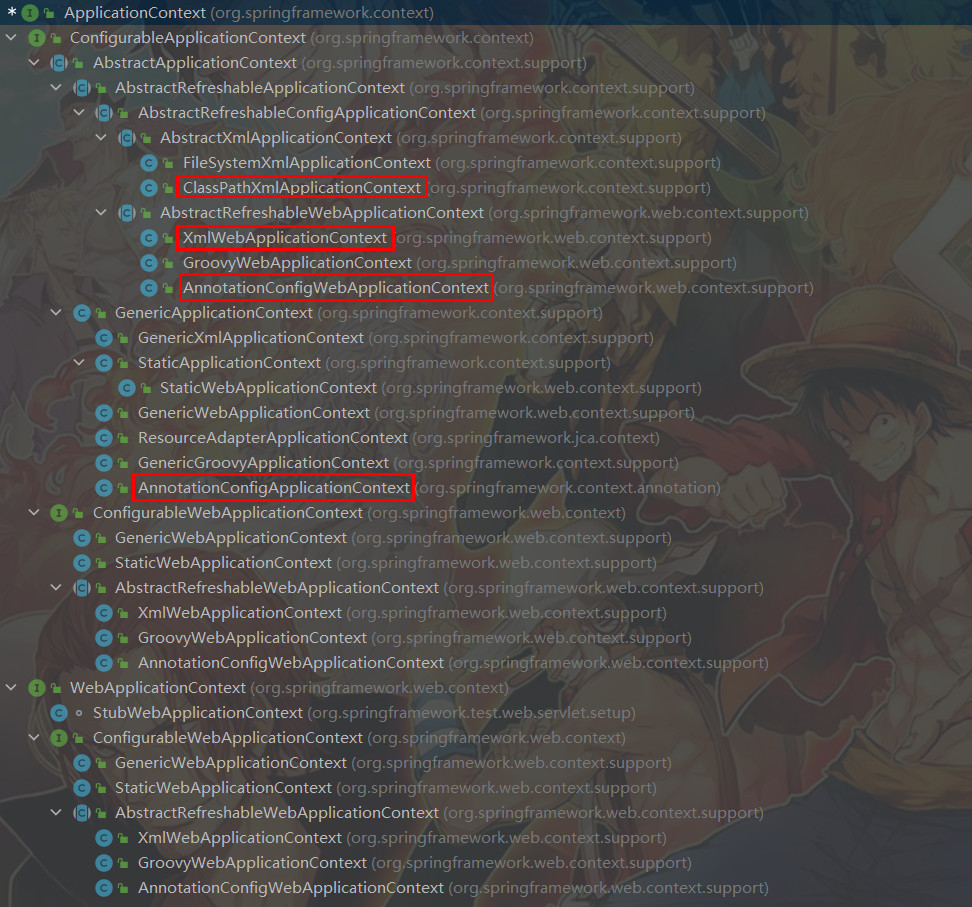
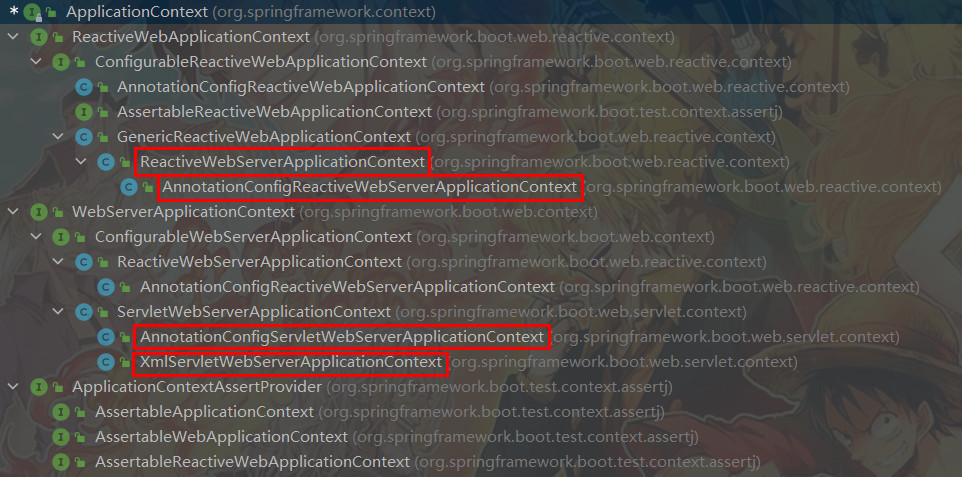
创建ApplicationContext
protected ConfigurableApplicationContext createApplicationContext() {

	Class<?> contextClass = this.applicationContextClass;

	if (contextClass == null) {

		try {

			switch (this.webApplicationType) {

			case SERVLET:

				// AnnotationConfigServletWebServerApplicationContext类

				contextClass = Class.forName(DEFAULT_SERVLET_WEB_CONTEXT_CLASS);

				break;

			case REACTIVE:

				// AnnotationConfigReactiveWebServerApplicationContext类

				contextClass = Class.forName(DEFAULT_REACTIVE_WEB_CONTEXT_CLASS);

				break;

			default:

				// AnnotationConfigApplicationContext类

				contextClass = Class.forName(DEFAULT_CONTEXT_CLASS);

			}

		} catch (ClassNotFoundException ex) {

			throw new IllegalStateException("Unable create a default ApplicationContext", ex);

		}

	}

	return (ConfigurableApplicationContext) BeanUtils.instantiateClass(contextClass);

}
prepareContext
private void prepareContext(

		ConfigurableApplicationContext context, ConfigurableEnvironment environment,

		SpringApplicationRunListeners listeners, ApplicationArguments applicationArguments,

		Banner printedBanner) {

	context.setEnvironment(environment);

	postProcessApplicationContext(context);

	// Apply any ApplicationContextInitializers to the context before it is refreshed.

	// ApplicationContextInitializers集是在创建SpringApplication对象的时候初始化的

	applyInitializers(context);

	// 触发contextPrepared事件

	listeners.contextPrepared(context);

	if (this.logStartupInfo) {

		logStartupInfo(context.getParent() == null);

		logStartupProfileInfo(context);

	}

	// 获取BeanFactory并注册必要的Bean

	ConfigurableListableBeanFactory beanFactory = context.getBeanFactory();

	// 注册启动参数

	beanFactory.registerSingleton("springApplicationArguments", applicationArguments);

	// 注册banner printer

	if (printedBanner != null) {

		beanFactory.registerSingleton("springBootBanner", printedBanner);

	}

	// 设置是否允许Bean覆盖,使用spring.main.allowBeanDefinitionOverriding参数配置

	if (beanFactory instanceof DefaultListableBeanFactory) {

		((DefaultListableBeanFactory) beanFactory)

				.setAllowBeanDefinitionOverriding(this.allowBeanDefinitionOverriding);

	}

	if (this.lazyInitialization) {

		context.addBeanFactoryPostProcessor(new LazyInitializationBeanFactoryPostProcessor());

	}

	// Load the sources

	Set<Object> sources = getAllSources();

	// 将SpringApplication.run(Xxx.class, args)方法传入的Class注册到容器

	// 使用AnnotatedBeanDefinitionReader.register(Class<?>...)方法注册启动类

	load(context, sources.toArray(new Object[0]));

	// 触发contextLoaded事件

	listeners.contextLoaded(context);

}
refreshApplicationContext
protected void refresh(ConfigurableApplicationContext applicationContext) {

	applicationContext.refresh();

}
调用的是ServletWebServerApplicationContext的refresh方法:
public final void refresh() throws BeansException, IllegalStateException {

	try {

		super.refresh();

	} catch (RuntimeException ex) {

		// 关闭web server

		WebServer webServer = this.webServer;

		if (webServer != null) {

			webServer.stop();

		}

		throw ex;

	}

}
绝大多数的refresh逻辑都在AbstractApplicationContext类里面,ServletWebServerApplicationContext中会在onRefresh阶段创建webServer:
protected void onRefresh() {

	super.onRefresh();

	try {

		createWebServer();

	} catch (Throwable ex) {

		throw new ApplicationContextException("Unable to start web server", ex);

	}

}
调用ApplicationRunner和CommandLineRunner
private void callRunners(ApplicationContext context, ApplicationArguments args) {

	List<Object> runners = new ArrayList<>();

	runners.addAll(context.getBeansOfType(ApplicationRunner.class).values());

	runners.addAll(context.getBeansOfType(CommandLineRunner.class).values());

	AnnotationAwareOrderComparator.sort(runners);

	for (Object runner : new LinkedHashSet<>(runners)) {

		if (runner instanceof ApplicationRunner) {

			callRunner((ApplicationRunner) runner, args);

		}

		if (runner instanceof CommandLineRunner) {

			callRunner((CommandLineRunner) runner, args);

		}

	}

}
SpringBootApplication注解
指示一个配置类,该类声明一个或多个@Bean方法,并触发自动配置和组件扫描。这是一个方便的注解,相当于声明@Configuration、@EnableAutoConfiguration和@ComponentScan注解。
@SpringBootConfiguration

@EnableAutoConfiguration

@ComponentScan(excludeFilters = { @Filter(type = FilterType.CUSTOM, classes = TypeExcludeFilter.class),

		@Filter(type = FilterType.CUSTOM, classes = AutoConfigurationExcludeFilter.class) })

public @interface SpringBootApplication {

	/**

	 * Exclude specific auto-configuration classes such that they will never be applied.

	 */

	@AliasFor(annotation = EnableAutoConfiguration.class)

	Class<?>[] exclude() default {};

	/**

	 * Exclude specific auto-configuration class names such that they will never be

	 * applied.

	 */

	@AliasFor(annotation = EnableAutoConfiguration.class)

	String[] excludeName() default {};

	/**

	 * Base packages to scan for annotated components. Use scanBasePackageClasses

	 * for a type-safe alternative to String-based package names.

	 */

	@AliasFor(annotation = ComponentScan.class, attribute = "basePackages")

	String[] scanBasePackages() default {};

	/**

	 * Type-safe alternative to scanBasePackages for specifying the packages to

	 * scan for annotated components. The package of each class specified will be scanned.

	 */

	@AliasFor(annotation = ComponentScan.class, attribute = "basePackageClasses")

	Class<?>[] scanBasePackageClasses() default {};

	/**

	 * The BeanNameGenerator class to be used for naming detected components

	 * within the Spring container.

	 */

	@AliasFor(annotation = ComponentScan.class, attribute = "nameGenerator")

	Class<? extends BeanNameGenerator> nameGenerator() default BeanNameGenerator.class;

	/**

	 * Specify whether @Bean methods should get proxied in order to enforce

	 * bean lifecycle behavior, e.g. to return shared singleton bean instances even in

	 * case of direct @Bean method calls in user code. This feature requires

	 * method interception, implemented through a runtime-generated CGLIB subclass which

	 * comes with limitations such as the configuration class and its methods not being

	 * allowed to declare final.

	 */

	@AliasFor(annotation = Configuration.class)

	boolean proxyBeanMethods() default true;

}
SpringBootConfiguration注解
指示一个类提供Spring Boot application @Configuration功能。可以替代Spring的标准@Configuration注解,以便可以自动找到配置类。
应用程序应该只标注一个@SpringBootConfiguration,大多数SpringBoot应用程序将从@SpringBootApplication继承它。
@Configuration

public @interface SpringBootConfiguration {

	@AliasFor(annotation = Configuration.class)

	boolean proxyBeanMethods() default true;

}
EnableAutoConfiguration注解
启用SpringBoot自动装配功能,尝试猜测和配置可能需要的组件Bean。
自动装配类通常是根据类路径和定义的Bean来应用的。例如,如果类路径上有tomcat-embedded.jar,那么可能需要一个TomcatServletWebServerFactory(除非已经定义了自己的Servlet WebServerFactory Bean)。
自动装配试图尽可能地智能化,并将随着开发者定义自己的配置而取消自动装配相冲突的配置。开发者可以使用exclude()排除不想使用的配置,也可以通过spring.autoconfig.exclude属性排除这些配置。自动装配总是在用户定义的Bean注册之后应用。
用@EnableAutoConfiguration注解标注的类所在包具有特定的意义,通常用作默认扫描的包。通常建议将@EnableAutoConfiguration(如果没有使用@SpringBootApplication注解)放在根包中,以便可以搜索所有子包和类。
自动装配类是普通的Spring @Configuration类,使用SpringFactoriesLoader机制定位。通常使用@Conditional方式装配,最常用的是@ConditionalOnClass和@ConditionalOnMissingBean注解。
@AutoConfigurationPackage

@Import(AutoConfigurationImportSelector.class)

public @interface EnableAutoConfiguration {

	/**

	 * Exclude specific auto-configuration classes such that they will never be applied.

	 */

	Class<?>[] exclude() default {};

	/**

	 * Exclude specific auto-configuration class names such that they will never be

	 * applied.

	 * 当类路径下没有指定的类时,可以使用这个属性指定排除的类

	 */

	String[] excludeName() default {};

}
AutoConfigurationPackage注解
Registers packages with AutoConfigurationPackages. When no base packages or base package classes are specified, the package of the annotated class is registered.
@Import(AutoConfigurationPackages.Registrar.class)

public @interface AutoConfigurationPackage {

	String[] basePackages() default {};

	Class<?>[] basePackageClasses() default {};

}
AutoConfigurationImportSelector类
DeferredImportSelector接口的实现类,处理自动装配,导出所有需要自动装配的类。
创建WebServer
SpringBoot会在onRefresh阶段创建webServer,首先从spring容器获取ServletWebServerFactory,然后调用getWebServer方法创建webServer。
getWebServer方法需要传入ServletContextInitializer集来初始化ServletContext。
@FunctionalInterface

public interface ServletContextInitializer {

	void onStartup(ServletContext servletContext) throws ServletException;

}
我们开发者如果需要使用ServletContextInitializer来初始化ServletContext的话,也可以编写一个实现类,然后将其注册到spring容器即可。
另外,SpringBoot还会自动装配DispatcherServletAutoConfiguration类,这个类会创建DispatcherServlet和DispatcherServletRegistrationBean。DispatcherServlet是SpringWebMvc的最核心组件,DispatcherServletRegistrationBean实现了ServletContextInitializer接口,可以将DispatcherServlet注册到ServletContext。以TomcatServletWebServerFactory为例,这个类会通过TomcatStarter来调用所有的ServletContextInitializer,TomcatStarter实现了ServletContainerInitializer接口,Tomcat的ServletContext在启动阶段会调用ServletContainerInitializer的onStartup方法来初始化Servlet容器。
SpringBoot启动流程
- 初始化environment应用配置参数:servletConfigInitParams, servletContextInitParams, systemProperties, systemEnvironment及配置文件等
- 创建ApplicationContext对象,SpringBoot应用默认使用的是AnnotationConfigServletWebServerApplicationContext类
- prepareContext阶段:触发一些事件,将启动类注册到Spring容器
- refresh阶段:扫描应用组件,自动装配
- onRefresh阶段:创建并初始化WebServer
- 调用ApplicationRunner和CommandLineRunner
springboot启动流程 (1) 流程概览的更多相关文章
- SpringBoot源码学习3——SpringBoot启动流程
系列文章目录和关于我 一丶前言 在 <SpringBoot源码学习1--SpringBoot自动装配源码解析+Spring如何处理配置类的>中我们学习了SpringBoot自动装配如何实现 ...
- (一)SpringBoot启动过程的分析-启动流程概览
-- 以下内容均基于2.1.8.RELEASE版本 通过粗粒度的分析SpringBoot启动过程中执行的主要操作,可以很容易划分它的大流程,每个流程只关注重要操作为后续深入学习建立一个大纲. 官方示例 ...
- SpringBoot启动原理及相关流程
一.springboot启动原理及相关流程概览 springboot是基于spring的新型的轻量级框架,最厉害的地方当属自动配置.那我们就可以根据启动流程和相关原理来看看,如何实现传奇的自动配置 二 ...
- SpringBoot启动流程及其原理
Spring Boot.Spring MVC 和 Spring 有什么区别? 分别描述各自的特征: Spring 框架就像一个家族,有众多衍生产品例如 boot.security.jpa等等:但他们的 ...
- SpringBoot启动流程解析
写在前面: 由于该系统是底层系统,以微服务形式对外暴露dubbo服务,所以本流程中SpringBoot不基于jetty或者tomcat等容器启动方式发布服务,而是以执行程序方式启动来发布(参考下图ke ...
- SpringBoot启动流程分析(五):SpringBoot自动装配原理实现
SpringBoot系列文章简介 SpringBoot源码阅读辅助篇: Spring IoC容器与应用上下文的设计与实现 SpringBoot启动流程源码分析: SpringBoot启动流程分析(一) ...
- SpringBoot启动流程分析(六):IoC容器依赖注入
SpringBoot系列文章简介 SpringBoot源码阅读辅助篇: Spring IoC容器与应用上下文的设计与实现 SpringBoot启动流程源码分析: SpringBoot启动流程分析(一) ...
- SpringBoot启动流程分析(一):SpringApplication类初始化过程
SpringBoot系列文章简介 SpringBoot源码阅读辅助篇: Spring IoC容器与应用上下文的设计与实现 SpringBoot启动流程源码分析: SpringBoot启动流程分析(一) ...
- SpringBoot启动流程分析(二):SpringApplication的run方法
SpringBoot系列文章简介 SpringBoot源码阅读辅助篇: Spring IoC容器与应用上下文的设计与实现 SpringBoot启动流程源码分析: SpringBoot启动流程分析(一) ...
- SpringBoot启动流程分析(三):SpringApplication的run方法之prepareContext()方法
SpringBoot系列文章简介 SpringBoot源码阅读辅助篇: Spring IoC容器与应用上下文的设计与实现 SpringBoot启动流程源码分析: SpringBoot启动流程分析(一) ...
随机推荐
- 自上而下的LL(1)语法分析法
LL(1)文法:从文法的开始符,向下推导,推出句子. 对文法G的句子进行确定的自顶向下语法分析的充分必要条件是,G的任意两个具有相同左部的 产生式A->α|β 满足下列条件: (1)如果α.β均 ...
- AD域配置和域用户登录
DSC控制台连接域服务器的基准DN选中域服务器会显示 客户端电脑无法连接服务器时将DNS填写成域服务器IP,并将网络改成自动获取
- IntelliJ IDEA下载安装,以及关联gitee
https://www.jetbrains.com.cn/ 点击下载 IntelliJ IDEA Ultimate 旗舰版(收费) IntelliJ IDEA Community 社区版(免费) 安装 ...
- 『Flutter』开篇
什么是 Flutter Flutter 是由 Google 开发的开源框架 Flutter 用于构建跨平台的移动应用程序 Flutter 它允许开发者使用同一套代码来同时为 IOS 和 Android ...
- 文心一言 VS 讯飞星火 VS chatgpt (32)-- 算法导论5.2 4题
四.利用指示器随机变量来解如下的帽子核对问题(hat-heck problem):n位顾客,他们每个人给餐厅核对帽子的服务生一顶帽子.服务生以随机顺序将帽子归还给顾客.请问拿到自己帽子的客户的期望数是 ...
- 神经网络基础篇:详解逻辑回归 & m个样本梯度下降
逻辑回归中的梯度下降 本篇讲解怎样通过计算偏导数来实现逻辑回归的梯度下降算法.它的关键点是几个重要公式,其作用是用来实现逻辑回归中梯度下降算法.但是在本博客中,将使用计算图对梯度下降算法进行计算.必须 ...
- MySQL进阶篇:详解存储引擎特点
MySQL进阶篇:第一章_一.四_存储引擎特点_Memory & MySQL存储引擎的区别及特点 1.1 存储引擎特点 1.1.3 Memory 1). 介绍 Memory引擎的表数据时存储在 ...
- MySQL进阶篇:详解存储引擎介绍和基本使用
1. MySQL进阶篇:第一章__一.一_存储引擎介绍和基本使用 1.1 MySQL体系结构 1). 连接层 最上层是一些客户端和链接服务,包含本地sock 通信和大多数基于客户端/服务端工具实现的类 ...
- 【华为云技术分享】LwM2M协议的学习与分享
[摘要] 本文主要对于LwM2M协议进行了简单的介绍,包括协议的体系架构以及特性.对象.资源.接口的定义等,希望对你有所帮助. 1协议简介 LwM2M(Lightweight Machine-To-M ...
- 千年荒漠变绿洲,看沙漠“卫士”携手昇腾AI植起绿色希望
摘要:风沙肆虐,沙漠侵蚀神州大地,华东师范大学基于昇腾AI基础软硬件平台研制的种树机器人成为沙漠"卫士",穿越戈壁,跨越千里,为荒漠治理贡献力量!华师大携手昇腾AI共同植起绿色希望 ...