
【Qt 应用】模仿实现Win10的Wifi列表
这里使用 Qt 模仿实现了 Win10 系统下的 Wifi 列表,主要用的是 QlistWidget + xml + cmd命令行 实现。
效果
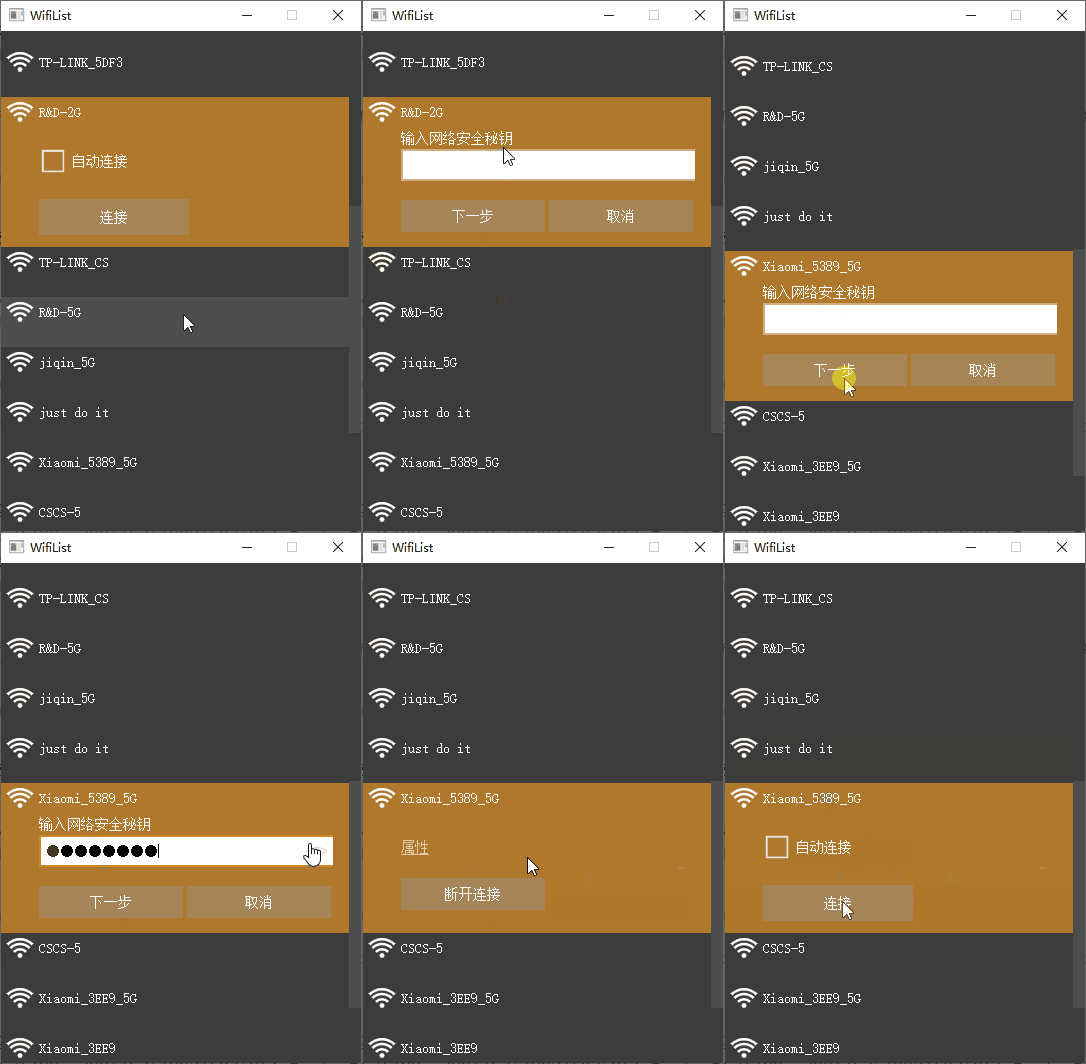
下载地址
https://github.com/confidentFeng/QtAppProject
关键代码
// 下一步按钮

connect(m_pBtnNext, &QPushButton::clicked, [=]{

    // 1. 创建wifi配置文件

    QString strWifiName = m_pLabName->text();

    XmlHelper::Get()->WriteXml(strWifiName, m_pEditPasswd->text());

    // 2. 添加wifi配置文件

    QString strReturn = AppCommon::Get().ExecuteCmd(QString("netsh wlan add profile filename=%1/%2.xml")\

                                                    .arg(QApplication::applicationDirPath()).arg(strWifiName));

    if (strReturn.contains("已将配置文件"))

    {

        // 密码正确,但未连接成功,则设置为连接中状态

        this->setState(Connecting);

        // 延时1.5秒,以显示加载状态

        AppCommon::Get().sleepEvent(1500);

        // 连接wifi

        QString strConReturn = AppCommon::Get().ExecuteCmd(QString("netsh wlan connect name=%1").arg(strWifiName));

        qDebug() << "reurn " << strConReturn;

        if(strConReturn.contains("已成功完成连接请求")) {

            // 连接成功,则设置为连接中状态

            this->setState(Connected);

        }

        else {

            // 密码错误,未连接成功,则设置为编辑状态

            this->setState(Edit);

            m_pLabErrorTip->setText(tr("网络安全秘钥不正确。请再试一次。"));

            m_pLabErrorTip->show(); // 错误提示

        }

    }

    else if (strReturn.contains("配置文件格式错误"))

    {

        m_pLabErrorTip->setText(tr("网络安全秘钥不正确。请再试一次。"));

        m_pLabErrorTip->show(); // 错误提示

    }

    // 不管添加wifi配置文件是否成功,都删除相应配置文件

    QString fileName = QApplication::applicationDirPath() + "/" + strWifiName + ".xml";

    QFile fileTemp(fileName);

    fileTemp.remove();

});

// 写xml:WIFI的profile脚本文本

void XmlHelper::WriteXml(const QString& strWifiName, const QString& strWifiPasswd)

{

    // 打开或创建文件

    QFile file(QApplication::applicationDirPath() + "/" + strWifiName + ".xml"); // 相对路径、绝对路径、资源路径都可以

    if(!file.open(QFile::WriteOnly | QFile::Truncate)) // 可以用QIODevice,Truncate表示清空原来的内容

        return;

    QDomDocument doc;

    // 写入xml头部

    QDomProcessingInstruction instruction; // 添加处理命令

    instruction = doc.createProcessingInstruction("xml", "version=\"1.0\"");

    doc.appendChild(instruction);

    // 添加根节点

    QDomElement root = doc.createElement("WLANProfile");

    root.setAttribute("xmlns", "http://www.microsoft.com/networking/WLAN/profile/v1");

    doc.appendChild(root);

    // 添加子元素-name

    QDomElement name = doc.createElement("name"); // 创建子元素

    QDomText text;

    text = doc.createTextNode(strWifiName);

    name.appendChild(text); //添加子元素值

    root.appendChild(name); // 添加子元素

    // 添加子元素-SSIDConfig

    QDomElement SSIDConfig = doc.createElement("SSIDConfig");

    QDomElement SSID = doc.createElement("SSID");

    QDomElement SSID_hex = doc.createElement("hex");

    QDomElement SSID_name = doc.createElement("name");

    //SSID_hex.appendChild(doc.createTextNode("4445565F322E3447")); // DEV_24.G 8个

	//SSID_hex.appendChild(doc.createTextNode("52454D4F54452D352E3047")); // REMOTE-5.0G 11个

	SSID_hex.appendChild(doc.createTextNode(QString(strWifiName.toLatin1().toHex())));

    SSID_name.appendChild(doc.createTextNode(strWifiName));

    SSID.appendChild(SSID_hex);

    SSID.appendChild(SSID_name);

    SSIDConfig.appendChild(SSID);

    root.appendChild(SSIDConfig);

    // 添加子元素-connectionType

    QDomElement connectionType = doc.createElement("connectionType");

    connectionType.appendChild(doc.createTextNode("ESS"));

    root.appendChild(connectionType);

    // 添加子元素-connectionMode

    QDomElement connectionMode = doc.createElement("connectionMode");

    connectionMode.appendChild(doc.createTextNode("auto"));

    root.appendChild(connectionMode);

    // 添加子元素-MSM

    QDomElement MSM = doc.createElement("MSM");

    QDomElement security = doc.createElement("security");

    // security添加子元素-authEncryption

    QDomElement authEncryption = doc.createElement("authEncryption");

    QDomElement authentication = doc.createElement("authentication");

    QDomElement encryption = doc.createElement("encryption");

    QDomElement useOneX = doc.createElement("useOneX");

    authentication.appendChild(doc.createTextNode("WPA2PSK"));

	//authentication.appendChild(doc.createTextNode("WPAPSK"));

    encryption.appendChild(doc.createTextNode("AES"));

    useOneX.appendChild(doc.createTextNode("false"));

    authEncryption.appendChild(authentication);

    authEncryption.appendChild(encryption);

    authEncryption.appendChild(useOneX);

    security.appendChild(authEncryption);

    // security添加子元素-sharedKey

    QDomElement sharedKey = doc.createElement("sharedKey");

    QDomElement keyType = doc.createElement("keyType");

    QDomElement protectedP = doc.createElement("protected");

    QDomElement keyMaterial = doc.createElement("keyMaterial");

    keyType.appendChild(doc.createTextNode("passPhrase"));

    protectedP.appendChild(doc.createTextNode("false"));

    keyMaterial.appendChild(doc.createTextNode(strWifiPasswd));

    sharedKey.appendChild(keyType);

    sharedKey.appendChild(protectedP);

    sharedKey.appendChild(keyMaterial);

    security.appendChild(sharedKey);

    // MSM添加子元素-security

    MSM.appendChild(security);

    root.appendChild(MSM);

    // 添加子元素-MSM

    QDomElement MacRandomization = doc.createElement("MacRandomization");

    MacRandomization.setAttribute("xmlns", "http://www.microsoft.com/networking/WLAN/profile/v3");

    QDomElement enableRandomization = doc.createElement("enableRandomization");

    enableRandomization.appendChild(doc.createTextNode("false"));

    MacRandomization.appendChild(enableRandomization);

    root.appendChild(MacRandomization);

    // 输出到文件

    QTextStream out_stream(&file);

    doc.save(out_stream,4); // 缩进4格

    file.close();

}
【Qt 应用】模仿实现Win10的Wifi列表的更多相关文章
- android 获取wifi列表,如果你忽略了这个细节,可能你的软件会崩溃
一:业务描述 最近公司有一个小需求,用户点击wifi扫描按钮(注意:是用户主动点击wifi扫描按钮),app去扫描附近的wifi,显示在listView中,仅此而已,app都不用去连接某个wifi,看 ...
- Qt 之 模仿 QQ登陆界面——样式篇
一.简述 今天晚上花了半天时间从QQ登录界面抠了些图,顺便加了点样式基本上实现了QQ的登陆界面全部效果.虽不说100%相似,那也有99.99%相似了哈O(∩_∩)O. QQ好像从去年开始,登录界面有了 ...
- android开发-获取wifi列表
近期博主在学frangment框架,因此想着想着就想通过listfragment完毕对wifi列表的获取. 好! 如今就不说废话了. 一.wifi的基础知识 在Android的官方文档中定义了例如以下 ...
- Qt实现表格控件-支持多级列表头、多级行表头、单元格合并、字体设置等
目录 一.概述 二.效果展示 三.定制表头 1.重写数据源 2.重写QHeaderView 四.设置属性 五.相关文章 原文链接:Qt实现表格控件-支持多级列表头.多级行表头.单元格合并.字体设置等 ...
- Win10连WiFi显示无internet,安全 却可以正常上网
1.现象: win10连WiFi显示无internet,安全 可以正常上网 2.原因: Wind10升级系统补丁后,更新了系统检查是否联网的注册表配置,新的域名在国内存在无法连接情况.导致此问题发生 ...
- win10 系统 wifi自动断开连接 wifi热点不稳定
我的系统的电脑是win10系统,笔记本 下载了一个wifi共享大师,但是wifi总是自动断,于是就找了找问题所在 在网上看了许多方案,大多数都是 在 电源管理 把[允许计算机关闭此设备以节 ...
- 关于 win10 创建WiFi热点 问题(无法启动承载网络 , 我们无法设置移动热点,因为你的电脑未建立以太网,wifi或手机网络数据连接 )
电脑创建WiFi,一般三种办法: 1. WiFi共享软件:猎豹wifi.wifi共享精灵.wifi共享大师..... 2. 命令提示符 netsh wlan set hostednetwork mod ...
- IOS零碎技术整理(3)-获取wifi列表
1. 该功能实现基于MobileApple80211框架来进行开发,而目前该框架成为了私有框架,其中的API均为私有API. 如果使用这些API可能导致应用不能上app store或者ios版本升 ...
- win10 uwp 通知列表
经常看到小伙伴问,问已经绑定列表,在进行修改时,不会通知界面添加或删除.这时问题就在,一般使用的列表不会在添加时通知界面,因为他们没有通知. 本文:知道什么是通知的列表,如何去写一个通知列表 在 C# ...
- 如何在win10查看wifi密码
tep1 找到wifi图标 step 2 右键点击打开网络共享中心 没有啦!!
随机推荐
- SQL concat_ws, collect_set, 和explode合并使用
1. 背景 有一个这样的数据集:字段和字段的值是两列 目的是将这个数据转换成规整的一个特征是一列的数据: 2. 做法 第一步:先造出列 select ucid ,CASE WHEN type ='性别 ...
- Git rebase使用小结
1.分支之间rebase 构造两个分支master和feature,其中feature是在提交点B处从master上拉出的分支 master上有一个新提交M,feature上有两个新提交C和D 此时我 ...
- 聊聊Redis sentinel 机制
Redis 的哨兵机制自动完成了以下三大功能,从而实现了主从库的自动切换,可以降低 Redis 集群的运维开销: 监控主库运行状态,并判断主库是否客观下线: 在主库客观下线后,选取新主库: 选出新主库 ...
- c语言趣味编程(1)百钱百鸡
一.问题描述 百钱买百鸡问题:公鸡五文钱一只,母鸡三文钱一只,小鸡三只一文钱,用100文钱买100只鸡,公鸡.母鸡.小鸡各买多少只 二.设计思路 (1)定义三个变量下x,y,z代表公鸡,母鸡,小鸡的数 ...
- 开心档之MySQL 复制表
MySQL 复制表 如果我们需要完全的复制MySQL的数据表,包括表的结构,索引,默认值等. 如果仅仅使用CREATE TABLE ... SELECT命令,是无法实现的. 本章节将为大家介绍如何完整 ...
- python-pygal
准备写大作业的时候发现了一个绝绝子的python库. 原文:https://blog.damavis.com/en/creating-vector-graphics-with-python/ 官网:h ...
- Python 创建数字列表
创建数字列表 用于存储数字集合,高效地处理数字列表 使用函数range() range(value1,value2),从指定的第一个值开始数,到达指定的第二个值后停止,输出不包含第二个值 使用rang ...
- 2023-05-04:用go语言重写ffmpeg的scaling_video.c示例,用于实现视频缩放(Scaling)功能。
2023-05-04:用go语言重写ffmpeg的scaling_video.c示例,用于实现视频缩放(Scaling)功能. 答案2023-05-04: 这段代码实现了使用 libswscale 库 ...
- BUG解决-Vscode/Sublime C++ 打印中文乱码问题
#include <iostream> using namespace std; #ifdef _WIN32 #include <windows.h> #endif int m ...
- 2020-12-05:go中,map的扩容流程是什么?
福哥答案2020-12-05:[答案来自此链接:](https://www.bilibili.com/video/BV1Nr4y1w7aa?p=13) 源码位于runtime/map.go文件中的ha ...