
SSM框架整合项目 :租房管理系统
使用ssm框架整合,oracle数据库
框架:
Spring
SpringMVC
MyBatis

导包:
1, spring
2, MyBatis
3, mybatis-spring
4, fastjson
5, aspectweaver----AspectJ框架
6, log4j-----打印日志信息
7, ojdbc6.jar
8, jstl.jar, standard.jar----标准标签库
9, commons-logging-1.2.jar
10,……
项目结构:

配置文件同前面:http://www.cnblogs.com/jiangwz/p/7674275.html
项目代码:
model:
 package com.hanqi.model;

 public class House {

     private Integer id;

     private String keyword;

     private String area;

     private Integer squaremeter;

     private Integer rent;

     private String renttype;

     private String housetype;

     public House(Integer id, String keyword, String area, Integer squaremeter, Integer rent, String renttype,

             String housetype) {

         super();

         this.id = id;

         this.keyword = keyword;

         this.area = area;

         this.squaremeter = squaremeter;

         this.rent = rent;

         this.renttype = renttype;

         this.housetype = housetype;

     }

     public House() {

         super();

         // TODO Auto-generated constructor stub

     }

     public Integer getId() {

         return id;

     }

     public void setId(Integer id) {

         this.id = id;

     }

     public String getKeyword() {

         return keyword;

     }

     public void setKeyword(String keyword) {

         this.keyword = keyword;

     }

     public String getArea() {

         return area;

     }

     public void setArea(String area) {

         this.area = area;

     }

     public Integer getSquaremeter() {

         return squaremeter;

     }

     public void setSquaremeter(Integer squaremeter) {

         this.squaremeter = squaremeter;

     }

     public Integer getRent() {

         return rent;

     }

     public void setRent(Integer rent) {

         this.rent = rent;

     }

     public String getRenttype() {

         return renttype;

     }

     public void setRenttype(String renttype) {

         this.renttype = renttype;

     }

     public String getHousetype() {

         return housetype;

     }

     public void setHousetype(String housetype) {

         this.housetype = housetype;

     }

     @Override

     public String toString() {

         return "House [id=" + id + ", keyword=" + keyword + ", area=" + area + ", SQUAREMETER=" + squaremeter

                 + ", rent=" + rent + ", renttype=" + renttype + ", housetype=" + housetype + "]";

     }

 }
dao层:
 package com.hanqi.dao;

 import java.util.List;

 import com.hanqi.model.House;

 public interface HouseDao {

     List<House> selectAll();

     int inserthouse(House house);

     int delhouse(Integer id);

     int updatehouse(House house);

     List<House> selectinfo(House house);

 }
dao层实现方法:
 <?xml version="1.0" encoding="UTF-8" ?>

 <!DOCTYPE mapper

   PUBLIC "-//mybatis.org//DTD Mapper 3.0//EN"

   "http://mybatis.org/dtd/mybatis-3-mapper.dtd">

 <mapper namespace="com.hanqi.dao.HouseDao">

     <select id="selectAll" resultType="House">

         select t.*from TABLE_HOUSE t

     </select>

     <insert id="inserthouse" parameterType="House" useGeneratedKeys="true" keyProperty="id" keyColumn="id">

         insert into TABLE_HOUSE values(test1.nextval,#{keyword},#{area},#{squaremeter},#{rent},#{renttype},#{housetype})

     </insert>

     <delete id="delhouse" parameterType="Map">

         delete TABLE_HOUSE t where t.id=#{id}

     </delete>

     <update id="updatehouse" parameterType="Map">

         update TABLE_HOUSE t set t.keyword=#{keyword},t.area=#{area},t.squaremeter=#{squaremeter},t.rent=#{rent},t.renttype=#{renttype},t.housetype=#{housetype} where t.id=#{id}

     </update>

     <select id="selectinfo" resultType="House" parameterType="House">

         select t.* from TABLE_HOUSE t

         <where>

             <if test="keyword!=null">

                 and t.keyword like #{keyword}

             </if>

             <if test="area!=null">

                 and t.area=#{area}

             </if>

             <if test="renttype!=null">

                 and t.renttype in #{renttype}

             </if>

             <if test="housetype!=null">

                 and t.housetype=#{housetype}

             </if>

         </where>

     </select>

 </mapper>
controller控制器:
 package com.hanqi.controller;

 import java.util.ArrayList;

 import java.util.List;

 import org.springframework.beans.factory.annotation.Autowired;

 import org.springframework.stereotype.Controller;

 import org.springframework.ui.Model;

 import org.springframework.web.bind.annotation.RequestMapping;

 import org.springframework.web.bind.annotation.ResponseBody;

 import org.springframework.web.bind.annotation.SessionAttributes;

 import org.springframework.web.servlet.ModelAndView;

 import com.alibaba.fastjson.JSONObject;

 import com.hanqi.dao.HouseDao;

 import com.hanqi.model.House;

 @Controller

 @SessionAttributes("currentUser")

 @RequestMapping("/house")

 public class HouseController {

     @Autowired

     private HouseDao houseDao;

     @ResponseBody

     @RequestMapping("/selectAll")

     public JSONObject selectAll() {

         JSONObject jo = new JSONObject();

         List<House> list = houseDao.selectAll();

         jo.put("total", list.size());

         jo.put("rows", list);

         return jo;

     }

     @ResponseBody

     @RequestMapping("/selectinfo")

     public ModelAndView  selectinfo(House house){

         house.setKeyword("%"+house.getKeyword()+"%");

         List<House> list = houseDao.selectinfo(house);

         ModelAndView modelAndView = new ModelAndView();

         modelAndView.setViewName("houselook3");

         modelAndView.addObject("list",list);

         return modelAndView;

     }

     @ResponseBody

     @RequestMapping("/selectAll1")

     public ModelAndView selectAll1(Model model) {

         //List<House> list = houseDao.selectAll();

         //System.out.println(list);

         //model.addAttribute("list", list);

         ModelAndView mv = new ModelAndView("redirect:/houselook.jsp");

         return mv;

     }

     @RequestMapping("/selectAll2")

     public String selectAll2(Model model) {

         List<House> list = houseDao.selectAll();

         System.out.println(list);

         model.addAttribute("list", list);

         return "houselook2";

     }

     @ResponseBody

     @RequestMapping("/addhouse")

     public ModelAndView addhouse(House house) {

         int i=houseDao.inserthouse(house);

         ModelAndView mv = new ModelAndView("redirect:/index.jsp");

         return mv;

     }

     @ResponseBody

     @RequestMapping("/delhouse")

     public ModelAndView delhouse(Integer id) {

         int i=houseDao.delhouse(id);

         ModelAndView mv = new ModelAndView("redirect:/index.jsp");

         return mv;

     }

     @ResponseBody

     @RequestMapping("/updatehouse")

     public ModelAndView updatehouse(House house) {

         int i=houseDao.updatehouse(house);

         ModelAndView mv = new ModelAndView("redirect:/index.jsp");

         return mv;

     }

 }
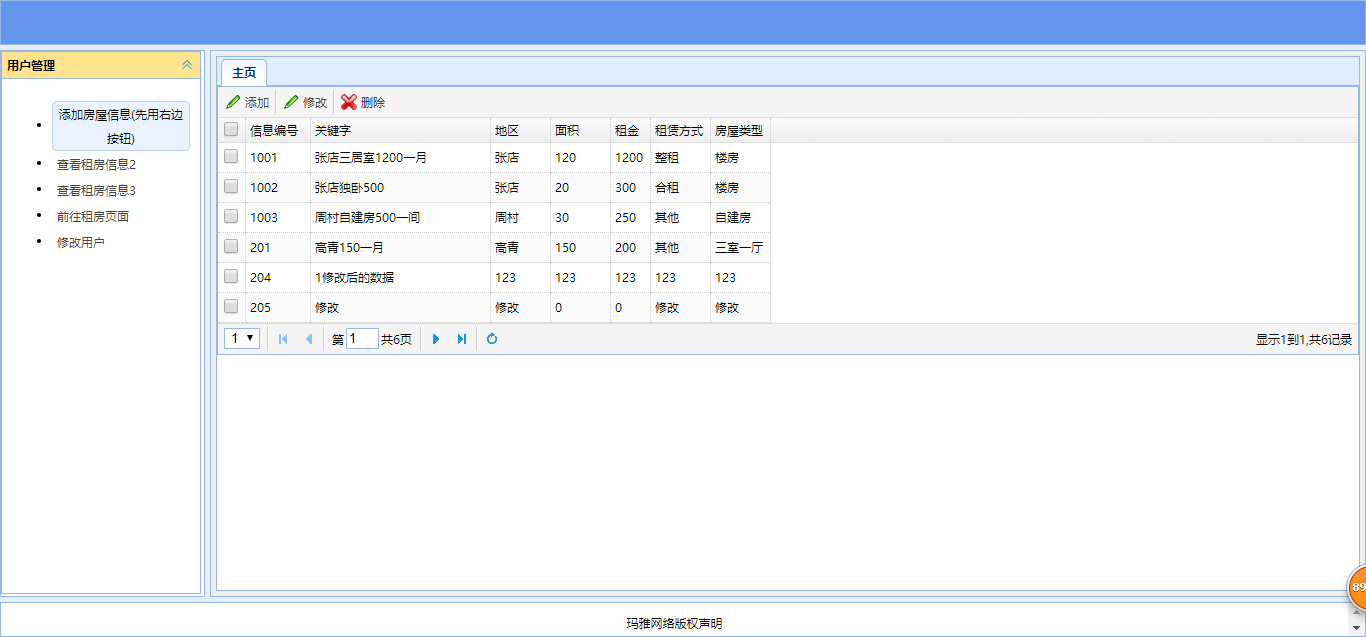
前台:
 <%@ page language="java" contentType="text/html; charset=UTF-8"

     pageEncoding="UTF-8"

     %>

 <%@ taglib uri="http://java.sun.com/jsp/jstl/core" prefix="c" %>

 <!DOCTYPE html PUBLIC "-//W3C//DTD HTML 4.01 Transitional//EN" "http://www.w3.org/TR/html4/loose.dtd">

 <html>

 <head>

 <meta http-equiv="Content-Type" content="text/html; charset=UTF-8">

 <script type="text/javascript" src="js/jquery-3.2.1.min.js"></script>

 <script type="text/javascript"

     src="jquery-easyui-1.5.1/jquery.easyui.min.js"></script>

     <link rel="shortcut icon" href="img/logo1.jpg"/>

 <link type="text/css" rel="stylesheet"

     href="jquery-easyui-1.5.1/themes/icon.css"></link>

 <link type="text/css" rel="stylesheet"

     href="jquery-easyui-1.5.1/themes/default/easyui.css"></link>

 <script type="text/javascript"

     src="jquery-easyui-1.5.1/locale/easyui-lang-zh_CN.js"></script>

 <title>租房管理</title>

 <%

     String basePath = request.getContextPath();

 %>

 <!-- <script type="text/javascript" src="js/index.js"></script> -->

 <style type="text/css">

 .datagrid-btable tr {

     height: 30px;

 }

 </style>

 </head>

 <body class="easyui-layout">

     <!-- 添加商品 -->

     <div data-options="region:'north',split:true"

         style="height: 50px; background-color: cornflowerblue">

     </div>

     <!-- 对话框开始 -->

     <div data-options="region:'center',split:true"

         style="padding: 5px; background: #eee">

         <div id="tabs" class="easyui-tabs" style="width: 100%; height: 100%;">

             <div title="主页" style="">

                 <table id="table"></table>

                 <!-- 添加的表单 -->

                 <div id="zhong" style="display: none">

                     <form id="addhouse" method="post"

                         style="width: 600px; padding: 20px">

                         关键字:<input type="text" name="keyword"><br>

                         地区:<input type="text" name="area"><br>

                         面积:<input type="text" name="squaremeter"><br>

                         租金:<input type="text" name="rent"><br>

                         租赁方式:<input type="text" name="renttype"><br>

                         房屋类型:<input type="text" name="housetype"><br>

                         <input type="submit" name="" id="" value="提交" /><br>

                         <input type="reset" value="重置"><br>

                     </form>

                 </div>

                 <!-- 修改的表单 -->

                 <div id="gai" style="display: none">

                     <form id="gaihouse" action="house/updatehouse.do" method="post"

                         style="width: 600px; padding: 20px">

                         id:<input type="text" name="id"><br>

                         关键字:<input type="text" name="keyword"><br>

                         地区:<input type="text" name="area"><br>

                         面积:<input type="text" name="squaremeter"><br>

                         租金:<input type="text" name="rent"><br>

                         租赁方式:<input type="text" name="renttype"><br>

                         房屋类型:<input type="text" name="housetype"><br>

                         <input type="submit" name="" id="" value="提交" /><br>

                         <input type="reset" value="重置"><br>

                     </form>

                 </div>

             </div>

         </div>

     </div>

     <!-- 对话框结束 -->

     <!-- 目录开始 -->

     <div data-options="region:'west',split:true" width=210>

         <div id="aa" class="easyui-accordion"

             style="width: 200px; height: 543px">

             <div title="用户管理" style="overflow: auto; padding: 10px" >

                 <ul>

                     <li class="lis"><a id="addhouse" class="easyui-linkbutton ab"

                         plain="true" >添加房屋信息(先用右边按钮)</a></li>

                     <li class="lis"><a href="<%=basePath %>/houselook.jsp" class="easyui-linkbutton ab"

                         plain="true">查看租房信息2</a></li>

                     <li class="lis"><a href="<%=basePath %>/house/selectAll2.do" class="easyui-linkbutton ab"

                         plain="true">查看租房信息3</a></li>

                     <li class="lis"><a href="houselook3.jsp" class="easyui-linkbutton ab"

                         plain="true">前往租房页面</a></li>

                     <li class="lis"><a href="#" class="easyui-linkbutton ab"

                         plain="true">修改用户</a></li>

                 </ul>

             </div>

         </div>

     </div>

     <!-- 底部声明 -->

     <div data-options="region:'south',split:true"

         style="height: 40px; line-height: 40px; vertical-align: center; text-align: center;">

         玛雅网络版权声明</div>

     <!-- 目录结束 -->

 </body>

 </html>

 <script type="text/javascript">

     $(function() {

         $('#addhouse').form({

             url:'house/addhouse.do',

             onSubmit: function(){

                 return $('#addhouse').form('validate');//如果有为空则返回false阻止提交

             },

             success:function(data){

                 if(data=="true"){

                     alert("添加成功");

                 }else if(data=="false"){

                     alert("请检查信息正确!");

                 }

             }

         });

         $('#table').datagrid({

             url : 'house/selectAll.do',

             striped:true,//显示斑马线

             autoRowHeight:false,//定义设置行的高度,根据该行的内容。设置为false可以提高负载性能。这里不设置,css中设置的行高无效

             singleSelect:true,//只允许选择一行

             pagination : true,

             pageNumber : 1,

             pageSize : 1,

             pageList : [ 1, 3, 5 ],

             toolbar : [{

                 iconCls : 'icon-edit',

                 text : "添加",

                 handler : function() {

                     var a = $(this).text();

                     $('#zhong').dialog({

                         width : 800,

                         height : 500,

                         title : a,

                         //closed : false,

                         cache : false,

                         modal : true

                     });

                 }

             },  '-',{

                 iconCls : 'icon-edit',

                 text : "修改",

                 handler : function() {

                     var a = $(this).text();

                     $('#gai').dialog({

                         width : 800,

                         height : 500,

                         title : a,

                         //closed : false,

                         cache : false,

                         modal : true

                     });

                     $('#gai').dialog("open");

                     var r = $("#table").datagrid("getSelected");//获取被选中的行,返回对象

                     $("#gaihouse").form("load", r);//将被选中的信息放到弹出的的表单中,富文本编辑器的内容无法显示

                 }

             }, '-',

             {

                 iconCls : 'icon-cancel',

                 text : "删除",

                 handler : function() {

                     var id=-1;

                     id = $('#table').datagrid("getSelected").id;

                     if(id>-1){

                         var r1 = confirm("确定删除编号为  "+id+" 的房屋信息吗?");

                         if(r1) {

                             window.location.href="house/delhouse.do?id="+id;

                             alert("删除成功");

                         }

                     }else{

                         alert("请选中需要删除的商品");

                     }

                 }

             } ],

              frozenColumns : [ [ {

                  field : '',

                 title : '',

                 width : 20,

                 checkbox : true

             } ] ],

             columns : [ [ {

                 field : "id",

                 title : "信息编号",

                 width:65

             },{

                 field : "keyword",

                 title : "关键字",

                 width:180

             },

             {

                 field : "area",

                 title : "地区",

                 width:60

             }, {

                 field : "squaremeter",

                 title : "面积",

                 width:60

             }, {

                 field : "rent",

                 title : "租金",

                 width:40

             } , {

                 field : "renttype",

                 title : "租赁方式",

                 width:60

             } ,{

                 field : "housetype",

                 title : "房屋类型",

                 width : 60

             } ] ],

         });

     });

 </script>
  <%@ page language="java" contentType="text/html; charset=UTF-8"

     pageEncoding="UTF-8" import="java.util.List,com.hanqi.model.House,com.hanqi.controller.HouseController"%>

 <%@ taglib prefix="c" uri="http://java.sun.com/jstl/core" %>

 <!DOCTYPE html PUBLIC "-//W3C//DTD HTML 4.01 Transitional//EN" "http://www.w3.org/TR/html4/loose.dtd">

 <html>

 <head>

 <meta http-equiv="Content-Type" content="text/html; charset=UTF-8">

 <title>Insert title here</title>

 <script type="text/javascript" src="js/jquery-3.2.1.min.js"></script>

 <script type="text/javascript"

     src="jquery-easyui-1.5.1/jquery.easyui.min.js"></script>

     <link rel="shortcut icon" href="img/logo1.jpg"/>

 <link type="text/css" rel="stylesheet"

     href="jquery-easyui-1.5.1/themes/icon.css"></link>

 <link type="text/css" rel="stylesheet"

     href="jquery-easyui-1.5.1/themes/default/easyui.css"></link>

 <script type="text/javascript"

     src="jquery-easyui-1.5.1/locale/easyui-lang-zh_CN.js"></script>

 </head>

 <body>

 <form action="house/selectinfo.do" method="post">

     区域:<input type="radio" name="area" id="s1" value="张店"/>

     <label for="s1">张店</label>

   <input type="radio" name="area" id="s2" value="淄川"/>

     <label for="s2">淄川</label>

   <input type="radio" name="area" id="s0" value="周村"/>

     <label for="s0">周村</label><br>

     租赁类型:<input type="checkbox" name="renttype" id="s3" value="整租"/>

     <label for="s3">整租</label>

   <input type="checkbox" name="renttype" id="s4" value="合租"/>

     <label for="s4">合租</label>

   <input type="checkbox" name="renttype" id="s5" value="其他"/>

     <label for="s5">其他</label><br>

     房屋类型:<input type="radio" name="housetype" id="s6" value="三室一厅"/>

     <label for="s6">三室一厅</label>

   <input type="radio" name="housetype" id="s7" value="自建房"/>

     <label for="s7">自建房</label>

   <input type="radio" name="housetype" id="s8" value="其他"/>

     <label for="s8">其他</label><br>

     关键字:<input type="text" name="keyword">

     <input type="submit" value="查询">

 </form>

 <%

     //HouseController hc=new HouseController();

     List<House> list=(List<House>)request.getAttribute("list");

     if(list!=null){

         out.print("<table border='1'>");

         for(House h:list){

             out.print("<tr>");

             out.print("<td>"+h.getKeyword()+"</td>");

             out.print("<td>"+h.getArea()+"</td>");

             out.print("<td>"+h.getSquaremeter()+"</td>");

             out.print("<td>"+h.getRent()+"</td>");

             out.print("<td>"+h.getRenttype()+"</td>");

             out.print("<td>"+h.getHousetype()+"</td>");

             out.print("</tr>");

         }

         out.print("</table>");

     }

 %>

 </body>

 </html>
SSM框架整合项目 :租房管理系统的更多相关文章
- SpringMVC详解及SSM框架整合项目
SpringMVC ssm : mybatis + Spring + SpringMVC MVC三层架构 JavaSE:认真学习,老师带,入门快 JavaWeb:认真学习,老师带,入门快 SSM框架: ...
- IDEA使用maven搭建SSM框架整合项目(超级详细,值得一看)
目录 温馨提示 简单介绍下SSM 搭建过程 一.框架介绍 二.下载Maven 三.创建Maven项目 四.Maven工程需要引入的Jar 包 五.整合SSM框架.需要的相关配置文件配置项目 六.工程导 ...
- SSM框架整合项目 :投票系统
框架: Spring SpringMVC MyBatis 题目: 投票系统 导包: 1, spring 2, MyBatis 3, mybatis-spring 4, fastjson 5, aspe ...
- SpringMVC--从理解SpringMVC执行流程到SSM框架整合
前言 SpringMVC框架是SSM框架中继Spring另一个重要的框架,那么什么是SpringMVC,如何用SpringMVC来整合SSM框架呢?下面让我们详细的了解一下. 注:在学习SpringM ...
- 使用IntelliJ IDEA创建Maven聚合工程、创建resources文件夹、ssm框架整合、项目运行一体化
一.创建一个空的项目作为存放整个项目的路径 1.选择 File——>new——>Project ——>Empty Project 2.WorkspaceforTest为项目存放文件夹 ...
- 【转载】使用IntelliJ IDEA创建Maven聚合工程、创建resources文件夹、ssm框架整合、项目运行一体化
一.创建一个空的项目作为存放整个项目的路径 1.选择 File——>new——>Project ——>Empty Project 2.WorkspaceforTest为项目存放文件夹 ...
- SSM(Spring,SpringMVC,Mybatis)框架整合项目
快速上手SSM(Spring,SpringMVC,Mybatis)框架整合项目 环境要求: IDEA MySQL 8.0.25 Tomcat 9 Maven 3.6 数据库环境: 创建一个存放书籍数据 ...
- SSM框架整合图书管理项目
SSM框架整合 1.建立简单的maven项目 2.导入依赖 <?xml version="1.0" encoding="UTF-8"?> <p ...
- JAVAEE——宜立方商城01:电商行业的背景、商城系统架构、后台工程搭建、SSM框架整合
1. 学习计划 第一天: 1.电商行业的背景. 2.宜立方商城的系统架构 a) 功能介绍 b) 架构讲解 3.工程搭建-后台工程 a) 使用maven搭建工程 b) 使用maven的tomcat插件启 ...
随机推荐
- vue-webpack-boilerplate分析
看完这篇文章你会学到通过vue-cli创建的项目,执行npm run dev后都发生了什么事情以及执行流程. 在创建vue项目时,官方推荐使用vue-cli这个命令行工具. # 全局安装 vue-cl ...
- 201521123012 《Java程序设计》第八周学习总结
1. 本周学习总结 1.1 以你喜欢的方式(思维导图或其他)归纳总结集合与泛型相关内容. 1.2 选做:收集你认为有用的代码片段 2. 书面作业 1.本次作业题集集合 List中指定元素的删除(题目4 ...
- 201521123101 《Java程序设计》第7周学习总结
1. 本周学习总结 2. 书面作业 1.ArrayList代码分析 1.1 解释ArrayList的contains源代码 contains()方法 public boolean contains(O ...
- 201521123010 《Java程序设计》第4周学习总结
1.本周学习总结 1.1 尝试使用思维导图总结有关继承的知识点. 1.2 使用常规方法总结其他上课内容. 这周上课主要学了继承,在打代码的时候对各个关键字(除了super关键字)的用法有一点混乱.对多 ...
- Scrapy爬虫框架解析
Scrapy框架解析 Scrapy框架大致包括以下几个组件:Scrapy Engine.Spiders.Scheduler.Item Pipeline.Downloader: 组件 Scrapy En ...
- 存储过程重置SEQUENCE值从新开始。
CREATE OR REPLACE PROCEDURE RESET_SEQUENCE( v_SeqName IN VARCHAR2, v_sqlcode OUT NUMBER, v_sqlerrm O ...
- Map.containsKey方法——判断Map集合对象中是否包含指定的键名
该方法判断Map集合对象中是否包含指定的键名.如果Map集合中包含指定的键名,则返回true,否则返回false. public static void main(String[] args) { M ...
- bookStore第三篇【用户模块、购买模块、订单模块】
用户模块 要登陆后才能购买,因此我们先写购买模块 设计实体 private String id; private String username; private String password; p ...
- 在Myeclipse中用Java语言操作mysql数据库
package OperateMysql; import java.sql.*; public class MysqlTest { public static void main(String[] a ...
- MongoDB 所支持的数据类型 创建和删除集合 创建和删除数据库
数据类型 MongoDB 支持如下数据类型: String:字符串.存储数据常用的数据类型.在 MongoDB 中,UTF-8 编码的字符串才是合法的. Integer:整型数值.用于存储数值.根据你 ...