
winfrom窗体加载控制台程序,可以自定义输出语句颜色
winfrom窗体加载控制台程序,可以自定方输出语句颜色,如下图所示
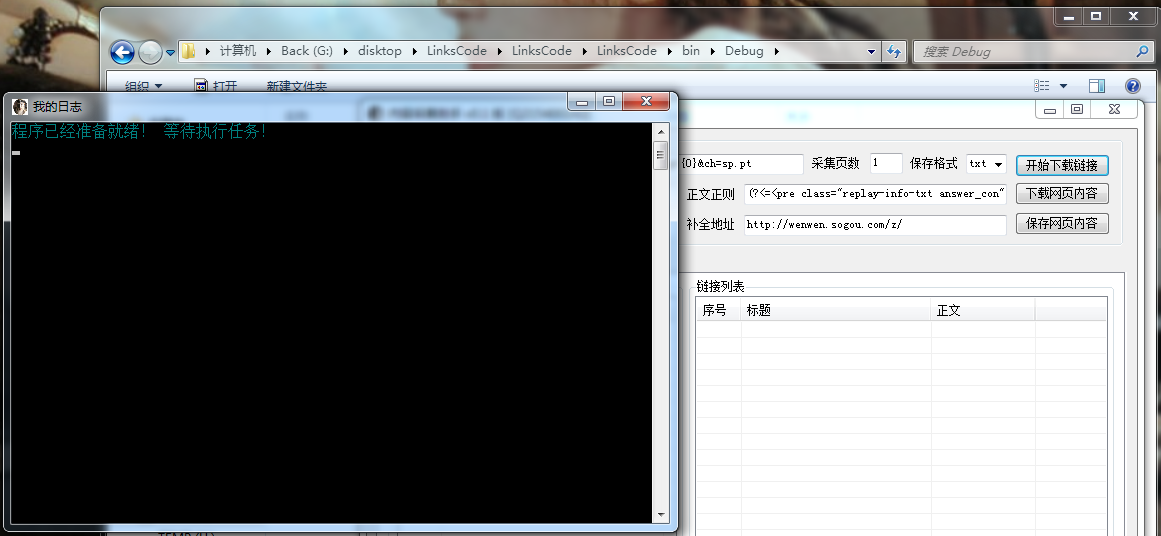
怎么实现的此功能,网上有大把的方法,我这里已经把方法打包成了一个类,只需要引用调用就可以使用了,写的比较粗糙,如有发现需要改进的地方欢迎提出!
至于使用方法很简单,把这个类复制到解决方案中,在引用 LLog , 另外在 程序初始化下面加上 XLog.AllocConsole(); 就可以在想使用的地方调用方法 XLog.Logx() 使用了,
如图所示:
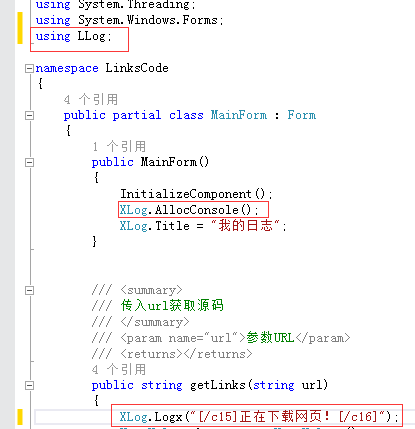
注意:图片中显示 [/c15] xxxxxx[/c16] 必须成对出现才不会出现输出颜色覆盖下一行内容, 此方法效率略低,水平有限还没想出高效方法,如想某行只输出某种颜色必须在语句后面加上 [/c16] 结尾 如:[/c1] 我是内容 [/c16]
 using System;
 using System.Collections.Generic;
 using System.Linq;
 using System.Runtime.InteropServices;
 using System.Text;

 namespace LLog
 {
     /// <summary>
     /// 与控制台交互
     /// </summary>
     static class XLog
     {

         [DllImport("kernel32.dll")]
         public static extern bool AllocConsole();
         [DllImport("kernel32.dll")]
         public static extern bool FreeConsole();

         /// <summary>
         /// 修改控制台标题
         /// </summary>
         public static string Title
         {
             get
             {
                 string result;
                 try
                 {
                     result = Console.Title;
                 }
                 catch
                 {
                     result = "";
                 }
                 return result;
             }
             set
             {
                 Console.Title = value;
             }
         }

         /// <summary>
         /// 调用输出日志方法从c1-c15 共15种颜色
         /// </summary>
         /// <param name="code">[c1]蓝色 [c2]青色(蓝绿色) [c3]藏蓝色 [c4]深紫色(深蓝绿色) [c5]深灰色 [c6]深绿色 [c7]深紫红色 [c8]深红色 [c9]深黄色 [c10]灰色 [c11]绿色 [c12]紫红色 [c13]红色 [c14]白色 [c15]黄色 [c16]默认灰色</param>
         public static void Logx_Console(string code)
         {
             //①②③④⑤⑥⑦⑧⑨⑩⑾⑿⒀⒁⒂
             string str = code;
             string output = str.Replace("[/c1]", "①").Replace("[/c2]", "②").Replace("[/c3]", "③").Replace("[/c4]", "④").Replace("[/c5]", "⑤").Replace("[/c6]", "⑥").Replace("[/c7]", "⑦").Replace("[/c8]", "⑧").Replace("[/c9]", "⑨").Replace("[/c10]", "⑩").Replace("[/c11]", "⑾").Replace("[/c12]", "⑿").Replace("[/c13]", "⒀").Replace("[/c14]", "⒁").Replace("[/c15]", "⒂").Replace("[/c16]","⒃");
             string display = "";
             foreach (char c in output)
             {
                 if (c == '①')
                 {
                     Console.ForegroundColor = ConsoleColor.Blue;
                 }

                 if (c == '②')
                 {
                     Console.ForegroundColor = ConsoleColor.Cyan;
                 }

                 if (c == '③')
                 {
                     Console.ForegroundColor = ConsoleColor.DarkBlue;
                 }
                 if (c == '④')
                 {
                     Console.ForegroundColor = ConsoleColor.DarkCyan;
                 }

                 if (c == '⑤')
                 {
                     Console.ForegroundColor = ConsoleColor.DarkGray;
                 }

                 if (c == '⑥')
                 {
                     Console.ForegroundColor = ConsoleColor.DarkGreen;
                 }

                 if (c == '⑦')
                 {
                     Console.ForegroundColor = ConsoleColor.DarkMagenta;
                 }

                 if (c == '⑧')
                 {
                     Console.ForegroundColor = ConsoleColor.DarkRed;
                 }

                 if (c == '⑨')
                 {
                     Console.ForegroundColor = ConsoleColor.DarkYellow;
                 }

                 if (c == '⑩')
                 {
                     Console.ForegroundColor = ConsoleColor.Gray;
                 }

                 if (c == '⑾')
                 {
                     Console.ForegroundColor = ConsoleColor.Green;
                 }

                 if (c == '⑿')
                 {
                     Console.ForegroundColor = ConsoleColor.Magenta;
                 }

                 if (c == '⒀')
                 {
                     Console.ForegroundColor = ConsoleColor.Red;
                 }

                 if (c == '⒁')
                 {
                     Console.ForegroundColor = ConsoleColor.White;
                 }

                 if (c == '⒂')
                 {
                     Console.ForegroundColor = ConsoleColor.Yellow;
                 }

                 if (c == '⒃')
                 {
                     Console.ForegroundColor = ConsoleColor.Gray;
                 }

                 display = c.ToString();
                 display = display.Replace("①", "").Replace("②", "").Replace("③", "").Replace("④", "").Replace("⑤", "").Replace("⑥", "").Replace("⑦", "").Replace("⑧", "").Replace("⑨", "").Replace("⑩", "").Replace("⑾", "").Replace("⑿", "").Replace("⒀", "").Replace("⒁", "").Replace("⒂", "").Replace("⒃", "");
                 Console.Write(display);
             }
         }

         /// <summary>
         /// 传入字符跟指定的颜色标签
         /// </summary>
         /// <param name="str">[c1]蓝色 [c2]青色(蓝绿色) [c3]藏蓝色 [c4]深紫色(深蓝绿色) [c5]深灰色 [c6]深绿色 [c7]深紫红色 [c8]深红色 [c9]深黄色 [c10]灰色 [c11]绿色 [c12]紫红色 [c13]红色 [c14]白色 [c15]黄色 [c16]默认灰色</param>
         public static void Logx(string str)
         {
             XLog.Logx_Console(str + "\r\n");
         }
     }
 }
winfrom窗体加载控制台程序,可以自定义输出语句颜色的更多相关文章
- jQuery自动加载更多程序
1.1.1 摘要 现在,我们经常使用的微博.微信或其他应用都有异步加载功能,简而言之,就是我们在刷微博或微信时,移动到界面的顶端或低端后程序通过异步的方式进行加载数据,这种方式加快了数据的加载速度,由 ...
- jQuery自动加载更多程序(转)
jQuery自动加载更多程序 1.1.1 摘要 现在,我们经常使用的微博.微信或其他应用都有异步加载功能,简而言之,就是我们在刷微博或微信时,移动到界面的顶端或低端后程序通过异步的方式进行加载数据 ...
- 用UBOOT自带loadb命令加载应用程序到SDRAM中运行的方法
S3C44B0开发板中,用UBOOT自带loadb命令加载应用程序到SDRAM中运行的方法 1.开发板说明: 开发板上已有移植好的UBOOT运行. 2.交叉编译工具链为arm-linu-g ...
- 用window的onload事件,窗体加载完毕的时候
<script type="text/javascript"> //用window的onload事件,窗体加载完毕的时候 window.onload=function( ...
- chrome 安装setupvpn 解决chorme未能成功加载扩展程序的问题
一: vpn文件 https://pan.baidu.com/s/1wZV2HAC3GHlh1bjlvbilRg 提取码: gz72; 二 : 安装步骤 ------请看完以下步骤,不要直接拖 ...
- C#窗体加载和控件加载不同步导致控件闪烁
窗体加载和控件加载不同步导致的控件闪烁现象:// 代码块加在父窗体中的任意位置,解决窗体加载和控件加载不同步导致的控件闪烁问题 protected override CreatePara ...
- spring-boot 如何加载rsources下面的自定义配置文件
spring-boot 如何加载resources下面的自定义配置文件 https://segmentfault.com/q/1010000006828771?_ea=1144561
- DevExpress窗体加载等待
using DevExpress.XtraEditors; using DevExpress.XtraSplashScreen; using System; using System.Collecti ...
- C#Winfrom中,窗体加载时会自动执行一次控件的textchange事件,怎么让它不执行?
http://zhidao.baidu.com/link?url=iTSyfa5_RJBSb37S8efdWoL5eDMrnxeAm-prhGSNBXqdP9r7PzNDQTc7gVzJgCNdzli ...
随机推荐
- Spring01-IOC
1,新建一个Java Project 导入如下jar包和apache-commons-logging包 2, 在src目录下创建一个beans.xml的配置文件,先加入schema spring-be ...
- [python学习笔记] 开篇
今天开始学习markdown,立贴为证. 平均一天一小时.两个月先学完基础. 所有的帖子只为了学习记录,有不对的请提出,轻吐槽
- 开博近一年的感想 by 程序员小白
/* 好吧,这里的写博客应该理解为更宏观的写文章. */ 在去年的这个时候,我所知道的平台只有 CSDN 和博客园..然而 CSDN 的广告实在是不想吐槽了,选择博客园是一件非常自然的事情.要说开 ...
- C++运算符优先级 案例1
问: ... short nReaderCount=10 ++pLock->nReaderCount==? ...++和->同为1级优先级,我想很多也有很多新手弄 ...
- (1)pygame_第一个窗口程序
####可以使用python自带的IDLE交互式开发,也可以借助其他的编辑器,我这里采用的pycharm编辑器 1.导入我们所需要的模块 import pygame,sys --导入我们需要的模块 ...
- uvalive 3029 City Game
https://vjudge.net/problem/UVALive-3029 题意: 给出一个只含有F和R字母的矩阵,求出全部为F的面积最大的矩阵并且输出它的面积乘以3. 思路: 求面积最大的子矩阵 ...
- 用ESP8266+android,制作自己的WIFI小车
整体思路ESP8266作为TCP服务器,,手机作为TCP客户端,自己使用Lua直接做到了芯片里面,省了单片机,,节约成本,其实本来就是个单片机(感觉Lua开发8266真的很好,甩AT指令好几条街,,而 ...
- python---time模块使用详解
python中的time模块提供一些方法用来进行关于时间的操作,time模块中有以下方法可供使用: time() --- 返回当前时间的时间戳. 调用:time.time(), 可用于计算程序运行的 ...
- Ionic3学习笔记(五)动画之使用 animate.css
本文为原创文章,转载请标明出处 目录 前言 animate.css 的使用 animate.scss 的使用 1. 前言 animate.css 是一款强大的.跨浏览器的预设CSS3动画库,内置了很多 ...
- 自签名的https证书是不安全的
一.项目内的需求 我们做的app都是企业级的应用,而企业级的应用的下载需要遵循itms协议,itms协议下需要https链接,这就需要你的服务器支持https的协议,该协议需要申请SSL证书,我们测试 ...