
Java NIO (三) 通道(Channel)
通道(Channel):由 java.nio.channels 包定义的,Channel 表示 IO 源与目标打开的连接。Channel 类似于传统的“流”,只不过 Channel本身不能直接访问数据,Channel 只能与Buffer 进行交互。
Channel的顶层接口:
public interface Channel extends Closeable {

  public boolean isOpen();

  public void close() throws IOException;

}
其中只包含最基本的两个方法,如下图是从《Java NIO》截取的Channel继承树。
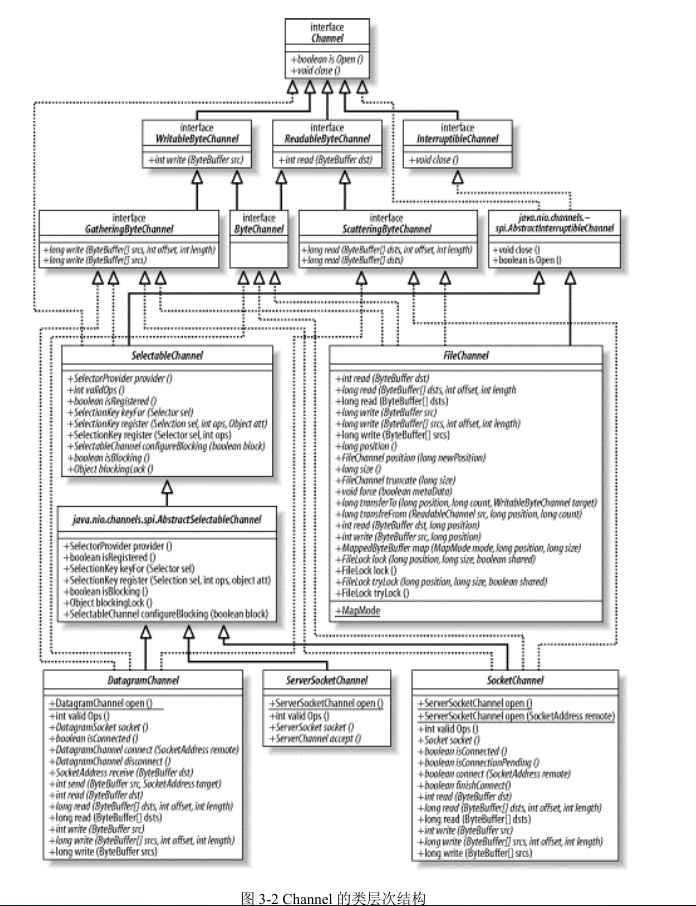
Channel可分为可读和可写,实现了对应的可读可写的Channel接口或者抽象Channel类,就可以读写兼并。
Java 为 Channel 接口提供的最主要实现类如下:
FileChannel:用于读取、写入、映射和操作文件的通道。
DatagramChannel:通过 UDP 读写网络中的数据通道。
SocketChannel:通过 TCP 读写网络中的数据。
ServerSocketChannel:可以监听新进来的 TCP 连接,对每一个新进来的连接都会创建一个 SocketChannel。
以上Channel都实现或者继承了相应的Channel读写接口或者读写抽象类,所以都是可读写的。但是因为FileChannel可以根据FileInputStream或者FileOutputStream获取,所以当根据以上类获取的FileChennel进行读或者写的时候会抛出异常。
获取Channel对象:
1. FileChannel对象的获取:
	@Test

	public void test() throws IOException{

		//1. 使用FileInputStream获取FileChannel

		FileInputStream fis = new FileInputStream("d:\\1.txt");

		FileChannel fChannel = fis.getChannel();

		//2. 使用FileOutputStream获取FileChannel

		FileInputStream ois = new FileInputStream("d:\\1.txt");

		FileChannel fChannel1 = ois.getChannel();

		//3, 使用RandomAccessFile对象获取

		RandomAccessFile raf = new RandomAccessFile("d:\\1.txt", "rw");

		FileChannel fChannel2 = raf.getChannel();

		//4. FileChannel的open方法打开

		FileChannel fChannel3 = FileChannel.open(Paths.get("d:\\1.txt"), StandardOpenOption.READ,StandardOpenOption.WRITE);

	}
2. 其他三个网络Channel的获取方式:
    @Test

    public void test2() throws IOException{

        SocketChannel socketChannel = SocketChannel.open(new InetSocketAddress("127.0.0.1", 9898));

        ServerSocketChannel ssChannel = ServerSocketChannel.open();

        DatagramChannel datagramChannel = DatagramChannel.open();

    }
Channel的读写:
1. 从Channel中读取数据到buffer
public abstract int read(ByteBuffer dst) throws IOException;
public abstract long read(ByteBuffer[] dsts, int offset, int length)throws IOException;
public final long read(ByteBuffer[] dsts) throws IOException {
return read(dsts, 0, dsts.length);
}
2. 将buffer中的数据写入Channel
public abstract int write(ByteBuffer src) throws IOException;
public abstract long write(ByteBuffer[] srcs, int offset, int length)throws IOException;
public final long write(ByteBuffer[] srcs) throws IOException {
return write(srcs, 0, srcs.length);
}
3. 如下一段文件读写的代码
public void test3() {

		FileInputStream fis = null;

		FileChannel inputChannel = null;

		FileOutputStream fos = null;

		FileChannel outputChannel = null;

		try {

			fis = new FileInputStream("d:\\1.txt");

			inputChannel = fis.getChannel();

			fos = new FileOutputStream("d:\\1.bak.txt");

			outputChannel = fos.getChannel();

			ByteBuffer buf = ByteBuffer.allocate(1024);

			int len = -1;

			while ((len = inputChannel.read(buf)) != -1) {

				buf.flip();

				outputChannel.write(buf);

				buf.clear();

			}

		} catch (IOException e) {

			e.printStackTrace();

		} finally {

			if (outputChannel != null) {

				try {

					outputChannel.close();

				} catch (Exception e2) {

				}

			}

			if (outputChannel != null) {

				try {

					outputChannel.close();

				} catch (Exception e2) {

				}

			}

			if (inputChannel != null) {

				try {

					inputChannel.close();

				} catch (Exception e2) {

				}

			}

			if (fos != null) {

				try {

					fos.close();

				} catch (Exception e2) {

				}

			}

			if (fis != null) {

				try {

					fis.close();

				} catch (Exception e2) {

				}

			}

		}

	}
Channel的transferFrom和transferTo,看如下代码(为了看着简单异常直接抛出去):
public void test4() throws IOException {

		FileInputStream fis = new FileInputStream("d:\\1.txt");

		FileChannel inputChannel = fis.getChannel();

		FileOutputStream fos = new FileOutputStream("d:\\1.bak.txt");

		FileChannel outputChannel = fos.getChannel();

		// 直接从通道中读,在内存中分配空间,在物理内存中直接操作

		// inputChannel.transferTo(0,inputChannel.size() , outputChannel);

		outputChannel.transferFrom(inputChannel, 0, inputChannel.size());

	}
分散(Scatter)和聚集(Gather)
1. 分散是将一个Channel中的数据写到多个顺序的buffer中,一般是传进一个buffer数组中,Channel中的数据依次写入buffer数组中的buffer当中。

2. 聚集是将多个buffer中的数据写入同一个buffer中,一般操作是一个buffer数组。

代码如下:
@Test

public void test5() throws IOException {

	FileInputStream fis = new FileInputStream("d:\\1.txt");

	FileChannel inputChannel = fis.getChannel();

	FileOutputStream fos = new FileOutputStream("d:\\1.bak.txt");

	FileChannel outputChannel = fos.getChannel();

	ByteBuffer buf1 = ByteBuffer.allocate(1024);

	ByteBuffer buf2 = ByteBuffer.allocate(64);

	ByteBuffer buf3 = ByteBuffer.allocate(32);

	ByteBuffer[] bufs = { buf1, buf2, buf3 };

	while (inputChannel.read(bufs) != -1) {

		// 分散读取(Scattering Reads)

		inputChannel.read(bufs);

		for (ByteBuffer buf : bufs) {

			buf.flip();

		}

		// 聚集写入(Gathering Writes)

		outputChannel.write(bufs);

		for (ByteBuffer buf : bufs) {

			buf.clear();

		}

	}

}
Channel暂时想到这么多东西,后续有想到的再补充,开始写博客欢迎批评指正。
参看资料: 《Java NIO 中文版》
Java NIO (三) 通道(Channel)的更多相关文章
- Java NIO之通道Channel
channel与流的区别: 流基于字节,且读写为单向的. 通道基于快Buffer,可以异步读写.除了FileChannel之外都是双向的. channel的主要实现: FileChannel Data ...
- Java NIO学习笔记---Channel
Java NIO 的核心组成部分: 1.Channels 2.Buffers 3.Selectors 我们首先来学习Channels(java.nio.channels): 通道 1)通道基础 通道( ...
- NIO之通道(Channel)的原理与获取以及数据传输与内存映射文件
通道(Channel) 由java.nio.channels包定义的,Channel表示IO源与目标打开的连接,Channel类似于传统的“流”,只不过Channel本身不能直接访问数据,Channe ...
- 5. 彤哥说netty系列之Java NIO核心组件之Channel
你好,我是彤哥,本篇是netty系列的第五篇. 简介 上一章我们一起学习了如何使用Java原生NIO实现群聊系统,这章我们一起来看看Java NIO的核心组件之一--Channel. 思维转变 首先, ...
- JAVA NIO Socket通道
DatagramChannel和SocketChannel都实现定义读写功能,ServerSocketChannel不实现,只负责监听传入的连接,并建立新的SocketChannel,本身不传输数 ...
- Java NIO之通道
一.前言 前面学习了缓冲区的相关知识点,接下来学习通道. 二.通道 2.1 层次结构图 对于通道的类层次结构如下图所示. 其中,Channel是所有类的父类,其定义了通道的基本操作.从 Channel ...
- 【NIO】Java NIO之通道
一.前言 前面学习了缓冲区的相关知识点,接下来学习通道. 二.通道 2.1 层次结构图 对于通道的类层次结构如下图所示. 其中,Channel是所有类的父类,其定义了通道的基本操作.从 Channel ...
- Java NIO:通道
最近打算把Java网络编程相关的知识深入一下(IO.NIO.Socket编程.Netty) Java NIO主要需要理解缓冲区.通道.选择器三个核心概念,作为对Java I/O的补充, 以提升大批量数 ...
- Java NIO 之 Socket Channel
在Java NIO中用Channel来对程序与进行I/O操作主体的连接关系进行抽象,这些IO主体包括如文件.Socket或其他设备.简而言之,指代了一种与IO操作对象间的连接关系. 按照Channel ...
- Java IO和Java NIO 和通道 在文件拷贝上的性能差异分析
1. 在JAVA传统的IO系统中,读取磁盘文件数据的过程如下: 以FileInputStream类为例,该类有一个read(byte b[])方法,byte b[]是我们要存储读取到用户空间的缓冲区 ...
随机推荐
- Numpy入门 - 数组排序
本节主要讲解numpy数组的排序方法sort的应用,包括按升序排列和按降序排列. 一.按升序排列 import numpy as np arr = np.array([[3, 1, 2], [6, 4 ...
- C#开发Windows窗体应用程序的步骤
使用C#开发应用程序时,一般包括创建项目.界面设计.设置属性.编写程序代码.保存项目.程序运行等6个步骤. 1.创建项目 在Visual Studio2017开发环境中选择“文件”→“新建”→“项目” ...
- QTP生成随机数字+字母
以下函数实现随机生成17位数(包括字母和数字),仍有改进的空间,可根据具体要求适当修改 Dim targetstring '调用返回函数给变量.Function过程通过函数名返回一个值 targets ...
- Java调用PDFBox打印自定义纸张PDF
打印对象 一份设置为A3纸张, 页面边距为(10, 10, 10, 10)mm的PDF文件. PageFormat 默认PDFPrintable无法设置页面大小. PDFPrintable print ...
- 【NOIP2015提高组】跳石头
https://www.luogu.org/problem/show?pid=2678 最小值最大问题,二分答案.每次检查是否能仅移走m块岩石使得所有跳跃距离均大于等于mid. #include &l ...
- Nginx的反向代理与负载均衡
1.1 集群是什么 简单地说,集群就是指一组(若干个)相互独立的计算机,利用高速通信网络组成的一个较大的计算机服务系统,每个集群节点(即集群中的每台计算机)都是运行各自服务的独立服器.这些服务器之间可 ...
- Python爬虫(十四)_BeautifulSoup4 解析器
CSS选择器:BeautifulSoup4 和lxml一样,Beautiful Soup也是一个HTML/XML的解析器,主要的功能也是如何解析和提取HTML/XML数据. lxml只会局部遍历,而B ...
- vue-cli 安装失败Failed to download repo vuejs-templates/webapck-simple: Response code 404 (Not Found)
新学习vue的萌新们经常会遇到各种各样的坑.例如上面这个报错.这个一般是命令行面板写错单词导致. 正确:vue init webpack-simple .(注意"."点,指当前目录 ...
- PHP 数据库连接池实现
摘要 xml 读取配置文件 简易方式 常规方式 PHP解析XML 配置文件 解析 数据库连接池 測试 申请过多时拒绝请求 已满后拒绝放入 总结 摘要 之前总是以脚本面向过程的方式写PHP代码,所以非常 ...
- Node.js开发Web后台服务
一.简介 Node.js 是一个基于Google Chrome V8 引擎的 JavaScript 运行环境.Node.js 使用了一个事件驱动.非阻塞式 I/O 的模型,使其轻量又高效.Node.j ...