
基于注解的Spring MVC的简单入门——简略版
网上关于此教程各种版本,太多太多了,因为我之前没搭过框架,最近带着两个实习生,为了帮他们搭框架,我只好。。。惭愧啊。。。基本原理的话各位自己了解下,表示我自己从来没研究过Spring的源码,所以工作了一年多还是在写代码。。。
下面直接正题,怎么搭建
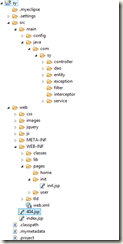
我的Project目录结构,jsp在web-inf目录,js之类的在webroot根目录。
1.配置web.xml
SpringMVC是一个基于DispatcherServlet的MVC框架,每一个请求最先访问的都是DispatcherServlet,DispatcherServlet负责转发每一个Request请求给相应的Handler,Handler处理以后再返回相应的视图(View)和模型(Model),返回的视图和模型都可以不指定,即可以只返回Model或只返回View或都不返回。DispatcherServlet是继承自HttpServlet的,既然SpringMVC是基于DispatcherServlet的,那么我们先来配置一下DispatcherServlet。
<?xml version="1.0" encoding="UTF-8"?>

<web-app version="2.5"

    xmlns="http://java.sun.com/xml/ns/javaee"

    xmlns:xsi="http://www.w3.org/2001/XMLSchema-instance"

    xsi:schemaLocation="http://java.sun.com/xml/ns/javaee

    http://java.sun.com/xml/ns/javaee/web-app_2_5.xsd">

    <display-name>sy</display-name>

   <servlet>

     <servlet-name>dispatcherServlet</servlet-name>

     <servlet-class>

            org.springframework.web.servlet.DispatcherServlet

        </servlet-class>

    <init-param>

      <param-name>contextConfigLocation</param-name>

      <param-value>classpath*:/main/config/applicationContext.xml,classpath*:/main/config/springmvc-servlet.xml</param-value>

    </init-param>

    <load-on-startup>1</load-on-startup>

  </servlet>

  <servlet-mapping>

    <servlet-name>dispatcherServlet</servlet-name>

    <url-pattern>*.html</url-pattern>

  </servlet-mapping>

  <welcome-file-list>

    <welcome-file>index.jsp</welcome-file>

  </welcome-file-list>

</web-app>
2.配置springmvc-servlet.xml,看注解。
<?xml version="1.0" encoding="UTF-8"?>

<beans xmlns="http://www.springframework.org/schema/beans"

    xmlns:xsi="http://www.w3.org/2001/XMLSchema-instance" xmlns:p="http://www.springframework.org/schema/p"

    xmlns:mvc="http://www.springframework.org/schema/mvc" xmlns:context="http://www.springframework.org/schema/context"

    xmlns:util="http://www.springframework.org/schema/util"

    xsi:schemaLocation="http://www.springframework.org/schema/beans http://www.springframework.org/schema/beans/spring-beans-3.0.xsd

            http://www.springframework.org/schema/context http://www.springframework.org/schema/context/spring-context-3.0.xsd

            http://www.springframework.org/schema/mvc http://www.springframework.org/schema/mvc/spring-mvc-3.0.xsd

            http://www.springframework.org/schema/util http://www.springframework.org/schema/util/spring-util-3.0.xsd">

    <!-- 对web包中的Controller进行扫描,以完成Bean创建和自动依赖注入的功能 -->

    <context:component-scan base-package="main.java.com.sy.controller"/>

    <!-- 启动Spring MVC的注解功能,完成请求和注解POJO的映射 -->

    <bean class="org.springframework.web.servlet.mvc.annotation.AnnotationMethodHandlerAdapter"/>

    <!--对模型视图名称的解析,即在模型视图名称添加前后缀 -->

    <bean class="org.springframework.web.servlet.view.InternalResourceViewResolver" p:prefix="/WEB-INF/pages/" p:suffix=".jsp"/>

</beans>
3.配置applicationContext.xml,扫描entity,service,dao的注解,其他的就不需要扫描,解析数据库properties文件,配置事务,和之前的Spring配置一样
<?xml version="1.0" encoding="UTF-8"?>

<beans xmlns="http://www.springframework.org/schema/beans"

    xmlns:xsi="http://www.w3.org/2001/XMLSchema-instance"

    xmlns:aop="http://www.springframework.org/schema/aop"

    xmlns:tx="http://www.springframework.org/schema/tx"

    xmlns:context="http://www.springframework.org/schema/context"

    xsi:schemaLocation="

http://www.springframework.org/schema/beans

http://www.springframework.org/schema/beans/spring-beans-3.0.xsd

http://www.springframework.org/schema/tx

http://www.springframework.org/schema/tx/spring-tx-3.0.xsd

http://www.springframework.org/schema/aop

http://www.springframework.org/schema/aop/spring-aop-3.0.xsd

  http://www.springframework.org/schema/context

   http://www.springframework.org/schema/context/spring-context-3.0.xsd

">

  <context:component-scan base-package="main.java.com.sy.service"></context:component-scan>

  <context:component-scan base-package="main.java.com.sy.dao"></context:component-scan>

  <context:component-scan base-package="main.java.com.sy.bean"></context:component-scan>

  <context:property-placeholder location="classpath*:/main/config/application.properties" />

    <!-- 支持aop注解 -->

    <aop:aspectj-autoproxy />

    <bean id="dataSource" class="org.springframework.jdbc.datasource.DriverManagerDataSource">

            <property name="driverClassName" value="${jdbc.driverClass}"></property>

            <property name="url" value="${jdbc.url}"></property>

            <property name="username" value="${jdbc.user}"></property>

            <property name="password" value="${jdbc.password}"></property>

    </bean>

   <bean id="sessionFactory"

       class="org.springframework.orm.hibernate3.annotation.AnnotationSessionFactoryBean">

           <property name="dataSource">

               <ref bean="dataSource" />

           </property>

           <property name="hibernateProperties">

               <props>

                   <prop key="hibernate.dialect">${hibernate.dialect}</prop>

                   <prop key="hibernate.show_sql">${hibernate.show_sql}</prop>

                   <prop key="hibernate.hbm2ddl.auto">${hibernate.hbm2ddl.auto}</prop>

               </props>

           </property>

        <property name="packagesToScan">

            <value>main.java.com.sy.entity</value>

        </property>

   </bean>

<bean id="hibernateTemplate" class="org.springframework.orm.hibernate3.HibernateTemplate" >

    <property name="sessionFactory" ref="sessionFactory"></property>

</bean>

<bean id="jdbcTemplate"  class="org.springframework.jdbc.core.JdbcTemplate">

     <property name="dataSource" ref="dataSource"/>

</bean>

<!-- 配置事务管理 -->

    <bean id="hibernateTransactionManager" class="org.springframework.orm.hibernate3.HibernateTransactionManager" >

        <property name="sessionFactory" ref="sessionFactory"></property>

    </bean>

    <tx:annotation-driven transaction-manager="hibernateTransactionManager" />

    <aop:config>

        <aop:pointcut expression="execution(* main.java.com.sy.service.impl.*.*(..))" id="businessService"/>

        <aop:advisor advice-ref="txAdvice" pointcut-ref="businessService" />

    </aop:config>

    <tx:advice id="txAdvice" transaction-manager="hibernateTransactionManager">

        <tx:attributes>

            <tx:method name="delete*" propagation="REQUIRED" rollback-for="Exception"/>

            <tx:method name="delet*" propagation="REQUIRED" rollback-for="Exception"/>

            <tx:method name="save*" propagation="REQUIRED" rollback-for="Exception"/>

            <tx:method name="update*" propagation="REQUIRED" rollback-for="Exception"/>

            <tx:method name="add*" propagation="REQUIRED" rollback-for="Exception"/>

            <tx:method name="create*" propagation="REQUIRED" rollback-for="Exception"/>

            <tx:method name="merge*" propagation="REQUIRED" rollback-for="Exception"/>

            <tx:method name="revoke*" propagation="REQUIRED" rollback-for="Exception"/>

            <tx:method name="*" propagation="SUPPORTS"/>

        </tx:attributes>

    </tx:advice>

</beans>
4.配置application.properties
#jdbc

jdbc.driverClass=com.mysql.jdbc.Driver

jdbc.url=jdbc:mysql://localhost:3306/sy

jdbc.user=root

jdbc.password=root

#hibernate

hibernate.dialect=org.hibernate.dialect.MySQLDialect

hibernate.show_sql=true

hibernate.hbm2ddl.auto=update
5.默认是进index.jsp页面,但是我们不可以直接访问,所以呢,做点修改。
<html>

  <head>

  </head>

  <body>

    <script type="text/javascript">

             top.window.location.replace("login.html");

    </script>

  </body>

</html>
6.如何才能进入这个页面呢,我们来写个Controller方法
UserController.java
@Controller

public class UserController {

    @RequestMapping(value = "/login.html")

    public String login(HttpServletRequest request,HttpServletResponse reponse) throws Exception{

        return "user/login";

    }

}
7.因为我们想默认进一个登录页面,方法有了跳转,页面建立一下。
<form action="success.html" name="loginform" accept-charset="utf-8" id="login_form" class="loginForm" method="post">

     <label class="input-tips" for="u">帐号:</label>

     <input type="text" id="accounName" name="accounName" class="inputstyle" placeholder="输入用户名/登录名"/>

     <label class="input-tips" for="p">密码:</label>

     <input type="password" id="loginPassword" name="loginPassword" class="inputstyle" placeholder="输入密码" autocomplete="off"/>

     <input type="button" id="login_button" value="登 录" style="width:150px;" class="button_blue"/>

</form>
8.进入页面之后,我们需要判断正确性咯,在UserController加个success方法。
@RequestMapping(value = "/success.html")

public String success(HttpServletRequest request,HttpServletResponse reponse){

    String msg ="add successfully";

    request.setAttribute("msg", msg);

    return "user/sucess";

}
9.测试msg页面很简单,一个el表达式搞定
<html>

  <head>

  </head>

  <body>

   msg=${msg }

  </body>

</html>
关于详细的源码,源码下载地址(提取码:48f0),可以直接运行,多余的jar包大家酌情删除,由于完稿仓促,很多细节没有写好,源码我最近也重新修改了,我会尽快完善的。
有问题的同学可以加我企鹅:8078687
基于注解的Spring MVC的简单入门——简略版的更多相关文章
- Spring7:基于注解的Spring MVC(下篇)
Model 上一篇文章<Spring6:基于注解的Spring MVC(上篇)>,讲了Spring MVC环境搭建.@RequestMapping以及参数绑定,这是Spring MVC中最 ...
- Spring:基于注解的Spring MVC
什么是Spring MVC Spring MVC框架是一个MVC框架,通过实现Model-View-Controller模式来很好地将数据.业务与展现进行分离.从这样一个角度来说,Spring MVC ...
- Spring MVC之简单入门
一.Spring MVC简介: 1.什么是MVC 模型-视图-控制器(MVC)是一个众所周知的以设计界面应用程序为基础的设计模式.它主要通过分离模型(Model).视图(View)及控制器(Contr ...
- 基于注解的 Spring MVC 简单入门
web.xml 配置: <servlet> <servlet-name>dispatcher</servlet-name> <servlet-class> ...
- Spring6:基于注解的Spring MVC(上篇)
什么是Spring MVC Spring MVC框架是一个MVC框架,通过实现Model-View-Controller模式来很好地将数据.业务与展现进行分离.从这样一个角度来说,Spring MVC ...
- 基于注解的 Spring MVC(上)
什么是Spring MVC Spring MVC框架是一个MVC框架,通过实现Model-View-Controller模式来很好地将数据.业务与展现进行分离.从这样一个角度来说,Spring MVC ...
- 基于注解的spring mvc 中使用 ajax json 的model
在 Spring mvc3中,响应.接受 JSON都十分方便. 使用注解@ResponseBody可以将结果(一个包含字符串和JavaBean的Map),转换成JSON. 使用 @RequestBod ...
- 基于注解的Spring MVC整合Hibernate(所需jar包,spring和Hibernate整合配置,springMVC配置,重定向,批量删除)
1.导入jar watermark/2/text/aHR0cDovL2Jsb2cuY3Nkbi5uZXQvdG90b3R1enVvcXVhbg==/font/5a6L5L2T/fontsize/400 ...
- 基于注解的Spring MVC
1.加入�jar 2.web.xml配置: <?xml version="1.0" encoding="UTF-8"?> <web-app v ...
随机推荐
- (转载)oracle的v$sqlarea表
原文摘自:http: [V$SQLAREA] 本视图持续跟踪所有shared pool中的共享cursor,在shared pool中的每一条SQL语句都对应一列.本视图在分析SQL语句资源使用方面 ...
- SerializableObj
package JBJADV003; import java.io.*; public class SerializableObj { /** * @param args * @throws IOEx ...
- java 网络编程 UDP TCP
网络编程 网络编程主要用于解决计算机与计算机(手机.平板..)之间的数据传输问题. 网络编程: 不需要基于html页面就可以达到数据之间的传输. 比如: feiQ , QQ , 微信....网页编程: ...
- 几个SQL语句(备忘)
1.三涨停 select biao1.代码,biao1.名称 from biao1,biao2,biao3 where (biao1.涨幅+ biao2.涨幅+biao3.涨幅)>0.27 an ...
- .NetCore~Json代替了Xml
回到目录 在进行.netCore时代后,最大的变化就是对Json的使用更加主动,基本代替了之前的XML,像一些用户配置,系统配置,包包配置等都是基于json的,而web.config这个文件基本变成一 ...
- jsp,2016.11.28
1,在jsp中要关联到js的时候就要导入js才可以调用到js <!-- 导入地区的js --> <script type="text/javascript" sr ...
- Luogu 1962 斐波那契数列(矩阵,递推)
Luogu 1962 斐波那契数列(矩阵,递推) Description 大家都知道,斐波那契数列是满足如下性质的一个数列: f(1) = 1 f(2) = 1 f(n) = f(n-1) + f(n ...
- PHP ORM笔记
1.ORM是什么? 经常听到程序员的面试中会问到对ORM的了解,但是一直不知道ORM是个什么鬼东西,知道有一天在百度上顺带看到才发现ORM就是我们平时在框架中一直使用的数据库对象操作.ORM(Obje ...
- curl学习之curl_setopt参数设置大总结
CURL函数库里最重要的函数是curl_setopt(),它可以通过设定CURL函数库定义的选项来定制HTTP请求使用方法:bool curl_setopt (int ch, string optio ...
- Android-重新包装Toast,自定义背景
Android-重新包装Toast,自定义背景 2016-4-27 Android L 算是包装了一个自己使用的小工具. 使用Toast的目的是弹一个提示框.先看一下Toast.makeText方法. ...