
STL的使用和背后数据结构
STL(Standard Template Library即,模板库)包括六个部分:容器(containers)、迭代器(iterators)、空间配置器(allocator)、配接器(adapters)、算法(algorithms)、仿函数(functors)
vector
1、vector:连续存储
(1)头文件,#include<vector>
(2)创建vector对象,vector<int> vec;
(3)尾部插入元素,vec.push_back(a);
(4)使用下标访问元素,cout<<vec[0]<<endl;
(5)使用迭代访问元素
 vector<int>::iterator it;

 for(it=vec.begin();it!=vec.end();it++)

 3     cout<<(*it)<<endl;
(6)插入元素,vec.insert(vec.begin()+i,a);在第i+1个元素前面插入a
(7)删除元素,vec.erase(vec.begin()+2);删除第3个元素
vec.erase(vec.begin()+i,vec.end()+j);删除区间[i,j-1];区间从0开始
(8)向量大小,vec.size();
(9)清空,vec.clear();
vector的元素不仅仅只限于int型,int、double、string、全局结构体等都可以。
 #include<iostream>

 #include<vector>

 using namespace std;

 struct Student

 {

     int num;

     double score;

     double operator< (const Student &stu) const

     {

         if(stu.score>score)

             return stu.score;

         else

             return score;

     }

 };

 int main()

 {

     vector<Student> stu;

     //student 1

     Student stu_temp;

     stu_temp.num = ;

     stu_temp.score =9.9;

     stu.push_back(stu_temp);

     //student 2

     Student stu_temp1;

     stu_temp1.num = ;

     stu_temp1.score =8.8;

     stu.push_back(stu_temp1);

     //student 3

     Student stu_temp2;

     stu_temp2.num = ;

     stu_temp2.score =7.7;

     stu.push_back(stu_temp2);

     //print all the students

     cout<<"the number of student:"<<stu.size()<<endl;

     vector<Student>::iterator it;

     for(it=stu.begin();it!=stu.end();it++)

         cout<<"number:"<<(*it).num<<" score:"<<(*it).score<<endl;

     //delete one student

     stu.erase(stu.begin()+);

     cout<<endl;

     cout<<"the number of student:"<<stu.size()<<endl;

     for(it=stu.begin();it!=stu.end();it++)

         cout<<"number:"<<(*it).num<<" score:"<<(*it).score<<endl;

     //print the better score

     double _result = stu_temp<stu_temp1;

     cout<<endl;

     cout<<"the better score:"<<_result<<endl;

     return ;

 }
vector_sample
string
2、string
平时最常用的一个,这里就不做过多说明了
map
3、map:关联容器,提供一对一的数据映射(关键字,值);数据结构为红黑树(RB-Tree)
关键字只能在map中出现一次;另外,map内部自建一颗红黑树(一种非严格意义上的平衡二叉树),这颗树具有对数据自动排序的功能,所以在map内部所有的数据都是有序的;
(1)头文件,#include<map>;
(2)创建map对象,map<int,string> mapStudent;
(3)插入数据,
第一种:用insert函数插入pair数据
 mapStudent.insert(pair<int,string>(,"Christal"));

 mapStudent.insert(pair<int,string>(,"Carl"));
第二种:用insert函数插入value_type数据
 mapStudent.insert(map<int,string>::value_type (,"Christal"));

 mapStudent.insert(map<int,string>::value_type (,"Carl"));
第三种:用数组方式插入数据
 1 mapStudent[] = "Christal";

 2 mapStudent[] = "Carl";
输出均为:
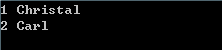
如果用前两种方法插入数据,因为关键字是唯一的,所以当关键字已经存在的时候,再插入相同关键字的map是不成功的;而第三种用数组插入的方法是仍然可以的,会将原来的关键字所对应的值进行更改,相当于被覆盖掉了。
所以要想知道前两种方法的插入是否成功,应该用一个返回值来检验。
 #include<iostream>

 #include<string>

 #include<map>

 using namespace std;

 int main()

 {

     map<int,string> mapStudent;

     pair<map<int,string>::iterator,bool> insert_pairl;

     //insert 1 and check

     insert_pairl = mapStudent.insert(pair<int,string>(,"Christal"));

     if(insert_pairl.second == true)

         cout<<"Insert Successfully"<<endl;

     else

         cout<<"Insert Failure"<<endl;

     //insert 2 and check

     insert_pairl = mapStudent.insert(pair<int,string>(,"Carl"));

     if(insert_pairl.second == true)

         cout<<"Insert Successfully"<<endl;

     else

         cout<<"Insert Failure"<<endl;

     //insert 3 and check

     insert_pairl = mapStudent.insert(pair<int,string>(,"Jerry"));

     if(insert_pairl.second == true)

         cout<<"Insert Successfully"<<endl<<endl;

     else

         cout<<"Insert Failure"<<endl<<endl;

     //print

     map<int,string>::iterator it;

     for(it=mapStudent.begin();it!=mapStudent.end();it++)

         cout<<(*it).first<<" "<<(*it).second<<endl;

     return ;

 }
map_insert_check
正如上面所说,当要插入的关键字已经存在,是插入失败的,所以输出结果为:

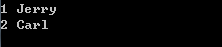
而采用数组插入方式会直接覆盖
 mapStudent[] = "Christal";

 mapStudent[] = "Carl";

 mapStudent[] = "Jerry";
输出结果为:
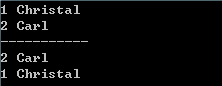
(4)数据的遍历,当然分为用迭代器遍历的方式和用数组遍历的方式,其中以迭代器遍历中又分为正向遍历和反向遍历,正向遍历就是我们所熟知的迭代器遍历方式,反向遍历如下:
 map<int,string>::iterator it; //print

 2 for(it=mapStudent.begin();it!=mapStudent.end();it++)

 3     cout<<(*it).first<<" "<<(*it).second<<endl;
 4

 5 map<int,string>::reverse_iterator rit; //reverse print

 6 for(rit=mapStudent.rbegin();rit!=mapStudent.rend();rit++)

 7     cout<<(*rit).first<<" "<<(*rit).second<<endl;
输出结果为:
(5)查找数据,一是用count()函数查找,存在返回1,否者返回0;二是用find()函数来定位数据出现的位置;
find()函数返回一个迭代器,如果找到数据,则返回数据所在位置的迭代器;如果不存在,则返回值与end()函数的返回值相同;
 1 map<int,string>::iterator _iter;

 2 _iter = mapStudent.find();

 if(_iter != mapStudent.end())

 4     cout<<"Find Successfully"<<endl;

 5 else

 6     cout<<"Find Failure"<<endl;
(6)删除数据,clear()和erase()
清空map中的所有数据用clear()函数,判定map中是否有数据用empty()函数,为空返回true。
选择性的删除用erase()函数,可以实现三种方式的删除,
用迭代器删除:
1 map<int,string>::iterator _iter;

2 _iter = mapStudent.find();

3  mapStudent.erase(_iter);
用关键字删除:
 int n = mapStudent.erase();

if(n == )

3     cout<<"Erase Successfully"<<endl;

else

5     cout<<"Erase Failure"<<endl;
用迭代器成片删除,删除区间是一个前闭后开[ )的集合:
1 mapStudent.erase(mapStudent.begin(),mapStudent.end());
set
4、set:用来存储同一数据类型的数据,内部每个元素都是唯一的,且自动排序;数据结构为红黑树(RB-Tree)
(1)构造函数,set<int> c;
(2)查找函数,find()函数和count()函数;
(3)数据访问函数,begin()、end()、rbegin()、rend();
(4)插入数据,insert(element)、insert(position,element)、insert(begin,end);
(5)删除数据,erase(position)、erase(element)、erase(begin,end);
hash_map&hash_set
5、hash_map和hash_set:底层数据结构是哈希表
hash_map与map用法类似,只是内部数据结构不同,hash_map提供内部数据随机、更快的访问;hash_set同理。
总结
6、总结:
(1)vector封装数组,list封装链表,map和set封装了二叉树;
(2)对于这些STL,应当掌握基本的插入、删除、排序、查找等操作;
(3)对于结构体类型的vector、map、set、hash_map、hash_set等,需要对运算符 ‘ < ’ 进行重载。
例如在map中引入结构体,对 ‘ < ’ 运算符进行重载:
#include<iostream>
#include<string>
#include<map>
using namespace std; struct Student
{
int num;
string name;
Student(int nu,string na) //constructor
{
name = na;
num = nu;
}
public:
bool operator< (const Student& stu) const //operator the <
{
return stu.num<num;
}
}; int main()
{
map<Student,double> mapStudent;
//student information
Student stu1(,"Christal");
Student stu2(,"Carl");
Student stu3(,"Jerry");
//insert
mapStudent.insert(pair<Student,double>(stu1,9.9));
mapStudent.insert(pair<Student,double>(stu2,8.8));
mapStudent.insert(pair<Student,double>(stu3,7.7));
map<Student,double>::iterator it;
for(it=mapStudent.begin();it!=mapStudent.end();it++)
cout<<(*it).first.num<<" "<<(*it).first.name<<" "<<(*it).second<<endl; return ;
}
STL的使用和背后数据结构的更多相关文章
- 转载:STL常用容器的底层数据结构实现
转载至:https://blog.csdn.net/qq_28584889/article/details/88763090 vector :底层数据结构为数组,支持快速随机访问 list:底层数据结 ...
- c++面试题【转】
语言部分: 虚函数,多态.这个概念几乎是必问. STL的使用和背后数据结构,vector string map set 和hash_map,hash_set 实现一个栈类,类似STL中的栈.这个题目初 ...
- STL中经常使用数据结构
STL中经常使用的数据结构: [1] stack.queue默认的底层实现为deque结构. [2] deque:用map管理多个size大小的连续内存块,方便头尾插入. [3] vector: ...
- C++的标准模板库STL中实现的数据结构之顺序表vector的分析与使用
摘要 本文主要借助对C++的标准模板库STL中实现的数据结构的学习和使用来加深对数据结构的理解.即联系数据结构的理论分析和详细的应用实现(STL),本文是系列总结的第一篇,主要针对线性表中的顺序表(动 ...
- C++的标准模板库STL中实现的数据结构之链表std::list的分析与使用
摘要 本文主要借助对C++的标准模板库STL中实现的数据结构的学习和使用来加深对数据结构的理解,即联系数据结构的理论分析和详细的应用实现(STL),本文是系列总结的第二篇.主要针对线性表中的链表 ST ...
- STL学习小结
STL就是Standard Template Library,标准模板库.这可能是一个历史上最令人兴奋的工具的最无聊的术语.从根本上说,STL是一些"容器"的集合,这些" ...
- STL学习总结
STL就是Standard Template Library,标准模板库.这可能是一个历史上最令人兴奋的工具的最无聊的术语.从根本上说,STL是一些"容器"的集合.这些" ...
- STL 较详尽总结
STL就是Standard Template Library,标准模板库.这可能是一个历史上最令人兴奋的工具的最无聊的术语.从根本上说,STL是一些"容器"的集合,这些" ...
- stl 迭代器(了解)
STL 主要是由 containers(容器),iterators(迭代器)和 algorithms(算法)的 templates(模板)构成的. 对应于它们所支持的操作,共有五种 iterators ...
随机推荐
- JSP/Servlet Web 学习笔记 DayTwo
JSP指令 a)page指令 定义JSP文件中的全局属性.一个JSP页面可以包含多个page指令.除了Import以外,其他page指令定义的属性/值只能出现一次. 其详细语法为: <%page ...
- 简易-五星评分-jQuery纯手写
超级简单的评分功能,分为四个步骤轻松搞定: 第一步: 引入jquery文件:这里我用百度CDN的jquery: <script src="http://apps.bdimg.com/l ...
- javaCV开发详解之7:让音频转换更加简单,实现通用音频编码格式转换、重采样等音频参数的转换功能(以pcm16le编码的wav转mp3为例)
javaCV系列文章: javacv开发详解之1:调用本机摄像头视频 javaCV开发详解之2:推流器实现,推本地摄像头视频到流媒体服务器以及摄像头录制视频功能实现(基于javaCV-FFMPEG.j ...
- 【原创】Ajax的用法总结
一.什么是Ajax Ajax英文全称为“ Asynchr JavsScript and XML”(异步的JavaScript和XML),是一种创建 交互式网页的开发技术. 二.Ajax技术的核心 Aj ...
- DNS全局负载均衡(GSLB)基本原理
原理 DNS全局负载均衡通过智能DNS解析来实现,通常在不同的地区设立多个数据中心,每个数据中心又使用多个运营商的线路.目前很多DNS服务商都提供了智能DNS服务,智能DNS通常是利用各运营商分省IP ...
- JSON字符串和JS对象
JSON和JS对象 一 JSON是什么 JSON是基于文本的,轻量的,用于数据交换的,一种格式. 可以看到JSON的定义里面有很多的定语,现在就每个限定解释一下: 1. 基于文本 这里的意思是相对于哪 ...
- Android 图片加载框架Glide4.0源码完全解析(二)
写在之前 上一篇博文写的是Android 图片加载框架Glide4.0源码完全解析(一),主要分析了Glide4.0源码中的with方法和load方法,原本打算是一起发布的,但是由于into方法复杂性 ...
- JMS 之 Active MQ 消息存储
一.消息的存储方式 ActiveMQ支持JMS规范中的持久化消息与非持久化消息 持久化消息通常用于不管是否消费者在线,它们都会保证消息会被消费者消费.当消息被确认消费后,会从存储中删除 非持久化消息通 ...
- MongoDB一个基于分布式文件存储的数据库(介于关系数据库和非关系数据库之间的数据库)
1:MongoDB的官方网址:https://www.mongodb.com MongoDB的中文社区:http://www.mongoing.com/(老外也很看重中国市场啊,知道大家英语不好, ...
- httpClient 发送请求后解析流重用的问题(HttpEntity的重用:BufferedHttpEntity)
使用场景: 项目中使用httpClient发送一次http请求,以流的方式处理返回结果,开始发现返回的流只能使用一次,再次使用就会出错,后来看了一些解决方案,EntityUtils.consume(r ...