
JS、JQUERY 获取浏览器和屏幕各种高度宽度
好长时间没有更新博客了。。。
把我最近积累的一点知识点放上博客,以后以备不需之要,也给大家整理一下。。
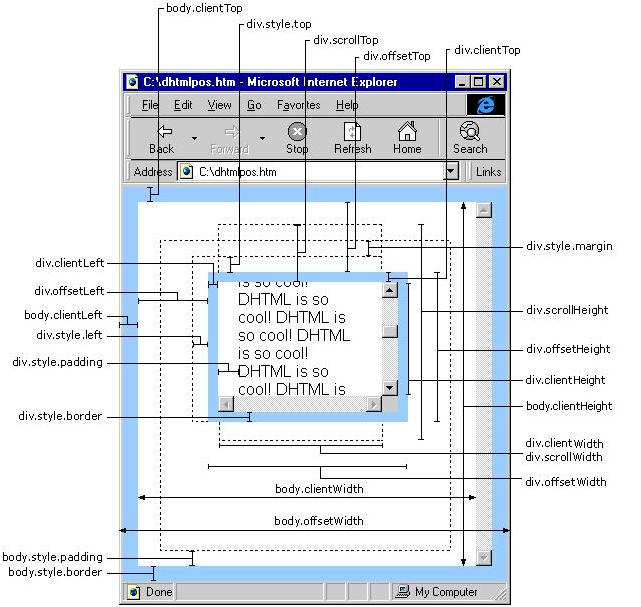
Javascript:
IE中:
document.body.clientWidth ==> BODY对象宽度
document.body.clientHeight ==> BODY对象高度
document.documentElement.clientWidth ==> 可见区域宽度
document.documentElement.clientHeight ==> 可见区域高度
FireFox中:
document.body.clientWidth ==> BODY对象宽度
document.body.clientHeight ==> BODY对象高度
document.documentElement.clientWidth ==> 可见区域宽度
document.documentElement.clientHeight ==> 可见区域高度
Opera中:
document.body.clientWidth ==> 可见区域宽度
document.body.clientHeight ==> 可见区域高度
document.documentElement.clientWidth ==> 页面对象宽度(即BODY对象宽度加上Margin宽)
document.documentElement.clientHeight ==> 页面对象高度(即BODY对象高度加上Margin高)
alert(document.body.clientWidth); //网页可见区域宽(body)
alert(document.body.clientHeight); //网页可见区域高(body)
alert(document.body.offsetWidth); //网页可见区域宽(body),包括border、margin等
alert(document.body.offsetHeight); //网页可见区域宽(body),包括border、margin等
alert(document.body.scrollWidth); //网页正文全文宽,包括有滚动条时的未见区域
alert(document.body.scrollHeight); //网页正文全文高,包括有滚动条时的未见区域
alert(document.body.scrollTop); //网页被卷去的Top(滚动条)
alert(document.body.scrollLeft); //网页被卷去的Left(滚动条)
alert(window.screenTop); //浏览器距离Top
alert(window.screenLeft); //浏览器距离Left
alert(window.screen.height); //屏幕分辨率的高
alert(window.screen.width); //屏幕分辨率的宽
alert(window.screen.availHeight); //屏幕可用工作区的高
alert(window.screen.availWidth); //屏幕可用工作区的宽
Jquery
alert($(window).height()); //浏览器当前窗口可视区域高度
alert($(document).height()); //浏览器当前窗口文档的高度
alert($(document.body).height()); //浏览器当前窗口文档body的高度
alert($(document.body).outerHeight(true)); //浏览器当前窗口文档body的总高度 包括border padding margin
alert($(window).width()); //浏览器当前窗口可视区域宽度
alert($(document).width()); //浏览器当前窗口文档对象宽度
alert($(document.body).width()); //浏览器当前窗口文档body的宽度
alert($(document.body).outerWidth(true)); //浏览器当前窗口文档body的总宽度 包括border padding margin
JS 获取浏览器窗口大小
常用:
JS 获取浏览器窗口大小
|
1
2
3
4
5
6
7
8
9
10
11
12
13
14
15
16
|
// 获取窗口宽度if (window.innerWidth)winWidth = window.innerWidth;else if ((document.body) && (document.body.clientWidth))winWidth = document.body.clientWidth;// 获取窗口高度if (window.innerHeight)winHeight = window.innerHeight;else if ((document.body) && (document.body.clientHeight))winHeight = document.body.clientHeight;// 通过深入 Document 内部对 body 进行检测,获取窗口大小if (document.documentElement && document.documentElement.clientHeight && document.documentElement.clientWidth){winHeight = document.documentElement.clientHeight;winWidth = document.documentElement.clientWidth;} |
详细:
关于获取各种浏览器可见窗口大小:
<script>
function getInfo()
{
var s = "";
s = " 网页可见区域宽:" document.body.clientWidth;
s = " 网页可见区域高:" document.body.clientHeight;
s = " 网页可见区域宽:" document.body.offsetWidth " (包括边线和滚动条的宽)";
s = " 网页可见区域高:" document.body.offsetHeight " (包括边线的宽)";
s = " 网页正文全文宽:" document.body.scrollWidth;
s = " 网页正文全文高:" document.body.scrollHeight;
s = " 网页被卷去的高(ff):" document.body.scrollTop;
s = " 网页被卷去的高(ie):" document.documentElement.scrollTop;
s = " 网页被卷去的左:" document.body.scrollLeft;
s = " 网页正文部分上:" window.screenTop;
s = " 网页正文部分左:" window.screenLeft;
s = " 屏幕分辨率的高:" window.screen.height;
s = " 屏幕分辨率的宽:" window.screen.width;
s = " 屏幕可用工作区高度:" window.screen.availHeight;
s = " 屏幕可用工作区宽度:" window.screen.availWidth;
s = " 你的屏幕设置是 " window.screen.colorDepth " 位彩色";
s = " 你的屏幕设置 " window.screen.deviceXDPI " 像素/英寸";
//alert (s);
}
getInfo();
</script>
在我本地测试当中:
在IE、FireFox、Opera下都可以使用
document.body.clientWidth
document.body.clientHeight
即可获得,很简单,很方便。
而在公司项目当中:
Opera仍然使用
document.body.clientWidth
document.body.clientHeight
可是IE和FireFox则使用
document.documentElement.clientWidth
document.documentElement.clientHeight
原来是W3C的标准在作怪啊
<!DOCTYPE html PUBLIC "-//W3C//DTD XHTML 1.0 Transitional//EN" "http://www.w3.org/TR/xhtml1/DTD/xhtml1-transitional.dtd">
如果在页面中添加这行标记的话 在IE中:
document.body.clientWidth ==> BODY对象宽度
document.body.clientHeight ==> BODY对象高度
document.documentElement.clientWidth ==> 可见区域宽度
document.documentElement.clientHeight ==> 可见区域高度
在FireFox中:
document.body.clientWidth ==> BODY对象宽度
document.body.clientHeight ==> BODY对象高度
document.documentElement.clientWidth ==> 可见区域宽度
document.documentElement.clientHeight ==> 可见区域高度
?
在Opera中:
document.body.clientWidth ==> 可见区域宽度
document.body.clientHeight ==> 可见区域高度
document.documentElement.clientWidth ==> 页面对象宽度(即BODY对象宽度加上Margin宽)
document.documentElement.clientHeight ==> 页面对象高度(即BODY对象高度加上Margin高)
而如果没有定义W3C的标准,则
IE为:
document.documentElement.clientWidth ==> 0
document.documentElement.clientHeight ==> 0
FireFox为:
document.documentElement.clientWidth ==> 页面对象宽度(即BODY对象宽度加上Margin宽)document.documentElement.clientHeight ==> 页面对象高度(即BODY对象高度加上Margin高)
Opera为:
document.documentElement.clientWidth ==> 页面对象宽度(即BODY对象宽度加上Margin宽)document.documentElement.clientHeight ==> 页面对象高度(即BODY对象高度加上Margin高)
 1 <!DOCTYPE html>

 2 <script src="jquery-1.8.3.min.js" type="text/javascript"></script>

 3 <html>

 4   <head>

 5     <title>aaa</title>

 6   </head>

 7   <body>

 8 <h1>aaaaaaaaaaaa</h1>

10     <p>Welcome to aaa</p>

11 <h1>aaa</h1>

12 <h1>aaa</h1>

13 <h1>aaa</h1>

14 <h1>aaa</h1>

15 <h1>aaa</h1>

16 <h1>aaa</h1>

17 <h1>aaa</h1>

18 <h1>aaa</h1>

19 <h1>aaa</h1>

20 <h1>aaa</h1>

21 <h1>aaa</h1>

22 <h1>aaa</h1>

23 <h1>aaa</h1>

24   </body>

25 </html>

26

27 <script type="text/javascript">

28 alert(document.body.clientWidth);

29 alert(document.body.clientHeight);

30 alert(document.body.offsetWidth);

31 alert(document.body.offsetHeight);

32

33 alert(document.body.scrollWidth);

34 alert(document.body.scrollHeight);

35

36 alert(document.body.scrollTop);

37 alert(document.body.scrollLeft);

38 alert(window.screenTop);

39 alert(window.screenLeft);

40 alert(window.screen.height);

41 alert(window.screen.width);

42 alert(window.screen.availHeight);

43 alert(window.screen.availWidth);

44

45 //alert($(document).height());

46 //alert($(document).width());

47 </script>
JS、JQUERY 获取浏览器和屏幕各种高度宽度的更多相关文章
- Javascript、Jquery获取浏览器和屏幕各种高度宽度(单位都为px)
Javascript.Jquery获取浏览器和屏幕各种高度宽度 另外参见 http://www.cnblogs.com/top5/archive/2009/05/07/1452135.html ...
- Javascript&Jquery获取浏览器和屏幕各种高度宽度方法总结及运用
<js篇> Javascript获取浏览器和屏幕各种高度宽度方法总结 document.body.clientWidth //网页可见区域宽(body) document.bo ...
- JS、Jquery获取浏览器和屏幕各种高度宽度
网页可见区域宽:document.body.clientWidth网页可见区域高:document.body.clientHeight网页可见区域宽:document.body.offsetWidth ...
- Javascript、Jquery获取浏览器和屏幕各种高度宽度
Javascript: IE中:document.body.clientWidth ==> BODY对象宽度document.body.clientHeight ==> BODY对象高度d ...
- Javascript、Jquery获取浏览器和屏幕各种高度宽度[mark]
Javascript: IE中:document.body.clientWidth ==> BODY对象宽度document.body.clientHeight ==> BODY对象高度d ...
- C#-WebForm-Javascript、Jquery获取浏览器和屏幕各种高度宽度
Javascript: IE中:document.body.clientWidth ==> BODY对象宽度document.body.clientHeight ==> BODY对象高度d ...
- js/jquery获取浏览器窗口可视区域高度和宽度以及滚动条高度实现代码
获取浏览器窗口的可视区域高度和宽度,滚动条高度有需要的朋友可参考一下.IE中,浏览器显示窗口大小只能以下获取: 代码如下复制代码 代码如下: document.body.offsetWidth doc ...
- Jq_Js_Js、Jq获取浏览器和屏幕各种高度宽度
$(document).ready(function() {alert($(window).height()); //浏览器当前窗口可视区域高度alert($(document).he ...
- js基础--获取浏览器当前页面的滚动条高度的兼容写法
欢迎访问我的个人博客:http://www.xiaolongwu.cn 前言 在开发中,兼容性问题是最常见的,今天就来介绍一下关于获取滚动条高度的兼容性写法,宽度同理,我在这里就不一一解释了 各浏览器 ...
随机推荐
- 内置对象:Math
JavaScript内置函数Math.random()自定义封装函数:1,Math.floor(Math.random()*(b-a+1)+a) 随机生成a到b之间的整数. 也可以写成:Math.f ...
- MFC 下拉框Combo Box
下拉框常用的事件是Change事件.属性常用:Data(英文;分隔),Sort(是否排序) // OnInitDialog()中 m_cbx.SetCurSel();//设置默认选项 //OnBnCl ...
- 无法识别的配置节点 applicationSettings/* Properties.Settings 解决方法
http://blog.csdn.net/yaoxtao/article/details/7766888 在项目中引用web service时,偶然出现 无法识别的配置节点 applicationSe ...
- @ComponentScan什么时候可以不加
SpringBoot在没配置@ComponentScan的情况下,默认只扫描和主类处于同包下的Class. 主类Application.java: import org.springframework ...
- 简单NLT
目录 操作文本 需求 代码实现 操作文本 I have a dream that my four little children will one day live in a nation where ...
- Python图形用户界面-Tkinter
Tkinter是什么 python 特定的GUI界面,是一个图像的窗口,tkinter是python 自带的,可以编辑的GUI界面,我们可以用GUI 实现很多一个直观的功能,如何想开发一个计算器,如果 ...
- JavaWeb_(Spring框架)Spring配置文件
一.什么是spring IOC IOC(Inversion of Control)即控制反转,在我们以往的编程中如果需要一个bean往往需要去手动去new一个出来.而spring帮我们解决了这个问题, ...
- addEventListener 事件监听器 冒泡事件)
addEventListener 事件监听器 (冒泡事件) 1.后面绑定的事件照样会执行 2.不会被覆盖 3.调用者是事件源but.addEventListener 4.参数1,事件名(不带on ...
- 20175227张雪莹 2018-2019-2 《Java程序设计》第十一周学习总结
20175227张雪莹 2018-2019-2 <Java程序设计>第十一周学习总结 教材学习内容总结 第十三章 Java网络编程 URL类 一个URL对象通常包含最基本的三部分信息:协议 ...
- redis 用scan 代替keys,hgetAll
转载自:https://blog.csdn.net/w05980598/article/details/80264568 众所周知,当redis中key数量越大,keys 命令执行越慢,而且最重要的会 ...