
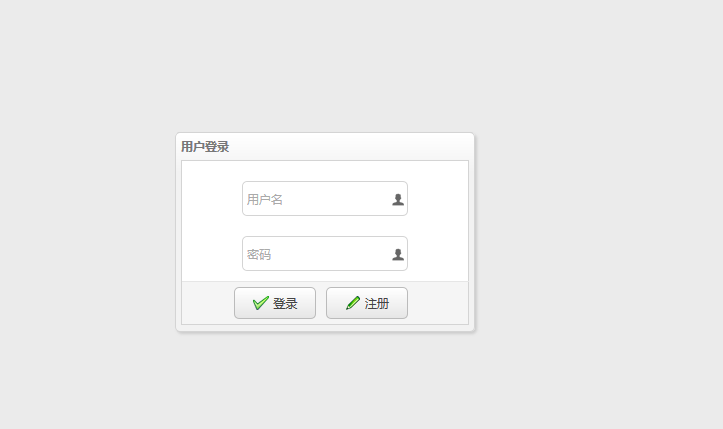
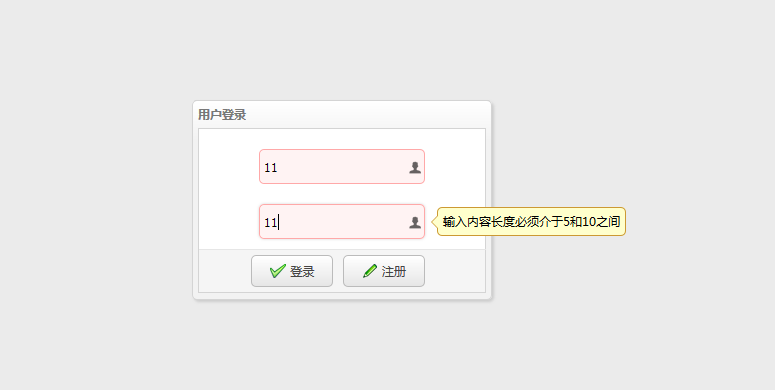
(十二)easyUI之表单和验证完成登录页面
<%@ page language="java" contentType="text/html; charset=UTF-8"

    pageEncoding="UTF-8"%>

<!DOCTYPE html>

<%

    String path = request.getContextPath();

%>

<html>

<head>

<link rel="stylesheet" type="text/css"

    href="<%=path%>/script/easyUI-1.4/themes/bootstrap/easyui.css">

<link rel="stylesheet" type="text/css"

    href="<%=path%>/script/easyUI-1.4/themes/icon.css">

<script type="text/javascript"

    src="<%=path%>/script/easyUI-1.4/jquery-1.8.3.min.js"></script>

<script type="text/javascript"

    src="<%=path%>/script/easyUI-1.4/jquery.easyui.min.js"></script>

<script type="text/javascript"

    src="<%=path%>/script/easyUI-1.4/locale/easyui-lang-zh_CN.js"></script>

</head>

<script type="text/javascript">

    jQuery(function() {

        $('#loginAndRegDialog').dialog({

            title : '用户登录',

            width : 300,

            height : 200,

            closable : false,

            cache : false,

            modal : true,

            buttons : "#btn"

        });

        $("#login").bind('click', function() {

            console.info("login");

        });

        $('#form1').form({

            url :"<%=path%>/userAction/save",

            onSubmit : function() {

                //在提交之前触发,返回false可以终止提交。

                console.info("onsubmit方法")

            },

            success : function(data) {

                //在表单提交成功以后触发

                console.info("返回值")

            }

        });

        $("#login").bind('click',function(){

                $('#form1').submit();

        });

    });

</script>

<body>

    <div id="loginAndRegDialog">

        <form id="form1" method="post" class="easyui-form">

            <div style="margin-top: 20px; margin-left: 60px; margin-right: 60px;">

                <input class="easyui-textbox" name="username"

                    data-options="iconCls:'icon-man',validType:'length[5,10]',prompt:'用户名'"

                    style="width: 100%; height: 35px">

            </div>

            <div style="margin-top: 20px; margin-left: 60px; margin-right: 60px;">

                <input class="easyui-textbox" name="password"

                    data-options="iconCls:'icon-man',validType:'length[5,10]',prompt:'密码'"

                    style="width: 100%; height: 35px">

            </div>

            <div id="btn">

                <a id="login" class="easyui-linkbutton"

                    data-options="iconCls:'icon-ok'" style="width: 30%; height: 32px">登录</a>

                <a id="reg" class="easyui-linkbutton"

                    data-options="iconCls:'icon-edit'"

                    style="width: 30%; height: 32px; margin-right: 55px;">注册</a>

            </div>

        </form>

    </div>

</body>

</html>
(十二)easyUI之表单和验证完成登录页面的更多相关文章
- 五十二:WTForms表单验证之基本使用
作用:1.做表单验证,把用户提交的数据验证是否合法2.做模板渲染 安装:pip install wtforms 表单验证1.自定义一个表单类,继承wtforms.Form2.定义好需要验证的字段,字段 ...
- 单点登录(十二)-----遇到问题-----cas启用mongodb验证方式登录后没反应-pac4j-mongo包中的MongoAuthenticatInvocationTargetException
cas启用mongodb验证方式登录后没反应 控制台输出 2017-02-09 20:27:15,766 INFO [org.jasig.cas.authentication.MongoAuthent ...
- HTML基础:用表单写一个简易登录页面
<!DOCTYPE html> <html> <head> <meta charset="utf-8"> <title> ...
- easyui表单多重验证,动态设置easyui控件
要实现的功能:在做添加学生信息的时候,利用easyui的验证功能判断 学号是否重复和学号只能为数字 最终效果如下图: 但在做这个的过程中,遇到了一系列的问题: 扩展validatebox的验证方法,最 ...
- JaveWeb 公司项目(4)----- Easyui的表单验证
前面三篇博文讲述的是界面的搭建和数据的传输,可以看出目前我做的这个小项目已经有了一个大体的雏形,剩下的就是细节部分的打磨和一些友好的人机交互设计,今天做的是表单的验证,作为初学者,着实花了一番功夫,所 ...
- 表单(上)EasyUI Form 表单、EasyUI Validatebox 验证框、EasyUI Combobox 组合框、EasyUI Combo 组合、EasyUI Combotree 组合树
EasyUI Form 表单 通过 $.fn.form.defaults 重写默认的 defaults. 表单(form)提供多种方法来执行带有表单字段的动作,比如 ajax 提交.加载.清除,等等. ...
- EasyUI加zTree使用解析 easyui修改操作的表单回显方法 验证框提交表单前验证 datagrid的load方法
带参提交一次查询,从服务器加载新数据.这是一个神奇的方法 $('#dg').datagrid('load',{ code: '01', name: 'name01' }); easyui修改操作的回显 ...
- ajax提交表单无法验证easyui的验证选项(比如required等)
在实际开发中,遇到ajax方式提交表单没法验证easyui的验证选项,这对实际用户体验造成了很大的困扰.当然,这也是理所当然的事情. 解决办法:使用jquery中ajax的beforeSend事件 ...
- [Swift通天遁地]二、表格表单-(18)快速应用多种预定义格式的表单验证
★★★★★★★★★★★★★★★★★★★★★★★★★★★★★★★★★★★★★★★★➤微信公众号:山青咏芝(shanqingyongzhi)➤博客园地址:山青咏芝(https://www.cnblogs. ...
随机推荐
- Vue学习手记04-跨域问题
01-安装axios,指令(npm install --save axios)02-解决跨域问题 在config=>中创建一个新的文件proxyConfig.js module.exports ...
- Git放弃修改
Stage之前放弃修改 如果做了修改,还没有stage(add),使用 git status 可以查看所有的改动: 修改:modified 删除:deleted 添加:Untracked 想要放弃修改 ...
- List根据多个字段分组
List<ClassEntity> distinctClass = classEntities.stream().collect(Collectors.collectingAndThen( ...
- SpringCloud学习成长之路 六 cloud配置中心
一.简介 在分布式系统中,由于服务数量巨多,为了方便服务配置文件统一管理,实时更新,所以需要分布式配置中心组件.在Spring Cloud中,有分布式配置中心组件spring cloud config ...
- IntelliJ-svn配置与使用
目录 IntelliJ-svn配置与使用 SVN的配置 版本控制主要操作按钮 版本控制相关的常用设置 Version Control窗口 @(目录) IntelliJ-svn配置与使用 SVN的配置 ...
- migrate设置
migrate配置 进入项目manage所在的目录中执行如下命令,否则会报错:no such table: django_session 进入cmd 输入盘符比如:E: 切换目录 cd E:\prog ...
- 【Leetcode_easy】771. Jewels and Stones
problem 771. Jewels and Stones solution1: class Solution { public: int numJewelsInStones(string J, s ...
- 【Leetcode_easy】706. Design HashMap
problem 706. Design HashMap solution1: class MyHashMap { public: /** Initialize your data structure ...
- Python3之返回函数
参考:https://www.cnblogs.com/mzc1997/p/7641995.html Python中函数不仅可以作为参数还可以作为结果返回 >>> def pro1(c ...
- .rpt 文件怎麽打開?Crystal Reports 打開.rpt失敗 ?
.rpt 是SAP Crystal Reports 製作出來的檔案的後綴名, 可以通過 SAP Crystal Reports Viewer 打開,也可以直接用記事本(notepad / Note ...