
asp.net mvc项目自定义区域
前言
直接上干货就是,就不废话了。
使用场景:分离模块,多站点等~~
一、分离模块
自定义视图引擎,设置视图路径格式
项目结构图
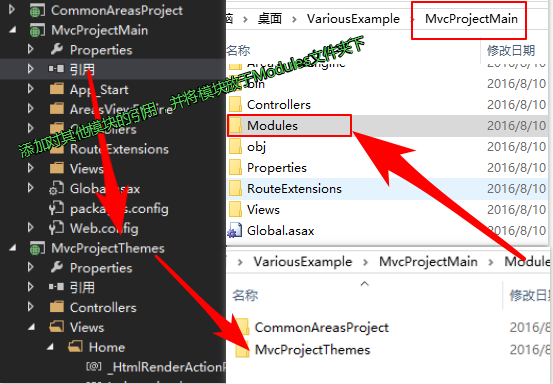
1.Code: 在Global.asax Application_Start方法中添加自定义的视图引擎
        using System.Collections.Generic;

        using System.Web.Mvc;

        namespace MvcProjectMain.AreasViewEngine

        {

            /// <summary>

            /// 自定义视图引擎

            /// </summary>

            /// <remarks>

            ///  ViewEngines.Engines.Add(new MvcProjectMain.AreasViewEngine.ThemableRazorViewEngine());

            /// </remarks>

            public class ThemableRazorViewEngine : VirtualPathProviderViewEngine

            {

                //所有区域分离到Modules文件夹,{2}为区域名

                public ThemableRazorViewEngine()

                {

                    ViewEngines.Engines.Clear();

                    AreaViewLocationFormats = new[]

                    {

                    "~/Modules/{2}/Views/{1}/{0}.cshtml",

                    "~/Modules/{2}/Views/Shared/{0}.cshtml",

                    };

                    AreaMasterLocationFormats = new[]

                    {

                    "~/Modules/{2}/Views/{1}/{0}.cshtml",

                    "~/Modules/{2}/Views/Shared/{0}.cshtml",

                    };

                    AreaPartialViewLocationFormats = new[]

                    {

                    "~/Modules/{2}/Views/{1}/{0}.cshtml",

                    "~/Modules/{2}/Views/Shared/{0}.cshtml",

                    };

                    ViewLocationFormats = new[]

                    {

                    "~/Views/{1}/{0}.cshtml",

                    "~/Views/Shared/{0}.cshtml",

                    };

                    MasterLocationFormats = new[]

                    {

                    "~/Views/{1}/{0}.cshtml",

                    "~/Views/Shared/{0}.cshtml",

                    };

                    PartialViewLocationFormats = new[]

                    {

                    "~/Views/{1}/{0}.cshtml",

                    "~/Views/Shared/{0}.cshtml",

                    };

                    FileExtensions = new[] { "cshtml" };

                }

                protected override IView CreatePartialView(ControllerContext controllerContext, string partialPath)

                {

                    string layoutPath = null;

                    var runViewStartPages = false;

                    IEnumerable<string> fileExtensions = base.FileExtensions;

                    return new RazorView(controllerContext, partialPath, layoutPath, runViewStartPages, fileExtensions);

                }

                protected override IView CreateView(ControllerContext controllerContext, string viewPath, string masterPath)

                {

                    string layoutPath = masterPath;

                    var runViewStartPages = true;

                    IEnumerable<string> fileExtensions = base.FileExtensions;

                    return new RazorView(controllerContext, viewPath, layoutPath, runViewStartPages, fileExtensions);

                }

            }

        }
2.Code:在Global.asax中添加注册区域-->AreaRegistration.RegisterAllAreas();
        public class ThemesAreaRegistration : AreaRegistration

            {

                public override string AreaName

                {

                    get

                    {

                        return "MvcProjectThemes";

                    }

                }

                public override void RegisterArea(AreaRegistrationContext context)

                {

                    context.MapRoute(

                        "MvcProjectThemes",

                        "MvcProjectThemes/{controller}/{action}/{id}",

                        new { controller = "Home", action = "Index", id = UrlParameter.Optional, },

                        namespaces: new string[] { "MvcProjectThemes.Controllers" }

                    );

                }

            }
3.Code:注册主项目MvcProjectMain的路由 RouteConfig.RegisterRoutes(RouteTable.Routes);
namespace MvcProjectMain

{

    public class RouteConfig

    {

        public static void RegisterRoutes(RouteCollection routes)

        {

            routes.IgnoreRoute("{resource}.axd/{*pathInfo}");

            routes.MapRoute(

                name: "Default",

                url: "{controller}/{action}/{id}",

                defaults: new { controller = "Home", action = "Index", id = UrlParameter.Optional },

                namespaces: new string[] { "MvcProjectMain.Controllers" }

            );

        }

    }

}
最后
主要代码就是步骤1中的ThemableRazorViewEngine.cs类。自定义查找路径,其他的都是MVC的基础知识了,不懂自行查阅资料
asp.net mvc项目自定义区域的更多相关文章
- 在 ASP.NET MVC 项目中使用 WebForm、 HTML
原文地址:http://www.cnblogs.com/snowdream/archive/2009/04/17/winforms-in-mvc.html ASP.NET MVC和WebForm各有各 ...
- ASP.NET MVC 项目分离
ASP.NET MVC 项目分离 说明: ZRT.Web 是前台网站,目录[D:\ZRT.Web\] ZRT.Admin 是后台管理,目录[D:\ZRT.Web\Applications\Admin\ ...
- ASP.Net Mvc实现自定义User Identity用户身份识别系统(1)
目的 当我们新建asp.net mvc 项目时,我们在使用下图所示的代码是否有以下思考: 1,在this.User.Identity.Name,为什么可以使用this便可以选中Name属性: 2,若项 ...
- AngularJS2 + ASP.NET MVC项目
环境:VS2015, NodeJS:v 6.5, npm: v3.10, AngularJs 2 通过将ASP.NET MVC项目与Angualr 2官网上的quick start整合的过程中遇到些问 ...
- 远程调试 ASP.NET MVC 项目
Visual Studio 支持从一台计算机到另一台设备的远程调试.进行远程调试时,主机可以是任何支持 Visual Studio 的平台.远程设备可以是 x86.x64 或 ARM 平台. 本文将指 ...
- 习题-任务2初始ASP.NET MVC项目开发
一.选择题 1.在ASP.NET MVC项目的RouteConfig.cs文件中,( )方法注册了默认的路由配置. A.RegisterMap B.RegisterRoutes C. ...
- Asp.net mvc项目架构分享系列之架构概览
Asp.net mvc项目架构分享系列之架构概览 Contents 系列一[架构概览] 0.项目简介 1.项目解决方案分层方案 2.所用到的技术 3.项目引用关系 系列二[架构搭建初步] 4.项目架构 ...
- 1.2 认识ASP.NET MVC项目结构
1.开发环境 操作系统:xp.vista.windows 7.windows 8.windows server 2003|2008|2008R2|2012: 集成开发环境IDE: Vsiual Stu ...
- 2.2 利用项目模板创建ASP.NET MVC项目
1.启动VS2012,点击“文件|新建|项目”. 2.在新建项目的窗口中,选择ASP.NET MVC 4应用程序. 3.在新ASP.NET MVC 4项目窗口中的“选择模板”列表中选择“基本”模板,在 ...
随机推荐
- (转)webHttpBinding、basicHttpBinding和wsHttpBinding区别
(1)webHttpBinding与basicHttpBinding / wsHttpBinding的区别: webHttpBinding is the REST-style binding, w ...
- Visual Studio Code 调试 nodeJS
Step 1: 点击Debug按钮,调出launch.json文件,更改program的路径为目标js文件. 生成的luanch.json文件在.vscode文件下 step2:接下来就可以加断点调试 ...
- 《Entity Framework 6 Recipes》中文翻译系列 (45) ------ 第八章 POCO之获取原始对象与手工同步对象图和变化跟踪器
翻译的初衷以及为什么选择<Entity Framework 6 Recipes>来学习,请看本系列开篇 8-6 获取原始对象 问题 你正在使用POCO,想从数据库获取原始对象. 解决方案 ...
- CentOS 7 网络配置
Virtual box 安装了CentOS 7最小模式后马上用ifconfig命令查看网络情况,发现该命令不存在. [root@centos1 ~]# ifconfig -bash: ifconfig ...
- Oracle 多行转多列,列值转为列名
前段时间做调查问卷,客户创建自定义问卷内容,包括题目和选项内容; 之后需要导出问卷明细,,,,麻烦来咯 于是到网上到处搜索,没有直接结果;于是又找各种相似的,,终于功夫不负有心人 然后最终自己写出来了 ...
- GitHub iOS-Top 100 简介
GitHub排名前100的iOS第三方汇总简介,方便开发者选择适合的第三方框架. 项目名称 项目信息 1. AFNetworking 作者是 NSHipster 的博主, iOS 开发界的大神级人物, ...
- C#设计模式系列:开闭原则(Open Close Principle)
1.开闭原则简介 开闭原则对扩展开放,对修改关闭,开闭原则是面向对象设计中可复用设计的基石. 2.开闭原则的实现 实现开闭原则的关键就在于抽象,把系统的所有可能的行为抽象成一个抽象底层,这个抽象底层规 ...
- dev c++ Boost库的安装
dev c++ 的boost库的安装步骤 然后点击“check for updates”按钮 最后点击“Download selected”按钮,下载完成后安装.... 给dev添加boost库文件, ...
- iOS开发之各种动画各种页面切面效果
因工作原因,有段时间没发表博客了,今天就发表篇博客给大家带来一些干货,切勿错过哦.今天所介绍的主题是关于动画的,在之前的博客中也有用到动画的地方,今天就好好的总结一下iOS开发中常用的动画.说道动画其 ...
- 从一道面试题分析javascript闭包
据说是一不注意就会做错的五道javascript面试题之一,我们来看看这道题长什么样 function Container( properties ) { var objthis = this; fo ...