
flask的post,get请求及获取不同格式的参数
flask的post,get请求及获取不同格式的参数
1 获取不同格式参数

1.0 获取json参数
- Demo
from flask import Flask, request, jsonify

app = Flask(__name__)

@app.route('/jsonargs/<string:args_1>', methods=['POST'])

def json_args(args_1):

    args_2 = request.json.get("args_2")

    args_3 = request.json['args_3']

    return jsonify({"args_1":args_1, "args_2":args_2, "args_3":args_3})

if __name__ == "__main__":

    app.run(host='0.0.0.0', port=8080, debug=True)
- request

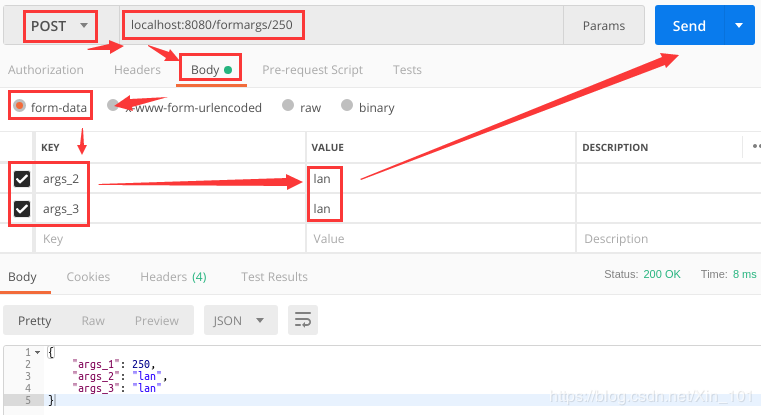
1.2 获取form参数
- Demo
from flask import Flask, request, jsonify

app = Flask(__name__)

@app.route('/formargs/<int:args_1>', methods=['POST'])

def form_args(args_1):

    args_2 = request.form.get('args_2')

    args_3 = request.form['args_3']

    return jsonify({"args_1":args_1, "args_2":args_2, "args_3":args_3})

if __name__ == "__main__":

    app.run(host='0.0.0.0', port=8080, debug=True)
- request
1.3 get获取地址栏参数
from flask import Flask, request, jsonify

app = Flask(__name__)

@app.route('/getargs', methods=['GET', 'POST'])

def get_args():

    args_1 = request.args.get("args_1")

    args_2 = request.args.get("args_2")

    args_3 = request.args.get("args_3")

    return jsonify({"args_1":args_1, "args_2":args_2, "args_3":args_3})

if __name__ == "__main__":

    app.run(host='0.0.0.0', port=8080, debug=True)
Request

1.4 获取file文件
from flask import Flask, request, jsonify

import os

basedir = os.path.abspath(os.path.dirname(__name__))

app = Flask(__name__)

@app.route('/imageprocess', methods=['GET', 'POST'])

def image_preprocess():

    # get upload image and save

    image = request.files['image']

    path = basedir + "/source_images/"

    file_path = path + image.filename

    image.save(file_path)

if __name__ == "__main__":

    app.run(host='0.0.0.0', port=8080, debug=True)
1.5 获取任何格式
from flask import Flask, request

app = Flask(__name__)

def upload_data():

    data = request.values.get("input")

    return jsonify({"data type":"successfully upload!"})

if __name__ == "__main__":

    app.run(host="0.0.0.0", port=8090, debug=True)
2 文件格式解析
from flask import Flask, jsonify, request,abort

import os

app = Flask(__name__)

def path_get():

    path = os.path.abspath(os.path.dirname(__name__))

    return path

@app.route('/connect', methods=["GET"])

def connect():

    return jsonify({"connect state":"successfully connect!"})

@app.route('/upload_data', methods=["GET", "POST"])

def upload_data():

    # 判断form文件是否为空及是否是form文件

    if request.form and 'input' in request.form:

        upload_data = request.form['input']

        form_type = request.form

        print("form type: {}".format(form_type))

        # return jsonify({"input data":upload_data})

        return jsonify({"form data type":form_type})

    # 判断json文件是否为空及是否是json文件

    elif request.json and 'input' in request.json:

        upload_data = request.json['input']

        # return jsonify({"input data":upload_data})

        # return jsonify({"input test":"success"})

        json_type = request.json

        print("json type: {}".format(json_type))

        return jsonify({"form data type":json_type})

    # 判断files文件是否为空及是否是files文件

    elif 'input' in request.files:

        file = request.files["input"]

        path = path_get() + "/images/test.png"

        # file.save(path)

        files_type = request.files

        print("files type: {}".format(files_type))

        return jsonify({"path":path})

        # return jsonify({"form data type":files_type})

    else:

        abort(400)

if __name__ == "__main__":

    app.run(host='0.0.0.0', port=8098, debug=True)
Result
# form数据

form type: ImmutableMultiDict([('input', 'dancer')])

{

    "form data type": {

        "input": "dancer"

    }

}

=======================

# json数据

json type: {'input': 'jumper'}

{

    "form data type": {

        "input": "jumper"

    }

}

=======================

# files文件

files type: ImmutableMultiDict([('input', <FileStorage: '1.jpeg' ('image/jpeg')>)])
Analysis
(1) form数据是可遍历的字典,可使用字典属性;
(2) json数据为字典,可使用字典属性;
(3) files数据为可遍历的字典,可使用字典属性,通过key判断是否存在该key,如input这个键;
(4) 当使用数据中的一种格式时,其他的数据为None,不可遍历,因此直接使用if判断是否为该类型的数据,会抛出错误TypeError: argument of type 'NoneType' is not iterable,所以通过先判断数据是否为空,然后判断是否为指定格式,解除错误;
3 获取checkbox数据
3.1 获取一个checkbox数据
- html
<p><input type="checkbox" name="checkbox_name" value="选择框">选择框</p>
- flask
data = request.values.get("checkbox_name")
3.2 获取多个checkbox数据
- html
<p><input type="checkbox" name="checkbox_names" value="选择1">选择1</p>

<p><input type="checkbox" name="checkbox_names" value="选择1">选择2</p>

<p><input type="checkbox" name="checkbox_names" value="选择1">选择3</p>
- flask
datas = request.values.getlist("checkbox_names")
3.3 分级选择
参考:https://www.cnblogs.com/kaituorensheng/p/4529113.html
<html>

<head>

<meta http-equiv="Content-Type" content="text/html; charset=utf-8" />

<script>

function allSelect(check_v, checkname)

{

    var v_item = document.getElementsByName(check_v);

    var items = document.getElementsByName(checkname);

    for (var i = 0; i < items.length; ++i)

    {

        if (v_item[0].checked)

        {

            items[i].checked = true;

        }

        else

        {

            items[i].checked = false;

        }

    }

}

function singleSelect2parent(check_v, checkname)

{

    var v_item = document.getElementsByName(check_v);

    var items = document.getElementsByName(checkname);

    var childStatus = true;

    for (var i = 0; i < items.length; ++i)

    {

        childStatus = (childStatus && items[i].checked);

    }

    if (childStatus)

    {

        v_item[0].checked = true;

    }

    else

    {

        v_item[0].checked = false;

    }

}

</script>

</head>

<body>

<p> <input type="checkbox" checked name="checkbox_v1" value="version1" onclick="allSelect('checkbox_v1', 'checkbox1')">默认全选</p>

<ul>

    <p> <input type="checkbox" checked name="checkbox1" value="layer1" onclick="singleSelect2parent('checkbox_v1', 'checkbox1')">tiger_roads</p>

    <p> <input type="checkbox" checked name="checkbox1" value="layer2" onclick="singleSelect2parent('checkbox_v1', 'checkbox1')">poly_landmarks</p>

    <p> <input type="checkbox" checked name="checkbox1" value="layer3" onclick="singleSelect2parent('checkbox_v1', 'checkbox1')">poi</p>

</ul>

<p> <input type="checkbox" name="checkbox_v2" value="version2" onclick="allSelect('checkbox_v2', 'checkbox2')">默认全不选</p>

<ul>

    <p> <input type="checkbox" name="checkbox2" value="layer1" onclick="singleSelect2parent('checkbox_v2', 'checkbox2')" >tiger_roads</p>

    <p> <input type="checkbox" name="checkbox2" value="layer2" onclick="singleSelect2parent('checkbox_v2', 'checkbox2')">poly_landmarks</p>

    <p> <input type="checkbox" name="checkbox2" value="layer3" onclick="singleSelect2parent('checkbox_v2', 'checkbox2')">poi</p>

</ul>

</body>

</html>
4 总结
(1) 数据获取使用request请求,常用数据格式有json,form,file及地址栏的get请求数据;
(2) form及json数据请求方式均有两种,如request.json.get(),request.json[];
(3) 获取文件数据,可通过filename属性获取文件名,save属性进行保存;
(4) 地址栏可直接写入数据,需在route的方法内使用格式为:<type:args>如<int:id>,<string:name>等;
(5) 通过判断输入数据的格式,提供不同类型的输入;
[参考文献]
[1]https://www.jianshu.com/p/ecd97b1c21c1
[2]https://blog.csdn.net/p571912102/article/details/80526634
[3]https://www.cnblogs.com/kaituorensheng/p/4529113.html
[4]https://blog.csdn.net/kuangshp128/article/details/68926902
flask的post,get请求及获取不同格式的参数的更多相关文章
- flask get和post请求使用
直接看代码 #-*-coding:utf-8-*- from flask import Flask,url_for,redirect,render_template,request app = Fla ...
- flask源码剖析--请求流程
想了解这篇里面的内容,请先去了解我另外一篇博客Flask上下文 在了解flask之前,我们需要了解两个小知识点 偏函数 import functools def func(a1,a2): print( ...
- 浅谈flask源码之请求过程
更新时间:2018年07月26日 09:51:36 作者:Dear. 我要评论 这篇文章主要介绍了浅谈flask源码之请求过程,小编觉得挺不错的,现在分享给大家,也给大家做个参考.一起跟随 ...
- Java发送Http请求并获取状态码
通过Java发送url请求,查看该url是否有效,这时我们可以通过获取状态码来判断. try { URL u = new URL("http://10.1.2.8:8080/fqz/page ...
- 速战速决 (6) - PHP: 获取 http 请求数据, 获取 get 数据 和 post 数据, json 字符串与对象之间的相互转换
[源码下载] 速战速决 (6) - PHP: 获取 http 请求数据, 获取 get 数据 和 post 数据, json 字符串与对象之间的相互转换 作者:webabcd 介绍速战速决 之 PHP ...
- PHP模拟POST请求,获取response内容
/* * 模拟POST请求,获取response内容 */ protected function curl($url, $type, $header, $data) { $CURL_OPTS = ar ...
- Java爬虫(一)利用GET和POST发送请求,获取服务器返回信息
本人所使用软件 eclipse fiddle UC浏览器 分析请求信息 以知乎(https://www.zhihu.com)为例,模拟登陆请求,获取登陆后首页,首先就是分析请求信息. 用UC浏览器F1 ...
- php curl请求和获取接口数据
curl请求和获取接口数据 class ToolModel{ /** * [http 调用接口函数] * @Author GeorgeHao * @param string $url [接口地址] * ...
- Python Socket请求网站获取数据
Python Socket请求网站获取数据 ---阻塞 I/O ->收快递,快递如果不到,就干不了其他的活 ---非阻塞I/0 ->收快递,不断的去问,有没有送到,有没有送到,. ...
随机推荐
- CentOS 8 (1905)系统安装
本章内容: CentOS 8 的安装(CentOS-8-1905) 一.安装光盘,选择Install CentOS Linux 8.0.1905 二.选择系统语言,我这里选的是英文,也可以选择中文,往 ...
- 基于栈的指令集与基于寄存器的指令集详细比对及JVM执行栈指令集实例剖析
基于栈的指令集与基于寄存器的指令集详细比对: 这次来学习一些新的概念:关于Java字节码的解释执行的一种方式,当然啦是一些纯理论的东东,但很重要,在之后会有详细的实验来对理论进行巩固滴,下面来了解一下 ...
- 《流畅的Python》Data Structures--第7章 colsure and decorator
Function Decorators and Closures 装饰器是用于增强函数的行为,理解它,就必须先理解闭包. Python3引入关键字nonlocal,如果要理解闭包,就必须了解它的所有方 ...
- Nginx中ngx_http_proxy_module模块
该模块允许将请求传递给另⼀一台服务器器指令:1 ,proxy_pass设置代理理服务器器的协议和地址以及应映射位置的可选 URI .作为协议,可以指定“ http 或 https .可以将地址指定为域 ...
- python panda读写内存溢出:MemoryError
pandas中read_xxx的块读取功能 pandas设计时应该是早就考虑到了这些可能存在的问题,所以在read功能中设计了块读取的功能,也就是不会一次性把所有的数据都放到内存中来,而是分块读到内存 ...
- vue文件夹上传插件选哪个好?
文件夹数据库处理逻辑 public class DbFolder { JSONObject root; public DbFolder() { this.root = new JSONObject() ...
- angularjs 动态计算平均值
<!DOCTYPE html> <html> <head> <meta charset="UTF-8"> <title> ...
- Codeforces Round #521 (Div.3)题解
A过水,不讲 题解 CF1077B [Disturbed People] 这题就是个显而易见的贪心可是我考场上差点没想出来 显然把一户被打扰的人家的右边人家的灯关掉肯定比把左边的灯关掉 从左到右扫一遍 ...
- jacky解读麻省理工《计算机科学与Python编程导论》第1集
文:@数据分析-jacky(朱元禄) (一)导言 本课程讲的中心思想就是五个字:计算机思维 Python只是辅助工具,是辅助大家理解计算机思维,仅此而已 急功近利是人性,适得其反是结果:我们看到有很多 ...
- C#控制台输入输出
C#控制台输入输出 Console.Read()方法: //从控制台窗口读取一个字符,返回int值 Console.ReadLine()方法: // 从控制台窗口读取一行文本,返回string值 Co ...