
异步消息处理机制相关面试问题-intentservice面试问题详解
IntentService是什么?
IntentService是继承并处理异步请求的一个类,在IntentService内有一个工作线程来处理耗时操作,启动IntentService方法和启动传统的Service一样,同时,当任务执行完后,IntentService会自动停止,而不需要我们手动的stopSelf()。另外,可以启动IntentService多次,而每个耗时操作会以工作队列的方式在IntentService的onHandleIntent回调方法中执行,并且,每次只会执行一个线程,执行完第一个再执行第二个。
- 它本质上是一种特殊的Service,继承自Service并且本身是一个抽象类。
- 它内部是通过HandlerThread和Handler实现异步操作的。
IntentService使用方法:
关于它的使用可以参考之前写的博客:http://www.cnblogs.com/webor2006/p/4305715.html
下面总结一下:创建IntentService时,只需要实现onHandleIntent()和构造方法,onHandleIntent()为异步方法,可以执行耗时操作。
IntentService源码解析:
跟HandlerThread的源代码类似,代码也不多,如下:
public abstract class IntentService extends Service {

    private volatile Looper mServiceLooper;

    private volatile ServiceHandler mServiceHandler;

    private String mName;

    private boolean mRedelivery;

    private final class ServiceHandler extends Handler {

        public ServiceHandler(Looper looper) {

            super(looper);

        }

        @Override

        public void handleMessage(Message msg) {

            onHandleIntent((Intent)msg.obj);

            stopSelf(msg.arg1);

        }

    }

    /**

     * Creates an IntentService.  Invoked by your subclass's constructor.

     *

     * @param name Used to name the worker thread, important only for debugging.

     */

    public IntentService(String name) {

        super();

        mName = name;

    }

    /**

     * Sets intent redelivery preferences.  Usually called from the constructor

     * with your preferred semantics.

     *

     * <p>If enabled is true,

     * {@link #onStartCommand(Intent, int, int)} will return

     * {@link Service#START_REDELIVER_INTENT}, so if this process dies before

     * {@link #onHandleIntent(Intent)} returns, the process will be restarted

     * and the intent redelivered.  If multiple Intents have been sent, only

     * the most recent one is guaranteed to be redelivered.

     *

     * <p>If enabled is false (the default),

     * {@link #onStartCommand(Intent, int, int)} will return

     * {@link Service#START_NOT_STICKY}, and if the process dies, the Intent

     * dies along with it.

     */

    public void setIntentRedelivery(boolean enabled) {

        mRedelivery = enabled;

    }

    @Override

    public void onCreate() {

        // TODO: It would be nice to have an option to hold a partial wakelock

        // during processing, and to have a static startService(Context, Intent)

        // method that would launch the service & hand off a wakelock.

        super.onCreate();

        HandlerThread thread = new HandlerThread("IntentService[" + mName + "]");

        thread.start();

        mServiceLooper = thread.getLooper();

        mServiceHandler = new ServiceHandler(mServiceLooper);

    }

    @Override

    public void onStart(@Nullable Intent intent, int startId) {

        Message msg = mServiceHandler.obtainMessage();

        msg.arg1 = startId;

        msg.obj = intent;

        mServiceHandler.sendMessage(msg);

    }

    /**

     * You should not override this method for your IntentService. Instead,

     * override {@link #onHandleIntent}, which the system calls when the IntentService

     * receives a start request.

     * @see android.app.Service#onStartCommand

     */

    @Override

    public int onStartCommand(@Nullable Intent intent, int flags, int startId) {

        onStart(intent, startId);

        return mRedelivery ? START_REDELIVER_INTENT : START_NOT_STICKY;

    }

    @Override

    public void onDestroy() {

        mServiceLooper.quit();

    }

    /**

     * Unless you provide binding for your service, you don't need to implement this

     * method, because the default implementation returns null.

     * @see android.app.Service#onBind

     */

    @Override

    @Nullable

    public IBinder onBind(Intent intent) {

        return null;

    }

    /**

     * This method is invoked on the worker thread with a request to process.

     * Only one Intent is processed at a time, but the processing happens on a

     * worker thread that runs independently from other application logic.

     * So, if this code takes a long time, it will hold up other requests to

     * the same IntentService, but it will not hold up anything else.

     * When all requests have been handled, the IntentService stops itself,

     * so you should not call {@link #stopSelf}.

     *

     * @param intent The value passed to {@link

     *               android.content.Context#startService(Intent)}.

     *               This may be null if the service is being restarted after

     *               its process has gone away; see

     *               {@link android.app.Service#onStartCommand}

     *               for details.

     */

    @WorkerThread

    protected abstract void onHandleIntent(@Nullable Intent intent);

}
而首先先看一下它的onCreate()方法:
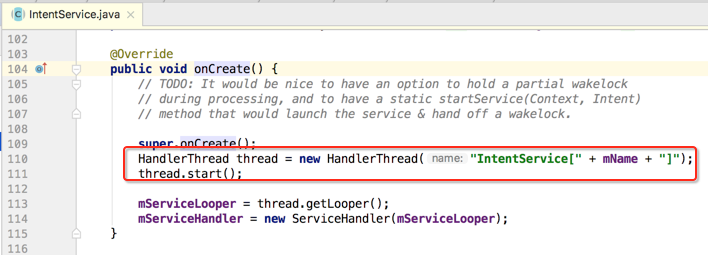
首先会创建一个HandlerThread,然后再根据它的Looper来创建一个Handler,如下:
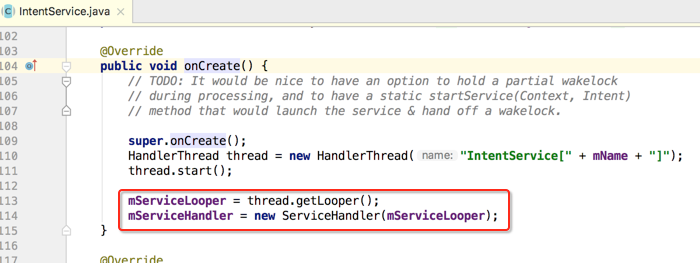
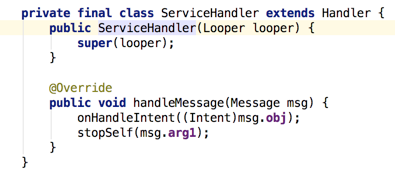
此时就可以在Handler中执行异步任务了。那IntentService是如何启动异步任务的呢?这里可以看一下onStrartCommand()方法:
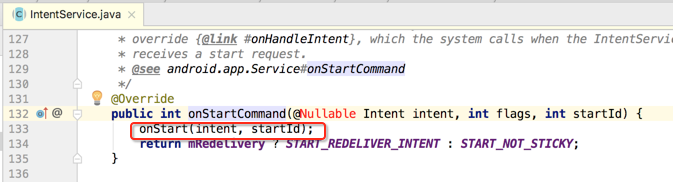
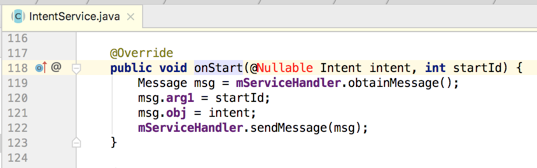
又调用了onStart()方法:
接着就会到handler的handleMessage()方法中去处理了:
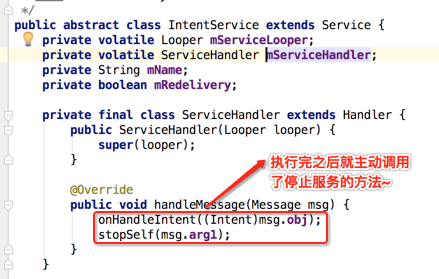
而onHandleIntent()方法是个抽象方法,由咱们自己来实现:

而其中调用停止任务时传了一个参数:
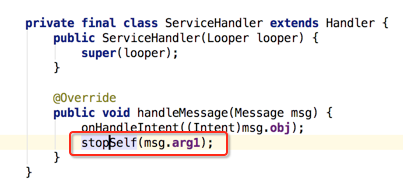
这时就会等待所有任务处理完之后才会停止,而不是立马停止。也就是如果有很多个任务都要由IntentService处理完之后,才会去让IntentService去停止,而非执行完一个就立马停止了。
它的本质就是一个封装了HandlerThread和handler的异步框架。
异步消息处理机制相关面试问题-intentservice面试问题详解的更多相关文章
- 异步消息处理机制相关面试问题-handlerThread面试问题详解
handlerThread产生背景: 开启Thread子线程进行耗时操作,多次创建和销毁线程是很耗系统资源的. handlerThread是什么? handler + thread + looper ...
- 异步消息处理机制相关面试问题-handler面试问题详解
什么是handler? 这个异常应该也就是引出handler的原因,也就是默认在非UI线程中是无法去更新UI的东东滴,那到底什么上handler呢? handler通过发送和处理Message和Run ...
- 异步消息处理机制相关面试问题-AsyncTask面试问题详解
什么是AsyncTask: 它本质上是一个封装了线程池和handler的异步框架. AsyncTask的使用方法: 三个参数: 五个方法: AsyncTask的内部原理: AsyncTask的注意事项 ...
- 【转】Android 异步消息处理机制 让你深入理解 Looper、Handler、Message三者关系
转载请标明出处:http://blog.csdn.net/lmj623565791/article/details/38377229 ,本文出自[张鸿洋的博客] 很多人面试肯定都被问到过,请问Andr ...
- Android 异步消息处理机制 让你在深入了解 Looper、Handler、Message之间的关系
转载请注明出处:http://blog.csdn.net/lmj623565791/article/details/38377229 ,本文出自[张鸿洋的博客] 非常多人面试肯定都被问到过,请问And ...
- Android 异步消息处理机制 让你深入理解 Looper、Handler、Message三者关系
转自:http://blog.csdn.net/lmj623565791/article/details/38377229 ,本文出自[张鸿洋的博客] 很多人面试肯定都被问到过,请问Android中的 ...
- Android 异步消息处理机制终结篇 :深入理解 Looper、Handler、Message、MessageQueue四者关系
版权声明:本文出自汪磊的博客,转载请务必注明出处. 一.概述 我们知道更新UI操作我们需要在UI线程中操作,如果在子线程中更新UI会发生异常可能导致崩溃,但是在UI线程中进行耗时操作又会导致ANR,这 ...
- 【转载】Android异步消息处理机制详解及源码分析
PS一句:最终还是选择CSDN来整理发表这几年的知识点,该文章平行迁移到CSDN.因为CSDN也支持MarkDown语法了,牛逼啊! [工匠若水 http://blog.csdn.net/yanbob ...
- Android多线程----异步消息处理机制之Handler详解
[声明] 欢迎转载,但请保留文章原始出处→_→ 生命壹号:http://www.cnblogs.com/smyhvae/ 文章来源:http://www.cnblogs.com/smyhvae/p/ ...
随机推荐
- Centos7搭建主从DNS服务器
1.准备 例:两台192.168.11.10(主),192.168.11.11(从),域名www.test1.com # 主从DNS服务器均需要安装bind.bind-chroot.bind-util ...
- jupyterlab部署到docker
操作环境:mac OS 10.14.6 docker版本:10.03.1 终端:iterm2 3.3 时间:2019年8月 ::说明::jupyter没有提供单独的jupyterlab镜像,可以使用j ...
- 【并行计算-CUDA开发】浅谈GPU并行计算新趋势
随着GPU的可编程性不断增强,GPU的应用能力已经远远超出了图形渲染任务,利用GPU完成通用计算的研究逐渐活跃起来,将GPU用于图形渲染以外领域的计算成为GPGPU(General Purpose c ...
- vue-cli3 取消eslint 校验代码 真正的解决办法
在网上找了各种办法都没解决,看了下文档就解决了 关闭vue-cli3.0 报错:eslint-disable-next-line to ignore the next line. 注意我这里是VU ...
- day22 subprocess、configeparser、表格操作模块
今日内容: 1.configparser模块的使用 2.subprocess模块的使用 3.表格处理模块 xlrd模块 xlwt模块 1.configparser模块 configparser模块是用 ...
- 博客C语言I作业11
一.本周教学内容&目标 第5章 函数 要求学生掌握各种类型函数的定义.调用和申明,熟悉变量的作用域.生存周期和存储类型. 二.本周作业头 这个作业属于哪个课程 c语言程序设计II 这个作业要求 ...
- MySQL线程池(THREAD POOL)的原理
MySQL常用(目前线上使用)的线程调度方式是one-thread-per-connection(每连接一个线程),server为每一个连接创建一个线程来服务,连接断开后,这个线程进入thread_c ...
- Linux就该这么学——新手必须掌握的命令之文件编辑命令组
cat 命令 用途 : 用于查看纯文本文件 格式 : cat [选项] [文件] 示例 : more 命令 用途 : 用于查看纯文本文件(内容较多的),可以用”Enter” 键或者”Space”键向下 ...
- 从入门到自闭之Python--虚拟环境如何安装
Windows下创建虚拟环境virtualenv 如果在一台电脑上, 想开发多个不同的项目, 需要用到同一个包的不同版本, 如果使用上面的命令, 在同一个目录下安装或者更新, 新版本会覆盖以前的版 ...
- ubutnu18.04LTS 配置网卡新特性
在Ubuntu16的时候配置网卡信息都是在 /etc/network/interfaces 下的,但是到了18,配置文件位置改为了/etc/netplan/*.yaml,配置配置内容如下: netwo ...