
一、zuul如何路由到上游服务器
所有文章
https://www.cnblogs.com/lay2017/p/11908715.html
正文
zuul在分布式项目中充当着一个网关的角色,而它最主要的功能像nginx一样针对上游服务器做反向代理。我们可以将它理解为一个服务的门面,作为客户端来说不需要再面向各式各样的服务,只需要面向zuul即可,简化了客户端与服务端的交互关系。
既然,zuul成为了客户端与服务端的中间层,那么zuul显然可以进行拦截、记录、安全管理、路由...等等各种处理。本文,将从路由这个点切入,看看路由的过程。
ZuulServlet
首先,客户端和服务端的交互显然少不了的http,所以先找到zuul针对Servlet的实现

可以看到,ZuulServlet直接继承了HttpServlet。所以,ZuulServlet依然走的是http通信协议,我们跟进ZuulServlet的service方法。
@Override

public void service(javax.servlet.ServletRequest servletRequest, javax.servlet.ServletResponse servletResponse) throws ServletException, IOException {

    try {

        init((HttpServletRequest) servletRequest, (HttpServletResponse) servletResponse);

        // 初始化一个上下文

        RequestContext context = RequestContext.getCurrentContext();

        context.setZuulEngineRan();

        // 路由前置处理-------------------

        try {

            // pre类型的ZuulFilter

            preRoute();

        } catch (ZuulException e) {

            // error类型的ZuulFilter

            error(e);

            // post类型的ZuulFilter

            postRoute();

            return;

        }

        // 路由处理-----------------------

        try {

            // route类型的ZuulFilter

            route();

        } catch (ZuulException e) {

            // error类型的ZuulFilter

            error(e);

            // post类型的ZuulFilter

            postRoute();

            return;

        }

        // 路由后置处理--------------------

        try {

            // post类型的ZuulFilter

            postRoute();

        } catch (ZuulException e) {

            // error类型的ZuulFilter

            error(e);

            return;

        }

    } catch (Throwable e) {

        // ...

    } finally {

        RequestContext.getCurrentContext().unset();

    }

}
显然,service方法很清晰地描绘了一个这样的路由过程:
浏览器发起响应 -> preFilter -> routeFilter -> postFilter -> 浏览器接受响应
|---------|-----------|-------> errorFilter -> 浏览器接受响应
PreDecorationFilter
preFilter无非就是对Servlet的请求信息进行处理,为routeFilter做准备。默认的preFilter有这么5个
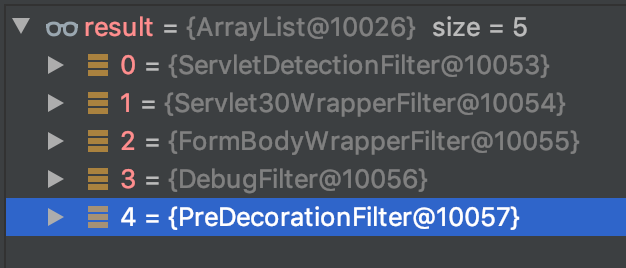
这里我们以PreDecorationFilter为例,看看它的处理过程。
public Object run() {

    RequestContext ctx = RequestContext.getCurrentContext();

    final String requestURI = this.urlPathHelper.getPathWithinApplication(ctx.getRequest());

    // 获取路由信息

    Route route = this.routeLocator.getMatchingRoute(requestURI);

    if (route != null) {

        // ... 处理路由信息,添加到context当中

    } else {

        // ...

    }

    return null;

}
PreDecorationFilter主要是做了一个路由准备。例如:http://localhost:8080/consumer/user/get?userId=1
这里的route信息将会是

经过PreDecorationFilter以后,我们已经知道了一个请求该路由到哪里去。
RibbonRoutingFilter
routeFilter默认有以下三种,这里以RibbonRoutingFilter为例

跟进RibbonRoutingFilter的run方法
@Override

public Object run() {

    RequestContext context = RequestContext.getCurrentContext();

    this.helper.addIgnoredHeaders();

    try {

        RibbonCommandContext commandContext = buildCommandContext(context);

        // 转发请求

        ClientHttpResponse response = forward(commandContext);

        // 设置响应结果到上下文

        setResponse(response);

        return response;

    }

    catch (ZuulException ex) {

        throw new ZuulRuntimeException(ex);

    }

    catch (Exception ex) {

        throw new ZuulRuntimeException(ex);

    }

}
run方法中做了一次请求转发,我们跟进forward看看
protected ClientHttpResponse forward(RibbonCommandContext context) throws Exception {

    Map<String, Object> info = this.helper.debug(context.getMethod(),

            context.getUri(), context.getHeaders(), context.getParams(),

            context.getRequestEntity());

    // 构造RibbonCommand

    RibbonCommand command = this.ribbonCommandFactory.create(context);

    try {

        // 执行RibbonCommand

        ClientHttpResponse response = command.execute();

        return response;

    }

    catch (HystrixRuntimeException ex) {

        return handleException(info, ex);

    }

}
这里构造并执行了一个RibbonComand,具体的实例对象是HttpClientRibbonCommand,我们看看它的类图
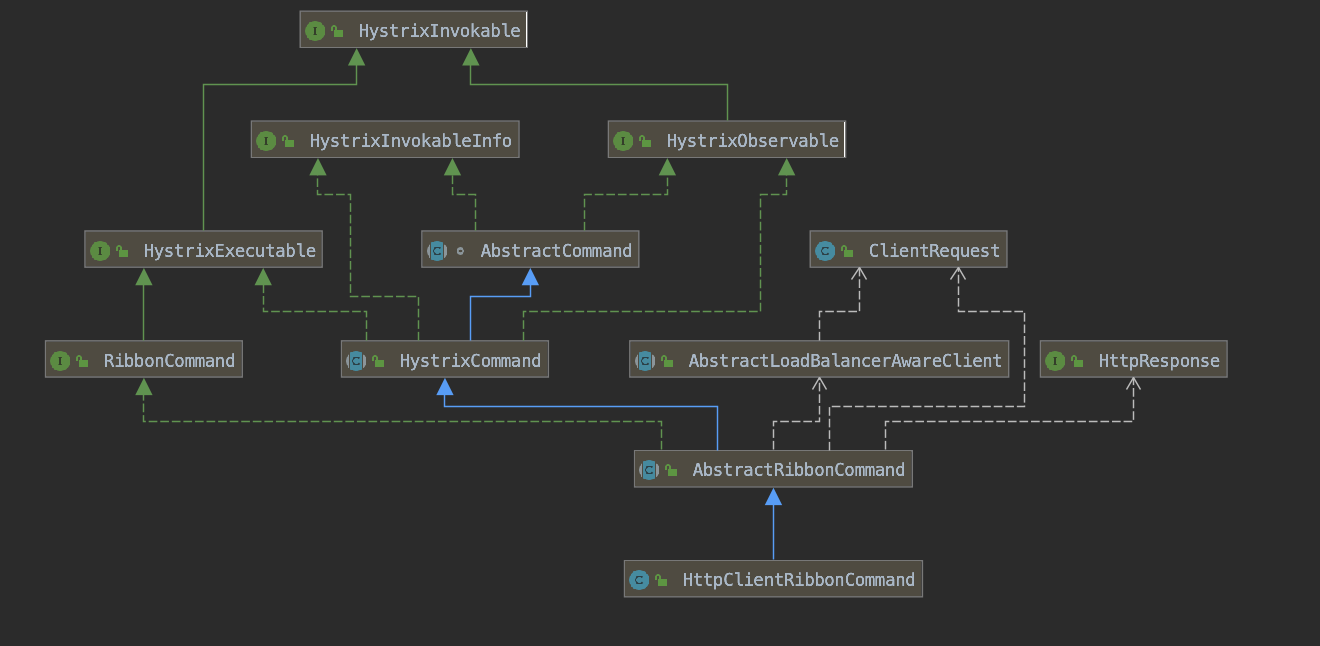
HttpClientRibbonCommand主要是包含了三种实现
1、ClientRequest:实现了请求响应
2、RibbonCommand表示了一个负载均衡的实现
3、HystrixCommand表示了一个熔断的实现
到这里我们基本可以知道HttpClientRibbonCommand的请求过程
Hystrix熔断前置判断 -> Ribbon负载均衡处理 -> http请求到上游服务 -> 返回响应结果 -> 设置到上下文当中
SendResponseFilter
经过routeFilter以后,我们已经获得了上游服务器的response结果。然后就是postFilter,默认的postFilter只有一个SendResponseFilter,顾名思义其实就是发送响应结果返回到客户端。
打开SendResponseFilter的run方法
@Override

public Object run() {

    try {

        addResponseHeaders();

        writeResponse();

    }

    catch (Exception ex) {

        ReflectionUtils.rethrowRuntimeException(ex);

    }

    return null;

}
只做了一件事,写入响应数据,跟进writeResponse方法
private void writeResponse() throws Exception {

    RequestContext context = RequestContext.getCurrentContext();

    // ...

    HttpServletResponse servletResponse = context.getResponse();

    // ...

    OutputStream outStream = servletResponse.getOutputStream();

    // 获取输入流

    InputStream is = null;

    try {

        if (context.getResponseBody() != null) {

            String body = context.getResponseBody();

            // 响应内容转化为字节流

            is = new ByteArrayInputStream(body.getBytes(servletResponse.getCharacterEncoding()));

        } else {

            // ...

        }

        // ...

        if (is != null) {

            // 写入响应流

            writeResponse(is, outStream);

        }

    } finally {

        // 清理...

    }

}
这里生成了字节流并写入outStream,继续跟进writeResponse
private void writeResponse(InputStream zin, OutputStream out) throws Exception {

    byte[] bytes = buffers.get();

    int bytesRead = -1;

    while ((bytesRead = zin.read(bytes)) != -1) {

        out.write(bytes, 0, bytesRead);

    }

}
单纯地写入输出流
总结
Zuul作为网关,主要实现都包含在了ZuulFilter的实现当中。以一个ThreadLocal实现的RequestContext来传递节点数据。如果想做一些自定义的处理可以通过实现ZuulFilter。
一、zuul如何路由到上游服务器的更多相关文章
- springcloud Zuul中路由配置细节
上篇文章我们介绍了API网关的基本构建方式以及请求过滤,小伙伴们对Zuul的作用应该已经有了一个基本的认识,但是对于路由的配置我们只是做了一个简单的介绍,本文我们就来看看路由配置的其他一些细节. 首先 ...
- Spring Cloud(Dalston.SR5)--Zuul 网关-路由配置
Spring Cloud 在 Zuul 的 routing 阶段实现了几个过滤器,这些过滤器决定如何进行路由工作. 简单路由(SimpleHostRoutingFilter) 该过滤器运行后,会将 H ...
- springCloud学习4(Zuul服务路由)
镇博图 springcloud 总集:https://www.tapme.top/blog/detail/2019-02-28-11-33 本篇中 Zuul 版本为 1.x,目前最新的是 2.x,二者 ...
- nginx系列10:通过upstream模块选择上游服务器和负载均衡策略round-robin
upstream模块的使用方法 1,使用upstream和server指令来选择上游服务器 这两个指令的语法如下图: 示例: 2,对上游服务使用keepalive长连接 负载均衡策略round-rob ...
- SpringCloud系列——Zuul 动态路由
前言 Zuul 是在Spring Cloud Netflix平台上提供动态路由,监控,弹性,安全等边缘服务的框架,是Netflix基于jvm的路由器和服务器端负载均衡器,相当于是设备和 Netflix ...
- Nginx 针对上游服务器缓存
L:99 nginx缓存 : 定义存放缓存的载体 proxy_cache 指令 Syntax: proxy_cache zone | off; Default: proxy_cache off; Co ...
- Nginx 当上游服务器返回失败时的处理办法
陶辉95课 Syntax: proxy_next_upstream error | timeout | invalid_header | http_500 | http_502 | http_503 ...
- Nginx 反向代理如何连接上游服务器
L:92 想上游服务器先建立TCP连接 如三次握手 下面指令可以控制握手时间 proxy_next_upstream 指令当出现502可以换个上游服务器 Tcp keepalive 一般都是由进程在 ...
- Zuul 网关路由
Zuul 网关路由 路由是微服务架构中不可或缺的一部分,例如:/api/user映射到user服务,/api/shop映射到shop服务. Zuul是一个基于JVM的路由和服务端的负载均衡器.Zuul ...
随机推荐
- iptables保存规则(ubuntu和centos)
1.Ubuntu 首先,保存现有的规则: iptables-save > /etc/iptables.rules 然后新建一个bash脚本,并保存到/etc/network/if-pre-up. ...
- tensorflow 如何看shape
https://blog.csdn.net/yinxingtianxia/article/details/78121941 输入: x= tf.truncated_normal([, , ], dty ...
- 【转载】 180623 Conda install 本地压缩包文件tar.bz2
原文地址“ https://blog.csdn.net/qq_33039859/article/details/80785535 ----------------------------------- ...
- window.location.href重定向失败的问题
如题,在js中通过window.location.href=URL来跳转到另一个页面(也可以是另一个项目的另一个页面). 打开的页面地址是:www.a.com/project1/index 要跳转的页 ...
- Java8的时间日期API
原先的时间 api 大部分已经过时了 Date构造器 需要传入年月日 但是对时间的加减操作比较麻烦 Calenda 加减比较方便 使用 LocalDate. LocalTime. LocalDa ...
- 123457123457#0#----com.ppGame.YinYu45--前拼后广--儿童yinyu-pp
com.ppGame.YinYu45--前拼后广--儿童yinyu-pp
- LeetCode_237. Delete Node in a Linked List
237. Delete Node in a Linked List Easy Write a function to delete a node (except the tail) in a sing ...
- 今天被这个BDE错误搞了半天,不过终于好了,分享一下
今天正编译程序时,突然就报了这个错误出来,重启电脑都没用,多亏网上高手指教,先把解决方案列于下,供受此累得朋友查阅,自己也留底供查找:"Shared memory conflict ($21 ...
- pipline中使用ansible
实验架构: 192.168.0.96 gitlab 192.168.0.97 jenkins.ansible 192.168.0.98 harbor.docker集群 说明:下面代码编译镜像那一步的代 ...
- LODOP插件的IE浏览器的安全设置
LodopFuncs.js里的判断默认是混合部署,IE等支持np插件的浏览器会走lodop插件方式,但是IE的安全设置可能会阻挡lodop插件,可点击允许或修改IE浏览器的安全设置让Lodop每次都能 ...