
BeautifulSoup库的安装与使用
BeautifulSoup库的安装
Win平台:“以管理员身份运行” cmd
执行 pip install beautifulsoup4
演示HTML页面地址:http://python123.io/ws//demo.html
文件名称:demo.html

网页源代码:HTML 5.0 格式代码
BeautifulSoup库的安装小测:
 >>> import requests

 >>> r = requests.get("http://python123.io/ws//demo.html")

 >>> r.text

 '<html><head><title>This is a python demo page</title></head>\r\n<body>\r\n<p class="title"><b>The demo python introduces several python courses.</b></p>\r\n<p class="course">Python is a wonderful general-purpose programming language. You can learn Python from novice to professional by tracking the following courses:\r\n<a href="http://www.icourse163.org/course/BIT-268001" class="py1" id="link1">Basic Python</a> and <a href="http://www.icourse163.org/course/BIT-1001870001" class="py2" id="link2">Advanced Python</a>.</p>\r\n</body></html>'

 >>> demo = r.text

 >>> from bs4 import BeautifulSoup

 >>> soup = BeautifulSoup(demo,'html.parser')

 >>> print(soup.prettify())

 <html>

  <head>

   <title>

    This is a python demo page

   </title>

  </head>

  <body>

   <p class="title">

    <b>

     The demo python introduces several python courses.

    </b>

   </p>

   <p class="course">

    Python is a wonderful general-purpose programming language. You can learn Python from novice to professional by tracking the following courses:

    <a class="py1" href="http://www.icourse163.org/course/BIT-268001" id="link1">

     Basic Python

    </a>

    and

    <a class="py2" href="http://www.icourse163.org/course/BIT-1001870001" id="link2">

     Advanced Python

    </a>

    .

   </p>

  </body>

 </html>

 >>>
Beautiful Soup库的基本元素:
Beautiful Soup库的理解:
Beautiful Soup库是解析、遍历、维护“标签树”的功能库。
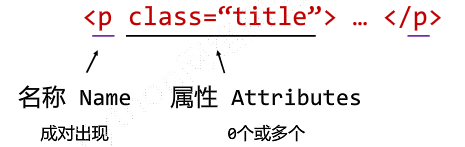
<p>..</p> : 标签Tag
Beautiful Soup库的引用:
from bs4 import BeautifulSoup
import bs4
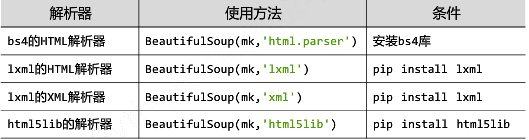
Beautiful Soup库解析器:
soup = BeautifulSoup ('<html>data</html>','html.parser')

BeautifulSoup类的基本元素:
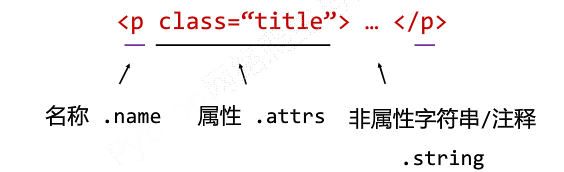
< p class = "title" > ... </p>

Tag标签:
 >>> from bs4 import BeautifulSoup

 >>> soup = BeautifulSoup(demo,'html.parser')

 >>> soup.title

 <title>This is a python demo page</title>

 >>> tag = soup.a

 >>> tag

 <a class="py1" href="http://www.icourse163.org/course/BIT-268001" id="link1">Basic Python</a>
任何存在于HTML语法中的标签都可以用soup.<tag>访问获得当HTML文档中存在多个相同<tag>对应内容时,soup.<tag>返回第一个
Tag的name:
 >>> from bs4 import BeautifulSoup

 >>> soup = BeautifulSoup(demo,'html.parser')

 >>> soup.a.name

 'a'

 >>> soup.a.parent.name

 'p'

 >>> soup.a.parent.parent.name

 'body'

 >>>
每个<tag>都有自己的名字,通过<tag>.name获取,字符串类型
Tag的attrs(属性):
 >>> tag = soup.a

 >>> tag.attrs

 {'href': 'http://www.icourse163.org/course/BIT-268001', 'class': ['py1'], 'id': 'link1'}

 >>> tag.attrs['class']

 ['py1']

 >>> tag.attrs['href']

 'http://www.icourse163.org/course/BIT-268001'

 >>> type(tag.attrs)

 <class 'dict'>

 >>> type(tag)

 <class 'bs4.element.Tag'>
一个<tag>可以有0或多个属性,字典类型
Tag的NavigableString:
>>> soup.a

<a class="py1" href="http://www.icourse163.org/course/BIT-268001" id="link1">Basic Python</a>

>>> soup.a.string

'Basic Python'

>>> soup.p

<p class="title"><b>The demo python introduces several python courses.</b></p>

>>> soup.p.string

'The demo python introduces several python courses.'

>>> type(soup.p.string)

<class 'bs4.element.NavigableString'>
NavigableString可以跨越多个层次
Tag的Comment:
 >>> newsoup = BeautifulSoup("<b><!--This is a comment--></b><p>This is not a comment</p>","html.parser")

 >>> newsoup.b.string

 'This is a comment'

 >>> type(newsoup.b.string)

 <class 'bs4.element.Comment'>

 >>> newsoup.p.string

 'This is not a comment'

 >>> type(newsoup.p.string)

 <class 'bs4.element.NavigableString'>
Comment是一种特殊类型
标签<tag>
基于bs4库的HTML内容遍历方法:
HTML基本格式:
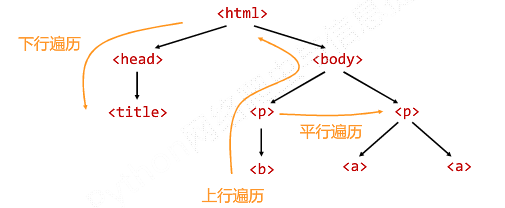
<>...</>构成了所属关系,形成了标签的树形结构
标签树的下行遍历:
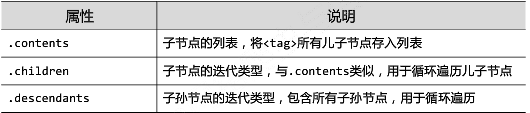
BeautifulSoup类型是标签树的根节点
标签树的下行遍历
>>> soup = BeautifulSoup(demo,'html.parser')
>>> soup.head
<head><title>This is a python demo page</title></head>
>>> soup.head.contents
[<title>This is a python demo page</title>]
>>> soup.body.contents
['\n', <p class="title"><b>The demo python introduces several python courses.</b></p>, '\n', <p class="course">Python is a wonderful general-purpose programming language. You can learn Python from novice to professional by tracking the following courses:
<a class="py1" href="http://www.icourse163.org/course/BIT-268001" id="link1">Basic Python</a> and <a class="py2" href="http://www.icourse163.org/course/BIT-1001870001" id="link2">Advanced Python</a>.</p>, '\n']
>>> len(soup.body.contents)
>>> soup.body.contents[1]
<p class="title"><b>The demo python introduces several python courses.</b></p>
遍历儿子节点:
for child in soup.body.children:

    print(child)
遍历子孙节点:
for child in soup.body.descendants:

    print(child)
标签树的上行遍历:

 soup = BeautifulSoup(demo,'html.parser')

 for parent in soup.a.parents:           #标签树的上行遍历

     if parent is None:

         print(parent)

     else:

         print(parent.name)
遍历所有先辈节点,包括soup本身,所以要区别判断
运行结果:

标签树的平行遍历:
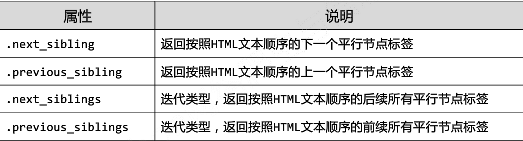
平行遍历发生在同一个父节点下的各节点间
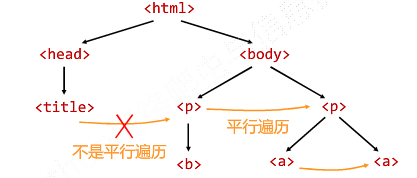
遍历的判断:

让HTML内容更加“友好”的显示:
bs4库的prettify()方法:
 >>> import requests

 >>> r = requests.get("http://python123.io/ws//demo.html")

 >>> demo = r.text

 >>> demo

 '<html><head><title>This is a python demo page</title></head>\r\n<body>\r\n<p class="title"><b>The demo python introduces several python courses.</b></p>\r\n<p class="course">Python is a wonderful general-purpose programming language. You can learn Python from novice to professional by tracking the following courses:\r\n<a href="http://www.icourse163.org/course/BIT-268001" class="py1" id="link1">Basic Python</a> and <a href="http://www.icourse163.org/course/BIT-1001870001" class="py2" id="link2">Advanced Python</a>.</p>\r\n</body></html>'

 >>> soup = BeautifulSoup(demo,'html.parser')

 >>> soup.prettify()

 '<html>\n <head>\n  <title>\n   This is a python demo page\n  </title>\n </head>\n <body>\n  <p class="title">\n   <b>\n    The demo python introduces several python courses.\n   </b>\n  </p>\n  <p class="course">\n   Python is a wonderful general-purpose programming language. You can learn Python from novice to professional by tracking the following courses:\n   <a class="py1" href="http://www.icourse163.org/course/BIT-268001" id="link1">\n    Basic Python\n   </a>\n   and\n   <a class="py2" href="http://www.icourse163.org/course/BIT-1001870001" id="link2">\n    Advanced Python\n   </a>\n   .\n  </p>\n </body>\n</html>'

 >>> print(soup.prettify())

 <html>

  <head>

   <title>

    This is a python demo page

   </title>

  </head>

  <body>

   <p class="title">

    <b>

     The demo python introduces several python courses.

    </b>

   </p>

   <p class="course">

    Python is a wonderful general-purpose programming language. You can learn Python from novice to professional by tracking the following courses:

    <a class="py1" href="http://www.icourse163.org/course/BIT-268001" id="link1">

     Basic Python

    </a>

    and

    <a class="py2" href="http://www.icourse163.org/course/BIT-1001870001" id="link2">

     Advanced Python

    </a>

    .

   </p>

  </body>

 </html>
.prettify()为HTML文本<>及其内容增加'\n'
.prettify()可用于标签,方法:<tag>.prettify()
 >>> print(soup.a.prettify())

 <a class="py1" href="http://www.icourse163.org/course/BIT-268001" id="link1">

  Basic Python

 </a>
bs4库的编码:
bs4库将任何HTML输入都变为utf-8编码,Python 3.x默认支持编码是utf-8,解析无障碍。
 >>> soup = BeautifulSoup("<p>中文</p>",'html.parser')

 >>> soup.p.string

 '中文'

 >>> print(soup.p.prettify())

 <p>

  中文

 </p>
BeautifulSoup库的安装与使用的更多相关文章
- Python3 常用爬虫库的安装
Python3 常用爬虫库的安装 1 简介 Windows下安装Python3常用的爬虫库:requests.selenium.beautifulsoup4.pyquery.pymysql.pymon ...
- Python安装BeautifulSoup库(Windows平台下)
简介 参照官网Beautiful Soup4.4.0文档:https://www.crummy.com/software/BeautifulSoup/bs4/doc/ 安装步骤 1.到https:// ...
- python下载安装BeautifulSoup库
python下载安装BeautifulSoup库 1.下载https://www.crummy.com/software/BeautifulSoup/bs4/download/4.5/ 2.解压到解压 ...
- MacOS下安装BeautifulSoup库及使用
BeautifulSoup简介 BeautifulSoup库是一个强大的python第三方库,它可以解析html进行解析,并提取信息. 安装BeautifulSoup 打开终端,输入命令: pip3 ...
- Python爬虫小白入门(三)BeautifulSoup库
# 一.前言 *** 上一篇演示了如何使用requests模块向网站发送http请求,获取到网页的HTML数据.这篇来演示如何使用BeautifulSoup模块来从HTML文本中提取我们想要的数据. ...
- Python3 网络爬虫(请求库的安装)
Python3 网络爬虫(请求库的安装) 爬虫可以简单分为几步:抓取页面,分析页面和存储数据 在页面爬取的过程中我们需要模拟浏览器向服务器发送请求,所以需要用到一些python库来实现HTTP的请求操 ...
- BeautifulSoup库的使用
1.简介 BeautifulSoup库也是一个HTML/XML的解析器,其使用起来很简单,但是其实解析网站用xpath和re已经足矣,这个库其实很少用到.因为其占用内存资源还是比xpath更高. '' ...
- python爬虫学习之使用BeautifulSoup库爬取开奖网站信息-模块化
实例需求:运用python语言爬取http://kaijiang.zhcw.com/zhcw/html/ssq/list_1.html这个开奖网站所有的信息,并且保存为txt文件和excel文件. 实 ...
- BeautifulSoup库
'''灵活又方便的网页解析库,处理高效,支持多种解析器.利用它不用编写正则表达式即可方便的实现网页信息的提取.''' BeautifulSoup库包含的一些解析库: 解析库 使用方法 优势 劣势 py ...
随机推荐
- Kotlin集合——Map集合
Kotlin集合——Map集合 转 https://www.jianshu.com/p/da5cc9072f1e Kotlin的Map集合用于保存key-value对,其也被分为可变的和不可变的. 一 ...
- js 跳转到 百度指定地址定位点
js 跳转到 百度指定地址定位点 http://api.map.baidu.com/geocoder?address=北京市海淀区上地信息路9号奎科科技大厦&output=html&s ...
- linux中proz下载软件安装部署
W系统里有迅雷这个下载工具,L系统里也一样有prozilla下面说一下CENTOS 5 系统里安装prozilla的过程1.首先在下面的链接下载最新稳定版本的prozilla 记得下tar包版本的[u ...
- 异常检测-基于孤立森林算法Isolation-based Anomaly Detection-2-实现
参考https://scikit-learn.org/stable/modules/generated/sklearn.ensemble.IsolationForest.html#sklearn.en ...
- ROS学习笔记(二)
===================================================== QT工具箱sudo apt-get install ros-kinetic-rqtsudo ...
- Java中使用Socket连接判断Inputstream结束,java tcp socket服务端,python tcp socket客户端
最近在试着用java写一个socket的服务器,用python写一个socket的客户端来完成二者之间的通信,但是发现存在一个问题,服务器方面就卡在读取inputsream的地方不动了,导致后面的代码 ...
- bind智能DNS + bindUI管理系统(postgresql + bind dlz)
# 软件环境: * Centos 7.6 * bind-9.14.1.tar.gz * postgresql 11 * python 3.7 * django 2.2.1 QPS:单节点1590 qp ...
- 【Java】Spring之控制反转(IoC)(二)
控制反转(IoC) IoC:Inverse of Control(控制反转) 读作“反转控制”,更好理解,不是什么技术,而是一种设计思想,就是将原本在程序中手动创建对象的控制权,交由Spring框架来 ...
- QML按键
1.普通用法 import QtQuick 2.9 import QtQuick.Window 2.2 import QtQuick.Controls 2.2 ApplicationWindow { ...
- Qt编写气体安全管理系统24-地图管理
一.前言 地图管理的主要功能是将系统中的地图文件做添加和删除,支持常见的jpg.png.bmp等格式图片,图片分辨率建议小于1080P,最好是和目标客户端电脑分辨率一致,这样在拉伸缩放的时候会比较清晰 ...