
sklearn逻辑回归实战
题目要求
根据学生两门课的成绩和是否入学的数据,预测学生能否顺利入学:利用ex2data1.txt和ex2data2.txt中的数据,进行逻辑回归和预测。
数据放在最后边。
ex2data1.txt处理
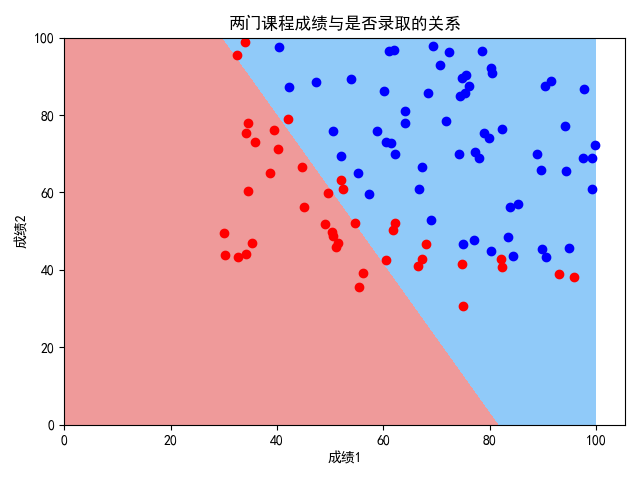
作散点图可知,决策大致符合线性关系,但还是有弯曲(非线性),用线性效果并不好,因此可用两种方案:方案一,无多项式特征;方案二,有多项式特征。
方案一:无多项式特征
对ex2data1.txt中的数据进行逻辑回归,无多项式特征
代码实现如下:
"""

    对ex2data1.txt中的数据进行逻辑回归(无多项式特征)

"""

from sklearn.model_selection import train_test_split

from matplotlib.colors import ListedColormap

from sklearn.linear_model import LogisticRegression

import numpy as np

import matplotlib.pyplot as plt

plt.rcParams['font.sans-serif'] = ['SimHei']  # 用来正常显示中文标签

plt.rcParams['axes.unicode_minus'] = False  # 用来正常显示负号

# 数据格式:成绩1,成绩2,是否被录取(1代表被录取,0代表未被录取)

# 函数(画决策边界)定义

def plot_decision_boundary(model, axis):

    x0, x1 = np.meshgrid(

        np.linspace(axis[0], axis[1], int((axis[1] - axis[0]) * 100)).reshape(-1, 1),

        np.linspace(axis[2], axis[3], int((axis[3] - axis[2]) * 100)).reshape(-1, 1),

    )

    X_new = np.c_[x0.ravel(), x1.ravel()]

    y_predict = model.predict(X_new)

    zz = y_predict.reshape(x0.shape)

    custom_cmap = ListedColormap(['#EF9A9A', '#FFF59D', '#90CAF9'])

    plt.contourf(x0, x1, zz, cmap=custom_cmap)

# 读取数据

data = np.loadtxt('ex2data1.txt', delimiter=',')

data_X = data[:, 0:2]

data_y = data[:, 2]

# 数据分割

X_train, X_test, y_train, y_test = train_test_split(data_X, data_y, random_state=666)

# 训练模型

log_reg = LogisticRegression()

log_reg.fit(X_train, y_train)

# 结果可视化

plot_decision_boundary(log_reg, axis=[0, 100, 0, 100])

plt.scatter(data_X[data_y == 0, 0], data_X[data_y == 0, 1], color='red')

plt.scatter(data_X[data_y == 1, 0], data_X[data_y == 1, 1], color='blue')

plt.xlabel('成绩1')

plt.ylabel('成绩2')

plt.title('两门课程成绩与是否录取的关系')

plt.show()

# 模型测试

print(log_reg.score(X_train, y_train))

print(log_reg.score(X_test, y_test))
输出结果如下:
0.8533333333333334

0.76
方案二:引入多项式特征
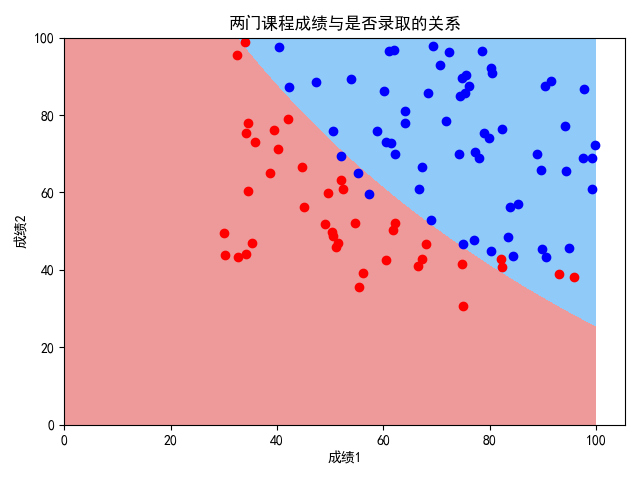
对ex2data1.txt中的数据进行逻辑回归,引入多项式特征。经调试,当degree为3时,耗费时间较长;当degree为2时,耗费时间可接受,效果与方案一相比好了很多
实现如下:
"""

    对ex2data1.txt中的数据进行逻辑回归(引入多项式特征)

"""

from sklearn.model_selection import train_test_split

from matplotlib.colors import ListedColormap

from sklearn.linear_model import LogisticRegression

import numpy as np

import matplotlib.pyplot as plt

from sklearn.preprocessing import PolynomialFeatures

from sklearn.pipeline import Pipeline

from sklearn.preprocessing import StandardScaler

plt.rcParams['font.sans-serif'] = ['SimHei']  # 用来正常显示中文标签

plt.rcParams['axes.unicode_minus'] = False  # 用来正常显示负号

# 数据格式:成绩1,成绩2,是否被录取(1代表被录取,0代表未被录取)

# 函数定义

def plot_decision_boundary(model, axis):

    x0, x1 = np.meshgrid(

        np.linspace(axis[0], axis[1], int((axis[1] - axis[0]) * 100)).reshape(-1, 1),

        np.linspace(axis[2], axis[3], int((axis[3] - axis[2]) * 100)).reshape(-1, 1),

    )

    X_new = np.c_[x0.ravel(), x1.ravel()]

    y_predict = model.predict(X_new)

    zz = y_predict.reshape(x0.shape)

    custom_cmap = ListedColormap(['#EF9A9A', '#FFF59D', '#90CAF9'])

    plt.contourf(x0, x1, zz, cmap=custom_cmap)

def PolynomialLogisticRegression(degree):

    return Pipeline([

        ('poly', PolynomialFeatures(degree=degree)),

        ('std_scaler', StandardScaler()),

        ('log_reg', LogisticRegression())

    ])

# 读取数据

data = np.loadtxt('ex2data1.txt', delimiter=',')

data_X = data[:, 0:2]

data_y = data[:, 2]

# 数据分割

X_train, X_test, y_train, y_test = train_test_split(data_X, data_y, random_state=666)

# 训练模型

poly_log_reg = PolynomialLogisticRegression(degree=2)

poly_log_reg.fit(X_train, y_train)

# 结果可视化

plot_decision_boundary(poly_log_reg, axis=[0, 100, 0, 100])

plt.scatter(data_X[data_y == 0, 0], data_X[data_y == 0, 1], color='red')

plt.scatter(data_X[data_y == 1, 0], data_X[data_y == 1, 1], color='blue')

plt.xlabel('成绩1')

plt.ylabel('成绩2')

plt.title('两门课程成绩与是否录取的关系')

plt.show()

# 模型测试

print(poly_log_reg.score(X_train, y_train))

print(poly_log_reg.score(X_test, y_test))
输出如下:
0.92

0.92
ex2data2.txt处理
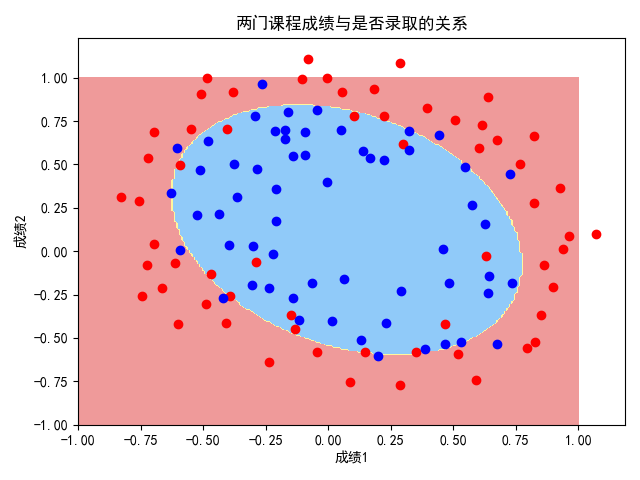
作散点图可知,这组数据的决策边界绝对是非线性的,所以直接引入多项式特征对ex2data2.txt中的数据进行逻辑回归。
代码实现如下:
"""

    对ex2data2.txt中的数据进行逻辑回归(引入多项式特征)

"""

from sklearn.model_selection import train_test_split

from matplotlib.colors import ListedColormap

from sklearn.linear_model import LogisticRegression

import numpy as np

import matplotlib.pyplot as plt

from sklearn.preprocessing import PolynomialFeatures

from sklearn.pipeline import Pipeline

from sklearn.preprocessing import StandardScaler

plt.rcParams['font.sans-serif'] = ['SimHei']  # 用来正常显示中文标签

plt.rcParams['axes.unicode_minus'] = False  # 用来正常显示负号

# 数据格式:成绩1,成绩2,是否被录取(1代表被录取,0代表未被录取)

# 函数定义

def plot_decision_boundary(model, axis):

    x0, x1 = np.meshgrid(

        np.linspace(axis[0], axis[1], int((axis[1] - axis[0]) * 100)).reshape(-1, 1),

        np.linspace(axis[2], axis[3], int((axis[3] - axis[2]) * 100)).reshape(-1, 1),

    )

    X_new = np.c_[x0.ravel(), x1.ravel()]

    y_predict = model.predict(X_new)

    zz = y_predict.reshape(x0.shape)

    custom_cmap = ListedColormap(['#EF9A9A', '#FFF59D', '#90CAF9'])

    plt.contourf(x0, x1, zz, cmap=custom_cmap)

def PolynomialLogisticRegression(degree):

    return Pipeline([

        ('poly', PolynomialFeatures(degree=degree)),

        ('std_scaler', StandardScaler()),

        ('log_reg', LogisticRegression())

    ])

# 读取数据

data = np.loadtxt('ex2data2.txt', delimiter=',')

data_X = data[:, 0:2]

data_y = data[:, 2]

# 数据分割

X_train, X_test, y_train, y_test = train_test_split(data_X, data_y, random_state=666)

# 训练模型

poly_log_reg = PolynomialLogisticRegression(degree=2)

poly_log_reg.fit(X_train, y_train)

# 结果可视化

plot_decision_boundary(poly_log_reg, axis=[-1, 1, -1, 1])

plt.scatter(data_X[data_y == 0, 0], data_X[data_y == 0, 1], color='red')

plt.scatter(data_X[data_y == 1, 0], data_X[data_y == 1, 1], color='blue')

plt.xlabel('成绩1')

plt.ylabel('成绩2')

plt.title('两门课程成绩与是否录取的关系')

plt.show()

# 模型测试

print(poly_log_reg.score(X_train, y_train))

print(poly_log_reg.score(X_test, y_test))
输出结果如下:
由图可知,分类结果较好。
0.7954545454545454

0.9
两份数据
ex2data1.txt
34.62365962451697,78.0246928153624,0

30.28671076822607,43.89499752400101,0

35.84740876993872,72.90219802708364,0

60.18259938620976,86.30855209546826,1

79.0327360507101,75.3443764369103,1

45.08327747668339,56.3163717815305,0

61.10666453684766,96.51142588489624,1

75.02474556738889,46.55401354116538,1

76.09878670226257,87.42056971926803,1

84.43281996120035,43.53339331072109,1

95.86155507093572,38.22527805795094,0

75.01365838958247,30.60326323428011,0

82.30705337399482,76.48196330235604,1

69.36458875970939,97.71869196188608,1

39.53833914367223,76.03681085115882,0

53.9710521485623,89.20735013750205,1

69.07014406283025,52.74046973016765,1

67.94685547711617,46.67857410673128,0

70.66150955499435,92.92713789364831,1

76.97878372747498,47.57596364975532,1

67.37202754570876,42.83843832029179,0

89.67677575072079,65.79936592745237,1

50.534788289883,48.85581152764205,0

34.21206097786789,44.20952859866288,0

77.9240914545704,68.9723599933059,1

62.27101367004632,69.95445795447587,1

80.1901807509566,44.82162893218353,1

93.114388797442,38.80067033713209,0

61.83020602312595,50.25610789244621,0

38.78580379679423,64.99568095539578,0

61.379289447425,72.80788731317097,1

85.40451939411645,57.05198397627122,1

52.10797973193984,63.12762376881715,0

52.04540476831827,69.43286012045222,1

40.23689373545111,71.16774802184875,0

54.63510555424817,52.21388588061123,0

33.91550010906887,98.86943574220611,0

64.17698887494485,80.90806058670817,1

74.78925295941542,41.57341522824434,0

34.1836400264419,75.2377203360134,0

83.90239366249155,56.30804621605327,1

51.54772026906181,46.85629026349976,0

94.44336776917852,65.56892160559052,1

82.36875375713919,40.61825515970618,0

51.04775177128865,45.82270145776001,0

62.22267576120188,52.06099194836679,0

77.19303492601364,70.45820000180959,1

97.77159928000232,86.7278223300282,1

62.07306379667647,96.76882412413983,1

91.56497449807442,88.69629254546599,1

79.94481794066932,74.16311935043758,1

99.2725269292572,60.99903099844988,1

90.54671411399852,43.39060180650027,1

34.52451385320009,60.39634245837173,0

50.2864961189907,49.80453881323059,0

49.58667721632031,59.80895099453265,0

97.64563396007767,68.86157272420604,1

32.57720016809309,95.59854761387875,0

74.24869136721598,69.82457122657193,1

71.79646205863379,78.45356224515052,1

75.3956114656803,85.75993667331619,1

35.28611281526193,47.02051394723416,0

56.25381749711624,39.26147251058019,0

30.05882244669796,49.59297386723685,0

44.66826172480893,66.45008614558913,0

66.56089447242954,41.09209807936973,0

40.45755098375164,97.53518548909936,1

49.07256321908844,51.88321182073966,0

80.27957401466998,92.11606081344084,1

66.74671856944039,60.99139402740988,1

32.72283304060323,43.30717306430063,0

64.0393204150601,78.03168802018232,1

72.34649422579923,96.22759296761404,1

60.45788573918959,73.09499809758037,1

58.84095621726802,75.85844831279042,1

99.82785779692128,72.36925193383885,1

47.26426910848174,88.47586499559782,1

50.45815980285988,75.80985952982456,1

60.45555629271532,42.50840943572217,0

82.22666157785568,42.71987853716458,0

88.9138964166533,69.80378889835472,1

94.83450672430196,45.69430680250754,1

67.31925746917527,66.58935317747915,1

57.23870631569862,59.51428198012956,1

80.36675600171273,90.96014789746954,1

68.46852178591112,85.59430710452014,1

42.0754545384731,78.84478600148043,0

75.47770200533905,90.42453899753964,1

78.63542434898018,96.64742716885644,1

52.34800398794107,60.76950525602592,0

94.09433112516793,77.15910509073893,1

90.44855097096364,87.50879176484702,1

55.48216114069585,35.57070347228866,0

74.49269241843041,84.84513684930135,1

89.84580670720979,45.35828361091658,1

83.48916274498238,48.38028579728175,1

42.2617008099817,87.10385094025457,1

99.31500880510394,68.77540947206617,1

55.34001756003703,64.9319380069486,1

74.77589300092767,89.52981289513276,1
ex2data2.txt
0.051267,0.69956,1

-0.092742,0.68494,1

-0.21371,0.69225,1

-0.375,0.50219,1

-0.51325,0.46564,1

-0.52477,0.2098,1

-0.39804,0.034357,1

-0.30588,-0.19225,1

0.016705,-0.40424,1

0.13191,-0.51389,1

0.38537,-0.56506,1

0.52938,-0.5212,1

0.63882,-0.24342,1

0.73675,-0.18494,1

0.54666,0.48757,1

0.322,0.5826,1

0.16647,0.53874,1

-0.046659,0.81652,1

-0.17339,0.69956,1

-0.47869,0.63377,1

-0.60541,0.59722,1

-0.62846,0.33406,1

-0.59389,0.005117,1

-0.42108,-0.27266,1

-0.11578,-0.39693,1

0.20104,-0.60161,1

0.46601,-0.53582,1

0.67339,-0.53582,1

-0.13882,0.54605,1

-0.29435,0.77997,1

-0.26555,0.96272,1

-0.16187,0.8019,1

-0.17339,0.64839,1

-0.28283,0.47295,1

-0.36348,0.31213,1

-0.30012,0.027047,1

-0.23675,-0.21418,1

-0.06394,-0.18494,1

0.062788,-0.16301,1

0.22984,-0.41155,1

0.2932,-0.2288,1

0.48329,-0.18494,1

0.64459,-0.14108,1

0.46025,0.012427,1

0.6273,0.15863,1

0.57546,0.26827,1

0.72523,0.44371,1

0.22408,0.52412,1

0.44297,0.67032,1

0.322,0.69225,1

0.13767,0.57529,1

-0.0063364,0.39985,1

-0.092742,0.55336,1

-0.20795,0.35599,1

-0.20795,0.17325,1

-0.43836,0.21711,1

-0.21947,-0.016813,1

-0.13882,-0.27266,1

0.18376,0.93348,0

0.22408,0.77997,0

0.29896,0.61915,0

0.50634,0.75804,0

0.61578,0.7288,0

0.60426,0.59722,0

0.76555,0.50219,0

0.92684,0.3633,0

0.82316,0.27558,0

0.96141,0.085526,0

0.93836,0.012427,0

0.86348,-0.082602,0

0.89804,-0.20687,0

0.85196,-0.36769,0

0.82892,-0.5212,0

0.79435,-0.55775,0

0.59274,-0.7405,0

0.51786,-0.5943,0

0.46601,-0.41886,0

0.35081,-0.57968,0

0.28744,-0.76974,0

0.085829,-0.75512,0

0.14919,-0.57968,0

-0.13306,-0.4481,0

-0.40956,-0.41155,0

-0.39228,-0.25804,0

-0.74366,-0.25804,0

-0.69758,0.041667,0

-0.75518,0.2902,0

-0.69758,0.68494,0

-0.4038,0.70687,0

-0.38076,0.91886,0

-0.50749,0.90424,0

-0.54781,0.70687,0

0.10311,0.77997,0

0.057028,0.91886,0

-0.10426,0.99196,0

-0.081221,1.1089,0

0.28744,1.087,0

0.39689,0.82383,0

0.63882,0.88962,0

0.82316,0.66301,0

0.67339,0.64108,0

1.0709,0.10015,0

-0.046659,-0.57968,0

-0.23675,-0.63816,0

-0.15035,-0.36769,0

-0.49021,-0.3019,0

-0.46717,-0.13377,0

-0.28859,-0.060673,0

-0.61118,-0.067982,0

-0.66302,-0.21418,0

-0.59965,-0.41886,0

-0.72638,-0.082602,0

-0.83007,0.31213,0

-0.72062,0.53874,0

-0.59389,0.49488,0

-0.48445,0.99927,0

-0.0063364,0.99927,0

0.63265,-0.030612,0
作者:@臭咸鱼
转载请注明出处:https://www.cnblogs.com/chouxianyu/
欢迎讨论和交流!
sklearn逻辑回归实战的更多相关文章
- 通俗地说逻辑回归【Logistic regression】算法(二)sklearn逻辑回归实战
前情提要: 通俗地说逻辑回归[Logistic regression]算法(一) 逻辑回归模型原理介绍 上一篇主要介绍了逻辑回归中,相对理论化的知识,这次主要是对上篇做一点点补充,以及介绍sklear ...
- sklearn逻辑回归(Logistic Regression,LR)调参指南
python信用评分卡建模(附代码,博主录制) https://study.163.com/course/introduction.htm?courseId=1005214003&utm_ca ...
- sklearn逻辑回归
sklearn逻辑回归 logistics回归名字虽然叫回归,但实际是用回归方法解决分类的问题,其形式简洁明了,训练的模型参数还有实际的解释意义,因此在机器学习中非常常见. 理论部分 设数据集有n个独 ...
- sklearn逻辑回归(Logistic Regression)类库总结
class sklearn.linear_model.LogisticRegression(penalty=’l2’, dual=False, tol=0.0001, C=1.0, fit_inter ...
- sklearn逻辑回归库函数直接拟合数据
from sklearn import model_selection from sklearn.linear_model import LogisticRegression from sklearn ...
- 机器学习入门-概率阈值的逻辑回归对准确度和召回率的影响 lr.predict_proba(获得预测样本的概率值)
1.lr.predict_proba(under_text_x) 获得的是正负的概率值 在sklearn逻辑回归的计算过程中,使用的是大于0.5的是正值,小于0.5的是负值,我们使用使用不同的概率结 ...
- 逻辑回归原理_挑战者飞船事故和乳腺癌案例_Python和R_信用评分卡(AAA推荐)
sklearn实战-乳腺癌细胞数据挖掘(博客主亲自录制视频教程) https://study.163.com/course/introduction.htm?courseId=1005269003&a ...
- 逻辑回归--美国挑战者号飞船事故_同盾分数与多头借贷Python建模实战
python信用评分卡(附代码,博主录制) https://study.163.com/course/introduction.htm?courseId=1005214003&utm_camp ...
- 机器学习_线性回归和逻辑回归_案例实战:Python实现逻辑回归与梯度下降策略_项目实战:使用逻辑回归判断信用卡欺诈检测
线性回归: 注:为偏置项,这一项的x的值假设为[1,1,1,1,1....] 注:为使似然函数越大,则需要最小二乘法函数越小越好 线性回归中为什么选用平方和作为误差函数?假设模型结果与测量值 误差满足 ...
随机推荐
- 粒子系统与雨的效果 (DirectX11 with Windows SDK)
前言 最近在学粒子系统,看这之前的<<3D图形编程基础 基于DirectX 11 >>是基于Direct SDK的,而DXSDK微软已经很久没有更新过了并且我学的DX11是用W ...
- 【计算机视觉】OPENCV对于有alpha通道的透明背景图片的读取和图片叠加
这个是我自己做的粗略的螺旋丸的图,导出为png并带有alpha通道. 最后和一只狗合成成这个样子. 效果还是可以的. 为了实现这个效果,首先我们要明白具有透明通道的图片的OpenCV的读取方式.在Op ...
- 如何衡量一个人的 JavaScript 水平?
参考链接:https://blog.csdn.net/weixin_37615279/article/details/103658866
- SourceTree使用图解
看完这篇文档你能做到的是: 1.简单的用Git管理项目. 2.怎样既要开发又要处理发布出去的版本bug情况. SourceTree是一个免费的Git图形化管理工具,mac下也可以安装. 下载地址:ht ...
- [转帖]1A2C多口充 紫米USB充电器65W桌面快充版评测
1A2C多口充 紫米USB充电器65W桌面快充版评测 2019年10月04日 07:48 1786 次阅读 稿源:充电头网 1 条评论 https://www.cnbeta.com/articles/ ...
- 【C++札记】标准模板库string
介绍 c++中字符串string对象属于一个类,内置了很多实用的成员函数,操作简单,方便更直观. 命名空间为std,所属头文件<string> 注意:不是<string.h>. ...
- PAT甲级 进制转换题_C++题解
进制转换题 PAT (Advanced Level) Practice 进制转换题 目录 <算法笔记> 重点摘要 1015 Reversible Primes (20) 1019 Gene ...
- Django 关联查询
查询id=1的XXXXX关联的YYYYY信息 a = XXXXX.objects.get(id=1) a.YYYYY.all() 查询id=1的YYYYY关联的XXXXX信息 b = YYYYY.ob ...
- go 构造切片slice
定义切片 make([]int, 5) 长度和容量均为5 make([]int, 0, 5) 长度为0 容量为0 切片 slice2[3:5] 对slice2进行切片返回 第3 4 两个元素 不包含 ...
- 【BFS】斗地主
斗地主 题目描述 众所周知,小 X 是一个身材极好.英俊潇洒.十分贪玩成绩却依然很好的奆老.这不,他又找了他的几个好基友去他家里玩斗地主了……身为奆老的小 X 一向认为身边人和自己一样的厉害,他坚信你 ...